
Windows 11: “This PC” fails to appear on the “network”,


jamal numan

Active member
Local time
10:27 PM
Posts
47
OS
windows 11
Windows 11: “This PC” fails to appear on the “network”,


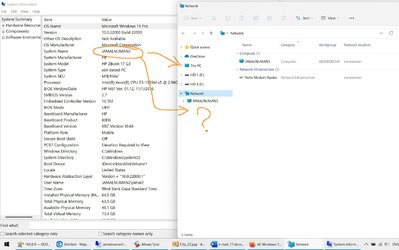
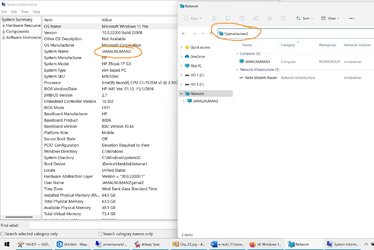
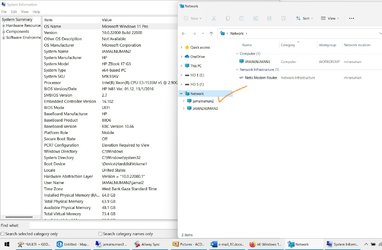
I couldn’t figure out why “This PC” fails to appear on the “network”.


In order to get it appeared in the network, I need each time to call it by:


\\jamalnuman2


This issue is very common and appears as if there are no rules for which machines that show in the “networks” and which are don’t
Clip_23.jpg


Clip_24.jpg


Clip_25.jpg
 

My Computer My Computer

At a glance

windows 11
OS
windows 11
You have to understand windows assumes all pcs are on 24/7 so when its turned off its not recorded when it comes on it can take 30 mins to discover it. Thats assuming you have it in the same workgroup and network discover and netbios on. can you ping by name and IP?
 

My Computer My Computer

At a glance

win 10
OS
win 10
You have to understand windows assumes all pcs are on 24/7 so when its turned off its not recorded when it comes on it can take 30 mins to discover it. Thats assuming you have it in the same workgroup and network discover and netbios on. can you ping by name and IP?
This is an interesting general comment. On some of our PCs browsing by name doesn't work (IP only), and I haven't been able to work out what the difference is. Of course manually hacking hosts is one way of doing it, but it's a bit hands-on. Where can I find more detail about this?
 

My Computer My Computer

At a glance

Windows 10i732GB
OS
Windows 10
Computer type
PC/Desktop
Manufacturer/Model
Dell
CPU
i7
Memory
32GB
Hard Drives
2x 512GB NVME
Antivirus
ESET
Correct, Samuria. The computer is switched on + on the same group + can be pinged


Right, radsdau. We have ever been struggling with this issue with no generic solution
 

My Computer My Computer

At a glance

windows 11
OS
windows 11
This has been a recurring issue from back in Windows 10 and as you say, there's no rhyme or reason which PCs decide not to show in the network map even though they are configured correctly and some have even reported they would show up days or weeks later for unknown reasons. I couldn't get one of my 3 to show in the network map no matter what I did. Like you, I could access it by ip address, so I made a shortcut to it, named the shortcut appropriately, and then pinned the shortcut to quick access. It's still that way until now.

When I was trying to chase down my problem, one common suggestion was to disable ipv6.

I might also suggest that on the problem computer that you run sfc /scannow from an administrative command prompt.

If your screenshot of settings is asking why "show accent color on start and taskbar' is grayed out, I also had that problem.
It is because Windows has to be in dark mode for it to be available. Here's what to do.
go to settings-personalization- colors.
under 'choose your mode', change it to dark mode (this is temporary and it un-grays the option.)
Change 'show accent color on start and taskbar' to ON
scroll back up to 'choose your mode' change it to CUSTOM
set 'choose your windows default mode' to DARK
set 'choose your app mode' to LIGHT
 

My Computers My Computers

  • At a glance

    Windows 11 Pro 25H2 26200.8655i9-10900 10 core 20 threads32 gbnone-Intel UHD Graphics 630
    OS
    Windows 11 Pro 25H2 26200.8655
    Computer type
    PC/Desktop
    Manufacturer/Model
    Dell Optiplex 7080
    CPU
    i9-10900 10 core 20 threads
    Motherboard
    DELL 0J37VM
    Memory
    32 gb
    Graphics Card(s)
    none-Intel UHD Graphics 630
    Sound Card
    Integrated Realtek
    Monitor(s) Displays
    Benq 27
    Screen Resolution
    2560x1440
    Hard Drives
    2x1tb Solidigm m.2 nvme /External drives 512gb Samsung m.2 sata+2tb Kingston m2.nvme
    PSU
    500w
    Case
    MT
    Cooling
    Dell Premium
    Keyboard
    Logitech wired
    Mouse
    Logitech wireless
    Internet Speed
    so slow I'm too embarrassed to tell
    Browser
    #1 Edge #2 Firefox
    Antivirus
    Defender+MWB Premium
  • At a glance

    Windows 11 Pro 24H2 26200.8457AMD Ryzen 7 6800U32 gbintegrated
    Operating System
    Windows 11 Pro 24H2 26200.8457
    Computer type
    PC/Desktop
    Manufacturer/Model
    Beelink Mini PC SER5
    CPU
    AMD Ryzen 7 6800U
    Memory
    32 gb
    Graphics card(s)
    integrated
    Sound Card
    integrated
    Monitor(s) Displays
    Benq 27
    Screen Resolution
    2560x1440
    Hard Drives
    1TB Crucial nvme
    Keyboard
    Logitech wired
    Mouse
    Logitech wireless
    Internet Speed
    still too embarrassed to tell
    Browser
    Firefox
    Antivirus
    Defender
    Other Info
    System 3 is non compliant Dell 9020 i7-4770/24gb ram Win11 PRO 26200.8457
Thank you for confirming that the issue of displaying connected machines in the network has never been resolved whatever settings are made. Hope other experts can provide their inputs in this


As for the color of the taskbar, I made a mistake as my post is supposed to be in the issue below. However, your answer resolves the issue

Windows 11: How to change the color of the taskbar?
 

My Computer My Computer

At a glance

windows 11
OS
windows 11
Hope other experts
You're welcome, but I'm no expert, sir; only an enthusiasist. I try to respond to only those problems I have encountered myself at one time or another where I spent hours and days researching a solution. This particular networking issue has been one of the most frustrating ones. I am one of those people that wants to know the "WHY"of the matter.

I have an assumption, but have not gone so far as to prove it. I believe a clean install on a problem machine that won't show up in the network map would solve this issue. But in my case it was more trouble than it was worth since I found an easy work around.
 

My Computers My Computers

  • At a glance

    Windows 11 Pro 25H2 26200.8655i9-10900 10 core 20 threads32 gbnone-Intel UHD Graphics 630
    OS
    Windows 11 Pro 25H2 26200.8655
    Computer type
    PC/Desktop
    Manufacturer/Model
    Dell Optiplex 7080
    CPU
    i9-10900 10 core 20 threads
    Motherboard
    DELL 0J37VM
    Memory
    32 gb
    Graphics Card(s)
    none-Intel UHD Graphics 630
    Sound Card
    Integrated Realtek
    Monitor(s) Displays
    Benq 27
    Screen Resolution
    2560x1440
    Hard Drives
    2x1tb Solidigm m.2 nvme /External drives 512gb Samsung m.2 sata+2tb Kingston m2.nvme
    PSU
    500w
    Case
    MT
    Cooling
    Dell Premium
    Keyboard
    Logitech wired
    Mouse
    Logitech wireless
    Internet Speed
    so slow I'm too embarrassed to tell
    Browser
    #1 Edge #2 Firefox
    Antivirus
    Defender+MWB Premium
  • At a glance

    Windows 11 Pro 24H2 26200.8457AMD Ryzen 7 6800U32 gbintegrated
    Operating System
    Windows 11 Pro 24H2 26200.8457
    Computer type
    PC/Desktop
    Manufacturer/Model
    Beelink Mini PC SER5
    CPU
    AMD Ryzen 7 6800U
    Memory
    32 gb
    Graphics card(s)
    integrated
    Sound Card
    integrated
    Monitor(s) Displays
    Benq 27
    Screen Resolution
    2560x1440
    Hard Drives
    1TB Crucial nvme
    Keyboard
    Logitech wired
    Mouse
    Logitech wireless
    Internet Speed
    still too embarrassed to tell
    Browser
    Firefox
    Antivirus
    Defender
    Other Info
    System 3 is non compliant Dell 9020 i7-4770/24gb ram Win11 PRO 26200.8457
Yes I have had that problem for ages including Win 10. When I can be bothered I bring up services and restart "Function Discovery Resource Publication"...then it returns.
 

My Computer My Computer

At a glance

Windows 11 ProIntel i9-10980XEGskill DDR4 4x8Gb 3200Mhz CL 14.14.14.34Nvidia FE 3800
OS
Windows 11 Pro
Computer type
PC/Desktop
Manufacturer/Model
Self built
CPU
Intel i9-10980XE
Motherboard
MSI X299 XPOWER GAMING AC BIOS 1.F0. Updated Network Card Intel Wi-fi 6E AX210
Memory
Gskill DDR4 4x8Gb 3200Mhz CL 14.14.14.34
Graphics Card(s)
Nvidia FE 3800
Sound Card
See other info.
Monitor(s) Displays
Dell 30" 3017
Screen Resolution
2560x1600
Hard Drives
C: WD_BLACK SN750 500GB M.2 2280 NVMe Gen 3
6 x SATA Kingston/WD
Back up Drives: Toshiba Mechanical/Intel SSD
PSU
Seasonic Prime TX-1000
Case
Silverstone Fortress FT02. Updates: Top USB ports to 3.1, AP183 PWM bottom fans, NF-A12x25 PWM chromax top fan. Mods: cut out bus slots for improved Graphics card air flow.
Cooling
CPU: Noctua D15S Chromax
Keyboard
Filco Majestouch 2 (10Keyless)
Mouse
Logitech MX Master 3
Internet Speed
275Mbps
Browser
Chrome, Firefox
Antivirus
MS Defender
Other Info
Sound: Matrix Audio Element H/USB cable/ SPDIF 2, Mogami 110 Ohm AES-EBU XLR, Adam Audio S3V Monitors.
Front Panel Bays: EZDIY-FAB 5.25in 10Gbps USB 3.1 Gen2 Hub and Type-C Port USB Hub with QC 3.0 Quick Charging. Dual Bay 3.5" + 2.5" Inch SATA III Hard Drive HDD & SSD Tray Caddy Internal Mobile Rack Enclosure Docking Station with USB 3.0 Port Hot Swap.
Logitech BRIO 4k Ultra HD USB-C Webcam

Latest Support Threads

Back
Top Bottom




