Solved Windows 11 update Install error - 0xc1900101


My Computer

System One

  • OS
    Windows 10
    Computer type
    Laptop
    Manufacturer/Model
    HP
    CPU
    Intel(R) Core(TM) i7-4800MQ CPU @ 2.70GHz
    Motherboard
    Product : 190A Version : KBC Version 94.56
    Memory
    16 GB Total: Manufacturer : Samsung MemoryType : DDR3 FormFactor : SODIMM Capacity : 8GB Speed : 1600
    Graphics Card(s)
    NVIDIA Quadro K3100M; Intel(R) HD Graphics 4600
    Sound Card
    IDT High Definition Audio CODEC; PNP Device ID HDAUDIO\FUNC_01&VEN_111D&DEV_76E0
    Hard Drives
    Model Hitachi HTS727575A9E364
    Antivirus
    Microsoft Defender
    Other Info
    Mobile Workstation

I found my model: HP ENVY 17t-n100cTO, Serial CND5322TQD Current BIOS: F.50 from 6/27/2018 HP's website shows no drivers/BIOS available for this model. Should I contact HP support. or is F.50 potentially the latest BIOS for this older model?
 

My Computers

System One System Two

  • OS
    Windows 11
    Computer type
    Laptop
    Manufacturer/Model
    HP Envy
  • Operating System
    Windows 11
I just saw your latest reply.
Claude ai has been helping me with your suggestions as this is very foreign to me.

I am currently running the extensive test of Systems Test from Run HP Hardware Diagnostics.

Should I let this finish and then run your latest instruction:

Make sure that this version is used for diagnostic testing:

9) Download and install: HP PC Hardware Diagnostics UEFI – v10.8.3.0


My Computers

System One System Two

  • OS
    Windows 11
    Computer type
    Laptop
    Manufacturer/Model
    HP Envy
  • Operating System
    Windows 11
The diagnostics are best run overnight while sleeping.


The computer has two GPU.

If it used as a desktop replacement then you can turn off the Intel integrated GPU (iGPU) and use only the Nvidia designated (dGPU).

If the laptop is used predominantly on battery then you can try to find a driver for Windows 11 or turn off memory integrity.
 

My Computer

System One

  • OS
    Windows 10
    Computer type
    Laptop
    Manufacturer/Model
    HP
    CPU
    Intel(R) Core(TM) i7-4800MQ CPU @ 2.70GHz
    Motherboard
    Product : 190A Version : KBC Version 94.56
    Memory
    16 GB Total: Manufacturer : Samsung MemoryType : DDR3 FormFactor : SODIMM Capacity : 8GB Speed : 1600
    Graphics Card(s)
    NVIDIA Quadro K3100M; Intel(R) HD Graphics 4600
    Sound Card
    IDT High Definition Audio CODEC; PNP Device ID HDAUDIO\FUNC_01&VEN_111D&DEV_76E0
    Hard Drives
    Model Hitachi HTS727575A9E364
    Antivirus
    Microsoft Defender
    Other Info
    Mobile Workstation
I use it at my desk during the day. I have a new HP Spectre All-in-One laptop that I use when I first start my day and use Syncthing to sync my desktops.
So the extensive system test is running plugged in. I'll let it run until it is finished.
Since I was able to update Windows 11 to 25H2 does it really matter if the Intel driver that is incompatible will not enable Memory Integrity? I understand that this is a further security measure to be able to enable Me ory Integrity.
I don't understand what you mean by:
"If it used as a desktop replacement then you can turn off the Intel integrated GPU (iGPU) and use only the Nvidia designated (dGPU."

Should I go into Device Manager and uninstall Intel Integrated GPU in Network Adapter or is Intel Integrated GPU (iGPU) elsewhere and how do I turn it off?
 

My Computers

System One System Two

  • OS
    Windows 11
    Computer type
    Laptop
    Manufacturer/Model
    HP Envy
  • Operating System
    Windows 11
There are three areas that may have menus to select preferences for GPU use:

(the HP business model laptop (mobile workstation) that I'm using to type this post has the GPU menu in the BIOS)

BIOS
Device manager
Nvidia control panel


The Windows 10 ESU is for improved security.


Using Windows 11 without secure boot decreases security.

Using Windows 11 without memory integrity decreases security.


My Computer

System One

  • OS
    Windows 10
    Computer type
    Laptop
    Manufacturer/Model
    HP
    CPU
    Intel(R) Core(TM) i7-4800MQ CPU @ 2.70GHz
    Motherboard
    Product : 190A Version : KBC Version 94.56
    Memory
    16 GB Total: Manufacturer : Samsung MemoryType : DDR3 FormFactor : SODIMM Capacity : 8GB Speed : 1600
    Graphics Card(s)
    NVIDIA Quadro K3100M; Intel(R) HD Graphics 4600
    Sound Card
    IDT High Definition Audio CODEC; PNP Device ID HDAUDIO\FUNC_01&VEN_111D&DEV_76E0
    Hard Drives
    Model Hitachi HTS727575A9E364
    Antivirus
    Microsoft Defender
    Other Info
    Mobile Workstation
I really am not comprehending what you are saying at this point.
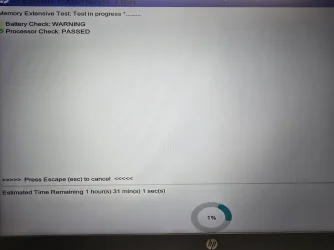
The Extensive System Test seems to be stuck at 1%. It has been running for over 2 hours, if not longer. Should I hit cancel and retry it or run the Quick System test?

Or 9) Download and install: HP PC Hardware Diagnostics UEFI – v10.8.3.0


My Computers

System One System Two

  • OS
    Windows 11
    Computer type
    Laptop
    Manufacturer/Model
    HP Envy
  • Operating System
    Windows 11
While waiting, I put everything to Claude.ai I existed the stalled System Extensive test and ran the Fast test. It passed.
Disabled the Intel driver and restarted the computer. Still wouldn't enable Memory Integrity. Uninstalled the Intel driver through device manager after trying to enable Memory Integrity still showed that incompatible igdkmd64.sys driver Finally, was able to enable Memory Integrity.
 

My Computers

System One System Two

  • OS
    Windows 11
    Computer type
    Laptop
    Manufacturer/Model
    HP Envy
  • Operating System
    Windows 11
I really am not comprehending what you are saying at this point.
The Extensive System Test seems to be stuck at 1%. It has been running for over 2 hours, if not longer. Should I hit cancel and retry it or run the Quick System test?

Or 9) Download and install: HP PC Hardware Diagnostics UEFI – v10.8.3.0


Hardware testing is best performed overnight while sleeping.

(Performing during day hours almost always leads to impatience, inadequate testing and or test disruption.)


Step 9 was to install the latest HP UEFI hardware diagnostics:

9) Download and install: HP PC Hardware Diagnostics UEFI – v10.8.3.0

https://ftp.hp.com/pub/softpaq/sp165501-166000/sp165721.exe


Updating the HP UEFI hardware diagnostics was not confirmed.

Images / share links displaying the hardware tests performed with results were not posted.


It's been AI that you're following.

Instead of having two instructional sources I'm willing to sign off so that you can follow the AI.
 
Last edited:

My Computer

System One

  • OS
    Windows 10
    Computer type
    Laptop
    Manufacturer/Model
    HP
    CPU
    Intel(R) Core(TM) i7-4800MQ CPU @ 2.70GHz
    Motherboard
    Product : 190A Version : KBC Version 94.56
    Memory
    16 GB Total: Manufacturer : Samsung MemoryType : DDR3 FormFactor : SODIMM Capacity : 8GB Speed : 1600
    Graphics Card(s)
    NVIDIA Quadro K3100M; Intel(R) HD Graphics 4600
    Sound Card
    IDT High Definition Audio CODEC; PNP Device ID HDAUDIO\FUNC_01&VEN_111D&DEV_76E0
    Hard Drives
    Model Hitachi HTS727575A9E364
    Antivirus
    Microsoft Defender
    Other Info
    Mobile Workstation
  • Like
Reactions: OAT
Good day to all,

First, I am at best a beginner with 30 years of experience. I learn by experts like you.

When I don't grasp what is being said, I have begun to input questions into ai to try to understand what is meant or to do.

I will let #9 run all day without using that dinosaur HP Envycomputer. I am on my new HP Sprectre All In One.

Many of your posts as to what to do were actually performed but I did not post everything I ended up doing.

The bottom line was that when I did go to HP for software and drivers, it said there was nothing available.

As you gave this link to HP: https://support.hp.com/us-en/contact/laptop-serial-number I can try to contact them to see if there is a newer BIOS version available.

In the BIOS setup I looked in System Configuaration for anything relating to Graphics or Video Display but could not find anything.

I tried to disable that incompatible Intel driver and then enable Memory Integrity but the driver still was there. Ended up uninstalling the Intel driver in Device Manager and then able to enable Memory Integrity.

I appreciate your incredible help and tutelage. My apologies to you if I offended your expertise. None was of course intended. My patience level was I am trying to resolve whatever needs to be done and it just seemed like a great idea to post it to ai to ask what is being asked of me.

Thank you again.

I will report back once that extensive test runs all night (in this case all day). I will let it run for 9 hours without using it.
 

My Computers

System One System Two

  • OS
    Windows 11
    Computer type
    Laptop
    Manufacturer/Model
    HP Envy
  • Operating System
    Windows 11
the extensive test has been running for 3 hrs 11 min. so far and still showing 1%. Will continue running for the balance of 9 hours.
 

My Computers

System One System Two

  • OS
    Windows 11
    Computer type
    Laptop
    Manufacturer/Model
    HP Envy
  • Operating System
    Windows 11
Make sure that you take pictures with a camera > post images or share links displaying each test performed with results
 

My Computer

System One

  • OS
    Windows 10
    Computer type
    Laptop
    Manufacturer/Model
    HP
    CPU
    Intel(R) Core(TM) i7-4800MQ CPU @ 2.70GHz
    Motherboard
    Product : 190A Version : KBC Version 94.56
    Memory
    16 GB Total: Manufacturer : Samsung MemoryType : DDR3 FormFactor : SODIMM Capacity : 8GB Speed : 1600
    Graphics Card(s)
    NVIDIA Quadro K3100M; Intel(R) HD Graphics 4600
    Sound Card
    IDT High Definition Audio CODEC; PNP Device ID HDAUDIO\FUNC_01&VEN_111D&DEV_76E0
    Hard Drives
    Model Hitachi HTS727575A9E364
    Antivirus
    Microsoft Defender
    Other Info
    Mobile Workstation
and it's been running for 4 hrs. 55 min. I'll let it run the full 9 hrs.
 

My Computers

System One System Two

  • OS
    Windows 11
    Computer type
    Laptop
    Manufacturer/Model
    HP Envy
  • Operating System
    Windows 11
Please post selected test selection and images/share links.
 

My Computer

System One

  • OS
    Windows 10
    Computer type
    Laptop
    Manufacturer/Model
    HP
    CPU
    Intel(R) Core(TM) i7-4800MQ CPU @ 2.70GHz
    Motherboard
    Product : 190A Version : KBC Version 94.56
    Memory
    16 GB Total: Manufacturer : Samsung MemoryType : DDR3 FormFactor : SODIMM Capacity : 8GB Speed : 1600
    Graphics Card(s)
    NVIDIA Quadro K3100M; Intel(R) HD Graphics 4600
    Sound Card
    IDT High Definition Audio CODEC; PNP Device ID HDAUDIO\FUNC_01&VEN_111D&DEV_76E0
    Hard Drives
    Model Hitachi HTS727575A9E364
    Antivirus
    Microsoft Defender
    Other Info
    Mobile Workstation
here is a photo of the System Extrndive test at 5hrs running
 

Attachments

  • 20251220_143556.webp
    20251220_143556.webp
    641.2 KB · Views: 1

My Computers

System One System Two

  • OS
    Windows 11
    Computer type
    Laptop
    Manufacturer/Model
    HP Envy
  • Operating System
    Windows 11
1) Did you download and upgrade to HP PC Hardware Diagnostics UEFI – v10.8.3.0?


2) What test selections were made:

a) system > extensive

b) system > extensive > loop until error
 

My Computer

System One

  • OS
    Windows 10
    Computer type
    Laptop
    Manufacturer/Model
    HP
    CPU
    Intel(R) Core(TM) i7-4800MQ CPU @ 2.70GHz
    Motherboard
    Product : 190A Version : KBC Version 94.56
    Memory
    16 GB Total: Manufacturer : Samsung MemoryType : DDR3 FormFactor : SODIMM Capacity : 8GB Speed : 1600
    Graphics Card(s)
    NVIDIA Quadro K3100M; Intel(R) HD Graphics 4600
    Sound Card
    IDT High Definition Audio CODEC; PNP Device ID HDAUDIO\FUNC_01&VEN_111D&DEV_76E0
    Hard Drives
    Model Hitachi HTS727575A9E364
    Antivirus
    Microsoft Defender
    Other Info
    Mobile Workstation
Please post a new image sometime during the next 30 minutes.
 

My Computer

System One

  • OS
    Windows 10
    Computer type
    Laptop
    Manufacturer/Model
    HP
    CPU
    Intel(R) Core(TM) i7-4800MQ CPU @ 2.70GHz
    Motherboard
    Product : 190A Version : KBC Version 94.56
    Memory
    16 GB Total: Manufacturer : Samsung MemoryType : DDR3 FormFactor : SODIMM Capacity : 8GB Speed : 1600
    Graphics Card(s)
    NVIDIA Quadro K3100M; Intel(R) HD Graphics 4600
    Sound Card
    IDT High Definition Audio CODEC; PNP Device ID HDAUDIO\FUNC_01&VEN_111D&DEV_76E0
    Hard Drives
    Model Hitachi HTS727575A9E364
    Antivirus
    Microsoft Defender
    Other Info
    Mobile Workstation
Back
Top Bottom