
Winslopr


Wolfzz

Well-known member
Guru
VIP
Local time
12:32 AM
Posts
2,043
Location
Perth Australia
OS
Windows 11 Pro

Winslop 26.02.02​

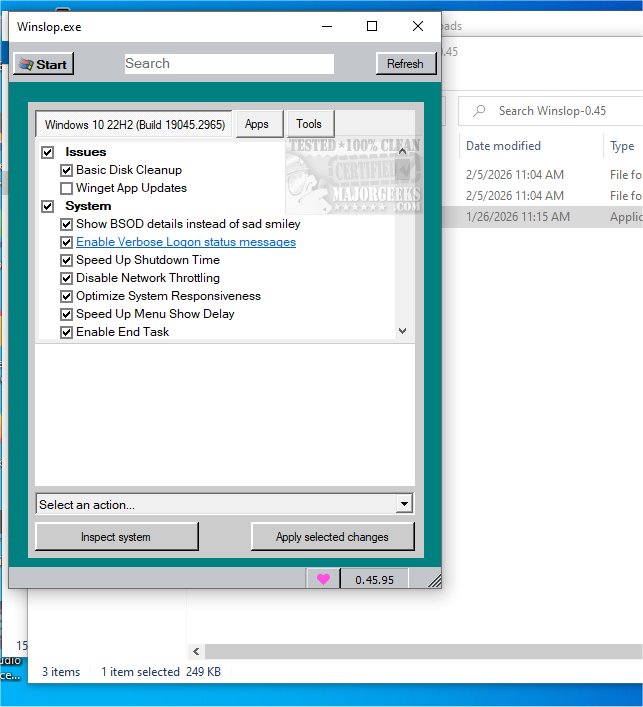
Winslop for Windows removes unnecessary bloat, reduces slop, restores user control, shows changes clearly, works locally, deterministic, reversible, lightweight fork of CrapFixer for a cleaner system.

Winslop key features:

Removes system slop – eliminates unnecessary or redundant Windows components.
Reduces bloatware – optimizes resource usage for faster performance.
Full user control – all changes are transparent, reviewable, and reversible.
Local and offline operation – no AI, cloud, or telemetry involved.
Deterministic behavior – predictable, consistent, and safe modifications.
Fork of CrapFixer – smaller, focused, and easier to maintain codebase.
Improves system performance – reduces overhead and unnecessary processes.
Targeted optimization – only removes opaque, forced, or optional slop.
Visibility of changes – shows exactly what will be modified before applying.
Lightweight tool – minimal footprint, no unnecessary layers or assistants.

Winslop 26.02.02 changelog:

This release marks the first stable milestone of the project and introduces a new versioning scheme.

Changed: Versioning scheme updated from 0.x to date-based format YY.MM.Patch
New format example: 26.02.01
Patch number increases with each release within the same month

This release replaces the previous 0.60 development version and represents the first stable major update

Added OS applicability system to prevent unsupported features from running on incompatible Windows versions. Non-applicable features are automatically skipped during Analyze/Fix/Restore operations
Added even more robust Windows version detection (incl. UBR like 26200.7921) and helpers for Windows 10/11 checks
Added: Taskbar: Always show all system tray icons (Windows 10)
Added: Taskbar: Remove “Meet Now” button from system tray (Windows 10)
Added: Taskbar: Disable Widgets (Windows 11)
Added: Taskbar: Disable News & Interests (Windows 10)
Added: Taskbar: Make taskbar small (Windows 10)
Added: Action: Clean Taskbar (removes all pinned items; clears Taskband\Favorites)
Improved: Analysis/Fix/Restore now skip non-applicable features to avoid invalid changes
Changed: Versioning scheme updated from 1.x.x to date-based format YY.MM.Patch (e.g. 26.02.01)
Added a Select profile... placeholder to prevent auto-loading on startup and ensure profiles are only applied when explicitly chosen
Reduced memory usage and improved overall resource efficiency
Updated docs
Minor bug fixes


My Computer My Computer

At a glance

Windows 11 ProIntel Core i9 12900KFCorsair 64GB DDR5 Vengeance C40 5200MhzASUS GeForce RTX 3090 ROG Strix OC 24GB
OS
Windows 11 Pro
Computer type
PC/Desktop
Manufacturer/Model
Custom Build
CPU
Intel Core i9 12900KF
Motherboard
ASUS ROG Maximus Z690 Hero
Memory
Corsair 64GB DDR5 Vengeance C40 5200Mhz
Graphics Card(s)
ASUS GeForce RTX 3090 ROG Strix OC 24GB
Sound Card
OnBoard
Monitor(s) Displays
Acer Predator XB323UGP 32" QHD G-SYNC-C 144Hz 1MS IPS LED
Screen Resolution
2560 x 1440
Hard Drives
1x Samsung 980 Pro Series Gen4 250GB M.2 NVMe
1x Samsung 980 Pro Series Gen4 500GB M.2 NVMe
2x Samsung 980 Pro Series Gen4 2TB M.2 NVMe
PSU
Corsair AX1200i 1200W 80PLUS Titanium Modular
Case
Corsair 4000D Black Case w/ Tempered Glass Side Panel
Cooling
Noctua NH-U12A Chromax Black CPU Cooler, 4x Noctua 120mm Fans
Keyboard
Logitech MK545
Mouse
Logitech MX Master 3
Internet Speed
Fixed Wireless 150mbps/75mbps
Browser
Firefox
Antivirus
Kaspersky
Other Info
Thrustmaster TS-PC RACER
Fanatec CSL Elite Pedals with the Load Cell Kit
Yamaha Amp with Bose Speakers
Looks interesting, I think I'll wait until someone else beta tests it. :D
 

My Computers My Computers

  • At a glance

    Win 11 Pro 25H2, Build 26200.8894Intel Core i5 1450064GB DDR4GeForce RTX 4060
    OS
    Win 11 Pro 25H2, Build 26200.8894
    Computer type
    PC/Desktop
    Manufacturer/Model
    Home Brew
    CPU
    Intel Core i5 14500
    Motherboard
    Gigabyte B760M G P WIFI
    Memory
    64GB DDR4
    Graphics Card(s)
    GeForce RTX 4060
    Sound Card
    Chipset Realtek
    Monitor(s) Displays
    LG 45" Ultragear, Acer 24" 1080p
    Screen Resolution
    5120x1440, 1920x1080
    Hard Drives
    Crucial P310 2TB 2280 PCIe Gen4 3D NAND NVMe M.2 SSD (O/S)
    Silicon Power 2TB US75 NVMe PCIe Gen4 M.2 2280 SSD (backup)
    Crucial BX500 2TB 3D NAND (2nd backup)
    Seagate 4TB Ironwolf, rotating HDD archive files
    External off-line backup Drives: 2 NVMe 4TB drives in external enclosures
    PSU
    Thermaltake Toughpower GF3 750W
    Case
    LIAN LI LANCOOL 216 E-ATX PC Case
    Cooling
    Lots of fans!
    Keyboard
    Microsoft Comfort Curve 2000
    Mouse
    Logitech G305
    Internet Speed
    Verizon FiOS 1GB
    Browser
    Firefox
    Antivirus
    Malware Bytes & Windows Defender Security
  • At a glance

    Win 11 Pro 25H2, Build 26200.8894Intel Core i5 1440032GB DDR5Intel 700 Embedded GPU
    Operating System
    Win 11 Pro 25H2, Build 26200.8894
    Computer type
    PC/Desktop
    Manufacturer/Model
    Home Brew
    CPU
    Intel Core i5 14400
    Motherboard
    Gigabyte B760M DS3H AX
    Memory
    32GB DDR5
    Graphics card(s)
    Intel 700 Embedded GPU
    Sound Card
    Realtek Embedded
    Monitor(s) Displays
    27" HP 1080p
    Screen Resolution
    1920x1080
    Hard Drives
    Crucial P310 2TB 2280 PCIe Gen4 eD NAND PCIe SSD
    Samsung EVO 990 2TB NVMe Gen4 SSD
    Samsung 2TB SATA SSD
    PSU
    Thermaltake Smart BM3 650W
    Case
    Okinos Micro ATX Case
    Cooling
    Fans
    Keyboard
    Microsoft Comfort Curve 2000
    Mouse
    Logitech G305
    Internet Speed
    Verizon FiOS 1GB
    Browser
    Firefox
    Antivirus
    Malware Bytes & Windows Defender Security
  • Nimo N171 17" Laptop, (Intel i3-1215U, 16GB RAM, 2TB NVMe, Win11 Pro)
    Acemagic Vista Mini PC V1 (Intel N150, 16GB RAM, 1TB NVMe, Win11 Pro)
    HP ENVY h8-1540t, (24GB RAM, 2TB SSD, 2TB HDD, Win11 Pro)
Chris Titus does something similar


My Computers My Computers

  • At a glance

    Windows 11 Pro 25H2 build: (26200.7623)32GB
    OS
    Windows 11 Pro 25H2 build: (26200.7623)
    Computer type
    Laptop
    Manufacturer/Model
    Microsoft Surface Pro
    Memory
    32GB
  • At a glance

    Microsoft 25H2 ProIntel Core Ultra 764GBIntel Integrated Graphics
    Operating System
    Microsoft 25H2 Pro
    Computer type
    Laptop
    Manufacturer/Model
    Dell Pro 14 - PC14250
    CPU
    Intel Core Ultra 7
    Memory
    64GB
    Graphics card(s)
    Intel Integrated Graphics
    Hard Drives
    Micron 1TB SSD

Winslop 26.03.20​


This release replaces the previous 0.60 development version and represents the first stable major update

Added

  • Integrated Winget Install Center for managing apps directly via Windows Package Manager
  • Bulk install / upgrade / uninstall for selected applications
  • System inspection via winget list and winget upgrade to detect installed apps and available updates
  • Category filtering, live search, and quick toggles: Installed only / Updates only
Improved
  • Optimized the "Disable Bing Search Results" feature
  • Numerous UI improvements and small modernizations
Note: Application list parsed and adapted from the WinUtil project by Chris Titus Tech


My Computer My Computer

At a glance

Windows 11 ProIntel Core i9 12900KFCorsair 64GB DDR5 Vengeance C40 5200MhzASUS GeForce RTX 3090 ROG Strix OC 24GB
OS
Windows 11 Pro
Computer type
PC/Desktop
Manufacturer/Model
Custom Build
CPU
Intel Core i9 12900KF
Motherboard
ASUS ROG Maximus Z690 Hero
Memory
Corsair 64GB DDR5 Vengeance C40 5200Mhz
Graphics Card(s)
ASUS GeForce RTX 3090 ROG Strix OC 24GB
Sound Card
OnBoard
Monitor(s) Displays
Acer Predator XB323UGP 32" QHD G-SYNC-C 144Hz 1MS IPS LED
Screen Resolution
2560 x 1440
Hard Drives
1x Samsung 980 Pro Series Gen4 250GB M.2 NVMe
1x Samsung 980 Pro Series Gen4 500GB M.2 NVMe
2x Samsung 980 Pro Series Gen4 2TB M.2 NVMe
PSU
Corsair AX1200i 1200W 80PLUS Titanium Modular
Case
Corsair 4000D Black Case w/ Tempered Glass Side Panel
Cooling
Noctua NH-U12A Chromax Black CPU Cooler, 4x Noctua 120mm Fans
Keyboard
Logitech MK545
Mouse
Logitech MX Master 3
Internet Speed
Fixed Wireless 150mbps/75mbps
Browser
Firefox
Antivirus
Kaspersky
Other Info
Thrustmaster TS-PC RACER
Fanatec CSL Elite Pedals with the Load Cell Kit
Yamaha Amp with Bose Speakers
Looks interesting, I think I'll wait until someone else beta tests it.

Someone may already have. I noticed it on Major Geeks yesterday


My Computer My Computer

At a glance

windows 10 21h2
OS
windows 10 21h2

Winslop 26.03.21​

This release replaces the previous 0.60 development version and represents the first stable major update
  • Improved: Install tab refined and improved. It now loads and displays Winget apps with available updates during initialization
  • Improved: Winget install functionality moved to plugins; the winget-apps.ini can now be updated anytime via Start Menu > Manage Plugins
  • Added: Feature to disable Silent App Installation (prevents apps from being installed automatically in the background)
  • Improved: Feature to disable Tailored Experiences (prevents Microsoft from using diagnostic data for personalized tips and suggestions). Tailored Experiences feature now also applies policy-level settings for stronger enforcement
  • Improved: Feature to disable suggested content in the Settings app
  • Added: Feature to disable Windows Spotlight rotating images on the lock screen
  • Added: Feature to disable Lock Screen slideshow suggestions
  • Added: Feature to disable Start menu app launch tracking
  • Added: Feature to disable Online Speech Recognition services
  • Added: Feature to disable Narrator online services
  • Improved: Feature to limit Windows diagnostic data to required level only. Diagnostic data feature with expanded registry coverage for more consistent telemetry control
  • Improved: Several privacy features now apply multiple registry values to ensure settings remain enforced
  • Improved: Updated naming of privacy features to better reflect recommended configuration states
  • Improved: UI modernized in several areas, including a new hamburger menu replacing the classic Windows 95/98-style start menu
 

My Computer My Computer

At a glance

Windows 11 ProIntel Core i9 12900KFCorsair 64GB DDR5 Vengeance C40 5200MhzASUS GeForce RTX 3090 ROG Strix OC 24GB
OS
Windows 11 Pro
Computer type
PC/Desktop
Manufacturer/Model
Custom Build
CPU
Intel Core i9 12900KF
Motherboard
ASUS ROG Maximus Z690 Hero
Memory
Corsair 64GB DDR5 Vengeance C40 5200Mhz
Graphics Card(s)
ASUS GeForce RTX 3090 ROG Strix OC 24GB
Sound Card
OnBoard
Monitor(s) Displays
Acer Predator XB323UGP 32" QHD G-SYNC-C 144Hz 1MS IPS LED
Screen Resolution
2560 x 1440
Hard Drives
1x Samsung 980 Pro Series Gen4 250GB M.2 NVMe
1x Samsung 980 Pro Series Gen4 500GB M.2 NVMe
2x Samsung 980 Pro Series Gen4 2TB M.2 NVMe
PSU
Corsair AX1200i 1200W 80PLUS Titanium Modular
Case
Corsair 4000D Black Case w/ Tempered Glass Side Panel
Cooling
Noctua NH-U12A Chromax Black CPU Cooler, 4x Noctua 120mm Fans
Keyboard
Logitech MK545
Mouse
Logitech MX Master 3
Internet Speed
Fixed Wireless 150mbps/75mbps
Browser
Firefox
Antivirus
Kaspersky
Other Info
Thrustmaster TS-PC RACER
Fanatec CSL Elite Pedals with the Load Cell Kit
Yamaha Amp with Bose Speakers

Winslop 26.03.30​

What's New​

  • .NET 10 Migration: Full move to modern .NET (C# 14) with a modernized, SDK-style project setup and overall performance improvements
    Heads-up: this inevitably loses a bit of the classic Winslop/WinForms retro charm (look & feel, packaging, some UI behavior). If we want to move forward, its the trade-off
  • Native Dark Mode: System theme detection with smooth light/dark switching
  • PowerShell SDK Updated: Bumped to 7.5.4
  • Versioning Improvements: Cleaner, more reliable version management
  • Modernized project structure with SDK-style
  • Numerous Improvements: Better stability, improved async behavior, and a generally modernized codebase

Please try this version and let me know how it works for you. Your feedback will help decide which direction Winslop should take going forward.


My Computer My Computer

At a glance

Windows 11 ProIntel Core i9 12900KFCorsair 64GB DDR5 Vengeance C40 5200MhzASUS GeForce RTX 3090 ROG Strix OC 24GB
OS
Windows 11 Pro
Computer type
PC/Desktop
Manufacturer/Model
Custom Build
CPU
Intel Core i9 12900KF
Motherboard
ASUS ROG Maximus Z690 Hero
Memory
Corsair 64GB DDR5 Vengeance C40 5200Mhz
Graphics Card(s)
ASUS GeForce RTX 3090 ROG Strix OC 24GB
Sound Card
OnBoard
Monitor(s) Displays
Acer Predator XB323UGP 32" QHD G-SYNC-C 144Hz 1MS IPS LED
Screen Resolution
2560 x 1440
Hard Drives
1x Samsung 980 Pro Series Gen4 250GB M.2 NVMe
1x Samsung 980 Pro Series Gen4 500GB M.2 NVMe
2x Samsung 980 Pro Series Gen4 2TB M.2 NVMe
PSU
Corsair AX1200i 1200W 80PLUS Titanium Modular
Case
Corsair 4000D Black Case w/ Tempered Glass Side Panel
Cooling
Noctua NH-U12A Chromax Black CPU Cooler, 4x Noctua 120mm Fans
Keyboard
Logitech MK545
Mouse
Logitech MX Master 3
Internet Speed
Fixed Wireless 150mbps/75mbps
Browser
Firefox
Antivirus
Kaspersky
Other Info
Thrustmaster TS-PC RACER
Fanatec CSL Elite Pedals with the Load Cell Kit
Yamaha Amp with Bose Speakers
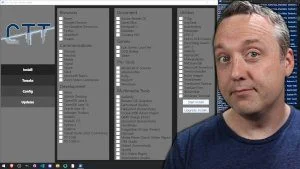
OK but it was a serious suggestion.


Denis
 

My Computer My Computer

At a glance

Windows 11 Home x64 Version 25H2 Build 26200....
OS
Windows 11 Home x64 Version 25H2 Build 26200.8037

My Computers My Computers

  • At a glance

    Windows11 Pro 26200.8894Intel Core i9 14900F (24 -Core, 68 MB Total C...32GB DDR5RTX 4080 Super w/610.74
    OS
    Windows11 Pro 26200.8894
    Computer type
    PC/Desktop
    Manufacturer/Model
    Dell Alienware Aurora R16
    CPU
    Intel Core i9 14900F (24 -Core, 68 MB Total Cache)
    Motherboard
    Dell Alienware
    Memory
    32GB DDR5
    Graphics Card(s)
    RTX 4080 Super w/610.74
    Sound Card
    Realtec
    Monitor(s) Displays
    Corsair XENEON 32QHD165
    Screen Resolution
    2560 X 1440
    Hard Drives
    1-2TB Samsung 990 Pro PCIe NVMe M2 SSD
    1-4TB Samsung 990 Pro PCIe NVMe M2 SSD
    PSU
    1000 Watt Platinum Dell
    Case
    Alienware
    Cooling
    Liquid Closed Loop
    Keyboard
    Corsair Strafe RGB
    Mouse
    Logitech MK270 Wireless
    Internet Speed
    100Gb's Down-20 Up
    Browser
    Firefox 152.0.6
    Antivirus
    Defender
    Other Info
    Very Quiet And Fast
    CyberPower UPS CP1500PFCLCD
  • At a glance

    PClinuxOS Mate (2025.7)13th Gen Inter(R) Core(TM) i3-1315U64 GB DDR4 @3200 MHz.Internal
    Operating System
    PClinuxOS Mate (2025.7)
    Computer type
    PC/Desktop
    Manufacturer/Model
    Intel
    CPU
    13th Gen Inter(R) Core(TM) i3-1315U
    Motherboard
    Intel
    Memory
    64 GB DDR4 @3200 MHz.
    Graphics card(s)
    Internal
    Sound Card
    None
    Monitor(s) Displays
    Dell 2419HGCF
    Screen Resolution
    1920 X 1080
    Hard Drives
    SAMSUNG 980 PRO SSD 2TB, PCIe 4.0 M.2 2280
    PSU
    Chicony 30 Watt
    Case
    Small
    Keyboard
    Dell
    Mouse
    Razor
    Internet Speed
    1GB
    Browser
    Slimjet
So this program gets upgraded almost every day? 😮

How stable is that?
 

My Computers My Computers

  • At a glance

    Windows 11 Pro 25H2 build: (26200.7623)32GB
    OS
    Windows 11 Pro 25H2 build: (26200.7623)
    Computer type
    Laptop
    Manufacturer/Model
    Microsoft Surface Pro
    Memory
    32GB
  • At a glance

    Microsoft 25H2 ProIntel Core Ultra 764GBIntel Integrated Graphics
    Operating System
    Microsoft 25H2 Pro
    Computer type
    Laptop
    Manufacturer/Model
    Dell Pro 14 - PC14250
    CPU
    Intel Core Ultra 7
    Memory
    64GB
    Graphics card(s)
    Intel Integrated Graphics
    Hard Drives
    Micron 1TB SSD

Winslop – WinUI3 Rebuild​

++++ Winslop v26.03.41 – Migration: WinForms > WinUI 3 (.NET 10) +++​


Winslop v26.03.40 – Migration: WinForms > WinUI 3 (.NET 10)
• Fully rebuilt UI: WinUI 3 (Windows App SDK 1.8)
• Migrated from .NET Framework 4.8 (WinForms) to .NET 10 (Preview)
• Mica backdrop, page-cached navigation, MVVM TreeView, plugin manager
• Portable: No installer needed, just unzip and run

Included in the package:
• Winslop.exe (main app)
• Compiled XAML pages (*.xbf)
• Plugins folder (optional)
• .NET 10 runtime (self-contained, no install required)
• Windows App SDK DLLs (UI framework)
• Only English language resources
• No MSIX/Store assets

Requirements:
• Windows 10/11 (1809 or newer)
• Windows App SDK Runtime (may need to be installed once)
• No .NET installation needed

Release package:
Winslop-26.03.41.zip

The classic WinForms version is available as a legacy asset Winslop-26.3.31-legacy.zip for download.


My Computer My Computer

At a glance

Windows 11 ProIntel Core i9 12900KFCorsair 64GB DDR5 Vengeance C40 5200MhzASUS GeForce RTX 3090 ROG Strix OC 24GB
OS
Windows 11 Pro
Computer type
PC/Desktop
Manufacturer/Model
Custom Build
CPU
Intel Core i9 12900KF
Motherboard
ASUS ROG Maximus Z690 Hero
Memory
Corsair 64GB DDR5 Vengeance C40 5200Mhz
Graphics Card(s)
ASUS GeForce RTX 3090 ROG Strix OC 24GB
Sound Card
OnBoard
Monitor(s) Displays
Acer Predator XB323UGP 32" QHD G-SYNC-C 144Hz 1MS IPS LED
Screen Resolution
2560 x 1440
Hard Drives
1x Samsung 980 Pro Series Gen4 250GB M.2 NVMe
1x Samsung 980 Pro Series Gen4 500GB M.2 NVMe
2x Samsung 980 Pro Series Gen4 2TB M.2 NVMe
PSU
Corsair AX1200i 1200W 80PLUS Titanium Modular
Case
Corsair 4000D Black Case w/ Tempered Glass Side Panel
Cooling
Noctua NH-U12A Chromax Black CPU Cooler, 4x Noctua 120mm Fans
Keyboard
Logitech MK545
Mouse
Logitech MX Master 3
Internet Speed
Fixed Wireless 150mbps/75mbps
Browser
Firefox
Antivirus
Kaspersky
Other Info
Thrustmaster TS-PC RACER
Fanatec CSL Elite Pedals with the Load Cell Kit
Yamaha Amp with Bose Speakers

Winslop – WinUI3, Round Two​

++++ Winslop – The WinUI3 Experiment Continues – Migration: WinForms > WinUI 3 (.NET 10) +++​


Winslop v26.03.45 – Migration: WinForms > WinUI 3 (.NET 10)
• Fully rebuilt UI: WinUI 3 (Windows App SDK 1.8)
• Migrated from .NET Framework 4.8 (WinForms) to .NET 10 (Preview)
• Mica backdrop, page-cached navigation, MVVM TreeView, plugin manager
• Portable: No installer needed, just unzip and run

Included in the package:
• Winslop.exe (main app)
• Compiled XAML pages (*.xbf)
• Plugins folder (optional)
• .NET 10 runtime (self-contained, no install required)
• Only English language resources
• No MSIX/Store assets

Requirements:
• Windows 10/11 (1809 or newer)
• Windows App SDK Runtime (may need to be installed once)
• No .NET installation needed
• Windows App SDK DLLs (UI framework) needed

Release package:
Winslop-26.03.45.zip

The classic WinForms version is available as a legacy asset Winslop-26.3.31-legacy.zip for download.
The program folder now also includes Winslop.Legacy.exe if you still want to enjoy the classic version


My Computer My Computer

At a glance

Windows 11 ProIntel Core i9 12900KFCorsair 64GB DDR5 Vengeance C40 5200MhzASUS GeForce RTX 3090 ROG Strix OC 24GB
OS
Windows 11 Pro
Computer type
PC/Desktop
Manufacturer/Model
Custom Build
CPU
Intel Core i9 12900KF
Motherboard
ASUS ROG Maximus Z690 Hero
Memory
Corsair 64GB DDR5 Vengeance C40 5200Mhz
Graphics Card(s)
ASUS GeForce RTX 3090 ROG Strix OC 24GB
Sound Card
OnBoard
Monitor(s) Displays
Acer Predator XB323UGP 32" QHD G-SYNC-C 144Hz 1MS IPS LED
Screen Resolution
2560 x 1440
Hard Drives
1x Samsung 980 Pro Series Gen4 250GB M.2 NVMe
1x Samsung 980 Pro Series Gen4 500GB M.2 NVMe
2x Samsung 980 Pro Series Gen4 2TB M.2 NVMe
PSU
Corsair AX1200i 1200W 80PLUS Titanium Modular
Case
Corsair 4000D Black Case w/ Tempered Glass Side Panel
Cooling
Noctua NH-U12A Chromax Black CPU Cooler, 4x Noctua 120mm Fans
Keyboard
Logitech MK545
Mouse
Logitech MX Master 3
Internet Speed
Fixed Wireless 150mbps/75mbps
Browser
Firefox
Antivirus
Kaspersky
Other Info
Thrustmaster TS-PC RACER
Fanatec CSL Elite Pedals with the Load Cell Kit
Yamaha Amp with Bose Speakers

Winslop – WinUI3 Release III​

New Feature "Profiles"

Winslop can now save configuration profiles.

In the Home tab you can now:
  • Save your current Winslop configuration
  • Load saved profiles anytime via the dropdown menu

This makes it much easier to switch between different setups.

Fixes

  • Fixed profile import/export when running with admin rights (#39)
    The WinUI3 FilePicker failed to initialize correctly in elevated contexts.


So yes, the WinUI experiment continues.
Whether Winslop ultimately becomes a modern Windows 11-style tool or remains a lean retro power utility is still up for debate.
For now, both worlds coexist.
And honestly… that might not be the worst outcome.

Release package:
Winslop-26.03.60-win-x64.zip

The classic WinForms version is available as a legacy asset Winslop-26.3.31-legacy.zip for download.
The program folder now also includes Winslop.Legacy.exe if you still want to enjoy the classic version
 

My Computer My Computer

At a glance

Windows 11 ProIntel Core i9 12900KFCorsair 64GB DDR5 Vengeance C40 5200MhzASUS GeForce RTX 3090 ROG Strix OC 24GB
OS
Windows 11 Pro
Computer type
PC/Desktop
Manufacturer/Model
Custom Build
CPU
Intel Core i9 12900KF
Motherboard
ASUS ROG Maximus Z690 Hero
Memory
Corsair 64GB DDR5 Vengeance C40 5200Mhz
Graphics Card(s)
ASUS GeForce RTX 3090 ROG Strix OC 24GB
Sound Card
OnBoard
Monitor(s) Displays
Acer Predator XB323UGP 32" QHD G-SYNC-C 144Hz 1MS IPS LED
Screen Resolution
2560 x 1440
Hard Drives
1x Samsung 980 Pro Series Gen4 250GB M.2 NVMe
1x Samsung 980 Pro Series Gen4 500GB M.2 NVMe
2x Samsung 980 Pro Series Gen4 2TB M.2 NVMe
PSU
Corsair AX1200i 1200W 80PLUS Titanium Modular
Case
Corsair 4000D Black Case w/ Tempered Glass Side Panel
Cooling
Noctua NH-U12A Chromax Black CPU Cooler, 4x Noctua 120mm Fans
Keyboard
Logitech MK545
Mouse
Logitech MX Master 3
Internet Speed
Fixed Wireless 150mbps/75mbps
Browser
Firefox
Antivirus
Kaspersky
Other Info
Thrustmaster TS-PC RACER
Fanatec CSL Elite Pedals with the Load Cell Kit
Yamaha Amp with Bose Speakers
Winslop – WinUI3 Release IV​

Whats new?​

Added​

  • Keyboard shortcutsfor all major menu actions:
    • Ctrl+T – Toggle All
    • Ctrl+Z – Undo last changes
    • F5 – Refresh
    • Ctrl+L – Copy log to clipboard
    • Delete – Clear log
  • Zoom support for the Home page > Feature tree (Ctrl+Scroll). So WinUI 3 controls carry significantly more padding and spacing than their WinForms equivalents; a ZoomMode was added as a practical workaround to let users reclaim vertical space on smaller screens
  • Context menu on right-click for individual tree nodes: Analyze, Fix, Restore, Help
  • Plugin analysis now included in the combined analysis summary dialog
  • Combined analysis summaryafter full inspection showing native features and plugins separately:
    • Windows Features : X of Y OK
    • Plugins : X of Y OK
    • Total : X of Y OK
  • Hyperlink to Online Log Inspector directly in the analysis result dialog
  • "No plugins selected" message in log when plugin analysis is skipped
  • Profile ComboBox with built-in Export, Import, and "Open profiles folder" actions
  • [CRITICAL] Search filter respects IsVisible state, so context menu actions (Analyze/Fix/Restore) now correctly skip hidden nodes
  • Log outputnow color-coded by severity using RichTextBlock and not TextBox
    • 🔴 Red – Errors
    • 🟠 Orange – Warnings
    • Gray – Info (theme-sensitive via TextFillColorPrimaryBrush)
  • Nav highlight auto-refreshes on Windows light/dark theme switch
  • Per-page menu state: Export, Import, Undo, Manage Plugins disabled on non-Features pages
  • More options flyout button (⋯) replaces separate Toggle/Undo/Refresh buttons and old log actions ComboBox
  • Log actions submenu under More options: Inspect online, Copy, Clear, Log checked/unchecked/summary
  • Plugin counters (TotalChecked, IssuesFound) added to PluginManager so it mirrors FeatureNodeManager
  • [CRITICAL] UnhandledException + TaskScheduler.UnobservedTaskException handlers to prevent silent crashes

Improved​

  • Analysis summary moved to end of log (after dialog closes) so auto-scroll always lands at the bottom
  • More options menu replaces three separate icon buttons. Should bring a cleaner toolbar, less visual noise
  • LogActionsController removed and actions are now wired directly as MenuFlyoutItem handlers, no ComboBox dependency
  • Nav buttons theme-aware highlight via NavigationService.UpdateHighlight() so it reacts to live theme changes
  • ApplyFilter now iterates item.Children.ToList() snapshot to prevent collection-modified crashes
  • ApplySearch guards against _rootItems == null during page initialization
  • Analysis dialog now uses a StackPanel content with a HyperlinkButton instead of plain string

Removed​

  • Log actions ComboBox (comboLogActions) is eplaced by flyout submenu
  • LogActionsController class is no longer needed
  • Separate Toggle All / Undo / Refresh buttons is consolidated into More options flyout
  • Intermediate analysis dialog shown before plugin analysis are replaced by single combined dialog after both complete

Fixed​

  • Context menu Analyze/Fix/Restore now respects active search filter (IsVisible check added to AnalyzeFeature, FixFeature, RestoreFeature)
  • Plugin nodes correctly skipped during native feature analysis and vice versa
  • Summary log entry no longer appears before plugin results
 

My Computer My Computer

At a glance

Windows 11 ProIntel Core i9 12900KFCorsair 64GB DDR5 Vengeance C40 5200MhzASUS GeForce RTX 3090 ROG Strix OC 24GB
OS
Windows 11 Pro
Computer type
PC/Desktop
Manufacturer/Model
Custom Build
CPU
Intel Core i9 12900KF
Motherboard
ASUS ROG Maximus Z690 Hero
Memory
Corsair 64GB DDR5 Vengeance C40 5200Mhz
Graphics Card(s)
ASUS GeForce RTX 3090 ROG Strix OC 24GB
Sound Card
OnBoard
Monitor(s) Displays
Acer Predator XB323UGP 32" QHD G-SYNC-C 144Hz 1MS IPS LED
Screen Resolution
2560 x 1440
Hard Drives
1x Samsung 980 Pro Series Gen4 250GB M.2 NVMe
1x Samsung 980 Pro Series Gen4 500GB M.2 NVMe
2x Samsung 980 Pro Series Gen4 2TB M.2 NVMe
PSU
Corsair AX1200i 1200W 80PLUS Titanium Modular
Case
Corsair 4000D Black Case w/ Tempered Glass Side Panel
Cooling
Noctua NH-U12A Chromax Black CPU Cooler, 4x Noctua 120mm Fans
Keyboard
Logitech MK545
Mouse
Logitech MX Master 3
Internet Speed
Fixed Wireless 150mbps/75mbps
Browser
Firefox
Antivirus
Kaspersky
Other Info
Thrustmaster TS-PC RACER
Fanatec CSL Elite Pedals with the Load Cell Kit
Yamaha Amp with Bose Speakers

Winslop WinUI3 – International​

What’s new

  • Language switcher in Settings (English / Deutsch)
  • UI localized: menus, navigation, dialogs, tooltips, search
  • 45+ feature names translated
  • Log messages and status summaries localized
  • Major dialogs translated (restore, migration, donation, plugin manager)
 

My Computer My Computer

At a glance

Windows 11 ProIntel Core i9 12900KFCorsair 64GB DDR5 Vengeance C40 5200MhzASUS GeForce RTX 3090 ROG Strix OC 24GB
OS
Windows 11 Pro
Computer type
PC/Desktop
Manufacturer/Model
Custom Build
CPU
Intel Core i9 12900KF
Motherboard
ASUS ROG Maximus Z690 Hero
Memory
Corsair 64GB DDR5 Vengeance C40 5200Mhz
Graphics Card(s)
ASUS GeForce RTX 3090 ROG Strix OC 24GB
Sound Card
OnBoard
Monitor(s) Displays
Acer Predator XB323UGP 32" QHD G-SYNC-C 144Hz 1MS IPS LED
Screen Resolution
2560 x 1440
Hard Drives
1x Samsung 980 Pro Series Gen4 250GB M.2 NVMe
1x Samsung 980 Pro Series Gen4 500GB M.2 NVMe
2x Samsung 980 Pro Series Gen4 2TB M.2 NVMe
PSU
Corsair AX1200i 1200W 80PLUS Titanium Modular
Case
Corsair 4000D Black Case w/ Tempered Glass Side Panel
Cooling
Noctua NH-U12A Chromax Black CPU Cooler, 4x Noctua 120mm Fans
Keyboard
Logitech MK545
Mouse
Logitech MX Master 3
Internet Speed
Fixed Wireless 150mbps/75mbps
Browser
Firefox
Antivirus
Kaspersky
Other Info
Thrustmaster TS-PC RACER
Fanatec CSL Elite Pedals with the Load Cell Kit
Yamaha Amp with Bose Speakers

Winslop - Final WinUI3 Release 26.02.120​

Whats new?​

Not everything made it into this listm, mostly because I lost track

Added​

  • Full app localization with support for English, German, and French
    For translators: LOCALIZATION.md
  • Keyboard shortcutsfor all major menu actions:
    • Ctrl+T – Toggle All
    • Ctrl+Z – Undo last changes
    • F5 – Refresh
    • Ctrl+L – Copy log to clipboard
    • Delete – Clear log
  • Zoom support for the Home page > Feature tree (Ctrl+Scroll). So WinUI 3 controls carry significantly more padding and spacing than their WinForms equivalents; a ZoomMode was added as a practical workaround to let users reclaim vertical space on smaller screens
  • Language-independent profile matching for feature tree selections
  • Built-in AI Panic Mode profile for quickly disabling Windows AI-related features
  • WINSLOP_SELECTION_V2 Changed the selection export format and added a stable profile selection format based on internal feature IDs and plugin file IDs
  • Reworked Settings page with centralized extension management
  • Context menu on right-click for individual tree nodes: Analyze, Fix, Restore, Help
  • Plugin analysis now included in the combined analysis summary dialog
  • Combined analysis summaryafter full inspection showing native features and plugins separately:
    • Windows Features : X of Y OK
    • Plugins : X of Y OK
    • Total : X of Y OK
  • Hyperlink to Online Log Inspector directly in the analysis result dialog
  • "No plugins selected" message in log when plugin analysis is skipped
  • Profile ComboBox with built-in Export, Import, and "Open profiles folder" actions
  • [CRITICAL] Search filter respects IsVisible state, so context menu actions (Analyze/Fix/Restore) now correctly skip hidden nodes
  • Log outputnow color-coded by severity using RichTextBlock and not TextBox
    • 🔴 Red – Errors
    • 🟠 Orange – Warnings
    • Gray – Info (theme-sensitive via TextFillColorPrimaryBrush)
  • Nav highlight auto-refreshes on Windows light/dark theme switch
  • Per-page menu state: Export, Import, Undo, Manage Plugins disabled on non-Features pages
  • More options flyout button (⋯) replaces separate Toggle/Undo/Refresh buttons and old log actions ComboBox
  • Log actions submenu under More options: Inspect online, Copy, Clear, Log checked/unchecked/summary
  • Plugin counters (TotalChecked, IssuesFound) added to PluginManager so it mirrors FeatureNodeManager
  • [CRITICAL] UnhandledException + TaskScheduler.UnobservedTaskException handlers to prevent silent crashes

Improved​

  • Analysis summary moved to end of log (after dialog closes) so auto-scroll always lands at the bottom
  • More options menu replaces three separate icon buttons. Should bring a cleaner toolbar, less visual noise
  • LogActionsController removed and actions are now wired directly as MenuFlyoutItem handlers, no ComboBox dependency
  • Nav buttons theme-aware highlight via NavigationService.UpdateHighlight() so it reacts to live theme changes
  • ApplyFilter now iterates item.Children.ToList() snapshot to prevent collection-modified crashes
  • ApplySearch guards against _rootItems == null during page initialization
  • Analysis dialog now uses a StackPanel content with a HyperlinkButton instead of plain string
  • Improved profile import/export so selections no longer depend on localized feature or category names
  • Improved plugin profile handling by using the plugin script filename as a stable identifier
  • Improved extension discoverability by separating native Feature Tree plugins from tool scripts in Settings
  • Improved accessibility for international users with a fully localized UI across three languages
  • Changed the Settings page structure to manage extensions in a more native and unified way

Removed​

  • Log actions ComboBox (comboLogActions) is eplaced by flyout submenu
  • LogActionsController class is no longer needed
  • Separate Toggle All / Undo / Refresh buttons is consolidated into More options flyout
  • Intermediate analysis dialog shown before plugin analysis are replaced by single combined dialog after both complete
  • Removed support for the old path/name-based selection format

Fixed​

  • Context menu Analyze/Fix/Restore now respects active search filter (IsVisible check added to AnalyzeFeature, FixFeature, RestoreFeature)
  • Plugin nodes correctly skipped during native feature analysis and vice versa
  • Summary log entry no longer appears before plugin results


My Computer My Computer

At a glance

Windows 11 ProIntel Core i9 12900KFCorsair 64GB DDR5 Vengeance C40 5200MhzASUS GeForce RTX 3090 ROG Strix OC 24GB
OS
Windows 11 Pro
Computer type
PC/Desktop
Manufacturer/Model
Custom Build
CPU
Intel Core i9 12900KF
Motherboard
ASUS ROG Maximus Z690 Hero
Memory
Corsair 64GB DDR5 Vengeance C40 5200Mhz
Graphics Card(s)
ASUS GeForce RTX 3090 ROG Strix OC 24GB
Sound Card
OnBoard
Monitor(s) Displays
Acer Predator XB323UGP 32" QHD G-SYNC-C 144Hz 1MS IPS LED
Screen Resolution
2560 x 1440
Hard Drives
1x Samsung 980 Pro Series Gen4 250GB M.2 NVMe
1x Samsung 980 Pro Series Gen4 500GB M.2 NVMe
2x Samsung 980 Pro Series Gen4 2TB M.2 NVMe
PSU
Corsair AX1200i 1200W 80PLUS Titanium Modular
Case
Corsair 4000D Black Case w/ Tempered Glass Side Panel
Cooling
Noctua NH-U12A Chromax Black CPU Cooler, 4x Noctua 120mm Fans
Keyboard
Logitech MK545
Mouse
Logitech MX Master 3
Internet Speed
Fixed Wireless 150mbps/75mbps
Browser
Firefox
Antivirus
Kaspersky
Other Info
Thrustmaster TS-PC RACER
Fanatec CSL Elite Pedals with the Load Cell Kit
Yamaha Amp with Bose Speakers

Winslop 26.03.130

Changelog:

Added

  • Compatibility check: Settings now shows whether your Windows version is fully compatible with Winslop (✅ for Windows 11, ⚠️ for Windows 10)
  • Theme switcher: Choose between System, Light, or Dark mode (requires restart)
  • Backdrop switcher: Switch between Mica and Mica Alt live in Settings
  • Russian and Chinese language support
Improved
  • Improved German language support
  • Log Inspector redesigned with dark theme matching the app's WinUI 3 aesthetic
  • Update page modernized with clean Fluent Light design
  • Settings page reorganized with collapsible sections (Extensions, Compatibility)
  • Removed duplicate Import/Export from the toolbar menu (already in profile selector)
  • Fixed
  • ScrollViewer on Settings page now scrolls to the bottom correctly
  • Title bar button colors now match the selected theme on restart
 

My Computer My Computer

At a glance

Windows 11 ProIntel Core i9 12900KFCorsair 64GB DDR5 Vengeance C40 5200MhzASUS GeForce RTX 3090 ROG Strix OC 24GB
OS
Windows 11 Pro
Computer type
PC/Desktop
Manufacturer/Model
Custom Build
CPU
Intel Core i9 12900KF
Motherboard
ASUS ROG Maximus Z690 Hero
Memory
Corsair 64GB DDR5 Vengeance C40 5200Mhz
Graphics Card(s)
ASUS GeForce RTX 3090 ROG Strix OC 24GB
Sound Card
OnBoard
Monitor(s) Displays
Acer Predator XB323UGP 32" QHD G-SYNC-C 144Hz 1MS IPS LED
Screen Resolution
2560 x 1440
Hard Drives
1x Samsung 980 Pro Series Gen4 250GB M.2 NVMe
1x Samsung 980 Pro Series Gen4 500GB M.2 NVMe
2x Samsung 980 Pro Series Gen4 2TB M.2 NVMe
PSU
Corsair AX1200i 1200W 80PLUS Titanium Modular
Case
Corsair 4000D Black Case w/ Tempered Glass Side Panel
Cooling
Noctua NH-U12A Chromax Black CPU Cooler, 4x Noctua 120mm Fans
Keyboard
Logitech MK545
Mouse
Logitech MX Master 3
Internet Speed
Fixed Wireless 150mbps/75mbps
Browser
Firefox
Antivirus
Kaspersky
Other Info
Thrustmaster TS-PC RACER
Fanatec CSL Elite Pedals with the Load Cell Kit
Yamaha Amp with Bose Speakers

Winslop 26.03.140​

Added​

  • Keyboard shortcutsfor all major menu actions:
    • Ctrl+T – Toggle All
    • Ctrl+Z – Undo last changes
    • F5 – Refresh
    • Ctrl+L – Copy log to clipboard
    • Delete – Clear log
  • Zoom support for the Home page > Feature tree (Ctrl+Scroll). So WinUI 3 controls carry significantly more padding and spacing than their WinForms equivalents; a ZoomMode was added as a practical workaround to let users reclaim vertical space on smaller screens
  • Context menu on right-click for individual tree nodes: Analyze, Fix, Restore, Help
  • Plugin analysis now included in the combined analysis summary dialog
  • Combined analysis summaryafter full inspection showing native features and plugins separately:
    • Windows Features : X of Y OK
    • Plugins : X of Y OK
    • Total : X of Y OK
  • Hyperlink to Online Log Inspector directly in the analysis result dialog
  • "No plugins selected" message in log when plugin analysis is skipped
  • Profile ComboBox with built-in Export, Import, and "Open profiles folder" actions
  • [CRITICAL] Search filter respects IsVisible state, so context menu actions (Analyze/Fix/Restore) now correctly skip hidden nodes
  • Log outputnow color-coded by severity using RichTextBlock and not TextBox
    • 🔴 Red – Errors
    • 🟠 Orange – Warnings
    • Gray – Info (theme-sensitive via TextFillColorPrimaryBrush)
  • Nav highlight auto-refreshes on Windows light/dark theme switch
  • Per-page menu state: Export, Import, Undo, Manage Plugins disabled on non-Features pages
  • More options flyout button (⋯) replaces separate Toggle/Undo/Refresh buttons and old log actions ComboBox
  • Log actions submenu under More options: Inspect online, Copy, Clear, Log checked/unchecked/summary
  • Plugin counters (TotalChecked, IssuesFound) added to PluginManager so it mirrors FeatureNodeManager
  • [CRITICAL] UnhandledException + TaskScheduler.UnobservedTaskException handlers to prevent silent crashes

Improved​

  • Analysis summary moved to end of log (after dialog closes) so auto-scroll always lands at the bottom
  • More options menu replaces three separate icon buttons. Should bring a cleaner toolbar, less visual noise
  • LogActionsController removed and actions are now wired directly as MenuFlyoutItem handlers, no ComboBox dependency
  • Nav buttons theme-aware highlight via NavigationService.UpdateHighlight() so it reacts to live theme changes
  • ApplyFilter now iterates item.Children.ToList() snapshot to prevent collection-modified crashes
  • ApplySearch guards against _rootItems == null during page initialization
  • Analysis dialog now uses a StackPanel content with a HyperlinkButton instead of plain string

Removed​

  • Log actions ComboBox (comboLogActions) is eplaced by flyout submenu
  • LogActionsController class is no longer needed
  • Separate Toggle All / Undo / Refresh buttons is consolidated into More options flyout
  • Intermediate analysis dialog shown before plugin analysis are replaced by single combined dialog after both complete

Fixed​

  • Context menu Analyze/Fix/Restore now respects active search filter (IsVisible check added to AnalyzeFeature, FixFeature, RestoreFeature)
  • Plugin nodes correctly skipped during native feature analysis and vice versa
  • Summary log entry no longer appears before plugin results


My Computer My Computer

At a glance

Windows 11 ProIntel Core i9 12900KFCorsair 64GB DDR5 Vengeance C40 5200MhzASUS GeForce RTX 3090 ROG Strix OC 24GB
OS
Windows 11 Pro
Computer type
PC/Desktop
Manufacturer/Model
Custom Build
CPU
Intel Core i9 12900KF
Motherboard
ASUS ROG Maximus Z690 Hero
Memory
Corsair 64GB DDR5 Vengeance C40 5200Mhz
Graphics Card(s)
ASUS GeForce RTX 3090 ROG Strix OC 24GB
Sound Card
OnBoard
Monitor(s) Displays
Acer Predator XB323UGP 32" QHD G-SYNC-C 144Hz 1MS IPS LED
Screen Resolution
2560 x 1440
Hard Drives
1x Samsung 980 Pro Series Gen4 250GB M.2 NVMe
1x Samsung 980 Pro Series Gen4 500GB M.2 NVMe
2x Samsung 980 Pro Series Gen4 2TB M.2 NVMe
PSU
Corsair AX1200i 1200W 80PLUS Titanium Modular
Case
Corsair 4000D Black Case w/ Tempered Glass Side Panel
Cooling
Noctua NH-U12A Chromax Black CPU Cooler, 4x Noctua 120mm Fans
Keyboard
Logitech MK545
Mouse
Logitech MX Master 3
Internet Speed
Fixed Wireless 150mbps/75mbps
Browser
Firefox
Antivirus
Kaspersky
Other Info
Thrustmaster TS-PC RACER
Fanatec CSL Elite Pedals with the Load Cell Kit
Yamaha Amp with Bose Speakers

Winslop 26.03.155​

  • [NEW] Search is now hidden by default. Just click the magnifying glass in the title bar to show it whenever you need it
  • [NEW] Support menu: share Winslop with friends via the native Windows share dialog as it opens straight from the Support button in the sidebar
  • [IMPROVED] Settings page got a fresh look with cleaner, wider cards
  • [IMPROVED] Extensions section now shows Plugins, Tools and Winslop Legacy as separate entries with quick-launch buttons
  • [IMPROVED] Quick access to Winslop Legacy added to launch the classic version straight from Settings
  • [IMPROVED] App info and compatibility details are now neatly tucked away under the About section
  • [FIXED] Scrollbar in Settings no longer covered part of the content
  • [FIXED, CRITICAL] App installs from the Install page were sometimes interrupted by a winget prompt. Added --source winget to prevent multi-source conflict prompt during install and upgrade
  • [IMPROVED] First-time notice about the WinUI 3 rebuild is now a small banner you can dismiss, so no more popup
  • [IMPROVED] Internal app folders renamed for consistency, there is no user action needed
  • [ADDED] Add zh-TW (Traditional Chinese, Taiwan) translation for WinUI 3
  • [UPDATED] Updated localization and support for Chinese, French, Spanish, and Russian


My Computer My Computer

At a glance

Windows 11 ProIntel Core i9 12900KFCorsair 64GB DDR5 Vengeance C40 5200MhzASUS GeForce RTX 3090 ROG Strix OC 24GB
OS
Windows 11 Pro
Computer type
PC/Desktop
Manufacturer/Model
Custom Build
CPU
Intel Core i9 12900KF
Motherboard
ASUS ROG Maximus Z690 Hero
Memory
Corsair 64GB DDR5 Vengeance C40 5200Mhz
Graphics Card(s)
ASUS GeForce RTX 3090 ROG Strix OC 24GB
Sound Card
OnBoard
Monitor(s) Displays
Acer Predator XB323UGP 32" QHD G-SYNC-C 144Hz 1MS IPS LED
Screen Resolution
2560 x 1440
Hard Drives
1x Samsung 980 Pro Series Gen4 250GB M.2 NVMe
1x Samsung 980 Pro Series Gen4 500GB M.2 NVMe
2x Samsung 980 Pro Series Gen4 2TB M.2 NVMe
PSU
Corsair AX1200i 1200W 80PLUS Titanium Modular
Case
Corsair 4000D Black Case w/ Tempered Glass Side Panel
Cooling
Noctua NH-U12A Chromax Black CPU Cooler, 4x Noctua 120mm Fans
Keyboard
Logitech MK545
Mouse
Logitech MX Master 3
Internet Speed
Fixed Wireless 150mbps/75mbps
Browser
Firefox
Antivirus
Kaspersky
Other Info
Thrustmaster TS-PC RACER
Fanatec CSL Elite Pedals with the Load Cell Kit
Yamaha Amp with Bose Speakers
Back
Top Bottom




