

Winslop 26.02.02
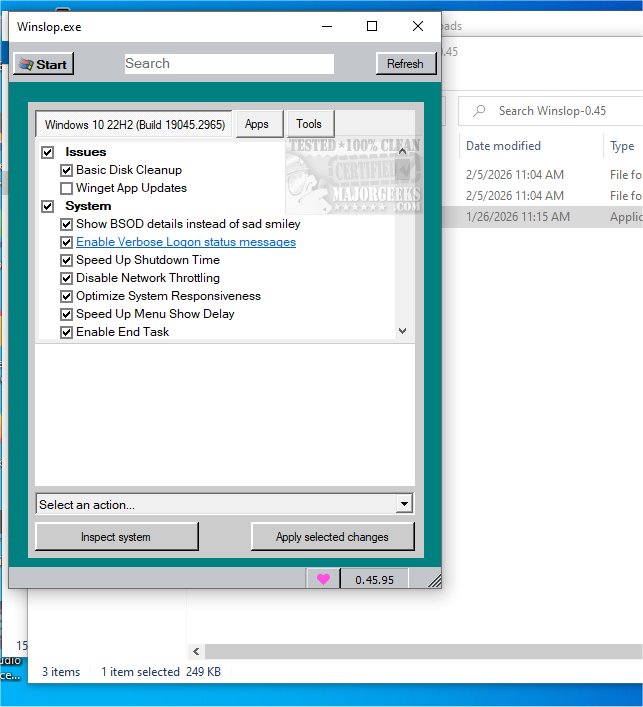
Winslop for Windows removes unnecessary bloat, reduces slop, restores user control, shows changes clearly, works locally, deterministic, reversible, lightweight fork of CrapFixer for a cleaner system.Winslop key features:
Removes system slop – eliminates unnecessary or redundant Windows components.
Reduces bloatware – optimizes resource usage for faster performance.
Full user control – all changes are transparent, reviewable, and reversible.
Local and offline operation – no AI, cloud, or telemetry involved.
Deterministic behavior – predictable, consistent, and safe modifications.
Fork of CrapFixer – smaller, focused, and easier to maintain codebase.
Improves system performance – reduces overhead and unnecessary processes.
Targeted optimization – only removes opaque, forced, or optional slop.
Visibility of changes – shows exactly what will be modified before applying.
Lightweight tool – minimal footprint, no unnecessary layers or assistants.
Winslop 26.02.02 changelog:
This release marks the first stable milestone of the project and introduces a new versioning scheme.
Changed: Versioning scheme updated from 0.x to date-based format YY.MM.Patch
New format example: 26.02.01
Patch number increases with each release within the same month
This release replaces the previous 0.60 development version and represents the first stable major update
Added OS applicability system to prevent unsupported features from running on incompatible Windows versions. Non-applicable features are automatically skipped during Analyze/Fix/Restore operations
Added even more robust Windows version detection (incl. UBR like 26200.7921) and helpers for Windows 10/11 checks
Added: Taskbar: Always show all system tray icons (Windows 10)
Added: Taskbar: Remove “Meet Now” button from system tray (Windows 10)
Added: Taskbar: Disable Widgets (Windows 11)
Added: Taskbar: Disable News & Interests (Windows 10)
Added: Taskbar: Make taskbar small (Windows 10)
Added: Action: Clean Taskbar (removes all pinned items; clears Taskband\Favorites)
Improved: Analysis/Fix/Restore now skip non-applicable features to avoid invalid changes
Changed: Versioning scheme updated from 1.x.x to date-based format YY.MM.Patch (e.g. 26.02.01)
Added a Select profile... placeholder to prevent auto-loading on startup and ensure profiles are only applied when explicitly chosen
Reduced memory usage and improved overall resource efficiency
Updated docs
Minor bug fixes
Release Winslop 26.02.02 · builtbybel/Winslop
🎉 Major Update – First Stable Release WarningUnofficial domain notice: I do not own or operate winslop.com and I'm not affiliated with whoever registered it. Even if it currently redirects to this ...
 github.com
My Computer
At a glance
Windows 11 ProIntel Core i9 12900KFCorsair 64GB DDR5 Vengeance C40 5200MhzASUS GeForce RTX 3090 ROG Strix OC 24GB
- OS
- Windows 11 Pro
- Computer type
- PC/Desktop
- Manufacturer/Model
- Custom Build
- CPU
- Intel Core i9 12900KF
- Motherboard
- ASUS ROG Maximus Z690 Hero
- Memory
- Corsair 64GB DDR5 Vengeance C40 5200Mhz
- Graphics Card(s)
- ASUS GeForce RTX 3090 ROG Strix OC 24GB
- Sound Card
- OnBoard
- Monitor(s) Displays
- Acer Predator XB323UGP 32" QHD G-SYNC-C 144Hz 1MS IPS LED
- Screen Resolution
- 2560 x 1440
- Hard Drives
- 1x Samsung 980 Pro Series Gen4 250GB M.2 NVMe
1x Samsung 980 Pro Series Gen4 500GB M.2 NVMe
2x Samsung 980 Pro Series Gen4 2TB M.2 NVMe
- PSU
- Corsair AX1200i 1200W 80PLUS Titanium Modular
- Case
- Corsair 4000D Black Case w/ Tempered Glass Side Panel
- Cooling
- Noctua NH-U12A Chromax Black CPU Cooler, 4x Noctua 120mm Fans
- Keyboard
- Logitech MK545
- Mouse
- Logitech MX Master 3
- Internet Speed
- Fixed Wireless 150mbps/75mbps
- Browser
- Firefox
- Antivirus
- Kaspersky
- Other Info
- Thrustmaster TS-PC RACER
Fanatec CSL Elite Pedals with the Load Cell Kit
Yamaha Amp with Bose Speakers






 Red – Errors
 Orange – Warnings
 for Windows 11,
  for Windows 10)






