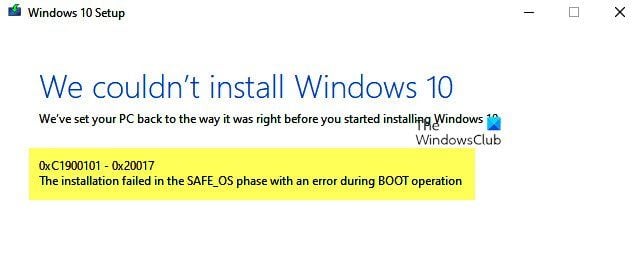
0x20017 error when upgrading to 22H2


lionn016

Member
Local time
12:57 AM
Posts
2
OS
Windows 11
Hello.

I'm always getting the dreaded 0xC1900101-0x20017 installation error when upgrading to 22H2 from 21H2 via in-place upgrade. Installation will finish at 100% and reboot the system but when the system boots up, the spinning circle freezes after a while. I have to forcefully shut down the device by pressing the power button and the system automatically rolls back to 21H2.

Microsoft's support page says that "A driver has caused a problem." I found and removed the problematic drivers using SetupDiag, but the issue still persists. I think there are still drivers in my system that must be removed/updated.

I've also tried installing 22H2 via clean install but the problem remains. Same frozen spinning circle at loading screen. Can't even get past the installer window. The BIOS may have also something to do with the error. BIOS is on the latest, version 1.26.

Please do note that I am using Windows 11 on unsupported hardware. I installed 21H2 via Rufus with the requirement check bypassed. I'm using the official 22H2 ISO from Microsoft with the registry bypass for hardware requirements.

Any solutions? I'm thinking this might be the end of the line for my device, but I would be really glad to hear anyone who has successfully upgraded to 22H2 using the same laptop model as mine.

Meanwhile, my N4120 tablet here is enjoying the latest 22H2 build. Sigh.

SetupDiag results can be found here: logs
 
Windows Build/Version
21H2 Build 22000.1516
Last edited:

My Computer My Computer

At a glance

Windows 11Intel Core i7-4610M8GB DDR3LIntel HD Graphics 4600, NVIDIA Quadro K1100M
OS
Windows 11
Computer type
Laptop
Manufacturer/Model
HP ZBook 17 G2
CPU
Intel Core i7-4610M
Memory
8GB DDR3L
Graphics Card(s)
Intel HD Graphics 4600, NVIDIA Quadro K1100M
Screen Resolution
1600x900
Hard Drives
KingDian S370 256GB SATA SSD
Antivirus
Windows Security

My Computers My Computers

  • At a glance

    Windows 11 Pro 25H2 26200.9278AMD Ryzen 7 5825U with Radeon Graphics16GB
    OS
    Windows 11 Pro 25H2 26200.9278
    Computer type
    Laptop
    Manufacturer/Model
    Acemagic LX15PRO
    CPU
    AMD Ryzen 7 5825U with Radeon Graphics
    Motherboard
    BIOS CT_BI_AMI_LX15PRO_AB8139_A-004
    Memory
    16GB
    Screen Resolution
    1920 x 1080
    Hard Drives
    SSD 2TB
    Internet Speed
    30 Mbps
    Browser
    Brave
    Antivirus
    Webroot SecureAnywhere Complete beta
  • At a glance

    Windows 11 Pro 23H2 22631.2506Atom N450 1.66GHz2GB
    Operating System
    Windows 11 Pro 23H2 22631.2506
    Computer type
    Laptop
    Manufacturer/Model
    HP Mini 210-1090NR PC (bought in late 2009!)
    CPU
    Atom N450 1.66GHz
    Memory
    2GB
    Browser
    Brave
    Antivirus
    Webroot
  • Acer Swift SF114-34 laptop
    OS Windows 11 Pro 26200.8894
    CPU Pentium Silver N6000
    RAM 4GB
    BIOS v1.17
    SSD Samsung 970 EVO Plus SSD 2TB (an upgrade)
installed 21H2 via Rufus with the requirement check bypassed. I'm using the official 22H2 ISO from Microsoft with the registry bypass for hardware requirements.
Just a thought here but it seems to me you are double-whammying it. I would think that you should use one method (Rufus bypass) or the other (registry bypass).
There could very well be a conflict between the two that's throwing out the error. But I really don't know since every system I've dealt with is compatible. I'm just saying it could be the problem.
 

My Computers My Computers

  • At a glance

    Windows 11 Pro 25H2 26200.9445i9-10900 10 core 20 threads32 gbnone-Intel UHD Graphics 630
    OS
    Windows 11 Pro 25H2 26200.9445
    Computer type
    PC/Desktop
    Manufacturer/Model
    Dell Optiplex 7080
    CPU
    i9-10900 10 core 20 threads
    Motherboard
    DELL 0J37VM
    Memory
    32 gb
    Graphics Card(s)
    none-Intel UHD Graphics 630
    Sound Card
    Integrated Realtek
    Monitor(s) Displays
    Benq 27
    Screen Resolution
    2560x1440
    Hard Drives
    2x1tb Solidigm m.2 nvme /External drives 512gb Samsung m.2 sata+2tb Kingston m2.nvme
    PSU
    500w
    Case
    MT
    Cooling
    Dell Premium
    Keyboard
    Logitech wired
    Mouse
    Logitech wireless
    Internet Speed
    so slow I'm too embarrassed to tell
    Browser
    #1 Edge #2 Firefox
    Antivirus
    Defender+MWB Premium
  • At a glance

    Windows 11 Pro 24H2 26200.9445AMD Ryzen 7 6800U32 gbintegrated
    Operating System
    Windows 11 Pro 24H2 26200.9445
    Computer type
    PC/Desktop
    Manufacturer/Model
    Beelink Mini PC SER5
    CPU
    AMD Ryzen 7 6800U
    Memory
    32 gb
    Graphics card(s)
    integrated
    Sound Card
    integrated
    Monitor(s) Displays
    Benq 27
    Screen Resolution
    2560x1440
    Hard Drives
    1TB Crucial nvme
    Keyboard
    Logitech wired
    Mouse
    Logitech wireless
    Internet Speed
    still too embarrassed to tell
    Browser
    Firefox
    Antivirus
    Defender
  • System 3 is non compliant Dell 9020 i7-4770/24gb ram Win11 PRO 26200.9445
Just a thought here but it seems to me you are double-whammying it. I would think that you should use one method (Rufus bypass) or the other (registry bypass).
There could very well be a conflict between the two that's throwing out the error. But I really don't know since every system I've dealt with is compatible. I'm just saying it could be the problem.
Thank you for pointing that out. But I'm afraid it did not solve the problem. I've removed the registry key for bypassing the hardware check and let Rufus do its thing. Tried both in-place upgrade and clean install. Same error result.
I Googled that error message and found lots of advice.


It's about 10, but it has lots of ideas for you to try.
Thanks for the suggestion, but I've already tried updating drivers and uninstalling the problematic ones. I did perform a clean boot before doing the in-place upgrade but to no avail.
 

My Computer My Computer

At a glance

Windows 11Intel Core i7-4610M8GB DDR3LIntel HD Graphics 4600, NVIDIA Quadro K1100M
OS
Windows 11
Computer type
Laptop
Manufacturer/Model
HP ZBook 17 G2
CPU
Intel Core i7-4610M
Memory
8GB DDR3L
Graphics Card(s)
Intel HD Graphics 4600, NVIDIA Quadro K1100M
Screen Resolution
1600x900
Hard Drives
KingDian S370 256GB SATA SSD
Antivirus
Windows Security
Did you try disabling wifi?
 

My Computers My Computers

  • At a glance

    Windows 11 Pro 25H2 26200.9278AMD Ryzen 7 5825U with Radeon Graphics16GB
    OS
    Windows 11 Pro 25H2 26200.9278
    Computer type
    Laptop
    Manufacturer/Model
    Acemagic LX15PRO
    CPU
    AMD Ryzen 7 5825U with Radeon Graphics
    Motherboard
    BIOS CT_BI_AMI_LX15PRO_AB8139_A-004
    Memory
    16GB
    Screen Resolution
    1920 x 1080
    Hard Drives
    SSD 2TB
    Internet Speed
    30 Mbps
    Browser
    Brave
    Antivirus
    Webroot SecureAnywhere Complete beta
  • At a glance

    Windows 11 Pro 23H2 22631.2506Atom N450 1.66GHz2GB
    Operating System
    Windows 11 Pro 23H2 22631.2506
    Computer type
    Laptop
    Manufacturer/Model
    HP Mini 210-1090NR PC (bought in late 2009!)
    CPU
    Atom N450 1.66GHz
    Memory
    2GB
    Browser
    Brave
    Antivirus
    Webroot
  • Acer Swift SF114-34 laptop
    OS Windows 11 Pro 26200.8894
    CPU Pentium Silver N6000
    RAM 4GB
    BIOS v1.17
    SSD Samsung 970 EVO Plus SSD 2TB (an upgrade)
Back
Top Bottom