- Local time
- 1:25 PM
- Posts
- 49
- OS
- Windows 11 25H2 26200.8524 Home Single Language
Hello,
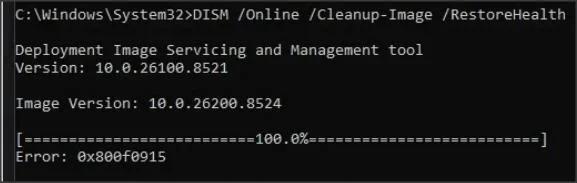
Today I updated my computer to the latest version, 25H2. So the current build is 26200.8524, but even though I performed a clean installation using the original ISO, the DISM tool keeps progressing but gives a 0x800f0915 error when it reaches the end. I can't figure out how to fix this error. Can you please help? I don't want to format again and again; I think there must be a reason and a solution.
Thank you in advance for your help.
Today I updated my computer to the latest version, 25H2. So the current build is 26200.8524, but even though I performed a clean installation using the original ISO, the DISM tool keeps progressing but gives a 0x800f0915 error when it reaches the end. I can't figure out how to fix this error. Can you please help? I don't want to format again and again; I think there must be a reason and a solution.
Thank you in advance for your help.
- Windows Build/Version
- 26200.8524
My Computer
At a glance
Windows 11 25H2 26200.8524 Home Single Language13th Gen Intel(R) Core(TM) i7-13700HX32GBx2 Kingston 4800MHz Total: 64GBNVIDIA GeForce RTX 4080 Laptop GPU 175 Watt
- OS
- Windows 11 25H2 26200.8524 Home Single Language
- Computer type
- Laptop
- Manufacturer/Model
- HP OMEN 17,3 2023 Model
- CPU
- 13th Gen Intel(R) Core(TM) i7-13700HX
- Motherboard
- HM770
- Memory
- 32GBx2 Kingston 4800MHz Total: 64GB
- Graphics Card(s)
- NVIDIA GeForce RTX 4080 Laptop GPU 175 Watt
- Monitor(s) Displays
- ViewSonic VX2780-2K 170 Hz
- Screen Resolution
- 2560 *1440-2K - 240 Hz
- Hard Drives
- 2 TB Crucial NVMe M.2 SSD-2 TB Western Digital NVMe M.2 SSD- 2 TB Seagete Portable Harddisk 5400 RPM
- Keyboard
- HP 4CF00AA Pavilion 800
- Mouse
- A4tech FG20 Fstyler 2.4Ghz Nano 2000DPI
- Internet Speed
- 50 Mbps
- Browser
- LibreWolf
- Antivirus
- Microsoft Defender

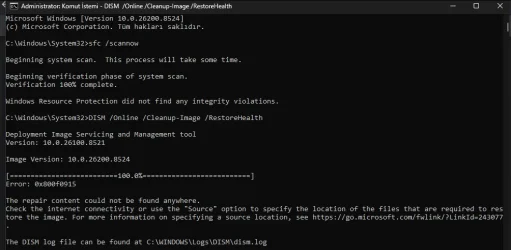



 :\sources\install.wim:INDEX /LimitAccess