0x800f0915 DISM Error


FallenDemon

Well-known member
Member
Local time
9:50 AM
Posts
49
OS
Windows 11 25H2 26200.8524 Home Single Language
Hello,

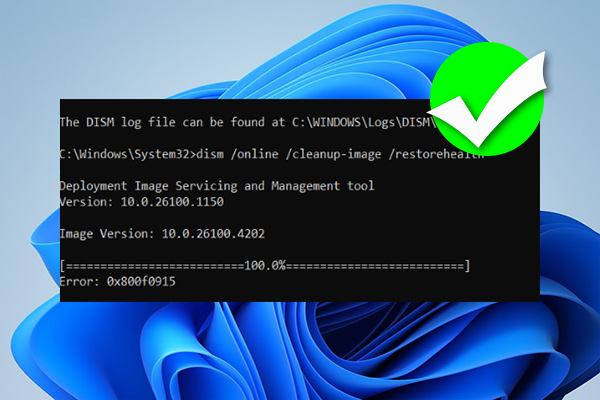
Today I updated my computer to the latest version, 25H2. So the current build is 26200.8524, but even though I performed a clean installation using the original ISO, the DISM tool keeps progressing but gives a 0x800f0915 error when it reaches the end. I can't figure out how to fix this error. Can you please help? I don't want to format again and again; I think there must be a reason and a solution.

Thank you in advance for your help.
 
Windows Build/Version
26200.8524

My Computer My Computer

At a glance

Windows 11 25H2 26200.8524 Home Single Language13th Gen Intel(R) Core(TM) i7-13700HX32GBx2 Kingston 4800MHz Total: 64GBNVIDIA GeForce RTX 4080 Laptop GPU 175 Watt
OS
Windows 11 25H2 26200.8524 Home Single Language
Computer type
Laptop
Manufacturer/Model
HP OMEN 17,3 2023 Model
CPU
13th Gen Intel(R) Core(TM) i7-13700HX
Motherboard
HM770
Memory
32GBx2 Kingston 4800MHz Total: 64GB
Graphics Card(s)
NVIDIA GeForce RTX 4080 Laptop GPU 175 Watt
Monitor(s) Displays
ViewSonic VX2780-2K 170 Hz
Screen Resolution
2560 *1440-2K - 240 Hz
Hard Drives
2 TB Crucial NVMe M.2 SSD-2 TB Western Digital NVMe M.2 SSD- 2 TB Seagete Portable Harddisk 5400 RPM
Keyboard
HP 4CF00AA Pavilion 800
Mouse
A4tech FG20 Fstyler 2.4Ghz Nano 2000DPI
Internet Speed
50 Mbps
Browser
LibreWolf
Antivirus
Microsoft Defender
DISM error 0x800f0915 means Windows cannot find the required repair files. This is usually caused by internet connectivity issues, a broken Windows Update cache, or third-party antivirus interference blocking the repair process.
 

My Computer My Computer

At a glance

Windows 11AMD Ryzen 7 5700GMicron Technology DDR4-3200 16GBNVIDIA GeForce RTX 3060
OS
Windows 11
Computer type
PC/Desktop
Manufacturer/Model
HP Pavilion
CPU
AMD Ryzen 7 5700G
Motherboard
Erica6
Memory
Micron Technology DDR4-3200 16GB
Graphics Card(s)
NVIDIA GeForce RTX 3060
Sound Card
Realtek ALC671
Monitor(s) Displays
Samsung SyncMaster U28E590
Screen Resolution
3840 x 2160
Hard Drives
SAMSUNG MZVLQ1T0HALB-000H1
DISM error 0x800f0915 means Windows cannot find the required repair files. This is usually caused by internet connectivity issues, a broken Windows Update cache, or third-party antivirus interference blocking the repair process.
I use Fort Firewall; could this be related? I use Microsoft Defender as my antivirus and no other third-party software.
 

My Computer My Computer

At a glance

Windows 11 25H2 26200.8524 Home Single Language13th Gen Intel(R) Core(TM) i7-13700HX32GBx2 Kingston 4800MHz Total: 64GBNVIDIA GeForce RTX 4080 Laptop GPU 175 Watt
OS
Windows 11 25H2 26200.8524 Home Single Language
Computer type
Laptop
Manufacturer/Model
HP OMEN 17,3 2023 Model
CPU
13th Gen Intel(R) Core(TM) i7-13700HX
Motherboard
HM770
Memory
32GBx2 Kingston 4800MHz Total: 64GB
Graphics Card(s)
NVIDIA GeForce RTX 4080 Laptop GPU 175 Watt
Monitor(s) Displays
ViewSonic VX2780-2K 170 Hz
Screen Resolution
2560 *1440-2K - 240 Hz
Hard Drives
2 TB Crucial NVMe M.2 SSD-2 TB Western Digital NVMe M.2 SSD- 2 TB Seagete Portable Harddisk 5400 RPM
Keyboard
HP 4CF00AA Pavilion 800
Mouse
A4tech FG20 Fstyler 2.4Ghz Nano 2000DPI
Internet Speed
50 Mbps
Browser
LibreWolf
Antivirus
Microsoft Defender
I use Fort Firewall; could this be related? I use Microsoft Defender as my antivirus and no other third-party software.
Disable or uninstall Fort Firewall to see it helps.
 

My Computer My Computer

At a glance

Windows 11AMD Ryzen 7 5700GMicron Technology DDR4-3200 16GBNVIDIA GeForce RTX 3060
OS
Windows 11
Computer type
PC/Desktop
Manufacturer/Model
HP Pavilion
CPU
AMD Ryzen 7 5700G
Motherboard
Erica6
Memory
Micron Technology DDR4-3200 16GB
Graphics Card(s)
NVIDIA GeForce RTX 3060
Sound Card
Realtek ALC671
Monitor(s) Displays
Samsung SyncMaster U28E590
Screen Resolution
3840 x 2160
Hard Drives
SAMSUNG MZVLQ1T0HALB-000H1
Disable or uninstall Fort Firewall to see it helps.
I completely disabled the Fort Firewall application from both services and task manager, but I'm still getting the same error.
 

My Computer My Computer

At a glance

Windows 11 25H2 26200.8524 Home Single Language13th Gen Intel(R) Core(TM) i7-13700HX32GBx2 Kingston 4800MHz Total: 64GBNVIDIA GeForce RTX 4080 Laptop GPU 175 Watt
OS
Windows 11 25H2 26200.8524 Home Single Language
Computer type
Laptop
Manufacturer/Model
HP OMEN 17,3 2023 Model
CPU
13th Gen Intel(R) Core(TM) i7-13700HX
Motherboard
HM770
Memory
32GBx2 Kingston 4800MHz Total: 64GB
Graphics Card(s)
NVIDIA GeForce RTX 4080 Laptop GPU 175 Watt
Monitor(s) Displays
ViewSonic VX2780-2K 170 Hz
Screen Resolution
2560 *1440-2K - 240 Hz
Hard Drives
2 TB Crucial NVMe M.2 SSD-2 TB Western Digital NVMe M.2 SSD- 2 TB Seagete Portable Harddisk 5400 RPM
Keyboard
HP 4CF00AA Pavilion 800
Mouse
A4tech FG20 Fstyler 2.4Ghz Nano 2000DPI
Internet Speed
50 Mbps
Browser
LibreWolf
Antivirus
Microsoft Defender
Can you update your system using Windows Update?

Also please post screenshot error message of Dism command.

Have you executed Sfc /scannow command?
 

My Computer My Computer

At a glance

Windows 11AMD Ryzen 7 5700GMicron Technology DDR4-3200 16GBNVIDIA GeForce RTX 3060
OS
Windows 11
Computer type
PC/Desktop
Manufacturer/Model
HP Pavilion
CPU
AMD Ryzen 7 5700G
Motherboard
Erica6
Memory
Micron Technology DDR4-3200 16GB
Graphics Card(s)
NVIDIA GeForce RTX 3060
Sound Card
Realtek ALC671
Monitor(s) Displays
Samsung SyncMaster U28E590
Screen Resolution
3840 x 2160
Hard Drives
SAMSUNG MZVLQ1T0HALB-000H1
Can you update your system using Windows Update?

Also please post screenshot error message of Dism command.

Have you executed Sfc /scannow command?
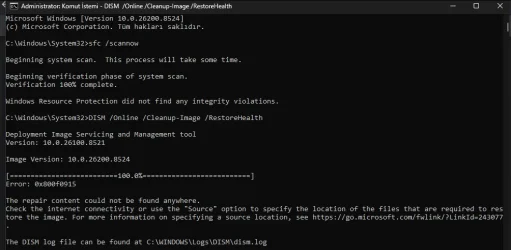
I downloaded the Windows 11 ISO from Microsoft's ISO site and then performed a fresh installation. Afterwards, I upgraded to version 26200.8524 via Windows Update. Now I've run SFC/scannow and I'm attaching a screenshot.1779996896209.webp
 

My Computer My Computer

At a glance

Windows 11 25H2 26200.8524 Home Single Language13th Gen Intel(R) Core(TM) i7-13700HX32GBx2 Kingston 4800MHz Total: 64GBNVIDIA GeForce RTX 4080 Laptop GPU 175 Watt
OS
Windows 11 25H2 26200.8524 Home Single Language
Computer type
Laptop
Manufacturer/Model
HP OMEN 17,3 2023 Model
CPU
13th Gen Intel(R) Core(TM) i7-13700HX
Motherboard
HM770
Memory
32GBx2 Kingston 4800MHz Total: 64GB
Graphics Card(s)
NVIDIA GeForce RTX 4080 Laptop GPU 175 Watt
Monitor(s) Displays
ViewSonic VX2780-2K 170 Hz
Screen Resolution
2560 *1440-2K - 240 Hz
Hard Drives
2 TB Crucial NVMe M.2 SSD-2 TB Western Digital NVMe M.2 SSD- 2 TB Seagete Portable Harddisk 5400 RPM
Keyboard
HP 4CF00AA Pavilion 800
Mouse
A4tech FG20 Fstyler 2.4Ghz Nano 2000DPI
Internet Speed
50 Mbps
Browser
LibreWolf
Antivirus
Microsoft Defender
If your file is install.wim, type the following command (replace D: with your actual drive letter) and press Enter:


Code:
DISM /Online /Cleanup-Image /RestoreHealth /Source:WIM:D:\Sources\install.wim:1 /LimitAccess

If your file is install.esd, type:


Code:
DISM /Online /Cleanup-Image /RestoreHealth /Source:ESD:D:\Sources\install.esd:1 /LimitAccess


You can do a repair install of Windows 11 by performing an in-place upgrade without losing anything.


My Computer My Computer

At a glance

Windows 11AMD Ryzen 7 5700GMicron Technology DDR4-3200 16GBNVIDIA GeForce RTX 3060
OS
Windows 11
Computer type
PC/Desktop
Manufacturer/Model
HP Pavilion
CPU
AMD Ryzen 7 5700G
Motherboard
Erica6
Memory
Micron Technology DDR4-3200 16GB
Graphics Card(s)
NVIDIA GeForce RTX 3060
Sound Card
Realtek ALC671
Monitor(s) Displays
Samsung SyncMaster U28E590
Screen Resolution
3840 x 2160
Hard Drives
SAMSUNG MZVLQ1T0HALB-000H1
If your file is install.wim, type the following command (replace D: with your actual drive letter) and press Enter:


Code:
DISM /Online /Cleanup-Image /RestoreHealth /Source:WIM:D:\Sources\install.wim:1 /LimitAccess

If your file is install.esd, type:


Code:
DISM /Online /Cleanup-Image /RestoreHealth /Source:ESD:D:\Sources\install.esd:1 /LimitAccess


You can do a repair install of Windows 11 by performing an in-place upgrade without losing anything.


Thank you, I'll download the ISO and try to repair it using that.
 

My Computer My Computer

At a glance

Windows 11 25H2 26200.8524 Home Single Language13th Gen Intel(R) Core(TM) i7-13700HX32GBx2 Kingston 4800MHz Total: 64GBNVIDIA GeForce RTX 4080 Laptop GPU 175 Watt
OS
Windows 11 25H2 26200.8524 Home Single Language
Computer type
Laptop
Manufacturer/Model
HP OMEN 17,3 2023 Model
CPU
13th Gen Intel(R) Core(TM) i7-13700HX
Motherboard
HM770
Memory
32GBx2 Kingston 4800MHz Total: 64GB
Graphics Card(s)
NVIDIA GeForce RTX 4080 Laptop GPU 175 Watt
Monitor(s) Displays
ViewSonic VX2780-2K 170 Hz
Screen Resolution
2560 *1440-2K - 240 Hz
Hard Drives
2 TB Crucial NVMe M.2 SSD-2 TB Western Digital NVMe M.2 SSD- 2 TB Seagete Portable Harddisk 5400 RPM
Keyboard
HP 4CF00AA Pavilion 800
Mouse
A4tech FG20 Fstyler 2.4Ghz Nano 2000DPI
Internet Speed
50 Mbps
Browser
LibreWolf
Antivirus
Microsoft Defender
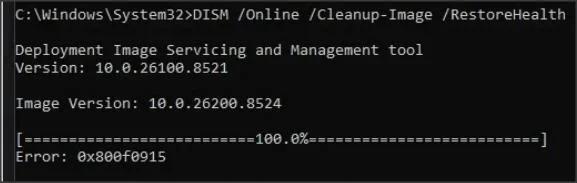
It looks as if this is the underlying cause of the error:
When the DISM tool version is older than the target system version, it fails to retrieve the correct repair files from the Windows Update servers and therefore reports “source files not found” (Error: 0x800f0915). To resolve this, you’ll need to provide a valid repair source that exactly matches your system version.
from

1.webp
 

My Computer My Computer

At a glance

Windows 11 Proi7-8650U16GBIntel UHD 620
OS
Windows 11 Pro
Computer type
Laptop
Manufacturer/Model
Lenovo t480s
CPU
i7-8650U
Memory
16GB
Graphics Card(s)
Intel UHD 620
Screen Resolution
1920x1080
Hard Drives
C SN810 SDCPNRY-512G-1006
Browser
Edge, Firefox
Antivirus
Defender
As you have a recent ISO, you can try pointing DISM at that, instead of using Windows Update.

In File Explore, double-click on the ISO to mount it and note the drive letter - probably D: or E:

Look in Sources to see if it has install.wim or install.esd and use the relevant of the two commands below.

DISM /Online /Cleanup-Image /RestoreHealth /Source:WIM:D:\sources\install.wim:INDEX /LimitAccess
or

DISM /Online /Cleanup-Image /RestoreHealth /Source:ESD:D:\sources\install.esd:INDEX /LimitAccess

but use the correct drive letter if not D: and replace the word INDEX by 6 for Win 11 Pro or 1 for Home.
 
Last edited:

My Computers My Computers

  • At a glance

    Windows 11 Pro 25H2 26200.8655AMD Ryzen 7 5825U with Radeon Graphics16GB
    OS
    Windows 11 Pro 25H2 26200.8655
    Computer type
    Laptop
    Manufacturer/Model
    Acemagic LX15PRO
    CPU
    AMD Ryzen 7 5825U with Radeon Graphics
    Memory
    16GB
    Screen Resolution
    1920 x 1080
    Hard Drives
    SSD 2TB
    Internet Speed
    30 Mbps
    Browser
    Brave
    Antivirus
    Webroot Secure Anywhere
    Other Info
    System 3

    Acer Swift SF114-34 laptop
    OS Windows 11 Pro 26200.8524
    CPU Pentium Silver N6000
    RAM 4GB
    SSD Samsung 970 EVO Plus SSD 2TB (an upgrade)
  • At a glance

    Windows 11 Pro 23H2 22631.2506Atom N450 1.66GHz2GB
    Operating System
    Windows 11 Pro 23H2 22631.2506
    Computer type
    Laptop
    Manufacturer/Model
    HP Mini 210-1090NR PC (bought in late 2009!)
    CPU
    Atom N450 1.66GHz
    Memory
    2GB
    Browser
    Brave
    Antivirus
    Webroot
It looks as if this is the underlying cause of the error:

from

View attachment 172806
I've tried different versions, the same versions, but I'm still getting the error.
 

My Computer My Computer

At a glance

Windows 11 25H2 26200.8524 Home Single Language13th Gen Intel(R) Core(TM) i7-13700HX32GBx2 Kingston 4800MHz Total: 64GBNVIDIA GeForce RTX 4080 Laptop GPU 175 Watt
OS
Windows 11 25H2 26200.8524 Home Single Language
Computer type
Laptop
Manufacturer/Model
HP OMEN 17,3 2023 Model
CPU
13th Gen Intel(R) Core(TM) i7-13700HX
Motherboard
HM770
Memory
32GBx2 Kingston 4800MHz Total: 64GB
Graphics Card(s)
NVIDIA GeForce RTX 4080 Laptop GPU 175 Watt
Monitor(s) Displays
ViewSonic VX2780-2K 170 Hz
Screen Resolution
2560 *1440-2K - 240 Hz
Hard Drives
2 TB Crucial NVMe M.2 SSD-2 TB Western Digital NVMe M.2 SSD- 2 TB Seagete Portable Harddisk 5400 RPM
Keyboard
HP 4CF00AA Pavilion 800
Mouse
A4tech FG20 Fstyler 2.4Ghz Nano 2000DPI
Internet Speed
50 Mbps
Browser
LibreWolf
Antivirus
Microsoft Defender
As you have a recent ISO, you can try pointing DISM at that, instead of using Windows Update.

In File Explore, double-click on the ISO to mount it and note the drive letter - probably D: or E:

Look in Sources to see if it has install.wim or install.esd and use the relevant of the two commands below.

DISM /Online /Cleanup-Image /RestoreHealth /Source:WIM:D:\sources\install.wim:INDEX /LimitAccess
or

DISM /Online /Cleanup-Image /RestoreHealth /Source:ESD:D:\sources\install.esd:INDEX /LimitAccess

but use the correct drive letter if not D: and replace the word INDEX by 6 for Win 11 Pro or 1 for Home.
I tried this method too, but unfortunately it still doesn't work. Interestingly, when I tried the previous version, specifically build 8037 (the latest part), I didn't encounter this problem. I tried it yesterday as well. It only happens when I upgrade to this version, which is really strange.
 

My Computer My Computer

At a glance

Windows 11 25H2 26200.8524 Home Single Language13th Gen Intel(R) Core(TM) i7-13700HX32GBx2 Kingston 4800MHz Total: 64GBNVIDIA GeForce RTX 4080 Laptop GPU 175 Watt
OS
Windows 11 25H2 26200.8524 Home Single Language
Computer type
Laptop
Manufacturer/Model
HP OMEN 17,3 2023 Model
CPU
13th Gen Intel(R) Core(TM) i7-13700HX
Motherboard
HM770
Memory
32GBx2 Kingston 4800MHz Total: 64GB
Graphics Card(s)
NVIDIA GeForce RTX 4080 Laptop GPU 175 Watt
Monitor(s) Displays
ViewSonic VX2780-2K 170 Hz
Screen Resolution
2560 *1440-2K - 240 Hz
Hard Drives
2 TB Crucial NVMe M.2 SSD-2 TB Western Digital NVMe M.2 SSD- 2 TB Seagete Portable Harddisk 5400 RPM
Keyboard
HP 4CF00AA Pavilion 800
Mouse
A4tech FG20 Fstyler 2.4Ghz Nano 2000DPI
Internet Speed
50 Mbps
Browser
LibreWolf
Antivirus
Microsoft Defender
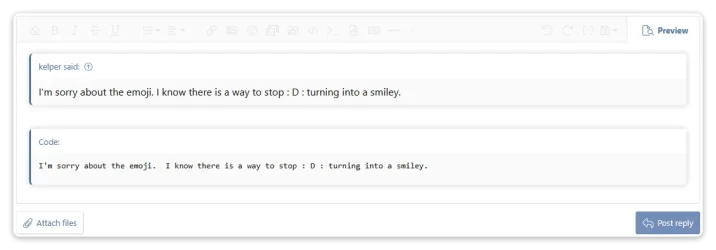
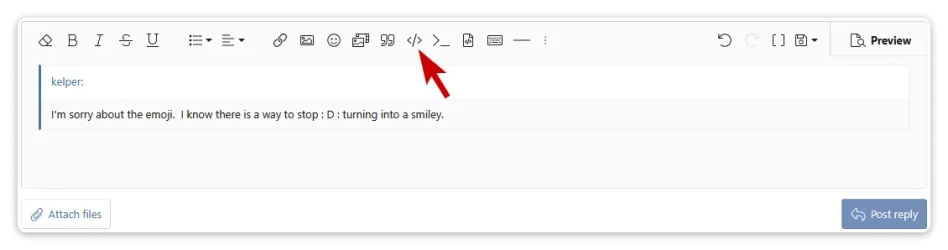
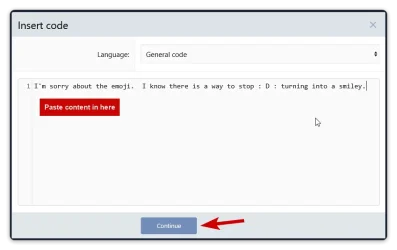
I'm sorry about the emoji. I know there is a way to stop : D : turning into a smiley.
 

My Computers My Computers

  • At a glance

    Windows 11 Pro 25H2 26200.8655AMD Ryzen 7 5825U with Radeon Graphics16GB
    OS
    Windows 11 Pro 25H2 26200.8655
    Computer type
    Laptop
    Manufacturer/Model
    Acemagic LX15PRO
    CPU
    AMD Ryzen 7 5825U with Radeon Graphics
    Memory
    16GB
    Screen Resolution
    1920 x 1080
    Hard Drives
    SSD 2TB
    Internet Speed
    30 Mbps
    Browser
    Brave
    Antivirus
    Webroot Secure Anywhere
    Other Info
    System 3

    Acer Swift SF114-34 laptop
    OS Windows 11 Pro 26200.8524
    CPU Pentium Silver N6000
    RAM 4GB
    SSD Samsung 970 EVO Plus SSD 2TB (an upgrade)
  • At a glance

    Windows 11 Pro 23H2 22631.2506Atom N450 1.66GHz2GB
    Operating System
    Windows 11 Pro 23H2 22631.2506
    Computer type
    Laptop
    Manufacturer/Model
    HP Mini 210-1090NR PC (bought in late 2009!)
    CPU
    Atom N450 1.66GHz
    Memory
    2GB
    Browser
    Brave
    Antivirus
    Webroot
I edited my post to get rid of the silly emojis.
 

My Computers My Computers

  • At a glance

    Windows 11 Pro 25H2 26200.8655AMD Ryzen 7 5825U with Radeon Graphics16GB
    OS
    Windows 11 Pro 25H2 26200.8655
    Computer type
    Laptop
    Manufacturer/Model
    Acemagic LX15PRO
    CPU
    AMD Ryzen 7 5825U with Radeon Graphics
    Memory
    16GB
    Screen Resolution
    1920 x 1080
    Hard Drives
    SSD 2TB
    Internet Speed
    30 Mbps
    Browser
    Brave
    Antivirus
    Webroot Secure Anywhere
    Other Info
    System 3

    Acer Swift SF114-34 laptop
    OS Windows 11 Pro 26200.8524
    CPU Pentium Silver N6000
    RAM 4GB
    SSD Samsung 970 EVO Plus SSD 2TB (an upgrade)
  • At a glance

    Windows 11 Pro 23H2 22631.2506Atom N450 1.66GHz2GB
    Operating System
    Windows 11 Pro 23H2 22631.2506
    Computer type
    Laptop
    Manufacturer/Model
    HP Mini 210-1090NR PC (bought in late 2009!)
    CPU
    Atom N450 1.66GHz
    Memory
    2GB
    Browser
    Brave
    Antivirus
    Webroot
Hello,

Today I updated my computer to the latest version, 25H2. So the current build is 26200.8524, but even though I performed a clean installation using the original ISO, the DISM tool keeps progressing but gives a 0x800f0915 error when it reaches the end. I can't figure out how to fix this error. Can you please help? I don't want to format again and again; I think there must be a reason and a solution.

Thank you in advance for your help.

Have experienced the same today after the update.
 

My Computers My Computers

  • At a glance

    Windows 11 Pro 25H2 Build 26200.8655Intel(R) Core(TM) i7-4770K CPU @ 3.50GHz32.0 GB of I forget and the box is in storage.Gigabyte nVidia GeForce GTX 1660 Super OC 6GB
    OS
    Windows 11 Pro 25H2 Build 26200.8655
    Computer type
    PC/Desktop
    Manufacturer/Model
    Sin-built 2013
    CPU
    Intel(R) Core(TM) i7-4770K CPU @ 3.50GHz
    Motherboard
    ASUS ROG Maximus VI Formula
    Memory
    32.0 GB of I forget and the box is in storage.
    Graphics Card(s)
    Gigabyte nVidia GeForce GTX 1660 Super OC 6GB
    Sound Card
    ROG SupremeFX Formula 8-Channel High Definition Audio
    Monitor(s) Displays
    5 x LG 25MS500-B - 1 x 24MK430H-B - 1 x Wacom Pro 22" Touch Screen Tablet
    Screen Resolution
    All over the place
    Hard Drives
    Too many to list. OS on Samsung 1TB 870 QVO SATA
    PSU
    Silverstone 1500
    Case
    NZXT Phantom 820 Full-Tower Case
    Cooling
    Noctua NH-D15 Elite Class Dual Tower CPU Cooler / 6 x EziDIY 120mm / 2 x Corsair 140mm somethings / 1 x 140mm Thermaltake something / 2 x 200mm Corsair.
    Keyboard
    Corsair K95 / Logitech diNovo Edge Wireless
    Mouse
    Logitech: G402 / G502 / Mx Masters / Mx Air Cordless
    Internet Speed
    2000/500Mbps
    Browser
    All sorts
    Antivirus
    Kaspersky Premium
    Other Info
    ㅤㅤㅤㅤㅤㅤㅤㅤㅤㅤㅤㅤㅤㅤㅤㅤㅤㅤㅤㅤㅤㅤㅤㅤㅤㅤㅤㅤㅤㅤㅤㅤㅤㅤㅤㅤㅤㅤㅤㅤ⠀⠀⠀⠀⠀⠀⠀⠀⠀⠀
    TP-Link BE9300 WiFi 7 Bluetooth 5.4 (Archer TBE550E)
    TP-Link TX201 V1 2.5GB Lan

    Grandstream HT812 - VoIP
    ASUS DSL-AX82U - Mesh
    ASUS RT-AC68U - Mesh
    ASUS RT-BE88U Router

    Brother MFC-L2880DW Printer

    I’m on a horse.
  • At a glance

    Windows 11 Pro 25H2 Build 26200.8655 (Wifes)13th Generation Intel® Core™ i5-1340P Process...16GB LPDDR5-52001x Intel® Iris® Xe Graphics
    Operating System
    Windows 11 Pro 25H2 Build 26200.8655 (Wifes)
    Computer type
    Laptop
    Manufacturer/Model
    LENOVO Yoga 7 14IRL8 - Type 82YL
    CPU
    13th Generation Intel® Core™ i5-1340P Processor(Core™ i5-1340P)
    Memory
    16GB LPDDR5-5200
    Graphics card(s)
    1x Intel® Iris® Xe Graphics
    Sound Card
    Optimized with Dolby Atmos®
    Screen Resolution
    QHD 2880 x 1800 OLED
    Hard Drives
    M.2 512 GB SSD PCIe
    Mouse
    Logiteck MX Master 3S
    Internet Speed
    2000/500
    Antivirus
    Defender / Malwarebytes
    Other Info
    …still on a horse.


    Wireless Network: Wi-Fi 6E 2x2 AX; Bluetooth® 5.1 or above
    Ports: 1x 1 Novo button; 2 in 1 Audio Combo jack; Micro SD Card Reader; HDMI 1.4b; 2 x USB Type-C (TBT4)
    USB 3.2 Gen 2 DP 1.4a
    PD 3.0); 1 x USB 3.2 Gen1 Type A
    Camera
    1x 1080P FHD IR/RGB Hybrid with Privacy Shutter and Dual Array Microphone
    Graphics
    1x Intel® Iris® Xe Graphics
    Monitor
    14" WUXGA
    Form Factor
    Convertible Notebook
  • Windows 11 Pro 25H2 Build 26200.8655 (Wifes)

    Yoga 7 2-in-1 14IML9 - Type 83DJ

    Processor: Intel® Core™ Ultra 7 155H Processor(Core™ Ultra 7 155H)

    Memory: 32GB LPD5X-7467

    Hard Drive: 1 TB SSD PCIe

    Wireless Network: 1x Wi-Fi 6E 2x2 AX; Bluetooth® 5.1 or above

    Ports: 1 x HDMI 2.1 TMDS; 1 x Novo Button; 1 x Combo Audio Jack
    2 x USB-C (USB 4.0)
    1 x USB-A 3.2 Gen 1

    Camera: 1080P FHD IR Hybrid with Dual Microphone

    Graphics: Intel® Arc™ Graphics

    Monitor: 14" 2.8K

    ...Where's my horse?

My Computers My Computers

  • At a glance

    Windows 11 Pro 25H2 Build 26200.8655Intel(R) Core(TM) i7-4770K CPU @ 3.50GHz32.0 GB of I forget and the box is in storage.Gigabyte nVidia GeForce GTX 1660 Super OC 6GB
    OS
    Windows 11 Pro 25H2 Build 26200.8655
    Computer type
    PC/Desktop
    Manufacturer/Model
    Sin-built 2013
    CPU
    Intel(R) Core(TM) i7-4770K CPU @ 3.50GHz
    Motherboard
    ASUS ROG Maximus VI Formula
    Memory
    32.0 GB of I forget and the box is in storage.
    Graphics Card(s)
    Gigabyte nVidia GeForce GTX 1660 Super OC 6GB
    Sound Card
    ROG SupremeFX Formula 8-Channel High Definition Audio
    Monitor(s) Displays
    5 x LG 25MS500-B - 1 x 24MK430H-B - 1 x Wacom Pro 22" Touch Screen Tablet
    Screen Resolution
    All over the place
    Hard Drives
    Too many to list. OS on Samsung 1TB 870 QVO SATA
    PSU
    Silverstone 1500
    Case
    NZXT Phantom 820 Full-Tower Case
    Cooling
    Noctua NH-D15 Elite Class Dual Tower CPU Cooler / 6 x EziDIY 120mm / 2 x Corsair 140mm somethings / 1 x 140mm Thermaltake something / 2 x 200mm Corsair.
    Keyboard
    Corsair K95 / Logitech diNovo Edge Wireless
    Mouse
    Logitech: G402 / G502 / Mx Masters / Mx Air Cordless
    Internet Speed
    2000/500Mbps
    Browser
    All sorts
    Antivirus
    Kaspersky Premium
    Other Info
    ㅤㅤㅤㅤㅤㅤㅤㅤㅤㅤㅤㅤㅤㅤㅤㅤㅤㅤㅤㅤㅤㅤㅤㅤㅤㅤㅤㅤㅤㅤㅤㅤㅤㅤㅤㅤㅤㅤㅤㅤ⠀⠀⠀⠀⠀⠀⠀⠀⠀⠀
    TP-Link BE9300 WiFi 7 Bluetooth 5.4 (Archer TBE550E)
    TP-Link TX201 V1 2.5GB Lan

    Grandstream HT812 - VoIP
    ASUS DSL-AX82U - Mesh
    ASUS RT-AC68U - Mesh
    ASUS RT-BE88U Router

    Brother MFC-L2880DW Printer

    I’m on a horse.
  • At a glance

    Windows 11 Pro 25H2 Build 26200.8655 (Wifes)13th Generation Intel® Core™ i5-1340P Process...16GB LPDDR5-52001x Intel® Iris® Xe Graphics
    Operating System
    Windows 11 Pro 25H2 Build 26200.8655 (Wifes)
    Computer type
    Laptop
    Manufacturer/Model
    LENOVO Yoga 7 14IRL8 - Type 82YL
    CPU
    13th Generation Intel® Core™ i5-1340P Processor(Core™ i5-1340P)
    Memory
    16GB LPDDR5-5200
    Graphics card(s)
    1x Intel® Iris® Xe Graphics
    Sound Card
    Optimized with Dolby Atmos®
    Screen Resolution
    QHD 2880 x 1800 OLED
    Hard Drives
    M.2 512 GB SSD PCIe
    Mouse
    Logiteck MX Master 3S
    Internet Speed
    2000/500
    Antivirus
    Defender / Malwarebytes
    Other Info
    …still on a horse.


    Wireless Network: Wi-Fi 6E 2x2 AX; Bluetooth® 5.1 or above
    Ports: 1x 1 Novo button; 2 in 1 Audio Combo jack; Micro SD Card Reader; HDMI 1.4b; 2 x USB Type-C (TBT4)
    USB 3.2 Gen 2 DP 1.4a
    PD 3.0); 1 x USB 3.2 Gen1 Type A
    Camera
    1x 1080P FHD IR/RGB Hybrid with Privacy Shutter and Dual Array Microphone
    Graphics
    1x Intel® Iris® Xe Graphics
    Monitor
    14" WUXGA
    Form Factor
    Convertible Notebook
  • Windows 11 Pro 25H2 Build 26200.8655 (Wifes)

    Yoga 7 2-in-1 14IML9 - Type 83DJ

    Processor: Intel® Core™ Ultra 7 155H Processor(Core™ Ultra 7 155H)

    Memory: 32GB LPD5X-7467

    Hard Drive: 1 TB SSD PCIe

    Wireless Network: 1x Wi-Fi 6E 2x2 AX; Bluetooth® 5.1 or above

    Ports: 1 x HDMI 2.1 TMDS; 1 x Novo Button; 1 x Combo Audio Jack
    2 x USB-C (USB 4.0)
    1 x USB-A 3.2 Gen 1

    Camera: 1080P FHD IR Hybrid with Dual Microphone

    Graphics: Intel® Arc™ Graphics

    Monitor: 14" 2.8K

    ...Where's my horse?
there is not a fix its know bug at this version..... 26200.8457 works all dism comands perfect
 

My Computer My Computer

At a glance

windows 11
OS
windows 11
Computer type
Laptop
Manufacturer/Model
lenovo
Have experienced the same today after the update.
I think there's a problem with this build number. I've seen it mentioned in a few posts on Reddit as well. Not everyone is experiencing the same issue, though. It's clear that some computers are having problems with this version. Now I'm trying to fix the issues again using Windows Update, and if that doesn't work, I'll revert to an older version.
 

My Computer My Computer

At a glance

Windows 11 25H2 26200.8524 Home Single Language13th Gen Intel(R) Core(TM) i7-13700HX32GBx2 Kingston 4800MHz Total: 64GBNVIDIA GeForce RTX 4080 Laptop GPU 175 Watt
OS
Windows 11 25H2 26200.8524 Home Single Language
Computer type
Laptop
Manufacturer/Model
HP OMEN 17,3 2023 Model
CPU
13th Gen Intel(R) Core(TM) i7-13700HX
Motherboard
HM770
Memory
32GBx2 Kingston 4800MHz Total: 64GB
Graphics Card(s)
NVIDIA GeForce RTX 4080 Laptop GPU 175 Watt
Monitor(s) Displays
ViewSonic VX2780-2K 170 Hz
Screen Resolution
2560 *1440-2K - 240 Hz
Hard Drives
2 TB Crucial NVMe M.2 SSD-2 TB Western Digital NVMe M.2 SSD- 2 TB Seagete Portable Harddisk 5400 RPM
Keyboard
HP 4CF00AA Pavilion 800
Mouse
A4tech FG20 Fstyler 2.4Ghz Nano 2000DPI
Internet Speed
50 Mbps
Browser
LibreWolf
Antivirus
Microsoft Defender
Back
Top Bottom