22449.100 will not boot


Thanks. From previous posts, you can see that I have:
1) removed anti-virus
2) posted the setuperr.log from Panther
3) removed all peripheral devices. (Only haven't disconnected internal drives.)
4) disconnected from internet
5) ran a SFC scan
6) submitted a whole bunch of log files as requested earlier
7) followed Kari's procedure
8) tried an in-place install from the ISO from UUDump
9) tried an in-place install from the ISO modified by Kari's process
10) uninstalled Intel SATA drivers
11) BIOS is up to date
Other things that I can't remember. Unfortunately to no avail.
Gee,,. then install 10 again.
 

My Computer My Computer

At a glance

Windows 11 Home(RP) - 25H2 -26200.8737AMD Ryzen 5 5600GG.SKILL Ripjaws V Series 64GB 4x16Nvidia geforce gtx titan x
OS
Windows 11 Home(RP) - 25H2 -26200.8737
Computer type
PC/Desktop
Manufacturer/Model
Banana Junior 5600-G Series
CPU
AMD Ryzen 5 5600G
Motherboard
Asus ROG Strix B550-F
Memory
G.SKILL Ripjaws V Series 64GB 4x16
Graphics Card(s)
Nvidia geforce gtx titan x
Monitor(s) Displays
28" ASUS VP28U 4k
Screen Resolution
4K
Hard Drives
Primary SAMSUNG 970 EVO Plus
PSU
EVGA BQ 700w 80+ Bronze
Case
Zalman i3 NEO
Cooling
ARCTIC Freezer 7 X
Keyboard
Corsair
Mouse
Amazon Generic with Cord
Internet Speed
Download: 295.11 mbps Upload: 65.35 mbps T-Mobile Internet
Browser
Firefox and Edge
Antivirus
MS - Defender
Other Info
Speakers: Klipsch ProMedia 2.1
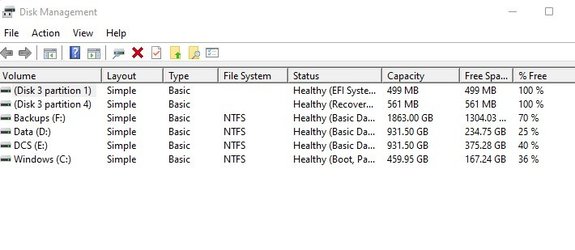
Volume G: was not seen using diskpart.

When Nirisoft was ran what steps were made?

It also allows you to easily change a drive letter of USB devices and remote network shares, as well as to delete a drive letter of USB device that is not plugged. You can also use DriveLetterView to export the list of all drives into text/csv/html/xml file.


Code:
Volume ###  Ltr  Label        Fs     Type        Size     Status     Info
  ----------  ---  -----------  -----  ----------  -------  ---------  --------
  Volume 0     D   Data         NTFS   Partition    931 GB  Healthy          
  Volume 1     E   DCS          NTFS   Partition    931 GB  Healthy          
  Volume 2     F   Backups      NTFS   Partition   1863 GB  Healthy          
  Volume 3     C   Windows      NTFS   Partition    459 GB  Healthy    Boot  
  Volume 4         BOOT         FAT32  Partition    499 MB  Healthy    System
  Volume 5                      NTFS   Partition    561 MB  Healthy    Hidden
  Volume 6         Recovery     NTFS   Partition   4765 MB  Healthy    Hidden
It doesn't show in DriveLetterView. The drive in question - BOOT - is a creation during this failing update. Wasn't there before all this.
 

Attachments

  • d3.jpg
    d3.jpg
    29.4 KB · Views: 4

My Computer My Computer

At a glance

Windows 11i7 12700K32GbMSI RTX 4090 Gaming X Trio
OS
Windows 11
Computer type
PC/Desktop
CPU
i7 12700K
Motherboard
ASUS ROG STRYX Z690-A Gaming Wi-Fi D4
Memory
32Gb
Graphics Card(s)
MSI RTX 4090 Gaming X Trio
Sound Card
Sound Blaster Z
Monitor(s) Displays
MSI MPG321UR-QD
Screen Resolution
4K
PSU
Corsair 850W
After several months of trouble free W11, I'm very reluctant to do that. Is there not a way of telling Windows to ignore this update?

You might try using Powershell to hide the update. Open an admin Powershell prompt and copy and paste the following into it. When the popup window appears, highlight the offending update and click "OK". If the update isn't listed, just click "Cancel".

$Session = New-Object -ComObject Microsoft.Update.Session
$Searcher = $Session.CreateUpdateSearcher()
$Criteria = "IsInstalled=0 or IsInstalled=0 and
deploymentaction='OptionalInstallation'"
$SearchResult = $Searcher.Search($Criteria)
$SearchResult.Updates | Out-GridView -passthru | ForEach-Object -Process {
$_.ishidden=$true}
$SearchResult.Updates | select title,ishidden
#end

Ben
 
Last edited:

My Computers My Computers

  • At a glance

    Windows 10 HomeIntel Core 2 Duo [email protected] GHz2 GB
    OS
    Windows 10 Home
    Computer type
    Laptop
    Manufacturer/Model
    HP Elitebook 2530p
    CPU
    Intel Core 2 Duo [email protected] GHz
    Memory
    2 GB
  • At a glance

    Windows 11 HomeIntel Core 2 Duo E75004 GB
    Operating System
    Windows 11 Home
    Computer type
    PC/Desktop
    Manufacturer/Model
    Dell Optiplex 330
    CPU
    Intel Core 2 Duo E7500
    Memory
    4 GB
Random thoughts.
It would appear the the G drive is actually the C drive, it's not been mapped by any chance? to check CMD or terminal
Code:
net use
then enter.
What does it say if you look at properties?
Try booting in safe mode and see if you can then get rid of it?
 

My Computers My Computers

  • At a glance

    Windows 11 22H2 OS Build 22623.1095AMD Ryzen 7 3800X16GB Corsair Vengeance LPX DDR4 @3000MhzASUS - GeForce RTX 3070 Ti 8 GB TUF GAMING OC
    OS
    Windows 11 22H2 OS Build 22623.1095
    Computer type
    PC/Desktop
    Manufacturer/Model
    Self Build
    CPU
    AMD Ryzen 7 3800X
    Motherboard
    Asus PRIME B350-PLUS
    Memory
    16GB Corsair Vengeance LPX DDR4 @3000Mhz
    Graphics Card(s)
    ASUS - GeForce RTX 3070 Ti 8 GB TUF GAMING OC
    Sound Card
    On Board Realtec
    Monitor(s) Displays
    Acer KA241
    Screen Resolution
    1920 x 1080 @60Hz
    Hard Drives
    240GB PNY CS900 SSD - OS
    2 x 1TB Crucial MX500 SSD
    1 x 500GB Crucial MX300 SSD
    2TB Seagate ST2000DM001-1ER164
    2TB Seagate ST2000DM008-2FR102
    PSU
    750 Watt Corsair TX750 Plus
    Case
    Cooler Master 690 III
    Cooling
    Akasa AK98 5 Case Fans
    Keyboard
    Logitech K270 - wireless
    Mouse
    Logitech - M185 wireless
    Internet Speed
    BT Fibre 75 Mbps
    Browser
    Firefox
    Antivirus
    Windows Defender
    Other Info
    Use hardware KVM to switch monitors on three PCs and software (input director) to use mouse and keyboard on all 4 PCs.
  • At a glance

    Windows 11 Pro 22H2 build 22621.900Intel i5 - 1040016GB of HyperX Fury @ 2133 MhzEVGA 6GB GTX 1060.
    Operating System
    Windows 11 Pro 22H2 build 22621.900
    Computer type
    PC/Desktop
    Manufacturer/Model
    Dell Inspiron 3881 - modified with SFX PSU fitted internally
    CPU
    Intel i5 - 10400
    Motherboard
    Dell 032w55 version A00
    Memory
    16GB of HyperX Fury @ 2133 Mhz
    Graphics card(s)
    EVGA 6GB GTX 1060.
    Sound Card
    Builtin
    Monitor(s) Displays
    ACER KA241
    Screen Resolution
    1920x 1080 @60Hz
    Hard Drives
    256GB SK hynix NVMe
    1TB Western Digital WD10EZEX-75WN4A1
    PSU
    Modular 450 Watt Corsair SF450 Platinum ( Mod to replace the Dell 265 Watt PSU)
    Case
    Inspiron Small Desktop
    Cooling
    Dell stock cooler
    Keyboard
    Dell
    Mouse
    Dell
    Internet Speed
    BT Fibre 75 Mbps
    Browser
    Firefox
    Antivirus
    Windows Defender
    Other Info
    Use hardware KVM to switch monitors on three PCs and software (input director) to use mouse and keyboard on all 4 PCs.
You might try using Powershell to hide the update. Open an admin Powershell prompt and copy and paste the following into it. When the popup windows appears, highlight the offending update and click "OK". If the update isn't listed, just click "Cancel".

$Session = New-Object -ComObject Microsoft.Update.Session
$Searcher = $Session.CreateUpdateSearcher()
$Criteria = "IsInstalled=0 or IsInstalled=0 and
deploymentaction='OptionalInstallation'"
$SearchResult = $Searcher.Search($Criteria)
$SearchResult.Updates | Out-GridView -passthru | ForEach-Object -Process {
$_.ishidden=$true}
$SearchResult.Updates | select title,ishidden
#end

Ben
Thank you so much, that worked! The update is now no longer showing in WU. Hopefully the next one won't have the issue.
 

My Computer My Computer

At a glance

Windows 11i7 12700K32GbMSI RTX 4090 Gaming X Trio
OS
Windows 11
Computer type
PC/Desktop
CPU
i7 12700K
Motherboard
ASUS ROG STRYX Z690-A Gaming Wi-Fi D4
Memory
32Gb
Graphics Card(s)
MSI RTX 4090 Gaming X Trio
Sound Card
Sound Blaster Z
Monitor(s) Displays
MSI MPG321UR-QD
Screen Resolution
4K
PSU
Corsair 850W
Random thoughts.
It would appear the the G drive is actually the C drive, it's not been mapped by any chance? to check CMD or terminal
Code:
net use
then enter.
What does it say if you look at properties?
Try booting in safe mode and see if you can then get rid of it?
Entering that came back with nothing. 'There are no entries on the list.'
Funny thing is, now this BOOT drive is not showing in File Explorer, whereas it was earlier, but it is still showing in DiskParInfo.
 

My Computer My Computer

At a glance

Windows 11i7 12700K32GbMSI RTX 4090 Gaming X Trio
OS
Windows 11
Computer type
PC/Desktop
CPU
i7 12700K
Motherboard
ASUS ROG STRYX Z690-A Gaming Wi-Fi D4
Memory
32Gb
Graphics Card(s)
MSI RTX 4090 Gaming X Trio
Sound Card
Sound Blaster Z
Monitor(s) Displays
MSI MPG321UR-QD
Screen Resolution
4K
PSU
Corsair 850W
Entering that came back with nothing. 'There are no entries on the list.'
Funny thing is, now this BOOT drive is not showing in File Explorer, whereas it was earlier, but it is still showing in DiskParInfo.
If it doesn't have a drive letter, it will not show up in File Explorer. You need to manually add a drive letter to it.
 

My Computers My Computers

  • At a glance

    Windows 11 ProAMD Ryzen 7 9800X3D32GB DDR5 CL30 Kingston FuryASUS Prime Radeon RX 9060 XT OC Edition 16GB
    OS
    Windows 11 Pro
    Computer type
    PC/Desktop
    CPU
    AMD Ryzen 7 9800X3D
    Motherboard
    MSI PRO B850-P Wifi
    Memory
    32GB DDR5 CL30 Kingston Fury
    Graphics Card(s)
    ASUS Prime Radeon RX 9060 XT OC Edition 16GB
    Monitor(s) Displays
    LG Ultrawide 34" + LG 27" 1080p
    Screen Resolution
    3440x1440
    Hard Drives
    Main Boot Drive : 512GB Adata XPG RGB Gen3x4 NVMe M.2 SSD
    PSU
    EVGA 750 Watts 80+ Gold
    Case
    Deepcool Genome II
    Cooling
    Thermalright Burst Assassin 120
    Internet Speed
    1Gbps
    Browser
    Chrome
    Antivirus
    "Moderna"
  • At a glance

    Windows 11 Proi7-4790K16GB Corsair Vengeance ProMSI R9 290
    Operating System
    Windows 11 Pro
    Computer type
    PC/Desktop
    CPU
    i7-4790K
    Motherboard
    ASRock Xtreme6 Z97
    Memory
    16GB Corsair Vengeance Pro
    Graphics card(s)
    MSI R9 290
    Monitor(s) Displays
    LG Ultrawide 34"
    Screen Resolution
    3440x1440
    Hard Drives
    500GB Adata SSD (OS Only)
    PSU
    Thermaltake 475 Watts 80 Bronze
    Case
    Thermaltake Commander I Snow Edition
    Cooling
    Deep Cool Archer Air Cooler
    Keyboard
    Armageddon MKA-5R RGB-Hornet
    Mouse
    Logitech G402
    Internet Speed
    1Gbps
    Browser
    Chrome
    Antivirus
    Moderna :)
sometimes your only option buddy is reinstall windows
 

My Computer My Computer

At a glance

win11i9 1085016GBnVIDEA Geoforce 3070
OS
win11
Computer type
PC/Desktop
Manufacturer/Model
Me
CPU
i9 10850
Motherboard
MS-7C75
Memory
16GB
Graphics Card(s)
nVIDEA Geoforce 3070
Sound Card
Onboard
Monitor(s) Displays
Samsung 55inch TV
Screen Resolution
3040 X 2160
Hard Drives
6TB over 4 drives
Case
generic
Cooling
water cooled
Keyboard
generic
Mouse
generic
Internet Speed
500mb
Browser
various
Antivirus
ATM Bitdefender
If it doesn't have a drive letter, it will not show up in File Explorer. You need to manually add a drive letter to it.
How can I do that if it doesn’t show in DriveLetterView?
 

My Computer My Computer

At a glance

Windows 11i7 12700K32GbMSI RTX 4090 Gaming X Trio
OS
Windows 11
Computer type
PC/Desktop
CPU
i7 12700K
Motherboard
ASUS ROG STRYX Z690-A Gaming Wi-Fi D4
Memory
32Gb
Graphics Card(s)
MSI RTX 4090 Gaming X Trio
Sound Card
Sound Blaster Z
Monitor(s) Displays
MSI MPG321UR-QD
Screen Resolution
4K
PSU
Corsair 850W
How can I do that if it doesn’t show in DriveLetterView?
 

My Computer My Computer

At a glance

Windows 11 Home(RP) - 25H2 -26200.8737AMD Ryzen 5 5600GG.SKILL Ripjaws V Series 64GB 4x16Nvidia geforce gtx titan x
OS
Windows 11 Home(RP) - 25H2 -26200.8737
Computer type
PC/Desktop
Manufacturer/Model
Banana Junior 5600-G Series
CPU
AMD Ryzen 5 5600G
Motherboard
Asus ROG Strix B550-F
Memory
G.SKILL Ripjaws V Series 64GB 4x16
Graphics Card(s)
Nvidia geforce gtx titan x
Monitor(s) Displays
28" ASUS VP28U 4k
Screen Resolution
4K
Hard Drives
Primary SAMSUNG 970 EVO Plus
PSU
EVGA BQ 700w 80+ Bronze
Case
Zalman i3 NEO
Cooling
ARCTIC Freezer 7 X
Keyboard
Corsair
Mouse
Amazon Generic with Cord
Internet Speed
Download: 295.11 mbps Upload: 65.35 mbps T-Mobile Internet
Browser
Firefox and Edge
Antivirus
MS - Defender
Other Info
Speakers: Klipsch ProMedia 2.1
My Computers My Computers

  • At a glance

    Windows 11 ProAMD Ryzen 7 9800X3D32GB DDR5 CL30 Kingston FuryASUS Prime Radeon RX 9060 XT OC Edition 16GB
    OS
    Windows 11 Pro
    Computer type
    PC/Desktop
    CPU
    AMD Ryzen 7 9800X3D
    Motherboard
    MSI PRO B850-P Wifi
    Memory
    32GB DDR5 CL30 Kingston Fury
    Graphics Card(s)
    ASUS Prime Radeon RX 9060 XT OC Edition 16GB
    Monitor(s) Displays
    LG Ultrawide 34" + LG 27" 1080p
    Screen Resolution
    3440x1440
    Hard Drives
    Main Boot Drive : 512GB Adata XPG RGB Gen3x4 NVMe M.2 SSD
    PSU
    EVGA 750 Watts 80+ Gold
    Case
    Deepcool Genome II
    Cooling
    Thermalright Burst Assassin 120
    Internet Speed
    1Gbps
    Browser
    Chrome
    Antivirus
    "Moderna"
  • At a glance

    Windows 11 Proi7-4790K16GB Corsair Vengeance ProMSI R9 290
    Operating System
    Windows 11 Pro
    Computer type
    PC/Desktop
    CPU
    i7-4790K
    Motherboard
    ASRock Xtreme6 Z97
    Memory
    16GB Corsair Vengeance Pro
    Graphics card(s)
    MSI R9 290
    Monitor(s) Displays
    LG Ultrawide 34"
    Screen Resolution
    3440x1440
    Hard Drives
    500GB Adata SSD (OS Only)
    PSU
    Thermaltake 475 Watts 80 Bronze
    Case
    Thermaltake Commander I Snow Edition
    Cooling
    Deep Cool Archer Air Cooler
    Keyboard
    Armageddon MKA-5R RGB-Hornet
    Mouse
    Logitech G402
    Internet Speed
    1Gbps
    Browser
    Chrome
    Antivirus
    Moderna :)
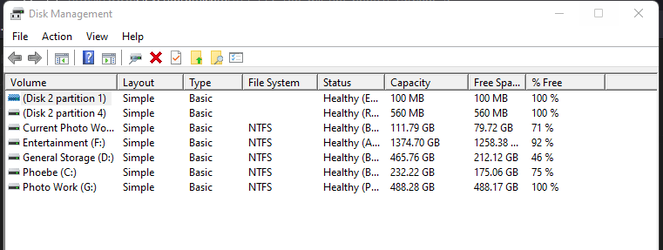
It doesn't show in Disk Management either.
 

Attachments

  • d4.jpg
    d4.jpg
    42.2 KB · Views: 6

My Computer My Computer

At a glance

Windows 11i7 12700K32GbMSI RTX 4090 Gaming X Trio
OS
Windows 11
Computer type
PC/Desktop
CPU
i7 12700K
Motherboard
ASUS ROG STRYX Z690-A Gaming Wi-Fi D4
Memory
32Gb
Graphics Card(s)
MSI RTX 4090 Gaming X Trio
Sound Card
Sound Blaster Z
Monitor(s) Displays
MSI MPG321UR-QD
Screen Resolution
4K
PSU
Corsair 850W
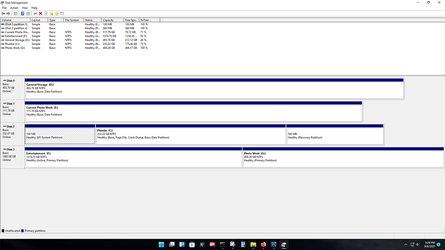
Mine shows the same because those are drives created when you install Windows.. they are associated with the primary drive(c) and don't get letters assigned,.

Mine Disk 2 is my C drive and that's where Windows is installed.

1630956290395.png

1630956347307.png
 

My Computer My Computer

At a glance

Windows 11 Home(RP) - 25H2 -26200.8737AMD Ryzen 5 5600GG.SKILL Ripjaws V Series 64GB 4x16Nvidia geforce gtx titan x
OS
Windows 11 Home(RP) - 25H2 -26200.8737
Computer type
PC/Desktop
Manufacturer/Model
Banana Junior 5600-G Series
CPU
AMD Ryzen 5 5600G
Motherboard
Asus ROG Strix B550-F
Memory
G.SKILL Ripjaws V Series 64GB 4x16
Graphics Card(s)
Nvidia geforce gtx titan x
Monitor(s) Displays
28" ASUS VP28U 4k
Screen Resolution
4K
Hard Drives
Primary SAMSUNG 970 EVO Plus
PSU
EVGA BQ 700w 80+ Bronze
Case
Zalman i3 NEO
Cooling
ARCTIC Freezer 7 X
Keyboard
Corsair
Mouse
Amazon Generic with Cord
Internet Speed
Download: 295.11 mbps Upload: 65.35 mbps T-Mobile Internet
Browser
Firefox and Edge
Antivirus
MS - Defender
Other Info
Speakers: Klipsch ProMedia 2.1
Mine shows the same because those are drives created when you install Windows.. they are associated with the primary drive(c) and don't get letters assigned,.

Mine Disk 2 is my C drive and that's where Windows is installed.

View attachment 7266

View attachment 7267
Sure, but the point is that the ‘bogus’ drive BOOT created in this failed update process is not showing at all in the list.
 

My Computer My Computer

At a glance

Windows 11i7 12700K32GbMSI RTX 4090 Gaming X Trio
OS
Windows 11
Computer type
PC/Desktop
CPU
i7 12700K
Motherboard
ASUS ROG STRYX Z690-A Gaming Wi-Fi D4
Memory
32Gb
Graphics Card(s)
MSI RTX 4090 Gaming X Trio
Sound Card
Sound Blaster Z
Monitor(s) Displays
MSI MPG321UR-QD
Screen Resolution
4K
PSU
Corsair 850W
Sure, but the point is that the ‘bogus’ drive BOOT created in this failed update process is not showing at all in the list.
Here,, go back to disk management and post this image plus what do you mean by 'bogus'??
Untitled-1.jpg
 

My Computer My Computer

At a glance

Windows 11 Home(RP) - 25H2 -26200.8737AMD Ryzen 5 5600GG.SKILL Ripjaws V Series 64GB 4x16Nvidia geforce gtx titan x
OS
Windows 11 Home(RP) - 25H2 -26200.8737
Computer type
PC/Desktop
Manufacturer/Model
Banana Junior 5600-G Series
CPU
AMD Ryzen 5 5600G
Motherboard
Asus ROG Strix B550-F
Memory
G.SKILL Ripjaws V Series 64GB 4x16
Graphics Card(s)
Nvidia geforce gtx titan x
Monitor(s) Displays
28" ASUS VP28U 4k
Screen Resolution
4K
Hard Drives
Primary SAMSUNG 970 EVO Plus
PSU
EVGA BQ 700w 80+ Bronze
Case
Zalman i3 NEO
Cooling
ARCTIC Freezer 7 X
Keyboard
Corsair
Mouse
Amazon Generic with Cord
Internet Speed
Download: 295.11 mbps Upload: 65.35 mbps T-Mobile Internet
Browser
Firefox and Edge
Antivirus
MS - Defender
Other Info
Speakers: Klipsch ProMedia 2.1
It seems that the drive is corrupted.
Having multiple drives installed during an update creates all kinds of issues sometimes.
Fixing a corrupted drive is hit or miss. Sometimes it works. Sometimes it doesn't. But most of the time, reformatting it makes it readable again. But of course, you will lose everything in it.
I have a 3rd party hard drive tool called MiniTool Partition Wizard Pro which I usually use to manage my drives. When windows cannot see my drive, this tool still sees it and that's what I use to reformat corrupted drives.
There are other 3rd party tools that you can check out and use trial version to fix your hard drive issues.
 

My Computers My Computers

  • At a glance

    Windows 11 ProAMD Ryzen 7 9800X3D32GB DDR5 CL30 Kingston FuryASUS Prime Radeon RX 9060 XT OC Edition 16GB
    OS
    Windows 11 Pro
    Computer type
    PC/Desktop
    CPU
    AMD Ryzen 7 9800X3D
    Motherboard
    MSI PRO B850-P Wifi
    Memory
    32GB DDR5 CL30 Kingston Fury
    Graphics Card(s)
    ASUS Prime Radeon RX 9060 XT OC Edition 16GB
    Monitor(s) Displays
    LG Ultrawide 34" + LG 27" 1080p
    Screen Resolution
    3440x1440
    Hard Drives
    Main Boot Drive : 512GB Adata XPG RGB Gen3x4 NVMe M.2 SSD
    PSU
    EVGA 750 Watts 80+ Gold
    Case
    Deepcool Genome II
    Cooling
    Thermalright Burst Assassin 120
    Internet Speed
    1Gbps
    Browser
    Chrome
    Antivirus
    "Moderna"
  • At a glance

    Windows 11 Proi7-4790K16GB Corsair Vengeance ProMSI R9 290
    Operating System
    Windows 11 Pro
    Computer type
    PC/Desktop
    CPU
    i7-4790K
    Motherboard
    ASRock Xtreme6 Z97
    Memory
    16GB Corsair Vengeance Pro
    Graphics card(s)
    MSI R9 290
    Monitor(s) Displays
    LG Ultrawide 34"
    Screen Resolution
    3440x1440
    Hard Drives
    500GB Adata SSD (OS Only)
    PSU
    Thermaltake 475 Watts 80 Bronze
    Case
    Thermaltake Commander I Snow Edition
    Cooling
    Deep Cool Archer Air Cooler
    Keyboard
    Armageddon MKA-5R RGB-Hornet
    Mouse
    Logitech G402
    Internet Speed
    1Gbps
    Browser
    Chrome
    Antivirus
    Moderna :)

My Computer My Computer

At a glance

Windows 11 Home(RP) - 25H2 -26200.8737AMD Ryzen 5 5600GG.SKILL Ripjaws V Series 64GB 4x16Nvidia geforce gtx titan x
OS
Windows 11 Home(RP) - 25H2 -26200.8737
Computer type
PC/Desktop
Manufacturer/Model
Banana Junior 5600-G Series
CPU
AMD Ryzen 5 5600G
Motherboard
Asus ROG Strix B550-F
Memory
G.SKILL Ripjaws V Series 64GB 4x16
Graphics Card(s)
Nvidia geforce gtx titan x
Monitor(s) Displays
28" ASUS VP28U 4k
Screen Resolution
4K
Hard Drives
Primary SAMSUNG 970 EVO Plus
PSU
EVGA BQ 700w 80+ Bronze
Case
Zalman i3 NEO
Cooling
ARCTIC Freezer 7 X
Keyboard
Corsair
Mouse
Amazon Generic with Cord
Internet Speed
Download: 295.11 mbps Upload: 65.35 mbps T-Mobile Internet
Browser
Firefox and Edge
Antivirus
MS - Defender
Other Info
Speakers: Klipsch ProMedia 2.1
I posted this in another thread, but it just got lost.

This build just won’t boot for me. Tried 3 times, same thing.
Installs OK from WU, restarts initially OK, gets to 100%, I see the new swirly graphic, then my drive light goes solid on (no flickering) and then, nothing. Just hangs.
A reboot takes me back to previous build. Looking at WU history shows a 0xc1900101 error.
First time I’ve had any issue with updates. Any ideas?
After install ok from WU and re-start it, then key in command below to avoid device drivers update with administrator privilege.

reg add "HKLM\SOFTWARE\Policies\Microsoft\Windows\WindowsUpdate" /v "ExcludeWUDriversInQualityUpdate" /t REG_DWORD /d "1" /f
reg add "HKLM\SOFTWARE\Policies\Microsoft\Windows\OOBE" /v "DisablePrivacyExperience" /t REG_DWORD /d 1 /f
reg add "HKLM\SOFTWARE\Microsoft\PolicyManager\current\device\Update" /v "ExcludeWUDriversInQualityUpdate" /t REG_DWORD /d 1 /f
reg add "HKLM\SOFTWARE\Microsoft\PolicyManager\default\Update" /v "ExcludeWUDriversInQualityUpdate" /t REG_DWORD /d 1 /f
reg add "HKLM\SOFTWARE\Microsoft\PolicyManager\default\Update\ExcludeWUDriversInQualityUpdate" /v "value" /t REG_DWORD /d 1 /f
reg add "HKLM\SOFTWARE\Microsoft\WindowsUpdate\UX\Settings" /v "ExcludeWUDriversInQualityUpdate" /t REG_DWORD /d 1 /f
reg add "HKLM\SOFTWARE\Policies\Microsoft\Windows\WindowsUpdate" /v "ExcludeWUDriversInQualityUpdate" /t REG_DWORD /d 1 /f

Hope it will help you!
 

My Computer My Computer

At a glance

windows 11 25H2 7623i5-1250016MBIntel UHD 770
OS
windows 11 25H2 7623
Computer type
PC/Desktop
Manufacturer/Model
Dell Optiplex 7400 AIO
CPU
i5-12500
Motherboard
DELL 00RG59
Memory
16MB
Graphics Card(s)
Intel UHD 770
Sound Card
REALTEK
Monitor(s) Displays
DEL940B
Screen Resolution
1920x1080
Hard Drives
Micron 3400 NVMe 512G (NVM Express 1.4)
Samsung 860 SSD 256G
Realtek RTL9210 NVMe SCSI 1TB Disk (NVM Express 2.0)
Realtek RTL9210 NVMe SCSI 2TB Disk (NVM Express 1.4)
Check this out.


Thanks again. That was already covered a couple of pages ago. I did attach the logs at that time. Didn't mean anything to me, but maybe they might to you! I've attached them again.
Interestingly, they are not in C:\Windows\Panther for me, they are in C:\$WINDOWS.~BT\Sources\Panther. Maybe a W11 change?
 

Attachments

My Computer My Computer

At a glance

Windows 11i7 12700K32GbMSI RTX 4090 Gaming X Trio
OS
Windows 11
Computer type
PC/Desktop
CPU
i7 12700K
Motherboard
ASUS ROG STRYX Z690-A Gaming Wi-Fi D4
Memory
32Gb
Graphics Card(s)
MSI RTX 4090 Gaming X Trio
Sound Card
Sound Blaster Z
Monitor(s) Displays
MSI MPG321UR-QD
Screen Resolution
4K
PSU
Corsair 850W
After install ok from WU and re-start it, then key in command below to avoid device drivers update with administrator privilege.

reg add "HKLM\SOFTWARE\Policies\Microsoft\Windows\WindowsUpdate" /v "ExcludeWUDriversInQualityUpdate" /t REG_DWORD /d "1" /f
reg add "HKLM\SOFTWARE\Policies\Microsoft\Windows\OOBE" /v "DisablePrivacyExperience" /t REG_DWORD /d 1 /f
reg add "HKLM\SOFTWARE\Microsoft\PolicyManager\current\device\Update" /v "ExcludeWUDriversInQualityUpdate" /t REG_DWORD /d 1 /f
reg add "HKLM\SOFTWARE\Microsoft\PolicyManager\default\Update" /v "ExcludeWUDriversInQualityUpdate" /t REG_DWORD /d 1 /f
reg add "HKLM\SOFTWARE\Microsoft\PolicyManager\default\Update\ExcludeWUDriversInQualityUpdate" /v "value" /t REG_DWORD /d 1 /f
reg add "HKLM\SOFTWARE\Microsoft\WindowsUpdate\UX\Settings" /v "ExcludeWUDriversInQualityUpdate" /t REG_DWORD /d 1 /f
reg add "HKLM\SOFTWARE\Policies\Microsoft\Windows\WindowsUpdate" /v "ExcludeWUDriversInQualityUpdate" /t REG_DWORD /d 1 /f

Hope it will help you!
Thanks for that. Not sure at what stage of the process these commands would be applied though.
 

My Computer My Computer

At a glance

Windows 11i7 12700K32GbMSI RTX 4090 Gaming X Trio
OS
Windows 11
Computer type
PC/Desktop
CPU
i7 12700K
Motherboard
ASUS ROG STRYX Z690-A Gaming Wi-Fi D4
Memory
32Gb
Graphics Card(s)
MSI RTX 4090 Gaming X Trio
Sound Card
Sound Blaster Z
Monitor(s) Displays
MSI MPG321UR-QD
Screen Resolution
4K
PSU
Corsair 850W

Latest Support Threads

Back
Top Bottom