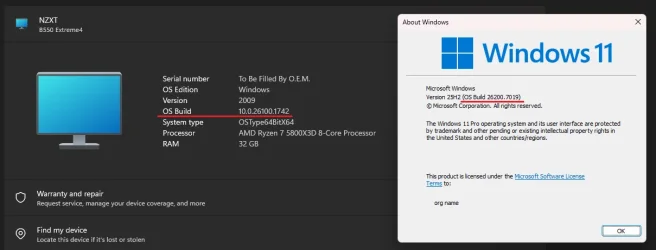
[25H2] OS Build discrepancy


strixfm4

Member
Local time
7:29 AM
Posts
7
OS
Windows 11 Pro
Hi all, recently I upgraded my PC to Windows 11. Everything is working fine at the moment, but I did notice a discrepancy with the OS Build number.
If I go to Settings -> System -> About, the OS build is 26200.7019, which is the correct one (I installed KB5067036 earlier today).
However, if I go to Settings -> Accounts -> Linked devices, OS Build is 26100.1742.
Are you also experiencing the same issue? Could it be related to our devices not appearing on the Microsoft account website?
Thanks!
 
Windows Build/Version
Windows 11 Pro 25H2, OS Build: 26200.7019

Attachments

  • Correct OS build.webp
    Correct OS build.webp
    10.6 KB · Views: 2
  • MS Account.webp
    MS Account.webp
    22.9 KB · Views: 2
  • Wrong OS Build.webp
    Wrong OS Build.webp
    10.2 KB · Views: 3

My Computer

System One

  • OS
    Windows 11 Pro
    Computer type
    PC/Desktop
    Manufacturer/Model
    Custom
    CPU
    AMD Ryzen 7 5800X3D
    Motherboard
    ASRock B550 Extreme4
    Memory
    G.Skill Trident Z Neo 32 GB 3600 MT/s
    Graphics Card(s)
    RTX 4070 Ti Super
    Monitor(s) Displays
    Gigabyte M27Q 170 Hz
    Screen Resolution
    2560x1440
    Hard Drives
    2 TB NVMe
    PSU
    Corsair RM750
    Case
    NZXT H510 Elite
    Cooling
    NZXT Kraken Z63
    Keyboard
    SteelSeries Apex Pro TKL
    Mouse
    Razer Deathadder V2
    Internet Speed
    300 Mbit/s
It takes some time before the info stored in your MS account to catch up.

  • The Microsoft Account portal doesn't update in real time.
  • It may take hours or even days for the correct OS build to reflect after an update.
  • This is especially common after installing cumulative updates or preview builds.
  • If your device hasn’t re-synced recently, it may show outdated info.
  • Your local system (via winver or Settings > About) shows the actual installed build.
 

My Computers

System One System Two

  • OS
    Windows 11 Pro 25H2 26200.8655
    Computer type
    PC/Desktop
    Manufacturer/Model
    Dell Optiplex 7080
    CPU
    i9-10900 10 core 20 threads
    Motherboard
    DELL 0J37VM
    Memory
    32 gb
    Graphics Card(s)
    none-Intel UHD Graphics 630
    Sound Card
    Integrated Realtek
    Monitor(s) Displays
    Benq 27
    Screen Resolution
    2560x1440
    Hard Drives
    2x1tb Solidigm m.2 nvme /External drives 512gb Samsung m.2 sata+2tb Kingston m2.nvme
    PSU
    500w
    Case
    MT
    Cooling
    Dell Premium
    Keyboard
    Logitech wired
    Mouse
    Logitech wireless
    Internet Speed
    so slow I'm too embarrassed to tell
    Browser
    #1 Edge #2 Firefox
    Antivirus
    Defender+MWB Premium
  • Operating System
    Windows 11 Pro 24H2 26200.8457
    Computer type
    PC/Desktop
    Manufacturer/Model
    Beelink Mini PC SER5
    CPU
    AMD Ryzen 7 6800U
    Memory
    32 gb
    Graphics card(s)
    integrated
    Sound Card
    integrated
    Monitor(s) Displays
    Benq 27
    Screen Resolution
    2560x1440
    Hard Drives
    1TB Crucial nvme
    Keyboard
    Logitech wired
    Mouse
    Logitech wireless
    Internet Speed
    still too embarrassed to tell
    Browser
    Firefox
    Antivirus
    Defender
    Other Info
    System 3 is non compliant Dell 9020 i7-4770/24gb ram Win11 PRO 26200.8457
Well I installed Windows 11 on 9.9., I'm sure my device would've appeared by now on my MS account. However, that's a separate issue (confirmed my MS). I was just wondering whether there are more people who noticed this OS build discrepancy. Or am I dealing with an isolated issue here?
 

My Computer

System One

  • OS
    Windows 11 Pro
    Computer type
    PC/Desktop
    Manufacturer/Model
    Custom
    CPU
    AMD Ryzen 7 5800X3D
    Motherboard
    ASRock B550 Extreme4
    Memory
    G.Skill Trident Z Neo 32 GB 3600 MT/s
    Graphics Card(s)
    RTX 4070 Ti Super
    Monitor(s) Displays
    Gigabyte M27Q 170 Hz
    Screen Resolution
    2560x1440
    Hard Drives
    2 TB NVMe
    PSU
    Corsair RM750
    Case
    NZXT H510 Elite
    Cooling
    NZXT Kraken Z63
    Keyboard
    SteelSeries Apex Pro TKL
    Mouse
    Razer Deathadder V2
    Internet Speed
    300 Mbit/s
I was able to temporarily fix the issue by signing out of my Microsoft account on the PC and then signing back in, but the wrong OS Build is again being displayed. At this point, I'm fairly certain that it's an issue on Microsoft's side, something must be wrong with how they sync data between the PC and Microsoft account. Also, my device is still not showing up on the web. I guess there's nothing else to be done, apart from waiting.
 

Attachments

  • Wrong OS Build.webp
    Wrong OS Build.webp
    34.1 KB · Views: 1

My Computer

System One

  • OS
    Windows 11 Pro
    Computer type
    PC/Desktop
    Manufacturer/Model
    Custom
    CPU
    AMD Ryzen 7 5800X3D
    Motherboard
    ASRock B550 Extreme4
    Memory
    G.Skill Trident Z Neo 32 GB 3600 MT/s
    Graphics Card(s)
    RTX 4070 Ti Super
    Monitor(s) Displays
    Gigabyte M27Q 170 Hz
    Screen Resolution
    2560x1440
    Hard Drives
    2 TB NVMe
    PSU
    Corsair RM750
    Case
    NZXT H510 Elite
    Cooling
    NZXT Kraken Z63
    Keyboard
    SteelSeries Apex Pro TKL
    Mouse
    Razer Deathadder V2
    Internet Speed
    300 Mbit/s
Hi all, recently I upgraded my PC to Windows 11. Everything is working fine at the moment, but I did notice a discrepancy with the OS Build number.
If I go to Settings -> System -> About, the OS build is 26200.7019, which is the correct one (I installed KB5067036 earlier today).
However, if I go to Settings -> Accounts -> Linked devices, OS Build is 26100.1742.
Are you also experiencing the same issue? Could it be related to our devices not appearing on the Microsoft account website?
Thanks!

Hi, I'm experiencing the same thing.
Under connected devices, sometimes it shows version 26200.6725, sometimes it shows the latest 26200.7019.
Try making a backup here:
Settings > Accounts > Windows Backup > Sync your Microsoft account with Windows > Manage
This works for me for a few days, then for some reason it breaks again. :mad:
 

My Computer

System One

  • OS
    Windows 11 25H2
    Computer type
    Laptop
    Manufacturer/Model
    DELL VOSTRO 15 3568
    CPU
    Intel Core i5-7200U
    Memory
    8,00 GB
    Graphics Card(s)
    Intel HD Graphics 620, Radeon R5 M420
    Sound Card
    Realtek Audio ALC3246
    Monitor(s) Displays
    BENQ PD3205UA
    Screen Resolution
    1920 X 1080
    Hard Drives
    SK HYNIX SC311 SATA 256 GB, SanDisk Extreme 510 external
    Mouse
    DELL MS700
    Internet Speed
    50/15 MB/s VDSL
    Browser
    Microsoft Edge
    Antivirus
    Microsoft Defender
Thanks for the reply! Yeah, it's definitely an issue on Microsoft's end. Good to know our devices are working fine :)
 

My Computer

System One

  • OS
    Windows 11 Pro
    Computer type
    PC/Desktop
    Manufacturer/Model
    Custom
    CPU
    AMD Ryzen 7 5800X3D
    Motherboard
    ASRock B550 Extreme4
    Memory
    G.Skill Trident Z Neo 32 GB 3600 MT/s
    Graphics Card(s)
    RTX 4070 Ti Super
    Monitor(s) Displays
    Gigabyte M27Q 170 Hz
    Screen Resolution
    2560x1440
    Hard Drives
    2 TB NVMe
    PSU
    Corsair RM750
    Case
    NZXT H510 Elite
    Cooling
    NZXT Kraken Z63
    Keyboard
    SteelSeries Apex Pro TKL
    Mouse
    Razer Deathadder V2
    Internet Speed
    300 Mbit/s
I have the same issue. My PC shows 26200.7019. The problem is that i need to run DISM to fix a few issues, which the process fails with errors
Error: 0x800f0915
The repair content could not be found anywhere.

Basically telling me that the version is wrong, this even after dowlaoding the latest OS files from Microsaoft. the wim files in the ISO are version 26100 . So they wont work.

Even downloads from uupdump which show 26200.7019 then produce version 26100.???? in the wim file which is anoying to say the least. I even tried a developer build of 26200.7019 and it did the samething.
 

My Computer

System One

  • OS
    WIndows 11
    Computer type
    PC/Desktop
    Manufacturer/Model
    Dell XPS8950
    CPU
    Intel(R) Core(TM) i7-12700 CPU @ 3.60GHz
    Motherboard
    Dell OEM
    Memory
    16GB
    Graphics Card(s)
    NVIDIA GeForce RTX 3070
    Sound Card
    NVIDIA and Realtek
    Monitor(s) Displays
    Samsung 34" & Dell 27"
    Screen Resolution
    3440x1440 Samsung 34" 1920X1080 Dell 27"
    Hard Drives
    Samsung 2TB HDD
    Toshiba 1T SSD
    Internet Speed
    500Mbps
    Browser
    Edge, Chrome
    Antivirus
    Defender
It seems to be fixed with 26200.7171 :-)
Screenshot 2025-11-17 232818.webp
 

My Computer

System One

  • OS
    Windows 11 Pro
    Computer type
    PC/Desktop
    Manufacturer/Model
    Custom
    CPU
    AMD Ryzen 7 5800X3D
    Motherboard
    ASRock B550 Extreme4
    Memory
    G.Skill Trident Z Neo 32 GB 3600 MT/s
    Graphics Card(s)
    RTX 4070 Ti Super
    Monitor(s) Displays
    Gigabyte M27Q 170 Hz
    Screen Resolution
    2560x1440
    Hard Drives
    2 TB NVMe
    PSU
    Corsair RM750
    Case
    NZXT H510 Elite
    Cooling
    NZXT Kraken Z63
    Keyboard
    SteelSeries Apex Pro TKL
    Mouse
    Razer Deathadder V2
    Internet Speed
    300 Mbit/s

Latest Support Threads

Back
Top Bottom