Activation issue with new SSD installation on Windows 11


Collected1

New member
Local time
11:41 AM
Posts
14
OS
Windows 11
I wonder if anyone can offer some suggestions on what may be causing the following issue.

I purchased a new SSD (NVME M2) at the weekend and installed it into my motherboard before performing a fresh install of Windows 11 Home from a newly created USB stick. I've a Digital License and logged in using my MS account details during the installation. However, it didn't automatically activate and any attempts to do so result in Error 0xC004F213 - Troubleshooting doesn't resolve the issue either. It reports back "We weren't able to activate Windows on this device". The "Recently changed hardware" option is no help either. That simply reports "We can't reactivate Windows on this device. Try again later".

Here is the odd part. If I install my old SSD (again, NVME M2) back into the same motherboard and perform a fresh install of Windows 11 using the same USB stick and same MS account, it activates automatically without any issues. I've repeated this behaviour more times than I can count over this weekend. Old SSD: works every time, New SSD: has yet to successfully activate.

Does anyone know what could be causing this? My understanding is the hard drive isn't a factor with digital licenses for Windows 10/11 so why does it seem like Microsoft only wants to install Windows 11 on one of my SSDs? To rule out a hardware problem with the new SSD, I attempted to install Windows 11 on a third SSD. This also failed with the same error.

Any help would be much appreciated. I'm at a loss at this point. Oh and yes, I am 100% certain I'm picking the right version each time (Windows 11 Home). Thank you.
 
Windows Build/Version
22621.2428

My Computer My Computer

At a glance

Windows 11
OS
Windows 11
Shouldn't be an issue but with MS systems who can be sure anymore. Instead of doing a clean install just do a Clone of the old drive then see if it boots and shows as activated. If it does THEN do a clean install using the same/new SSD.

One of the things I did earlier in Win7 to Win10 upgrades was to do an inplace upgrade from Win7 to Win10 initially. Then after the update is finished then I'd perform a clean install on the same system. After seeing the occasional Win7 license key not work on a clean Win10 install the 7 --> 10 upgrade seemed to work better for this purpose.

I realize in your case it's not a Win7 --> Win10 upgrade issue but just to highlight how MS works sometimes.
 

My Computer My Computer

At a glance

Win 7/10/11
OS
Win 7/10/11
Computer type
PC/Desktop
Other Info
I'm a computer enthusiast so have quite a few systems that I run. More like an advanced hobby.
Try running activation troubleshooter.
This troubleshooter will only be available if your copy of Windows 11 isn’t activated.
Sign in as an administrator.
  1. Select the Start button, then select Settings > System > Activation > Troubleshoot . The troubleshooter will show Windows can’t be activated on your device.

    Open Activation settings
  2. Select I changed hardware on this device recently, then select Next.
  3. Enter your connected Microsoft account and password, then select Sign in. The troubleshooter will only work with the connected Microsoft account.
  4. From the list of devices that are linked to your Microsoft account, select the check box next to This is the device I’m using right now.
  5. Select Activate.
    If you don’t see the device you’re using in the list of results, make sure that you signed in using the same Microsoft account you associated with the Windows 11 digital license on your device.
If still no success it's easy to activate by phone
  1. Select Start > Settings > System > Activation.
  2. Under Activate Windows Now section, select Activate by Phone.
 

My Computers My Computers

  • At a glance

    Windows 11 Pro 25H2 26200.8655i9-10900 10 core 20 threads32 gbnone-Intel UHD Graphics 630
    OS
    Windows 11 Pro 25H2 26200.8655
    Computer type
    PC/Desktop
    Manufacturer/Model
    Dell Optiplex 7080
    CPU
    i9-10900 10 core 20 threads
    Motherboard
    DELL 0J37VM
    Memory
    32 gb
    Graphics Card(s)
    none-Intel UHD Graphics 630
    Sound Card
    Integrated Realtek
    Monitor(s) Displays
    Benq 27
    Screen Resolution
    2560x1440
    Hard Drives
    2x1tb Solidigm m.2 nvme /External drives 512gb Samsung m.2 sata+2tb Kingston m2.nvme
    PSU
    500w
    Case
    MT
    Cooling
    Dell Premium
    Keyboard
    Logitech wired
    Mouse
    Logitech wireless
    Internet Speed
    so slow I'm too embarrassed to tell
    Browser
    #1 Edge #2 Firefox
    Antivirus
    Defender+MWB Premium
  • At a glance

    Windows 11 Pro 24H2 26200.8457AMD Ryzen 7 6800U32 gbintegrated
    Operating System
    Windows 11 Pro 24H2 26200.8457
    Computer type
    PC/Desktop
    Manufacturer/Model
    Beelink Mini PC SER5
    CPU
    AMD Ryzen 7 6800U
    Memory
    32 gb
    Graphics card(s)
    integrated
    Sound Card
    integrated
    Monitor(s) Displays
    Benq 27
    Screen Resolution
    2560x1440
    Hard Drives
    1TB Crucial nvme
    Keyboard
    Logitech wired
    Mouse
    Logitech wireless
    Internet Speed
    still too embarrassed to tell
    Browser
    Firefox
    Antivirus
    Defender
    Other Info
    System 3 is non compliant Dell 9020 i7-4770/24gb ram Win11 PRO 26200.8457
Shouldn't be an issue but with MS systems who can be sure anymore. Instead of doing a clean install just do a Clone of the old drive then see if it boots and shows as activated. If it does THEN do a clean install using the same/new SSD.

One of the things I did earlier in Win7 to Win10 upgrades was to do an inplace upgrade from Win7 to Win10 initially. Then after the update is finished then I'd perform a clean install on the same system. After seeing the occasional Win7 license key not work on a clean Win10 install the 7 --> 10 upgrade seemed to work better for this purpose.

I realize in your case it's not a Win7 --> Win10 upgrade issue but just to highlight how MS works sometimes.
Thank you for the response and suggestion. The restore from the clone onto my new SSD stated it was activated which looked promising. That's the first time I've seen Windows state it's activated on that drive. So I went ahead and performed a clean install and.... I'm back to unable to activate again. Just to confirm, should I be doing anything in the Devices list at this point such as deleting the entry for the old SSD installation?
 

My Computer My Computer

At a glance

Windows 11
OS
Windows 11
Try running activation troubleshooter.
This troubleshooter will only be available if your copy of Windows 11 isn’t activated.
Sign in as an administrator.
  1. Select the Start button, then select Settings > System > Activation > Troubleshoot . The troubleshooter will show Windows can’t be activated on your device.

    Open Activation settings
  2. Select I changed hardware on this device recently, then select Next.
  3. Enter your connected Microsoft account and password, then select Sign in. The troubleshooter will only work with the connected Microsoft account.
  4. From the list of devices that are linked to your Microsoft account, select the check box next to This is the device I’m using right now.
  5. Select Activate.
    If you don’t see the device you’re using in the list of results, make sure that you signed in using the same Microsoft account you associated with the Windows 11 digital license on your device.
If still no success it's easy to activate by phone
  1. Select Start > Settings > System > Activation.
  2. Under Activate Windows Now section, select Activate by Phone.
Thanks for the response. Steps 1 to 5 aren't resolving the issue for me. I've never seen my current SSD installation in the list at Step 4, just my previous SSD installation. Ticking that doesn't result in a successful activation.

And my Activation screen has no "Activate Windows Now" section or "Activate by Phone" option. All I see is Activation State, Troubleshoot, Change Product Key, Get Help and Open Store.
 

My Computer My Computer

At a glance

Windows 11
OS
Windows 11
See if you can activate with a real person. Here are some old numbers I've used in the past. I can't guarantee they are still good but it would be worth a try. In the past when I had trouble activating the MS reps are really good to help you. It's getting to them that's kind of hard to do.

activation 888 725-1047
support 800 936-5700

I've also been able to contact them by using this site. Select your product and go through the process of entering your issue. Eventually you are given a number to call.
 

My Computers My Computers

  • At a glance

    Windows 11 Pro 25H2 26200.8655i9-10900 10 core 20 threads32 gbnone-Intel UHD Graphics 630
    OS
    Windows 11 Pro 25H2 26200.8655
    Computer type
    PC/Desktop
    Manufacturer/Model
    Dell Optiplex 7080
    CPU
    i9-10900 10 core 20 threads
    Motherboard
    DELL 0J37VM
    Memory
    32 gb
    Graphics Card(s)
    none-Intel UHD Graphics 630
    Sound Card
    Integrated Realtek
    Monitor(s) Displays
    Benq 27
    Screen Resolution
    2560x1440
    Hard Drives
    2x1tb Solidigm m.2 nvme /External drives 512gb Samsung m.2 sata+2tb Kingston m2.nvme
    PSU
    500w
    Case
    MT
    Cooling
    Dell Premium
    Keyboard
    Logitech wired
    Mouse
    Logitech wireless
    Internet Speed
    so slow I'm too embarrassed to tell
    Browser
    #1 Edge #2 Firefox
    Antivirus
    Defender+MWB Premium
  • At a glance

    Windows 11 Pro 24H2 26200.8457AMD Ryzen 7 6800U32 gbintegrated
    Operating System
    Windows 11 Pro 24H2 26200.8457
    Computer type
    PC/Desktop
    Manufacturer/Model
    Beelink Mini PC SER5
    CPU
    AMD Ryzen 7 6800U
    Memory
    32 gb
    Graphics card(s)
    integrated
    Sound Card
    integrated
    Monitor(s) Displays
    Benq 27
    Screen Resolution
    2560x1440
    Hard Drives
    1TB Crucial nvme
    Keyboard
    Logitech wired
    Mouse
    Logitech wireless
    Internet Speed
    still too embarrassed to tell
    Browser
    Firefox
    Antivirus
    Defender
    Other Info
    System 3 is non compliant Dell 9020 i7-4770/24gb ram Win11 PRO 26200.8457
Google seems to think that error relates to the wrong edition of windows being used.
 

My Computers My Computers

  • At a glance

    Windows 11 Enterprise 25H2 26200 7462Intel XEON E5-2699 v364GB Teamgroup UD4-3600NVIDIA GeForce GTX 1080 Ti
    OS
    Windows 11 Enterprise 25H2 26200 7462
    Computer type
    PC/Desktop
    Manufacturer/Model
    Custom Build
    CPU
    Intel XEON E5-2699 v3
    Motherboard
    ASUS X99-A
    Memory
    64GB Teamgroup UD4-3600
    Graphics Card(s)
    NVIDIA GeForce GTX 1080 Ti
    Sound Card
    Integrated
    Monitor(s) Displays
    ACER X34 Predator
    Screen Resolution
    3440 x 1440
    Hard Drives
    Crucial CT1000P 3P SSD8 1TB
    Crucial CT1000 BX500 SSD 1TB
    PSU
    GameMax Pro
    Case
    Fractal Design
    Cooling
    Corsair H110iGT + 6 140mm Fans
    Keyboard
    Corsair K4
    Mouse
    G-Skill G502
    Internet Speed
    300MBs
    Browser
    Chrome
    Antivirus
    OEM
    Other Info
    ASUS RT-AC87U Router
  • At a glance

    25H2 26200.50748GB
    Operating System
    25H2 26200.5074
    Computer type
    Laptop
    Manufacturer/Model
    ASUS X555LA
    Memory
    8GB
    Browser
    Chrome
    Antivirus
    OEM
Google seems to think that error relates to the wrong edition of windows being used.
Yes that's what I discovered too but I'm sure I'm installing Windows 11 Home on both SSDs. And I can verify this on the MS website in the Devices List. Both are set to the same version of Windows 11. I'm baffled at this point. I think I'll try to contact MS as a final option.
 

My Computer My Computer

At a glance

Windows 11
OS
Windows 11
How to get a MS telephone number

To activate Windows 11 by phone:

Select Start > Settings > System > Activation.

Under Activate Windows Now section, select Activate by Phone.
 

My Computers My Computers

  • At a glance

    Windows 11 Pro 25H2 26200.8737AMD Ryzen 7 5825U with Radeon Graphics16GB
    OS
    Windows 11 Pro 25H2 26200.8737
    Computer type
    Laptop
    Manufacturer/Model
    Acemagic LX15PRO
    CPU
    AMD Ryzen 7 5825U with Radeon Graphics
    Motherboard
    BIOS CT_BI_AMI_LX15PRO_AB8139_A-004
    Memory
    16GB
    Screen Resolution
    1920 x 1080
    Hard Drives
    SSD 2TB
    Internet Speed
    30 Mbps
    Browser
    Brave
    Antivirus
    Webroot SecureAnywhere Complete beta
  • At a glance

    Windows 11 Pro 23H2 22631.2506Atom N450 1.66GHz2GB
    Operating System
    Windows 11 Pro 23H2 22631.2506
    Computer type
    Laptop
    Manufacturer/Model
    HP Mini 210-1090NR PC (bought in late 2009!)
    CPU
    Atom N450 1.66GHz
    Memory
    2GB
    Browser
    Brave
    Antivirus
    Webroot
  • Acer Swift SF114-34 laptop
    OS Windows 11 Pro 26200.8737
    CPU Pentium Silver N6000
    RAM 4GB
    BIOS v1.17
    SSD Samsung 970 EVO Plus SSD 2TB (an upgrade)
Thank you for the responses so far. This forum really is extremely helpful in that regard and I appreciate it.

I'm starting to wonder if I've fallen foul of the recent tightening up of activation rules. My original key dates back to a Windows 7 OEM System Builders copy I bought from New Egg back in 2012 when I built a PC. I subsequently took advantage of the free Windows 10 upgrade path at the time it was offered and switched to Windows 11 as soon as that was available to me. I've reinstalled Windows countless times since without activation issues.

I wonder if my license is no longer considered valid for fresh Windows 10/11 installations and perhaps my old SSD has been given some sort of grace period in the MS system because that's where the license was present and active at the point the recent change was made? It might explain the behaviour I'm seeing. If I need to buy a new copy of Windows 11 then so be it.
 

My Computer My Computer

At a glance

Windows 11
OS
Windows 11
I think MS will activate your Windows over the phone if you explain what's happened. I have just activated Win 11 on a laptop bought in 2010 that was running Win 7 starter edition. Win 11 was able to find the embedded key in firmware and that I had later upgraded to Win 8 Pro. The entire disk was wiped before the clean install. Initially I did get a message that the activation servers were unavailable but the next time I tried, minutes later, all was fine.
 

My Computers My Computers

  • At a glance

    Windows 11 Pro 25H2 26200.8737AMD Ryzen 7 5825U with Radeon Graphics16GB
    OS
    Windows 11 Pro 25H2 26200.8737
    Computer type
    Laptop
    Manufacturer/Model
    Acemagic LX15PRO
    CPU
    AMD Ryzen 7 5825U with Radeon Graphics
    Motherboard
    BIOS CT_BI_AMI_LX15PRO_AB8139_A-004
    Memory
    16GB
    Screen Resolution
    1920 x 1080
    Hard Drives
    SSD 2TB
    Internet Speed
    30 Mbps
    Browser
    Brave
    Antivirus
    Webroot SecureAnywhere Complete beta
  • At a glance

    Windows 11 Pro 23H2 22631.2506Atom N450 1.66GHz2GB
    Operating System
    Windows 11 Pro 23H2 22631.2506
    Computer type
    Laptop
    Manufacturer/Model
    HP Mini 210-1090NR PC (bought in late 2009!)
    CPU
    Atom N450 1.66GHz
    Memory
    2GB
    Browser
    Brave
    Antivirus
    Webroot
  • Acer Swift SF114-34 laptop
    OS Windows 11 Pro 26200.8737
    CPU Pentium Silver N6000
    RAM 4GB
    BIOS v1.17
    SSD Samsung 970 EVO Plus SSD 2TB (an upgrade)
I'm starting to wonder if I've fallen foul of the recent tightening up of activation rules. My original key dates back to a Windows 7 OEM System Builders copy I bought from New Egg back in 2012 when I built a PC. I subsequently took advantage of the free Windows 10 upgrade path at the time it was offered and switched to Windows 11 as soon as that was available to me. I've reinstalled Windows countless times since without activation issues.
Oh that adds some things to the issue. I had kinda assumed the old Win7 license keys would continue working on already activated systems they just wouldn't allow any NEW activations. You might have discovered a limitation. It was working on the old drive but a clean install it won't. Curious now.
 

My Computer My Computer

At a glance

Win 7/10/11
OS
Win 7/10/11
Computer type
PC/Desktop
Other Info
I'm a computer enthusiast so have quite a few systems that I run. More like an advanced hobby.
Oh that adds some things to the issue. I had kinda assumed the old Win7 license keys would continue working on already activated systems they just wouldn't allow any NEW activations. You might have discovered a limitation. It was working on the old drive but a clean install it won't. Curious now.
No, that's not how it works. Once you have activated, even with a Win 7 key, they are not revoking those activations. Once you have a digital license, you can reinstall without difficulties, or at least you should be able to do so.
 

My Computers My Computers

  • At a glance

    Win11 Pro 25H2 (RTM+)Intel i7-14650HX32 GBNo GPU - Built-in Intel Graphics
    OS
    Win11 Pro 25H2 (RTM+)
    Computer type
    PC/Desktop
    Manufacturer/Model
    Acemagic
    CPU
    Intel i7-14650HX
    Memory
    32 GB
    Graphics Card(s)
    No GPU - Built-in Intel Graphics
    Sound Card
    Integrated
    Monitor(s) Displays
    Varies as machine will often be moved to locations with different monitors
    Screen Resolution
    Varies
    Hard Drives
    1 x 1TB Gen 4 NVMe SSD
    PSU
    120W Power Brick
    Keyboard
    Corsair K70 Max RGB Magnetic Keyboard
    Mouse
    Logitech MX Master 3
    Internet Speed
    1Gb Up / 1 Gb Down
    Browser
    Edge
    Antivirus
    Windows Defender
  • At a glance

    Win11 Pro 25H2 (RTM+)Intel i7-1255U16 GBIntel Iris Xe Graphics
    Operating System
    Win11 Pro 25H2 (RTM+)
    Computer type
    Laptop
    Manufacturer/Model
    Lenovo ThinkBook 13x Gen 2
    CPU
    Intel i7-1255U
    Memory
    16 GB
    Graphics card(s)
    Intel Iris Xe Graphics
    Sound Card
    Realtek® ALC3306-CG codec
    Monitor(s) Displays
    13.3-inch IPS Display
    Screen Resolution
    WQXGA (2560 x 1600)
    Hard Drives
    2 TB 4 x 4 NVMe SSD
    PSU
    USB-C / Thunderbolt 4 Power / Charging
    Keyboard
    Backlit, spill resistant keyboard
    Mouse
    Buttonless Glass Precision Touchpad
    Internet Speed
    1Gb Up / 1Gb Down
    Browser
    Edge
    Antivirus
    Windows Defender
    Other Info
    WiFi 6e / Bluetooth 5.1 / Facial Recognition / Fingerprint Sensor / ToF (Time of Flight) Human Presence Sensor
I'm just reaching here, looking for what might be different between the old SSD and new SSD that could cause possible issues. On the new SSD, are you preparing this disk in the same manner as the working disk? For example, on the disk that works, is it configured as MBR or GPT?

As another test, have you also considered simply cloning the original disk to the new disk?
 

My Computers My Computers

  • At a glance

    Win11 Pro 25H2 (RTM+)Intel i7-14650HX32 GBNo GPU - Built-in Intel Graphics
    OS
    Win11 Pro 25H2 (RTM+)
    Computer type
    PC/Desktop
    Manufacturer/Model
    Acemagic
    CPU
    Intel i7-14650HX
    Memory
    32 GB
    Graphics Card(s)
    No GPU - Built-in Intel Graphics
    Sound Card
    Integrated
    Monitor(s) Displays
    Varies as machine will often be moved to locations with different monitors
    Screen Resolution
    Varies
    Hard Drives
    1 x 1TB Gen 4 NVMe SSD
    PSU
    120W Power Brick
    Keyboard
    Corsair K70 Max RGB Magnetic Keyboard
    Mouse
    Logitech MX Master 3
    Internet Speed
    1Gb Up / 1 Gb Down
    Browser
    Edge
    Antivirus
    Windows Defender
  • At a glance

    Win11 Pro 25H2 (RTM+)Intel i7-1255U16 GBIntel Iris Xe Graphics
    Operating System
    Win11 Pro 25H2 (RTM+)
    Computer type
    Laptop
    Manufacturer/Model
    Lenovo ThinkBook 13x Gen 2
    CPU
    Intel i7-1255U
    Memory
    16 GB
    Graphics card(s)
    Intel Iris Xe Graphics
    Sound Card
    Realtek® ALC3306-CG codec
    Monitor(s) Displays
    13.3-inch IPS Display
    Screen Resolution
    WQXGA (2560 x 1600)
    Hard Drives
    2 TB 4 x 4 NVMe SSD
    PSU
    USB-C / Thunderbolt 4 Power / Charging
    Keyboard
    Backlit, spill resistant keyboard
    Mouse
    Buttonless Glass Precision Touchpad
    Internet Speed
    1Gb Up / 1Gb Down
    Browser
    Edge
    Antivirus
    Windows Defender
    Other Info
    WiFi 6e / Bluetooth 5.1 / Facial Recognition / Fingerprint Sensor / ToF (Time of Flight) Human Presence Sensor
No, that's not how it works. Once you have activated, even with a Win 7 key, they are not revoking those activations. Once you have a digital license, you can reinstall without difficulties, or at least you should be able to do so.
That's basically what I said in my post yet the OPs issue might be related somehow.
 

My Computer My Computer

At a glance

Win 7/10/11
OS
Win 7/10/11
Computer type
PC/Desktop
Other Info
I'm a computer enthusiast so have quite a few systems that I run. More like an advanced hobby.
I've humoured myself with a little experiment this evening. Four SSD drives (2 x NVMe and 2 x SATA). Four identical W11 installations using the same USB stick, same MS account details and same PC. Only one activated... and you guessed it, it's the SSD I'm trying to replace that I've been using for around a year. So I feel somewhat confident in speculating that somewhere in the MS activation servers they've locked my license to that particular SSD.
As another test, have you also considered simply cloning the original disk to the new disk?
This has worked. I now have an activated Windows 11 on my new SSD. For how long, I'm not sure. But for now it's a solution. Thank you for suggesting it. The mystery remains.
 

My Computer My Computer

At a glance

Windows 11
OS
Windows 11
I've humoured myself with a little experiment this evening. Four SSD drives (2 x NVMe and 2 x SATA). Four identical W11 installations using the same USB stick, same MS account details and same PC. Only one activated... and you guessed it, it's the SSD I'm trying to replace that I've been using for around a year. So I feel somewhat confident in speculating that somewhere in the MS activation servers they've locked my license to that particular SSD.

This has worked. I now have an activated Windows 11 on my new SSD. For how long, I'm not sure. But for now it's a solution. Thank you for suggesting it. The mystery remains.
That tells me that me presumption that the drives were configured differently is almost certainly correct. We could examine that if you care to do so, but I won't bore you with the details unless you wish to persue it.
 

My Computers My Computers

  • At a glance

    Win11 Pro 25H2 (RTM+)Intel i7-14650HX32 GBNo GPU - Built-in Intel Graphics
    OS
    Win11 Pro 25H2 (RTM+)
    Computer type
    PC/Desktop
    Manufacturer/Model
    Acemagic
    CPU
    Intel i7-14650HX
    Memory
    32 GB
    Graphics Card(s)
    No GPU - Built-in Intel Graphics
    Sound Card
    Integrated
    Monitor(s) Displays
    Varies as machine will often be moved to locations with different monitors
    Screen Resolution
    Varies
    Hard Drives
    1 x 1TB Gen 4 NVMe SSD
    PSU
    120W Power Brick
    Keyboard
    Corsair K70 Max RGB Magnetic Keyboard
    Mouse
    Logitech MX Master 3
    Internet Speed
    1Gb Up / 1 Gb Down
    Browser
    Edge
    Antivirus
    Windows Defender
  • At a glance

    Win11 Pro 25H2 (RTM+)Intel i7-1255U16 GBIntel Iris Xe Graphics
    Operating System
    Win11 Pro 25H2 (RTM+)
    Computer type
    Laptop
    Manufacturer/Model
    Lenovo ThinkBook 13x Gen 2
    CPU
    Intel i7-1255U
    Memory
    16 GB
    Graphics card(s)
    Intel Iris Xe Graphics
    Sound Card
    Realtek® ALC3306-CG codec
    Monitor(s) Displays
    13.3-inch IPS Display
    Screen Resolution
    WQXGA (2560 x 1600)
    Hard Drives
    2 TB 4 x 4 NVMe SSD
    PSU
    USB-C / Thunderbolt 4 Power / Charging
    Keyboard
    Backlit, spill resistant keyboard
    Mouse
    Buttonless Glass Precision Touchpad
    Internet Speed
    1Gb Up / 1Gb Down
    Browser
    Edge
    Antivirus
    Windows Defender
    Other Info
    WiFi 6e / Bluetooth 5.1 / Facial Recognition / Fingerprint Sensor / ToF (Time of Flight) Human Presence Sensor
simply cloning the original disk to the new disk?
That's what I've done twice now'
Did it with the GT73 about 4 years ago and now, with
my newer GE76. Both went without issues.
 

My Computers My Computers

  • At a glance

    windows 11 22631.5039Core i9 12th gen 12900HK 2.9 MHz (overcloked:...32 Gigs DDR5-4800nVidia RTX 3070 Ti / 8 Gigs DDR6
    OS
    windows 11 22631.5039
    Computer type
    Laptop
    Manufacturer/Model
    MSI Raider GE76
    CPU
    Core i9 12th gen 12900HK 2.9 MHz (overcloked: 3890.48)
    Motherboard
    MSI
    Memory
    32 Gigs DDR5-4800
    Graphics Card(s)
    nVidia RTX 3070 Ti / 8 Gigs DDR6
    Sound Card
    DYNAUDIO - Steelsries Arena 7- Sound Effects by Nahimic 3
    Monitor(s) Displays
    17.3" 1920 x 1080 360 Hz 3 ms, IPS / Connected to MSI 32 inch curved @ 165 Hz
    Screen Resolution
    1920 x 1080 / Both
    Hard Drives
    Samsung 990 Pro 2TB (OS) - Solidigm P41 2TB (Storage)
    PSU
    280 watts
    Case
    MSI GE series
    Cooling
    internal
    Keyboard
    Steelseries
    Mouse
    G903 Lightspeed
    Internet Speed
    1000 Mbps
    Browser
    Firefox / Opera GX- Do not like Edge
    Antivirus
    Malwarebytes'
    Other Info
    just ask.
  • At a glance

    Windows 10 22H2Intel Core i7 7820HK 2.9 Ghz16 Gigs DDR4 2400 MhznVidia 1070 8GB RAM
    Operating System
    Windows 10 22H2
    Computer type
    Laptop
    Manufacturer/Model
    MSI GT73 7RE VR Titan
    CPU
    Intel Core i7 7820HK 2.9 Ghz
    Motherboard
    MSI
    Memory
    16 Gigs DDR4 2400 Mhz
    Graphics card(s)
    nVidia 1070 8GB RAM
    Sound Card
    DYNAUDIO / Nahimic 2
    Monitor(s) Displays
    IPS / 120HZ
    Screen Resolution
    1920x1080P
    Hard Drives
    Samsung NVME EVO 970 1TB / Samsung SSD (SATA) 1TB
    PSU
    240 watts
    Case
    MSI
    Cooling
    Internal
    Keyboard
    Steelseries
    Mouse
    Logitech G903 Lightspeed
    Internet Speed
    1 Gb/s
    Browser
    Firefox / Vivaldi
    Antivirus
    MalwareBytes'
    Other Info
    none.
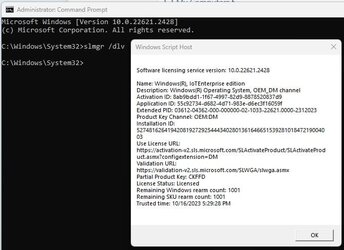
Open a command prompt with admin and run slmgr /dlv. It would be interesting to see what your results are.

Capture1a.jpg
 

My Computers My Computers

  • At a glance

    Windows 11AMD Ryzen 7 3800XT32GBEVGA GeForce GTX 1080 Ti
    OS
    Windows 11
    Computer type
    PC/Desktop
    Manufacturer/Model
    Homebuilt
    CPU
    AMD Ryzen 7 3800XT
    Motherboard
    ASUS ROG Crosshair VII Hero (WiFi)
    Memory
    32GB
    Graphics Card(s)
    EVGA GeForce GTX 1080 Ti
  • At a glance

    Windows 11 EducationIntel i7-8550U32GBNvidia Geforce MX150
    Operating System
    Windows 11 Education
    Computer type
    Laptop
    Manufacturer/Model
    Dell Inspiron 7773
    CPU
    Intel i7-8550U
    Memory
    32GB
    Graphics card(s)
    Nvidia Geforce MX150
    Sound Card
    Realtek
    Monitor(s) Displays
    17"
    Screen Resolution
    1920 x 1080
    Hard Drives
    Toshiba 512GB NVMe SSD
    SK Hynix 512GB SATA SSD
    Internet Speed
    Fast!
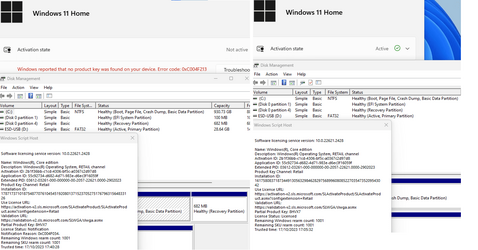
hsehestedt & NavyLCDR: See below. I've attached two sets of screenshots from the SSDs after a full clean reinstall. Let me know if anything jumps out at you as being a cause for concern. I can't spot anything personally but perhaps someone else can. Thank you again for the responses.
 

Attachments

  • SSDs.png
    SSDs.png
    48.2 KB · Views: 5

My Computer My Computer

At a glance

Windows 11
OS
Windows 11
Back
Top Bottom