Bluetooth Blues


Driver Provider: Barrot Technology Co.,Ltd.
Driver Section: brbtusb.NT
Driver Rank: 0xFF0001
Matching Device ID: USB\VID_33FA&PID_0001
Outranked Drivers: bth.inf:USB\Class_E0&SubClass_01&Prot_01:00FF2003
Device Updated: false
Parent Device: USB\VID_214B&PID_7250\5&5a350ad&0&1

The device status should have an error code. NOPE
Events:
View attachment 184557
--Right-click in an empty space in the information panel??
Getting too long - losing track - will continue next post. Thanks again. Sleep tight...
The code 31 in the device status that causes it to not work properly, is not an error? :-)
It's tiring to get mixed up with this stuff. It happens to me all the time so don't worry about it. :-)

Now do the extra step on this driver and check the events tab just in case it has something interesting at the end of its list.

I'd also like to know how did you install that driver from the link you posted on your latest message.
It's an OEM driver collection and the .cab you download has 3 files but no installer. They usually come with a small CD that includes the installer.
I installed it eventually with some extra work. It installed successfully but not displayed in any of device sections. Maybe it waits for something to connect but it should still show in the Bluetooth section.

The BARROT site itself (Barrot Technology Co., Ltd) looks clean but hard to find anything. I couldn't tell if they had a driver for your buds or not. It could be out of production, no idea.

Do you have in your Bluetooth devices the default Windows "Generic Bluetooth Radio" or some other working Bluetooth adapter?
Disable the BARROT device and check the Bluetooth & devices section to see if any Bluetooth device has any image posted and its status.
If nothing is there, go back to the Device Manager and under Bluetooth, scan for the Microsoft Bluetooth Radio. Install it and since it's the only one active it should not have any flags,
Back to the Bluetooth & devices see if any devices were identified (and in particular yours).
If found, switch the buds on, pair again if you have to and try it out.
If not found, unplug its dongle, plug it back to another USB port, switch it on and see if it wakes up.

Later...
 

My Computer My Computer

At a glance

Windows 11 Pro for Workstations 26H2 26300.95506C+4c Intel 13th Gen Intel(R) Core(TM) i5-134...64 GBNVIDIA GeForce RTX 4060, Intel UHD Graphics 730
OS
Windows 11 Pro for Workstations 26H2 26300.9550
Computer type
PC/Desktop
Manufacturer/Model
ASRock
CPU
6C+4c Intel 13th Gen Intel(R) Core(TM) i5-13400, 4100 M
Motherboard
ASRock B660M-HDV
Memory
64 GB
Graphics Card(s)
NVIDIA GeForce RTX 4060, Intel UHD Graphics 730
Sound Card
Realtek
Monitor(s) Displays
AOC 24V2W1G5
Screen Resolution
1920x1080
Hard Drives
Samsung SSD 990 Pro with Heatsink
Keyboard
Logitech
Mouse
Logitech
Internet Speed
1GB
Antivirus
Windows Defender

I think I am just getting tired of trying to get this to work -- didn't see code 31 -- still don't.
The events list just shows yesterday. Nothing for today yet.
Do you have in your Bluetooth devices the default Windows "Generic Bluetooth Radio" -- No do not see anything like that. MS has a site that tells how to deal with this if it is missing. I guess I will install it from there. Will it make the BT earbuds work?
Thanks again.
 

My Computer My Computer

At a glance

1113th Gen Intel(R) Core(TM) i5-1335U 1.30 GHz8 gb
OS
11
Computer type
Laptop
Manufacturer/Model
Lenovo Ideapad
CPU
13th Gen Intel(R) Core(TM) i5-1335U 1.30 GHz
Memory
8 gb
Screen Resolution
1900x1200
Hard Drives
500 gb ssd
I didn't install it - It called out something unfamiliar - Cambridge Silicon Radio Bluetooth.
  1. Install the correct CSR Bluetooth driver
  • After the restart, reconnect the CSR dongle to your computer. -- Didn't proceed as don't have this dongle.

    Here's my question - if I go ahead and order that new dongle -- I am assuming it will work as the Barrot one seems totally ineffectual. Do you see the Barrot adapter as the problem or is it something screwed up on the laptop? Any thoughts?
 

My Computer My Computer

At a glance

1113th Gen Intel(R) Core(TM) i5-1335U 1.30 GHz8 gb
OS
11
Computer type
Laptop
Manufacturer/Model
Lenovo Ideapad
CPU
13th Gen Intel(R) Core(TM) i5-1335U 1.30 GHz
Memory
8 gb
Screen Resolution
1900x1200
Hard Drives
500 gb ssd
I didn't install it - It called out something unfamiliar - Cambridge Silicon Radio Bluetooth.
  1. Install the correct CSR Bluetooth driver
  • After the restart, reconnect the CSR dongle to your computer. -- Didn't proceed as don't have this dongle.

    Here's my question - if I go ahead and order that new dongle -- I am assuming it will work as the Barrot one seems totally ineffectual. Do you see the Barrot adapter as the problem or is it something screwed up on the laptop? Any thoughts?
1. The error code is in the last line of the posted image.
2. The Cambridge Silicon is another company. Probably Windows thought their drivers are close enough for your dongle. You could try them and uninstall it if it doesn't work.
As it stands, you don't use the drivers from the link you downloaded them from.
3. It seems like the BARROT doesn't get installed though a CD/installer because its drivers are not signed. It can only be installed manually.

You can try that too:
Pick up the BARROT_Files.zip from the attachment in this message. UnZip it to a folder (e.g C:\BARROT_Files).
It has the 3 files I got from the link you posted. An .inf, *.cat and *.sys
Open Device Manager, select Bluetooth and click "Action" at the Manager's top row.
Select "Add Drivers".

On the popup that will come up,:
You can leave the checkmark for "include subfolders". Causes no harm and does nothing since there are no subfolders in what it will process.
Now click "Browse" and navigate to select the "C:\BARROT_FILES" folder you created.
It goes back to the previous panel with the driver's location filled in.
Just click 'Next'.

It will show a message that the drivers were installed, the name of the .inf it used and the name of the .inf it created for it. Save the created .Inf's name just in case.
In my computer, it says that it was installed on 0 devices. (Fine since I don't have a dongle it recognizes).
In your case, if the dongle was plugged in before you started the driver addition, I hope it connects to 1 device. Reboot and see if it's there.

So the steps are these (in Device Manager):

1. Uninstall the BARROT you have installed already. Remove its files too. On the popup, first select the "Attempt to remove the driver for this device" and then click the 'uninstall' button.
2. If you have anything flagged, disable it.
3. If you have any other Bluetooth Adapters (or radios), disable them. The reason being that only 1 Bluetooth radio can be active at any time. The disabled Adapters will not interfere.
4. Now you reboot.
5. Check the Device Manager to see what's there now. If the BARROT is there make sure it's enabled and all other radios/adapters left are still disabled.
6) Over to Bluetooth & devices, see the status of your devices. They should show as not connected unless they were on at the time of the restart.
Switch on you buds and see if they connect and get paired. For auto-connect and such, I think it was discussed earlier in this thread. Also, if the dongle is alive, you might have to go through the earlier comments on how to clean the Bluetooth cache and create new pairs for your BT devices if something can't connect.

Now I rest and you work :)


If the above doesn't work we might have to install instead the Microsoft Generic Bluetooth Radio, disable the active radio and enable the Generic one.
You could also try to unplug the dongle and re-plug it into another USB port. Maybe the currently used port got some pin broken or something.
 

Attachments

My Computer My Computer

At a glance

Windows 11 Pro for Workstations 26H2 26300.95506C+4c Intel 13th Gen Intel(R) Core(TM) i5-134...64 GBNVIDIA GeForce RTX 4060, Intel UHD Graphics 730
OS
Windows 11 Pro for Workstations 26H2 26300.9550
Computer type
PC/Desktop
Manufacturer/Model
ASRock
CPU
6C+4c Intel 13th Gen Intel(R) Core(TM) i5-13400, 4100 M
Motherboard
ASRock B660M-HDV
Memory
64 GB
Graphics Card(s)
NVIDIA GeForce RTX 4060, Intel UHD Graphics 730
Sound Card
Realtek
Monitor(s) Displays
AOC 24V2W1G5
Screen Resolution
1920x1080
Hard Drives
Samsung SSD 990 Pro with Heatsink
Keyboard
Logitech
Mouse
Logitech
Internet Speed
1GB
Antivirus
Windows Defender

Phew...
Uninstall the BARROT you have installed already. Remove its files too. On the popup, first select the "Attempt to remove the driver for this device" and then click the 'uninstall' button. I uninstalled on the remove/uninstall program windows program so 2nd option did not show up.
Rebooting now -- i'll be back--Rebooted -- devices -- add device -- no deal. Barrot back in dev mgr...enabled

I am throwing in the towel. We have given this our best shot and I'm going to order that other dongle. Something is just amiss and I want to spend some time elsewhere. Thanks again for all your help. You're the best!
 
Last edited:

My Computer My Computer

At a glance

1113th Gen Intel(R) Core(TM) i5-1335U 1.30 GHz8 gb
OS
11
Computer type
Laptop
Manufacturer/Model
Lenovo Ideapad
CPU
13th Gen Intel(R) Core(TM) i5-1335U 1.30 GHz
Memory
8 gb
Screen Resolution
1900x1200
Hard Drives
500 gb ssd
I am having a hard time following all of this so I will start over.

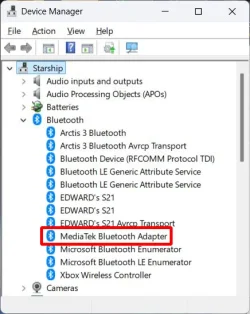
In the Device Manager you find the Bluetooth group.
You then look for the actual Bluetooth adapter that is used.
On my laptop it is the MediaTek Bluetooth Adapter.

1790714640231.webp

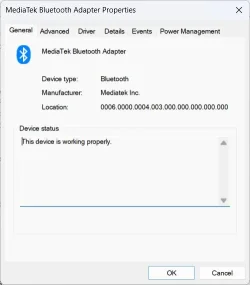
If you right-click on the adapter you see its properties. The status should say "working properly.
Note in Power Management it is set to power off but that has never been a problem for me,

1790714652232.webp

I searched for pairing for your earbuds. It said if you open the charge case the buds should automatically go into pairing mode.
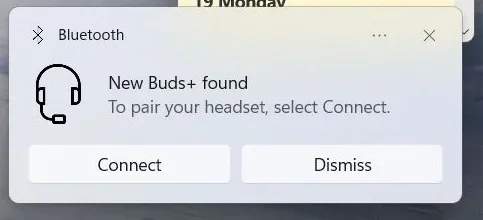
I have Samsung Galaxy Bud+ earbuds. When I open the charge case they also automatically go into pairing mode.
After I do that I get a notification at the lower right of my display. If I then select Connect...

pair1.webp

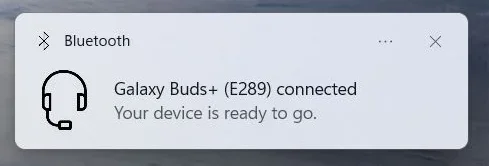
The earbuds are automatically connected.

pair2.webp

Note: If you let the first connect notification close before connecting it will not show again unless you log out or reboot.

That is OK because you can still connect in Bluetooth settings.

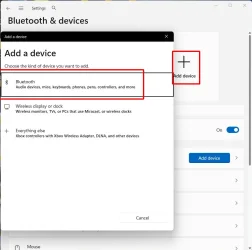
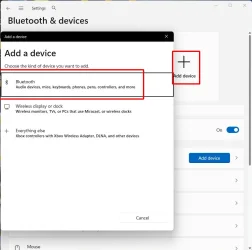
Select Add Device and then Bluetooth

Add Device 1.webp

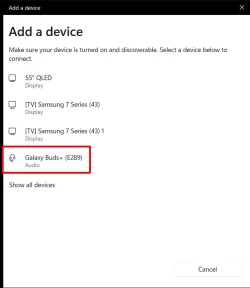
Open the earbud charging case with the earbuds in it
Wait until the earbuds show up in the device list.
Select the earbuds in the list

Add Device 2.webp

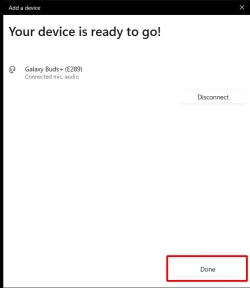
After the earbuds are connected select Done.

Add Device 3.webp

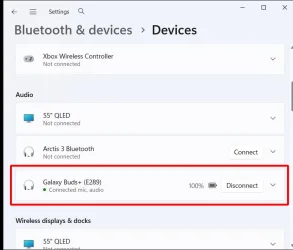
In the Bluetooth Audio device list you should see that the earbuds are connected.

Add Device 4.webp
 

Attachments

  • Add Device 1.webp
    Add Device 1.webp
    35.3 KB · Views: 0

My Computers My Computers

  • At a glance

    Windows 11 Pro 25H2 (26200.6901)AMD Ryzen 7 6800H with Radeon 680M GPU (486MB...Crucial DDR5-4800 (2400MHz) 32GB (2 x 16GB)NVIDIA RTX 3060 Laptop (6GB RAM)
    OS
    Windows 11 Pro 25H2 (26200.6901)
    Computer type
    Laptop
    Manufacturer/Model
    ASUS TUF Gaming A15 (2022)
    CPU
    AMD Ryzen 7 6800H with Radeon 680M GPU (486MB RAM)
    Memory
    Crucial DDR5-4800 (2400MHz) 32GB (2 x 16GB)
    Graphics Card(s)
    NVIDIA RTX 3060 Laptop (6GB RAM)
    Sound Card
    n/a
    Monitor(s) Displays
    15.6-inch
    Screen Resolution
    1920x1080 300Hz
    Hard Drives
    2 x Samsung 990 Evo Plus (2TB M.2 NVME SSD)
    PSU
    n/a
    Mouse
    Wireless Mouse M510
    Internet Speed
    2100Mbps/300Mbps
    Browser
    Firefox
    Antivirus
    Malwarebytes
  • At a glance

    Windows 11 Pro 25H2 (26200.8246)AMD Ryzen 7 5700X3DG.SKILL Flare X 32GB (2x16GB) DDR4ASUS ROG-STRIX-RTX3060TI-08G-V2-GAMING (RTX 3...
    Operating System
    Windows 11 Pro 25H2 (26200.8246)
    Computer type
    PC/Desktop
    Manufacturer/Model
    Custom build
    CPU
    AMD Ryzen 7 5700X3D
    Motherboard
    ASUS ROG Strix B550-F Gaming WiFi II
    Memory
    G.SKILL Flare X 32GB (2x16GB) DDR4
    Graphics card(s)
    ASUS ROG-STRIX-RTX3060TI-08G-V2-GAMING (RTX 3060-Ti, 8GB RAM)
    Monitor(s) Displays
    Samsung G50D IPS 27"
    Screen Resolution
    1440p/180Hz
    Hard Drives
    SAMSUNG 990 EVO Plus (2TB] M.2 NVME SSD
    SAMSUNG 990 EVO Plus (4TB) M.2 NVME SSD
    PSU
    Corsair RM750x (750 watts)
    Case
    Cooler Master MasterCase 5
    Cooling
    Scythe Mugen 6
    Keyboard
    Logitech K520 (MK540 keyboard/mouse combo)
    Mouse
    Logitech M310 (MK540 keyboard/mouse combo)
    Internet Speed
    2100 Mbps down / 300 Mbps up
    Browser
    Firefox, Edge, Chrome
    Antivirus
    Malwarebytes (Premium)
    Other Info
    ASUS Blu-ray Burner BW-16D1HT (SATA) || Western Digital Easystore 20TB USB 3.0 external hard drive used with Acronis True Image 2025 backup software || HP OfficeJet Pro 6975 Printer/Scanner
Phew...
Uninstall the BARROT you have installed already. Remove its files too. On the popup, first select the "Attempt to remove the driver for this device" and then click the 'uninstall' button. I uninstalled on the remove/uninstall program windows program so 2nd option did not show up.
Rebooting now -- i'll be back--Rebooted -- devices -- add device -- no deal. Barrot back in dev mgr...enabled

I am throwing in the towel. We have given this our best shot and I'm going to order that other dongle. Something is just amiss and I want to spend some time elsewhere. Thanks again for all your help. You're the best!
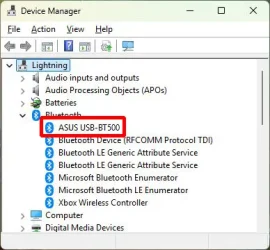
All Bluetooth adapters should show in the Device Manager in the Bluetooth group. I bought an ASUS Bluetooth USB adapter for one of my desktops. Here is what that looks like.

Device Manager LN.webp
 

My Computers My Computers

  • At a glance

    Windows 11 Pro 25H2 (26200.6901)AMD Ryzen 7 6800H with Radeon 680M GPU (486MB...Crucial DDR5-4800 (2400MHz) 32GB (2 x 16GB)NVIDIA RTX 3060 Laptop (6GB RAM)
    OS
    Windows 11 Pro 25H2 (26200.6901)
    Computer type
    Laptop
    Manufacturer/Model
    ASUS TUF Gaming A15 (2022)
    CPU
    AMD Ryzen 7 6800H with Radeon 680M GPU (486MB RAM)
    Memory
    Crucial DDR5-4800 (2400MHz) 32GB (2 x 16GB)
    Graphics Card(s)
    NVIDIA RTX 3060 Laptop (6GB RAM)
    Sound Card
    n/a
    Monitor(s) Displays
    15.6-inch
    Screen Resolution
    1920x1080 300Hz
    Hard Drives
    2 x Samsung 990 Evo Plus (2TB M.2 NVME SSD)
    PSU
    n/a
    Mouse
    Wireless Mouse M510
    Internet Speed
    2100Mbps/300Mbps
    Browser
    Firefox
    Antivirus
    Malwarebytes
  • At a glance

    Windows 11 Pro 25H2 (26200.8246)AMD Ryzen 7 5700X3DG.SKILL Flare X 32GB (2x16GB) DDR4ASUS ROG-STRIX-RTX3060TI-08G-V2-GAMING (RTX 3...
    Operating System
    Windows 11 Pro 25H2 (26200.8246)
    Computer type
    PC/Desktop
    Manufacturer/Model
    Custom build
    CPU
    AMD Ryzen 7 5700X3D
    Motherboard
    ASUS ROG Strix B550-F Gaming WiFi II
    Memory
    G.SKILL Flare X 32GB (2x16GB) DDR4
    Graphics card(s)
    ASUS ROG-STRIX-RTX3060TI-08G-V2-GAMING (RTX 3060-Ti, 8GB RAM)
    Monitor(s) Displays
    Samsung G50D IPS 27"
    Screen Resolution
    1440p/180Hz
    Hard Drives
    SAMSUNG 990 EVO Plus (2TB] M.2 NVME SSD
    SAMSUNG 990 EVO Plus (4TB) M.2 NVME SSD
    PSU
    Corsair RM750x (750 watts)
    Case
    Cooler Master MasterCase 5
    Cooling
    Scythe Mugen 6
    Keyboard
    Logitech K520 (MK540 keyboard/mouse combo)
    Mouse
    Logitech M310 (MK540 keyboard/mouse combo)
    Internet Speed
    2100 Mbps down / 300 Mbps up
    Browser
    Firefox, Edge, Chrome
    Antivirus
    Malwarebytes (Premium)
    Other Info
    ASUS Blu-ray Burner BW-16D1HT (SATA) || Western Digital Easystore 20TB USB 3.0 external hard drive used with Acronis True Image 2025 backup software || HP OfficeJet Pro 6975 Printer/Scanner
OK - Mr. ED I'll check out your input. As you can see by the "encyclopediac" posting everything has been tried to get this to work. I'll see about yours as well. Thanks for your thoughts.
 

My Computer My Computer

At a glance

1113th Gen Intel(R) Core(TM) i5-1335U 1.30 GHz8 gb
OS
11
Computer type
Laptop
Manufacturer/Model
Lenovo Ideapad
CPU
13th Gen Intel(R) Core(TM) i5-1335U 1.30 GHz
Memory
8 gb
Screen Resolution
1900x1200
Hard Drives
500 gb ssd
"If you right-click on the adapter you see its properties. The status should say "working properly."
This is the beginning of no deal. The properties for my adapter Barrot - say:
barrot.webp
So even though I have made these earbuds work in the past -- in spite of that message -- they no longer work. Thanks for your input but I am kinda done.
 

My Computer My Computer

At a glance

1113th Gen Intel(R) Core(TM) i5-1335U 1.30 GHz8 gb
OS
11
Computer type
Laptop
Manufacturer/Model
Lenovo Ideapad
CPU
13th Gen Intel(R) Core(TM) i5-1335U 1.30 GHz
Memory
8 gb
Screen Resolution
1900x1200
Hard Drives
500 gb ssd

Latest Support Threads

Back
Top Bottom