Can I get QuickLaunch in Windows 11?


UpdatesMess

Active member
Local time
4:25 PM
Posts
18
OS
windows 11 24h2 Pro
I just got a Lenovo Carbon 7th Gen with Windows 11 because my 5th Gen (with Win 10) cannot be charged. My original intent was to swap harddrives, and I got excellent advice about how to do this and potential pitfalls in TenForum.com. I had used Win 11 on another computer some years ago, and, after a year of foaming at the mouth, I downgraded to Win 10. However, it seems as though I will be dragged into using Win 11, as I just got a notice from TurboTax stating that their product will now only support Win 11, and I assume that financial organizations will follow.

So, I started to work with the existing Win 11 Pro 24H2 Build 26100.4946 on the laptop. The very first thing I tried to do was to install QuickLaunch, which I had been able to do on my earlier encounter with Win 11. I found innumerable threads both on Elevenforum and elsewhere recommending how to do it, followed with comments that the specific approach would not work with new Windows 11 updates. In the process of reading these, I also found references to problems in opening and not combining multiple instances of a program. I am trying to avoid a trial-and-error approach with Open Shell, StartAllBack, Start11, ExplorerPatcher, etc. My question is that assuming I decide to run (or, more appropriately, stumble) with Win 11, what add-on program/combination of programs/registry edits, etc., should I use to get as close functionally to Win 10, with the lowest possible future headaches. I do NOT care about visual aesthetics (like taskbar transparency, rounded corners, etc.). I just want to make things function.

Thanks.
 
Windows Build/Version
Win 11 22H2 Build 26100.4946

My Computer

System One

  • OS
    windows 11 24h2 Pro
    Computer type
    Laptop
    Manufacturer/Model
    Lenovo
    CPU
    Intel(R) Core(TM) i5-8365U CPU @ 1.60GHz, 189
    Motherboard
    Lenovo 20QES3DM00 SDK0J40697 WIN
    Memory
    16GB
    Graphics Card(s)
    Intel UHD Graphics 620
    Sound Card
    Realtec Audio

My Computer

System One

  • OS
    Windows 11 Pro Insider 64 bit 25H2 26200.5742
    Computer type
    PC/Desktop
    Manufacturer/Model
    Gigabyte Z390 UD
    CPU
    Intel Core i7 9700K 3.60
    Motherboard
    Gigabyte Z390 UD
    Memory
    16 GB
    Graphics Card(s)
    nVidia GEForce RTX 2060 Super
    Sound Card
    onboard
    Monitor(s) Displays
    Two 27" Dell 4K monitors
    Screen Resolution
    3840 x 2160
    Hard Drives
    M.2 NVME SSD, 500 GB; Two 2TB Mechanical HDD's
    PSU
    850w PSU
    Case
    Cyberpower PC
    Cooling
    Water cooled
    Keyboard
    Backlit Cyberpower gaming keyboard
    Mouse
    Backlit Cyberpower gaming mouse
    Internet Speed
    1 GB mbps
    Browser
    Brave
    Antivirus
    Windows Security
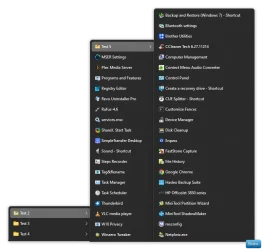
Everyone will laugh but I do the KISS concept really well. I use poor man's quick launch. Free and don't have to mess with 3rd party app. For what I use it for, it works for me.
 

Attachments

  • Screenshot 2025-08-23 173719.webp
    Screenshot 2025-08-23 173719.webp
    308 KB · Views: 11

My Computers

System One System Two

  • OS
    Windows 11 Pro 25H2 26200.8655
    Computer type
    PC/Desktop
    Manufacturer/Model
    Dell Optiplex 7080
    CPU
    i9-10900 10 core 20 threads
    Motherboard
    DELL 0J37VM
    Memory
    32 gb
    Graphics Card(s)
    none-Intel UHD Graphics 630
    Sound Card
    Integrated Realtek
    Monitor(s) Displays
    Benq 27
    Screen Resolution
    2560x1440
    Hard Drives
    2x1tb Solidigm m.2 nvme /External drives 512gb Samsung m.2 sata+2tb Kingston m2.nvme
    PSU
    500w
    Case
    MT
    Cooling
    Dell Premium
    Keyboard
    Logitech wired
    Mouse
    Logitech wireless
    Internet Speed
    so slow I'm too embarrassed to tell
    Browser
    #1 Edge #2 Firefox
    Antivirus
    Defender+MWB Premium
  • Operating System
    Windows 11 Pro 24H2 26200.8457
    Computer type
    PC/Desktop
    Manufacturer/Model
    Beelink Mini PC SER5
    CPU
    AMD Ryzen 7 6800U
    Memory
    32 gb
    Graphics card(s)
    integrated
    Sound Card
    integrated
    Monitor(s) Displays
    Benq 27
    Screen Resolution
    2560x1440
    Hard Drives
    1TB Crucial nvme
    Keyboard
    Logitech wired
    Mouse
    Logitech wireless
    Internet Speed
    still too embarrassed to tell
    Browser
    Firefox
    Antivirus
    Defender
    Other Info
    System 3 is non compliant Dell 9020 i7-4770/24gb ram Win11 PRO 26200.8457
I just pin my favorite pizza places to the Taskbar.

Instant... Quick Lunch. :D
 

My Computers

System One System Two

  • OS
    Win 11 Home ♦♦♦26200.8655 ♦♦♦♦♦♦♦25H2
    Computer type
    PC/Desktop
    Manufacturer/Model
    Built by Ghot® [May 2020]
    CPU
    AMD Ryzen 7 3700X
    Motherboard
    Asus Pro WS X570-ACE (BIOS 5302)
    Memory
    G.Skill (F4-3200C14D-16GTZKW)
    Graphics Card(s)
    EVGA RTX 2070 (08G-P4-2171-KR)
    Sound Card
    Realtek ALC1220P / ALC S1220A
    Monitor(s) Displays
    Dell U3011 30"
    Screen Resolution
    2560 x 1600
    Hard Drives
    2x Samsung 860 EVO 500GB,
    WD 4TB Black FZBX - SATA III,
    WD 8TB Black FZBX - SATA III,
    DRW-24B1ST CD/DVD Burner
    PSU
    PC Power & Cooling 750W Quad EPS12V
    Case
    Cooler Master ATCS 840 Tower
    Cooling
    CM Hyper 212 EVO (push/pull)
    Keyboard
    Ducky DK9008 Shine II Blue LED
    Mouse
    Logitech Optical M-100
    Internet Speed
    300/300
    Browser
    Firefox (latest)
    Antivirus
    Bitdefender Total Security
    Other Info
    Speakers: Klipsch Pro Media 2.1
  • Operating System
    Windows XP Pro 32bit w/SP3
    Computer type
    PC/Desktop
    Manufacturer/Model
    Built by Ghot® (not in use)
    CPU
    AMD Athlon 64 X2 5000+ (OC'd @ 3.2Ghz)
    Motherboard
    ASUS M2N32-SLI Deluxe Wireless Edition
    Memory
    TWIN2X2048-6400C4DHX (2 x 1GB, DDR2 800)
    Graphics card(s)
    EVGA 256-P2-N758-TR GeForce 8600GT SSC
    Sound Card
    Onboard
    Monitor(s) Displays
    ViewSonic G90FB Black 19" Professional (CRT)
    Screen Resolution
    up to 2048 x 1536
    Hard Drives
    WD 36GB 10,000rpm Raptor SATA
    Seagate 80GB 7200rpm SATA
    Lite-On LTR-52246S CD/RW
    Lite-On LH-18A1P CD/DVD Burner
    PSU
    PC Power & Cooling Silencer 750 Quad EPS12V
    Case
    Generic Beige case, 80mm fans
    Cooling
    ZALMAN 9500A 92mm CPU Cooler
    Keyboard
    Logitech Classic Keybooard 200
    Mouse
    Logitech Optical M-BT96a
    Internet Speed
    300/300
    Browser
    Firefox 3.x ??
    Antivirus
    Symantec (Norton)
    Other Info
    Still assembled, still runs. Haven't turned it on for 15 years?
I'm using QuickAccessPopup.
Does the job for me. Awesome bit of free software!
 

My Computer

System One

  • OS
    W11 24H2
    Computer type
    Laptop
    Manufacturer/Model
    ASUS A 14
    CPU
    Ryzen 7
    Memory
    16Gb
    Graphics Card(s)
    AMD Radeon & NVIDIA GeForce RTX 3050
    Hard Drives
    500GB SSD & 2 TB portable
    Browser
    Edge
    Antivirus
    Defender
I'm using QuickAccessPopup.
Does the job for me. Awesome bit of free software!


Here's 5 points, for mostly filling out your computer specs. :-)
 

My Computers

System One System Two

  • OS
    Win 11 Home ♦♦♦26200.8655 ♦♦♦♦♦♦♦25H2
    Computer type
    PC/Desktop
    Manufacturer/Model
    Built by Ghot® [May 2020]
    CPU
    AMD Ryzen 7 3700X
    Motherboard
    Asus Pro WS X570-ACE (BIOS 5302)
    Memory
    G.Skill (F4-3200C14D-16GTZKW)
    Graphics Card(s)
    EVGA RTX 2070 (08G-P4-2171-KR)
    Sound Card
    Realtek ALC1220P / ALC S1220A
    Monitor(s) Displays
    Dell U3011 30"
    Screen Resolution
    2560 x 1600
    Hard Drives
    2x Samsung 860 EVO 500GB,
    WD 4TB Black FZBX - SATA III,
    WD 8TB Black FZBX - SATA III,
    DRW-24B1ST CD/DVD Burner
    PSU
    PC Power & Cooling 750W Quad EPS12V
    Case
    Cooler Master ATCS 840 Tower
    Cooling
    CM Hyper 212 EVO (push/pull)
    Keyboard
    Ducky DK9008 Shine II Blue LED
    Mouse
    Logitech Optical M-100
    Internet Speed
    300/300
    Browser
    Firefox (latest)
    Antivirus
    Bitdefender Total Security
    Other Info
    Speakers: Klipsch Pro Media 2.1
  • Operating System
    Windows XP Pro 32bit w/SP3
    Computer type
    PC/Desktop
    Manufacturer/Model
    Built by Ghot® (not in use)
    CPU
    AMD Athlon 64 X2 5000+ (OC'd @ 3.2Ghz)
    Motherboard
    ASUS M2N32-SLI Deluxe Wireless Edition
    Memory
    TWIN2X2048-6400C4DHX (2 x 1GB, DDR2 800)
    Graphics card(s)
    EVGA 256-P2-N758-TR GeForce 8600GT SSC
    Sound Card
    Onboard
    Monitor(s) Displays
    ViewSonic G90FB Black 19" Professional (CRT)
    Screen Resolution
    up to 2048 x 1536
    Hard Drives
    WD 36GB 10,000rpm Raptor SATA
    Seagate 80GB 7200rpm SATA
    Lite-On LTR-52246S CD/RW
    Lite-On LH-18A1P CD/DVD Burner
    PSU
    PC Power & Cooling Silencer 750 Quad EPS12V
    Case
    Generic Beige case, 80mm fans
    Cooling
    ZALMAN 9500A 92mm CPU Cooler
    Keyboard
    Logitech Classic Keybooard 200
    Mouse
    Logitech Optical M-BT96a
    Internet Speed
    300/300
    Browser
    Firefox 3.x ??
    Antivirus
    Symantec (Norton)
    Other Info
    Still assembled, still runs. Haven't turned it on for 15 years?
ExplorerPatcher

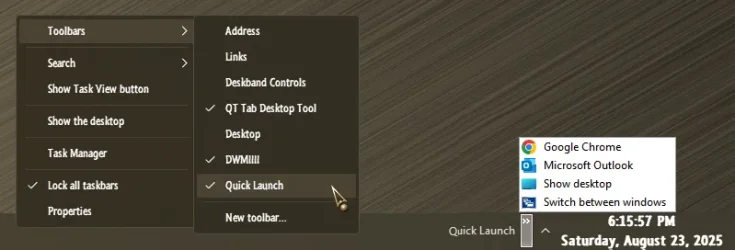
Quick Launch.webp

P.S., personally, I, use it together with these:
  • Open-Shell (also including the Classic Explorer component thereof)
  • Windhawk (with only a handful of the available mods)
  • SystemTrayMenu (for easy keyboard navigation, because I am lazy...)
  • some additional tweaks—most of which are known registry edits.
 
Last edited:

My Computers

System One System Two

  • OS
    11 Home
    Computer type
    Laptop
    Manufacturer/Model
    Asus TUF Gaming F16 (2024)
    CPU
    i7 13650HX
    Memory
    16GB DDR5
    Graphics Card(s)
    GeForce RTX 4060 Mobile
    Sound Card
    Eastern Electric MiniMax DAC Supreme; Emotiva UMC-200; Astell & Kern AK240
    Monitor(s) Displays
    Sony Bravia XR-55X90J
    Screen Resolution
    3840×2160
    Hard Drives
    512GB SSD internal
    37TB external
    PSU
    Li-ion
    Cooling
    2× Arc Flow Fans, 4× exhaust vents, 5× heatpipes
    Keyboard
    Logitech K800
    Mouse
    Logitech G402
    Internet Speed
    30Mbit/s up, 500Mbit/s down
    Browser
    FF
    Antivirus
    What's an antivirus?
  • Operating System
    11 Home
    Computer type
    Laptop
    Manufacturer/Model
    Medion S15450
    CPU
    i5 1135G7
    Memory
    16GB DDR4
    Graphics card(s)
    Intel Iris Xe
    Sound Card
    Eastern Electric MiniMax DAC Supreme; Emotiva UMC-200; Astell & Kern AK240
    Monitor(s) Displays
    Sony Bravia XR-55X90J
    Screen Resolution
    3840×2160
    Hard Drives
    2TB SSD internal
    37TB external
    PSU
    Li-ion
    Keyboard
    Logitech K800
    Mouse
    Logitech G402
    Internet Speed
    30Mbit/s up, 500Mbit/s down
    Browser
    FF
I thought I had replied to this, but must have done so on the wrong thread.
I had written:
Thanks to everyone for your suggestions. I have started to go through all the suggestions (a wee bit overwhelming!). Unfortunately, everyday life is intruding on my ability to spend a lot of time on this for the next few days, but I will get back with more questions once I have researched all these ideas.

Thanks

I'll try and get back to this soon.
 

My Computer

System One

  • OS
    windows 11 24h2 Pro
    Computer type
    Laptop
    Manufacturer/Model
    Lenovo
    CPU
    Intel(R) Core(TM) i5-8365U CPU @ 1.60GHz, 189
    Motherboard
    Lenovo 20QES3DM00 SDK0J40697 WIN
    Memory
    16GB
    Graphics Card(s)
    Intel UHD Graphics 620
    Sound Card
    Realtec Audio
Thanks again for all the suggestions above.

Going through them all, as well as various threads relating to them online, and playing around with Win 11 (is it still “playing” when you tear out chunks of hair that you can ill afford to lose?) helped clarify what I want to accomplish.

  1. The changes that I want are
    1. A Start Menu like win 10 or 7
    2. A QuickLaunch bar or equivalent
    3. Ability to launch, show and access multiple instances of open programs.
  2. It seems that it is advisable to do as little as possible to get to these goals. Many of the recommended apps accomplish a variety of other things. However, the pages of discussions regarding what to adjust to get things just so is not what I need. At one time, I would have reveled in them, but now, @glassskutter’s KISS method has a distinct appeal, Does it help with showing multiple instances of open programs?
    While I don’t think that @Ghot’s QuickLunch method will solve my problems, where in PA do you live, and what are the pizza places that you have pinned? (I am in a Philly suburb, and one can never know of too many pizza, cheesesteak and ice-cream places)
  3. Keep the apps as light as possible. The numerous threads about the incompatibilities between the apps and successive Windows updates makes me inclined to eliminate several otherwise good apps.
Along those lines, I thought that I could perhaps make do with the current Start Menu with a few tweaks. I don’t want to see recommended or frequent apps, but I want to see All the apps without having to click another button. It seemed as though one had could do that within Windows, except that that option was just removed by the Microsoft Department of Driving Customers to Distraction! So, to replicate the way I currently work, I thought that I would end up with some of apps and Windows accessories pinned to whatever I end up using as a QuickLaunch Toolbar, and only pin the others that I use regularly (like Control Panel, Run, Command) to the Start Menu. I tried to do so, and was able to do so with programs like Office, Quicken, etc., but ran into problems with the items in Windows Tools. What was a problem was that one could “Pin to start” Registry Editor, Command Prompt, etc., but I had to go through multiple gyrations with Control Panel and Run. I finally managed to get Control Panel with its icon pinned, but while I managed to pin “Run”, it does so with a generic icon, which I cannot change, and also removes Run from Windows Tools! Any suggestion to fix this would be welcome—not a key issue, but an annoyance!

So, is there a way to change the default to All programs and not just Pinned.

Finally managed to get the “Show Desktop” pinned to the toolbar, as most of the prior suggestion online no longer work—don’t know if I could replicate what I did!

I now have the Start Menu more or less working. My question is if I am missing some other function of the old Start Menu that has been changed by the latest version of Win 11, which caused people to use apps like StartAllBack or OpenShell (I realized I first typed it as Open Hell—a Freudian slip with regard to Win 11?)

Along the same lines, why do people use a replacement for File Explorer like ExplorerPatcher or parts of OpenShell? Are there deficiencies that I may not realize until I start to use it?

I can focus on the QuickLaunch substitute, and the ability to launch, show and access multiple instances of open programs.

Looking at QL substitutes, I am attracted by the fact that SystemTrayMenu and TrayToolbar do not modify underlying system files. Have people had any problems with these and Win updates? I eliminated QuickAccessPopup as it was did more than I wanted.

Finally, what do I do to open, show and access multiple instances of open programs, or is that part of programs like SystemTrayMenu, etc.

Sorry for the long message, but I wanted to explain my thinking and make sure that there are no holes in it.
 

My Computer

System One

  • OS
    windows 11 24h2 Pro
    Computer type
    Laptop
    Manufacturer/Model
    Lenovo
    CPU
    Intel(R) Core(TM) i5-8365U CPU @ 1.60GHz, 189
    Motherboard
    Lenovo 20QES3DM00 SDK0J40697 WIN
    Memory
    16GB
    Graphics Card(s)
    Intel UHD Graphics 620
    Sound Card
    Realtec Audio
Start11 v2. (From what I can gather) Does all that you want for a minimal yearly subscription.
I couldn’t get by without Start11 & Fences6. I’ve been using Stardock Start** since Start8 (Windows 8)

I don’t really use QuickLaunch settings but the last time I looked you can add a folder to your Taskbar and if that folder has folders, they are also accessible via a flyout structure from the same QuickLaunch. And you can add multiple QuickLaunch folders to the Taskbar. Add program shortcuts to the folder you make a QuickLaunch with, they’re obviously accessible. Throw some Excel sheets, Documents, PDF… whatever in there also.
Plus a multitude of other goodies and options.

The only thing I don’t think you can do is seperate the QuickLaunch folder from other Taskbar shortcuts, like putting it next to the System tray, if you get my meaning. If I can find 5 minutes I’ll show you an example later.
 

My Computers

System One System Two

  • OS
    Windows 11 Pro 25H2 Build 26200.8655
    Computer type
    PC/Desktop
    Manufacturer/Model
    Sin-built 2013
    CPU
    Intel(R) Core(TM) i7-4770K CPU @ 3.50GHz
    Motherboard
    ASUS ROG Maximus VI Formula
    Memory
    32.0 GB of I forget and the box is in storage.
    Graphics Card(s)
    Gigabyte nVidia GeForce GTX 1660 Super OC 6GB
    Sound Card
    Onboard thingy
    Monitor(s) Displays
    5 x LG 25MS500-B - 1 x 24MK430H-B - 1 x Wacom Pro 22" Touch Screen Tablet
    Screen Resolution
    All over the place
    Hard Drives
    Too many to list.
    OS on Samsung 1TB 870 QVO SATA
    PSU
    Silverstone 1500
    Case
    NZXT Phantom 820 Full-Tower Case
    Cooling
    Noctua NH-D15 Elite Class Dual Tower CPU Cooler / 6 x EziDIY 120mm / 2 x Corsair 140mm somethings / 1 x 140mm Thermaltake something / 2 x 200mm Corsair.
    Keyboard
    Corsair K95 / Logitech diNovo Edge Wireless
    Mouse
    Logitech: G402 / G502 / Mx Masters / Mx Air Cordless
    Internet Speed
    2000/500Mbps
    Browser
    All sorts
    Antivirus
    Kaspersky Premium
    Other Info
    ㅤㅤㅤㅤㅤㅤㅤㅤㅤㅤㅤㅤㅤㅤㅤㅤㅤㅤㅤㅤㅤㅤㅤㅤㅤㅤㅤㅤㅤㅤㅤㅤㅤㅤㅤㅤㅤㅤㅤㅤ⠀⠀⠀⠀⠀⠀⠀⠀⠀⠀
    TP-Link BE9300 WiFi 7 Bluetooth 5.4 (Archer TBE550E)
    TP-Link TX201 V1 2.5GB Lan

    Grandstream HT812 - VoIP
    ASUS DSL-AX82U - Mesh
    ASUS RT-AC68U - Mesh
    ASUS RT-BE88U Router

    Brother MFC-L2880DW Printer

    I’m on a horse.
  • Operating System
    Windows 11 Pro 25H2 Build 26200.8655
    Computer type
    Laptop
    Manufacturer/Model
    LENOVO Yoga 7 14IRL8 - 7i EVO OLED 14" Touchscreen i5 12 Core 16GB/512GB
    CPU
    Intel Core 12th Gen i5-1240P Processor (1.7 - 4.4GHz)
    Memory
    16GB LPDDR5 RAM
    Graphics card(s)
    Intel Iris Xe Graphics Processor
    Sound Card
    Optimized with Dolby Atmos®
    Screen Resolution
    QHD 2880 x 1800 OLED
    Hard Drives
    M.2 512GB
    Antivirus
    Defender / Malwarebytes
    Other Info
    …still on a horse.
Sorry for the long message, but I wanted to explain my thinking and make sure that there are no holes in it.
Basically, to accomplish most of what you desire, is to eliminate the use of the Windows 11 Explorer SDK by mounting an alternative shell, which StartAllBack, and others mentioned herein, accomplish quite well.
And, eliminate the use of Store Apps and stick with classic Win32 programs.
The multiple instances feature may largely depend on each programs capabilities, though.
 

My Computers

System One System Two

  • OS
    Windows 11 Pro
    Computer type
    PC/Desktop
    Manufacturer/Model
    ASUS ROG Strix
  • Operating System
    Windows 11 Pro
    Computer type
    Laptop
    Manufacturer/Model
    ASUS VivoBook
Vastly exaggerated 'problems' which new users of Windows 11 seem to think they have.

Just get on and use it. Things like Pre-fetch and Super prefetch still work in speeding up App launches. Some Apps also have faster launch feature which tends to put things in the Startup which some people don't like.

All those system mods you mention, just no, get on and use Windows 11 as is, it will take at least a year then you will forget about Windows 10.
"with the lowest possible future headaches" that is exactly what system mods will give you.

I have a newish Laptop on Windows 11 and a 12 year old one on Windows 10. They are both well maintained. The Windows 10 Laptop is dreadful in comparison, slower in every respect, mainly of course due to hardware developments but that is the reality.

"but I do the KISS concept really well."
That is what I think as well.

"Finally managed to get the “Show Desktop” pinned to the toolbar, as most of the prior suggestion online no longer work—don’t know if I could replicate what I did!"

That is on the far right of the Taskbar, indeed from memory the same in Windows 10.
Settings > Personalisation > Task bar > Taskbar behaviours > Select far corner of taskbar to show desktop > tick box.

"but I wanted to explain my thinking and make sure that there are no holes in it."

Those holes are in your knowledge of Windows 11, and intentionally googling around for "problems with Windows 11" then reinforced by people who use a load of mods and forget to tell you about the disadvantages.

I would imagine many similar posts to yours in the coming months.
 

My Computer

System One

  • OS
    Windows 11
Ability to launch, show and access multiple instances of open programs.
Middle-click opens an additional instance of an open program on Windows by default.
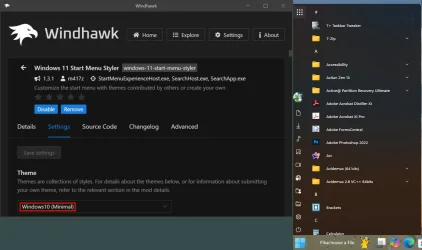
So, is there a way to change the default to All programs and not just Pinned.
Windows 10 Minimal.webp
My question is if I am missing some other function of the old Start Menu that has been changed by the latest version of Win 11, which caused people to use apps like StartAllBack or OpenShell (I realized I first typed it as Open Hell—a Freudian slip with regard to Win 11?)
If the "old Start Menu" that you had in mind is the Windows 10 Start Menu and all you want is the "All programs" part thereof (not the part that has the tiles) then no, I don't think you need to look any further than the solution above.
Along the same lines, why do people use a replacement for File Explorer like ExplorerPatcher or parts of OpenShell? Are there deficiencies that I may not realize until I start to use it?
They aren't actual replacements, as ExplorerPatcher's File Explorer > Control Interface option merely lets you restore the classic (Windows 10) File Explorer with ribbon, which is still present in Windows 11 version 24H2 but was "deactivated" by Microsoft and replaced with the new, tabbed File Explorer.

Additionally, both ExplorerPatcher and Open-Shell's Classic Explorer component add extra customization options to the classic File Explorer. I also use Windhawk's Better file sizes in Explorer details mod BTW. Even with all these extra customizations, the classic File Explorer runs pretty stable (at least IME), is more responsive and more lightweight, and has no noticeable bugs (also IME).

By comparison, the new File Explorer with tabs was/is still what I like to describe as a catastrophe of cataclysmic proportions. So much so, it has been crashing the explorer process for years. The same also holds true about the Windows 11 taskbar BTW. It's a slice of cabbage. Each time when you try to touch it, it almost immediately falls apart. That plus the fact that, regardless of what you use to tweak it (Windhawk/StartAllBack/etc.), it still doesn't let you make taskbar icons small enough on a big 4k screen.
I can focus on the QuickLaunch substitute, and the ability to launch, show and access multiple instances of open programs.

Looking at QL substitutes, I am attracted by the fact that SystemTrayMenu and TrayToolbar do not modify underlying system files. Have people had any problems with these and Win updates?
SystemTrayMenu doesn't really replace the toolbars function of the (Windows 7/8/8.1/10) taskbar. (As you probably know, QuickLaunch can be restored by adding a toolbar between the Start button and the Pinned/Open apps area.) Rather, SystemTrayMenu lets you use the keyboard for quick navigation in a highly convenient manner. IMO it complements the numerous enhancement options of Open-Shell's Windows 7 style start menu, as some (or a lot of) power users prefer to navigate through items with just a few keypresses in a lot of situations.

ExplorerPatcher also does not modify any system files, and neither does Windhawk (at least not if you don't install untrusted mods in Windhawk, but Windhawk pops up a warning before it lets you install a mod that couldn't be verified).

As for Windows Update. Windows Update is breaking SSDs as I am typing this and no, tweaks like ExplorerPatcher are not to blame. LOL! Sorry, I had to do it... it was stronger than me. Seriously, though. If the ship is sinking—which it is—usually I try not to worry too much about the quality of the lifeboat. So, if ExplorerPatcher stops working after an update one day, then either I will move back to the slice of cabbage or I will look for a different solution.

On my two different laptops I haven't experienced any significant problems that I wasn't able to fix within only minutes after an update. The vast majority of times when I needed to fix a problem, all I had to do was just reinstall ExplorerPatcher due to the explorer process failing to start. The last time when I needed to do that was before the end of last year, though. When it happes, the screen stays black with only a mouse cursor that can still be moved around, the solution is to press Ctrl + Shift + Esc to bring up Task Manager > Run new task > %programfiles%\explorerpatcher\ep_setup /uninstall > press Enter > follow the steps to uninstall ExplorerPatcher. Then you can install ExplorerPatcher again.
Finally, what do I do to open, show and access multiple instances of open programs, or is that part of programs like SystemTrayMenu, etc.
I use ExplorerPatcher's Simple Window Switcher feature. In addition to customizing the Alt+Tab window, it also lets me use Alt + key above Tab and Ctrl + Alt + key above Tab (or, if the keyboard layout has an Alt Gr key, then Alt Gr + key above Tab also works). I use it with Windhawk's Alt+Tab window delayer mod.

I also use Windhawk's Disable grouping on the taskbar mod (with Pinned items mode > "Pinned items remain in place" in the mod's settings with all the other settings of the mod turned off).

As for the problems being "exaggerated". The reason why I don't have to exaggerate them is because I already fixed them of course. Advanced customizations are neccessary to anyone whose workflow depends on them. The "KISS" principle is overrated, and the "but not simpler" in Albert Einstein's "keep everything as simple as possible, but not simpler" is still very heavily underrated.
 
Last edited:

My Computers

System One System Two

  • OS
    11 Home
    Computer type
    Laptop
    Manufacturer/Model
    Asus TUF Gaming F16 (2024)
    CPU
    i7 13650HX
    Memory
    16GB DDR5
    Graphics Card(s)
    GeForce RTX 4060 Mobile
    Sound Card
    Eastern Electric MiniMax DAC Supreme; Emotiva UMC-200; Astell & Kern AK240
    Monitor(s) Displays
    Sony Bravia XR-55X90J
    Screen Resolution
    3840×2160
    Hard Drives
    512GB SSD internal
    37TB external
    PSU
    Li-ion
    Cooling
    2× Arc Flow Fans, 4× exhaust vents, 5× heatpipes
    Keyboard
    Logitech K800
    Mouse
    Logitech G402
    Internet Speed
    30Mbit/s up, 500Mbit/s down
    Browser
    FF
    Antivirus
    What's an antivirus?
  • Operating System
    11 Home
    Computer type
    Laptop
    Manufacturer/Model
    Medion S15450
    CPU
    i5 1135G7
    Memory
    16GB DDR4
    Graphics card(s)
    Intel Iris Xe
    Sound Card
    Eastern Electric MiniMax DAC Supreme; Emotiva UMC-200; Astell & Kern AK240
    Monitor(s) Displays
    Sony Bravia XR-55X90J
    Screen Resolution
    3840×2160
    Hard Drives
    2TB SSD internal
    37TB external
    PSU
    Li-ion
    Keyboard
    Logitech K800
    Mouse
    Logitech G402
    Internet Speed
    30Mbit/s up, 500Mbit/s down
    Browser
    FF
I’m going to respond to the various suggestions to date in just this one post.

@antspants: I have used Start11 in the past….did it start life as Start8 when MS tried to force PC users to act like tablet users?

I will take a look at it again.

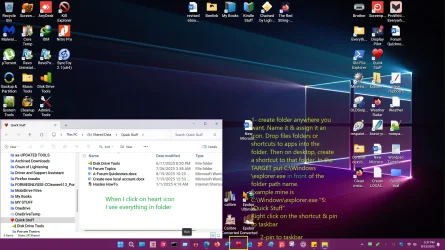
I just tried your suggestion of pinning a folder of programs to the Taskbar as a substitute for QL. When I did so, but I could not make it accessible via a flyout structure. Clicking on it opened the folder with the apps visible, but then you had to double-click on the app, and then also click to close the folder, resulting in 4 clicks instead of just 1 for QL. Is there a way of creating a flyout structure that I am missing?

The inability to separate apps pinned to the Taskbar from opened tabs is an inconvenience. Maybe I’ll get used to it, but it seems like a mess right now (see TaskBar 1 and 2), and it changes the physical layout every time you open a program (I did not realize that until I just tried it.)

@Helmut: I am not a new user of Win 11. I had purchased a new PC a few years back which had Win 11 Pro on it, and because I wanted to make sure that I was not rejecting it just because it was different, I tried using it for over a year. After multiple crashes with Windows Updates, I finally gave up on it, and downgraded the OS to Win 10 Pro. I used it by itself, as well as with mods.

I had tried the “Show Desktop” setting in TaskBar Behaviors, and saw no visible icon on my taskbar, and so had concluded that it was not working. I tried it again, and again saw no icon, but moving the cursor to the bottom corner switched me to the desktop. So, thanks for that—it saved precious real estate on my laptop.

I freely admit that there are holes in my knowledge of Win 11, which is why I posted here to get the benefit of the experience of others. I was not “intentionally googling for problems with Win 11”. However, when I see a thread of 200+ pages of problems and potential solutions written by users of an app, I will be cautious about it.

@hdmi: A special thanks for the very detailed response.

In my case, middle click of an open program in the Taskbar did not seem to open another instance, but rightclick did, so t hanks.

I apologize I was not clear. I want both the All programs as well as the tiles of the old Start Menu. It seems that I can get that from several of the “Start*” apps. I’m trying to see if there are any with the fewest hassles when Windows does its updates.

Looking at the photo you attached, is that your desktop? In that case, what do the icons on the taskbar like Edge accomplish? Is that like a QL toolbar, and how well does it work?

When you refer to “classic File Explorer runs pretty stable (at least IME),” you are talking about the Open-Shell one, right, not some Classic Explorer provided by Windows as a an alternative to the one with tabs? I agree that the “Better file size” mod is very useful—I currently use the FolderSizeExplorer app when I need this information, but it would be useful to have it by default.

Your comment re the new Windows File Explorer was an eye-opener. I have seen headlines raving about “File Explorer gets tabs!!!” As is often the case, one has to go to actual users who use PCs as a tool to accomplish something to get under the hood (is it “under the bonnet” in England?) and find what the actual usage experience is like.

Re QL, I’ll repeat what I said earlier: “I just tried your suggestion of pinning a folder of programs to the Taskbar as a substitute for QL. When I did so, but I could not make it accessible via a flyout structure. Clicking on it opened the folder with the apps visible, but then you had to double-click on the app, and then also click to close the folder, resulting in 4 clicks instead of just 1 for QL. Is there a way of creating a flyout structure that I am missing?”

I have copied and created a document containing what you did to recover from an ExplorerPatcher crash for my future reference.

Looks like you are recommending ExplorerPatcher with Open-Shell and Windhawk, and reinstalling ExplorerPatcher as needed. (I may have to adopt a simpler approach when I install Win11 on my wife’s next machine, but I won’t think of that now!) If I want to take an incremental approach, should it be ExplorerPatcher, try that, then add Open-shell and then Windhawk, if needed?

Also, thank you so much for the full elucidation of the KISS principle! I had never heard of the last phrase in it!
 

Attachments

  • TaskBar 2.webp
    TaskBar 2.webp
    7.9 KB · Views: 3
  • TaskBar 1.webp
    TaskBar 1.webp
    15.4 KB · Views: 3
Last edited:

My Computer

System One

  • OS
    windows 11 24h2 Pro
    Computer type
    Laptop
    Manufacturer/Model
    Lenovo
    CPU
    Intel(R) Core(TM) i5-8365U CPU @ 1.60GHz, 189
    Motherboard
    Lenovo 20QES3DM00 SDK0J40697 WIN
    Memory
    16GB
    Graphics Card(s)
    Intel UHD Graphics 620
    Sound Card
    Realtec Audio
I want both the All programs as well as the tiles of the old Start Menu. It seems that I can get that from several of the “Start*” apps. I’m trying to see if there are any with the fewest hassles when Windows does its updates.
ExplorerPatcher has an option to mimic the old Start Menu with tiles such a way that makes it very easy to use and also lets you choose between Display/Hide/Disable the App list. If you choose Display, the App list is kept visible between the tiles section on the right and the vertical bar on the left [that triggers the flyout when you hover your mouse on it or when you click on the hamburger icon at the top].

I found that all of the “Start*” apps have hassles even when Windows does not do its updates. I pointed this out to someone who was asking similar questions a long time ago here on ElevenForum. It didn't take that long before he arrived at the same conclusion as me. Here in your thread, there is a participant (whose name I will not mention) who got his underpants in a permanent twist over this subject. Personally, I, don't care for a Start Menu that looks like a phone, and that is regardless of whether it's Windows Phone 8/8.1 (the Windows 10 Start Menu) or some other phone (Windows 11). However, if you forced me to pick one that looks like a phone, the one from ExplorerPatcher still has my vote, because it has no real hassles besides the fact that it looks like a phone.
Looking at the photo you attached, is that your desktop? In that case, what do the icons on the taskbar like Edge accomplish? Is that like a QL toolbar, and how well does it work?
No, it's not my screenshot. It's from this page: windows-11-start-menu-styling-guide/Themes/Windows10/README.md at main · ramensoftware/windows-11-start-menu-styling-guide
I suppose that Edge was pinned to taskbar in that screenshot, but I really don't know.
When you refer to “classic File Explorer runs pretty stable (at least IME),” you are talking about the Open-Shell one, right, not some Classic Explorer provided by Windows as a an alternative to the one with tabs?
"classic File Explorer" is the File Explorer with ribbon (instead of tabs) that belongs to Windows 10 and that still currently exists in Windows 11 (although hidden, or kind of...).

Whereas Open-Shell's "Classic Explorer" component is an optional component that belongs to Open-Shell, and that uses its own separate settings window panel to leverage several many extra customization options to customize File Explorer. One of these options is the ability to add a customizable toolbar to File Explorer, and, this toolbar also lets you add custom commands. It also is possible to create special batch scripts that don't work the same way as normal batch scripts but that you can assign to custom commands for more advanced actions. This particular batch scripting feature is a bit of a niche within a niche. I use it, it is documented in the .chm help file that comes included with Open-Shell and its exalted ancestor, ClassicShell by Ivo Beltchev.
Your comment re the new Windows File Explorer was an eye-opener. I have seen headlines raving about “File Explorer gets tabs!!!”
Anyone who has ever googled why File Explorer with tabs sucks deserves a medal IMO.
Re QL, I’ll repeat what I said earlier: “I just tried your suggestion of pinning a folder of programs to the Taskbar as a substitute for QL. When I did so, but I could not make it accessible via a flyout structure. Clicking on it opened the folder with the apps visible, but then you had to double-click on the app, and then also click to close the folder, resulting in 4 clicks instead of just 1 for QL. Is there a way of creating a flyout structure that I am missing?”
The whole idea behind QuickLaunch was to be able to launch items from the area right next to the Start button with exactly one single mouseclick. No flyouts, no menus, no compromise. Just click, and click quick. I put the Show desktop shortcut in mine because having to move my mouse to the other end of the taskbar just wears me out each time when I am not doing anything else with my mouse near that area.

If you're missing a way of creating a flyout structure, you're simply missing the point.
Looks like you are recommending ExplorerPatcher with Open-Shell and Windhawk, and reinstalling ExplorerPatcher as needed. (I may have to adopt a simpler approach when I install Win11 on my wife’s next machine, but I won’t think of that now!) If I want to take an incremental approach, should it be ExplorerPatcher, try that, then add Open-shell and then Windhawk, if needed?
You could try ExplorerPatcher first if that's what you want. It has an option to export/import its settings to/from a file, and, like I said, since before the end of last year, for me anyway, the problem of the explorer process failing to start after an update has no longer occurred. ExplorerPatcher also remembers its settings even after you reinstall it.

Next, you could try Open-Shell to see if you like its Start Menu possibilities. It too has an option to export/import its settings. Also, it has a Controls tab in its settings where you can assign its Start Menu (Open-Shell Menu) to different keyboard/mouse actions, e.g., "Shift+Win" and "Shift+Click". Then when you assign the Windows Start Menu to "Windows Key" and "Left Click", you can still open the default (Windows 11) Start Menu like normal (at least if we can assume that ExplorerPatcher is not installed or that the Start menu style setting thereof isn't set to "Windows 10"), and also you can open the Open-Shell Menu by holding down Shift when you press Win or when you click on the Start button. If you do that, you can more easily familiarize with Open-Shell Menu and the numerous customization options that it has. Then, should you decide to make it your preferred Start Menu, you can re-assign these keyboard/mouse actions so they meet that new preference.

As for the "if needed" in "then add Open-Shell and then Windhawk, if needed". To me, personally, all of them are "needed". lol You can get seriously overwhelmed just by looking at all the settings, but the good news is that many of the options are fairly self-explanatory and the documentation usually helps to fill in the gaps plus you can always ask questions here and on GitHub.
 

My Computers

System One System Two

  • OS
    11 Home
    Computer type
    Laptop
    Manufacturer/Model
    Asus TUF Gaming F16 (2024)
    CPU
    i7 13650HX
    Memory
    16GB DDR5
    Graphics Card(s)
    GeForce RTX 4060 Mobile
    Sound Card
    Eastern Electric MiniMax DAC Supreme; Emotiva UMC-200; Astell & Kern AK240
    Monitor(s) Displays
    Sony Bravia XR-55X90J
    Screen Resolution
    3840×2160
    Hard Drives
    512GB SSD internal
    37TB external
    PSU
    Li-ion
    Cooling
    2× Arc Flow Fans, 4× exhaust vents, 5× heatpipes
    Keyboard
    Logitech K800
    Mouse
    Logitech G402
    Internet Speed
    30Mbit/s up, 500Mbit/s down
    Browser
    FF
    Antivirus
    What's an antivirus?
  • Operating System
    11 Home
    Computer type
    Laptop
    Manufacturer/Model
    Medion S15450
    CPU
    i5 1135G7
    Memory
    16GB DDR4
    Graphics card(s)
    Intel Iris Xe
    Sound Card
    Eastern Electric MiniMax DAC Supreme; Emotiva UMC-200; Astell & Kern AK240
    Monitor(s) Displays
    Sony Bravia XR-55X90J
    Screen Resolution
    3840×2160
    Hard Drives
    2TB SSD internal
    37TB external
    PSU
    Li-ion
    Keyboard
    Logitech K800
    Mouse
    Logitech G402
    Internet Speed
    30Mbit/s up, 500Mbit/s down
    Browser
    FF
I put the Show desktop shortcut in mine because having to move my mouse to the other end of the taskbar just wears me out each time when I am not doing anything else with my mouse near that area.
I use the Peek feature a lot, though.

10426.webp
 

My Computers

System One System Two

  • OS
    Windows 11 Pro
    Computer type
    PC/Desktop
    Manufacturer/Model
    ASUS ROG Strix
  • Operating System
    Windows 11 Pro
    Computer type
    Laptop
    Manufacturer/Model
    ASUS VivoBook
The whole idea behind QuickLaunch was to be able to launch items from the area right next to the Start button with exactly one single mouseclick. No flyouts, no menus, no compromise. Just click, and click quick.
In my system, where I have the taskbar modified by Windhawk, no real Quicklaunch (like in Win10) is possible (as far as I have found out).
Did not want to load extra tweaking apps like ExplorerPatcher or StartAllBack, because of possible conflicts with Windhawk.
Beside Windhawk I only have Open Shell to modify the startmenu to my wishes...
Yet I have made the left part of the taskbar as such, that I have a simulated Quicklaunch there.
This is how I did that:
  • Downloaded the litlle app 'Nircmd'
  • Copied the file nircmd.exe to the Windows folder
  • Made a folder 'Quicklaunch' somewhere on the data partition (but could have been made anywhere else)
  • Made shortcuts in the that folder like this:
    • Dokumenten (Documents) location: C:\Windows\explorer.exe D:\
    • Werkgebied (Scratch Area in RAM-disk) location: C:\Windows\explorer.exe Z:\Werkgebied
    • Mail location: C:\Windows\nircmd.exe exec show "C:\Program Files (x86)\eM Client\MailClient.exe"
    • Firefox location: C:\Windows\nircmd.exe exec hide "C:\Program Files Portable\Mozilla Firefox\firefox.exe"
  • Attached appropiate icons to the shortcuts (as far as they were not already there).
  • All 4 shortcuts I copied to the taskbar by the normal Win option and moved them to the left of that taskbar.
Taskbar now is looking like this:
000552.webp
When I click one of them, a separate taskbar item will appear, like the Firefox items in the screenshot example.
When I close those windows, the normal Firefox symbol on the left will stay.
So I really simulated the Quicklaunch without needing some other tweaking app.

I could have done it the same as well without Windhawk, but I need that app for changing the taskbar size and color.
If one only would use the simulated QuickLaunch method, the taskbar part would be hifher and have another color.

It only would be somewhat more complicated to use this method, if one would want to have many entries in the quicklaunch, because it would be neccesary to make such a shortcut for every command.
 

My Computer

System One

  • OS
    Windows 11 Pro 25H2 26200.8457
    Computer type
    PC/Desktop
    Manufacturer/Model
    Build by vendor to my specs
    CPU
    AMD Ryzen 7 5700G
    Motherboard
    MSI PRO B550M-P Gen3
    Memory
    Kingston FURY Beast 2x16GB DIMM DDR4 2666 CL16
    Graphics Card(s)
    MSI GeForce GT 730 2GB LP V1
    Sound Card
    Creative Sound Blaster Audigy FX
    Monitor(s) Displays
    Samsung S24E450F 24"
    Screen Resolution
    1920 x 1080
    Hard Drives
    1. SSD Crucial P5 Plus 500GB PCIe M.2
    2. SSD-SATA Crucial MX500-2TB
    PSU
    Corsair CV650W
    Case
    Cooler Master Silencio S400
    Cooling
    Cooler Master Hyper H412R with Be Quiet Pure Wings 2 PWM BL038 fan
    Keyboard
    Cherry Stream (wired, scissor keys)
    Mouse
    Asus WT465 (wireless)
    Internet Speed
    70 Mbps down / 80 Mbps up
    Browser
    Firefox 130.0
    Antivirus
    F-Secure (Internetprovider version)
    Other Info
    Router: FRITZBox 7490
    Oracle VirtualBox 7 for testing software on Win 10 or 11
@antspants: I have used Start11 in the past….did it start life as Start8 when MS tried to force PC users to act like tablet users?

I will take a look at it again.

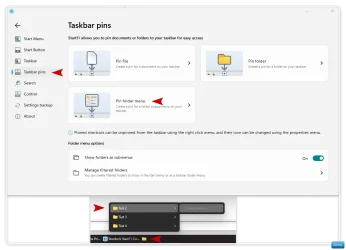
Hi

I created a test folder in File Explorer and added 3 (empty) folders into that test folder. I could have kept going adding more test folders to the first test folders etc etc.

The results are fine, they work well.

Clip-1854.webp
 

My Computers

System One System Two

  • OS
    Windows 11 Pro 25H2 Build 26200.8655
    Computer type
    PC/Desktop
    Manufacturer/Model
    Sin-built 2013
    CPU
    Intel(R) Core(TM) i7-4770K CPU @ 3.50GHz
    Motherboard
    ASUS ROG Maximus VI Formula
    Memory
    32.0 GB of I forget and the box is in storage.
    Graphics Card(s)
    Gigabyte nVidia GeForce GTX 1660 Super OC 6GB
    Sound Card
    Onboard thingy
    Monitor(s) Displays
    5 x LG 25MS500-B - 1 x 24MK430H-B - 1 x Wacom Pro 22" Touch Screen Tablet
    Screen Resolution
    All over the place
    Hard Drives
    Too many to list.
    OS on Samsung 1TB 870 QVO SATA
    PSU
    Silverstone 1500
    Case
    NZXT Phantom 820 Full-Tower Case
    Cooling
    Noctua NH-D15 Elite Class Dual Tower CPU Cooler / 6 x EziDIY 120mm / 2 x Corsair 140mm somethings / 1 x 140mm Thermaltake something / 2 x 200mm Corsair.
    Keyboard
    Corsair K95 / Logitech diNovo Edge Wireless
    Mouse
    Logitech: G402 / G502 / Mx Masters / Mx Air Cordless
    Internet Speed
    2000/500Mbps
    Browser
    All sorts
    Antivirus
    Kaspersky Premium
    Other Info
    ㅤㅤㅤㅤㅤㅤㅤㅤㅤㅤㅤㅤㅤㅤㅤㅤㅤㅤㅤㅤㅤㅤㅤㅤㅤㅤㅤㅤㅤㅤㅤㅤㅤㅤㅤㅤㅤㅤㅤㅤ⠀⠀⠀⠀⠀⠀⠀⠀⠀⠀
    TP-Link BE9300 WiFi 7 Bluetooth 5.4 (Archer TBE550E)
    TP-Link TX201 V1 2.5GB Lan

    Grandstream HT812 - VoIP
    ASUS DSL-AX82U - Mesh
    ASUS RT-AC68U - Mesh
    ASUS RT-BE88U Router

    Brother MFC-L2880DW Printer

    I’m on a horse.
  • Operating System
    Windows 11 Pro 25H2 Build 26200.8655
    Computer type
    Laptop
    Manufacturer/Model
    LENOVO Yoga 7 14IRL8 - 7i EVO OLED 14" Touchscreen i5 12 Core 16GB/512GB
    CPU
    Intel Core 12th Gen i5-1240P Processor (1.7 - 4.4GHz)
    Memory
    16GB LPDDR5 RAM
    Graphics card(s)
    Intel Iris Xe Graphics Processor
    Sound Card
    Optimized with Dolby Atmos®
    Screen Resolution
    QHD 2880 x 1800 OLED
    Hard Drives
    M.2 512GB
    Antivirus
    Defender / Malwarebytes
    Other Info
    …still on a horse.
Win-1855.webp
 

My Computers

System One System Two

  • OS
    Windows 11 Pro 25H2 Build 26200.8655
    Computer type
    PC/Desktop
    Manufacturer/Model
    Sin-built 2013
    CPU
    Intel(R) Core(TM) i7-4770K CPU @ 3.50GHz
    Motherboard
    ASUS ROG Maximus VI Formula
    Memory
    32.0 GB of I forget and the box is in storage.
    Graphics Card(s)
    Gigabyte nVidia GeForce GTX 1660 Super OC 6GB
    Sound Card
    Onboard thingy
    Monitor(s) Displays
    5 x LG 25MS500-B - 1 x 24MK430H-B - 1 x Wacom Pro 22" Touch Screen Tablet
    Screen Resolution
    All over the place
    Hard Drives
    Too many to list.
    OS on Samsung 1TB 870 QVO SATA
    PSU
    Silverstone 1500
    Case
    NZXT Phantom 820 Full-Tower Case
    Cooling
    Noctua NH-D15 Elite Class Dual Tower CPU Cooler / 6 x EziDIY 120mm / 2 x Corsair 140mm somethings / 1 x 140mm Thermaltake something / 2 x 200mm Corsair.
    Keyboard
    Corsair K95 / Logitech diNovo Edge Wireless
    Mouse
    Logitech: G402 / G502 / Mx Masters / Mx Air Cordless
    Internet Speed
    2000/500Mbps
    Browser
    All sorts
    Antivirus
    Kaspersky Premium
    Other Info
    ㅤㅤㅤㅤㅤㅤㅤㅤㅤㅤㅤㅤㅤㅤㅤㅤㅤㅤㅤㅤㅤㅤㅤㅤㅤㅤㅤㅤㅤㅤㅤㅤㅤㅤㅤㅤㅤㅤㅤㅤ⠀⠀⠀⠀⠀⠀⠀⠀⠀⠀
    TP-Link BE9300 WiFi 7 Bluetooth 5.4 (Archer TBE550E)
    TP-Link TX201 V1 2.5GB Lan

    Grandstream HT812 - VoIP
    ASUS DSL-AX82U - Mesh
    ASUS RT-AC68U - Mesh
    ASUS RT-BE88U Router

    Brother MFC-L2880DW Printer

    I’m on a horse.
  • Operating System
    Windows 11 Pro 25H2 Build 26200.8655
    Computer type
    Laptop
    Manufacturer/Model
    LENOVO Yoga 7 14IRL8 - 7i EVO OLED 14" Touchscreen i5 12 Core 16GB/512GB
    CPU
    Intel Core 12th Gen i5-1240P Processor (1.7 - 4.4GHz)
    Memory
    16GB LPDDR5 RAM
    Graphics card(s)
    Intel Iris Xe Graphics Processor
    Sound Card
    Optimized with Dolby Atmos®
    Screen Resolution
    QHD 2880 x 1800 OLED
    Hard Drives
    M.2 512GB
    Antivirus
    Defender / Malwarebytes
    Other Info
    …still on a horse.

Latest Support Threads

Back
Top Bottom