Cannot get WD exterior drives to go to sleep


rfhar

Active member
Member
Local time
1:16 AM
Posts
98
OS
Win 11 home 23H2
I use these drives Everyday other day for backups as such I wanted to have them go to sleep when not used.

My two drives are not going to sleep. I have used WD Utilities, and both have the sleep timer toggled off. The Device Manager also is set to allow the drives to be shut off.
Windows Home 23H2 64bit Firmware version 01.01a01

My passport 2626
P/N WDBPKJ0050BBPK-OA S/N WX62D836KHPE Model # WDC WD50NDZW-11BCSS1

My Passport 2627
P/N WDPBKJ0040BBK-0B S/N WX51796PU2J Model # WDC WD40NDZW-11MR8S0

Any Ideas?
 

My Computer My Computer

At a glance

Win 11 home 23H23.6 Mhz Intel Core i7 Core i7-9700KGSKILL Ripjaws 16GB DDR4 MemoryGigabyte GeForce GTX 1050i Graphics
OS
Win 11 home 23H2
Computer type
PC/Desktop
Manufacturer/Model
Custom
CPU
3.6 Mhz Intel Core i7 Core i7-9700K
Motherboard
Asus Prime Z390-A Motherboard
Memory
GSKILL Ripjaws 16GB DDR4 Memory
Graphics Card(s)
Gigabyte GeForce GTX 1050i Graphics
Sound Card
MoBo
Monitor(s) Displays
HP M22fFHD monitor
Screen Resolution
1920 x 1080
Hard Drives
SHGP-31-1000GM SSD
SAMSUNG 850 PRO 2.5" 256GB SSD
1 Tetra Seagate ST1000DX001-1NS162
Exterior Gotega CD/DVD
PSU
600 Watt power supply
Case
Fractal Design Meshify C case
Cooling
Cooler Master 120mm CPU Cooler
Keyboard
Iogi K540
Mouse
Logi 310Edge
Internet Speed
7GB Down - - -IGB Up
Browser
Brave mostly lately
Antivirus
Windows
Other Info
Win11 ver 23H2 (OS Build 22361.3085
I have used WD Utilities, and both have the sleep timer toggled off.


Maybe you should toggle that... ON, if possible?
I'm guessing they can't sleep if the sleep timer is toggled OFF.


As far as I know... storage hard drives don't do anything, unless they are being accessed.
So putting them to sleep, doesn't make much sense.
I could be wrong, I don't know.
I don't use sleep for anything, on a desktop PC.


Also, I gave you ten points for filling out your computer specs. :-)
 
Last edited:

My Computers My Computers

  • At a glance

    Win 11 Home ♦♦♦26200.8655 ♦♦♦♦♦♦♦25H2AMD Ryzen 7 3700XG.Skill (F4-3200C14D-16GTZKW)EVGA RTX 2070 (08G-P4-2171-KR)
    OS
    Win 11 Home ♦♦♦26200.8655 ♦♦♦♦♦♦♦25H2
    Computer type
    PC/Desktop
    Manufacturer/Model
    Built by Ghot® [May 2020]
    CPU
    AMD Ryzen 7 3700X
    Motherboard
    Asus Pro WS X570-ACE (BIOS 5302)
    Memory
    G.Skill (F4-3200C14D-16GTZKW)
    Graphics Card(s)
    EVGA RTX 2070 (08G-P4-2171-KR)
    Sound Card
    Realtek ALC1220P / ALC S1220A
    Monitor(s) Displays
    Dell U3011 30"
    Screen Resolution
    2560 x 1600
    Hard Drives
    2x Samsung 860 EVO 500GB,
    WD 4TB Black FZBX - SATA III,
    WD 8TB Black FZBX - SATA III,
    DRW-24B1ST CD/DVD Burner
    PSU
    PC Power & Cooling 750W Quad EPS12V
    Case
    Cooler Master ATCS 840 Tower
    Cooling
    CM Hyper 212 EVO (push/pull)
    Keyboard
    Ducky DK9008 Shine II Blue LED
    Mouse
    Logitech Optical M-100
    Internet Speed
    300/300
    Browser
    Firefox (latest)
    Antivirus
    Bitdefender Total Security
    Other Info
    Speakers: Klipsch Pro Media 2.1
  • At a glance

    Windows XP Pro 32bit w/SP3AMD Athlon 64 X2 5000+ (OC'd @ 3.2Ghz)TWIN2X2048-6400C4DHX (2 x 1GB, DDR2 800)EVGA 256-P2-N758-TR GeForce 8600GT SSC
    Operating System
    Windows XP Pro 32bit w/SP3
    Computer type
    PC/Desktop
    Manufacturer/Model
    Built by Ghot® (not in use)
    CPU
    AMD Athlon 64 X2 5000+ (OC'd @ 3.2Ghz)
    Motherboard
    ASUS M2N32-SLI Deluxe Wireless Edition
    Memory
    TWIN2X2048-6400C4DHX (2 x 1GB, DDR2 800)
    Graphics card(s)
    EVGA 256-P2-N758-TR GeForce 8600GT SSC
    Sound Card
    Onboard
    Monitor(s) Displays
    ViewSonic G90FB Black 19" Professional (CRT)
    Screen Resolution
    up to 2048 x 1536
    Hard Drives
    WD 36GB 10,000rpm Raptor SATA
    Seagate 80GB 7200rpm SATA
    Lite-On LTR-52246S CD/RW
    Lite-On LH-18A1P CD/DVD Burner
    PSU
    PC Power & Cooling Silencer 750 Quad EPS12V
    Case
    Generic Beige case, 80mm fans
    Cooling
    ZALMAN 9500A 92mm CPU Cooler
    Keyboard
    Logitech Classic Keybooard 200
    Mouse
    Logitech Optical M-BT96a
    Internet Speed
    300/300
    Browser
    Firefox 3.x ??
    Antivirus
    Symantec (Norton)
    Other Info
    Still assembled, still runs. Haven't turned it on for 15 years?
A word of caution: It is always best to keep the drive where you keep the system images disconneted when not in use. If a power surge or other unusual event got into your computer, any connected device could be affected. Not only that, but there's always a possibility if anyone ever hacked into your system, they could render your computer AND the images useless. Better to be safe than sorry.
 

My Computers My Computers

  • At a glance

    Windows 11 Pro 25H2 26200.8655i9-10900 10 core 20 threads32 gbnone-Intel UHD Graphics 630
    OS
    Windows 11 Pro 25H2 26200.8655
    Computer type
    PC/Desktop
    Manufacturer/Model
    Dell Optiplex 7080
    CPU
    i9-10900 10 core 20 threads
    Motherboard
    DELL 0J37VM
    Memory
    32 gb
    Graphics Card(s)
    none-Intel UHD Graphics 630
    Sound Card
    Integrated Realtek
    Monitor(s) Displays
    Benq 27
    Screen Resolution
    2560x1440
    Hard Drives
    2x1tb Solidigm m.2 nvme /External drives 512gb Samsung m.2 sata+2tb Kingston m2.nvme
    PSU
    500w
    Case
    MT
    Cooling
    Dell Premium
    Keyboard
    Logitech wired
    Mouse
    Logitech wireless
    Internet Speed
    so slow I'm too embarrassed to tell
    Browser
    #1 Edge #2 Firefox
    Antivirus
    Defender+MWB Premium
  • At a glance

    Windows 11 Pro 24H2 26200.8457AMD Ryzen 7 6800U32 gbintegrated
    Operating System
    Windows 11 Pro 24H2 26200.8457
    Computer type
    PC/Desktop
    Manufacturer/Model
    Beelink Mini PC SER5
    CPU
    AMD Ryzen 7 6800U
    Memory
    32 gb
    Graphics card(s)
    integrated
    Sound Card
    integrated
    Monitor(s) Displays
    Benq 27
    Screen Resolution
    2560x1440
    Hard Drives
    1TB Crucial nvme
    Keyboard
    Logitech wired
    Mouse
    Logitech wireless
    Internet Speed
    still too embarrassed to tell
    Browser
    Firefox
    Antivirus
    Defender
    Other Info
    System 3 is non compliant Dell 9020 i7-4770/24gb ram Win11 PRO 26200.8457
A word of caution: It is always best to keep the drive where you keep the system images disconnected when not in use. If a power surge or other unusual event got into your computer, any connected device could be affected. Not only that, but there's always a possibility if anyone ever hacked into your system, they could render your computer AND the images useless. Better to be safe than sorry.
I have been thinking about that, but it will be changing decades of habit. I back up to two different HD's M/W and T/TH because one time when I had two (paired/ RAID) they both failed at the same time, and I spent a lot of hours digging out my wife's unfinished book. I do not use RAID anymore and if I do it will be a hardware RAID not Microsoft's software RAID. I backup at night as above and alternately every other week and month on each of my hard drives. I am not sure it will be safe from hackers if the hard drive is turned off and left connected. As such I would have to rely on a Calander to remind me to use the disconnected HD. I am eager for your further input on a better way to safely backup.
 

My Computer My Computer

At a glance

Win 11 home 23H23.6 Mhz Intel Core i7 Core i7-9700KGSKILL Ripjaws 16GB DDR4 MemoryGigabyte GeForce GTX 1050i Graphics
OS
Win 11 home 23H2
Computer type
PC/Desktop
Manufacturer/Model
Custom
CPU
3.6 Mhz Intel Core i7 Core i7-9700K
Motherboard
Asus Prime Z390-A Motherboard
Memory
GSKILL Ripjaws 16GB DDR4 Memory
Graphics Card(s)
Gigabyte GeForce GTX 1050i Graphics
Sound Card
MoBo
Monitor(s) Displays
HP M22fFHD monitor
Screen Resolution
1920 x 1080
Hard Drives
SHGP-31-1000GM SSD
SAMSUNG 850 PRO 2.5" 256GB SSD
1 Tetra Seagate ST1000DX001-1NS162
Exterior Gotega CD/DVD
PSU
600 Watt power supply
Case
Fractal Design Meshify C case
Cooling
Cooler Master 120mm CPU Cooler
Keyboard
Iogi K540
Mouse
Logi 310Edge
Internet Speed
7GB Down - - -IGB Up
Browser
Brave mostly lately
Antivirus
Windows
Other Info
Win11 ver 23H2 (OS Build 22361.3085
Maybe you should toggle that... ON, if possible?
I'm guessing they can't sleep if the sleep timer is toggled OFF.


As far as I know... storage hard drives don't do anything, unless they are being accessed.
So putting them to sleep, doesn't make much sense.
I could be wrong, I don't know.
I don't use sleep for anything, on a desktop PC.


Also, I gave you ten points for filling out your computer specs. :-)
having it on is where I started, WD support told me to shut it off. After they tried everything they could think of I was told to just turn the HD's off 😒.
 

My Computer My Computer

At a glance

Win 11 home 23H23.6 Mhz Intel Core i7 Core i7-9700KGSKILL Ripjaws 16GB DDR4 MemoryGigabyte GeForce GTX 1050i Graphics
OS
Win 11 home 23H2
Computer type
PC/Desktop
Manufacturer/Model
Custom
CPU
3.6 Mhz Intel Core i7 Core i7-9700K
Motherboard
Asus Prime Z390-A Motherboard
Memory
GSKILL Ripjaws 16GB DDR4 Memory
Graphics Card(s)
Gigabyte GeForce GTX 1050i Graphics
Sound Card
MoBo
Monitor(s) Displays
HP M22fFHD monitor
Screen Resolution
1920 x 1080
Hard Drives
SHGP-31-1000GM SSD
SAMSUNG 850 PRO 2.5" 256GB SSD
1 Tetra Seagate ST1000DX001-1NS162
Exterior Gotega CD/DVD
PSU
600 Watt power supply
Case
Fractal Design Meshify C case
Cooling
Cooler Master 120mm CPU Cooler
Keyboard
Iogi K540
Mouse
Logi 310Edge
Internet Speed
7GB Down - - -IGB Up
Browser
Brave mostly lately
Antivirus
Windows
Other Info
Win11 ver 23H2 (OS Build 22361.3085
Alternating images between 2 drives is a good idea.
I know it's a personal choice, so it's up to you how often you do it, but If this is a personal system rather than a business one, full images 4 days a week seen a little bit overkill to me. May I ask what exactly you do that your feel you need to create full images that often.
 

My Computers My Computers

  • At a glance

    Windows 11 Pro 25H2 26200.8655i9-10900 10 core 20 threads32 gbnone-Intel UHD Graphics 630
    OS
    Windows 11 Pro 25H2 26200.8655
    Computer type
    PC/Desktop
    Manufacturer/Model
    Dell Optiplex 7080
    CPU
    i9-10900 10 core 20 threads
    Motherboard
    DELL 0J37VM
    Memory
    32 gb
    Graphics Card(s)
    none-Intel UHD Graphics 630
    Sound Card
    Integrated Realtek
    Monitor(s) Displays
    Benq 27
    Screen Resolution
    2560x1440
    Hard Drives
    2x1tb Solidigm m.2 nvme /External drives 512gb Samsung m.2 sata+2tb Kingston m2.nvme
    PSU
    500w
    Case
    MT
    Cooling
    Dell Premium
    Keyboard
    Logitech wired
    Mouse
    Logitech wireless
    Internet Speed
    so slow I'm too embarrassed to tell
    Browser
    #1 Edge #2 Firefox
    Antivirus
    Defender+MWB Premium
  • At a glance

    Windows 11 Pro 24H2 26200.8457AMD Ryzen 7 6800U32 gbintegrated
    Operating System
    Windows 11 Pro 24H2 26200.8457
    Computer type
    PC/Desktop
    Manufacturer/Model
    Beelink Mini PC SER5
    CPU
    AMD Ryzen 7 6800U
    Memory
    32 gb
    Graphics card(s)
    integrated
    Sound Card
    integrated
    Monitor(s) Displays
    Benq 27
    Screen Resolution
    2560x1440
    Hard Drives
    1TB Crucial nvme
    Keyboard
    Logitech wired
    Mouse
    Logitech wireless
    Internet Speed
    still too embarrassed to tell
    Browser
    Firefox
    Antivirus
    Defender
    Other Info
    System 3 is non compliant Dell 9020 i7-4770/24gb ram Win11 PRO 26200.8457
Alternating images between 2 drives is a good idea.
I know it's a personal choice, so it's up to you how often you do it, but If this is a personal system rather than a business one, full images 4 days a week seen a little bit overkill to me. May I ask what exactly you do that your feel you need to create full images that often.
Making a differential or such and having it just seemed too much confusion after a while when looking at the backup saved and picking out what I want to restore out of a full page(S) of files. Besides, it is doing the job while I'm sleeping. Also, I have backups on two exterior drives and all my Folders are up to date without having to pay for the ability to do file and folder backups.
 

My Computer My Computer

At a glance

Win 11 home 23H23.6 Mhz Intel Core i7 Core i7-9700KGSKILL Ripjaws 16GB DDR4 MemoryGigabyte GeForce GTX 1050i Graphics
OS
Win 11 home 23H2
Computer type
PC/Desktop
Manufacturer/Model
Custom
CPU
3.6 Mhz Intel Core i7 Core i7-9700K
Motherboard
Asus Prime Z390-A Motherboard
Memory
GSKILL Ripjaws 16GB DDR4 Memory
Graphics Card(s)
Gigabyte GeForce GTX 1050i Graphics
Sound Card
MoBo
Monitor(s) Displays
HP M22fFHD monitor
Screen Resolution
1920 x 1080
Hard Drives
SHGP-31-1000GM SSD
SAMSUNG 850 PRO 2.5" 256GB SSD
1 Tetra Seagate ST1000DX001-1NS162
Exterior Gotega CD/DVD
PSU
600 Watt power supply
Case
Fractal Design Meshify C case
Cooling
Cooler Master 120mm CPU Cooler
Keyboard
Iogi K540
Mouse
Logi 310Edge
Internet Speed
7GB Down - - -IGB Up
Browser
Brave mostly lately
Antivirus
Windows
Other Info
Win11 ver 23H2 (OS Build 22361.3085
In Device Manager - check the Universal Bus Controllers - right click on each and check at Power Management - to see if all are ticked for Power Saving.

Same goes for your Advanced Power Plan Settings - Turn Off Hard Disk After (since the system is plugged in - it's usually set to Never).

There's also the possibility - that something keeps accessing the drive - at low enough intervals so it can't go to Sleep.
 

My Computer My Computer

At a glance

WinDOS 25H2Intel & AMDSO-DIMM SK Hynix 15.8 GB Dual-Channel DDR4-26...nVidia RTX 2060 6GB Mobile GPU (TU106M)
OS
WinDOS 25H2
Computer type
Laptop
CPU
Intel & AMD
Memory
SO-DIMM SK Hynix 15.8 GB Dual-Channel DDR4-2666 (2 x 8 GB) 1329MHz (19-19-19-43)
Graphics Card(s)
nVidia RTX 2060 6GB Mobile GPU (TU106M)
Sound Card
Onbord Realtek ALC1220
Screen Resolution
1920 x 1080
Hard Drives
1x Samsung PM981 NVMe PCIe M.2 512GB / 1x Seagate Expansion ST1000LM035 1TB
In Device Manager - check the Universal Bus Controllers - right click on each and check at Power Management - to see if all are ticked for Power Saving.

Same goes for your Advanced Power Plan Settings - Turn Off Hard Disk After (since the system is plugged in - it's usually set to Never).

There's also the possibility - that something keeps accessing the drive - at low enough intervals so it can't go to Sleep.
Been there all is OK. How can I check to what is accessing the HD's
 

My Computer My Computer

At a glance

Win 11 home 23H23.6 Mhz Intel Core i7 Core i7-9700KGSKILL Ripjaws 16GB DDR4 MemoryGigabyte GeForce GTX 1050i Graphics
OS
Win 11 home 23H2
Computer type
PC/Desktop
Manufacturer/Model
Custom
CPU
3.6 Mhz Intel Core i7 Core i7-9700K
Motherboard
Asus Prime Z390-A Motherboard
Memory
GSKILL Ripjaws 16GB DDR4 Memory
Graphics Card(s)
Gigabyte GeForce GTX 1050i Graphics
Sound Card
MoBo
Monitor(s) Displays
HP M22fFHD monitor
Screen Resolution
1920 x 1080
Hard Drives
SHGP-31-1000GM SSD
SAMSUNG 850 PRO 2.5" 256GB SSD
1 Tetra Seagate ST1000DX001-1NS162
Exterior Gotega CD/DVD
PSU
600 Watt power supply
Case
Fractal Design Meshify C case
Cooling
Cooler Master 120mm CPU Cooler
Keyboard
Iogi K540
Mouse
Logi 310Edge
Internet Speed
7GB Down - - -IGB Up
Browser
Brave mostly lately
Antivirus
Windows
Other Info
Win11 ver 23H2 (OS Build 22361.3085
How can I check to what is accessing the HD's


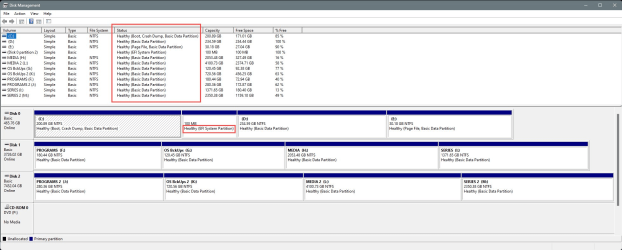
What backup software are you using?
And please connect the external drives and post a screenshot of Disk Management.
Either of these might give a clue to what is accessing your external drives.

You need to expand the Disk Management window, so we can "see" everything.
Mainly the things in the RED boxes...

000000 Disk Management - GOOD.png


________________________________________________________________________________________________________________

To post a screenshot on this forum...​

1. Take the screenshot, (or camera pic), edit it as desired, save to your desktop as .png or .jpg (max. size = 2MB)
2. Left click in your post, where you want to place the screenshot.
3. Click the Attach Files button at lower left, browse to your pic and click Insert.
4. After clicking Insert, I usually choose the Thumbnail (smaller) option, or there is a Full Image (larger) option.

If the "new" PrtSc key function is not to your liking... here is how to set it back to it's classic function...

 
Last edited:

My Computers My Computers

  • At a glance

    Win 11 Home ♦♦♦26200.8655 ♦♦♦♦♦♦♦25H2AMD Ryzen 7 3700XG.Skill (F4-3200C14D-16GTZKW)EVGA RTX 2070 (08G-P4-2171-KR)
    OS
    Win 11 Home ♦♦♦26200.8655 ♦♦♦♦♦♦♦25H2
    Computer type
    PC/Desktop
    Manufacturer/Model
    Built by Ghot® [May 2020]
    CPU
    AMD Ryzen 7 3700X
    Motherboard
    Asus Pro WS X570-ACE (BIOS 5302)
    Memory
    G.Skill (F4-3200C14D-16GTZKW)
    Graphics Card(s)
    EVGA RTX 2070 (08G-P4-2171-KR)
    Sound Card
    Realtek ALC1220P / ALC S1220A
    Monitor(s) Displays
    Dell U3011 30"
    Screen Resolution
    2560 x 1600
    Hard Drives
    2x Samsung 860 EVO 500GB,
    WD 4TB Black FZBX - SATA III,
    WD 8TB Black FZBX - SATA III,
    DRW-24B1ST CD/DVD Burner
    PSU
    PC Power & Cooling 750W Quad EPS12V
    Case
    Cooler Master ATCS 840 Tower
    Cooling
    CM Hyper 212 EVO (push/pull)
    Keyboard
    Ducky DK9008 Shine II Blue LED
    Mouse
    Logitech Optical M-100
    Internet Speed
    300/300
    Browser
    Firefox (latest)
    Antivirus
    Bitdefender Total Security
    Other Info
    Speakers: Klipsch Pro Media 2.1
  • At a glance

    Windows XP Pro 32bit w/SP3AMD Athlon 64 X2 5000+ (OC'd @ 3.2Ghz)TWIN2X2048-6400C4DHX (2 x 1GB, DDR2 800)EVGA 256-P2-N758-TR GeForce 8600GT SSC
    Operating System
    Windows XP Pro 32bit w/SP3
    Computer type
    PC/Desktop
    Manufacturer/Model
    Built by Ghot® (not in use)
    CPU
    AMD Athlon 64 X2 5000+ (OC'd @ 3.2Ghz)
    Motherboard
    ASUS M2N32-SLI Deluxe Wireless Edition
    Memory
    TWIN2X2048-6400C4DHX (2 x 1GB, DDR2 800)
    Graphics card(s)
    EVGA 256-P2-N758-TR GeForce 8600GT SSC
    Sound Card
    Onboard
    Monitor(s) Displays
    ViewSonic G90FB Black 19" Professional (CRT)
    Screen Resolution
    up to 2048 x 1536
    Hard Drives
    WD 36GB 10,000rpm Raptor SATA
    Seagate 80GB 7200rpm SATA
    Lite-On LTR-52246S CD/RW
    Lite-On LH-18A1P CD/DVD Burner
    PSU
    PC Power & Cooling Silencer 750 Quad EPS12V
    Case
    Generic Beige case, 80mm fans
    Cooling
    ZALMAN 9500A 92mm CPU Cooler
    Keyboard
    Logitech Classic Keybooard 200
    Mouse
    Logitech Optical M-BT96a
    Internet Speed
    300/300
    Browser
    Firefox 3.x ??
    Antivirus
    Symantec (Norton)
    Other Info
    Still assembled, still runs. Haven't turned it on for 15 years?
Read the reply by ‘rism’


My Computer My Computer

At a glance

Windows 11 Pro
OS
Windows 11 Pro
Read the reply by ‘rism’

Try to find it here in!! forums, WD told me that I on the logo in the task Tray old disconnect it. Me thinks I got the wrong WD employee.
 

My Computer My Computer

At a glance

Win 11 home 23H23.6 Mhz Intel Core i7 Core i7-9700KGSKILL Ripjaws 16GB DDR4 MemoryGigabyte GeForce GTX 1050i Graphics
OS
Win 11 home 23H2
Computer type
PC/Desktop
Manufacturer/Model
Custom
CPU
3.6 Mhz Intel Core i7 Core i7-9700K
Motherboard
Asus Prime Z390-A Motherboard
Memory
GSKILL Ripjaws 16GB DDR4 Memory
Graphics Card(s)
Gigabyte GeForce GTX 1050i Graphics
Sound Card
MoBo
Monitor(s) Displays
HP M22fFHD monitor
Screen Resolution
1920 x 1080
Hard Drives
SHGP-31-1000GM SSD
SAMSUNG 850 PRO 2.5" 256GB SSD
1 Tetra Seagate ST1000DX001-1NS162
Exterior Gotega CD/DVD
PSU
600 Watt power supply
Case
Fractal Design Meshify C case
Cooling
Cooler Master 120mm CPU Cooler
Keyboard
Iogi K540
Mouse
Logi 310Edge
Internet Speed
7GB Down - - -IGB Up
Browser
Brave mostly lately
Antivirus
Windows
Other Info
Win11 ver 23H2 (OS Build 22361.3085

Attachments

  • Clipboard01.jpg
    Clipboard01.jpg
    150.7 KB · Views: 2

My Computer My Computer

At a glance

Win 11 home 23H23.6 Mhz Intel Core i7 Core i7-9700KGSKILL Ripjaws 16GB DDR4 MemoryGigabyte GeForce GTX 1050i Graphics
OS
Win 11 home 23H2
Computer type
PC/Desktop
Manufacturer/Model
Custom
CPU
3.6 Mhz Intel Core i7 Core i7-9700K
Motherboard
Asus Prime Z390-A Motherboard
Memory
GSKILL Ripjaws 16GB DDR4 Memory
Graphics Card(s)
Gigabyte GeForce GTX 1050i Graphics
Sound Card
MoBo
Monitor(s) Displays
HP M22fFHD monitor
Screen Resolution
1920 x 1080
Hard Drives
SHGP-31-1000GM SSD
SAMSUNG 850 PRO 2.5" 256GB SSD
1 Tetra Seagate ST1000DX001-1NS162
Exterior Gotega CD/DVD
PSU
600 Watt power supply
Case
Fractal Design Meshify C case
Cooling
Cooler Master 120mm CPU Cooler
Keyboard
Iogi K540
Mouse
Logi 310Edge
Internet Speed
7GB Down - - -IGB Up
Browser
Brave mostly lately
Antivirus
Windows
Other Info
Win11 ver 23H2 (OS Build 22361.3085

Latest Support Threads

Back
Top Bottom