Can't install update KB5066835


Mayfly

Active member
Local time
12:42 AM
Posts
12
OS
W11
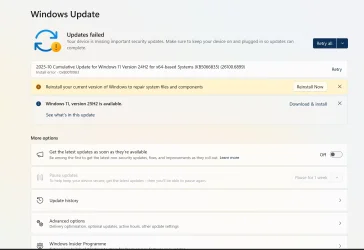
Hi Guys, I have a failed update KB5066835 tried a couple of times and got the message 'reinstall windows' as per the shot below....
My question is will clicking the reinstall do it all automatically or am out of my depth as a 'complete novice' in this area. Would it be better to click the version 25H2 install button?

Edition Windows 11 Home
Version 24H2
Installed on ‎14/‎02/‎2025
OS build 26100.4652
Experience Windows Feature Experience Pack 1000.26100.128.0
1761475917871.webp
 

My Computer

System One

  • OS
    W11
    Computer type
    Laptop
    Manufacturer/Model
    HP
    Graphics Card(s)
    Intel(R) Iris (R) Xe graphics 128MB
I have this problem too few days ago, so I try use 'Fix problem using Windows Update'
It fixed my Windows issues and no issues after using 'Fix problem using Windows Update'
Can you try 'Fix problem using Windows Update'
 

My Computer

System One

  • OS
    Windows 11 25H2
    Computer type
    PC/Desktop
    Manufacturer/Model
    MSI
    CPU
    i9 285K
    Motherboard
    MSI Z890 MEG ACE
    Memory
    Corsair Vengeance RGB 48GB DDR 9200mt/s 2 x 24gb
    Graphics Card(s)
    NVIDIA RTX 4080 Foundation Editon 16 GB
    Sound Card
    EVGA NU Audio
    Monitor(s) Displays
    Acer Predator X35 35-inch Curved G-Sync Ultimate 200Hz
    Screen Resolution
    3440 x 1440 G-Sync
    Hard Drives
    M.2 Samsung Pro 1100 1TB
    M.2 Samsung Pro 990 1TB HDD 1TB
    PSU
    EVGA SuperNOVA 1300 X3
    Case
    EVGA case D77
    Cooling
    EVGA CLCx 380 Liquid / Water CPU Cooler
    Keyboard
    EVGA Z10
    Mouse
    EVGA Torq X10
    Internet Speed
    900 mb/s
    Browser
    Mircosoft Edges Google and Bing
    Antivirus
    Kaspersky Internet
    Other Info
    Logitech Z906 THX 5.1 Surround Sound Speakers SPDIF
  • Like
Reactions: OAT
Thanks I'll give it a go, can you tell how long it took please?

Hopefully I'll be back and say it worked!
 

My Computer

System One

  • OS
    W11
    Computer type
    Laptop
    Manufacturer/Model
    HP
    Graphics Card(s)
    Intel(R) Iris (R) Xe graphics 128MB
Thanks I'll give it a go, can you tell how long it took please?

Hopefully I'll be back and say it worked!
Using the Windows Update fix downloads the entire OS image, not just the CU.
Depending on your internet & system performances, it can take up to 2 hours.
 

My Computers

System One System Two

  • OS
    All Branches but Release
    Computer type
    Laptop
    Manufacturer/Model
    Acer Nitro ANV15-51
    CPU
    AMD Ryzen 7 7735HS 3200-4500 Mhz 8 cores x 2
    Motherboard
    Sportage_RBH
    Memory
    32 GB DDR5
    Graphics Card(s)
    Radeon Graphic / NVIDIA GeForce RTX 4060 8 GB GDDR6
    Sound Card
    AMD/Realtek(R) Audio
    Monitor(s) Displays
    Integrated Monitor (15.3"vis)
    Screen Resolution
    FHD 1920X1080 16:9 144Hz
    Hard Drives
    KINGSTON OM8SEP4512Q-AA 1TB
    Western Digital 256GB
    PSU
    19V DC 6.32 A 120 W
    Cooling
    Dual Fans
    Mouse
    MS Bluetooth
    Internet Speed
    Fiber 1GB Cox -us & 1GB Orange-fr
    Browser
    Edge Canary- Firefox Nightly-Chrome Dev-Chrome Dev
    Antivirus
    Windows Defender
  • Operating System
    Windows 11 Beta
    Computer type
    Laptop
    Manufacturer/Model
    Asus X751BP
    CPU
    AMD A9-9420
    Memory
    8 GB of DDR4
    Graphics card(s)
    AMD Radeon R5
    Screen Resolution
    1600x900
    Hard Drives
    Seagate 1 TB
Thanks I'll give it a go, can you tell how long it took please?

Hopefully I'll be back and say it worked!
No Worry
Depend on your Rig and shall I say 30mins to an hour depend!
 

My Computer

System One

  • OS
    Windows 11 25H2
    Computer type
    PC/Desktop
    Manufacturer/Model
    MSI
    CPU
    i9 285K
    Motherboard
    MSI Z890 MEG ACE
    Memory
    Corsair Vengeance RGB 48GB DDR 9200mt/s 2 x 24gb
    Graphics Card(s)
    NVIDIA RTX 4080 Foundation Editon 16 GB
    Sound Card
    EVGA NU Audio
    Monitor(s) Displays
    Acer Predator X35 35-inch Curved G-Sync Ultimate 200Hz
    Screen Resolution
    3440 x 1440 G-Sync
    Hard Drives
    M.2 Samsung Pro 1100 1TB
    M.2 Samsung Pro 990 1TB HDD 1TB
    PSU
    EVGA SuperNOVA 1300 X3
    Case
    EVGA case D77
    Cooling
    EVGA CLCx 380 Liquid / Water CPU Cooler
    Keyboard
    EVGA Z10
    Mouse
    EVGA Torq X10
    Internet Speed
    900 mb/s
    Browser
    Mircosoft Edges Google and Bing
    Antivirus
    Kaspersky Internet
    Other Info
    Logitech Z906 THX 5.1 Surround Sound Speakers SPDIF

Latest Support Threads

Back
Top Bottom