Solved Challenge for Experts. I am 25 years on PC but cant solve this - need only Expert opinions


You are new here. Rather than doggedly defending your postion re. shouting etiquette, a more humble and effective approach would be to reply "ok I will note that in future".

Remember all posters here do so voluntarily, and are not paid. So annoying people here will have a negative impact.
What to not do in future ? Can you tell us what i did wrong so i will not do in future . What's wrong with 2 Lines of bold text!
This thread is for Guinness Record !!! I 25 years over forums i saw arguing , but never saw something like this. I help others too i am not paid as well. If you are not paid for something that's does not give you right to insult others that ask for help. Any way, as i said, its tremendous how members are ready to arguing instead of helping!!!
 

My Computer My Computer

At a glance

Microsoft Windows [Version 10.0.26100.4349]Intel(R) Core(TM) i5-4590 CPU @ 3.30GHz, 3301Installed Physical Memory (RAM) 12.0 GBNVIDIA GeForce GTX 1050 Ti
OS
Microsoft Windows [Version 10.0.26100.4349]
Computer type
PC/Desktop
Manufacturer/Model
System Model HP EliteDesk 800 G1 SFF
CPU
Intel(R) Core(TM) i5-4590 CPU @ 3.30GHz, 3301
Motherboard
Hewlett-Packard
Memory
Installed Physical Memory (RAM) 12.0 GB
Graphics Card(s)
NVIDIA GeForce GTX 1050 Ti
Sound Card
Realtek High Definition Audio
Monitor(s) Displays
1 Monitor 32 inch Hyundai
Screen Resolution
1920x1080
Hard Drives
SSD 120 + HDD 1TB + HDD 4TB
PSU
Crosair CX 450
Case
HP
Keyboard
HP KU 0316
Mouse
A4 Tech
Internet Speed
100 Mbs
Browser
Chrome
Antivirus
ESET Smart Security
Yes, i tried sharing too but it didn't work
So you enabled sharing on the drive after you saw the error message appear? If you don't need drive sharing then disable it.
 

My Computer My Computer

At a glance

Windows 11, Windows 10, Linux Fedora Cinnamon
OS
Windows 11, Windows 10, Linux Fedora Cinnamon
@formingus

I'm sure you will get the help you deserve!
 

My Computers My Computers

  • At a glance

    Windows 11 Pro 25H2 26200.8655AMD Ryzen 7 5825U with Radeon Graphics16GB
    OS
    Windows 11 Pro 25H2 26200.8655
    Computer type
    Laptop
    Manufacturer/Model
    Acemagic LX15PRO
    CPU
    AMD Ryzen 7 5825U with Radeon Graphics
    Motherboard
    BIOS CT_BI_AMI_LX15PRO_AB8139_A-004
    Memory
    16GB
    Screen Resolution
    1920 x 1080
    Hard Drives
    SSD 2TB
    Internet Speed
    30 Mbps
    Browser
    Brave
    Antivirus
    Defender/Windows Security
    Other Info
    System 3

    Acer Swift SF114-34 laptop
    OS Windows 11 Pro 26200.8655
    CPU Pentium Silver N6000
    RAM 4GB
    BIOS v1.17
    SSD Samsung 970 EVO Plus SSD 2TB (an upgrade)
  • At a glance

    Windows 11 Pro 23H2 22631.2506Atom N450 1.66GHz2GB
    Operating System
    Windows 11 Pro 23H2 22631.2506
    Computer type
    Laptop
    Manufacturer/Model
    HP Mini 210-1090NR PC (bought in late 2009!)
    CPU
    Atom N450 1.66GHz
    Memory
    2GB
    Browser
    Brave
    Antivirus
    Webroot
So you enabled sharing on the drive after you saw the error message appear? If you don't need drive sharing then disable it.
After i got this problem i try couple of things, neither of them works, then i try sharing, still same
 

My Computer My Computer

At a glance

Microsoft Windows [Version 10.0.26100.4349]Intel(R) Core(TM) i5-4590 CPU @ 3.30GHz, 3301Installed Physical Memory (RAM) 12.0 GBNVIDIA GeForce GTX 1050 Ti
OS
Microsoft Windows [Version 10.0.26100.4349]
Computer type
PC/Desktop
Manufacturer/Model
System Model HP EliteDesk 800 G1 SFF
CPU
Intel(R) Core(TM) i5-4590 CPU @ 3.30GHz, 3301
Motherboard
Hewlett-Packard
Memory
Installed Physical Memory (RAM) 12.0 GB
Graphics Card(s)
NVIDIA GeForce GTX 1050 Ti
Sound Card
Realtek High Definition Audio
Monitor(s) Displays
1 Monitor 32 inch Hyundai
Screen Resolution
1920x1080
Hard Drives
SSD 120 + HDD 1TB + HDD 4TB
PSU
Crosair CX 450
Case
HP
Keyboard
HP KU 0316
Mouse
A4 Tech
Internet Speed
100 Mbs
Browser
Chrome
Antivirus
ESET Smart Security

My Computer My Computer

At a glance

Microsoft Windows [Version 10.0.26100.4349]Intel(R) Core(TM) i5-4590 CPU @ 3.30GHz, 3301Installed Physical Memory (RAM) 12.0 GBNVIDIA GeForce GTX 1050 Ti
OS
Microsoft Windows [Version 10.0.26100.4349]
Computer type
PC/Desktop
Manufacturer/Model
System Model HP EliteDesk 800 G1 SFF
CPU
Intel(R) Core(TM) i5-4590 CPU @ 3.30GHz, 3301
Motherboard
Hewlett-Packard
Memory
Installed Physical Memory (RAM) 12.0 GB
Graphics Card(s)
NVIDIA GeForce GTX 1050 Ti
Sound Card
Realtek High Definition Audio
Monitor(s) Displays
1 Monitor 32 inch Hyundai
Screen Resolution
1920x1080
Hard Drives
SSD 120 + HDD 1TB + HDD 4TB
PSU
Crosair CX 450
Case
HP
Keyboard
HP KU 0316
Mouse
A4 Tech
Internet Speed
100 Mbs
Browser
Chrome
Antivirus
ESET Smart Security
So you enabled sharing on the drive after you saw the error message appear? If you don't need drive sharing then disable it.
Now sharing its disabled but problem still remains
 

My Computer My Computer

At a glance

Microsoft Windows [Version 10.0.26100.4349]Intel(R) Core(TM) i5-4590 CPU @ 3.30GHz, 3301Installed Physical Memory (RAM) 12.0 GBNVIDIA GeForce GTX 1050 Ti
OS
Microsoft Windows [Version 10.0.26100.4349]
Computer type
PC/Desktop
Manufacturer/Model
System Model HP EliteDesk 800 G1 SFF
CPU
Intel(R) Core(TM) i5-4590 CPU @ 3.30GHz, 3301
Motherboard
Hewlett-Packard
Memory
Installed Physical Memory (RAM) 12.0 GB
Graphics Card(s)
NVIDIA GeForce GTX 1050 Ti
Sound Card
Realtek High Definition Audio
Monitor(s) Displays
1 Monitor 32 inch Hyundai
Screen Resolution
1920x1080
Hard Drives
SSD 120 + HDD 1TB + HDD 4TB
PSU
Crosair CX 450
Case
HP
Keyboard
HP KU 0316
Mouse
A4 Tech
Internet Speed
100 Mbs
Browser
Chrome
Antivirus
ESET Smart Security
K..., let's forget about the etiquette thing and get back to the problem...,

... check out Controlled Folder Access.

I'm done here.
Controlled Folder Access is missing/disabled in my case, i think is because i Use ESET Smart Security and its controlling that option
 

My Computer My Computer

At a glance

Microsoft Windows [Version 10.0.26100.4349]Intel(R) Core(TM) i5-4590 CPU @ 3.30GHz, 3301Installed Physical Memory (RAM) 12.0 GBNVIDIA GeForce GTX 1050 Ti
OS
Microsoft Windows [Version 10.0.26100.4349]
Computer type
PC/Desktop
Manufacturer/Model
System Model HP EliteDesk 800 G1 SFF
CPU
Intel(R) Core(TM) i5-4590 CPU @ 3.30GHz, 3301
Motherboard
Hewlett-Packard
Memory
Installed Physical Memory (RAM) 12.0 GB
Graphics Card(s)
NVIDIA GeForce GTX 1050 Ti
Sound Card
Realtek High Definition Audio
Monitor(s) Displays
1 Monitor 32 inch Hyundai
Screen Resolution
1920x1080
Hard Drives
SSD 120 + HDD 1TB + HDD 4TB
PSU
Crosair CX 450
Case
HP
Keyboard
HP KU 0316
Mouse
A4 Tech
Internet Speed
100 Mbs
Browser
Chrome
Antivirus
ESET Smart Security
The only thing I can think of would be to completely reset the permissions using icacls:

Rich (BB code):
icacls "K:\*" /T /Q /C /RESET

That command will take some time to complete.
 

My Computer My Computer

At a glance

Windows 11, Windows 10, Linux Fedora Cinnamon
OS
Windows 11, Windows 10, Linux Fedora Cinnamon
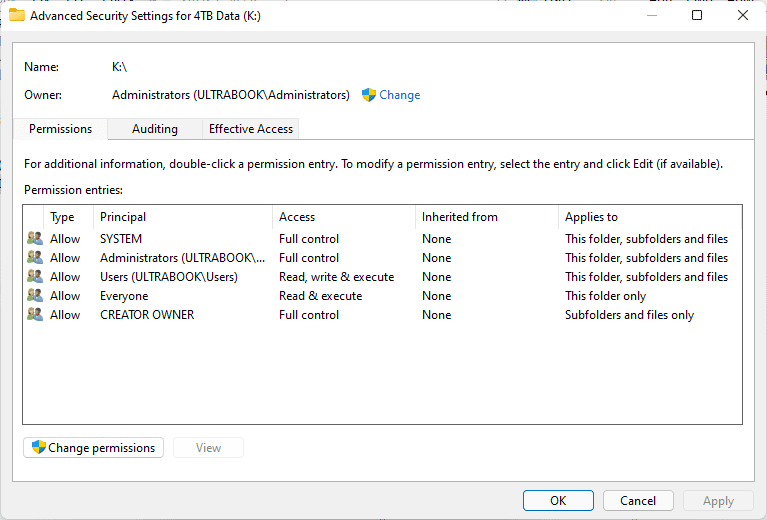
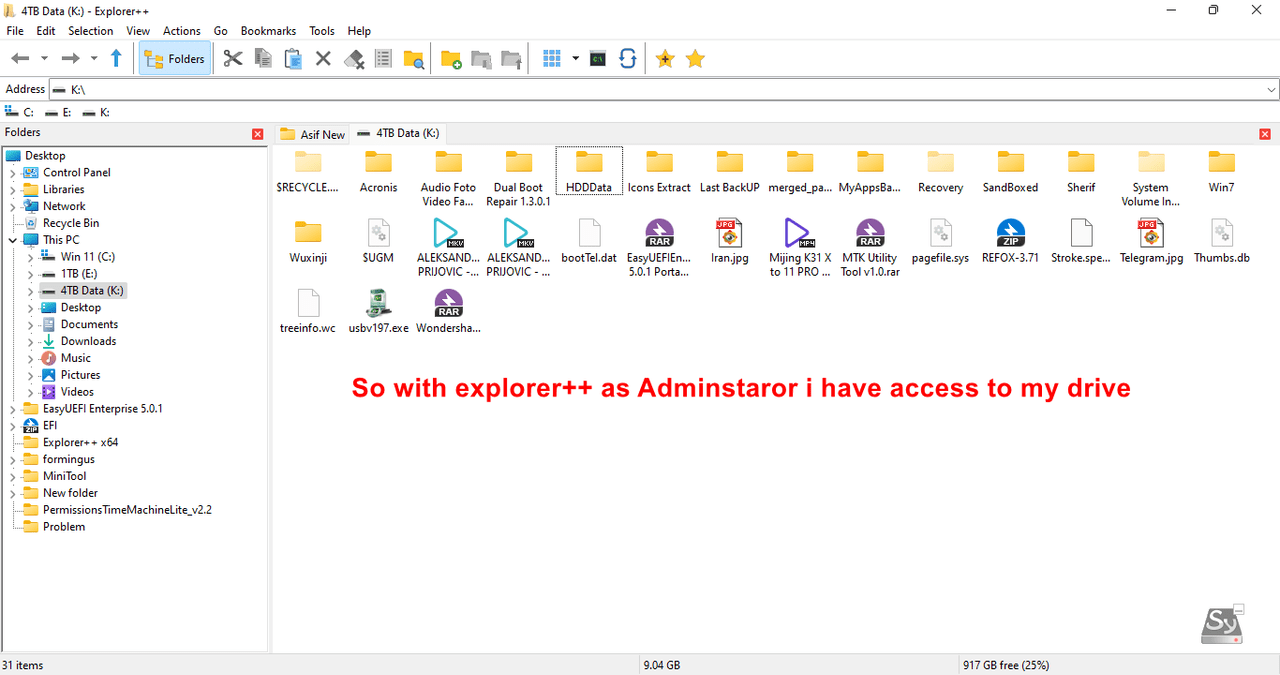
On my second Computer (where i can connect to drive) checked and make same Security settings as they are to this one, but still can not connect to Drive . I will repeat - I Can connect to drive with explorer++ as Administrator.

Fast-Stone-Editor2.png


But
Fast-Stone-Editor3.png
 

My Computer My Computer

At a glance

Microsoft Windows [Version 10.0.26100.4349]Intel(R) Core(TM) i5-4590 CPU @ 3.30GHz, 3301Installed Physical Memory (RAM) 12.0 GBNVIDIA GeForce GTX 1050 Ti
OS
Microsoft Windows [Version 10.0.26100.4349]
Computer type
PC/Desktop
Manufacturer/Model
System Model HP EliteDesk 800 G1 SFF
CPU
Intel(R) Core(TM) i5-4590 CPU @ 3.30GHz, 3301
Motherboard
Hewlett-Packard
Memory
Installed Physical Memory (RAM) 12.0 GB
Graphics Card(s)
NVIDIA GeForce GTX 1050 Ti
Sound Card
Realtek High Definition Audio
Monitor(s) Displays
1 Monitor 32 inch Hyundai
Screen Resolution
1920x1080
Hard Drives
SSD 120 + HDD 1TB + HDD 4TB
PSU
Crosair CX 450
Case
HP
Keyboard
HP KU 0316
Mouse
A4 Tech
Internet Speed
100 Mbs
Browser
Chrome
Antivirus
ESET Smart Security
The only thing I can think of would be to completely reset the permissions using icacls:

Rich (BB code):
icacls "K:\*" /T /Q /C /RESET

That command will take some time to complete.
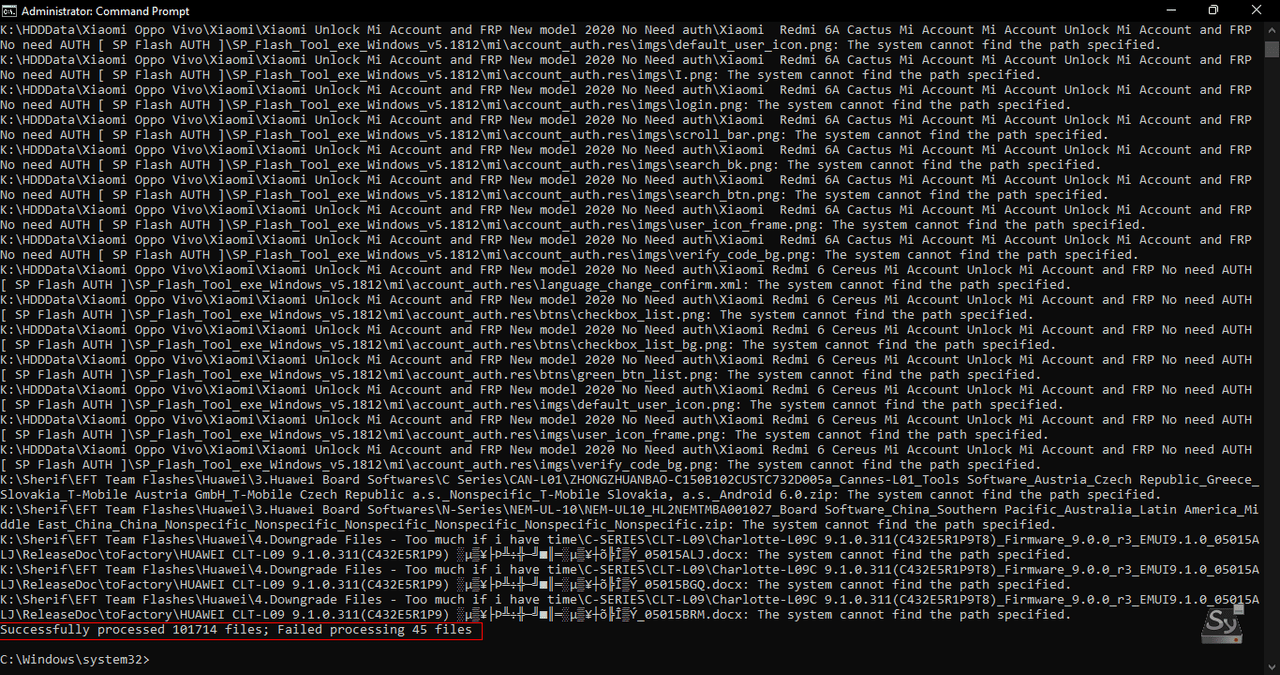
Still the same. Really rare problem. You think it has something to do bcz is GPT partition ? Or something from BIOS ?
But before it happen, works great as GPT with same bios options.

Fast-Stone-Editor1.png
 

My Computer My Computer

At a glance

Microsoft Windows [Version 10.0.26100.4349]Intel(R) Core(TM) i5-4590 CPU @ 3.30GHz, 3301Installed Physical Memory (RAM) 12.0 GBNVIDIA GeForce GTX 1050 Ti
OS
Microsoft Windows [Version 10.0.26100.4349]
Computer type
PC/Desktop
Manufacturer/Model
System Model HP EliteDesk 800 G1 SFF
CPU
Intel(R) Core(TM) i5-4590 CPU @ 3.30GHz, 3301
Motherboard
Hewlett-Packard
Memory
Installed Physical Memory (RAM) 12.0 GB
Graphics Card(s)
NVIDIA GeForce GTX 1050 Ti
Sound Card
Realtek High Definition Audio
Monitor(s) Displays
1 Monitor 32 inch Hyundai
Screen Resolution
1920x1080
Hard Drives
SSD 120 + HDD 1TB + HDD 4TB
PSU
Crosair CX 450
Case
HP
Keyboard
HP KU 0316
Mouse
A4 Tech
Internet Speed
100 Mbs
Browser
Chrome
Antivirus
ESET Smart Security
Not big deal, i will leave by my self. I don't see any reason to stay hear where 9 of 10 members are ready 4 arguing about bold or italic fonts!
It was your sh!tty attitude to the responses to the shouting that said everything i needed to hear, nobody here is an expert at everything thats why we try to drill down to the cause from the symptoms, simple answers to simple questions and without attitude.

Good luck and may all your 1's turn to 0
 

My Computers My Computers

  • At a glance

    Windows 11 Enterprise 25H2 26200 7462Intel XEON E5-2699 v364GB Teamgroup UD4-3600NVIDIA GeForce GTX 1080 Ti
    OS
    Windows 11 Enterprise 25H2 26200 7462
    Computer type
    PC/Desktop
    Manufacturer/Model
    Custom Build
    CPU
    Intel XEON E5-2699 v3
    Motherboard
    ASUS X99-A
    Memory
    64GB Teamgroup UD4-3600
    Graphics Card(s)
    NVIDIA GeForce GTX 1080 Ti
    Sound Card
    Integrated
    Monitor(s) Displays
    ACER X34 Predator
    Screen Resolution
    3440 x 1440
    Hard Drives
    Crucial CT1000P 3P SSD8 1TB
    Crucial CT1000 BX500 SSD 1TB
    PSU
    GameMax Pro
    Case
    Fractal Design
    Cooling
    Corsair H110iGT + 6 140mm Fans
    Keyboard
    Corsair K4
    Mouse
    G-Skill G502
    Internet Speed
    300MBs
    Browser
    Chrome
    Antivirus
    OEM
    Other Info
    ASUS RT-AC87U Router
  • At a glance

    25H2 26200.50748GB
    Operating System
    25H2 26200.5074
    Computer type
    Laptop
    Manufacturer/Model
    ASUS X555LA
    Memory
    8GB
    Browser
    Chrome
    Antivirus
    OEM
You think it has something to do bcz is GPT partition ? Or something from BIOS ?
But before it happen, works great as GPT with same bios options.
No, this is a Windows specific issue. I doubt Process Monitor will help much but it might at least identify where exactly that access denied message is being thrown on.

Capture Process Monitor Trace
1. Download and run Process Monitor. Leave this running while you perform the next steps.
2. Try accessing the K:\ drive just like you have.
3. Stop Process Monitor as soon as Explorer throws the error. You can simply do this by clicking the square icon on the toolbar as shown below.
j8MhY5V.png

4. Select the File menu...Save... and save the file to your desktop. This is likely the default location. The name (unless changed) will be LogFile.PML. This is fine.
5. Zip up and provide the link to the LogFile.PML file. Examples of services to upload to are Dropbox or OneDrive or WeTransfer.
 

My Computer My Computer

At a glance

Windows 11, Windows 10, Linux Fedora Cinnamon
OS
Windows 11, Windows 10, Linux Fedora Cinnamon
No, this is a Windows specific issue. I doubt Process Monitor will help much but it might at least identify where exactly that access denied message is being thrown on.

Capture Process Monitor Trace
1. Download and run Process Monitor. Leave this running while you perform the next steps.
2. Try accessing the K:\ drive just like you have.
3. Stop Process Monitor as soon as Explorer throws the error. You can simply do this by clicking the square icon on the toolbar as shown below.
j8MhY5V.png

4. Select the File menu...Save... and save the file to your desktop. This is likely the default location. The name (unless changed) will be LogFile.PML. This is fine.
5. Zip up and provide the link to the LogFile.PML file. Examples of services to upload to are Dropbox or OneDrive or WeTransfer.
Ok, Doing that, until then, check video for better understanding
 

My Computer My Computer

At a glance

Microsoft Windows [Version 10.0.26100.4349]Intel(R) Core(TM) i5-4590 CPU @ 3.30GHz, 3301Installed Physical Memory (RAM) 12.0 GBNVIDIA GeForce GTX 1050 Ti
OS
Microsoft Windows [Version 10.0.26100.4349]
Computer type
PC/Desktop
Manufacturer/Model
System Model HP EliteDesk 800 G1 SFF
CPU
Intel(R) Core(TM) i5-4590 CPU @ 3.30GHz, 3301
Motherboard
Hewlett-Packard
Memory
Installed Physical Memory (RAM) 12.0 GB
Graphics Card(s)
NVIDIA GeForce GTX 1050 Ti
Sound Card
Realtek High Definition Audio
Monitor(s) Displays
1 Monitor 32 inch Hyundai
Screen Resolution
1920x1080
Hard Drives
SSD 120 + HDD 1TB + HDD 4TB
PSU
Crosair CX 450
Case
HP
Keyboard
HP KU 0316
Mouse
A4 Tech
Internet Speed
100 Mbs
Browser
Chrome
Antivirus
ESET Smart Security
No, this is a Windows specific issue. I doubt Process Monitor will help much but it might at least identify where exactly that access denied message is being thrown on.

Capture Process Monitor Trace
1. Download and run Process Monitor. Leave this running while you perform the next steps.
2. Try accessing the K:\ drive just like you have.
3. Stop Process Monitor as soon as Explorer throws the error. You can simply do this by clicking the square icon on the toolbar as shown below.
j8MhY5V.png

4. Select the File menu...Save... and save the file to your desktop. This is likely the default location. The name (unless changed) will be LogFile.PML. This is fine.
5. Zip up and provide the link to the LogFile.PML file. Examples of services to upload to are Dropbox or OneDrive or WeTransfer.
It was your sh!tty attitude to the responses to the shouting that said everything i needed to hear, nobody here is an expert at everything thats why we try to drill down to the cause from the symptoms, simple answers to simple questions and without attitude.

Good luck and may all your 1's turn to 0
Can't understand who had $*tty attitude, You who began, or me who answered on your rude reply. Now, just simply leave this thread and let others who want to help be in peace, it doest not matter is 1 or 0, simply take your attitude with yourself...
 

My Computer My Computer

At a glance

Microsoft Windows [Version 10.0.26100.4349]Intel(R) Core(TM) i5-4590 CPU @ 3.30GHz, 3301Installed Physical Memory (RAM) 12.0 GBNVIDIA GeForce GTX 1050 Ti
OS
Microsoft Windows [Version 10.0.26100.4349]
Computer type
PC/Desktop
Manufacturer/Model
System Model HP EliteDesk 800 G1 SFF
CPU
Intel(R) Core(TM) i5-4590 CPU @ 3.30GHz, 3301
Motherboard
Hewlett-Packard
Memory
Installed Physical Memory (RAM) 12.0 GB
Graphics Card(s)
NVIDIA GeForce GTX 1050 Ti
Sound Card
Realtek High Definition Audio
Monitor(s) Displays
1 Monitor 32 inch Hyundai
Screen Resolution
1920x1080
Hard Drives
SSD 120 + HDD 1TB + HDD 4TB
PSU
Crosair CX 450
Case
HP
Keyboard
HP KU 0316
Mouse
A4 Tech
Internet Speed
100 Mbs
Browser
Chrome
Antivirus
ESET Smart Security
No, this is a Windows specific issue. I doubt Process Monitor will help much but it might at least identify where exactly that access denied message is being thrown on.

Capture Process Monitor Trace
1. Download and run Process Monitor. Leave this running while you perform the next steps.
2. Try accessing the K:\ drive just like you have.
3. Stop Process Monitor as soon as Explorer throws the error. You can simply do this by clicking the square icon on the toolbar as shown below.
j8MhY5V.png

4. Select the File menu...Save... and save the file to your desktop. This is likely the default location. The name (unless changed) will be LogFile.PML. This is fine.
5. Zip up and provide the link to the LogFile.PML file. Examples of services to upload to are Dropbox or OneDrive or WeTransfer.
LOG File
 

My Computer My Computer

At a glance

Microsoft Windows [Version 10.0.26100.4349]Intel(R) Core(TM) i5-4590 CPU @ 3.30GHz, 3301Installed Physical Memory (RAM) 12.0 GBNVIDIA GeForce GTX 1050 Ti
OS
Microsoft Windows [Version 10.0.26100.4349]
Computer type
PC/Desktop
Manufacturer/Model
System Model HP EliteDesk 800 G1 SFF
CPU
Intel(R) Core(TM) i5-4590 CPU @ 3.30GHz, 3301
Motherboard
Hewlett-Packard
Memory
Installed Physical Memory (RAM) 12.0 GB
Graphics Card(s)
NVIDIA GeForce GTX 1050 Ti
Sound Card
Realtek High Definition Audio
Monitor(s) Displays
1 Monitor 32 inch Hyundai
Screen Resolution
1920x1080
Hard Drives
SSD 120 + HDD 1TB + HDD 4TB
PSU
Crosair CX 450
Case
HP
Keyboard
HP KU 0316
Mouse
A4 Tech
Internet Speed
100 Mbs
Browser
Chrome
Antivirus
ESET Smart Security
Bold or Capitals assuming IMPORTANT same as in this case.
BTW I didn't come here to argue for nonsense, if you have some idea about my problem it will be appreciated,
otherwise, you are shouting in this case...
No need to be rude.
 

My Computers My Computers

  • At a glance

    Windows 11 build 26200.8728 / WSL 2 running U...Intel i7-1355U16GBIntel Iris XE
    OS
    Windows 11 build 26200.8728 / WSL 2 running Ubuntu
    Computer type
    Laptop
    Manufacturer/Model
    Dell Inspiron 14 5430
    CPU
    Intel i7-1355U
    Motherboard
    Dell 0GMW80
    Memory
    16GB
    Graphics Card(s)
    Intel Iris XE
    Sound Card
    Realtek
    Monitor(s) Displays
    Dell 14", LG 32" Curved Wide screen monitor and LG Ultrawide 26"
    Screen Resolution
    1920 x 1200 @ 60Hz, 1920 x 1080 @ 100Hz and 2560 x 1080 @ 60Hz
    Hard Drives
    Samsung 990 Pro 1TB NVME Gen 4 M.2 SSD
    PSU
    Dell
    Case
    Dell
    Cooling
    Dell
    Keyboard
    Dell KM3322W
    Mouse
    Dell Trackpad or Dell KM3322W
    Internet Speed
    900mb down / 400mb up FTTP
    Browser
    Edge 149.0.4022.80
    Antivirus
    Windows Defender
    Other Info
    Windows 365
    1TB OneDrive
    Outlook Classic
    Visual Studio Code running in WSL
    Python 3.14
    Samsung Magician
    Garmin Express
    Dell TB16 Thunderbolt dock
    WSL
    WEI Score: 8.3
  • At a glance

    Windows 11Core i5 - 1035G48GBIntel Iris Plus
    Operating System
    Windows 11
    Computer type
    Tablet
    Manufacturer/Model
    Microsoft Surface Pro 7
    CPU
    Core i5 - 1035G4
    Motherboard
    Microsoft
    Memory
    8GB
    Graphics card(s)
    Intel Iris Plus
    Monitor(s) Displays
    Surface touch
    Screen Resolution
    2736 x 1824
    Hard Drives
    128GB
    PSU
    Microsoft
    Case
    Microsoft Keyboard
    Cooling
    None
    Keyboard
    Microsoft Surface Keyboard
    Mouse
    Microsoft Arc Intellimouse
    Internet Speed
    900mb / 400mb FTTP
    Browser
    Edge
    Antivirus
    Windows Defender

My Computer My Computer

At a glance

Microsoft Windows [Version 10.0.26100.4349]Intel(R) Core(TM) i5-4590 CPU @ 3.30GHz, 3301Installed Physical Memory (RAM) 12.0 GBNVIDIA GeForce GTX 1050 Ti
OS
Microsoft Windows [Version 10.0.26100.4349]
Computer type
PC/Desktop
Manufacturer/Model
System Model HP EliteDesk 800 G1 SFF
CPU
Intel(R) Core(TM) i5-4590 CPU @ 3.30GHz, 3301
Motherboard
Hewlett-Packard
Memory
Installed Physical Memory (RAM) 12.0 GB
Graphics Card(s)
NVIDIA GeForce GTX 1050 Ti
Sound Card
Realtek High Definition Audio
Monitor(s) Displays
1 Monitor 32 inch Hyundai
Screen Resolution
1920x1080
Hard Drives
SSD 120 + HDD 1TB + HDD 4TB
PSU
Crosair CX 450
Case
HP
Keyboard
HP KU 0316
Mouse
A4 Tech
Internet Speed
100 Mbs
Browser
Chrome
Antivirus
ESET Smart Security
Have you tried running chkdsk?
Have you tried running SFC /SCANNOW?
What is your first language, out of interest?

Please list what you have already tried, apart from fiddling with permissions.
 

My Computers My Computers

  • At a glance

    Windows 11 Pro 25H2 26200.8655AMD Ryzen 7 5825U with Radeon Graphics16GB
    OS
    Windows 11 Pro 25H2 26200.8655
    Computer type
    Laptop
    Manufacturer/Model
    Acemagic LX15PRO
    CPU
    AMD Ryzen 7 5825U with Radeon Graphics
    Motherboard
    BIOS CT_BI_AMI_LX15PRO_AB8139_A-004
    Memory
    16GB
    Screen Resolution
    1920 x 1080
    Hard Drives
    SSD 2TB
    Internet Speed
    30 Mbps
    Browser
    Brave
    Antivirus
    Defender/Windows Security
    Other Info
    System 3

    Acer Swift SF114-34 laptop
    OS Windows 11 Pro 26200.8655
    CPU Pentium Silver N6000
    RAM 4GB
    BIOS v1.17
    SSD Samsung 970 EVO Plus SSD 2TB (an upgrade)
  • At a glance

    Windows 11 Pro 23H2 22631.2506Atom N450 1.66GHz2GB
    Operating System
    Windows 11 Pro 23H2 22631.2506
    Computer type
    Laptop
    Manufacturer/Model
    HP Mini 210-1090NR PC (bought in late 2009!)
    CPU
    Atom N450 1.66GHz
    Memory
    2GB
    Browser
    Brave
    Antivirus
    Webroot
Try this..
Go outside
Dump your attitude in the rubbish bin
Come in and start again
 

My Computer My Computer

At a glance

Win 11 ProAMD Ryzen 7 9700XG.Skill Trident Z5 Neo RGB 64GB Kit (2x32GB) ...PowerColor Radeon RX 9060 XT Reaper GDDR6 16GB
OS
Win 11 Pro
Computer type
PC/Desktop
Manufacturer/Model
N/A
CPU
AMD Ryzen 7 9700X
Motherboard
Asrock 870E Nova WiFi
Memory
G.Skill Trident Z5 Neo RGB 64GB Kit (2x32GB) DDR5-6000 C30
Graphics Card(s)
PowerColor Radeon RX 9060 XT Reaper GDDR6 16GB
Sound Card
USB Out NAD M51 DAC with Adams A8 powered speakers
Monitor(s) Displays
Dell 3219Q
Screen Resolution
3840 x 2160
Hard Drives
5 x WD_BLACK SN850x PCIe Gen4 NVMe M.2 SSD - 4TB
PSU
be quiet! DARK POWER 13 1000W Titanium PCIe 5.0 ATX Modular PSU
Case
Fractal Design Define 7 Full Tower Case (Black)
Cooling
Noctua NH-D15 G2 LBC - High Performance Multi-Socket PWM CPU Cooler
Keyboard
Razer Huntsman V2
Mouse
Razer Viper Ultimate
Internet Speed
Starlink 94Mbps down 20Mbps up
Browser
Brave
Antivirus
ESET

My Computer My Computer

At a glance

Microsoft Windows [Version 10.0.26100.4349]Intel(R) Core(TM) i5-4590 CPU @ 3.30GHz, 3301Installed Physical Memory (RAM) 12.0 GBNVIDIA GeForce GTX 1050 Ti
OS
Microsoft Windows [Version 10.0.26100.4349]
Computer type
PC/Desktop
Manufacturer/Model
System Model HP EliteDesk 800 G1 SFF
CPU
Intel(R) Core(TM) i5-4590 CPU @ 3.30GHz, 3301
Motherboard
Hewlett-Packard
Memory
Installed Physical Memory (RAM) 12.0 GB
Graphics Card(s)
NVIDIA GeForce GTX 1050 Ti
Sound Card
Realtek High Definition Audio
Monitor(s) Displays
1 Monitor 32 inch Hyundai
Screen Resolution
1920x1080
Hard Drives
SSD 120 + HDD 1TB + HDD 4TB
PSU
Crosair CX 450
Case
HP
Keyboard
HP KU 0316
Mouse
A4 Tech
Internet Speed
100 Mbs
Browser
Chrome
Antivirus
ESET Smart Security

Latest Support Threads

Back
Top Bottom