Solved Challenge for Experts. I am 25 years on PC but cant solve this - need only Expert opinions


My Computers My Computers

  • At a glance

    Windows 11 Enterprise 25H2 26200 7462Intel XEON E5-2699 v364GB Teamgroup UD4-3600NVIDIA GeForce GTX 1080 Ti
    OS
    Windows 11 Enterprise 25H2 26200 7462
    Computer type
    PC/Desktop
    Manufacturer/Model
    Custom Build
    CPU
    Intel XEON E5-2699 v3
    Motherboard
    ASUS X99-A
    Memory
    64GB Teamgroup UD4-3600
    Graphics Card(s)
    NVIDIA GeForce GTX 1080 Ti
    Sound Card
    Integrated
    Monitor(s) Displays
    ACER X34 Predator
    Screen Resolution
    3440 x 1440
    Hard Drives
    Crucial CT1000P 3P SSD8 1TB
    Crucial CT1000 BX500 SSD 1TB
    PSU
    GameMax Pro
    Case
    Fractal Design
    Cooling
    Corsair H110iGT + 6 140mm Fans
    Keyboard
    Corsair K4
    Mouse
    G-Skill G502
    Internet Speed
    300MBs
    Browser
    Chrome
    Antivirus
    OEM
    Other Info
    ASUS RT-AC87U Router
  • At a glance

    25H2 26200.50748GB
    Operating System
    25H2 26200.5074
    Computer type
    Laptop
    Manufacturer/Model
    ASUS X555LA
    Memory
    8GB
    Browser
    Chrome
    Antivirus
    OEM
In Disk Genius scanning result, some files or folders are tagged with a red or green deletion icon. The green one means the folder contains deleted data, and the red means it is the deleted file/folder.

What is in the “Orphaned Files“ folder showing in Disk Genius?
At a guess I’d say you ran some type of software on your drive and totally screwed it.

To whatever effect, I’d unmount the drive in Disk Management… then reboot a couple of times with the drive disconnected from the PC. Then remount the drive. If the drive doesn’t show, I’d then try changing the drive letter (as I said earlier in the thread) to something other than D: or K:
This all may seem pointless but you haven’t got anything to lose. I have rediscovered drives before, screwing around like this.

Ok, thanks will do that, just to clarify the steps.

With Unmount drive, do you mean put Offline? bcz at Disk Management everything is grayed out except Offline and Help.
With the drive Disconnected, do you mean the previous unmount or physical disconnect from the SATA port of the mainboard?
And last one, don't know if you saw my screenshot upload, but there is no Drive letter present at Disk Management. I can change the Drive letter by other partition tools but on Device Management still appear WO Drive Leter, Missing Drive Letter at Device Manager can cause this problem.

1705656055314.png
 

My Computer My Computer

At a glance

Microsoft Windows [Version 10.0.26100.4349]Intel(R) Core(TM) i5-4590 CPU @ 3.30GHz, 3301Installed Physical Memory (RAM) 12.0 GBNVIDIA GeForce GTX 1050 Ti
OS
Microsoft Windows [Version 10.0.26100.4349]
Computer type
PC/Desktop
Manufacturer/Model
System Model HP EliteDesk 800 G1 SFF
CPU
Intel(R) Core(TM) i5-4590 CPU @ 3.30GHz, 3301
Motherboard
Hewlett-Packard
Memory
Installed Physical Memory (RAM) 12.0 GB
Graphics Card(s)
NVIDIA GeForce GTX 1050 Ti
Sound Card
Realtek High Definition Audio
Monitor(s) Displays
1 Monitor 32 inch Hyundai
Screen Resolution
1920x1080
Hard Drives
SSD 120 + HDD 1TB + HDD 4TB
PSU
Crosair CX 450
Case
HP
Keyboard
HP KU 0316
Mouse
A4 Tech
Internet Speed
100 Mbs
Browser
Chrome
Antivirus
ESET Smart Security
By the looks of the results of his screenshot of Disk Genius, there are only a couple of folders left. There is a folder called “MyAppsBackUP” that has been deleted by the looks, not much else left. This is why I think they have run something on the drive and screwed it. But I guess.
No,
“MyAppsBackUP”

Thats my existing folder
 

My Computer My Computer

At a glance

Microsoft Windows [Version 10.0.26100.4349]Intel(R) Core(TM) i5-4590 CPU @ 3.30GHz, 3301Installed Physical Memory (RAM) 12.0 GBNVIDIA GeForce GTX 1050 Ti
OS
Microsoft Windows [Version 10.0.26100.4349]
Computer type
PC/Desktop
Manufacturer/Model
System Model HP EliteDesk 800 G1 SFF
CPU
Intel(R) Core(TM) i5-4590 CPU @ 3.30GHz, 3301
Motherboard
Hewlett-Packard
Memory
Installed Physical Memory (RAM) 12.0 GB
Graphics Card(s)
NVIDIA GeForce GTX 1050 Ti
Sound Card
Realtek High Definition Audio
Monitor(s) Displays
1 Monitor 32 inch Hyundai
Screen Resolution
1920x1080
Hard Drives
SSD 120 + HDD 1TB + HDD 4TB
PSU
Crosair CX 450
Case
HP
Keyboard
HP KU 0316
Mouse
A4 Tech
Internet Speed
100 Mbs
Browser
Chrome
Antivirus
ESET Smart Security
Could the drive itself be the problem?
No, 100% is not a drive problem, dunno if you read the whole thread, id mention that I can access the drive and files via Explorer++ as Administrator. Plus tested with Sentinel, HD Tune, SMART status and all clusters, everything look fine
 

My Computer My Computer

At a glance

Microsoft Windows [Version 10.0.26100.4349]Intel(R) Core(TM) i5-4590 CPU @ 3.30GHz, 3301Installed Physical Memory (RAM) 12.0 GBNVIDIA GeForce GTX 1050 Ti
OS
Microsoft Windows [Version 10.0.26100.4349]
Computer type
PC/Desktop
Manufacturer/Model
System Model HP EliteDesk 800 G1 SFF
CPU
Intel(R) Core(TM) i5-4590 CPU @ 3.30GHz, 3301
Motherboard
Hewlett-Packard
Memory
Installed Physical Memory (RAM) 12.0 GB
Graphics Card(s)
NVIDIA GeForce GTX 1050 Ti
Sound Card
Realtek High Definition Audio
Monitor(s) Displays
1 Monitor 32 inch Hyundai
Screen Resolution
1920x1080
Hard Drives
SSD 120 + HDD 1TB + HDD 4TB
PSU
Crosair CX 450
Case
HP
Keyboard
HP KU 0316
Mouse
A4 Tech
Internet Speed
100 Mbs
Browser
Chrome
Antivirus
ESET Smart Security
That would be my guess. Or at the least needs to be wiped reformatted/partitioned.
That is my last option, because i need to buy another 4TB HDD to do that, if I am unable to repair this problem, will do that and let you guys know what happens after format hdd
If the drive is the problem I hope they can recover any data that they don't want to lose.
No worries, thanks for your concern. I have access to files via Explorer++ as Administrator, but for any other work will ask for admin rights, like saving files, opening dialog, creating files/folders etc, Its become too annoying to work in this way.
Thankyou i will stay.
As you wish, just don't offend me as you did in first post bcz I didn't offend you, I ask for help
 

My Computer My Computer

At a glance

Microsoft Windows [Version 10.0.26100.4349]Intel(R) Core(TM) i5-4590 CPU @ 3.30GHz, 3301Installed Physical Memory (RAM) 12.0 GBNVIDIA GeForce GTX 1050 Ti
OS
Microsoft Windows [Version 10.0.26100.4349]
Computer type
PC/Desktop
Manufacturer/Model
System Model HP EliteDesk 800 G1 SFF
CPU
Intel(R) Core(TM) i5-4590 CPU @ 3.30GHz, 3301
Motherboard
Hewlett-Packard
Memory
Installed Physical Memory (RAM) 12.0 GB
Graphics Card(s)
NVIDIA GeForce GTX 1050 Ti
Sound Card
Realtek High Definition Audio
Monitor(s) Displays
1 Monitor 32 inch Hyundai
Screen Resolution
1920x1080
Hard Drives
SSD 120 + HDD 1TB + HDD 4TB
PSU
Crosair CX 450
Case
HP
Keyboard
HP KU 0316
Mouse
A4 Tech
Internet Speed
100 Mbs
Browser
Chrome
Antivirus
ESET Smart Security
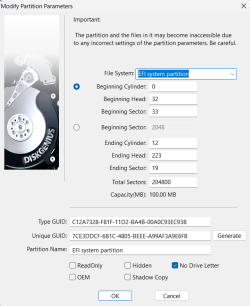
Looks like K drive has been created as an EFI partition firm the disc manager image. You should have created it as a data partition if you want to store stuff on it.
 

My Computer My Computer

At a glance

Win11 26100.332312th Gen Intel(R) Core(TM) i7-1270P 2.20 GHz16Gb
OS
Win11 26100.3323
Computer type
Laptop
Manufacturer/Model
Dell Latitude 7430
CPU
12th Gen Intel(R) Core(TM) i7-1270P 2.20 GHz
Motherboard
Dell
Memory
16Gb
Disk Management everything is grayed out except Offline and Help.

View attachment 84484
Ahh sorry, I missed that earlier. yes, disconnect the drive from the MB, reboot a couple of times. But I am guessing you might be in for a deletion of the partition in Minitools and a reformat, if the drive hasn’t died.


No,


Thats my existing folder
Then why is there a red deleted icon on “MyAppsBackUP”? Disk Genius places those on deleted folders.

Looks like K drive has been created as an EFI partition firm the disc manager image. You should have created it as a data partition if you want to store stuff on it.

Good point
 

My Computers My Computers

  • At a glance

    Windows 11 Pro 25H2 Build 26200.8655Intel(R) Core(TM) i7-4770K CPU @ 3.50GHz32.0 GB of I forget and the box is in storage.Gigabyte nVidia GeForce GTX 1660 Super OC 6GB
    OS
    Windows 11 Pro 25H2 Build 26200.8655
    Computer type
    PC/Desktop
    Manufacturer/Model
    Sin-built 2013
    CPU
    Intel(R) Core(TM) i7-4770K CPU @ 3.50GHz
    Motherboard
    ASUS ROG Maximus VI Formula
    Memory
    32.0 GB of I forget and the box is in storage.
    Graphics Card(s)
    Gigabyte nVidia GeForce GTX 1660 Super OC 6GB
    Sound Card
    ROG SupremeFX Formula 8-Channel High Definition Audio
    Monitor(s) Displays
    5 x LG 25MS500-B - 1 x 24MK430H-B - 1 x Wacom Pro 22" Touch Screen Tablet
    Screen Resolution
    All over the place
    Hard Drives
    Too many to list. OS on Samsung 1TB 870 QVO SATA
    PSU
    Silverstone 1500
    Case
    NZXT Phantom 820 Full-Tower Case
    Cooling
    Noctua NH-D15 Elite Class Dual Tower CPU Cooler / 6 x EziDIY 120mm / 2 x Corsair 140mm somethings / 1 x 140mm Thermaltake something / 2 x 200mm Corsair.
    Keyboard
    Corsair K95 / Logitech diNovo Edge Wireless
    Mouse
    Logitech: G402 / G502 / Mx Masters / Mx Air Cordless
    Internet Speed
    2000/500Mbps
    Browser
    All sorts
    Antivirus
    Kaspersky Premium
    Other Info
    ㅤㅤㅤㅤㅤㅤㅤㅤㅤㅤㅤㅤㅤㅤㅤㅤㅤㅤㅤㅤㅤㅤㅤㅤㅤㅤㅤㅤㅤㅤㅤㅤㅤㅤㅤㅤㅤㅤㅤㅤ⠀⠀⠀⠀⠀⠀⠀⠀⠀⠀
    TP-Link BE9300 WiFi 7 Bluetooth 5.4 (Archer TBE550E)
    TP-Link TX201 V1 2.5GB Lan

    Grandstream HT812 - VoIP
    ASUS DSL-AX82U - Mesh
    ASUS RT-AC68U - Mesh
    ASUS RT-BE88U Router

    Brother MFC-L2880DW Printer

    I’m on a horse.
  • At a glance

    Windows 11 Pro 25H2 Build 26200.8655 (Wifes)13th Generation Intel® Core™ i5-1340P Process...16GB LPDDR5-52001x Intel® Iris® Xe Graphics
    Operating System
    Windows 11 Pro 25H2 Build 26200.8655 (Wifes)
    Computer type
    Laptop
    Manufacturer/Model
    LENOVO Yoga 7 14IRL8 - Type 82YL
    CPU
    13th Generation Intel® Core™ i5-1340P Processor(Core™ i5-1340P)
    Memory
    16GB LPDDR5-5200
    Graphics card(s)
    1x Intel® Iris® Xe Graphics
    Sound Card
    Optimized with Dolby Atmos®
    Screen Resolution
    QHD 2880 x 1800 OLED
    Hard Drives
    M.2 512 GB SSD PCIe
    Mouse
    Logiteck MX Master 3S
    Internet Speed
    2000/500
    Antivirus
    Defender / Malwarebytes
    Other Info
    …still on a horse.


    Wireless Network: Wi-Fi 6E 2x2 AX; Bluetooth® 5.1 or above
    Ports: 1x 1 Novo button; 2 in 1 Audio Combo jack; Micro SD Card Reader; HDMI 1.4b; 2 x USB Type-C (TBT4)
    USB 3.2 Gen 2 DP 1.4a
    PD 3.0); 1 x USB 3.2 Gen1 Type A
    Camera
    1x 1080P FHD IR/RGB Hybrid with Privacy Shutter and Dual Array Microphone
    Graphics
    1x Intel® Iris® Xe Graphics
    Monitor
    14" WUXGA
    Form Factor
    Convertible Notebook
  • Windows 11 Pro 25H2 Build 26200.8655 (Wifes)

    Yoga 7 2-in-1 14IML9 - Type 83DJ

    Processor: Intel® Core™ Ultra 7 155H Processor(Core™ Ultra 7 155H)

    Memory: 32GB LPD5X-7467

    Hard Drive: 1 TB SSD PCIe

    Wireless Network: 1x Wi-Fi 6E 2x2 AX; Bluetooth® 5.1 or above

    Ports: 1 x HDMI 2.1 TMDS; 1 x Novo Button; 1 x Combo Audio Jack
    2 x USB-C (USB 4.0)
    1 x USB-A 3.2 Gen 1

    Camera: 1080P FHD IR Hybrid with Dual Microphone

    Graphics: Intel® Arc™ Graphics

    Monitor: 14" 2.8K

    ...Where's my horse?
You can use DiskGenius to change the K: drive partition from EFI to NTFS or FAT32 and that should restore access.
Right-click, Modify Partition Parameters and then select from the drop-down list. But uncheck the box 'no drive letter' to retain it as K:
1705658931555.png
 

My Computers My Computers

  • At a glance

    Windows 11 Pro 25H2 26200.8655AMD Ryzen 7 5825U with Radeon Graphics16GB
    OS
    Windows 11 Pro 25H2 26200.8655
    Computer type
    Laptop
    Manufacturer/Model
    Acemagic LX15PRO
    CPU
    AMD Ryzen 7 5825U with Radeon Graphics
    Motherboard
    BIOS CT_BI_AMI_LX15PRO_AB8139_A-004
    Memory
    16GB
    Screen Resolution
    1920 x 1080
    Hard Drives
    SSD 2TB
    Internet Speed
    30 Mbps
    Browser
    Brave
    Antivirus
    Defender/Windows Security
    Other Info
    System 3

    Acer Swift SF114-34 laptop
    OS Windows 11 Pro 26200.8655
    CPU Pentium Silver N6000
    RAM 4GB
    BIOS v1.17
    SSD Samsung 970 EVO Plus SSD 2TB (an upgrade)
  • At a glance

    Windows 11 Pro 23H2 22631.2506Atom N450 1.66GHz2GB
    Operating System
    Windows 11 Pro 23H2 22631.2506
    Computer type
    Laptop
    Manufacturer/Model
    HP Mini 210-1090NR PC (bought in late 2009!)
    CPU
    Atom N450 1.66GHz
    Memory
    2GB
    Browser
    Brave
    Antivirus
    Webroot
Looks like K drive has been created as an EFI partition firm the disc manager image. You should have created it as a data partition if you want to store stuff on it.
That Disk had 2 Partitions - 1 250 GB had Win 7 installed - Rest was Data, that Worked fine. (Hope i understand what you trying to say)
This is my Actually info of Disk
1705579489497.png
 

My Computer My Computer

At a glance

Microsoft Windows [Version 10.0.26100.4349]Intel(R) Core(TM) i5-4590 CPU @ 3.30GHz, 3301Installed Physical Memory (RAM) 12.0 GBNVIDIA GeForce GTX 1050 Ti
OS
Microsoft Windows [Version 10.0.26100.4349]
Computer type
PC/Desktop
Manufacturer/Model
System Model HP EliteDesk 800 G1 SFF
CPU
Intel(R) Core(TM) i5-4590 CPU @ 3.30GHz, 3301
Motherboard
Hewlett-Packard
Memory
Installed Physical Memory (RAM) 12.0 GB
Graphics Card(s)
NVIDIA GeForce GTX 1050 Ti
Sound Card
Realtek High Definition Audio
Monitor(s) Displays
1 Monitor 32 inch Hyundai
Screen Resolution
1920x1080
Hard Drives
SSD 120 + HDD 1TB + HDD 4TB
PSU
Crosair CX 450
Case
HP
Keyboard
HP KU 0316
Mouse
A4 Tech
Internet Speed
100 Mbs
Browser
Chrome
Antivirus
ESET Smart Security
You can use DiskGenius to change the K: drive partition from EFI to NTFS or FAT32 and that should restore access.
Right-click, Modify Partition Parameters and then select from the drop-down list. But uncheck the box 'no drive letter' to retain it as K:
View attachment 84485
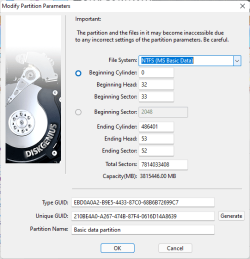
This is Actually How Parameter's Look - Change to MBR has limit of 2TB, same way Change to FAT32 will Limit Files to 4GB - Thanks for Advice
1705579534067.png
 

My Computer My Computer

At a glance

Microsoft Windows [Version 10.0.26100.4349]Intel(R) Core(TM) i5-4590 CPU @ 3.30GHz, 3301Installed Physical Memory (RAM) 12.0 GBNVIDIA GeForce GTX 1050 Ti
OS
Microsoft Windows [Version 10.0.26100.4349]
Computer type
PC/Desktop
Manufacturer/Model
System Model HP EliteDesk 800 G1 SFF
CPU
Intel(R) Core(TM) i5-4590 CPU @ 3.30GHz, 3301
Motherboard
Hewlett-Packard
Memory
Installed Physical Memory (RAM) 12.0 GB
Graphics Card(s)
NVIDIA GeForce GTX 1050 Ti
Sound Card
Realtek High Definition Audio
Monitor(s) Displays
1 Monitor 32 inch Hyundai
Screen Resolution
1920x1080
Hard Drives
SSD 120 + HDD 1TB + HDD 4TB
PSU
Crosair CX 450
Case
HP
Keyboard
HP KU 0316
Mouse
A4 Tech
Internet Speed
100 Mbs
Browser
Chrome
Antivirus
ESET Smart Security
In post #1 and #62, you show that it is an EFI system partition?

1705661589075.png

1705661742257.png
 

My Computers My Computers

  • At a glance

    Windows 11 Pro 25H2 26200.8655AMD Ryzen 7 5825U with Radeon Graphics16GB
    OS
    Windows 11 Pro 25H2 26200.8655
    Computer type
    Laptop
    Manufacturer/Model
    Acemagic LX15PRO
    CPU
    AMD Ryzen 7 5825U with Radeon Graphics
    Motherboard
    BIOS CT_BI_AMI_LX15PRO_AB8139_A-004
    Memory
    16GB
    Screen Resolution
    1920 x 1080
    Hard Drives
    SSD 2TB
    Internet Speed
    30 Mbps
    Browser
    Brave
    Antivirus
    Defender/Windows Security
    Other Info
    System 3

    Acer Swift SF114-34 laptop
    OS Windows 11 Pro 26200.8655
    CPU Pentium Silver N6000
    RAM 4GB
    BIOS v1.17
    SSD Samsung 970 EVO Plus SSD 2TB (an upgrade)
  • At a glance

    Windows 11 Pro 23H2 22631.2506Atom N450 1.66GHz2GB
    Operating System
    Windows 11 Pro 23H2 22631.2506
    Computer type
    Laptop
    Manufacturer/Model
    HP Mini 210-1090NR PC (bought in late 2009!)
    CPU
    Atom N450 1.66GHz
    Memory
    2GB
    Browser
    Brave
    Antivirus
    Webroot
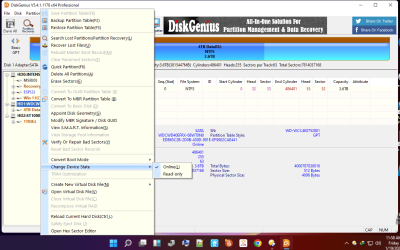
Thanks to all of you that try to help. Problem resolved with 2 Click - Writing this in order if some member will have this kind of problem so any f us can help him.
What I did was - With Disk Genius - Device state was Online. I put it to Read Only then I Removed Read Only and HDD Works Fine Now
Diagnose. Probably somewhere HDD was getting some TAG as read-only and ding this revert to normal State

Thanks to all of you that try to help. All the best guys and thanks one more time


1705661940764.png
 

My Computer My Computer

At a glance

Microsoft Windows [Version 10.0.26100.4349]Intel(R) Core(TM) i5-4590 CPU @ 3.30GHz, 3301Installed Physical Memory (RAM) 12.0 GBNVIDIA GeForce GTX 1050 Ti
OS
Microsoft Windows [Version 10.0.26100.4349]
Computer type
PC/Desktop
Manufacturer/Model
System Model HP EliteDesk 800 G1 SFF
CPU
Intel(R) Core(TM) i5-4590 CPU @ 3.30GHz, 3301
Motherboard
Hewlett-Packard
Memory
Installed Physical Memory (RAM) 12.0 GB
Graphics Card(s)
NVIDIA GeForce GTX 1050 Ti
Sound Card
Realtek High Definition Audio
Monitor(s) Displays
1 Monitor 32 inch Hyundai
Screen Resolution
1920x1080
Hard Drives
SSD 120 + HDD 1TB + HDD 4TB
PSU
Crosair CX 450
Case
HP
Keyboard
HP KU 0316
Mouse
A4 Tech
Internet Speed
100 Mbs
Browser
Chrome
Antivirus
ESET Smart Security
In post #1 and #62, you show that it is an EFI system partition?

View attachment 84488

View attachment 84489
As i say, I work with same parameter's for year. After you advice me i open Disk Genius and saw that there are those parameter's
Thank you one more time for being part of help. Problem solved byu doing Read Only then Revert to Normal with Disk Genius...
 

My Computer My Computer

At a glance

Microsoft Windows [Version 10.0.26100.4349]Intel(R) Core(TM) i5-4590 CPU @ 3.30GHz, 3301Installed Physical Memory (RAM) 12.0 GBNVIDIA GeForce GTX 1050 Ti
OS
Microsoft Windows [Version 10.0.26100.4349]
Computer type
PC/Desktop
Manufacturer/Model
System Model HP EliteDesk 800 G1 SFF
CPU
Intel(R) Core(TM) i5-4590 CPU @ 3.30GHz, 3301
Motherboard
Hewlett-Packard
Memory
Installed Physical Memory (RAM) 12.0 GB
Graphics Card(s)
NVIDIA GeForce GTX 1050 Ti
Sound Card
Realtek High Definition Audio
Monitor(s) Displays
1 Monitor 32 inch Hyundai
Screen Resolution
1920x1080
Hard Drives
SSD 120 + HDD 1TB + HDD 4TB
PSU
Crosair CX 450
Case
HP
Keyboard
HP KU 0316
Mouse
A4 Tech
Internet Speed
100 Mbs
Browser
Chrome
Antivirus
ESET Smart Security
I had the same problem and after installing the controller's driver from the manufacturer (found on motherboard's dvd), the problem was solved.
 

My Computer My Computer

At a glance

Windows 11
OS
Windows 11
Computer type
PC/Desktop
Manufacturer/Model
Gigabyte
@formingus

I'm happy that you got it sorted. Now make sure to backup regularly with a program like Macrium Reflect. It is far quicker to restore from a recent backup than it is to fault find or reinstall Windows. A backup make take only a few minutes and a restore will be just as quick.
 

My Computers My Computers

  • At a glance

    Windows 11 Pro 25H2 26200.8655AMD Ryzen 7 5825U with Radeon Graphics16GB
    OS
    Windows 11 Pro 25H2 26200.8655
    Computer type
    Laptop
    Manufacturer/Model
    Acemagic LX15PRO
    CPU
    AMD Ryzen 7 5825U with Radeon Graphics
    Motherboard
    BIOS CT_BI_AMI_LX15PRO_AB8139_A-004
    Memory
    16GB
    Screen Resolution
    1920 x 1080
    Hard Drives
    SSD 2TB
    Internet Speed
    30 Mbps
    Browser
    Brave
    Antivirus
    Defender/Windows Security
    Other Info
    System 3

    Acer Swift SF114-34 laptop
    OS Windows 11 Pro 26200.8655
    CPU Pentium Silver N6000
    RAM 4GB
    BIOS v1.17
    SSD Samsung 970 EVO Plus SSD 2TB (an upgrade)
  • At a glance

    Windows 11 Pro 23H2 22631.2506Atom N450 1.66GHz2GB
    Operating System
    Windows 11 Pro 23H2 22631.2506
    Computer type
    Laptop
    Manufacturer/Model
    HP Mini 210-1090NR PC (bought in late 2009!)
    CPU
    Atom N450 1.66GHz
    Memory
    2GB
    Browser
    Brave
    Antivirus
    Webroot
I'm glad to hear that you managed to resolve the issue, I guess the way to check without any third-party tools would have been the following from command prompt:

Code:
diskpart
list disk
select disk #
attributes disk
 

My Computer My Computer

At a glance

Windows 11, Windows 10, Linux Fedora Cinnamon
OS
Windows 11, Windows 10, Linux Fedora Cinnamon
I had the same problem and after installing the controller's driver from the manufacturer (found on motherboard's dvd), the problem was solved.
In my case wasn't the controller, all i know is that tired me a lot. Nice to hear that your case was solved too
@formingus

I'm happy that you got it sorted. Now make sure to backup regularly with a program like Macrium Reflect. It is far quicker to restore from a recent backup than it is to fault find or reinstall Windows. A backup make take only a few minutes and a restore will be just as quick.
I am using Acronis for Backup, but in this case, there wasn't a data problem because I got access as an administrator.
The problem was that on each command like, save as text on that drive, open any folder on that drive, etc asked for Admin rights or was denied. Thanks for contributing to this thread.
I'm glad to hear that you managed to resolve the issue, I guess the way to check without any third-party tools would have been the following from command prompt:

Code:
diskpart
list disk
select disk #
attributes disk
Will keep as note. Thanks for your effort, really appreciated. All the best 👍.
 

My Computer My Computer

At a glance

Microsoft Windows [Version 10.0.26100.4349]Intel(R) Core(TM) i5-4590 CPU @ 3.30GHz, 3301Installed Physical Memory (RAM) 12.0 GBNVIDIA GeForce GTX 1050 Ti
OS
Microsoft Windows [Version 10.0.26100.4349]
Computer type
PC/Desktop
Manufacturer/Model
System Model HP EliteDesk 800 G1 SFF
CPU
Intel(R) Core(TM) i5-4590 CPU @ 3.30GHz, 3301
Motherboard
Hewlett-Packard
Memory
Installed Physical Memory (RAM) 12.0 GB
Graphics Card(s)
NVIDIA GeForce GTX 1050 Ti
Sound Card
Realtek High Definition Audio
Monitor(s) Displays
1 Monitor 32 inch Hyundai
Screen Resolution
1920x1080
Hard Drives
SSD 120 + HDD 1TB + HDD 4TB
PSU
Crosair CX 450
Case
HP
Keyboard
HP KU 0316
Mouse
A4 Tech
Internet Speed
100 Mbs
Browser
Chrome
Antivirus
ESET Smart Security

Latest Support Threads

Back
Top Bottom