Solved Classic Alt Tab (Reincarnation)


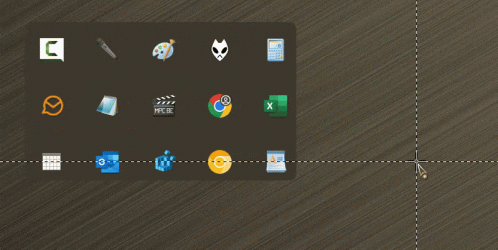
ok try this one.
It'll suffice. (y)
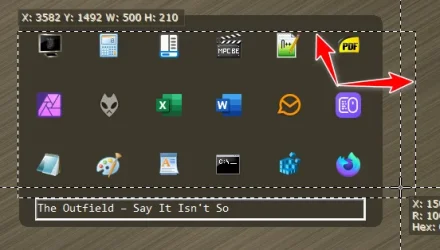
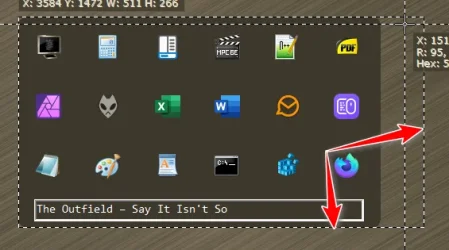
The ghost frames are still visible with object sniffer, but it works properly, regardless of the amount of items.

9311.gif
 

My Computers

System One System Two

  • OS
    Windows 11 Pro
    Computer type
    PC/Desktop
    Manufacturer/Model
    ASUS ROG Strix
  • Operating System
    Windows 11 Pro
    Computer type
    Laptop
    Manufacturer/Model
    ASUS VivoBook
Now all you have to do is make a Dark Mode version!!! :winkt:
 

My Computers

System One System Two

  • OS
    Windows 11 Pro
    Computer type
    PC/Desktop
    Manufacturer/Model
    ASUS ROG Strix
  • Operating System
    Windows 11 Pro
    Computer type
    Laptop
    Manufacturer/Model
    ASUS VivoBook
It'll suffice. (y)
The ghost frames are still visible with object sniffer, but it works properly, regardless of the amount of items.

View attachment 132972
Had to step out for a bit. I can fix the bottom rounded corners when I get back.

Now all you have to do is make a Dark Mode version!!! :winkt:
Coloring is the easy part lmao. You want charcoal, black or a custom gold? Post whatever here and I’ll use the eyedropper to pull the rgb from it
 

My Computer

System One

  • OS
    Windows 11 Pro
My accent color is RGB: 61, 56, 45
 

My Computers

System One System Two

  • OS
    Windows 11 Pro
    Computer type
    PC/Desktop
    Manufacturer/Model
    ASUS ROG Strix
  • Operating System
    Windows 11 Pro
    Computer type
    Laptop
    Manufacturer/Model
    ASUS VivoBook

My Computers

System One System Two

  • OS
    Windows 11 Pro
    Computer type
    PC/Desktop
    Manufacturer/Model
    ASUS ROG Strix
  • Operating System
    Windows 11 Pro
    Computer type
    Laptop
    Manufacturer/Model
    ASUS VivoBook
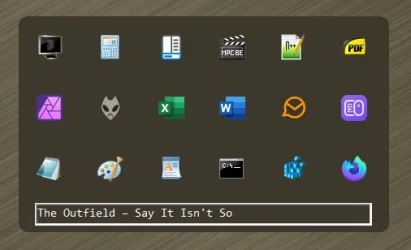
Post updated with (*SHOULD BE*) fixed resolution issues - thanks for letting me know you had issues @Edwin
Dark Mode for each has been added as well. If anyone comes across any issues, please post info here with a screenshot for troubleshooting. Thanks.
 

My Computer

System One

  • OS
    Windows 11 Pro

My Computers

System One System Two

  • OS
    Windows 11 Pro
    Computer type
    PC/Desktop
    Manufacturer/Model
    ASUS ROG Strix
  • Operating System
    Windows 11 Pro
    Computer type
    Laptop
    Manufacturer/Model
    ASUS VivoBook
Pretty much the same as in Post #10.

View attachment 133027
hahaha... i'm extremely curious to see what others get. i didnt change anything but the color and the rounding on that one so no idea how the dimensions could've changed from the last gif you posted. heres another for you

1746454141953.webp
 
Last edited:

My Computer

System One

  • OS
    Windows 11 Pro
whats the res on your screen?
 

My Computer

System One

  • OS
    Windows 11 Pro
2560x1080 at 100%
Wait a minute...
if I change the Laptop screen to 100% as well, it works properly on both screens. 🤷‍♂️
 

My Computers

System One System Two

  • OS
    Windows 11 Pro
    Computer type
    PC/Desktop
    Manufacturer/Model
    ASUS ROG Strix
  • Operating System
    Windows 11 Pro
    Computer type
    Laptop
    Manufacturer/Model
    ASUS VivoBook
ahh. good to know for troubleshooting. so its a dual reso issue. i'll connect my test laptop to a monitor and play with that. good thinkin'
 

My Computer

System One

  • OS
    Windows 11 Pro
@dacrone; Just to say thanks for the effort you have put in those ahk scripts. I am still on W23H2, but now I know what to use after upgrading to 24H2.

AltTab1.webp
 

My Computer

System One

  • OS
    Win 11 25H2
    Computer type
    PC/Desktop
    Manufacturer/Model
    custom
    CPU
    intel i7-8700
    Motherboard
    Asus Z370 TUF Gaming
    Memory
    32Gb
    Graphics Card(s)
    Intel iGPU
    Sound Card
    Realtek
    Hard Drives
    Samsung
    PSU
    Corsair
    Cooling
    Fans
A couple ghost frames still...

9765.webp

9766.webp

... but working when all monitors are at 100%. (This is on my 4 monitor production machine)

9767.webp
 

My Computers

System One System Two

  • OS
    Windows 11 Pro
    Computer type
    PC/Desktop
    Manufacturer/Model
    ASUS ROG Strix
  • Operating System
    Windows 11 Pro
    Computer type
    Laptop
    Manufacturer/Model
    ASUS VivoBook

My Computer

System One

  • OS
    Windows 11 Pro
if you use the original script, do you have ghost frames when set to 100%? that custom color i had set to larger sizing and set it to dynamically resize (downsize).
Yep. They're all the same.
 

My Computers

System One System Two

  • OS
    Windows 11 Pro
    Computer type
    PC/Desktop
    Manufacturer/Model
    ASUS ROG Strix
  • Operating System
    Windows 11 Pro
    Computer type
    Laptop
    Manufacturer/Model
    ASUS VivoBook
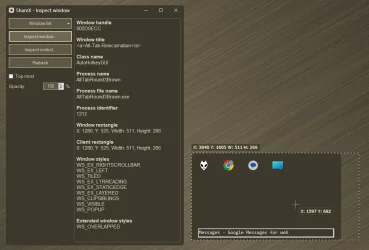
Here's the Sniffer results, I don't know if they're pertinent or pointless or not...

9771.webp
 

My Computers

System One System Two

  • OS
    Windows 11 Pro
    Computer type
    PC/Desktop
    Manufacturer/Model
    ASUS ROG Strix
  • Operating System
    Windows 11 Pro
    Computer type
    Laptop
    Manufacturer/Model
    ASUS VivoBook

Latest Support Threads

Back
Top Bottom