Clicking on Edge opens Firefox instead


MFaklis

Member
Local time
9:19 AM
Posts
5
Location
N 37° 47.932’ W 122° 24.038’
OS
Windows 11 Pro v.24H2 Build 26100.3476
Yes, Firefox is my default browser, but until today I've been able to click on the Edge icon to start the Edge browser.
Now when I click on Edge, Windows is opening Firefox. I don't know how this happened, or how to fix it.

My system is a fully updated Windows 11 Pro on 25H2.

I have tried to reinstall Edge with the current MicrosoftEdgeSetup.exe, and it did a repair of Edge. This didn't fix the problem.

I want Firefox to be my default browser, but I want to be able to start Edge by clicking on its icon.
 
Windows Build/Version
Version 25H2 (OS Build 26200.7171)

My Computer

System One

  • OS
    Windows 11 Pro v.24H2 Build 26100.3476
    Computer type
    Laptop
    Manufacturer/Model
    Framework 13
    CPU
    Intel Core Ultra Series 1
    Motherboard
    Framework
    Memory
    32 GB
If you edit the shortcut, does it actually point to Edge or is the shortcut to Firefox, what if you right click on Edge and select pin to taskbar/start or create a shortcut on the desktop.

Do you use something like Edge Deflector?
 

My Computer

System One

  • OS
    Linux Mint
    Computer type
    Laptop
    Manufacturer/Model
    System76 Lemur Pro
@MFaklis


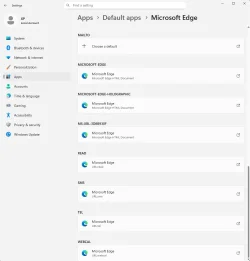
Make sure these are all set to MS Edge... and set all the others to Firefox.


Image1.webp
 
Last edited:

My Computers

System One System Two

  • OS
    Win 11 Home ♦♦♦26200.8457 ♦♦♦♦♦♦♦25H2
    Computer type
    PC/Desktop
    Manufacturer/Model
    Built by Ghot® [May 2020]
    CPU
    AMD Ryzen 7 3700X
    Motherboard
    Asus Pro WS X570-ACE (BIOS 5302)
    Memory
    G.Skill (F4-3200C14D-16GTZKW)
    Graphics Card(s)
    EVGA RTX 2070 (08G-P4-2171-KR)
    Sound Card
    Realtek ALC1220P / ALC S1220A
    Monitor(s) Displays
    Dell U3011 30"
    Screen Resolution
    2560 x 1600
    Hard Drives
    2x Samsung 860 EVO 500GB,
    WD 4TB Black FZBX - SATA III,
    WD 8TB Black FZBX - SATA III,
    DRW-24B1ST CD/DVD Burner
    PSU
    PC Power & Cooling 750W Quad EPS12V
    Case
    Cooler Master ATCS 840 Tower
    Cooling
    CM Hyper 212 EVO (push/pull)
    Keyboard
    Ducky DK9008 Shine II Blue LED
    Mouse
    Logitech Optical M-100
    Internet Speed
    300/300
    Browser
    Firefox (latest)
    Antivirus
    Bitdefender Total Security
    Other Info
    Speakers: Klipsch Pro Media 2.1
  • Operating System
    Windows XP Pro 32bit w/SP3
    Computer type
    PC/Desktop
    Manufacturer/Model
    Built by Ghot® (not in use)
    CPU
    AMD Athlon 64 X2 5000+ (OC'd @ 3.2Ghz)
    Motherboard
    ASUS M2N32-SLI Deluxe Wireless Edition
    Memory
    TWIN2X2048-6400C4DHX (2 x 1GB, DDR2 800)
    Graphics card(s)
    EVGA 256-P2-N758-TR GeForce 8600GT SSC
    Sound Card
    Onboard
    Monitor(s) Displays
    ViewSonic G90FB Black 19" Professional (CRT)
    Screen Resolution
    up to 2048 x 1536
    Hard Drives
    WD 36GB 10,000rpm Raptor SATA
    Seagate 80GB 7200rpm SATA
    Lite-On LTR-52246S CD/RW
    Lite-On LH-18A1P CD/DVD Burner
    PSU
    PC Power & Cooling Silencer 750 Quad EPS12V
    Case
    Generic Beige case, 80mm fans
    Cooling
    ZALMAN 9500A 92mm CPU Cooler
    Keyboard
    Logitech Classic Keybooard 200
    Mouse
    Logitech Optical M-BT96a
    Internet Speed
    300/300
    Browser
    Firefox 3.x ??
    Antivirus
    Symantec (Norton)
    Other Info
    Still assembled, still runs. Haven't turned it on for 15 years?
I am getting this as well, this is seriously messed up.

I can go directly to C:\Program Files (x86)\Microsoft\Edge\Application and double-click msedge.exe and it opens up Firefox.
 

My Computer

System One

  • OS
    Windows 11
    Computer type
    PC/Desktop
    Manufacturer/Model
    iBuyPower
This really is a longshot but I suggest you check
HKEY_LOCAL_MACHINE\SOFTWARE\Microsoft\Windows NT\CurrentVersion\Image File Execution Options
and
HKEY_LOCAL_MACHINE\SOFTWARE\WOW6432Node\Microsoft\Windows NT\CurrentVersion\Image File Execution Options
to make sure that it does not contain any Debugger entries redirecting calls to Firefox.

There is an explanation of such redirections in
redirect exe calls to another exe - LesFerch #43 - TenForums
@LesFerch

If you do find any such entries, it begs the question of how they were created.


Best of luck,
Denis
 
Last edited:

My Computer

System One

  • OS
    Windows 11 Home x64 Version 25H2 Build 26200.8037
1763836719089.webp

This is what I have in the registry, same for the other path.
 

My Computer

System One

  • OS
    Windows 11
    Computer type
    PC/Desktop
    Manufacturer/Model
    iBuyPower

My Computer

System One

  • OS
    Windows 11 Home x64 Version 25H2 Build 26200.8037

My Computers

System One System Two

  • OS
    All Branches but Release
    Computer type
    Laptop
    Manufacturer/Model
    Acer Nitro ANV15-51
    CPU
    AMD Ryzen 7 7735HS 3200-4500 Mhz 8 cores x 2
    Motherboard
    Sportage_RBH
    Memory
    32 GB DDR5
    Graphics Card(s)
    Radeon Graphic / NVIDIA GeForce RTX 4060 8 GB GDDR6
    Sound Card
    AMD/Realtek(R) Audio
    Monitor(s) Displays
    Integrated Monitor (15.3"vis)
    Screen Resolution
    FHD 1920X1080 16:9 144Hz
    Hard Drives
    KINGSTON OM8SEP4512Q-AA 1TB
    Western Digital 256GB
    PSU
    19V DC 6.32 A 120 W
    Cooling
    Dual Fans
    Mouse
    MS Bluetooth
    Internet Speed
    Fiber 1GB Cox -us & 1GB Orange-fr
    Browser
    Edge Canary- Firefox Nightly-Chrome Dev-Chrome Dev
    Antivirus
    Windows Defender
  • Operating System
    Windows 11 Beta
    Computer type
    Laptop
    Manufacturer/Model
    Asus X751BP
    CPU
    AMD A9-9420
    Memory
    8 GB of DDR4
    Graphics card(s)
    AMD Radeon R5
    Screen Resolution
    1600x900
    Hard Drives
    Seagate 1 TB
Is that some third-party utility that supposed to deal with built-in links to Edge [such as links in Settings]?
msedgeredirect - DDGo search
If so, try uninstalling it.
You might also find it useful to repair Edge afterwards
Repair Edge - ElevenForumTutorials
and possibly then running a Windows Repair install
Repair Install Windows 11 with an In-place Upgrade - ElevenForumTutorials


Denis
I did have msedgeredirect installed. Once uninstalled, edge is working again. I installed msedgeredirect inorder to use firefox for Netflix, ...
 

My Computer

System One

  • OS
    Windows 11 Pro v.24H2 Build 26100.3476
    Computer type
    Laptop
    Manufacturer/Model
    Framework 13
    CPU
    Intel Core Ultra Series 1
    Motherboard
    Framework
    Memory
    32 GB
Back
Top Bottom