Deleted boot partition


paul_53

Member
Local time
5:01 AM
Posts
22
OS
Windows 11
I don’t know how I’ve managed this but somehow I’ve managed to delete the boot partition and obviously now Windows won’t boot up. I’ve tried using the installation disc to do a repair but that doesn’t work. I’ve tried all of the options. The only one I haven’t used is the cmd prompt option but to be honest I wouldn’t know what to do with that anyway.

The actual windows installation is still on the machine and I was wondering if I can rebuild the boot partition from that.

I know I could do a fresh install but I’m hoping that is a last resort. That part isn’t the problem it’s the fact that I have Microsoft Flight Simulator installed (albeit on a separate drive). That takes hours to put back on.

Hopefully there is a solution. Any help on this will greatly appreciated

Thanks Paul
 

My Computer My Computer

At a glance

Windows 11AMD Ryzen 7 78003xdDDR 5 6000mhz 32gbRTX 4070 12gb
OS
Windows 11
Computer type
PC/Desktop
Manufacturer/Model
Custom built
CPU
AMD Ryzen 7 78003xd
Motherboard
MSI Pro B650M-A
Memory
DDR 5 6000mhz 32gb
Graphics Card(s)
RTX 4070 12gb
Hard Drives
2 x name drives
PSU
850W Fully Modular 80+ Gold Power Supply
Cooling
360MM AIO CPU Watercooler
Internet Speed
150 mbs
Browser
Edge
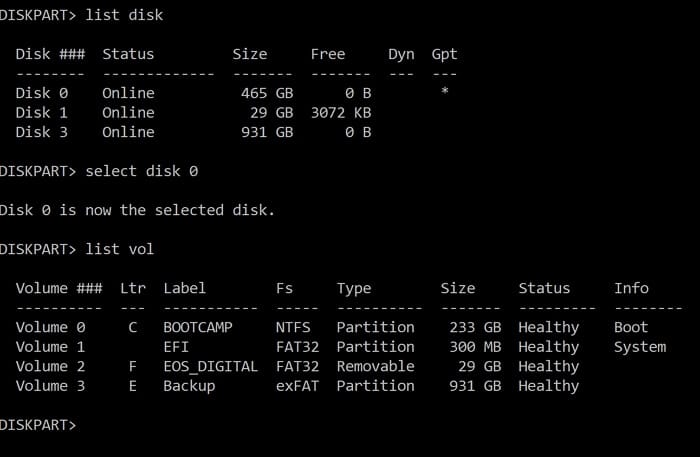
Boot to the Media Creation Tool (MCT) (Windows 11 iso) > command prompt > type:


diskpart
lis dis
lis vol
sel dis 0
det dis
lis par
sel dis 1
det dis
lis par

Post images or share links.
 

My Computer My Computer

At a glance

Windows 10Intel(R) Core(TM) i7-4800MQ CPU @ 2.70GHz16 GB Total: Manufacturer : Samsung MemoryTyp...NVIDIA Quadro K3100M; Intel(R) HD Graphics 4600
OS
Windows 10
Computer type
Laptop
Manufacturer/Model
HP
CPU
Intel(R) Core(TM) i7-4800MQ CPU @ 2.70GHz
Motherboard
Product : 190A Version : KBC Version 94.56
Memory
16 GB Total: Manufacturer : Samsung MemoryType : DDR3 FormFactor : SODIMM Capacity : 8GB Speed : 1600
Graphics Card(s)
NVIDIA Quadro K3100M; Intel(R) HD Graphics 4600
Sound Card
IDT High Definition Audio CODEC; PNP Device ID HDAUDIO\FUNC_01&VEN_111D&DEV_76E0
Hard Drives
Model Hitachi HTS727575A9E364
Antivirus
Microsoft Defender
Other Info
Mobile Workstation
diskpart
sel dis V (change V to the disk # for the Windows disk)
sel par W (change W to the windows partition #)
shrink desired=100
create par EFI
format fs=fat32 label="EFI"
assign letter=T
exit


bcdboot C:\Windows /s T: /f UEFI

(sometimes in Windows RE the Windows drive may have letter D: then use command bcdboot D:\Windows /s T: /f UEFI)

Reboot

(Had waited for your reply to post #2)
(Heading to bed)

Post images or share links displaying disk management:


My Computer My Computer

At a glance

Windows 10Intel(R) Core(TM) i7-4800MQ CPU @ 2.70GHz16 GB Total: Manufacturer : Samsung MemoryTyp...NVIDIA Quadro K3100M; Intel(R) HD Graphics 4600
OS
Windows 10
Computer type
Laptop
Manufacturer/Model
HP
CPU
Intel(R) Core(TM) i7-4800MQ CPU @ 2.70GHz
Motherboard
Product : 190A Version : KBC Version 94.56
Memory
16 GB Total: Manufacturer : Samsung MemoryType : DDR3 FormFactor : SODIMM Capacity : 8GB Speed : 1600
Graphics Card(s)
NVIDIA Quadro K3100M; Intel(R) HD Graphics 4600
Sound Card
IDT High Definition Audio CODEC; PNP Device ID HDAUDIO\FUNC_01&VEN_111D&DEV_76E0
Hard Drives
Model Hitachi HTS727575A9E364
Antivirus
Microsoft Defender
Other Info
Mobile Workstation
The Bcdedit | find "osdevice" command can be used to find out the drive letter of the Windows installed partition, the output of the Bcdedit command is similar to this osdevice partition=D:. The drive letter after partition= is the drive letter of the Windows partition.
 

My Computer My Computer

At a glance

Windows 11AMD Ryzen 7 5700GMicron Technology DDR4-3200 16GBNVIDIA GeForce RTX 3060
OS
Windows 11
Computer type
PC/Desktop
Manufacturer/Model
HP Pavilion
CPU
AMD Ryzen 7 5700G
Motherboard
Erica6
Memory
Micron Technology DDR4-3200 16GB
Graphics Card(s)
NVIDIA GeForce RTX 3060
Sound Card
Realtek ALC671
Monitor(s) Displays
Samsung SyncMaster U28E590
Screen Resolution
3840 x 2160
Hard Drives
SAMSUNG MZVLQ1T0HALB-000H1
Thank you all for responding so quickly. I realised after I had posted that I hadn’t detailed the drives so here goes:-

1gb nvme drive for windows
2gb nvme drive for MSFS 2020
2gb Samsung ssd drive for flight simulator stuff
2gb Samsung drive for anything else

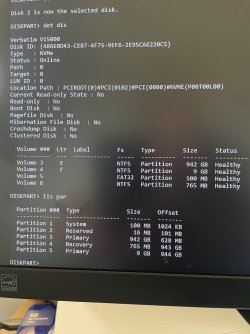
I’ve attached a screenshot of some of the results after following the first posters instructions and I’m wondering if my build has any bearing on the the instructions.

Sorry to be such a numpty but there’s only so much my old head can cope with:-)
 

Attachments

  • IMG_0008.jpeg
    IMG_0008.jpeg
    585.1 KB · Views: 2

My Computer My Computer

At a glance

Windows 11AMD Ryzen 7 78003xdDDR 5 6000mhz 32gbRTX 4070 12gb
OS
Windows 11
Computer type
PC/Desktop
Manufacturer/Model
Custom built
CPU
AMD Ryzen 7 78003xd
Motherboard
MSI Pro B650M-A
Memory
DDR 5 6000mhz 32gb
Graphics Card(s)
RTX 4070 12gb
Hard Drives
2 x name drives
PSU
850W Fully Modular 80+ Gold Power Supply
Cooling
360MM AIO CPU Watercooler
Internet Speed
150 mbs
Browser
Edge
This is also a good guide that you can follow at your leisure if needed,


My Computers My Computers

  • At a glance

    Win 11 ProAMD Ryzen™ 7 7730U24GB Dual-Channel DDR4 @ 1596MHz (22-22-22-52)512MB ATI AMD Radeon Graphics (ASUStek Comput...
    OS
    Win 11 Pro
    Computer type
    Laptop
    Manufacturer/Model
    ASUS Vivobook
    CPU
    AMD Ryzen™ 7 7730U
    Motherboard
    M1605YA
    Memory
    24GB Dual-Channel DDR4 @ 1596MHz (22-22-22-52)
    Graphics Card(s)
    512MB ATI AMD Radeon Graphics (ASUStek Computer Inc)
    Monitor(s) Displays
    Generic PnP Monitor (1920x1200@60Hz) - P1 PLUS (1920x1080@59Hz)
    Screen Resolution
    1920 X 1200
    Hard Drives
    953GB Western Digital WD
    PSU
    45 Watts
    Mouse
    Lenovo Bluetooth.
    Internet Speed
    500 Mbps
    Browser
    Edge
    Antivirus
    Defender
  • At a glance

    Windows 11AMD Ryzen 7 5800H / 3.2 GHz32 GB DDR4 SDRAM 3200 MHzNVIDIA GeForce RTX 3060 6 GB GDDR6 SDRAM
    Operating System
    Windows 11
    Computer type
    Laptop
    Manufacturer/Model
    ACER NITRO
    CPU
    AMD Ryzen 7 5800H / 3.2 GHz
    Motherboard
    CZ Scala_CAS (FP6)
    Memory
    32 GB DDR4 SDRAM 3200 MHz
    Graphics card(s)
    NVIDIA GeForce RTX 3060 6 GB GDDR6 SDRAM
    Sound Card
    Realtek Audio. NVIDIA High Definition Audio
    Monitor(s) Displays
    15.6" LED backlight 1920 x 1080 (Full HD) 144 Hz
    Screen Resolution
    1920 x 1080 (Full HD)
    Hard Drives
    Samsung 970 Evo Plus 2TB NVMe M.2
    PSU
    180 Watt, 19.5 V
    Mouse
    Lenovo Bluetooth
    Internet Speed
    500 Mbps
    Browser
    Edge
    Antivirus
    Defender
I’ve attached a photo of the windows disc and partitions
 

Attachments

  • IMG_2689.jpeg
    IMG_2689.jpeg
    950.9 KB · Views: 1

My Computer My Computer

At a glance

Windows 11AMD Ryzen 7 78003xdDDR 5 6000mhz 32gbRTX 4070 12gb
OS
Windows 11
Computer type
PC/Desktop
Manufacturer/Model
Custom built
CPU
AMD Ryzen 7 78003xd
Motherboard
MSI Pro B650M-A
Memory
DDR 5 6000mhz 32gb
Graphics Card(s)
RTX 4070 12gb
Hard Drives
2 x name drives
PSU
850W Fully Modular 80+ Gold Power Supply
Cooling
360MM AIO CPU Watercooler
Internet Speed
150 mbs
Browser
Edge
On another pc, install Macrium Reflect (trial version will be adequate).

Create a Macrium Rescue usb flash drive

Boot from it and select link "fix windows boot problems"
 

My Computer My Computer

At a glance

Windows 11 Pro + Win11 Canary VM.I9 13th gen i9-13900H 2.60 GHZ16 GB solderedIntegrated Intel Iris XE
OS
Windows 11 Pro + Win11 Canary VM.
Computer type
Laptop
Manufacturer/Model
ASUS Zenbook 14
CPU
I9 13th gen i9-13900H 2.60 GHZ
Motherboard
Yep, Laptop has one.
Memory
16 GB soldered
Graphics Card(s)
Integrated Intel Iris XE
Sound Card
Realtek built in
Monitor(s) Displays
laptop OLED screen
Screen Resolution
2880x1800 touchscreen
Hard Drives
1 TB NVME SSD (only weakness is only one slot)
PSU
Internal + 65W thunderbolt USB4 charger
Case
Yep, got one
Cooling
Stella Artois (UK pint cans - 568 ml) - extra cost.
Keyboard
Built in UK keybd
Mouse
Bluetooth , wireless dongled, wired
Internet Speed
900 mbs (ethernet), wifi 6 typical 350-450 mb/s both up and down
Browser
Edge
Antivirus
Defender
Other Info
TPM 2.0, 2xUSB4 thunderbolt, 1xUsb3 (usb a), 1xUsb-c, hdmi out, 3.5 mm audio out/in combo, ASUS backlit trackpad (inc. switchable number pad)

Macrium Reflect Home V8
Office 365 Family (6 users each 1TB onedrive space)
Hyper-V (a vm runs almost as fast as my older laptop)
Unfortunately I haven’t got access to another pc
 

My Computer My Computer

At a glance

Windows 11AMD Ryzen 7 78003xdDDR 5 6000mhz 32gbRTX 4070 12gb
OS
Windows 11
Computer type
PC/Desktop
Manufacturer/Model
Custom built
CPU
AMD Ryzen 7 78003xd
Motherboard
MSI Pro B650M-A
Memory
DDR 5 6000mhz 32gb
Graphics Card(s)
RTX 4070 12gb
Hard Drives
2 x name drives
PSU
850W Fully Modular 80+ Gold Power Supply
Cooling
360MM AIO CPU Watercooler
Internet Speed
150 mbs
Browser
Edge
I think you mean the System partition.

If you have deleted it, then there should be unallocated space where it was previously.

You could create an esp ( aka system ) partition from that unallocated space and populate it using bcdboot command.
 

My Computers My Computers

  • At a glance

    Win7,Win11i7-97002x16gb 3600mhz
    OS
    Win7,Win11
    Computer type
    PC/Desktop
    CPU
    i7-9700
    Motherboard
    gigabyte b365m ds3h
    Memory
    2x16gb 3600mhz
    Monitor(s) Displays
    benq gw2480
    PSU
    bequiet pure power 11 400CM
    Cooling
    cryorig m9i
  • At a glance

    win7,win11i5-84002x8gb 3200
    Operating System
    win7,win11
    Computer type
    PC/Desktop
    CPU
    i5-8400
    Motherboard
    gigabyte b365m ds3h
    Memory
    2x8gb 3200
    PSU
    xfx pro 450
"somehow I’ve managed to delete the boot partition"


Power on the computer > post images or share links displaying any error messages or codes

Boot to the MCT > command prompt > type

Code:
bcdedit
bcdedit | find "osdevice"
diskpart
sel dis 2
det dis
lis par
sel par 1
det par
sel par 2
det par
sel par 3
det par
sel par 4
det par

Post images or share links.
 

My Computer My Computer

At a glance

Windows 10Intel(R) Core(TM) i7-4800MQ CPU @ 2.70GHz16 GB Total: Manufacturer : Samsung MemoryTyp...NVIDIA Quadro K3100M; Intel(R) HD Graphics 4600
OS
Windows 10
Computer type
Laptop
Manufacturer/Model
HP
CPU
Intel(R) Core(TM) i7-4800MQ CPU @ 2.70GHz
Motherboard
Product : 190A Version : KBC Version 94.56
Memory
16 GB Total: Manufacturer : Samsung MemoryType : DDR3 FormFactor : SODIMM Capacity : 8GB Speed : 1600
Graphics Card(s)
NVIDIA Quadro K3100M; Intel(R) HD Graphics 4600
Sound Card
IDT High Definition Audio CODEC; PNP Device ID HDAUDIO\FUNC_01&VEN_111D&DEV_76E0
Hard Drives
Model Hitachi HTS727575A9E364
Antivirus
Microsoft Defender
Other Info
Mobile Workstation
If you have deleted it, then there should be unallocated space where it was previously.
It looks like their ESP partition still exists, I should imagine they've somehow corrupted their BCD store.

@paul_53 What does output does the following command produce?

Code:
bcdedit /enum
 

My Computer My Computer

At a glance

Windows 11, Windows 10, Linux Fedora Cinnamon
OS
Windows 11, Windows 10, Linux Fedora Cinnamon
zbook, I followed your instruction and Windows now boots up and I have a boot file where the old one was thank you very much (y)

I now have an old problem back though :rolleyes:

I can hear windows boot up with its annoying little tune, but all I have is a black screen? If I restart the pc and go into the MB settings and restart from there its fine?? What I noticed is that the lights on the flightstick will come on then flash off then back on, thats when I know I'm going to get the black screen?
 

My Computer My Computer

At a glance

Windows 11AMD Ryzen 7 78003xdDDR 5 6000mhz 32gbRTX 4070 12gb
OS
Windows 11
Computer type
PC/Desktop
Manufacturer/Model
Custom built
CPU
AMD Ryzen 7 78003xd
Motherboard
MSI Pro B650M-A
Memory
DDR 5 6000mhz 32gb
Graphics Card(s)
RTX 4070 12gb
Hard Drives
2 x name drives
PSU
850W Fully Modular 80+ Gold Power Supply
Cooling
360MM AIO CPU Watercooler
Internet Speed
150 mbs
Browser
Edge
See what happens in safe mode:


Post images or share links.


And report what happens after refreshing the video: click: windows key + ctrl + shift + b
 

My Computer My Computer

At a glance

Windows 10Intel(R) Core(TM) i7-4800MQ CPU @ 2.70GHz16 GB Total: Manufacturer : Samsung MemoryTyp...NVIDIA Quadro K3100M; Intel(R) HD Graphics 4600
OS
Windows 10
Computer type
Laptop
Manufacturer/Model
HP
CPU
Intel(R) Core(TM) i7-4800MQ CPU @ 2.70GHz
Motherboard
Product : 190A Version : KBC Version 94.56
Memory
16 GB Total: Manufacturer : Samsung MemoryType : DDR3 FormFactor : SODIMM Capacity : 8GB Speed : 1600
Graphics Card(s)
NVIDIA Quadro K3100M; Intel(R) HD Graphics 4600
Sound Card
IDT High Definition Audio CODEC; PNP Device ID HDAUDIO\FUNC_01&VEN_111D&DEV_76E0
Hard Drives
Model Hitachi HTS727575A9E364
Antivirus
Microsoft Defender
Other Info
Mobile Workstation

Latest Support Threads

Back
Top Bottom