
Deleting a system file (Suppression d'un fichier système)


You need to remove LV564aV64.sys from the end of the line as this is not a valid FOLDER name.
 

My Computers

System One System Two

  • OS
    Windows 11 Pro 25H2 26200.8655
    Computer type
    Laptop
    Manufacturer/Model
    Acemagic LX15PRO
    CPU
    AMD Ryzen 7 5825U with Radeon Graphics
    Memory
    16GB
    Screen Resolution
    1920 x 1080
    Hard Drives
    SSD 2TB
    Internet Speed
    30 Mbps
    Browser
    Brave
    Antivirus
    Webroot Secure Anywhere
    Other Info
    System 3

    Acer Swift SF114-34 laptop
    OS Windows 11 Pro 26200.8524
    CPU Pentium Silver N6000
    RAM 4GB
    SSD Samsung 970 EVO Plus SSD 2TB (an upgrade)
  • Operating System
    Windows 11 Pro 23H2 22631.2506
    Computer type
    Laptop
    Manufacturer/Model
    HP Mini 210-1090NR PC (bought in late 2009!)
    CPU
    Atom N450 1.66GHz
    Memory
    2GB
    Browser
    Brave
    Antivirus
    Webroot
RD /S /Q

there is a space before /Q

and RD is for directory, DEL is for a file

I am not sure that is the best way to go about it.

check the system hive for the .sys file first in case it is set to start type 0 or 1 or in case there is an associated filter.

then think about removing the driver with dism from booted winpe:


Dism /Image:C:\ /Remove-Driver /Driver:OEM81.inf

you can see it is oem81.inf from your regedit screenshot.

replace C with the letter of the os partition as seen from booted media.
 

My Computers

System One System Two

  • OS
    Win7,Win11
    Computer type
    PC/Desktop
    CPU
    i7-9700
    Motherboard
    gigabyte b365m ds3h
    Memory
    2x16gb 3600mhz
    Monitor(s) Displays
    benq gw2480
    PSU
    bequiet pure power 11 400CM
    Cooling
    cryorig m9i
  • Operating System
    win7,win11
    Computer type
    PC/Desktop
    CPU
    i5-8400
    Motherboard
    gigabyte b365m ds3h
    Memory
    2x8gb 3200
    PSU
    xfx pro 450
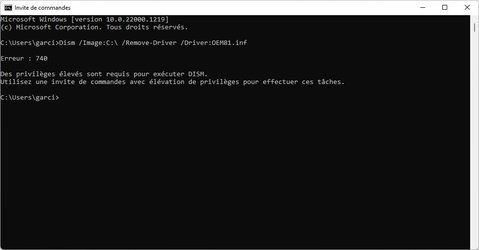
Here is the result of the command
Here is the translation
Error: 740

Elevated privileges are required to run DISM.
Use an elevated command prompt to perform these tasks.
 

Attachments

  • Sans titre.jpg
    Sans titre.jpg
    23.8 KB · Views: 1

My Computer

System One

  • OS
    w11 21h2
    Computer type
    Laptop
    Manufacturer/Model
    asus rog strix
    CPU
    amd ryzen 7 4800
    Memory
    16
    Graphics Card(s)
    NVIDIA GeForce RTX 3050Ti
    Hard Drives
    intel ssdpeknus512gz
    Antivirus
    w11
It appears that you are not logged in as admin!
 

My Computers

System One System Two

  • OS
    Windows 11 Pro 25H2 26200.8655
    Computer type
    Laptop
    Manufacturer/Model
    Acemagic LX15PRO
    CPU
    AMD Ryzen 7 5825U with Radeon Graphics
    Memory
    16GB
    Screen Resolution
    1920 x 1080
    Hard Drives
    SSD 2TB
    Internet Speed
    30 Mbps
    Browser
    Brave
    Antivirus
    Webroot Secure Anywhere
    Other Info
    System 3

    Acer Swift SF114-34 laptop
    OS Windows 11 Pro 26200.8524
    CPU Pentium Silver N6000
    RAM 4GB
    SSD Samsung 970 EVO Plus SSD 2TB (an upgrade)
  • Operating System
    Windows 11 Pro 23H2 22631.2506
    Computer type
    Laptop
    Manufacturer/Model
    HP Mini 210-1090NR PC (bought in late 2009!)
    CPU
    Atom N450 1.66GHz
    Memory
    2GB
    Browser
    Brave
    Antivirus
    Webroot
here
 

Attachments

  • Sans titre1.jpg
    Sans titre1.jpg
    53.7 KB · Views: 2

My Computer

System One

  • OS
    w11 21h2
    Computer type
    Laptop
    Manufacturer/Model
    asus rog strix
    CPU
    amd ryzen 7 4800
    Memory
    16
    Graphics Card(s)
    NVIDIA GeForce RTX 3050Ti
    Hard Drives
    intel ssdpeknus512gz
    Antivirus
    w11
Error: 87

The /Image option specified points to a running Windows installation.
To process the running operating system, use the /online option. For more information, see Help by running DISM.exe /Online/?.

The DISM log file is located at C:\WINDOWS\Logs\DISM\dism.log
 

Attachments

  • Sans titre2.jpg
    Sans titre2.jpg
    37.4 KB · Views: 1

My Computer

System One

  • OS
    w11 21h2
    Computer type
    Laptop
    Manufacturer/Model
    asus rog strix
    CPU
    amd ryzen 7 4800
    Memory
    16
    Graphics Card(s)
    NVIDIA GeForce RTX 3050Ti
    Hard Drives
    intel ssdpeknus512gz
    Antivirus
    w11
Please go to command prompt and type cd c:\users and then DIR

Show the result.

Merci
 

My Computers

System One System Two

  • OS
    Windows 11 Pro 25H2 26200.8655
    Computer type
    Laptop
    Manufacturer/Model
    Acemagic LX15PRO
    CPU
    AMD Ryzen 7 5825U with Radeon Graphics
    Memory
    16GB
    Screen Resolution
    1920 x 1080
    Hard Drives
    SSD 2TB
    Internet Speed
    30 Mbps
    Browser
    Brave
    Antivirus
    Webroot Secure Anywhere
    Other Info
    System 3

    Acer Swift SF114-34 laptop
    OS Windows 11 Pro 26200.8524
    CPU Pentium Silver N6000
    RAM 4GB
    SSD Samsung 970 EVO Plus SSD 2TB (an upgrade)
  • Operating System
    Windows 11 Pro 23H2 22631.2506
    Computer type
    Laptop
    Manufacturer/Model
    HP Mini 210-1090NR PC (bought in late 2009!)
    CPU
    Atom N450 1.66GHz
    Memory
    2GB
    Browser
    Brave
    Antivirus
    Webroot
here
 

Attachments

  • Sans titre3.jpg
    Sans titre3.jpg
    47.6 KB · Views: 2

My Computer

System One

  • OS
    w11 21h2
    Computer type
    Laptop
    Manufacturer/Model
    asus rog strix
    CPU
    amd ryzen 7 4800
    Memory
    16
    Graphics Card(s)
    NVIDIA GeForce RTX 3050Ti
    Hard Drives
    intel ssdpeknus512gz
    Antivirus
    w11
then think about removing the driver with dism from booted winpe:


Dism /Image:C:\ /Remove-Driver /Driver:OEM81.inf

you can see it is oem81.inf from your regedit screenshot.

replace C with the letter of the os partition as seen from booted media.

please read the posts.
 

My Computers

System One System Two

  • OS
    Win7,Win11
    Computer type
    PC/Desktop
    CPU
    i7-9700
    Motherboard
    gigabyte b365m ds3h
    Memory
    2x16gb 3600mhz
    Monitor(s) Displays
    benq gw2480
    PSU
    bequiet pure power 11 400CM
    Cooling
    cryorig m9i
  • Operating System
    win7,win11
    Computer type
    PC/Desktop
    CPU
    i5-8400
    Motherboard
    gigabyte b365m ds3h
    Memory
    2x8gb 3200
    PSU
    xfx pro 450
I was wrong sorry
 

Attachments

  • Sans titre4.jpg
    Sans titre4.jpg
    45.4 KB · Views: 3

My Computer

System One

  • OS
    w11 21h2
    Computer type
    Laptop
    Manufacturer/Model
    asus rog strix
    CPU
    amd ryzen 7 4800
    Memory
    16
    Graphics Card(s)
    NVIDIA GeForce RTX 3050Ti
    Hard Drives
    intel ssdpeknus512gz
    Antivirus
    w11

My Computer

System One

  • OS
    w11 21h2
    Computer type
    Laptop
    Manufacturer/Model
    asus rog strix
    CPU
    amd ryzen 7 4800
    Memory
    16
    Graphics Card(s)
    NVIDIA GeForce RTX 3050Ti
    Hard Drives
    intel ssdpeknus512gz
    Antivirus
    w11
Back
Top Bottom


