Svallux
Member
- Local time
- 3:29 AM
- Posts
- 4
- OS
- Windows 11
The Problem
I am experiencing an issue with my desktop icons.
Symptoms
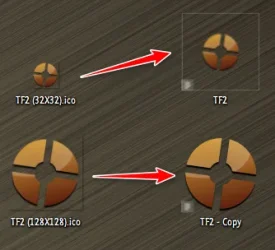
Out of approximately 100 desktop icons, about 30-35 appear "broken." When broken, they convert to a low-quality, smaller version of themselves with a thin gray border around them.
If I leave them, they stay in this state. If I manually fix them it all appears fine initially. However, if I restart my PC or reload the desktop in any way, 30-35 other icons break. some are the same as before some new ones
Observations
There doesn't seem to be a consistent pattern to which icons break, but I have noticed that if an icon is already broken, then upon a reset it might have a higher chance of being in the new pool of broken icons. also game icons tend to break more often, though this might just be because I have more of them on my desktop.
I logged onto a new account, and it "SEEMS fine," but I do not want to migrate as that would be an even bigger headache.
Steps Taken So Far
I have tried the following troubleshooting steps:
* Nuking Explorer, clearing the icon cache, and reviving Explorer. This resulted in some icons breaking and some being fixed.
* Installing Shellexview and disabling all non-Microsoft items, then nuking Explorer, clearing the icon cache, and reviving Explorer. The result was the same.
* Restarting my PC multiple times. No change.
* Pulling power from the PC. No change.
* Rebinding shortcuts to their original locations with a CMD input. This seemingly had no reaction.
* Checking for viruses with both Windows Antivirus and Malwarebytes. Zero threats were detected.
Screenshots
As you can see, icons 3, 5, 6, 9, and 12 are broken.
My Skill Level: Know a little
I am experiencing an issue with my desktop icons.
Symptoms
Out of approximately 100 desktop icons, about 30-35 appear "broken." When broken, they convert to a low-quality, smaller version of themselves with a thin gray border around them.
If I leave them, they stay in this state. If I manually fix them it all appears fine initially. However, if I restart my PC or reload the desktop in any way, 30-35 other icons break. some are the same as before some new ones
Observations
There doesn't seem to be a consistent pattern to which icons break, but I have noticed that if an icon is already broken, then upon a reset it might have a higher chance of being in the new pool of broken icons. also game icons tend to break more often, though this might just be because I have more of them on my desktop.
I logged onto a new account, and it "SEEMS fine," but I do not want to migrate as that would be an even bigger headache.
Steps Taken So Far
I have tried the following troubleshooting steps:
* Nuking Explorer, clearing the icon cache, and reviving Explorer. This resulted in some icons breaking and some being fixed.
* Installing Shellexview and disabling all non-Microsoft items, then nuking Explorer, clearing the icon cache, and reviving Explorer. The result was the same.
* Restarting my PC multiple times. No change.
* Pulling power from the PC. No change.
* Rebinding shortcuts to their original locations with a CMD input. This seemingly had no reaction.
* Checking for viruses with both Windows Antivirus and Malwarebytes. Zero threats were detected.
Screenshots
As you can see, icons 3, 5, 6, 9, and 12 are broken.
My Skill Level: Know a little
- Windows Build/Version
- windows 11
Attachments

My Computer
At a glance
Windows 11AMD ryzen 7 3800X 8-core Proscessor32 GBnvidia geforce GTX 1060 6GB
- OS
- Windows 11
- Computer type
- PC/Desktop
- Manufacturer/Model
- Micro-star International co. Ltd (MS-7B86)
- CPU
- AMD ryzen 7 3800X 8-core Proscessor
- Motherboard
- B450 GAMING PLUS MAX (MS-7B86)
- Memory
- 32 GB
- Graphics Card(s)
- nvidia geforce GTX 1060 6GB
- Sound Card
- no clue
- Monitor(s) Displays
- LG HDR QHD
- Screen Resolution
- 2560x1440 / 60Hz
- Hard Drives
- the regular ones
- PSU
- ???
- Case
- black i guess?
- Cooling
- theres a fan
- Keyboard
- razer synapse i think
- Mouse
- doesnt rly matter
- Internet Speed
- decent
- Browser
- opera
- Antivirus
- default windows + malewarebytes