Desktop right click


Absolutely not!!!

These attributes should be there on first click! Native or not! Period!

View attachment 4018 View attachment 4019

I'm getting sick and tired of all the speculation on what MS did to the right click context menu, why they did it, what you can do to work around it, whether it works for this, or that, blah, blah, blah!

They made a mistake! They should fix it!
Okay, Okay, Okay! I agree, Microsoft has definitely screwed this one up. But then, some of us are pretty unobservant . . . like yours truly. I didn't see those icons on the top bar of the Context Menu. Nope, Edit ain't there. :(
 

My Computers My Computers

  • At a glance

    Windows 11 23H2 22631.2861Intel(R) Core(TM) i7-10700 CPU @ 2.90GHz 2.90...16384 MBytesIntel UHD Graphics 630
    OS
    Windows 11 23H2 22631.2861
    Computer type
    PC/Desktop
    Manufacturer/Model
    HP Envy TE01-1xxx
    CPU
    Intel(R) Core(TM) i7-10700 CPU @ 2.90GHz 2.90 GHz
    Motherboard
    16.0GB Dual-Channel Unknown @ 1463MHz (21-21-21-47)
    Memory
    16384 MBytes
    Graphics Card(s)
    Intel UHD Graphics 630
    Sound Card
    Realtek High Definition Audio
    Monitor(s) Displays
    Monitor 1 - Acer 27" Monitor 2 - Acer 27"
    Screen Resolution
    1920 x 1080
    Hard Drives
    WDC PC SN530 SDBPNPZ-512G-1006 (SSD)
    Seagate ST1000DM003-1SB102
    Seagate BUP Slim SCSI Disk Device (SSD)
    PSU
    HP
    Case
    HP
    Cooling
    Standard
    Keyboard
    Logitech Wave K350
    Mouse
    Logitech M705
    Internet Speed
    500 mbps
    Browser
    Firefox
    Antivirus
    Windows Defender
    Other Info
    That's all Folks!
  • At a glance

    Windows 11Intel Core i7 (10th gen) 1070016 GBIntel UHD Graphics 630
    Operating System
    Windows 11
    Computer type
    PC/Desktop
    Manufacturer/Model
    HP
    CPU
    Intel Core i7 (10th gen) 10700
    Motherboard
    Intel
    Memory
    16 GB
    Graphics card(s)
    Intel UHD Graphics 630
    Sound Card
    Built-in
    Monitor(s) Displays
    Acer 27" & Samsung 24"
    Screen Resolution
    1920 x
    Hard Drives
    SSD (512 GB)
    HDD (1 TB)
    Seagate
    PSU
    Intel i7 10th Generation
    Case
    HP
    Cooling
    HP/Intel?
    Keyboard
    Logitech Wave K350
    Mouse
    Logitech M705
    Internet Speed
    50 mbps
    Browser
    Firefox 90.2
    Antivirus
    Windows Defender
    Other Info
    Headphone/Microphone Combo
    SuperSpeed USB Type-A (4 on front)
    HP 3-in-One Card Readr
    SuperSpeed USB Type-C
    DVD Writer
3. The Macrium choice is no longer there in 22000.100 for me.
I just right clicked on a Macrium Image file and Explore image is the first choice.
 

My Computers My Computers

  • At a glance

    Windows 11 Pro 25H2Intel Core i7-10700K16GB (8GB PC4-19200 DDR4 SDRAM x2)NVIDIA GeForce GTX 1050 TI
    OS
    Windows 11 Pro 25H2
    Computer type
    PC/Desktop
    Manufacturer/Model
    PowerSpec B746
    CPU
    Intel Core i7-10700K
    Motherboard
    ASRock Z490 Phantom Gaming 4/ax
    Memory
    16GB (8GB PC4-19200 DDR4 SDRAM x2)
    Graphics Card(s)
    NVIDIA GeForce GTX 1050 TI
    Sound Card
    Realtek Audio
    Monitor(s) Displays
    #1. LG ULTRAWIDE 34" #2. AOC Q32G2WG3 32"
    Screen Resolution
    #1. 3440 X 1440 #2. 1920 x 1080
    Hard Drives
    NVMe WDC WDS100T2B0C-00PXH0 1TB
    Samsung SSD 860 EVO 1TB
    PSU
    750 Watts (62.5A)
    Case
    PowerSpec/Lian Li ATX 205
    Keyboard
    Logitech K270
    Mouse
    Logitech M185
    Browser
    Microsoft Edge and Firefox
    Antivirus
    Webroot SecureAnywhere CE 26.1
  • At a glance

    Windows 11 Canary ChannelIntel Core i5-8400 CPU @ 2.80GHz16 MB DDR 4-2666
    Operating System
    Windows 11 Canary Channel
    Computer type
    PC/Desktop
    Manufacturer/Model
    PowerSpec G156
    CPU
    Intel Core i5-8400 CPU @ 2.80GHz
    Motherboard
    AsusTeK Prime B360M-A
    Memory
    16 MB DDR 4-2666
    Monitor(s) Displays
    23" Speptre HDMI 75Hz
    Screen Resolution
    1920x1080
    Hard Drives
    Samsung 970 EVO 500GB NVMe
    Keyboard
    Logitek K270
    Mouse
    Logitek M185
    Browser
    Firefox, Edge and Edge Canary
    Antivirus
    Windows Defender
I hate it, it reminds me of having to use Keyboard shortcuts In Dos. Why have a modern GUI and go backward.
 

My Computer My Computer

At a glance

windows 11 ProRyzen 5 3600x16Gb 3200MhzMSI RADION Rx480 8 gb
OS
windows 11 Pro
Computer type
PC/Desktop
Manufacturer/Model
Me home built
CPU
Ryzen 5 3600x
Motherboard
Msi B450 PRO-VDH MAx
Memory
16Gb 3200Mhz
Graphics Card(s)
MSI RADION Rx480 8 gb
Sound Card
realteck HDMI
Monitor(s) Displays
ASUS 24" and Xpen Artidt pro 12 Monitor tablet.
Screen Resolution
1920x1080
Hard Drives
C:\crucial 240Gb SSD >crucial M2 250Gb cache >F:\WD 2TB
PSU
CoolMaster G750 M
Cooling
Cooler Master 212 thermal Heatsink 2x120mm Fans:2 x120mm in push pull above it 2"x 1 20mm on front on intake and 1 120mm exhaling on the back panel.
Keyboard
Logitech
Mouse
cobra
Internet Speed
210M
Browser
Google
Antivirus
Malwarebytes
Morning, have any of you been experiencing problems when right-clicking?. Sometimes I have to do it three or more times to get it to perform the action required.
Yes, I have the same issue.
 

My Computers My Computers

  • At a glance

    Windows 11 ProIntel Core i9 14900K 5800/4500 P/E96GB (2x48) G.skill Ripjaws 6800Asus ROG Strix 4070 Ti OC
    OS
    Windows 11 Pro
    Computer type
    PC/Desktop
    Manufacturer/Model
    DIY Photoshop/Audio/Game/tinker
    CPU
    Intel Core i9 14900K 5800/4500 P/E
    Motherboard
    Asus ROG Maximus Z790 Dark Hero
    Memory
    96GB (2x48) G.skill Ripjaws 6800
    Graphics Card(s)
    Asus ROG Strix 4070 Ti OC
    Sound Card
    B&W 606 S3 speakers; Audiolabs 7000a integrated amp; RSL 10S Mk2 sub
    Monitor(s) Displays
    Eizo CG2730 ColorEdge, ViewSonic VP2768
    Screen Resolution
    2560 x 1440 x 2
    Hard Drives
    nvme: WDC SN850X 4TB, SN850 1TB, SK-Hynix 2 TB P41
    Spinners: Sabrent USB-C DS-SC5B 5-bay docking station, 6TB WDC Black, 6TB Ironwolf Pro 2x 2TB WDC Black
    PSU
    850W Seasonic Vertex PX-850
    Case
    FD North XL Mesh, Black Walnut
    Cooling
    EK Nucleus black 360 AIO w/Phanteks T30 fans; 2 Noctua NF-A14 Chromax ; T30 for memory
    Keyboard
    Keychron Q3 Max TKL w/GMK Redsuns Red Samuri keycaps
    Mouse
    Logitech G305 wireless gaming
    Internet Speed
    575 Mb/s down | 25 Mb/s up
    Browser
    Firefox
    Antivirus
    Defender, Macrium Reflect X
    Other Info
    Phangkey Amaterasu V2 Desk Mat
  • At a glance

    Apple M1
    Computer type
    Laptop
    Manufacturer/Model
    💻 Apple 13" Macbook Pro 2020 (m1)
    CPU
    Apple M1
    Screen Resolution
    2560x1600
    Browser
    Firefox
I disabled those two, I now have to right click twice, instead of three times. At least that's an improvement :).

lol. what version are you on?

i had those issues in earlier builds but in i think .65 or .71 the sluggishness is gone.


try to remove this too:

1627190295616.png
 

My Computer My Computer

At a glance

Windows 11 x64 v23H2 Build 22631.3958
OS
Windows 11 x64 v23H2 Build 22631.3958
Computer type
PC/Desktop
Manufacturer/Model
Acer

My Computers My Computers

  • At a glance

    Windows 11 Pro
    OS
    Windows 11 Pro
    Computer type
    PC/Desktop
    Manufacturer/Model
    ASUS ROG Strix
  • At a glance

    Windows 11 Pro
    Operating System
    Windows 11 Pro
    Computer type
    Laptop
    Manufacturer/Model
    ASUS VivoBook
  • ASUS VivoBook 'Lite' ~ Windows 11 Home
All you have to do is hit shift & F10 , not that hard but it is something that should be fixed, I used to be able to adjust the volume from the task bar on different programs and now I have to go into settings. Seem like MS wants to put everything in settings.(n)
 

My Computers My Computers

  • At a glance

    Windows11 Pro 26200.9267Intel Core i9 14900F (24 -Core, 68 MB Total C...32GB DDR5RTX 4080 Super w/610.74
    OS
    Windows11 Pro 26200.9267
    Computer type
    PC/Desktop
    Manufacturer/Model
    Dell Alienware Aurora R16
    CPU
    Intel Core i9 14900F (24 -Core, 68 MB Total Cache)
    Motherboard
    Dell Alienware
    Memory
    32GB DDR5
    Graphics Card(s)
    RTX 4080 Super w/610.74
    Sound Card
    Realtec
    Monitor(s) Displays
    Corsair XENEON 32QHD165
    Screen Resolution
    2560 X 1440
    Hard Drives
    1-2TB Samsung 990 Pro PCIe NVMe M2 SSD
    1-4TB Samsung 990 Pro PCIe NVMe M2 SSD
    PSU
    1000 Watt Platinum Dell
    Case
    Alienware
    Cooling
    Liquid Closed Loop
    Keyboard
    Corsair Strafe RGB
    Mouse
    Logitech MK270 Wireless
    Internet Speed
    100Gb's Down-20 Up
    Browser
    Firefox 154.0
    Antivirus
    Defender
    Other Info
    Very Quiet And Fast
    CyberPower UPS CP1500PFCLCD
  • At a glance

    PClinuxOS Mate (2025.7)13th Gen Inter(R) Core(TM) i3-1315U64 GB DDR4 @3200 MHz.Internal
    Operating System
    PClinuxOS Mate (2025.7)
    Computer type
    PC/Desktop
    Manufacturer/Model
    Intel
    CPU
    13th Gen Inter(R) Core(TM) i3-1315U
    Motherboard
    Intel
    Memory
    64 GB DDR4 @3200 MHz.
    Graphics card(s)
    Internal
    Sound Card
    None
    Monitor(s) Displays
    Dell 2419HGCF
    Screen Resolution
    1920 X 1080
    Hard Drives
    SAMSUNG 980 PRO SSD 2TB, PCIe 4.0 M.2 2280
    PSU
    Chicony 30 Watt
    Case
    Small
    Keyboard
    Dell
    Mouse
    Razor
    Internet Speed
    1GB
    Browser
    Slimjet
lol. what version are you on?

i had those issues in earlier builds but in i think .65 or .71 the sluggishness is gone.


try to remove this too:

View attachment 4043
Afternoon vannn, I'm on version100. Are you suggesting uninstall NVIDIA Control Panel?.
 

My Computer My Computer

At a glance

Windows 11Intel(R) Core(TM) i5-8600K CPU @ 3.60GHz 3.60...16GBGeForce GTX 1070
OS
Windows 11
Computer type
PC/Desktop
CPU
Intel(R) Core(TM) i5-8600K CPU @ 3.60GHz 3.60 GHz
Motherboard
ROG MAXIMUS X HERO
Memory
16GB
Graphics Card(s)
GeForce GTX 1070
Afternoon vannn, I'm on version100. Are you suggesting uninstall NVIDIA Control Panel?.

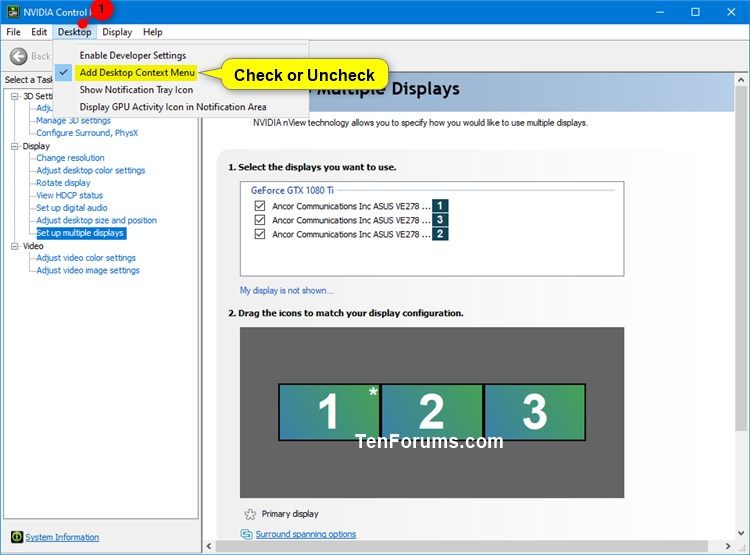
just remove the desktop context menu.

240285d1563226293-add-remove-nvidia-control-panel-desktop-context-menu-windows-nvidia_control_panel_desktop_context_menu.jpg
 

My Computer My Computer

At a glance

Windows 11 x64 v23H2 Build 22631.3958
OS
Windows 11 x64 v23H2 Build 22631.3958
Computer type
PC/Desktop
Manufacturer/Model
Acer
It is. Even worse at the previous build. Makes me think that I have to buy a new mouse.
Same here, tried two different mice, but same results
Cheers,

Ray
 

My Computer My Computer

At a glance

Windows 11 Pro and Windows 11 BetaRyzen 9 3900X 4.35GHz OC32GB Corsair 2400 2800 OCMSI 2070
OS
Windows 11 Pro and Windows 11 Beta
Computer type
PC/Desktop
Manufacturer/Model
Self made
CPU
Ryzen 9 3900X 4.35GHz OC
Motherboard
MSI MPG X570S Edge MAX
Memory
32GB Corsair 2400 2800 OC
Graphics Card(s)
MSI 2070
Sound Card
On MB
Monitor(s) Displays
Samsung 32 inch curved 4k
Screen Resolution
3840 X 2160P
Hard Drives
M.2 times 3, 1 SSD 3, HD
PSU
Corsair 750 semi mod
Case
Phanteks
Cooling
NZXI 280MM
Keyboard
Mech
Mouse
Not sure
Internet Speed
1 GB/S (Comcast)
Browser
Firefox, Edge
Antivirus
Malewarebytes/Windows defender
Other Info
Second self made PC - 82 years young and still going (first Windows for me was 3.1)

My Computer My Computer

At a glance

Windows 11Intel(R) Core(TM) i5-8600K CPU @ 3.60GHz 3.60...16GBGeForce GTX 1070
OS
Windows 11
Computer type
PC/Desktop
CPU
Intel(R) Core(TM) i5-8600K CPU @ 3.60GHz 3.60 GHz
Motherboard
ROG MAXIMUS X HERO
Memory
16GB
Graphics Card(s)
GeForce GTX 1070
Morning, have any of you been experiencing problems when right-clicking?. Sometimes I have to do it three or more times to get it to perform the action required.
I haven't had any problems when right clicking. I am having problems using the scroll wheel on my wireless mouse. It occasionally lags and/or will start scrolling in the wrong diretion. This is in the Edge browser. I haven't tried it in any other programs.
 

My Computers My Computers

  • At a glance

    Windows 11 Pro 25H2Intel Core i7-10700K16GB (8GB PC4-19200 DDR4 SDRAM x2)NVIDIA GeForce GTX 1050 TI
    OS
    Windows 11 Pro 25H2
    Computer type
    PC/Desktop
    Manufacturer/Model
    PowerSpec B746
    CPU
    Intel Core i7-10700K
    Motherboard
    ASRock Z490 Phantom Gaming 4/ax
    Memory
    16GB (8GB PC4-19200 DDR4 SDRAM x2)
    Graphics Card(s)
    NVIDIA GeForce GTX 1050 TI
    Sound Card
    Realtek Audio
    Monitor(s) Displays
    #1. LG ULTRAWIDE 34" #2. AOC Q32G2WG3 32"
    Screen Resolution
    #1. 3440 X 1440 #2. 1920 x 1080
    Hard Drives
    NVMe WDC WDS100T2B0C-00PXH0 1TB
    Samsung SSD 860 EVO 1TB
    PSU
    750 Watts (62.5A)
    Case
    PowerSpec/Lian Li ATX 205
    Keyboard
    Logitech K270
    Mouse
    Logitech M185
    Browser
    Microsoft Edge and Firefox
    Antivirus
    Webroot SecureAnywhere CE 26.1
  • At a glance

    Windows 11 Canary ChannelIntel Core i5-8400 CPU @ 2.80GHz16 MB DDR 4-2666
    Operating System
    Windows 11 Canary Channel
    Computer type
    PC/Desktop
    Manufacturer/Model
    PowerSpec G156
    CPU
    Intel Core i5-8400 CPU @ 2.80GHz
    Motherboard
    AsusTeK Prime B360M-A
    Memory
    16 MB DDR 4-2666
    Monitor(s) Displays
    23" Speptre HDMI 75Hz
    Screen Resolution
    1920x1080
    Hard Drives
    Samsung 970 EVO 500GB NVMe
    Keyboard
    Logitek K270
    Mouse
    Logitek M185
    Browser
    Firefox, Edge and Edge Canary
    Antivirus
    Windows Defender

My Computer My Computer

At a glance

Windows 11Intel(R) Core(TM) i5-8600K CPU @ 3.60GHz 3.60...16GBGeForce GTX 1070
OS
Windows 11
Computer type
PC/Desktop
CPU
Intel(R) Core(TM) i5-8600K CPU @ 3.60GHz 3.60 GHz
Motherboard
ROG MAXIMUS X HERO
Memory
16GB
Graphics Card(s)
GeForce GTX 1070

My Computers My Computers

  • At a glance

    Windows11 Pro 26200.9267Intel Core i9 14900F (24 -Core, 68 MB Total C...32GB DDR5RTX 4080 Super w/610.74
    OS
    Windows11 Pro 26200.9267
    Computer type
    PC/Desktop
    Manufacturer/Model
    Dell Alienware Aurora R16
    CPU
    Intel Core i9 14900F (24 -Core, 68 MB Total Cache)
    Motherboard
    Dell Alienware
    Memory
    32GB DDR5
    Graphics Card(s)
    RTX 4080 Super w/610.74
    Sound Card
    Realtec
    Monitor(s) Displays
    Corsair XENEON 32QHD165
    Screen Resolution
    2560 X 1440
    Hard Drives
    1-2TB Samsung 990 Pro PCIe NVMe M2 SSD
    1-4TB Samsung 990 Pro PCIe NVMe M2 SSD
    PSU
    1000 Watt Platinum Dell
    Case
    Alienware
    Cooling
    Liquid Closed Loop
    Keyboard
    Corsair Strafe RGB
    Mouse
    Logitech MK270 Wireless
    Internet Speed
    100Gb's Down-20 Up
    Browser
    Firefox 154.0
    Antivirus
    Defender
    Other Info
    Very Quiet And Fast
    CyberPower UPS CP1500PFCLCD
  • At a glance

    PClinuxOS Mate (2025.7)13th Gen Inter(R) Core(TM) i3-1315U64 GB DDR4 @3200 MHz.Internal
    Operating System
    PClinuxOS Mate (2025.7)
    Computer type
    PC/Desktop
    Manufacturer/Model
    Intel
    CPU
    13th Gen Inter(R) Core(TM) i3-1315U
    Motherboard
    Intel
    Memory
    64 GB DDR4 @3200 MHz.
    Graphics card(s)
    Internal
    Sound Card
    None
    Monitor(s) Displays
    Dell 2419HGCF
    Screen Resolution
    1920 X 1080
    Hard Drives
    SAMSUNG 980 PRO SSD 2TB, PCIe 4.0 M.2 2280
    PSU
    Chicony 30 Watt
    Case
    Small
    Keyboard
    Dell
    Mouse
    Razor
    Internet Speed
    1GB
    Browser
    Slimjet
Same here, tried two different mice, but same results
Cheers,

Ray
Better now, but sometimes my pointer just wont to be clicked, jump up/down not to the menu that I want to click..
 

My Computer My Computer

At a glance

Windows 11AMD Phenom(tm) II X2 555 Processor 3.20 GHzKingston 16GB DDR3NVidia GeForce GTX 650
OS
Windows 11
Computer type
PC/Desktop
Manufacturer/Model
Unbranded
CPU
AMD Phenom(tm) II X2 555 Processor 3.20 GHz
Motherboard
Asus M4A785T-M
Memory
Kingston 16GB DDR3
Graphics Card(s)
NVidia GeForce GTX 650
Sound Card
VIA HD Audio
Monitor(s) Displays
2x LG 20" Display
Screen Resolution
1600 x 900 60MHz
Hard Drives
WD Blue 1TB HDD
ADATA 500GB SSD
Midas Force 500GB SSD
PSU
Enermax 500W
Case
Unbranded
Cooling
Unbranded
Keyboard
Logitech Wired K120
Mouse
Logitech Wired B100
Internet Speed
20MB Download 1,5MB Upload
Browser
Firefox
Antivirus
McAffee, Malwarebytes, Windows Defender
Other Info
Are you sneaking?
I still have to right-click twice on files inside of folders.

thats an improvement! :LOL: j/k

there's definitely something else causing it.

perhaps some other apps you've installed that is also in the context menu.
 

My Computer My Computer

At a glance

Windows 11 x64 v23H2 Build 22631.3958
OS
Windows 11 x64 v23H2 Build 22631.3958
Computer type
PC/Desktop
Manufacturer/Model
Acer
There's something weird goin on with erratic mouse behavior!
Often I will hover highlight an object, but, when I click it chooses the one above, below or beside it!
I noticed also, when I shutdown, right at the last second, the mouse pointer jumps to the center of the screen!
 

My Computers My Computers

  • At a glance

    Windows 11 Pro
    OS
    Windows 11 Pro
    Computer type
    PC/Desktop
    Manufacturer/Model
    ASUS ROG Strix
  • At a glance

    Windows 11 Pro
    Operating System
    Windows 11 Pro
    Computer type
    Laptop
    Manufacturer/Model
    ASUS VivoBook
  • ASUS VivoBook 'Lite' ~ Windows 11 Home
There's something weird goin on with erratic mouse behavior!
Often I will hover highlight an object, but, when I click it chooses the one above, below or beside it!
I noticed also, when I shutdown, right at the last second, the mouse pointer jumps to the center of the screen!
I get this too from time to time.
 

My Computer My Computer

At a glance

Windows 11Intel(R) Core(TM) i5-8600K CPU @ 3.60GHz 3.60...16GBGeForce GTX 1070
OS
Windows 11
Computer type
PC/Desktop
CPU
Intel(R) Core(TM) i5-8600K CPU @ 3.60GHz 3.60 GHz
Motherboard
ROG MAXIMUS X HERO
Memory
16GB
Graphics Card(s)
GeForce GTX 1070
There's something weird goin on with erratic mouse behavior!
Often I will hover highlight an object, but, when I click it chooses the one above, below or beside it!
I noticed also, when I shutdown, right at the last second, the mouse pointer jumps to the center of the screen!
Ha! I was just about to buy a new mouse because of that. Happened oftenly in Explorer. But not in applications (I use Corel, Photoshop, etc). Almost anytime I try to click the most right item in Explorer, the cursor jump 1-2 items to the left.
 

My Computer My Computer

At a glance

Windows 11AMD Phenom(tm) II X2 555 Processor 3.20 GHzKingston 16GB DDR3NVidia GeForce GTX 650
OS
Windows 11
Computer type
PC/Desktop
Manufacturer/Model
Unbranded
CPU
AMD Phenom(tm) II X2 555 Processor 3.20 GHz
Motherboard
Asus M4A785T-M
Memory
Kingston 16GB DDR3
Graphics Card(s)
NVidia GeForce GTX 650
Sound Card
VIA HD Audio
Monitor(s) Displays
2x LG 20" Display
Screen Resolution
1600 x 900 60MHz
Hard Drives
WD Blue 1TB HDD
ADATA 500GB SSD
Midas Force 500GB SSD
PSU
Enermax 500W
Case
Unbranded
Cooling
Unbranded
Keyboard
Logitech Wired K120
Mouse
Logitech Wired B100
Internet Speed
20MB Download 1,5MB Upload
Browser
Firefox
Antivirus
McAffee, Malwarebytes, Windows Defender
Other Info
Are you sneaking?
Anyone other than me annoyed by the "Show More Options" when you right click an icon on the Desktop or other places.
You don't have to right-click then select 'Show more options', once such an item is selected you can just press Shift+F10 to get the full context menu straight away. If your keyboard has a Menu key even better, just press that.
 

My Computers My Computers

  • At a glance

    Windows 11 HomeAMD Athlon Silver 3050U8GBRadeon Graphics
    OS
    Windows 11 Home
    Computer type
    Laptop
    Manufacturer/Model
    Acer Aspire 3 A315-23-R9VY
    CPU
    AMD Athlon Silver 3050U
    Memory
    8GB
    Graphics Card(s)
    Radeon Graphics
    Monitor(s) Displays
    laptop screen
    Screen Resolution
    1366x768 native resolution, up to 2560x1440 with Radeon Virtual Super Resolution
    Hard Drives
    1TB Samsung EVO 870 SSD (from April 2026: 250GB EVO 850)
    Internet Speed
    150 Mbps
    Browser
    Edge, Firefox
    Antivirus
    Defender
    Other Info
    UPDATE - 11 April 2026: due to lid hinges starting to break up this laptop has been retired from active duty. The OS with all software and files has been migrated to my System Seven in 'Other systems' to carry on as my general purpose 'main machine'.

    I've now clean installed 25H2 and used Garlin's scripts to update Secure Boot to CA 2023 and revoke the PCA 2011 certificates. It's new role is to test secure boot issues.

    Info for 2021-2026:
    fully 'Windows 11 ready' laptop. Windows 10 C: partition migrated from my old unsupported 'main machine' then upgraded to 11. A test migration ran Insider builds for 2 months. When 11 was released on 5th October 2021 it was re-imaged back to 10 and was offered the upgrade in Windows Update on 20th October. Windows Update offered the 22H2 Feature Update on 20th September 2022. It got the 23H2 Feature Update on 4th November 2023 through Windows Update, 24H2 on 3rd October 2024 through Windows Update by setting the Target Release Version for 24H2, and 25H2 on 30th September 2025 through Windows Update by setting the Target Release Version for 25H2.
  • At a glance

    Windows 11 ProIntel® Core™ i5-520M8GB(integrated graphics) Intel HD Graphics
    Operating System
    Windows 11 Pro
    Computer type
    Laptop
    Manufacturer/Model
    Dell Latitude E4310
    CPU
    Intel® Core™ i5-520M
    Motherboard
    0T6M8G
    Memory
    8GB
    Graphics card(s)
    (integrated graphics) Intel HD Graphics
    Screen Resolution
    1366x768
    Hard Drives
    500GB Crucial MX500 SSD
    Browser
    Firefox, Edge
    Antivirus
    Defender
    Other Info
    unsupported machine: Legacy bios, MBR, TPM 1.2, upgraded from W10 to W11 using W10/W11 hybrid install media workaround.

    In-place upgrade to 22H2 using ISO and a workaround.
    Feature Update to 23H2 by manually installing the Enablement Package.
    In-place upgrade to 24H2 using hybrid 23H2/24H2 install media.
    Upgraded to 25H2 by Enablement Package.

    Also running Insider Experimental 263xx and 29xxx builds and Windows 10 as native boot .vhdx.
  • My SYSTEM THREE is a Dell Latitude 5410, i7-10610U, 32GB RAM, 512GB NVMe ssd, supported device running Windows 11 Pro.

    My SYSTEM FOUR was a 2-in-1 convertible Lenovo Yoga 11e (1st gen) type 20DA, Celeron N2930, 8GB RAM, 256GB ssd. Unsupported device. This has now been sold. It has been replaced by my System Eight.

    My SYSTEM FIVE is a Dell Latitude 3190 2-in-1, Pentium Silver N5030, 8GB RAM, 1TB NVMe ssd, supported device running Windows 11 Pro, plus Insider Beta, Experimental 263xx and 29xxx builds (and a few others) as a native boot .vhdx.

    My SYSTEM SIX is a Dell Latitude 5550, Core Ultra 7 165H, 64GB RAM, 1TB NVMe SSD, supported device, Windows 11 Pro, Hyper-V host machine. Updated to 25H2 on 30th September 2025.

    My SYSTEM SEVEN is a Lenovo Thinkpad T580, 1920x1080 touchscreen, Intel Core i7-8650U, 16GB RAM, 512GB NVMe SSD + 2nd 512GB NVMe SSD, a supported device for Windows 11. This is my current general purpose 'main machine'. The installed Windows 11 Home from my System One has been migrated to this machine. As its new home has an existing digital licence for Pro I've been able to upgrade the migrated OS from Home to Pro.

    My SYSTEM EIGHT is a 2-in-1 convertible Lenovo Yoga 11e (5th gen) type 20LN, Celeron N4120, 8GB RAM, 512GB NVMe ssd, a supported device for Windows 11. Currently running Windows 11 Pro, plus Insider Beta, Experimental 263xx and 29xxx builds as native boot vhdx.

Latest Support Threads

Back
Top Bottom