Elevated Command non-functioning


rhstubby

Member
Local time
8:22 PM
Posts
28
OS
Win 11 Pro
My win 11 Pro (Version 25H2 os build 26200.7628) will not properly elevate rights (ex: run as administrator), Windows will NOT display a UAC prompt for the standard user to enter the password of an administrator account for approval and confirmation before allowing the action. If signed in as Administrator by default, the built-in Administrator account will not be prompted by UAC and assigns a lower level prompt without Admin rights.

In a similar manner PowerShell will not elevate to admin privileges. The only way to get a command prompt is to do a Cntrl + Alt + Del to bring up the Task Manager and click on Run New Task then type in the command needed and click the box ‘Create this task with admin privileges.

Here are the issues that have been noted for years about PC 9-5900. Access to windows privileges seemed lacking. Recent evaluations have revealed that the Windows Operating System appears to be incorrectly installed or otherwise corrupted beyond MS tools available to the end user.

This PC was built approximately Jun 2020 with Windows 10 installed (Best Buy Microsoft Windows 10 purchase 6/12/2020)

It was upgraded to Windows 11 during the grace period as Microsoft moved to a newer OS (win 11) so it became Home version Windows 11 shortly after the win 10 installation.

The PC was upgraded to Windows 11 PRO on or about 5/18/2024 with a purchase from the Microsoft Store for $107.17 in hopes this would reconcile issues with the PC. (It did not)

While the Best Buy purchase was retail the Windows 11 Pro upgrade was with the Microsoft store. The (personal email account info) account is where the resident bill of sale is located for the Pro upgrade. I have license keys for both the original software Windows 10 and Windows 11 Pro upgrade. NO hardware changes have occurred since building the machine in 2020. (SAME motherboard and SSD drive)

Review of membership of accounts reveal that rhstu account supposedly has Administrator rights (it is listed as administrator) but again will not enter into a command prompt with administrative rights. Also (wife’s Personal email account) is also on the PC with Admin privileges however it too does not respond with admin rights.

The symptoms include no Administrator Command Prompt. In fact, when requesting the Administrator privileges to elevate the UAC (User Account Control) does not even report an error or a message such as ‘access denied’. Furthermore, access to PowerShell and other administrative rights are also affected.

Incidentally the UAC under Settings is set to the second bar down (not extreme max top bar).

Admin Privileges can be attained ONLY by going to the Task Manager and creating a NEW TASK with Administrative privileges. Which was attempted without success to make changes or fix code.

The following attempts to remedy the situation have been unsuccessfully tried and failed.

Sfc /scannow

Dism /online /cleanup-image /restorehealth

The LOG file for the DISM command shows errors early on it the log (Don’t know what they mean)

Attempts to alter via RegEdit the HKEY_Local_Machine Windows\system32\config\SAM\domain\accounts\users\0000001F4 fails to set the value to 11 to 10 (access denied)

Attempting to create a new admin user fails from the elevated command prompt also.

Mounted ISO Win 11 USB from Microsoft and attempted reinstall of the OS from the MS Site. This too failed to remedy the situation.


NOTE: I’m self-taught on Microsoft Windows and do NOT profess high levels of intimate knowledge therefore my observations noted previously may be flawed.
 

My Computers

System One System Two

  • OS
    Win 11 Pro
    Computer type
    PC/Desktop
    Manufacturer/Model
    AMD
    CPU
    Ryzen 9-7900
    Motherboard
    ASUS Prime X670E-Pro Wifi
    Memory
    64 GB
    Graphics Card(s)
    NVIDIA GeForce RTX-3070
    Sound Card
    Realtek Audio
    Monitor(s) Displays
    Samsung 32" X 2
    Screen Resolution
    2560 x 1440
    Hard Drives
    SSD 980 PRO 2TB , 8TB , 20TB
    PSU
    EVGA 1000GT Power Supply
    Case
    Corsair Case 4000d
    Cooling
    MasterLiquid cooler ML2400 Mirror
    Keyboard
    Logitech K350
    Mouse
    LogitechM705
    Internet Speed
    495/11
    Browser
    Google Chrome, Edge
    Antivirus
    Bitdefender
  • Operating System
    Windows 11 Pro
    Computer type
    PC/Desktop
    Manufacturer/Model
    AMD
    CPU
    9-5900
    Motherboard
    ASUS ROG-Crosshair VIII Hero Wifi
    Memory
    32 GB Corsair Vengeance LPX 32GB (2 X 16GB) DDR4 3600 (PC4-28800)
    Graphics card(s)
    Zotec GTX 1650 OC 4GB GDDR6
    Sound Card
    Sound bar
    Monitor(s) Displays
    32" Samsung x 2
    Screen Resolution
    1920 x 1440
    Hard Drives
    Samsung 970 EVO Plus SSD 1TB NVME,
    PSU
    EVGA 850 W
    Case
    Corsair 4000D Airflow Tempered Glass Mid-Tower ATX PC
    Cooling
    Cooler Master MasterLiquid ML240L RGB V2,
    Keyboard
    Logitech
    Mouse
    Logitech
    Internet Speed
    495/11
    Browser
    Firefox
    Antivirus
    bitdefender

My Computers

System One System Two

  • OS
    Windows 11 Pro 25H2 Build 26200.8524
    Computer type
    PC/Desktop
    Manufacturer/Model
    Sin-built 2013
    CPU
    Intel(R) Core(TM) i7-4770K CPU @ 3.50GHz
    Motherboard
    ASUS ROG Maximus VI Formula
    Memory
    32.0 GB of I forget and the box is in storage.
    Graphics Card(s)
    Gigabyte nVidia GeForce GTX 1660 Super OC 6GB
    Sound Card
    Onboard thingy
    Monitor(s) Displays
    5 x LG 25MS500-B - 1 x 24MK430H-B - 1 x Wacom Pro 22" Touch Screen Tablet
    Screen Resolution
    All over the place
    Hard Drives
    Too many to list.
    OS on Samsung 1TB 870 QVO SATA
    PSU
    Silverstone 1500
    Case
    NZXT Phantom 820 Full-Tower Case
    Cooling
    Noctua NH-D15 Elite Class Dual Tower CPU Cooler / 6 x EziDIY 120mm / 2 x Corsair 140mm somethings / 1 x 140mm Thermaltake something / 2 x 200mm Corsair.
    Keyboard
    Corsair K95 / Logitech diNovo Edge Wireless
    Mouse
    Logitech: G402 / G502 / Mx Masters / Mx Air Cordless
    Internet Speed
    2000/500Mbps
    Browser
    All sorts
    Antivirus
    Kaspersky Premium
    Other Info
    ㅤㅤㅤㅤㅤㅤㅤㅤㅤㅤㅤㅤㅤㅤㅤㅤㅤㅤㅤㅤㅤㅤㅤㅤㅤㅤㅤㅤㅤㅤㅤㅤㅤㅤㅤㅤㅤㅤㅤㅤ⠀⠀⠀⠀⠀⠀⠀⠀⠀⠀
    TP-Link BE9300 WiFi 7 Bluetooth 5.4 (Archer TBE550E)
    TP-Link TX201 V1 2.5GB Lan

    Grandstream HT812 - VoIP
    ASUS DSL-AX82U - Mesh
    ASUS RT-AC68U - Mesh
    ASUS RT-BE88U Router

    Brother MFC-L2880DW Printer

    I’m on a horse.
  • Operating System
    Windows 11 Pro 25H2 Build 26200.8524
    Computer type
    Laptop
    Manufacturer/Model
    LENOVO Yoga 7 14IRL8 - 7i EVO OLED 14" Touchscreen i5 12 Core 16GB/512GB
    CPU
    Intel Core 12th Gen i5-1240P Processor (1.7 - 4.4GHz)
    Memory
    16GB LPDDR5 RAM
    Graphics card(s)
    Intel Iris Xe Graphics Processor
    Sound Card
    Optimized with Dolby Atmos®
    Screen Resolution
    QHD 2880 x 1800 OLED
    Hard Drives
    M.2 512GB
    Antivirus
    Defender / Malwarebytes
    Other Info
    …still on a horse.
You could try a repair install in-place upgrade, keeping your stuff.


My Computers

System One System Two

  • OS
    Windows 11 Pro 25H2 Build 26200.8524
    Computer type
    PC/Desktop
    Manufacturer/Model
    Sin-built 2013
    CPU
    Intel(R) Core(TM) i7-4770K CPU @ 3.50GHz
    Motherboard
    ASUS ROG Maximus VI Formula
    Memory
    32.0 GB of I forget and the box is in storage.
    Graphics Card(s)
    Gigabyte nVidia GeForce GTX 1660 Super OC 6GB
    Sound Card
    Onboard thingy
    Monitor(s) Displays
    5 x LG 25MS500-B - 1 x 24MK430H-B - 1 x Wacom Pro 22" Touch Screen Tablet
    Screen Resolution
    All over the place
    Hard Drives
    Too many to list.
    OS on Samsung 1TB 870 QVO SATA
    PSU
    Silverstone 1500
    Case
    NZXT Phantom 820 Full-Tower Case
    Cooling
    Noctua NH-D15 Elite Class Dual Tower CPU Cooler / 6 x EziDIY 120mm / 2 x Corsair 140mm somethings / 1 x 140mm Thermaltake something / 2 x 200mm Corsair.
    Keyboard
    Corsair K95 / Logitech diNovo Edge Wireless
    Mouse
    Logitech: G402 / G502 / Mx Masters / Mx Air Cordless
    Internet Speed
    2000/500Mbps
    Browser
    All sorts
    Antivirus
    Kaspersky Premium
    Other Info
    ㅤㅤㅤㅤㅤㅤㅤㅤㅤㅤㅤㅤㅤㅤㅤㅤㅤㅤㅤㅤㅤㅤㅤㅤㅤㅤㅤㅤㅤㅤㅤㅤㅤㅤㅤㅤㅤㅤㅤㅤ⠀⠀⠀⠀⠀⠀⠀⠀⠀⠀
    TP-Link BE9300 WiFi 7 Bluetooth 5.4 (Archer TBE550E)
    TP-Link TX201 V1 2.5GB Lan

    Grandstream HT812 - VoIP
    ASUS DSL-AX82U - Mesh
    ASUS RT-AC68U - Mesh
    ASUS RT-BE88U Router

    Brother MFC-L2880DW Printer

    I’m on a horse.
  • Operating System
    Windows 11 Pro 25H2 Build 26200.8524
    Computer type
    Laptop
    Manufacturer/Model
    LENOVO Yoga 7 14IRL8 - 7i EVO OLED 14" Touchscreen i5 12 Core 16GB/512GB
    CPU
    Intel Core 12th Gen i5-1240P Processor (1.7 - 4.4GHz)
    Memory
    16GB LPDDR5 RAM
    Graphics card(s)
    Intel Iris Xe Graphics Processor
    Sound Card
    Optimized with Dolby Atmos®
    Screen Resolution
    QHD 2880 x 1800 OLED
    Hard Drives
    M.2 512GB
    Antivirus
    Defender / Malwarebytes
    Other Info
    …still on a horse.
Please run Tuneup_plus_log.bat > post a share link (drop box, google dive, Gofile - Cloud Storage Made Simple)


My Computer

System One

  • OS
    Windows 10
    Computer type
    Laptop
    Manufacturer/Model
    HP
    CPU
    Intel(R) Core(TM) i7-4800MQ CPU @ 2.70GHz
    Motherboard
    Product : 190A Version : KBC Version 94.56
    Memory
    16 GB Total: Manufacturer : Samsung MemoryType : DDR3 FormFactor : SODIMM Capacity : 8GB Speed : 1600
    Graphics Card(s)
    NVIDIA Quadro K3100M; Intel(R) HD Graphics 4600
    Sound Card
    IDT High Definition Audio CODEC; PNP Device ID HDAUDIO\FUNC_01&VEN_111D&DEV_76E0
    Hard Drives
    Model Hitachi HTS727575A9E364
    Antivirus
    Microsoft Defender
    Other Info
    Mobile Workstation
If signed in as Administrator by default, the built-in Administrator account will not be prompted by UAC and assigns a lower level prompt without Admin rights.
If your Built-in Admin [username Administrator] is corrupt then you will not be able to fix the fault. You will have to reinstall Windows.
Backup your own files to an external disk first.
Download Windows 11 ISO file - ElevenForumTutorials
Create Windows 11 Bootable USB Installation Media - ElevenForumTutorials
Clean Install Windows 11 - ElevenForumTutorials

And, afterwards, leave the Built-in Admin [username Administrator] disabled as it is intended to be.

Consider creating spare, Admin, password-protected local accounts ready for any future troubleshooting:-
my ditty - Create two spare local, password-protected Admin accounts [post #2] in Windows 10, 11 - TenForums


Best of luck,
Denis
 

My Computer

System One

  • OS
    Windows 11 Home x64 Version 25H2 Build 26200.8037
I've conducted (antspants) and verified the Register on option 2 to run scripts on the UAC activities. Each aligned with the outcome expected. I've conducted an ISO install which was a second suggestion both of these seem not to work unless I'm missing something. I'll try the supplemental log data collection in the next suggestion to see if more details can be revealed on this issue. (Try 3 advises) as Administrator by default, the built-in Administrator account will not be prompted by UAC and assigns a lower level prompt without Admin rights. however I can only execute a local user command prompt (UNLESS I go to task manager and get an elevated command there).
Zookbook your up on deck! Will read and execute this next.
 

My Computers

System One System Two

  • OS
    Win 11 Pro
    Computer type
    PC/Desktop
    Manufacturer/Model
    AMD
    CPU
    Ryzen 9-7900
    Motherboard
    ASUS Prime X670E-Pro Wifi
    Memory
    64 GB
    Graphics Card(s)
    NVIDIA GeForce RTX-3070
    Sound Card
    Realtek Audio
    Monitor(s) Displays
    Samsung 32" X 2
    Screen Resolution
    2560 x 1440
    Hard Drives
    SSD 980 PRO 2TB , 8TB , 20TB
    PSU
    EVGA 1000GT Power Supply
    Case
    Corsair Case 4000d
    Cooling
    MasterLiquid cooler ML2400 Mirror
    Keyboard
    Logitech K350
    Mouse
    LogitechM705
    Internet Speed
    495/11
    Browser
    Google Chrome, Edge
    Antivirus
    Bitdefender
  • Operating System
    Windows 11 Pro
    Computer type
    PC/Desktop
    Manufacturer/Model
    AMD
    CPU
    9-5900
    Motherboard
    ASUS ROG-Crosshair VIII Hero Wifi
    Memory
    32 GB Corsair Vengeance LPX 32GB (2 X 16GB) DDR4 3600 (PC4-28800)
    Graphics card(s)
    Zotec GTX 1650 OC 4GB GDDR6
    Sound Card
    Sound bar
    Monitor(s) Displays
    32" Samsung x 2
    Screen Resolution
    1920 x 1440
    Hard Drives
    Samsung 970 EVO Plus SSD 1TB NVME,
    PSU
    EVGA 850 W
    Case
    Corsair 4000D Airflow Tempered Glass Mid-Tower ATX PC
    Cooling
    Cooler Master MasterLiquid ML240L RGB V2,
    Keyboard
    Logitech
    Mouse
    Logitech
    Internet Speed
    495/11
    Browser
    Firefox
    Antivirus
    bitdefender

assigns a lower level prompt without Admin rights
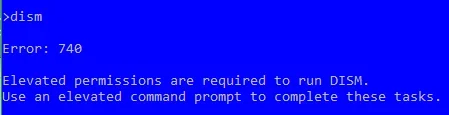
I take this to mean that, despite being logged into the Built-in Admin [username Administrator], you cannot run, for example, dism without getting error 740.
Dism needs to be elevated.webp


Denis
 

My Computer

System One

  • OS
    Windows 11 Home x64 Version 25H2 Build 26200.8037
try3: I can run DISM and SFC from my Task Manager [elevated] Command Prompt without error however as administrator I cannot get an Admin Prompt from the search bar (requiring additional prompt to "Run as Admin". My PC just ignores any mouse click on the 'run as administrator'. I get NO user messaging that implies it is accepted or rejected just no response at all. That's when I turn to the Task Manager for an elevated command.
Zbook: I ran the script Tunup_Bat_Log.bat; it executed went through perhaps 1500 or so files then quite. Screen went away as if it encountered a problem and aborted. Not sure if there's a path to where any logs could be stored but I'm at a loss here? Do I try it again or wait for a path to evaluate what went wrong with the batch file??
By the way: I do appreciate all of you for trying to solve this mystery.
 

My Computers

System One System Two

  • OS
    Win 11 Pro
    Computer type
    PC/Desktop
    Manufacturer/Model
    AMD
    CPU
    Ryzen 9-7900
    Motherboard
    ASUS Prime X670E-Pro Wifi
    Memory
    64 GB
    Graphics Card(s)
    NVIDIA GeForce RTX-3070
    Sound Card
    Realtek Audio
    Monitor(s) Displays
    Samsung 32" X 2
    Screen Resolution
    2560 x 1440
    Hard Drives
    SSD 980 PRO 2TB , 8TB , 20TB
    PSU
    EVGA 1000GT Power Supply
    Case
    Corsair Case 4000d
    Cooling
    MasterLiquid cooler ML2400 Mirror
    Keyboard
    Logitech K350
    Mouse
    LogitechM705
    Internet Speed
    495/11
    Browser
    Google Chrome, Edge
    Antivirus
    Bitdefender

  • Operating System
    Windows 11 Pro
    Computer type
    PC/Desktop
    Manufacturer/Model
    AMD
    CPU
    9-5900
    Motherboard
    ASUS ROG-Crosshair VIII Hero Wifi
    Memory
    32 GB Corsair Vengeance LPX 32GB (2 X 16GB) DDR4 3600 (PC4-28800)
    Graphics card(s)
    Zotec GTX 1650 OC 4GB GDDR6
    Sound Card
    Sound bar
    Monitor(s) Displays
    32" Samsung x 2
    Screen Resolution
    1920 x 1440
    Hard Drives
    Samsung 970 EVO Plus SSD 1TB NVME,
    PSU
    EVGA 850 W
    Case
    Corsair 4000D Airflow Tempered Glass Mid-Tower ATX PC
    Cooling
    Cooler Master MasterLiquid ML240L RGB V2,
    Keyboard
    Logitech
    Mouse
    Logitech
    Internet Speed
    495/11
    Browser
    Firefox
    Antivirus
    bitdefender
I can run DISM and SFC from my Task Manager [elevated] Command Prompt
I was just checking that I had understood what you had posted.
If you just open Terminal
wt.exe
and get to its Command prompt mode [such as by just entering cmd in it]
then enter
dism
you will get error 740 [assuming I have understood your posts correctly].


Denis
 

My Computer

System One

  • OS
    Windows 11 Home x64 Version 25H2 Build 26200.8037
try3: Yes that is correct my path clearly implies I'm at the 'User Level' because it does not s1769453507682.webpay System32 it is my rhstu

Now if I go to the Taskmanager and seek a PowerShell with admin it's OK1769453691429.webp
 

My Computers

System One System Two

  • OS
    Win 11 Pro
    Computer type
    PC/Desktop
    Manufacturer/Model
    AMD
    CPU
    Ryzen 9-7900
    Motherboard
    ASUS Prime X670E-Pro Wifi
    Memory
    64 GB
    Graphics Card(s)
    NVIDIA GeForce RTX-3070
    Sound Card
    Realtek Audio
    Monitor(s) Displays
    Samsung 32" X 2
    Screen Resolution
    2560 x 1440
    Hard Drives
    SSD 980 PRO 2TB , 8TB , 20TB
    PSU
    EVGA 1000GT Power Supply
    Case
    Corsair Case 4000d
    Cooling
    MasterLiquid cooler ML2400 Mirror
    Keyboard
    Logitech K350
    Mouse
    LogitechM705
    Internet Speed
    495/11
    Browser
    Google Chrome, Edge
    Antivirus
    Bitdefender
  • Operating System
    Windows 11 Pro
    Computer type
    PC/Desktop
    Manufacturer/Model
    AMD
    CPU
    9-5900
    Motherboard
    ASUS ROG-Crosshair VIII Hero Wifi
    Memory
    32 GB Corsair Vengeance LPX 32GB (2 X 16GB) DDR4 3600 (PC4-28800)
    Graphics card(s)
    Zotec GTX 1650 OC 4GB GDDR6
    Sound Card
    Sound bar
    Monitor(s) Displays
    32" Samsung x 2
    Screen Resolution
    1920 x 1440
    Hard Drives
    Samsung 970 EVO Plus SSD 1TB NVME,
    PSU
    EVGA 850 W
    Case
    Corsair 4000D Airflow Tempered Glass Mid-Tower ATX PC
    Cooling
    Cooler Master MasterLiquid ML240L RGB V2,
    Keyboard
    Logitech
    Mouse
    Logitech
    Internet Speed
    495/11
    Browser
    Firefox
    Antivirus
    bitdefender
I asked how it behaved while you were logged into the Built-in Admin
Built-in Admin [username Administrator], you cannot run, for example, dism without getting error 740.
Dism needs to be elevated.webp

It is this account's problems that make me think a clean install is the only solution and that's why I thought it worth asking you to do that dism test while logged into it.


Denis
 

My Computer

System One

  • OS
    Windows 11 Home x64 Version 25H2 Build 26200.8037
Try3: Do you mean a clean install: i.e., reformat the SSD, then reinstall win 11 Pro? That's what I has hoping to avoid. That's why I did and ISO install over the old Win 11 Pro. Is there any other choice to this sort of issue. Reset attributes or something like that?
 

My Computers

System One System Two

  • OS
    Win 11 Pro
    Computer type
    PC/Desktop
    Manufacturer/Model
    AMD
    CPU
    Ryzen 9-7900
    Motherboard
    ASUS Prime X670E-Pro Wifi
    Memory
    64 GB
    Graphics Card(s)
    NVIDIA GeForce RTX-3070
    Sound Card
    Realtek Audio
    Monitor(s) Displays
    Samsung 32" X 2
    Screen Resolution
    2560 x 1440
    Hard Drives
    SSD 980 PRO 2TB , 8TB , 20TB
    PSU
    EVGA 1000GT Power Supply
    Case
    Corsair Case 4000d
    Cooling
    MasterLiquid cooler ML2400 Mirror
    Keyboard
    Logitech K350
    Mouse
    LogitechM705
    Internet Speed
    495/11
    Browser
    Google Chrome, Edge
    Antivirus
    Bitdefender
  • Operating System
    Windows 11 Pro
    Computer type
    PC/Desktop
    Manufacturer/Model
    AMD
    CPU
    9-5900
    Motherboard
    ASUS ROG-Crosshair VIII Hero Wifi
    Memory
    32 GB Corsair Vengeance LPX 32GB (2 X 16GB) DDR4 3600 (PC4-28800)
    Graphics card(s)
    Zotec GTX 1650 OC 4GB GDDR6
    Sound Card
    Sound bar
    Monitor(s) Displays
    32" Samsung x 2
    Screen Resolution
    1920 x 1440
    Hard Drives
    Samsung 970 EVO Plus SSD 1TB NVME,
    PSU
    EVGA 850 W
    Case
    Corsair 4000D Airflow Tempered Glass Mid-Tower ATX PC
    Cooling
    Cooler Master MasterLiquid ML240L RGB V2,
    Keyboard
    Logitech
    Mouse
    Logitech
    Internet Speed
    495/11
    Browser
    Firefox
    Antivirus
    bitdefender
That's why I did and ISO install over the old Win 11 Pro
That Repair install requires elevation.
I've never tried it but I do wonder if you might be able to run it elevated using that Task mgr trick you've been using.
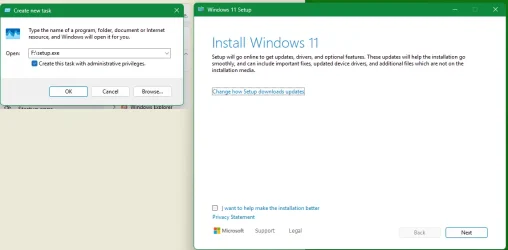
i.e. Task mgr, Processes, Run new task, Create the new task with Admin privileges, enter cmd, enter [... whatever the path is to the mounted/extracted ISO file's setup.exe]\setup.exe
There is no particular reason to think a Repair install will solve the problem because Repair installs do not alter user accounts
but
perhaps your user accounts are actually OK and the problem is caused by some Windows component that they are calling up when you try to elevate.
So I think it would be a long shot but your Task mgr trick might get it to run elevated.

Do you mean a clean install
If the Repair install attempt fails to fix the problem,
and
if you do that test of the Built-in Admin [username Administrator] & get an error,
then
I do not think there is any option but a Clean install.


Best of luck,
Denis
 

My Computer

System One

  • OS
    Windows 11 Home x64 Version 25H2 Build 26200.8037
You can also try resetting local security policy.


My Computer

System One

  • OS
    Windows 11 Pro 25H2
    Computer type
    PC/Desktop
    Manufacturer/Model
    Intel NUC12WSHi7
    CPU
    12th Gen Core i7-1260P
    Motherboard
    NUC12WSBi7
    Memory
    64 GB Micron PC4-25600
    Graphics Card(s)
    Intel Iris Xe Graphics
    Sound Card
    on-board Realtek HD Audio
    Monitor(s) Displays
    Dell U3219Q
    Screen Resolution
    3840 x 2160
    Hard Drives
    Samsung SSD 990 PRO 1TB
    Crucial MX500 2 TB
    Antivirus
    Microsoft Defender
P.S.

I've just been able to get a Repair install to start running using your Task mgr trick.
Run Repair install elevated from task mgr.webp
Please don't forget that it does not fix user accounts themselves but it does fix Windows components.


Denis
 

My Computer

System One

  • OS
    Windows 11 Home x64 Version 25H2 Build 26200.8037
Hey Detectives:
I found this on-line:

May I use an elevated commands to mount a Windows 11 ISO and initiate a reinstallation. I think this process is often called a "repair install" or "in-place upgrade." (But with admin privileges)

1. Open an Elevated Command Prompt

To run administrative commands, you must first open the Command Prompt with elevated privileges:

Open the Start menu, type cmd, right-click on Command Prompt, and select Run as administrator.

Alternatively, press Win + R, type cmd, and press Ctrl + Shift + Enter.

2. Mount the Windows 11 ISO

If you have a Windows 11 ISO file, use PowerShell commands from within your elevated prompt to mount it:

In the elevated Command Prompt, type powershell and press Enter.

Run the following command to mount the ISO (replace the path with your actual file path):

Mount-DiskImage -ImagePath "C:\Path\To\Windows11.iso".

Note the drive letter assigned to the newly mounted image (e.g., D: or E:).

3. Reinstall Windows 11 via Command Line

Once the ISO is mounted, you can start the reinstallation process using the setup.exe file located on the mounted drive:

For a standard reinstallation (preserves files and apps):

Run the following command (replace D: with your mounted drive letter):

D:\setup.exe /auto upgrade.

For a "Silent" repair install:

Start-Process -FilePath "D:\setup.exe" -ArgumentList "/auto upgrade /quiet /noreboot" -Wait.
 

My Computers

System One System Two

  • OS
    Win 11 Pro
    Computer type
    PC/Desktop
    Manufacturer/Model
    AMD
    CPU
    Ryzen 9-7900
    Motherboard
    ASUS Prime X670E-Pro Wifi
    Memory
    64 GB
    Graphics Card(s)
    NVIDIA GeForce RTX-3070
    Sound Card
    Realtek Audio
    Monitor(s) Displays
    Samsung 32" X 2
    Screen Resolution
    2560 x 1440
    Hard Drives
    SSD 980 PRO 2TB , 8TB , 20TB
    PSU
    EVGA 1000GT Power Supply
    Case
    Corsair Case 4000d
    Cooling
    MasterLiquid cooler ML2400 Mirror
    Keyboard
    Logitech K350
    Mouse
    LogitechM705
    Internet Speed
    495/11
    Browser
    Google Chrome, Edge
    Antivirus
    Bitdefender
  • Operating System
    Windows 11 Pro
    Computer type
    PC/Desktop
    Manufacturer/Model
    AMD
    CPU
    9-5900
    Motherboard
    ASUS ROG-Crosshair VIII Hero Wifi
    Memory
    32 GB Corsair Vengeance LPX 32GB (2 X 16GB) DDR4 3600 (PC4-28800)
    Graphics card(s)
    Zotec GTX 1650 OC 4GB GDDR6
    Sound Card
    Sound bar
    Monitor(s) Displays
    32" Samsung x 2
    Screen Resolution
    1920 x 1440
    Hard Drives
    Samsung 970 EVO Plus SSD 1TB NVME,
    PSU
    EVGA 850 W
    Case
    Corsair 4000D Airflow Tempered Glass Mid-Tower ATX PC
    Cooling
    Cooler Master MasterLiquid ML240L RGB V2,
    Keyboard
    Logitech
    Mouse
    Logitech
    Internet Speed
    495/11
    Browser
    Firefox
    Antivirus
    bitdefender
I found this on-line
You cannot elevate it the normal way.

1 You mount the ISO by double-clicking on it. Then you'll see it 'mounts' as a virtual disk drive and you'll see its drive letter & its setup.exe file.
You do not need elevation to mount the ISO file; you just do that in File explorer as a standard user.

2 Then use the Task mgr trick to run its setup.exe elevated as I've just done [my post #15].

It's all menu-driven from then on but if you want to check details of the procedure from that point onwards, use the forum tutorial - Option 2 Steps 1,2,4 & onwards
Repair Install Windows 11 with an In-place Upgrade - ElevenForumTutorials


Best of luck,
Denis
 
Last edited:

My Computer

System One

  • OS
    Windows 11 Home x64 Version 25H2 Build 26200.8037

pseymour: Sorry to report but setting security to defaults as you instructed did not alter the outcome. I still cannot raise and elevated command except through the Task Manager.​


My Computers

System One System Two

  • OS
    Win 11 Pro
    Computer type
    PC/Desktop
    Manufacturer/Model
    AMD
    CPU
    Ryzen 9-7900
    Motherboard
    ASUS Prime X670E-Pro Wifi
    Memory
    64 GB
    Graphics Card(s)
    NVIDIA GeForce RTX-3070
    Sound Card
    Realtek Audio
    Monitor(s) Displays
    Samsung 32" X 2
    Screen Resolution
    2560 x 1440
    Hard Drives
    SSD 980 PRO 2TB , 8TB , 20TB
    PSU
    EVGA 1000GT Power Supply
    Case
    Corsair Case 4000d
    Cooling
    MasterLiquid cooler ML2400 Mirror
    Keyboard
    Logitech K350
    Mouse
    LogitechM705
    Internet Speed
    495/11
    Browser
    Google Chrome, Edge
    Antivirus
    Bitdefender
  • Operating System
    Windows 11 Pro
    Computer type
    PC/Desktop
    Manufacturer/Model
    AMD
    CPU
    9-5900
    Motherboard
    ASUS ROG-Crosshair VIII Hero Wifi
    Memory
    32 GB Corsair Vengeance LPX 32GB (2 X 16GB) DDR4 3600 (PC4-28800)
    Graphics card(s)
    Zotec GTX 1650 OC 4GB GDDR6
    Sound Card
    Sound bar
    Monitor(s) Displays
    32" Samsung x 2
    Screen Resolution
    1920 x 1440
    Hard Drives
    Samsung 970 EVO Plus SSD 1TB NVME,
    PSU
    EVGA 850 W
    Case
    Corsair 4000D Airflow Tempered Glass Mid-Tower ATX PC
    Cooling
    Cooler Master MasterLiquid ML240L RGB V2,
    Keyboard
    Logitech
    Mouse
    Logitech
    Internet Speed
    495/11
    Browser
    Firefox
    Antivirus
    bitdefender
1) Had you run a defender or third party AV scan?


2) What happened with the script in post #4

(please post images or share links displaying error messages or codes)


3) See if you can or cannot enter safe mode:


4) See if you can or cannot enter command prompt at boot:


5) See if you can or cannot enter Windows RE:


6) If Windows RE opens:


a) attempt a system restore to the oldest system restore point:


b) attempt a startup repair:


My Computer

System One

  • OS
    Windows 10
    Computer type
    Laptop
    Manufacturer/Model
    HP
    CPU
    Intel(R) Core(TM) i7-4800MQ CPU @ 2.70GHz
    Motherboard
    Product : 190A Version : KBC Version 94.56
    Memory
    16 GB Total: Manufacturer : Samsung MemoryType : DDR3 FormFactor : SODIMM Capacity : 8GB Speed : 1600
    Graphics Card(s)
    NVIDIA Quadro K3100M; Intel(R) HD Graphics 4600
    Sound Card
    IDT High Definition Audio CODEC; PNP Device ID HDAUDIO\FUNC_01&VEN_111D&DEV_76E0
    Hard Drives
    Model Hitachi HTS727575A9E364
    Antivirus
    Microsoft Defender
    Other Info
    Mobile Workstation
Have you mounted the ISO & started the Repair install yet?


Denis
 

My Computer

System One

  • OS
    Windows 11 Home x64 Version 25H2 Build 26200.8037
Back
Top Bottom