File explorer very slow to open


stevem5000

Well-known member
Member
Local time
8:13 AM
Posts
86
OS
10 and 11 Linux
Win 11 Pro....25H2...
13th Gen Intel(R) Core(TM) i7-13700K (3.40 GHz)
32.0 GB (31.7 GB usable)
NVIDIA GeForce RTX 4060 (8 GB)

Rebuilt about 3 months ago....
Since the rebuild file explorer sometimes takes as long as 1 1/2 minutes to open....
At beginning opened pretty much normal time....then gradually got longer and longer...

Did not do this before the rebuild....opened normal time...

I think I remember reading some online post that there was a regedit to fix this issue....
But I could be very wrong....

Any fixes for this issue...???

Thanks
Steve
 

My Computer

System One

  • OS
    10 and 11 Linux
    Computer type
    PC/Desktop
    Motherboard
    Asus Z97-ar
    Memory
    16
    Graphics Card(s)
    HIS QP3-41H-A
    Sound Card
    default
    Monitor(s) Displays
    2 Dell 22"
    Hard Drives
    M.2 for system M.2 Data and 2 - SATA for photos and music data
    PSU
    Yes...I have one
    Case
    Now sure
    Internet Speed
    650 both ways
    Browser
    Brave
    Antivirus
    Win Defender
try this


My Computer

System One

  • OS
    Windows 11 Pro
Maybe this could help... not exactly same symptoms, but maybe...
 

My Computers

System One System Two

  • OS
    Windows 11 Pro 25H2
    Computer type
    PC/Desktop
    Manufacturer/Model
    Built PC
    CPU
    AMD Ryzen 5 5600G @ 3.9/4.4Ghz
    Motherboard
    MSI B550M-PRO-WiFi Ver. 1.4
    Memory
    2 x 16 GB DDR4 Kingston Fury Beast 3200 Mhz
    Graphics Card(s)
    AMD Radeon RX 6600 XT MSI Mech 2X OC Edition 8 GB
    Sound Card
    Realtek High Definition Audio (Integrated)
    Monitor(s) Displays
    Samsung C50Rx 27" LED / HP S2031 20" LCD
    Screen Resolution
    1920 x 1080 px / 1600 x 900 px
    Hard Drives
    WD Blue SN570 NVME M.2 SSD [1 TB] -- External Drives: - WD Scorpion Blue 250 GB 5400 RPM (Data Backup) - Hitachi 500 GB 5400 RPM (Software / ISOs Backup) - Toshiba MQ01ABD100 1 TB 5400 RPM (OS Images) - HGST TravelStar 7K1000 1 TB, 7200 RPM USB 3.0 - ADATA SU800 2TB SSD USB 3.0
    PSU
    Corsair RM750e 750W Fully Modular
    Case
    Naceb Hydra NA-1602
    Cooling
    Naceb Orpheus x 3 (Front) + Naceb Cepheus 1200 RPM Max (Rear) + ThemalRight Assasin X 90 SE (CPU)
    Keyboard
    Logitech MK470 Wireless
    Mouse
    Logitech MK470 Wireless
    Internet Speed
    120 MB Symetrical
    Browser
    Firefox / Brave / Edge
    Antivirus
    Windows Defender
    Other Info
    - VMs: WMware Player - Windows 8.1 Pro x64 / Windows 11 Pro
    - Wacom Intuos Pro Small Tablet PTH-460
  • Operating System
    Windows 11 Pro 25H2
    Computer type
    Laptop
    Manufacturer/Model
    HP Pavilion 15-eh3000la (80M53LA)
    CPU
    AMD Ryzen 7 7730U @ 2.0/4.5 Ghz
    Motherboard
    HP 8BC7
    Memory
    2 x 16 GB Kingston Fury Impact DDR4 3200 Mhz
    Graphics card(s)
    Radeon (tm) Graphics Vega 8 (512 MB)
    Sound Card
    Realtek High Definition Audio (Integrated)
    Monitor(s) Displays
    AU Optronics
    Screen Resolution
    1920 x 1080 px (125% size)
    Hard Drives
    WD Blue SN570 1TB NVME M.2 Drive
    PSU
    45 Watt Charger
    Cooling
    Laptop Cooling Pad
    Keyboard
    Free Wolf Foldable Portable Keyboard
    Mouse
    Free Wolf Wireless Mouse
    Internet Speed
    120 MB Symetrical
    Browser
    Firefox / Brave / Edge
    Antivirus
    Windows Defender
    Other Info
    - 41mWh battery.
    - Wacom Intuos Pro Small Tablet PTH-460
Consider the many options given here:

Unfortunately there's no one specific 'fix'.

Missing:
- any screenshot- where file explorer is set to open i.e. in which situations it is slow - your full build number e.g. 26200.8457

Do you seem the same slowness if you boot to Safe Mode?

Try
 
Last edited:

My Computer

System One

  • OS
    Windows 11 Pro
    Computer type
    Laptop
    Manufacturer/Model
    Lenovo t480s
    CPU
    i7-8650U
    Memory
    16GB
    Graphics Card(s)
    Intel UHD 620
    Screen Resolution
    1920x1080
    Hard Drives
    C SN810 SDCPNRY-512G-1006
    Browser
    Edge, Firefox
    Antivirus
    Defender
Dacron....i did the indexing thing....took about an hour.....rebooted.....
Opened file explorer very quickly.......did it again.....slower......did it a 3ed time and took about 45 seconds.....
I would say it didn't work.....

But thanks for the tip...
 

My Computer

System One

  • OS
    10 and 11 Linux
    Computer type
    PC/Desktop
    Motherboard
    Asus Z97-ar
    Memory
    16
    Graphics Card(s)
    HIS QP3-41H-A
    Sound Card
    default
    Monitor(s) Displays
    2 Dell 22"
    Hard Drives
    M.2 for system M.2 Data and 2 - SATA for photos and music data
    PSU
    Yes...I have one
    Case
    Now sure
    Internet Speed
    650 both ways
    Browser
    Brave
    Antivirus
    Win Defender
It looks like your problem is Windows Search. Unless you absolutely need indexing of your files, I'd suggest disabling the service fully and trying again. You can always leave it as it was if it doesn't fix it.
 

My Computers

System One System Two

  • OS
    Windows 11 Pro 25H2
    Computer type
    PC/Desktop
    Manufacturer/Model
    Built PC
    CPU
    AMD Ryzen 5 5600G @ 3.9/4.4Ghz
    Motherboard
    MSI B550M-PRO-WiFi Ver. 1.4
    Memory
    2 x 16 GB DDR4 Kingston Fury Beast 3200 Mhz
    Graphics Card(s)
    AMD Radeon RX 6600 XT MSI Mech 2X OC Edition 8 GB
    Sound Card
    Realtek High Definition Audio (Integrated)
    Monitor(s) Displays
    Samsung C50Rx 27" LED / HP S2031 20" LCD
    Screen Resolution
    1920 x 1080 px / 1600 x 900 px
    Hard Drives
    WD Blue SN570 NVME M.2 SSD [1 TB] -- External Drives: - WD Scorpion Blue 250 GB 5400 RPM (Data Backup) - Hitachi 500 GB 5400 RPM (Software / ISOs Backup) - Toshiba MQ01ABD100 1 TB 5400 RPM (OS Images) - HGST TravelStar 7K1000 1 TB, 7200 RPM USB 3.0 - ADATA SU800 2TB SSD USB 3.0
    PSU
    Corsair RM750e 750W Fully Modular
    Case
    Naceb Hydra NA-1602
    Cooling
    Naceb Orpheus x 3 (Front) + Naceb Cepheus 1200 RPM Max (Rear) + ThemalRight Assasin X 90 SE (CPU)
    Keyboard
    Logitech MK470 Wireless
    Mouse
    Logitech MK470 Wireless
    Internet Speed
    120 MB Symetrical
    Browser
    Firefox / Brave / Edge
    Antivirus
    Windows Defender
    Other Info
    - VMs: WMware Player - Windows 8.1 Pro x64 / Windows 11 Pro
    - Wacom Intuos Pro Small Tablet PTH-460
  • Operating System
    Windows 11 Pro 25H2
    Computer type
    Laptop
    Manufacturer/Model
    HP Pavilion 15-eh3000la (80M53LA)
    CPU
    AMD Ryzen 7 7730U @ 2.0/4.5 Ghz
    Motherboard
    HP 8BC7
    Memory
    2 x 16 GB Kingston Fury Impact DDR4 3200 Mhz
    Graphics card(s)
    Radeon (tm) Graphics Vega 8 (512 MB)
    Sound Card
    Realtek High Definition Audio (Integrated)
    Monitor(s) Displays
    AU Optronics
    Screen Resolution
    1920 x 1080 px (125% size)
    Hard Drives
    WD Blue SN570 1TB NVME M.2 Drive
    PSU
    45 Watt Charger
    Cooling
    Laptop Cooling Pad
    Keyboard
    Free Wolf Foldable Portable Keyboard
    Mouse
    Free Wolf Wireless Mouse
    Internet Speed
    120 MB Symetrical
    Browser
    Firefox / Brave / Edge
    Antivirus
    Windows Defender
    Other Info
    - 41mWh battery.
    - Wacom Intuos Pro Small Tablet PTH-460
Await response to my updated post.

I see no reason to think this is associated with indexing or search.

Is indexing complete?
If it is, search is not going to do anything (well it shouldn't) until you ... search for something.

Want to find out what's really happening as file explorer launches - to the nth degree? Get procmon (free) from MS. That logs everything happening.. so it's hard to take the log apart.
 

My Computer

System One

  • OS
    Windows 11 Pro
    Computer type
    Laptop
    Manufacturer/Model
    Lenovo t480s
    CPU
    i7-8650U
    Memory
    16GB
    Graphics Card(s)
    Intel UHD 620
    Screen Resolution
    1920x1080
    Hard Drives
    C SN810 SDCPNRY-512G-1006
    Browser
    Edge, Firefox
    Antivirus
    Defender
Await response to my updated post.

I see no reason to think this is associated with indexing or search.

Is indexing complete?
If it is, search is not going to do anything (well it shouldn't) until you ... search for something.

Want to find out what's really happening as file explorer launches - to the nth degree? Get procmon (free) from MS. That logs everything happening.. so it's hard to take the log apart.
I'm not saying is the same case, but for me rebuilding or having the indexing done made no difference, libraries were acting strangely until I just disabled the service temporarily and re-enabled it. Doesn't hurt to try. If it doesn't work, there's also the thread you mention. As long as he resolves his problem, everything goes lol
 

My Computers

System One System Two

  • OS
    Windows 11 Pro 25H2
    Computer type
    PC/Desktop
    Manufacturer/Model
    Built PC
    CPU
    AMD Ryzen 5 5600G @ 3.9/4.4Ghz
    Motherboard
    MSI B550M-PRO-WiFi Ver. 1.4
    Memory
    2 x 16 GB DDR4 Kingston Fury Beast 3200 Mhz
    Graphics Card(s)
    AMD Radeon RX 6600 XT MSI Mech 2X OC Edition 8 GB
    Sound Card
    Realtek High Definition Audio (Integrated)
    Monitor(s) Displays
    Samsung C50Rx 27" LED / HP S2031 20" LCD
    Screen Resolution
    1920 x 1080 px / 1600 x 900 px
    Hard Drives
    WD Blue SN570 NVME M.2 SSD [1 TB] -- External Drives: - WD Scorpion Blue 250 GB 5400 RPM (Data Backup) - Hitachi 500 GB 5400 RPM (Software / ISOs Backup) - Toshiba MQ01ABD100 1 TB 5400 RPM (OS Images) - HGST TravelStar 7K1000 1 TB, 7200 RPM USB 3.0 - ADATA SU800 2TB SSD USB 3.0
    PSU
    Corsair RM750e 750W Fully Modular
    Case
    Naceb Hydra NA-1602
    Cooling
    Naceb Orpheus x 3 (Front) + Naceb Cepheus 1200 RPM Max (Rear) + ThemalRight Assasin X 90 SE (CPU)
    Keyboard
    Logitech MK470 Wireless
    Mouse
    Logitech MK470 Wireless
    Internet Speed
    120 MB Symetrical
    Browser
    Firefox / Brave / Edge
    Antivirus
    Windows Defender
    Other Info
    - VMs: WMware Player - Windows 8.1 Pro x64 / Windows 11 Pro
    - Wacom Intuos Pro Small Tablet PTH-460
  • Operating System
    Windows 11 Pro 25H2
    Computer type
    Laptop
    Manufacturer/Model
    HP Pavilion 15-eh3000la (80M53LA)
    CPU
    AMD Ryzen 7 7730U @ 2.0/4.5 Ghz
    Motherboard
    HP 8BC7
    Memory
    2 x 16 GB Kingston Fury Impact DDR4 3200 Mhz
    Graphics card(s)
    Radeon (tm) Graphics Vega 8 (512 MB)
    Sound Card
    Realtek High Definition Audio (Integrated)
    Monitor(s) Displays
    AU Optronics
    Screen Resolution
    1920 x 1080 px (125% size)
    Hard Drives
    WD Blue SN570 1TB NVME M.2 Drive
    PSU
    45 Watt Charger
    Cooling
    Laptop Cooling Pad
    Keyboard
    Free Wolf Foldable Portable Keyboard
    Mouse
    Free Wolf Wireless Mouse
    Internet Speed
    120 MB Symetrical
    Browser
    Firefox / Brave / Edge
    Antivirus
    Windows Defender
    Other Info
    - 41mWh battery.
    - Wacom Intuos Pro Small Tablet PTH-460
Win 11 Pro....25H2...
13th Gen Intel(R) Core(TM) i7-13700K (3.40 GHz)
32.0 GB (31.7 GB usable)
NVIDIA GeForce RTX 4060 (8 GB)

Rebuilt about 3 months ago....
Since the rebuild file explorer sometimes takes as long as 1 1/2 minutes to open....
At beginning opened pretty much normal time....then gradually got longer and longer...

Did not do this before the rebuild....opened normal time...

I think I remember reading some online post that there was a regedit to fix this issue....
But I could be very wrong....

Any fixes for this issue...???

Thanks
Steve
Is this a new OS install with the rebuild/hardware or is it an old OS install on new hardware?
 

My Computer

System One

  • OS
    Windows 11 25H2
    Computer type
    PC/Desktop
    Manufacturer/Model
    EVGA home brew
    CPU
    Broadwell-e 6850K 4.5ghz @1.36v
    Motherboard
    EVGA X99 FTW K
    Memory
    32GB Corsair LPM 3600 C16
    Graphics Card(s)
    EVGA RTX 3080Ti FTW
    Sound Card
    Asus Centurion true 7.1 headset. (5 speakers in each earpeice)
    Monitor(s) Displays
    LG C4 55"
    Screen Resolution
    4K 144hz
    Hard Drives
    Various models of SSDs ~10TB No HDDs installed.
    PSU
    be quiet! BN516 Straight Power 12-1000w 80 Plus Platinum
    Case
    Corsair 780T modified to dual 200mm intake fans
    Cooling
    Corsair H110i
    Keyboard
    Corsair K95 Platinum
    Mouse
    Corsair M65 RGB Elite
    Internet Speed
    50Mbs
Opened Windows Exploreer from the right click on the start button......51 seconds......not acceptable....

This is a new install on old PC with previous win 11 and win 10 about 2 yr before that........Using Rufus to install win 11......I have 3 other computers...win 11... with old builds....1 yr plus....where file / windows explorer open right away......it is only this one computer.....
 

My Computer

System One

  • OS
    10 and 11 Linux
    Computer type
    PC/Desktop
    Motherboard
    Asus Z97-ar
    Memory
    16
    Graphics Card(s)
    HIS QP3-41H-A
    Sound Card
    default
    Monitor(s) Displays
    2 Dell 22"
    Hard Drives
    M.2 for system M.2 Data and 2 - SATA for photos and music data
    PSU
    Yes...I have one
    Case
    Now sure
    Internet Speed
    650 both ways
    Browser
    Brave
    Antivirus
    Win Defender
No response to or polite acknowledgement of my post.. so I'm out.
Old PC? Which- is it one in your specs or sthg else?
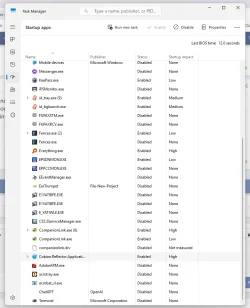
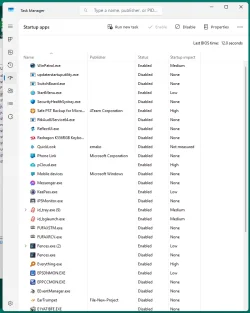
No pic of task manager.. no info on free space on C: .. nothing to go on.

Goodbye.
 

My Computer

System One

  • OS
    Windows 11 Pro
    Computer type
    Laptop
    Manufacturer/Model
    Lenovo t480s
    CPU
    i7-8650U
    Memory
    16GB
    Graphics Card(s)
    Intel UHD 620
    Screen Resolution
    1920x1080
    Hard Drives
    C SN810 SDCPNRY-512G-1006
    Browser
    Edge, Firefox
    Antivirus
    Defender
Dalchina....no disrespect......I just had not gotten to you yet.....
2 attachments...screenshot 1 and screenshot 2....that gives you full view.....
The computer i am referring is the one in my original post....

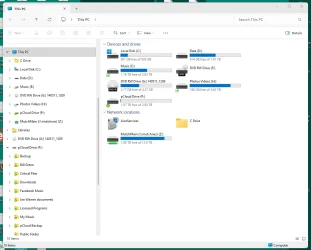
My C:\ drive is Samsung SSD 860 1 tb....I have about 800 gb free.....screen shot enclosed...

I'm not sure what else I can provide you.....BUT right now my file explorer is opening in about 1 second like it should.....

Appreciate y ou sticking in there....
SteveScreenshot 2026-05-25 095513.webpScreenshot 2026-05-25 095815.webpTaskmanager.webp
 

My Computer

System One

  • OS
    10 and 11 Linux
    Computer type
    PC/Desktop
    Motherboard
    Asus Z97-ar
    Memory
    16
    Graphics Card(s)
    HIS QP3-41H-A
    Sound Card
    default
    Monitor(s) Displays
    2 Dell 22"
    Hard Drives
    M.2 for system M.2 Data and 2 - SATA for photos and music data
    PSU
    Yes...I have one
    Case
    Now sure
    Internet Speed
    650 both ways
    Browser
    Brave
    Antivirus
    Win Defender
You got a lot of network / remote locations and synced stuff... And probably external devices. If there is too much, it could take a real lot to open and display the contents of a folder.
Try a new user account without customizations and see if explorer opens consistently slow there. If it does, probably a factory reset or in-place upgrade, but if it doesn't... will be matter of checking what of all of that is causing the issue, if not all lol
 

My Computers

System One System Two

  • OS
    Windows 11 Pro 25H2
    Computer type
    PC/Desktop
    Manufacturer/Model
    Built PC
    CPU
    AMD Ryzen 5 5600G @ 3.9/4.4Ghz
    Motherboard
    MSI B550M-PRO-WiFi Ver. 1.4
    Memory
    2 x 16 GB DDR4 Kingston Fury Beast 3200 Mhz
    Graphics Card(s)
    AMD Radeon RX 6600 XT MSI Mech 2X OC Edition 8 GB
    Sound Card
    Realtek High Definition Audio (Integrated)
    Monitor(s) Displays
    Samsung C50Rx 27" LED / HP S2031 20" LCD
    Screen Resolution
    1920 x 1080 px / 1600 x 900 px
    Hard Drives
    WD Blue SN570 NVME M.2 SSD [1 TB] -- External Drives: - WD Scorpion Blue 250 GB 5400 RPM (Data Backup) - Hitachi 500 GB 5400 RPM (Software / ISOs Backup) - Toshiba MQ01ABD100 1 TB 5400 RPM (OS Images) - HGST TravelStar 7K1000 1 TB, 7200 RPM USB 3.0 - ADATA SU800 2TB SSD USB 3.0
    PSU
    Corsair RM750e 750W Fully Modular
    Case
    Naceb Hydra NA-1602
    Cooling
    Naceb Orpheus x 3 (Front) + Naceb Cepheus 1200 RPM Max (Rear) + ThemalRight Assasin X 90 SE (CPU)
    Keyboard
    Logitech MK470 Wireless
    Mouse
    Logitech MK470 Wireless
    Internet Speed
    120 MB Symetrical
    Browser
    Firefox / Brave / Edge
    Antivirus
    Windows Defender
    Other Info
    - VMs: WMware Player - Windows 8.1 Pro x64 / Windows 11 Pro
    - Wacom Intuos Pro Small Tablet PTH-460
  • Operating System
    Windows 11 Pro 25H2
    Computer type
    Laptop
    Manufacturer/Model
    HP Pavilion 15-eh3000la (80M53LA)
    CPU
    AMD Ryzen 7 7730U @ 2.0/4.5 Ghz
    Motherboard
    HP 8BC7
    Memory
    2 x 16 GB Kingston Fury Impact DDR4 3200 Mhz
    Graphics card(s)
    Radeon (tm) Graphics Vega 8 (512 MB)
    Sound Card
    Realtek High Definition Audio (Integrated)
    Monitor(s) Displays
    AU Optronics
    Screen Resolution
    1920 x 1080 px (125% size)
    Hard Drives
    WD Blue SN570 1TB NVME M.2 Drive
    PSU
    45 Watt Charger
    Cooling
    Laptop Cooling Pad
    Keyboard
    Free Wolf Foldable Portable Keyboard
    Mouse
    Free Wolf Wireless Mouse
    Internet Speed
    120 MB Symetrical
    Browser
    Firefox / Brave / Edge
    Antivirus
    Windows Defender
    Other Info
    - 41mWh battery.
    - Wacom Intuos Pro Small Tablet PTH-460
Disable all non-Microsoft programmes from auto starting---Task Manager>Startups.
Then shutdown the computer,power off,for about a minute.
Restart and see if the problem persists.
if not,then in Terminal[admin],type in ---dism /online /cleanup-image /restorehealth and run it.
follow up with ---sfc /scannow ---and run it.
Re enable the programmes one at a time to see if a particular programme or an accumulation is the cause.
 

My Computer

System One

  • OS
    win 10
    Computer type
    PC/Desktop
    Manufacturer/Model
    home built
    CPU
    amd ryzen 5-2600
    Motherboard
    gigabyte b450m-ds3h
    Memory
    ng skill sniper x 16gb
    Graphics Card(s)
    nvidea gtx 1050
    Monitor(s) Displays
    benq fp 92
    Hard Drives
    samsung 860 evo 500gb m2 ssd
    PSU
    antec ea550g
    Case
    nzxt noctis 450
    Browser
    edge
I got it...!!!....the NAS drive was going bad.....need to figure out what happened there....
But when I unplugged the NAS......file explorer opened up normally.....

There were a LOT of folks who replied with various suggestions.....Thank you all.....
I think DarkShadowMD had the best suggestion.....I had not unconnected anything until his post.....
Thank you....
 

My Computer

System One

  • OS
    10 and 11 Linux
    Computer type
    PC/Desktop
    Motherboard
    Asus Z97-ar
    Memory
    16
    Graphics Card(s)
    HIS QP3-41H-A
    Sound Card
    default
    Monitor(s) Displays
    2 Dell 22"
    Hard Drives
    M.2 for system M.2 Data and 2 - SATA for photos and music data
    PSU
    Yes...I have one
    Case
    Now sure
    Internet Speed
    650 both ways
    Browser
    Brave
    Antivirus
    Win Defender
Dalchina......I had not considered posting screen shots until you suggested it.......I wish I had read your comment sooner.....
Thank you for your input......
 

My Computer

System One

  • OS
    10 and 11 Linux
    Computer type
    PC/Desktop
    Motherboard
    Asus Z97-ar
    Memory
    16
    Graphics Card(s)
    HIS QP3-41H-A
    Sound Card
    default
    Monitor(s) Displays
    2 Dell 22"
    Hard Drives
    M.2 for system M.2 Data and 2 - SATA for photos and music data
    PSU
    Yes...I have one
    Case
    Now sure
    Internet Speed
    650 both ways
    Browser
    Brave
    Antivirus
    Win Defender

Latest Support Threads

Back
Top Bottom