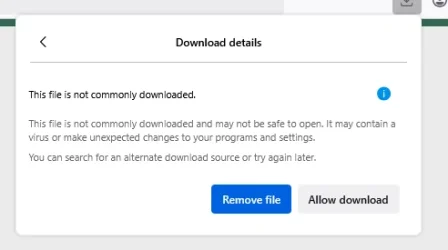
Firefox v142.0
Using Firefox I tried 3 times to download an app update file but it failed each time. By 'failed' I mean it tried to download the file but the downloaded file was zero bytes and would not launch. I had to use Vivaldi browser to download the file and it worked. A Firefox 'Download' problem?
Although the app update failed to download using FF the app download still shows in FF 'Downloads' list and a Download popup appears at every launch of Firefox.
This happens even though I have clicked on 'Clear Downloads' and it disappears from the screen but it reappears at next FF launch session. I have also tried 'Delete' downloads as well but same result.
I have cleared Browsing and Download history' but it still happens.
Is anyone else seeing this behaviour? Is there a workaround/fix?


Using Firefox I tried 3 times to download an app update file but it failed each time. By 'failed' I mean it tried to download the file but the downloaded file was zero bytes and would not launch. I had to use Vivaldi browser to download the file and it worked. A Firefox 'Download' problem?
Although the app update failed to download using FF the app download still shows in FF 'Downloads' list and a Download popup appears at every launch of Firefox.
This happens even though I have clicked on 'Clear Downloads' and it disappears from the screen but it reappears at next FF launch session. I have also tried 'Delete' downloads as well but same result.
I have cleared Browsing and Download history' but it still happens.
Is anyone else seeing this behaviour? Is there a workaround/fix?
Last edited:
My Computers
-
At a glance
Windows 11 ProAMD Ryzen 9 8945HS32GB DDR5 SO-DIMMIntegrated AMD Radeon 780M (4.00 GHz)- OS
- Windows 11 Pro
- Computer type
- PC/Desktop
- Manufacturer/Model
- GMKtec K11
- CPU
- AMD Ryzen 9 8945HS
- Memory
- 32GB DDR5 SO-DIMM
- Graphics Card(s)
- Integrated AMD Radeon 780M (4.00 GHz)
- Monitor(s) Displays
- Benq 2250HM
- Screen Resolution
- 1920 x 1080
- Hard Drives
- 1 TB PCIe 4.0 NVMe M.2 SSD
- Antivirus
- Bit Defender Total Security
-
At a glance
Windows 11 HomeIntel® Core™ Ultra 7 - 255H processor16 GB LPDDR5 SDRAMIntel Arc 140T onboard graphics- Operating System
- Windows 11 Home
- Computer type
- Laptop
- Manufacturer/Model
- ASUS Zenbook 14 OLED 14" Laptop - UX3405CA-QL192W
- CPU
- Intel® Core™ Ultra 7 - 255H processor
- Memory
- 16 GB LPDDR5 SDRAM
- Graphics card(s)
- Intel Arc 140T onboard graphics
- Screen Resolution
- 1920 x 1200 (16:10 WUXGA resolution) OLED Touchscreen
- Hard Drives
- 1TB SSD
- Antivirus
- Bit Defender Total Security