
- Local time
- 8:48 PM
- Posts
- 298
- OS
- Window 11 v24H2 Build 26100.2033
I Regret.
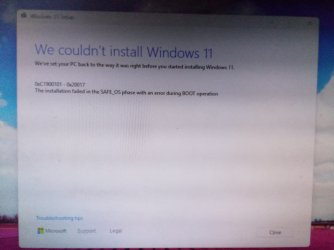
In place upgrade , after 100% installation, displayed green screen.
Undoing changes put my pc back to build 26080.
See the error message in image attached herewith, please.
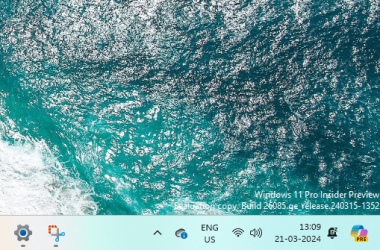
Now clean install of build 26085 canary channel from usb is going on ...55% complete... Restarted pc 92% complete... just a moment...
Installed successfully. Please see the images.
In post #10 in this thread on page 1, please read as
x:\sources>K:
K:\> cd sources
k:\sources>
instead of x:\sources>cd K:\sources
Thanks.
In place upgrade , after 100% installation, displayed green screen.
Undoing changes put my pc back to build 26080.
See the error message in image attached herewith, please.
Now clean install of build 26085 canary channel from usb is going on ...55% complete... Restarted pc 92% complete... just a moment...
Installed successfully. Please see the images.
In post #10 in this thread on page 1, please read as
x:\sources>K:
K:\> cd sources
k:\sources>
instead of x:\sources>cd K:\sources
Thanks.
Attachments

Last edited:
My Computer
At a glance
Window 11 v24H2 Build 26100.2033Intel(R) Core(TM) i3-2100 CPU @ 3.10GHz 3.10 GHz4.00 GB (3.89 GB usable)Onboard
- OS
- Window 11 v24H2 Build 26100.2033
- Computer type
- PC/Desktop
- Manufacturer/Model
- ASSEMMBLED
- CPU
- Intel(R) Core(TM) i3-2100 CPU @ 3.10GHz 3.10 GHz
- Motherboard
- ZEBRONICS
- Memory
- 4.00 GB (3.89 GB usable)
- Graphics Card(s)
- Onboard
- Sound Card
- Onboard
- Monitor(s) Displays
- LG
- Screen Resolution
- 1366x768
- Hard Drives
- Toshiba HDD 1 TB
- Keyboard
- Mechanical
- Mouse
- Mechanical
- Internet Speed
- 700 kb/s
- Browser
- Microsoft EDGE, CHROME
- Antivirus
- Microsoft Defender






