Solved garlin's PowerShell scripts for updating Secure Boot CA 2023


For those having HP Sure Start technology, the following screenshot is taken from
If you expand deeper, HP models with Sure Start have a self-protection feature that prevents certain UEFI changes (as a security mechanism).

For some models, HP has released a new BIOS version where they display the version string "'SBKPFV3". This indicates it's compatible with the update process. Anything other than "'SBKPFV3", like "'SBKPFV2" or "'SBKPFV" will not be compatible.

I'll add a change to both scripts to check if you own a HP, and detect if the BIOS is supported or not. It sounds like the unsupported PC's (due to age) won't get a fix to Sure Start. Sure Starts sound like why some HP's don't take the UEFI certificates.

Sure Start is an onboard mechanism to confirm if UEFI changes are authorized. If recent changes aren't confirmed (by an outside server), then the UEFI automatically restores a backup copy to undo the change. It sounds like when HP introduced this feature, they thought it was a good anti-tampering mechanism, but couldn't predict the UEFI keys needed updating 10 years later.

You can't turn off Sure Start (otherwise it could be defeated by attackers), so the only away to allow changes is because HP re-programmed your BIOS to allow the Secure Boot migration to happen. It may be that a whole lot of older HP machines can never be updated, if HP decided to abandon them by not providing an updated version of BIOS firmware.
 

My Computer

System One

  • OS
    Windows 7
Yes, I think that’s what Expert Key Management in Custom Mode is about.

1. Download the KEK CA 2023 cert file (.der) from the MS GitHub:
secureboot_objects/PreSignedObjects/KEK/Certificates/microsoft corporation kek 2k ca 2023.der at main · microsoft/secureboot_objects

2. Run the commands:
Code:
mountvol S: /s
mkdir S:\Certs
copy "C:\folder\microsoft corporation kek 2k ca 2023.der" S:\Certs
mountvol S: /d

3. Enter the UEFI menu, load it from the system disk's EFI partition under the \Certs folder you copied it. The actual location doesn't matter, but the \Certs folder makes it easier to find & clean up later. Enroll the cert.

4. With a KEK CA 2023 installed, you can re-run the update script. It will only make pending changes that haven't be made.
 

My Computer

System One

  • OS
    Windows 7
1. Download the KEK CA 2023 cert file (.der) from the MS GitHub:
secureboot_objects/PreSignedObjects/KEK/Certificates/microsoft corporation kek 2k ca 2023.der at main · microsoft/secureboot_objects

2. Run the commands:
Code:
mountvol S: /s
mkdir S:\Certs
copy "C:\folder\microsoft corporation kek 2k ca 2023.der" S:\Certs
mountvol S: /d

3. Enter the UEFI menu, load it from the system disk's EFI partition under the \Certs folder you copied it. The actual location doesn't matter, but the \Certs folder makes it easier to find & clean up later. Enroll the cert.

4. With a KEK CA 2023 installed, you can re-run the update script. It will only make pending changes that haven't be made.
Is this a way around getting the KEK cert updated on unsupported devices? If there's no ' Expert Key Management ' in a BIOS, would using Mosby as a tool to install the cert possibly work? I noticed the Mosby app has an option to install specific certs.
 

My Computer

System One

  • OS
    Windows 11
Is this a way around getting the KEK cert updated on unsupported devices? If there's no ' Expert Key Management ' in a BIOS, would using Mosby as a tool to install the cert possibly work? I noticed the Mosby app has an option to install specific certs.
Mosby presumes you've cleared your UEFI certs using Setup Mode. When there is no Platform Key defined, then UEFI has no security. Anyone can write any key values to it (which is why it's "Setup Mode").

Because the PK is missing, Mosby can self-create a new unique PK for you, and since it generated the PK, it can self-sign all the other certs since it has control of the PK. Since you're not the vendor, you don't have the vendor's PK and are at their mercy. The vendor is supposed to sign MS's provided KEK CA 2023 and return the signed file to MS, allowing MS to update your UEFI.

Mosby is a sort of "nuclear option", you have to clear all certs and hand control over to Mosby. It's also done for a different philosophical bent (self-managed certs). But you could have done that already in the Linux world (which users have done for a decade). The difference is I'm trying to work within the bounds of the way MS intended for you to update certs.

What Mosby is doing isn't ground breaking, it's just a neatly packaged app to do what Linux users have done, that fits on a self-booting image. But the catch is pbatard really doesn't like going on public forums and answering support questions (at length). Once in a while, he'll pop on to defend some point. Otherwise, he's not there replying to individual questions.
 

My Computer

System One

  • OS
    Windows 7
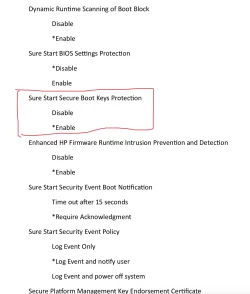
Further to my post #410, for HP PCs with HP Sure Start technology, Sure Start secure boot key protections can be disabled in BIOS to install CA2023 certificates. I haven’t tried to install the certificates, though. Therefore, I can not advise this. The following screenshot is from HP BIOS output to a text file. In my notebook, Sure Start secure boot key protection is enabled by default.

IMG_2084.webp
 

My Computers

System One System Two

  • OS
    Windows 11 Pro build 26200.8524
    Computer type
    PC/Desktop
    Manufacturer/Model
    Home Built
    CPU
    Intel i7-4790
    Motherboard
    Asus H97 Pro Gamer with add-on TPM1.2 module
    Memory
    Teams DDR3-1600 4x4 GB
    Graphics Card(s)
    MSI Nvidia GeForce GTX 1050Ti
    Sound Card
    Realtek ALC1150
    Monitor(s) Displays
    Dell P2425D
    Screen Resolution
    2560 by 1440 pixels
    Hard Drives
    Corsair NVMe M.2 Core XT 1000 GB (Windows 11 v.25H2); Samsung SATA Evo 870 500 GB (Windows 11 v.25H2);
    PSU
    Corsair HX850
    Case
    Gigabyte Solo 210
    Cooling
    Zalman CNPS7X Tower
    Keyboard
    Microsoft AIO Wireless (includes touchpad)
    Mouse
    HP S1000 Plus Wireless
    Internet Speed
    500 Mb fiber optic
    Browser
    Chrome; MS Edge
    Antivirus
    Windows Defender
  • Operating System
    MacOS 12 Monterey
    Computer type
    Laptop
    Manufacturer/Model
    Apple Macbook Air
    CPU
    Intel Core i5
    Memory
    8 GB
    Graphics card(s)
    Intel integrated
    Screen Resolution
    1440 by 900 pixels
    Hard Drives
    128 GB
    Keyboard
    Built-in
    Mouse
    Microsoft Wireless
    Internet Speed
    802.11 ac
    Browser
    Chrome; Safari
    Antivirus
    N/A
I've just seen on github that ASUS have released PK signed KEK update.

As I’ve used MOSBY to sort out my ASUS X-99, would a future or manual update via your software update my systems keys to give me an 'Official' update?

  1. Additional KEKs provided by ASUS, Acer, Fujitsu, BIOSTAR, TONGFANG, MEDION, Redhat, Microsoft
  2. Bug fixes in auth_var_tool.py

What's Changed​

  • [Secure Boot KEK Update] ASUS PK-Signed KEK Update by @ChengAn0519 in #293
  • [Secure Boot KEK Update] ASUS PK-Signed KEK Update by @ChengAn0519 in #295
  • pip: bump pytest from 8.4.2 to 9.0.0 by @dependabot[bot] in #297
  • pip: bump ruff from 0.14.3 to 0.14.4 by @dependabot[bot] in #296
  • auth_var_tool: Fix timestamp handling by @Flickdm in #299
  • Repo File Sync: Update mu_devops from v18.0.0 to v18.0.2 by @mu-automation[bot] in #300
  • pip: bump ruff from 0.14.4 to 0.14.5 by @dependabot[bot] in #307
  • [Secure Boot KEK Update] Acer PK-Signed KEK Update by @bloomlin in #309
  • pip: bump pytest from 9.0.0 to 9.0.1 by @dependabot[bot] in #306
  • [Secure Boot KEK Update] Fujitsu (& FCCL) PK-Signed KEK Update by @akudou1 in #310
  • [Secure Boot KEK Update] Acer PK-Signed KEK Update by @bloomlin in #311
  • [Secure Boot KEK Update] TONGFANG PK-Signed KEK Update by @Faintsnow in #315
  • [Secure Boot KEK Update] BIOSTAR PK-Signed KEK Update by @bloomlin in #316
  • MEDION KEK files added by @MaHoBo in #308
  • Revert "[Secure Boot KEK Update] TONGFANG PK-Signed KEK Update" by @Flickdm in #322
  • pip: bump edk2-pytool-extensions from 0.30.5 to 0.30.6 by @dependabot[bot] in #320
  • pip: bump ruff from 0.14.5 to 0.14.7 by @dependabot[bot] in #329
  • [Secure Boot KEK Update] RedHat PK-Signed KEK Update by @kraxel in #328
  • KEK: Update the get_auth_var_signing_certificate and kek_update_map.json by @Flickdm in #325
  • pip: bump ruff from 0.14.7 to 0.14.8 by @dependabot[bot] in #330
  • pip: bump pytest from 9.0.1 to 9.0.2 by @dependabot[bot] in #332
  • pip: bump edk2-pytool-library from 0.23.10 to 0.23.11 by @dependabot[bot] in #331
  • GitHub Action: Bump actions/checkout from 4 to 6 by @dependabot[bot] in #317
  • [Secure Boot KEK Update] Microsoft PK-Signed KEK Update by @Flickdm in #336
  • [Secure Boot KEK Update] TONGFANG PK-Signed KEK Update by @Faintsnow in #335
  • pip: bump ruff from 0.14.8 to 0.14.9 by @dependabot[bot] in #337
  • GitHub Action: Bump actions/upload-artifact from 4 to 6 by @dependabot[bot] in #334
  • pip: bump ruff from 0.14.9 to 0.14.10 by @dependabot[bot] in #338
  • pip: bump pyasn1 from 0.6.1 to 0.6.2 by @dependabot[bot] in #340
  • pip: bump ruff from 0.14.10 to 0.14.13 by @dependabot[bot] in #341
  • pip: bump ruff from 0.14.13 to 0.14.14 by @dependabot[bot] in #342
 

My Computers

System One System Two

  • OS
    Windows 11 Enterprise 25H2 26200 7462
    Computer type
    PC/Desktop
    Manufacturer/Model
    Custom Build
    CPU
    Intel XEON E5-2699 v3
    Motherboard
    ASUS X99-A
    Memory
    64GB Teamgroup UD4-3600
    Graphics Card(s)
    NVIDIA GeForce GTX 1080 Ti
    Sound Card
    Integrated
    Monitor(s) Displays
    ACER X34 Predator
    Screen Resolution
    3440 x 1440
    Hard Drives
    Crucial CT1000P 3P SSD8 1TB
    Crucial CT1000 BX500 SSD 1TB
    PSU
    GameMax Pro
    Case
    Fractal Design
    Cooling
    Corsair H110iGT + 6 140mm Fans
    Keyboard
    Corsair K4
    Mouse
    G-Skill G502
    Internet Speed
    300MBs
    Browser
    Chrome
    Antivirus
    OEM
    Other Info
    ASUS RT-AC87U Router
  • Operating System
    25H2 26200.5074
    Computer type
    Laptop
    Manufacturer/Model
    ASUS X555LA
    Memory
    8GB
    Browser
    Chrome
    Antivirus
    OEM
If you expand deeper, HP models with Sure Start have a self-protection feature that prevents certain UEFI changes (as a security mechanism).

For some models, HP has released a new BIOS version where they display the version string "'SBKPFV3". This indicates it's compatible with the update process. Anything other than "'SBKPFV3", like "'SBKPFV2" or "'SBKPFV" will not be compatible.

I'll add a change to both scripts to check if you own a HP, and detect if the BIOS is supported or not. It sounds like the unsupported PC's (due to age) won't get a fix to Sure Start. Sure Starts sound like why some HP's don't take the UEFI certificates.

Sure Start is an onboard mechanism to confirm if UEFI changes are authorized. If recent changes aren't confirmed (by an outside server), then the UEFI automatically restores a backup copy to undo the change. It sounds like when HP introduced this feature, they thought it was a good anti-tampering mechanism, but couldn't predict the UEFI keys needed updating 10 years later.

You can't turn off Sure Start (otherwise it could be defeated by attackers), so the only away to allow changes is because HP re-programmed your BIOS to allow the Secure Boot migration to happen. It may be that a whole lot of older HP machines can never be updated, if HP decided to abandon them by not providing an updated version of BIOS firmware.
I had a quick read of the Sure Start white paper and if Sure Start does everything it claims then I'm amazed that my BIOS is bricked. Anyway I don't want to derail the thread anymore so I'll just suggest a warning for HP users to be added on the first page of the OP. If my bricked mobo can act as a lesson to save others then it will have been worth it.
Also just wanted to say thanks for your time and effort in providing these scripts and keep up the good work. I should have done a bit more research before I jumped in and I hold only my self responsible for my bricked mobo. Heck I've been using free scripts and programmes since the days of Spybot S&D and they have saved me on numerous occasions so one mobo is a small price to pay for all the years of free scripts and programmes.
Thanks to you and everyone who tried to help.
 

My Computer

System One

  • OS
    Windows 10 pro
    Computer type
    PC/Desktop
    Manufacturer/Model
    HP EliteDesk 800 G5 SFF
    CPU
    Intel i7
I've just seen on github that ASUS have released PK signed KEK update.

As I’ve used MOSBY to sort out my ASUS X-99, would a future or manual update via your software update my systems keys to give me an 'Official' update?
Both scripts will download (on the fly) the current list of submitted KEK certs from MS's GitHub, and check if your PK's thumbprint is listed.

Each unique PK gets their own thumbprint (as a function of the signing Certificate Authority's cert). All BIOS'es that share that same PK can use the same signed KEK file. A vendor might have multiple PK's, for each of their different product families. ASUS is a little strange, because they have both ASUS and ASR products listed in the GitHub.

This older script will inform you if they've submitted your UEFI's PK or not. If that's true, you can have the option to perform a factory reset (with the latest BIOS installed), and repeat the process with non-Mosby certs.
 

Attachments

My Computer

System One

  • OS
    Windows 7
3. Enter the UEFI menu, load it from the system disk's EFI partition under the \Certs folder you copied it. The actual location doesn't matter, but the \Certs folder makes it easier to find & clean up later. Enroll the cert.
Thank you for the additional instructions.

Unfortunately, step 3 fails when I try to install the downloaded "microsoft corporation kek 2k ca 2023.der" file with this error:

Code:
Error replacing key. Please make sure that the new key is properly formatted
with signature list and serialization headers.

Does anyone know which format this Dell BIOS expects?
 

My Computer

System One

  • OS
    Windows 11
    Computer type
    Laptop
    Manufacturer/Model
    Dell Latitude 3380
    CPU
    Intel Core i3-6006U @ 2.00 GHz
    Motherboard
    Dell 0WM4F
    Memory
    16,0 GB
    Graphics Card(s)
    Intel HD Graphics 520
    Sound Card
    Realtek Audio
    Monitor(s) Displays
    Built-in
    Screen Resolution
    1366 x 768 @ 59 Hz
    Hard Drives
    SK Hynix SC311 SATA 128 GB SSD
    Other Info
    Multi-boot Windows/Ubuntu using rEFInd
This older script will inform you if they've submitted your UEFI's PK or not. If that's true, you can have the option to perform a factory reset (with the latest BIOS installed), and repeat the process with non-Mosby certs.
Is there a good reason to not trust or use the Mosby certs?
 

My Computers

System One System Two

  • OS
    Win 11 Pro 25H2, Build 26200.8524
    Computer type
    PC/Desktop
    Manufacturer/Model
    Home Brew
    CPU
    Intel Core i5 14500
    Motherboard
    Gigabyte B760M G P WIFI
    Memory
    64GB DDR4
    Graphics Card(s)
    GeForce RTX 4060
    Sound Card
    Chipset Realtek
    Monitor(s) Displays
    LG 45" Ultragear, Acer 24" 1080p
    Screen Resolution
    5120x1440, 1920x1080
    Hard Drives
    Crucial P310 2TB 2280 PCIe Gen4 3D NAND NVMe M.2 SSD (O/S)
    Silicon Power 2TB US75 NVMe PCIe Gen4 M.2 2280 SSD (backup)
    Crucial BX500 2TB 3D NAND (2nd backup)
    Seagate 4TB Ironwolf, rotating HDD archive files
    External off-line backup Drives: 2 NVMe 4TB drives in external enclosures
    PSU
    Thermaltake Toughpower GF3 750W
    Case
    LIAN LI LANCOOL 216 E-ATX PC Case
    Cooling
    Lots of fans!
    Keyboard
    Microsoft Comfort Curve 2000
    Mouse
    Logitech G305
    Internet Speed
    Verizon FiOS 1GB
    Browser
    Firefox
    Antivirus
    Malware Bytes & Windows Defender Security
  • Operating System
    Win 11 Pro 25H2, Build 26200.8524
    Computer type
    PC/Desktop
    Manufacturer/Model
    Home Brew
    CPU
    Intel Core i5 14400
    Motherboard
    Gigabyte B760M DS3H AX
    Memory
    32GB DDR5
    Graphics card(s)
    Intel 700 Embedded GPU
    Sound Card
    Realtek Embedded
    Monitor(s) Displays
    27" HP 1080p
    Screen Resolution
    1920x1080
    Hard Drives
    Crucial P310 2TB 2280 PCIe Gen4 eD NAND PCIe SSD
    Samsung EVO 990 2TB NVMe Gen4 SSD
    Samsung 2TB SATA SSD
    PSU
    Thermaltake Smart BM3 650W
    Case
    Okinos Micro ATX Case
    Cooling
    Fans
    Keyboard
    Microsoft Comfort Curve 2000
    Mouse
    Logitech G305
    Internet Speed
    Verizon FiOS 1GB
    Browser
    Firefox
    Antivirus
    Malware Bytes & Windows Defender Security
Unfortunately, step 3 fails when I try to install the downloaded "microsoft corporation kek 2k ca 2023.der" file with this error:

Code:
Error replacing key. Please make sure that the new key is properly formatted
with signature list and serialization headers.

Does anyone know which format this Dell BIOS expects?
Try renaming the file as .crt instead of .der

Some BIOS'es are very picky about the filename extension.
 

My Computer

System One

  • OS
    Windows 7
Is there a good reason to not trust or use the Mosby certs?
Mosby aims to create a private PK for you, specifically so it can sign the KEK CA 2023 cert with it. I believe it also creates another Mosby cert to allow other future operations. In terms of trust, a Mosby PK is entirely trustworthy because it's randomly generated and you provided a key password.

But nobody else will support it. You can't ask your OEM or MS for help (maybe your OEM is useless since they abandoned this BIOS any way). If you use the vendor's factory PK or the generic Windows OEM PK, then you have a greater chance someone (other than me) can help you.

If you have a Mosby-related problem (not saying it will have a problem), then your only answer is to do a factory reset and try again. The Mosby process creates a private PK (nobody will have the same one), and you have to provide a password. If you give away those details in order to get someone to try to duplicate your problem, what was the point of this added security?

I didn't want the only update options to be A) follow MS, or B) follow Mosby.
I'm here to provide a third option C), which follows MS's methods but with clearer visibility.
 

My Computer

System One

  • OS
    Windows 7

My Computers

System One System Two

  • OS
    Windows 11 Enterprise 25H2 26200 7462
    Computer type
    PC/Desktop
    Manufacturer/Model
    Custom Build
    CPU
    Intel XEON E5-2699 v3
    Motherboard
    ASUS X99-A
    Memory
    64GB Teamgroup UD4-3600
    Graphics Card(s)
    NVIDIA GeForce GTX 1080 Ti
    Sound Card
    Integrated
    Monitor(s) Displays
    ACER X34 Predator
    Screen Resolution
    3440 x 1440
    Hard Drives
    Crucial CT1000P 3P SSD8 1TB
    Crucial CT1000 BX500 SSD 1TB
    PSU
    GameMax Pro
    Case
    Fractal Design
    Cooling
    Corsair H110iGT + 6 140mm Fans
    Keyboard
    Corsair K4
    Mouse
    G-Skill G502
    Internet Speed
    300MBs
    Browser
    Chrome
    Antivirus
    OEM
    Other Info
    ASUS RT-AC87U Router
  • Operating System
    25H2 26200.5074
    Computer type
    Laptop
    Manufacturer/Model
    ASUS X555LA
    Memory
    8GB
    Browser
    Chrome
    Antivirus
    OEM
Try renaming the file as .crt instead of .der

Some BIOS'es are very picky about the filename extension.
Looks like the Dell BIOS is even worse; it apparently requires a "signed signature list" (aka ".auth") format?

I plan to try this tonight; hoping I have to do this conversion only for the KEK and can still use your script for the other elements.

However, maybe I will have to do this (manually) for all four elements (PK, KEK, db, dbx). Or worse, use self-signed stuff after all...

How would I get PK, db and dbx locally on my PC? (You already helped me getting KEK I think?)
 

My Computer

System One

  • OS
    Windows 11
    Computer type
    Laptop
    Manufacturer/Model
    Dell Latitude 3380
    CPU
    Intel Core i3-6006U @ 2.00 GHz
    Motherboard
    Dell 0WM4F
    Memory
    16,0 GB
    Graphics Card(s)
    Intel HD Graphics 520
    Sound Card
    Realtek Audio
    Monitor(s) Displays
    Built-in
    Screen Resolution
    1366 x 768 @ 59 Hz
    Hard Drives
    SK Hynix SC311 SATA 128 GB SSD
    Other Info
    Multi-boot Windows/Ubuntu using rEFInd
I didn't want the only update options to be A) follow MS, or B) follow Mosby.
I'm here to provide a third option C), which follows MS's methods but with clearer visibility.
That answers the question, thanks. :crossed
 

My Computers

System One System Two

  • OS
    Win 11 Pro 25H2, Build 26200.8524
    Computer type
    PC/Desktop
    Manufacturer/Model
    Home Brew
    CPU
    Intel Core i5 14500
    Motherboard
    Gigabyte B760M G P WIFI
    Memory
    64GB DDR4
    Graphics Card(s)
    GeForce RTX 4060
    Sound Card
    Chipset Realtek
    Monitor(s) Displays
    LG 45" Ultragear, Acer 24" 1080p
    Screen Resolution
    5120x1440, 1920x1080
    Hard Drives
    Crucial P310 2TB 2280 PCIe Gen4 3D NAND NVMe M.2 SSD (O/S)
    Silicon Power 2TB US75 NVMe PCIe Gen4 M.2 2280 SSD (backup)
    Crucial BX500 2TB 3D NAND (2nd backup)
    Seagate 4TB Ironwolf, rotating HDD archive files
    External off-line backup Drives: 2 NVMe 4TB drives in external enclosures
    PSU
    Thermaltake Toughpower GF3 750W
    Case
    LIAN LI LANCOOL 216 E-ATX PC Case
    Cooling
    Lots of fans!
    Keyboard
    Microsoft Comfort Curve 2000
    Mouse
    Logitech G305
    Internet Speed
    Verizon FiOS 1GB
    Browser
    Firefox
    Antivirus
    Malware Bytes & Windows Defender Security
  • Operating System
    Win 11 Pro 25H2, Build 26200.8524
    Computer type
    PC/Desktop
    Manufacturer/Model
    Home Brew
    CPU
    Intel Core i5 14400
    Motherboard
    Gigabyte B760M DS3H AX
    Memory
    32GB DDR5
    Graphics card(s)
    Intel 700 Embedded GPU
    Sound Card
    Realtek Embedded
    Monitor(s) Displays
    27" HP 1080p
    Screen Resolution
    1920x1080
    Hard Drives
    Crucial P310 2TB 2280 PCIe Gen4 eD NAND PCIe SSD
    Samsung EVO 990 2TB NVMe Gen4 SSD
    Samsung 2TB SATA SSD
    PSU
    Thermaltake Smart BM3 650W
    Case
    Okinos Micro ATX Case
    Cooling
    Fans
    Keyboard
    Microsoft Comfort Curve 2000
    Mouse
    Logitech G305
    Internet Speed
    Verizon FiOS 1GB
    Browser
    Firefox
    Antivirus
    Malware Bytes & Windows Defender Security
Looks like the Dell BIOS is even worse; it apparently requires a "signed signature list" (aka ".auth") format?

I plan to try this tonight; hoping I have to do this conversion only for the KEK and can still use your script for the other elements.

However, maybe I will have to do this (manually) for all four elements (PK, KEK, db, dbx). Or worse, use self-signed stuff after all...

How would I get PK, db and dbx locally on my PC? (You already helped me getting KEK I think?)
The "hump" in the Secure Boot process is getting the KEK CA 2023 installed. After it's installed, either Windows or the update script can finish the rest.

UEFI security model works like this:
Vendor PK signs the KEK CA 2023 -> validates CA 2023 certs -> Windows can push updates​
-or-​
User in UEFI menu manually loads a KEK CA 2023 cert file -> KEK CA 2023 is validated using onboard PK -> validates CA 2023 certs​

Your link is for the manual method used by Linux to create self-signed keys. In a nutshell, that's what Mosby does except it rolls everything into a single self-booting Linux app. If you can just enroll the KEK CA 2023 by hand, then the entire rest of the posted method is moot.

Newer UEFI's with key management in their menus are nice because the only non-Windows step is manually enrolling the KEK CA 2023 cert file. My update script recognizes when you don't have a supported PK (because the thumbprint is missing on the MS GitHub), and it copies the KEK cert file to the EFI partition. This way you don't need to scrounge for a spare USB drive to make a FAT32 filesystem.

After you get the KEK CA 2023 loaded by hand, then just run the upgrade script and it will figure what to do.
 

My Computer

System One

  • OS
    Windows 7
Your link is for the manual method used by Linux to create self-signed keys.
I was not planning to do that; I was hoping that I could use the instructions somewhere in the middle of that tutorial that describe how to create a "signed signature list" (.auth) file, which was suggested to be the format that the Dell BIOS requires. However, I missed that their example requires both a key and a certificate, while I only have a certificate, so this won't work for me.

More research needed (on required format and how to create that) on my side I'm afraid...
 

My Computer

System One

  • OS
    Windows 11
    Computer type
    Laptop
    Manufacturer/Model
    Dell Latitude 3380
    CPU
    Intel Core i3-6006U @ 2.00 GHz
    Motherboard
    Dell 0WM4F
    Memory
    16,0 GB
    Graphics Card(s)
    Intel HD Graphics 520
    Sound Card
    Realtek Audio
    Monitor(s) Displays
    Built-in
    Screen Resolution
    1366 x 768 @ 59 Hz
    Hard Drives
    SK Hynix SC311 SATA 128 GB SSD
    Other Info
    Multi-boot Windows/Ubuntu using rEFInd
No progress...

Maybe I'm out of options:
  • Your script (the tools it uses) fails
  • Update via Ubuntu fails (writing data to efivarfs)
  • BIOS refuses to import anything I try
I have checked; the option to update UEFI items via Windows Update or Linux (LVFS) is enabled.

The third option is currently the most likely to succeed I guess, but I can't find out how to convert the file you suggested to download to a format that the Dell BIOS accepts.

I'm not blaming you! I was hoping somebody would have run into this before and I could find a solution on the internet. Maybe this post will be found at some point by someone who also ran into this and does know how to fix any of the issues above?
 

My Computer

System One

  • OS
    Windows 11
    Computer type
    Laptop
    Manufacturer/Model
    Dell Latitude 3380
    CPU
    Intel Core i3-6006U @ 2.00 GHz
    Motherboard
    Dell 0WM4F
    Memory
    16,0 GB
    Graphics Card(s)
    Intel HD Graphics 520
    Sound Card
    Realtek Audio
    Monitor(s) Displays
    Built-in
    Screen Resolution
    1366 x 768 @ 59 Hz
    Hard Drives
    SK Hynix SC311 SATA 128 GB SSD
    Other Info
    Multi-boot Windows/Ubuntu using rEFInd
OK. Google AI says Dell accepts DER certificates as .cer, and not named as .der or .crt.
 

My Computer

System One

  • OS
    Windows 7
Already tried those, without success.

Maybe a bug in the BIOS?
 

My Computer

System One

  • OS
    Windows 11
    Computer type
    Laptop
    Manufacturer/Model
    Dell Latitude 3380
    CPU
    Intel Core i3-6006U @ 2.00 GHz
    Motherboard
    Dell 0WM4F
    Memory
    16,0 GB
    Graphics Card(s)
    Intel HD Graphics 520
    Sound Card
    Realtek Audio
    Monitor(s) Displays
    Built-in
    Screen Resolution
    1366 x 768 @ 59 Hz
    Hard Drives
    SK Hynix SC311 SATA 128 GB SSD
    Other Info
    Multi-boot Windows/Ubuntu using rEFInd

Latest Support Threads

Back
Top Bottom