Google Browser no longer in Chrome


Memnon

Member
Local time
10:56 PM
Posts
30
OS
W11
W11 26H2

For 3rd time Browser has stopped using Google and switched to Yahoo, even though previously deleted Yahoo
All searches I try for help tell me to select Goggle under settings - I can't as its not there as an option.

How do I add Google back into Chrome & stop it being changed.
 

My Computer My Computer

At a glance

W11AMD Ryzen 9 7900X 4.7 GHz 12-CoreCORSAIR VENGEANCE DDR5 64GB (2x32GB) DDR5 600...Gigabyte Radeon RX 7800 XT GAMING OC 16GB
OS
W11
Computer type
PC/Desktop
Manufacturer/Model
Home Build
CPU
AMD Ryzen 9 7900X 4.7 GHz 12-Core
Motherboard
Gigabyte Aorus Master X670e
Memory
CORSAIR VENGEANCE DDR5 64GB (2x32GB) DDR5 6000MHz
Graphics Card(s)
Gigabyte Radeon RX 7800 XT GAMING OC 16GB
Monitor(s) Displays
1 x Alienware AW2725QF 27" 1 x Dell P2422HD 23"
Screen Resolution
4K
Hard Drives
2 x 2TB Crucial T700 2TB SSD PCIe Gen5 NVMe M.2 I
PSU
Thermaltake TOUGHPOWER GF A3 1050W Modular
Case
Fractal Define 7 Mid Tower Gaming Case
Cooling
Thermalright Phantom Spirit 1230 EVO
Internet Speed
8GB full fibre
Your browser is likely infected with a browser hijacker or a Potentially Unwanted Program (PUP) that forces your searches back to Yahoo. Just deleting Yahoo or changing your default search engine is not enough because the underlying malware or rogue extension automatically resets it. What extensions do you have?
Run a Full Scan with https://www.malwarebytes.com/premium ( you can try the free one) post your results.
 

My Computer My Computer

At a glance

Windows 11 26H2 (OS Build 26300.9711)Processor: 11th Gen Intel(R) Core(TM) i5-1135...12GBIntel R Iris R XE Graphics family
OS
Windows 11 26H2 (OS Build 26300.9711)
Computer type
Laptop
Manufacturer/Model
Dell
CPU
Processor: 11th Gen Intel(R) Core(TM) i5-1135G7 @ 2.40G
Motherboard
64-bit operating system Dell 0XMF7W
Memory
12GB
Graphics Card(s)
Intel R Iris R XE Graphics family
Sound Card
Cirrus Speakers High Definition Audio
Monitor(s) Displays
Generic PnP monitor
Screen Resolution
1920 x 1080
Hard Drives
NVMe 670p SSDPEKNU512GZ NVMe I NTEL 512GB
Case
cheap
Mouse
Logitech wireless mouse
Internet Speed
16 Mps download
Browser
Google Chrome
Antivirus
Security: Microsoft Defender & Malwarebytes Premium (with browser guard)
Other Info
Dell model: Inspiron 15 3511
Ran Malwarebytes & let it apply malware fixes report attached
Going through each item .... Malwarebytes details this one as most likely Malwarebytes Threat Alert | Adware.SpecialSearchOffer

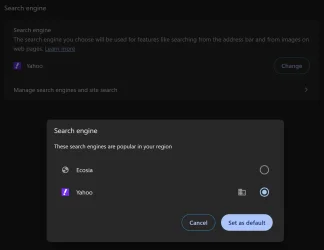
It has quarantined this, how do I add Google Search Engine back into Chrome ? ....... in settings in only lists Yahoo & Ecosia
 

Attachments

Last edited:

My Computer My Computer

At a glance

W11AMD Ryzen 9 7900X 4.7 GHz 12-CoreCORSAIR VENGEANCE DDR5 64GB (2x32GB) DDR5 600...Gigabyte Radeon RX 7800 XT GAMING OC 16GB
OS
W11
Computer type
PC/Desktop
Manufacturer/Model
Home Build
CPU
AMD Ryzen 9 7900X 4.7 GHz 12-Core
Motherboard
Gigabyte Aorus Master X670e
Memory
CORSAIR VENGEANCE DDR5 64GB (2x32GB) DDR5 6000MHz
Graphics Card(s)
Gigabyte Radeon RX 7800 XT GAMING OC 16GB
Monitor(s) Displays
1 x Alienware AW2725QF 27" 1 x Dell P2422HD 23"
Screen Resolution
4K
Hard Drives
2 x 2TB Crucial T700 2TB SSD PCIe Gen5 NVMe M.2 I
PSU
Thermaltake TOUGHPOWER GF A3 1050W Modular
Case
Fractal Define 7 Mid Tower Gaming Case
Cooling
Thermalright Phantom Spirit 1230 EVO
Internet Speed
8GB full fibre
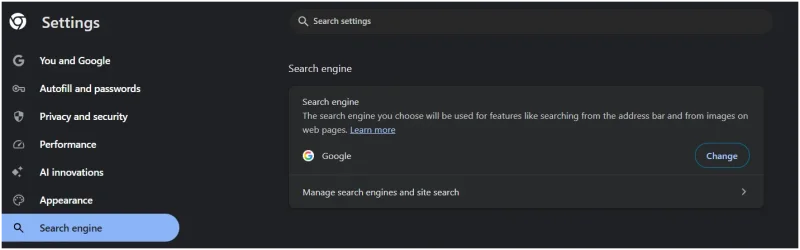
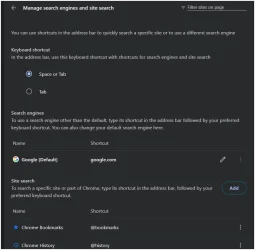
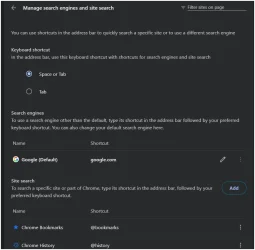
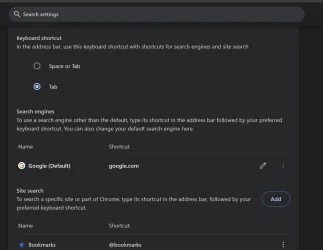
I put 2 screenshots from mine - go to Search Enigne Click, on that takes you to the 2nd. pic. & remove yahoo & any other Browsers you see there
 

Attachments

  • Screenshot 2026-10-23 133313.webp
    Screenshot 2026-10-23 133313.webp
    27.6 KB · Views: 1
  • Screenshot 2026-10-23 133333.webp
    Screenshot 2026-10-23 133333.webp
    34 KB · Views: 1

My Computer My Computer

At a glance

Windows 11 26H2 (OS Build 26300.9711)Processor: 11th Gen Intel(R) Core(TM) i5-1135...12GBIntel R Iris R XE Graphics family
OS
Windows 11 26H2 (OS Build 26300.9711)
Computer type
Laptop
Manufacturer/Model
Dell
CPU
Processor: 11th Gen Intel(R) Core(TM) i5-1135G7 @ 2.40G
Motherboard
64-bit operating system Dell 0XMF7W
Memory
12GB
Graphics Card(s)
Intel R Iris R XE Graphics family
Sound Card
Cirrus Speakers High Definition Audio
Monitor(s) Displays
Generic PnP monitor
Screen Resolution
1920 x 1080
Hard Drives
NVMe 670p SSDPEKNU512GZ NVMe I NTEL 512GB
Case
cheap
Mouse
Logitech wireless mouse
Internet Speed
16 Mps download
Browser
Google Chrome
Antivirus
Security: Microsoft Defender & Malwarebytes Premium (with browser guard)
Other Info
Dell model: Inspiron 15 3511
Malwarebytes did a Quarantine on a few items. Don't re-install them please
 

My Computer My Computer

At a glance

Windows 11 26H2 (OS Build 26300.9711)Processor: 11th Gen Intel(R) Core(TM) i5-1135...12GBIntel R Iris R XE Graphics family
OS
Windows 11 26H2 (OS Build 26300.9711)
Computer type
Laptop
Manufacturer/Model
Dell
CPU
Processor: 11th Gen Intel(R) Core(TM) i5-1135G7 @ 2.40G
Motherboard
64-bit operating system Dell 0XMF7W
Memory
12GB
Graphics Card(s)
Intel R Iris R XE Graphics family
Sound Card
Cirrus Speakers High Definition Audio
Monitor(s) Displays
Generic PnP monitor
Screen Resolution
1920 x 1080
Hard Drives
NVMe 670p SSDPEKNU512GZ NVMe I NTEL 512GB
Case
cheap
Mouse
Logitech wireless mouse
Internet Speed
16 Mps download
Browser
Google Chrome
Antivirus
Security: Microsoft Defender & Malwarebytes Premium (with browser guard)
Other Info
Dell model: Inspiron 15 3511

My Computer My Computer

At a glance

W11AMD Ryzen 9 7900X 4.7 GHz 12-CoreCORSAIR VENGEANCE DDR5 64GB (2x32GB) DDR5 600...Gigabyte Radeon RX 7800 XT GAMING OC 16GB
OS
W11
Computer type
PC/Desktop
Manufacturer/Model
Home Build
CPU
AMD Ryzen 9 7900X 4.7 GHz 12-Core
Motherboard
Gigabyte Aorus Master X670e
Memory
CORSAIR VENGEANCE DDR5 64GB (2x32GB) DDR5 6000MHz
Graphics Card(s)
Gigabyte Radeon RX 7800 XT GAMING OC 16GB
Monitor(s) Displays
1 x Alienware AW2725QF 27" 1 x Dell P2422HD 23"
Screen Resolution
4K
Hard Drives
2 x 2TB Crucial T700 2TB SSD PCIe Gen5 NVMe M.2 I
PSU
Thermaltake TOUGHPOWER GF A3 1050W Modular
Case
Fractal Define 7 Mid Tower Gaming Case
Cooling
Thermalright Phantom Spirit 1230 EVO
Internet Speed
8GB full fibre
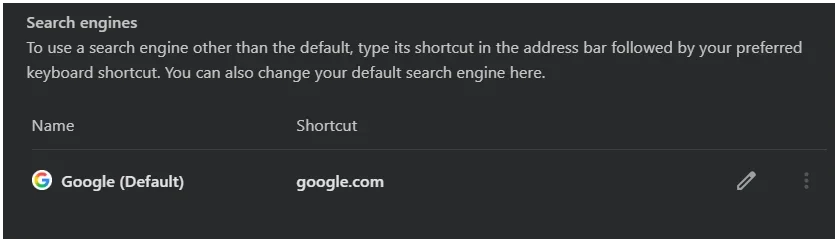
If you want to use "default search engine" This is what you should see
 

Attachments

  • Screenshot 2026-10-23 134356.webp
    Screenshot 2026-10-23 134356.webp
    11.9 KB · Views: 1

My Computer My Computer

At a glance

Windows 11 26H2 (OS Build 26300.9711)Processor: 11th Gen Intel(R) Core(TM) i5-1135...12GBIntel R Iris R XE Graphics family
OS
Windows 11 26H2 (OS Build 26300.9711)
Computer type
Laptop
Manufacturer/Model
Dell
CPU
Processor: 11th Gen Intel(R) Core(TM) i5-1135G7 @ 2.40G
Motherboard
64-bit operating system Dell 0XMF7W
Memory
12GB
Graphics Card(s)
Intel R Iris R XE Graphics family
Sound Card
Cirrus Speakers High Definition Audio
Monitor(s) Displays
Generic PnP monitor
Screen Resolution
1920 x 1080
Hard Drives
NVMe 670p SSDPEKNU512GZ NVMe I NTEL 512GB
Case
cheap
Mouse
Logitech wireless mouse
Internet Speed
16 Mps download
Browser
Google Chrome
Antivirus
Security: Microsoft Defender & Malwarebytes Premium (with browser guard)
Other Info
Dell model: Inspiron 15 3511
Although Google is set as default search engine..... even after a reboot ..... Chrome is still using Yahoo pic shows only Google is active in settings
This is proving difficult.
afetr 100% checking google is default ..... tried a simple search .... and as you can see it attached pic its still using Yahoo
 

Attachments

  • search settings.webp
    search settings.webp
    29.5 KB · Views: 1
  • result.webp
    result.webp
    18.8 KB · Views: 1

My Computer My Computer

At a glance

W11AMD Ryzen 9 7900X 4.7 GHz 12-CoreCORSAIR VENGEANCE DDR5 64GB (2x32GB) DDR5 600...Gigabyte Radeon RX 7800 XT GAMING OC 16GB
OS
W11
Computer type
PC/Desktop
Manufacturer/Model
Home Build
CPU
AMD Ryzen 9 7900X 4.7 GHz 12-Core
Motherboard
Gigabyte Aorus Master X670e
Memory
CORSAIR VENGEANCE DDR5 64GB (2x32GB) DDR5 6000MHz
Graphics Card(s)
Gigabyte Radeon RX 7800 XT GAMING OC 16GB
Monitor(s) Displays
1 x Alienware AW2725QF 27" 1 x Dell P2422HD 23"
Screen Resolution
4K
Hard Drives
2 x 2TB Crucial T700 2TB SSD PCIe Gen5 NVMe M.2 I
PSU
Thermaltake TOUGHPOWER GF A3 1050W Modular
Case
Fractal Define 7 Mid Tower Gaming Case
Cooling
Thermalright Phantom Spirit 1230 EVO
Internet Speed
8GB full fibre
On this page there are 3 dots to the right of any browser, If you see yahoo? Click on the dots that say delete
 

Attachments

  • Screenshot 2026-10-23 133333.webp
    Screenshot 2026-10-23 133333.webp
    34 KB · Views: 1

My Computer My Computer

At a glance

Windows 11 26H2 (OS Build 26300.9711)Processor: 11th Gen Intel(R) Core(TM) i5-1135...12GBIntel R Iris R XE Graphics family
OS
Windows 11 26H2 (OS Build 26300.9711)
Computer type
Laptop
Manufacturer/Model
Dell
CPU
Processor: 11th Gen Intel(R) Core(TM) i5-1135G7 @ 2.40G
Motherboard
64-bit operating system Dell 0XMF7W
Memory
12GB
Graphics Card(s)
Intel R Iris R XE Graphics family
Sound Card
Cirrus Speakers High Definition Audio
Monitor(s) Displays
Generic PnP monitor
Screen Resolution
1920 x 1080
Hard Drives
NVMe 670p SSDPEKNU512GZ NVMe I NTEL 512GB
Case
cheap
Mouse
Logitech wireless mouse
Internet Speed
16 Mps download
Browser
Google Chrome
Antivirus
Security: Microsoft Defender & Malwarebytes Premium (with browser guard)
Other Info
Dell model: Inspiron 15 3511
Click on "Manage Search Engine" tell me what it says now please
 

My Computer My Computer

At a glance

Windows 11 26H2 (OS Build 26300.9711)Processor: 11th Gen Intel(R) Core(TM) i5-1135...12GBIntel R Iris R XE Graphics family
OS
Windows 11 26H2 (OS Build 26300.9711)
Computer type
Laptop
Manufacturer/Model
Dell
CPU
Processor: 11th Gen Intel(R) Core(TM) i5-1135G7 @ 2.40G
Motherboard
64-bit operating system Dell 0XMF7W
Memory
12GB
Graphics Card(s)
Intel R Iris R XE Graphics family
Sound Card
Cirrus Speakers High Definition Audio
Monitor(s) Displays
Generic PnP monitor
Screen Resolution
1920 x 1080
Hard Drives
NVMe 670p SSDPEKNU512GZ NVMe I NTEL 512GB
Case
cheap
Mouse
Logitech wireless mouse
Internet Speed
16 Mps download
Browser
Google Chrome
Antivirus
Security: Microsoft Defender & Malwarebytes Premium (with browser guard)
Other Info
Dell model: Inspiron 15 3511
100% confirm no other search engine is there - deleted all except Google.
However it still uses Yahoo
 

My Computer My Computer

At a glance

W11AMD Ryzen 9 7900X 4.7 GHz 12-CoreCORSAIR VENGEANCE DDR5 64GB (2x32GB) DDR5 600...Gigabyte Radeon RX 7800 XT GAMING OC 16GB
OS
W11
Computer type
PC/Desktop
Manufacturer/Model
Home Build
CPU
AMD Ryzen 9 7900X 4.7 GHz 12-Core
Motherboard
Gigabyte Aorus Master X670e
Memory
CORSAIR VENGEANCE DDR5 64GB (2x32GB) DDR5 6000MHz
Graphics Card(s)
Gigabyte Radeon RX 7800 XT GAMING OC 16GB
Monitor(s) Displays
1 x Alienware AW2725QF 27" 1 x Dell P2422HD 23"
Screen Resolution
4K
Hard Drives
2 x 2TB Crucial T700 2TB SSD PCIe Gen5 NVMe M.2 I
PSU
Thermaltake TOUGHPOWER GF A3 1050W Modular
Case
Fractal Define 7 Mid Tower Gaming Case
Cooling
Thermalright Phantom Spirit 1230 EVO
Internet Speed
8GB full fibre

Attachments

  • manage.webp
    manage.webp
    50.9 KB · Views: 1

My Computer My Computer

At a glance

W11AMD Ryzen 9 7900X 4.7 GHz 12-CoreCORSAIR VENGEANCE DDR5 64GB (2x32GB) DDR5 600...Gigabyte Radeon RX 7800 XT GAMING OC 16GB
OS
W11
Computer type
PC/Desktop
Manufacturer/Model
Home Build
CPU
AMD Ryzen 9 7900X 4.7 GHz 12-Core
Motherboard
Gigabyte Aorus Master X670e
Memory
CORSAIR VENGEANCE DDR5 64GB (2x32GB) DDR5 6000MHz
Graphics Card(s)
Gigabyte Radeon RX 7800 XT GAMING OC 16GB
Monitor(s) Displays
1 x Alienware AW2725QF 27" 1 x Dell P2422HD 23"
Screen Resolution
4K
Hard Drives
2 x 2TB Crucial T700 2TB SSD PCIe Gen5 NVMe M.2 I
PSU
Thermaltake TOUGHPOWER GF A3 1050W Modular
Case
Fractal Define 7 Mid Tower Gaming Case
Cooling
Thermalright Phantom Spirit 1230 EVO
Internet Speed
8GB full fibre
Remove Unfamiliar Extensions
Uninstall Unwanted Apps
Reset Browser Settings: Go to Settings > Reset settings and restore defaults to disable rogue tools and clear temporary data (this keeps your saved bookmarks and passwords)
 

My Computer My Computer

At a glance

Windows 11 26H2 (OS Build 26300.9711)Processor: 11th Gen Intel(R) Core(TM) i5-1135...12GBIntel R Iris R XE Graphics family
OS
Windows 11 26H2 (OS Build 26300.9711)
Computer type
Laptop
Manufacturer/Model
Dell
CPU
Processor: 11th Gen Intel(R) Core(TM) i5-1135G7 @ 2.40G
Motherboard
64-bit operating system Dell 0XMF7W
Memory
12GB
Graphics Card(s)
Intel R Iris R XE Graphics family
Sound Card
Cirrus Speakers High Definition Audio
Monitor(s) Displays
Generic PnP monitor
Screen Resolution
1920 x 1080
Hard Drives
NVMe 670p SSDPEKNU512GZ NVMe I NTEL 512GB
Case
cheap
Mouse
Logitech wireless mouse
Internet Speed
16 Mps download
Browser
Google Chrome
Antivirus
Security: Microsoft Defender & Malwarebytes Premium (with browser guard)
Other Info
Dell model: Inspiron 15 3511
Not sure if relevant ...... previously Chrome would start up at Google search box ....... www.google.com
Now it starts up on this url New Tab

This was what I noticed different first

I went to settings/start up and deleted the sets of URLS added a new one www.google.com
Chrome now starts as it should on Google Search ....... and now if I try a search it does not use Yahoo .... assume the startup URL was causing it to open a tab and Yahoo.
 

My Computer My Computer

At a glance

W11AMD Ryzen 9 7900X 4.7 GHz 12-CoreCORSAIR VENGEANCE DDR5 64GB (2x32GB) DDR5 600...Gigabyte Radeon RX 7800 XT GAMING OC 16GB
OS
W11
Computer type
PC/Desktop
Manufacturer/Model
Home Build
CPU
AMD Ryzen 9 7900X 4.7 GHz 12-Core
Motherboard
Gigabyte Aorus Master X670e
Memory
CORSAIR VENGEANCE DDR5 64GB (2x32GB) DDR5 6000MHz
Graphics Card(s)
Gigabyte Radeon RX 7800 XT GAMING OC 16GB
Monitor(s) Displays
1 x Alienware AW2725QF 27" 1 x Dell P2422HD 23"
Screen Resolution
4K
Hard Drives
2 x 2TB Crucial T700 2TB SSD PCIe Gen5 NVMe M.2 I
PSU
Thermaltake TOUGHPOWER GF A3 1050W Modular
Case
Fractal Define 7 Mid Tower Gaming Case
Cooling
Thermalright Phantom Spirit 1230 EVO
Internet Speed
8GB full fibre
Is this the way you tried to change your search engine in Chrome?

ChinAd.dds is a Chinese software bundler.

Here is Google's own instructions:

Step 1: Remove Suspicious Extensions
    • Open Chrome and click the three dots (Menu) in the top-right corner.
    • Go to Extensions > Manage extensions.
    • Look for unfamiliar or recently installed extensions that appeared around the time the redirects started.
    • Click Remove and confirm the deletion.

Step 2: Reset Default Search Engines
    • Click the three dots and select Settings.
    • Click on Search engine in the left sidebar.
    • Select Manage search engines and site search.
    • Delete any unknown, suspicious, or auto-generated search engines.
    • Ensure your preferred search engine (such as Google) is set as the default.

Step 3: Block Pop-ups and Unwanted Redirects
    • Go to Settings > Privacy and security > Site settings.
    • Click on Pop-ups and redirects.
    • Select Do not allow sites to send pop-ups or use redirects.
    • Under Site settings, go to Notifications and remove any unknown or shady websites from the "Allowed" list.

Step 4: Restore Chrome to Default Settings
    • In Chrome Settings, click on Reset settings in the left sidebar.
    • Click Restore settings to their original defaults.
    • Click Reset settings to confirm (this disables extensions and resets startup pages/search engines without deleting your bookmarks or passwords).

Step 5: Uninstall Malicious Apps from Your Computer
    • Windows: Go to Start > Settings > Apps > Installed apps, locate any unfamiliar or recently installed programs, and click Uninstall.
    • Mac: Open Finder > Applications, drag any unknown or suspicious apps to the Trash, and empty it. Check System Preferences > Profiles and remove unknown administrative profiles if present.

Step 6: Run an Anti-Malware Scan
    • Download a trusted security scanner such as Malwarebytes or TotalAV.
    • Run a full system scan to detect and remove deeper rootkits, adware, or background Trojans causing the hijack.
    • Restart your computer after the scan completes
 

My Computers My Computers

  • At a glance

    Windows 11 Pro 26H2 26300.9457i9-10900 10 core 20 threads32 gbnone-Intel UHD Graphics 630
    OS
    Windows 11 Pro 26H2 26300.9457
    Computer type
    PC/Desktop
    Manufacturer/Model
    Dell Optiplex 7080
    CPU
    i9-10900 10 core 20 threads
    Motherboard
    DELL 0J37VM
    Memory
    32 gb
    Graphics Card(s)
    none-Intel UHD Graphics 630
    Sound Card
    Integrated Realtek
    Monitor(s) Displays
    Benq 27
    Screen Resolution
    2560x1440
    Hard Drives
    2x1tb Solidigm m.2 nvme /External drives 512gb Samsung m.2 sata+2tb Kingston m2.nvme
    PSU
    500w
    Case
    MT
    Cooling
    Dell Premium
    Keyboard
    Logitech wired
    Mouse
    Logitech wireless
    Internet Speed
    so slow I'm too embarrassed to tell
    Browser
    #1 Edge #2 Firefox
    Antivirus
    Defender+MWB Premium
  • At a glance

    Windows 11 Pro 24H2 26200.9457AMD Ryzen 7 6800U32 gbintegrated
    Operating System
    Windows 11 Pro 24H2 26200.9457
    Computer type
    PC/Desktop
    Manufacturer/Model
    Beelink Mini PC SER5
    CPU
    AMD Ryzen 7 6800U
    Memory
    32 gb
    Graphics card(s)
    integrated
    Sound Card
    integrated
    Monitor(s) Displays
    Benq 27
    Screen Resolution
    2560x1440
    Hard Drives
    1TB Crucial nvme
    Keyboard
    Logitech wired
    Mouse
    Logitech wireless
    Internet Speed
    still too embarrassed to tell
    Browser
    Firefox
    Antivirus
    Defender
  • System 3 is non compliant Dell 9020 i7-4770/24gb ram Win11 PRO 26200.9457
Remove Unfamiliar Extensions
Uninstall Unwanted Apps
Reset Browser Settings: Go to Settings > Reset settings and restore defaults to disable rogue tools and clear temporary data (this keeps your saved bookmarks and passwords)
Only my standard extensions are shown in chrome://extensions/
Where do I find apps to check for unwanted .... not aware of any apps in Chrome
 

My Computer My Computer

At a glance

W11AMD Ryzen 9 7900X 4.7 GHz 12-CoreCORSAIR VENGEANCE DDR5 64GB (2x32GB) DDR5 600...Gigabyte Radeon RX 7800 XT GAMING OC 16GB
OS
W11
Computer type
PC/Desktop
Manufacturer/Model
Home Build
CPU
AMD Ryzen 9 7900X 4.7 GHz 12-Core
Motherboard
Gigabyte Aorus Master X670e
Memory
CORSAIR VENGEANCE DDR5 64GB (2x32GB) DDR5 6000MHz
Graphics Card(s)
Gigabyte Radeon RX 7800 XT GAMING OC 16GB
Monitor(s) Displays
1 x Alienware AW2725QF 27" 1 x Dell P2422HD 23"
Screen Resolution
4K
Hard Drives
2 x 2TB Crucial T700 2TB SSD PCIe Gen5 NVMe M.2 I
PSU
Thermaltake TOUGHPOWER GF A3 1050W Modular
Case
Fractal Define 7 Mid Tower Gaming Case
Cooling
Thermalright Phantom Spirit 1230 EVO
Internet Speed
8GB full fibre
Follow Glasskuters info: Your browser randomly switched to Yahoo because of a browser hijacker, a malicious extension, or unwanted adware/malware installed on your system
 

My Computer My Computer

At a glance

Windows 11 26H2 (OS Build 26300.9711)Processor: 11th Gen Intel(R) Core(TM) i5-1135...12GBIntel R Iris R XE Graphics family
OS
Windows 11 26H2 (OS Build 26300.9711)
Computer type
Laptop
Manufacturer/Model
Dell
CPU
Processor: 11th Gen Intel(R) Core(TM) i5-1135G7 @ 2.40G
Motherboard
64-bit operating system Dell 0XMF7W
Memory
12GB
Graphics Card(s)
Intel R Iris R XE Graphics family
Sound Card
Cirrus Speakers High Definition Audio
Monitor(s) Displays
Generic PnP monitor
Screen Resolution
1920 x 1080
Hard Drives
NVMe 670p SSDPEKNU512GZ NVMe I NTEL 512GB
Case
cheap
Mouse
Logitech wireless mouse
Internet Speed
16 Mps download
Browser
Google Chrome
Antivirus
Security: Microsoft Defender & Malwarebytes Premium (with browser guard)
Other Info
Dell model: Inspiron 15 3511
Is this the way you tried to change your search engine in Chrome?

ChinAd.dds is a Chinese software bundler.

Here is Google's own instructions:

Step 1: Remove Suspicious Extensions
  1. tes

The steps shown would not work as Google was not there to be selected ( I manually added)

Step 1: done all as should be
Step 2: did not work as Google was not there to select - as desribed above I have manually added it and made it default
Step 3: was correct
Step 4: Reset done
Step 5: None installed
Step 6: done Report attched earlier in thread
 

My Computer My Computer

At a glance

W11AMD Ryzen 9 7900X 4.7 GHz 12-CoreCORSAIR VENGEANCE DDR5 64GB (2x32GB) DDR5 600...Gigabyte Radeon RX 7800 XT GAMING OC 16GB
OS
W11
Computer type
PC/Desktop
Manufacturer/Model
Home Build
CPU
AMD Ryzen 9 7900X 4.7 GHz 12-Core
Motherboard
Gigabyte Aorus Master X670e
Memory
CORSAIR VENGEANCE DDR5 64GB (2x32GB) DDR5 6000MHz
Graphics Card(s)
Gigabyte Radeon RX 7800 XT GAMING OC 16GB
Monitor(s) Displays
1 x Alienware AW2725QF 27" 1 x Dell P2422HD 23"
Screen Resolution
4K
Hard Drives
2 x 2TB Crucial T700 2TB SSD PCIe Gen5 NVMe M.2 I
PSU
Thermaltake TOUGHPOWER GF A3 1050W Modular
Case
Fractal Define 7 Mid Tower Gaming Case
Cooling
Thermalright Phantom Spirit 1230 EVO
Internet Speed
8GB full fibre
your chrome apps would be in the top right corner of the browser ---- is anything there? here's mine
 

Attachments

  • Screenshot 2026-10-23 142217.webp
    Screenshot 2026-10-23 142217.webp
    3.4 KB · Views: 1

My Computer My Computer

At a glance

Windows 11 26H2 (OS Build 26300.9711)Processor: 11th Gen Intel(R) Core(TM) i5-1135...12GBIntel R Iris R XE Graphics family
OS
Windows 11 26H2 (OS Build 26300.9711)
Computer type
Laptop
Manufacturer/Model
Dell
CPU
Processor: 11th Gen Intel(R) Core(TM) i5-1135G7 @ 2.40G
Motherboard
64-bit operating system Dell 0XMF7W
Memory
12GB
Graphics Card(s)
Intel R Iris R XE Graphics family
Sound Card
Cirrus Speakers High Definition Audio
Monitor(s) Displays
Generic PnP monitor
Screen Resolution
1920 x 1080
Hard Drives
NVMe 670p SSDPEKNU512GZ NVMe I NTEL 512GB
Case
cheap
Mouse
Logitech wireless mouse
Internet Speed
16 Mps download
Browser
Google Chrome
Antivirus
Security: Microsoft Defender & Malwarebytes Premium (with browser guard)
Other Info
Dell model: Inspiron 15 3511
your chrome apps would be in the top right corner of the browser ---- is anything there? here's mine
Only standard ones therer no extras
 

My Computer My Computer

At a glance

W11AMD Ryzen 9 7900X 4.7 GHz 12-CoreCORSAIR VENGEANCE DDR5 64GB (2x32GB) DDR5 600...Gigabyte Radeon RX 7800 XT GAMING OC 16GB
OS
W11
Computer type
PC/Desktop
Manufacturer/Model
Home Build
CPU
AMD Ryzen 9 7900X 4.7 GHz 12-Core
Motherboard
Gigabyte Aorus Master X670e
Memory
CORSAIR VENGEANCE DDR5 64GB (2x32GB) DDR5 6000MHz
Graphics Card(s)
Gigabyte Radeon RX 7800 XT GAMING OC 16GB
Monitor(s) Displays
1 x Alienware AW2725QF 27" 1 x Dell P2422HD 23"
Screen Resolution
4K
Hard Drives
2 x 2TB Crucial T700 2TB SSD PCIe Gen5 NVMe M.2 I
PSU
Thermaltake TOUGHPOWER GF A3 1050W Modular
Case
Fractal Define 7 Mid Tower Gaming Case
Cooling
Thermalright Phantom Spirit 1230 EVO
Internet Speed
8GB full fibre

Latest Support Threads

Back
Top Bottom