Hey all, new guy with a weird network issue I just can't resolve


FlyinHawaiian

New member
Local time
2:38 PM
Posts
5
OS
windows 11 24h2
I'll try to keep this as short as possible so it doesn't bore y'all to death! New build on this machine, and everything is working fantastic but SMB sharing. I've read dozens of posts in the last few days and tried every powershell script, command line command and trick I could come up with but it just won't do what I need it to do!!! Here's where its weird...

My pc will not see any other pc on my network, regardless of whether its a win 7, 10 or 11 machine (yep, built a quick machine with a different win11 version, 22h2 just to test this out), this is via SMB sharing and no password protection at all just to see if it will see anything. It wouldn't be so bad if nobody else could see this machine either, but they DO!!! Every, single, machine sees this pc's shared drives, can open files, copy, delete, save and anything else you can do on the share drive. It works incredibly well too! Fast transfers from one pc to this one, no crashing or anything else whatsoever.

I've looked through all of the windows defender firewall inbound and outbound rules, hell, I've even turned on the ones that were off and turned off the ones that were on with no luck.

I'm at a loss at this point and just don't know where to turn. I even asked my buddy who's a senior network tech for our local power company to take a look and he couldn't find anything that is out of order.

I've tried disabling defender too, just to see if that's what is causing it, and I'm still not convinced its not the culprit but it does seem to be off (at least that's what's being reported from Microsoft).

Now, there's one other important note to post here, and that's the OS version. It is based on Win11 LTSC, modded by Windows X-lite (win11 , I'm using the optimum 24h2 version right now). I'd like to say that its a great build, because it really is fast and clean with zero microsoft garbage, but the network thing is a no-go at this point. If I could contact the builder of this os, I would, but it seems he has no contact info anywhere at all! I've even tried contacting him on his youtube channel but no replies.

Hopefully someone here can offer some guidance on getting this working! I'd even be willing to remove all network components and reinstall that if you think that would work, but there is a TON of networking stuff in win11 and I don't know where I'd even start.

Thanks for any help you can offer!
Chris
 
Windows Build/Version
24h2 26100.4652--optimum 11

My Computer

System One

  • OS
    windows 11 24h2
    Computer type
    PC/Desktop
    Manufacturer/Model
    Asus Maximus IX Hero

My Computer

System One

  • OS
    Microsoft Windows 11 Home
    Computer type
    PC/Desktop
    Manufacturer/Model
    MSI MS-7D98
    CPU
    Intel Core i5-13490F
    Motherboard
    MSI B760 GAMING PLUS WIFI
    Memory
    2 x 16 Patriot Memory (PDP Systems) PSD516G560081 6400MT (32-37-37-74); 1.35V)
    Graphics Card(s)
    GIGABYTE GeForce RTX 4070 WINDFORCE OC 12G (GV-N4070WF3OC-12GD)
    Sound Card
    Bluetooth Аудио
    Monitor(s) Displays
    INNOCN 15K1F
    Screen Resolution
    1920 x 1080
    Hard Drives
    WD_BLACK SN770 250GB
    KINGSTON SNV2S1000G (ELFK0S.6)
    PSU
    Thermaltake Toughpower GF3 1000W
    Case
    CG560 - DeepCool
    Cooling
    ID-COOLING SE-224-XTS / 2 x 140Mm Fan - rear and top; 3 x 120Mm - front
    Keyboard
    Corsair K70 RGB TKL
    Mouse
    Corsair KATAR PRO XT
    Internet Speed
    100 Mbps
    Browser
    Firefox
    Antivirus
    Microsoft Defender Antivirus
    Other Info
    https://www.userbenchmark.com/UserRun/66553205
Have you tried this in PowerShell?
Code:
Set-SmbClientConfiguration -RequireSecuritySignature $false
Set-SmbClientConfiguration -EnableInsecureGuestLogons $true
 

My Computer

System One

  • OS
    Windows 7
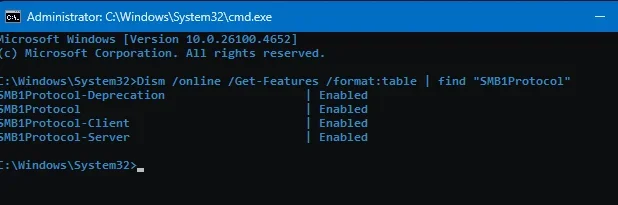
Yep, checked that, SMB1 is good!

1753573204959.webp

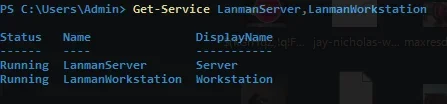
Also, SMB2 is also turned on and working:
1753573352077.webp

Thanks for the link! I'll go through all of those items in that page, see if something comes back incorrect!
 

My Computer

System One

  • OS
    windows 11 24h2
    Computer type
    PC/Desktop
    Manufacturer/Model
    Asus Maximus IX Hero

Have you tried this in PowerShell?
Code:
Set-SmbClientConfiguration -RequireSecuritySignature $false
Set-SmbClientConfiguration -EnableInsecureGuestLogons $true
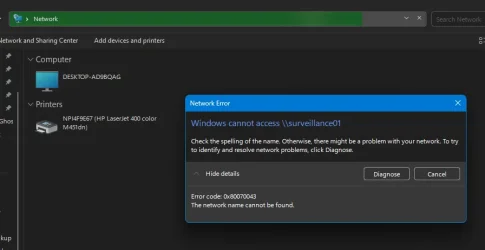
Yep! Just did it again though just to make sure, setting "A" for all. This is the issue I have when I try to open a shared drive on the network from this pc:

1753573525223.webp

It sees a computer and my networked printer, but I cannot connect to that pc at all. The printer works just fine though! I can pin from cmd all the machines in the network just fine, but cannot see any shared drives in network. Crazy, right???
 

My Computer

System One

  • OS
    windows 11 24h2
    Computer type
    PC/Desktop
    Manufacturer/Model
    Asus Maximus IX Hero
See if this works. Do this on all systems in network..

add "LanmanWorkstation" as an additional startup dependency for the "Function Discovery Resource Publication" (FDResPub) service, which seems to do the trick. To do this, you simply open an elevated command prompt (i.e. use the "run as administrator" right-click context menu option to start cmd.exe), then execute the following command:
sc config fdrespub depend= RpcSs/http/fdphost/LanmanWorkstation
Reboot each device after executing this command,

Make sure these services are set to automatic and running

DNS-Client – Server

Function Discovery Provider Host

Function Discovery Resource Publication

SSDP Discovery

UPNP Device Host

Windows Defender Firewall


My Computers

System One System Two

  • OS
    Windows 11 Pro 25H2
    Computer type
    PC/Desktop
    Manufacturer/Model
    Dell Optiplex 7080
    CPU
    i9-10900 10 core 20 threads
    Motherboard
    DELL 0J37VM
    Memory
    32 gb
    Graphics Card(s)
    none-Intel UHD Graphics 630
    Sound Card
    Integrated Realtek
    Monitor(s) Displays
    Benq 27
    Screen Resolution
    2560x1440
    Hard Drives
    2x1tb Solidigm m.2 nvme /External drives 512gb Samsung m.2 sata+2tb Kingston m2.nvme
    PSU
    500w
    Case
    MT
    Cooling
    Dell Premium
    Keyboard
    Logitech wired
    Mouse
    Logitech wireless
    Internet Speed
    so slow I'm too embarrassed to tell
    Browser
    #1 Edge #2 Firefox
    Antivirus
    Defender+MWB Premium
  • Operating System
    Windows 11 Pro 24H2 26200.8457
    Computer type
    PC/Desktop
    Manufacturer/Model
    Beelink Mini PC SER5
    CPU
    AMD Ryzen 7 6800U
    Memory
    32 gb
    Graphics card(s)
    integrated
    Sound Card
    integrated
    Monitor(s) Displays
    Benq 27
    Screen Resolution
    2560x1440
    Hard Drives
    1TB Crucial nvme
    Keyboard
    Logitech wired
    Mouse
    Logitech wireless
    Internet Speed
    still too embarrassed to tell
    Browser
    Firefox
    Antivirus
    Defender
    Other Info
    System 3 is non compliant Dell 9020 i7-4770/24gb ram Win11 PRO 26200.8457
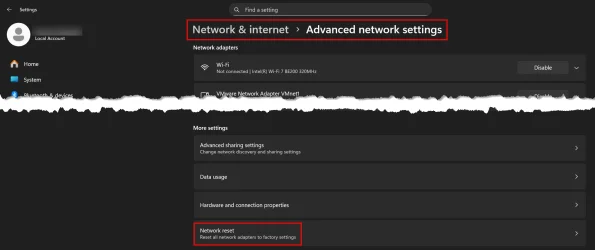
I have had some weird network problems lately myself, and the one thing that always seems to work for me when nothing else works is to perform a Network reset in settings...

IM1.webp

Give that a try and see if helps.
 

My Computers

System One System Two

  • OS
    Win11 Pro 25H2 (RTM+)
    Computer type
    PC/Desktop
    Manufacturer/Model
    Acemagic
    CPU
    Intel i7-14650HX
    Memory
    32 GB
    Graphics Card(s)
    No GPU - Built-in Intel Graphics
    Sound Card
    Integrated
    Monitor(s) Displays
    Varies as machine will often be moved to locations with different monitors
    Screen Resolution
    Varies
    Hard Drives
    1 x 1TB Gen 4 NVMe SSD
    PSU
    120W Power Brick
    Keyboard
    Corsair K70 Max RGB Magnetic Keyboard
    Mouse
    Logitech MX Master 3
    Internet Speed
    1Gb Up / 1 Gb Down
    Browser
    Edge
    Antivirus
    Windows Defender
  • Operating System
    Win11 Pro 25H2 (RTM+)
    Computer type
    Laptop
    Manufacturer/Model
    Lenovo ThinkBook 13x Gen 2
    CPU
    Intel i7-1255U
    Memory
    16 GB
    Graphics card(s)
    Intel Iris Xe Graphics
    Sound Card
    Realtek® ALC3306-CG codec
    Monitor(s) Displays
    13.3-inch IPS Display
    Screen Resolution
    WQXGA (2560 x 1600)
    Hard Drives
    2 TB 4 x 4 NVMe SSD
    PSU
    USB-C / Thunderbolt 4 Power / Charging
    Keyboard
    Backlit, spill resistant keyboard
    Mouse
    Buttonless Glass Precision Touchpad
    Internet Speed
    1Gb Up / 1Gb Down
    Browser
    Edge
    Antivirus
    Windows Defender
    Other Info
    WiFi 6e / Bluetooth 5.1 / Facial Recognition / Fingerprint Sensor / ToF (Time of Flight) Human Presence Sensor
See if this works. Do this on all systems in network..

add "LanmanWorkstation" as an additional startup dependency for the "Function Discovery Resource Publication" (FDResPub) service, which seems to do the trick. To do this, you simply open an elevated command prompt (i.e. use the "run as administrator" right-click context menu option to start cmd.exe), then execute the following command:
sc config fdrespub depend= RpcSs/http/fdphost/LanmanWorkstation
Reboot each device after executing this command,

Make sure these services are set to automatic and running

DNS-Client – Server

Function Discovery Provider Host

Function Discovery Resource Publication

SSDP Discovery

UPNP Device Host

Windows Defender Firewall
THAT WAS IT!!!!! You rock!!! Ran that command, checked that the other services were running (they were) and rebooted. Started back up, opened the surveillance machine and it showed me the video recording drive!!! I only had to run the command on one other machine, which was also a win11 box that I built last year, but it too worked perfectly after the command!

I sincerely thank you for your expertise in win11! You've saved me from going grey and losing my mind!!!:ROFLMAO:
 

My Computer

System One

  • OS
    windows 11 24h2
    Computer type
    PC/Desktop
    Manufacturer/Model
    Asus Maximus IX Hero
Just a note, you're using a "debloated" Windows. Typically background services are disabled for performance reasons, but they don't bother documenting which ones they chose to turn off. It comes with the territory.
 

My Computer

System One

  • OS
    Windows 7
Just a note, you're using a "debloated" Windows. Typically background services are disabled for performance reasons, but they don't bother documenting which ones they chose to turn off. It comes with the territory.
Yes, this is absolutely true! The build is solid and works really well, but two big negatives is there's no contact info to get info from the builder and report bugs/issues, and second is what you said, there's no list of everything that's been done.

I understood the risks of using it, and made sure I could go back to my previous build without any major issues, I just didn't expect such a strange issue that isn't documented very well online. This one kicked my arse for sure!!! Glad I found this forum though, going through I've learned quite a few things already!

Without a community of people smarter than I, I'd be stuck with a standard build and all the garbage that comes with it! Thanks to y'all!
 

My Computer

System One

  • OS
    windows 11 24h2
    Computer type
    PC/Desktop
    Manufacturer/Model
    Asus Maximus IX Hero
Back
Top Bottom