Solved How do I remove a Bluetooth Device?


therealsimpsons

Active member
Member
Local time
10:50 PM
Posts
66
OS
Win 11 64-Bit Home
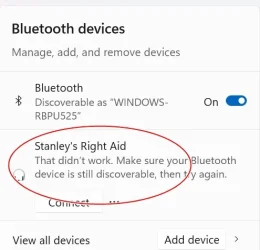
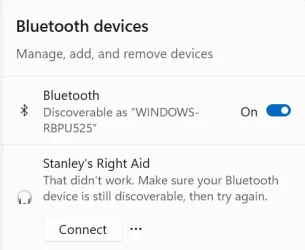
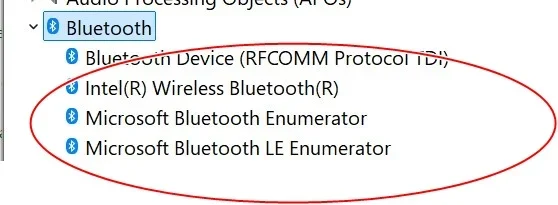
Last night, a storm here, knocked out power for over 4 hours. Since it was restored, I have not been able to pair my Phonak hearing aids to the PC. They were paired the moment the power went out. When I open settings, I get a notice that connection failed (see photos). I talked to Phonak, and they could only suggest I remove the device, and re-pair it. When I click on remove device, it says "removing device" for a bit, and then "removal failed". The Phonak tech guy said, I will have to remove the driver in order to uninstall it. I read the tutorials on how to remove a driver, and the bluetooth is not on the list of things to un-install. My motherboard has built in blue tooth, but at the time of the power outage, I was using a USB bluetooth adaptor. l don't know what to look for to remove. The third picture is the list of bluetooth devices in my Device Manager.

Any ideas would be appreciated. Thank you.
 
Windows Build/Version
24H2 build 26.100.4349

Attachments

  • Screenshot 2025-06-26 162827.webp
    Screenshot 2025-06-26 162827.webp
    22 KB · Views: 2
  • Screenshot 2025-06-26 171539.webp
    Screenshot 2025-06-26 171539.webp
    15.8 KB · Views: 2
  • Screenshot 2025-06-26 171408.webp
    Screenshot 2025-06-26 171408.webp
    19.1 KB · Views: 2

My Computer My Computer

At a glance

Win 11 64-Bit Home12 Gen Intel i7-12700K 360 GHz32 GBEVGA Nividia GeForce RTX 3060 12GB
OS
Win 11 64-Bit Home
Computer type
PC/Desktop
Manufacturer/Model
Custom Build
CPU
12 Gen Intel i7-12700K 360 GHz
Motherboard
Gigabyte B760M
Memory
32 GB
Graphics Card(s)
EVGA Nividia GeForce RTX 3060 12GB
Sound Card
None
Monitor(s) Displays
Dell 32in curved
Screen Resolution
2560 x 1440
Hard Drives
Samsung 1 TB SSD M.2 970 EVO Nvme PicIe 3.0 x 4
Seagate 2 TB SATA 7200 RPM 64MB
PSU
Apevia 800W GOLD
Case
Apevia ENZO
Cooling
2 Case Fans, ZeroTherm ZT100 Thermal Grease
Keyboard
Logitech K360
Mouse
Logitech GS 502 Hero
Internet Speed
650 mbps
Browser
Duck Duck Go
Antivirus
Webroot Anywhere
I read the tutorials on how to remove a driver, and the bluetooth is not on the list of things to un-install. My motherboard has built in blue tooth, but at the time of the power outage, I was using a USB bluetooth adaptor. l don't know what to look for to remove. The third picture is the list of bluetooth devices in my Device Manager.
You can remove a bluetooth device in Device Manager. Right-click on it and select 'Uninstall device', optionally you can tick 'Attempt to remove the driver for this device'.


1750982114795.webp

Then select Action > Scan for hardware changes and Device Manager will reinstall bluetooth.

1750982415969.webp
 

My Computers My Computers

  • At a glance

    Windows 11 HomeAMD Athlon Silver 3050U8GBRadeon Graphics
    OS
    Windows 11 Home
    Computer type
    Laptop
    Manufacturer/Model
    Acer Aspire 3 A315-23-R9VY
    CPU
    AMD Athlon Silver 3050U
    Memory
    8GB
    Graphics Card(s)
    Radeon Graphics
    Monitor(s) Displays
    laptop screen
    Screen Resolution
    1366x768 native resolution, up to 2560x1440 with Radeon Virtual Super Resolution
    Hard Drives
    1TB Samsung EVO 870 SSD (from April 2026: 250GB EVO 850)
    Internet Speed
    150 Mbps
    Browser
    Edge, Firefox
    Antivirus
    Defender
    Other Info
    fully 'Windows 11 ready' laptop. Windows 10 C: partition migrated from my old unsupported 'main machine' then upgraded to 11. A test migration ran Insider builds for 2 months. When 11 was released on 5th October 2021 it was re-imaged back to 10 and was offered the upgrade in Windows Update on 20th October. Windows Update offered the 22H2 Feature Update on 20th September 2022. It got the 23H2 Feature Update on 4th November 2023 through Windows Update, 24H2 on 3rd October 2024 through Windows Update by setting the Target Release Version for 24H2, and 25H2 on 30th September 2025 through Windows Update by setting the Target Release Version for 25H2.

    UPDATE - 11 April 2026: due to mechanical deterioration this PC has been retired from active duty. The OS with all software and files has been migrated to my System Seven in 'Other systems' to carry on as my general purpose 'main machine'.

    I've now clean installed 25H2 and used Garlin's scripts to update Secure Boot to CA 2023 and revoke the PCA 2011 certificates. It's new role is to test secure boot issues.
  • At a glance

    Windows 11 ProIntel® Core™ i5-520M8GB(integrated graphics) Intel HD Graphics
    Operating System
    Windows 11 Pro
    Computer type
    Laptop
    Manufacturer/Model
    Dell Latitude E4310
    CPU
    Intel® Core™ i5-520M
    Motherboard
    0T6M8G
    Memory
    8GB
    Graphics card(s)
    (integrated graphics) Intel HD Graphics
    Screen Resolution
    1366x768
    Hard Drives
    500GB Crucial MX500 SSD
    Browser
    Firefox, Edge
    Antivirus
    Defender
    Other Info
    unsupported machine: Legacy bios, MBR, TPM 1.2, upgraded from W10 to W11 using W10/W11 hybrid install media workaround.

    In-place upgrade to 22H2 using ISO and a workaround.
    Feature Update to 23H2 by manually installing the Enablement Package.
    In-place upgrade to 24H2 using hybrid 23H2/24H2 install media.
    Upgraded to 25H2 by Enablement Package.

    Also running Insider Dev, and Canary builds and Windows 10 as native boot .vhdx.
  • My SYSTEM THREE is a Dell Latitude 5410, i7-10610U, 32GB RAM, 512GB NVMe ssd, supported device running Windows 11 Pro.

    My SYSTEM FOUR is a 2-in-1 convertible Lenovo Yoga 11e 20DA, Celeron N2930, 8GB RAM, 256GB ssd. Unsupported device: currently running Win10 Pro, plus Win11 Pro RTM and Insider Dev, Beta, and RP 24H2 as native boot vhdx.

    My SYSTEM FIVE is a Dell Latitude 3190 2-in-1, Pentium Silver N5030, 8GB RAM, 1TB NVMe ssd, supported device running Windows 11 Pro, plus Insider Beta, Dev, and Canary builds (and a few others) as a native boot .vhdx.

    My SYSTEM SIX is a Dell Latitude 5550, Core Ultra 7 165H, 64GB RAM, 1TB NVMe SSD, supported device, Windows 11 Pro 24H2, Hyper-V host machine. Updated to 25H2 on 30th September 2025.

    My SYSTEM SEVEN is a Lenovo Thinkpad T580, Intel Core i7-8650U, 16GB RAM, 512GB NVMe SSD + 2nd 512GB NVMe SSD, a supported device for Windows 11. This is my current general purpose 'main machine'. The installed Windows 11 Home from my System One has been migrated to this machine.
Possible cause:
1. If you have a built in bluetooth device. you'll need to disable it to use the external USB Bluetooth device to avoid conflict. Can be done in the BIOS or disable via Device Manager.
2. If you have any other bluetooth device near by such as smart phone, tablet etc... then when you turn on your hearing aid, it might connect to one of those other than your PC. Turn off the bluetooth on other devices except your PC.
 
Last edited:

My Computers My Computers

  • At a glance

    Windows 11 Pro 25H2, Linux Mint 21.3Intel Core i9-14900K @5.8GHZ64GB (2XG Skill F5-6400J3239G32G) @6800Radeon (TM) RX 480 Graphics (8 GB)
    OS
    Windows 11 Pro 25H2, Linux Mint 21.3
    Computer type
    PC/Desktop
    Manufacturer/Model
    Self Build Feb.2024
    CPU
    Intel Core i9-14900K @5.8GHZ
    Motherboard
    MSI MAG Z790 Tomahawk Max WiFi 7
    Memory
    64GB (2XG Skill F5-6400J3239G32G) @6800
    Graphics Card(s)
    Radeon (TM) RX 480 Graphics (8 GB)
    Sound Card
    Intergrated Realtek
    Monitor(s) Displays
    Samsung
    Screen Resolution
    3840x2160
    Hard Drives
    1 - Crucial 705 1TB GEN5
    1 - Crucial 705 2TB GEN5
    2 - Crucial T500 2TB Gen4
    PSU
    750W EVGA-G3
    Case
    Antec NX410
    Cooling
    H2O Thermalright
    Keyboard
    Logitech K800
    Mouse
    Logitech Master 2S
    Internet Speed
    600 Mbps
    Browser
    Chrome
    Antivirus
    WD
  • At a glance

    Windows 11 Pro & Linux Mint X64Intel(R) Core(TM) i7-3770K CPU @ 4.20 GHz32.0GB Dual-Channel CMY16GX3M2A1600C9NVIDIA GeForce GT 740
    Operating System
    Windows 11 Pro & Linux Mint X64
    Computer type
    PC/Desktop
    Manufacturer/Model
    MSI Z77 MPower (MS-7751)
    CPU
    Intel(R) Core(TM) i7-3770K CPU @ 4.20 GHz
    Motherboard
    Z77 MPower (MS-7751)
    Memory
    32.0GB Dual-Channel CMY16GX3M2A1600C9
    Graphics card(s)
    NVIDIA GeForce GT 740
    Monitor(s) Displays
    40" Samsung
    Screen Resolution
    1920X1080
    Hard Drives
    WIN10 - 111GB Samsung SSD 840 Series
    WIN11 - 223GB Crucial CT240BX500SSD
    2X931GB Crucial CT1000BX500SSD1
    PSU
    Antec 850W
    Case
    Antec 900
    Cooling
    H20
    Keyboard
    Logitech K800 Wireless
    Mouse
    Logitech MX Master 2S
    Internet Speed
    100 Mbps
    Browser
    Chrome
    Antivirus
    Windows Defender
Excellent, thank you both.

Update: That worked!! Wonderful!
 
Last edited:

My Computer My Computer

At a glance

Win 11 64-Bit Home12 Gen Intel i7-12700K 360 GHz32 GBEVGA Nividia GeForce RTX 3060 12GB
OS
Win 11 64-Bit Home
Computer type
PC/Desktop
Manufacturer/Model
Custom Build
CPU
12 Gen Intel i7-12700K 360 GHz
Motherboard
Gigabyte B760M
Memory
32 GB
Graphics Card(s)
EVGA Nividia GeForce RTX 3060 12GB
Sound Card
None
Monitor(s) Displays
Dell 32in curved
Screen Resolution
2560 x 1440
Hard Drives
Samsung 1 TB SSD M.2 970 EVO Nvme PicIe 3.0 x 4
Seagate 2 TB SATA 7200 RPM 64MB
PSU
Apevia 800W GOLD
Case
Apevia ENZO
Cooling
2 Case Fans, ZeroTherm ZT100 Thermal Grease
Keyboard
Logitech K360
Mouse
Logitech GS 502 Hero
Internet Speed
650 mbps
Browser
Duck Duck Go
Antivirus
Webroot Anywhere
I came here looking for an answer to the same issue, and the uninstall worked for me as well. :-)
 

My Computer My Computer

At a glance

Windows 11 ProAMD Ryzen 9 5900X 12-Core ProcessorNVIDIA GeForce RTX 3080
OS
Windows 11 Pro
Computer type
PC/Desktop
Manufacturer/Model
Alienware Aurora Ryzen
CPU
AMD Ryzen 9 5900X 12-Core Processor
Graphics Card(s)
NVIDIA GeForce RTX 3080
Keyboard
Logitec K860 ergonomic
Mouse
Logitec M570
Internet Speed
lousy
Back
Top Bottom