How to fix an error in the Start menu?


@Lavik Read the intervening messages (if you enjoy reading about other people's pain)... uninstalling and reinstalling "Adobe Reader" had no effect whatever. I'm just going to have to live with a machine that is haunted by a ghost of Adobe Reader that I cannot exorcise. That should be pretty easy if I stop trying to use it!
 

My Computer My Computer

At a glance

Windows 11i7-10875SH32 GBNVIDIA Quadro RTX 3000
OS
Windows 11
Computer type
Laptop
Manufacturer/Model
Dell Precision 5750
CPU
i7-10875SH
Memory
32 GB
Graphics Card(s)
NVIDIA Quadro RTX 3000
Screen Resolution
2x 1920x1200
Hard Drives
1 TB SSD
Browser
Firefox
I installed PDFgear and tried it briefly. My first impression is: If you just want to open a PDF to read it requires too many clicks


If you associate Sumatra with PDFs... it only takes a double click to open a PDF.
 

My Computers My Computers

  • At a glance

    Win 11 Home ♦♦♦26300.9550 ♦♦♦♦♦♦♦26H2AMD Ryzen 7 3700XG.Skill (F4-3200C14D-16GTZKW)EVGA RTX 2070 (08G-P4-2171-KR)
    OS
    Win 11 Home ♦♦♦26300.9550 ♦♦♦♦♦♦♦26H2
    Computer type
    PC/Desktop
    Manufacturer/Model
    Built by Ghot® [May 2020]
    CPU
    AMD Ryzen 7 3700X
    Motherboard
    Asus Pro WS X570-ACE (BIOS 5302)
    Memory
    G.Skill (F4-3200C14D-16GTZKW)
    Graphics Card(s)
    EVGA RTX 2070 (08G-P4-2171-KR)
    Sound Card
    Realtek ALC1220P / ALC S1220A
    Monitor(s) Displays
    Dell U3011 30"
    Screen Resolution
    2560 x 1600
    Hard Drives
    2x Samsung 860 EVO 500GB,
    WD 4TB Black FZBX - SATA III,
    WD 8TB Black FZBX - SATA III,
    DRW-24B1ST CD/DVD Burner
    PSU
    PC Power & Cooling 750W Quad EPS12V
    Case
    Cooler Master ATCS 840 Tower
    Cooling
    CM Hyper 212 EVO (push/pull)
    Keyboard
    Ducky DK9008 Shine II Blue LED
    Mouse
    Logitech Optical M-100
    Internet Speed
    300/300
    Browser
    Firefox (latest)
    Antivirus
    Bitdefender Total Security
    Other Info
    Speakers: Klipsch Pro Media 2.1
  • At a glance

    Windows XP Pro 32bit w/SP3AMD Athlon 64 X2 5000+ (OC'd @ 3.2Ghz)TWIN2X2048-6400C4DHX (2 x 1GB, DDR2 800)EVGA 256-P2-N758-TR GeForce 8600GT SSC
    Operating System
    Windows XP Pro 32bit w/SP3
    Computer type
    PC/Desktop
    Manufacturer/Model
    Built by Ghot® (not in use)
    CPU
    AMD Athlon 64 X2 5000+ (OC'd @ 3.2Ghz)
    Motherboard
    ASUS M2N32-SLI Deluxe Wireless Edition
    Memory
    TWIN2X2048-6400C4DHX (2 x 1GB, DDR2 800)
    Graphics card(s)
    EVGA 256-P2-N758-TR GeForce 8600GT SSC
    Sound Card
    Onboard
    Monitor(s) Displays
    ViewSonic G90FB Black 19" Professional (CRT)
    Screen Resolution
    up to 2048 x 1536
    Hard Drives
    WD 36GB 10,000rpm Raptor SATA
    Seagate 80GB 7200rpm SATA
    Lite-On LTR-52246S CD/RW
    Lite-On LH-18A1P CD/DVD Burner
    PSU
    PC Power & Cooling Silencer 750 Quad EPS12V
    Case
    Generic Beige case, 80mm fans
    Cooling
    ZALMAN 9500A 92mm CPU Cooler
    Keyboard
    Logitech Classic Keybooard 200
    Mouse
    Logitech Optical M-BT96a
    Internet Speed
    300/300
    Browser
    Firefox 3.x ??
    Antivirus
    Symantec (Norton)
    Other Info
    Still assembled, still runs. Haven't turned it on for 15 years?
Sumatra is probably the fastest, most versatile free reader out there..., and uses very little resources.
 
Last edited:

My Computers My Computers

  • At a glance

    Windows 11 Pro
    OS
    Windows 11 Pro
    Computer type
    PC/Desktop
    Manufacturer/Model
    ASUS ROG Strix
  • At a glance

    Windows 11 Pro
    Operating System
    Windows 11 Pro
    Computer type
    Laptop
    Manufacturer/Model
    ASUS VivoBook
  • ASUS VivoBook 'Lite' ~ Windows 11 Home
@jhsachs I'm just a little confused by your messages.
Use cleaning up failed and incomplete installations
https://ardownload2.adobe.com/pub/adobe/acrobat/win/AcrobatDC/2100120135/x64/AdobeAcroCleaner_DC2021.exe
 
Last edited by a moderator:

My Computer My Computer

At a glance

Windows 11 Insider Experimental (26H2)Intel Core i5-1140032Gb (DDR4 SDRAM)Intel(R) UHD Graphics 730
OS
Windows 11 Insider Experimental (26H2)
Computer type
PC/Desktop
Manufacturer/Model
Gigabyte Technology Co., Ltd.
CPU
Intel Core i5-11400
Motherboard
Z590 AORUS PRO AX
Memory
32Gb (DDR4 SDRAM)
Graphics Card(s)
Intel(R) UHD Graphics 730
Sound Card
Realtek USB Audio
Monitor(s) Displays
LG 27US500-W 4K UHD UltraFine™
Screen Resolution
3840x2160
Hard Drives
Samsung SSD 980 PRO 1TB
WDC WD7501AALS
PSU
Montech CENTURY, 650W, 80+ Gold
Case
Cougar Airface ECO RGB
Cooling
ID-COOLING SE-224-XTS BLACK
Keyboard
Microsoft SideWinder X6 Keyboard
Mouse
Microsoft SideWinder Mouse
Internet Speed
Internet speed of 1 Gbit/s
Browser
Vivaldi browser
Antivirus
Windows Defender
@Lavik Here's my very unfavorable impression of AcroCleaner:

First, the page you linked to says, "Adobe provides the utility as a least resort to repair machines after a failed or partial uninstall..." Least resort? I don't expect that kind of goof in customer-facing content from a major software supplier. It suggests that AcroCleaner is not exactly an Adobe product... it's a product of some Adobe engineer who got a bright idea and somehow pushed it out the door without going through Adobe's standard QA process.

Second, the page says, "The tool provides options for removing problematic Acrobat items only while leaving Reader untouched and vice versa." Nope. I ran it. It gave me no options at all.

Third, when I was done, the "ghost" entry for Adobe Reader was still there.

Thanks for the effort to help, but this one didn't do it.
 

My Computer My Computer

At a glance

Windows 11i7-10875SH32 GBNVIDIA Quadro RTX 3000
OS
Windows 11
Computer type
Laptop
Manufacturer/Model
Dell Precision 5750
CPU
i7-10875SH
Memory
32 GB
Graphics Card(s)
NVIDIA Quadro RTX 3000
Screen Resolution
2x 1920x1200
Hard Drives
1 TB SSD
Browser
Firefox

My Computer My Computer

At a glance

Windows 11 Insider Experimental (26H2)Intel Core i5-1140032Gb (DDR4 SDRAM)Intel(R) UHD Graphics 730
OS
Windows 11 Insider Experimental (26H2)
Computer type
PC/Desktop
Manufacturer/Model
Gigabyte Technology Co., Ltd.
CPU
Intel Core i5-11400
Motherboard
Z590 AORUS PRO AX
Memory
32Gb (DDR4 SDRAM)
Graphics Card(s)
Intel(R) UHD Graphics 730
Sound Card
Realtek USB Audio
Monitor(s) Displays
LG 27US500-W 4K UHD UltraFine™
Screen Resolution
3840x2160
Hard Drives
Samsung SSD 980 PRO 1TB
WDC WD7501AALS
PSU
Montech CENTURY, 650W, 80+ Gold
Case
Cougar Airface ECO RGB
Cooling
ID-COOLING SE-224-XTS BLACK
Keyboard
Microsoft SideWinder X6 Keyboard
Mouse
Microsoft SideWinder Mouse
Internet Speed
Internet speed of 1 Gbit/s
Browser
Vivaldi browser
Antivirus
Windows Defender
@Ghot @Edwin I have a question about SumatraPDF. I'm having trouble getting access to the SumatraPDF forum on GitHub, so perhaps one of you can give me a quicker answer.

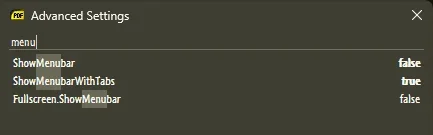
I want the menu bar to be displayed at all times. I opened the settings file and discovered that the relevant setting, ShowMenubar, is already set to true.

As an experiment I changed another option, EscToExit, to true. I saved the file, restarted the program, and pressed Esc... no response. It appears that SumatraPDF is ignoring options, or the options file is not stored in the right place. (I selected the -all-users option, and the file is in C:\Program Files\SumatraPDF.)

Can anyone shed light on this?
 

My Computer My Computer

At a glance

Windows 11i7-10875SH32 GBNVIDIA Quadro RTX 3000
OS
Windows 11
Computer type
Laptop
Manufacturer/Model
Dell Precision 5750
CPU
i7-10875SH
Memory
32 GB
Graphics Card(s)
NVIDIA Quadro RTX 3000
Screen Resolution
2x 1920x1200
Hard Drives
1 TB SSD
Browser
Firefox
I use SumatraPDF v2.5
So I can't be much help.
 

My Computers My Computers

  • At a glance

    Win 11 Home ♦♦♦26300.9550 ♦♦♦♦♦♦♦26H2AMD Ryzen 7 3700XG.Skill (F4-3200C14D-16GTZKW)EVGA RTX 2070 (08G-P4-2171-KR)
    OS
    Win 11 Home ♦♦♦26300.9550 ♦♦♦♦♦♦♦26H2
    Computer type
    PC/Desktop
    Manufacturer/Model
    Built by Ghot® [May 2020]
    CPU
    AMD Ryzen 7 3700X
    Motherboard
    Asus Pro WS X570-ACE (BIOS 5302)
    Memory
    G.Skill (F4-3200C14D-16GTZKW)
    Graphics Card(s)
    EVGA RTX 2070 (08G-P4-2171-KR)
    Sound Card
    Realtek ALC1220P / ALC S1220A
    Monitor(s) Displays
    Dell U3011 30"
    Screen Resolution
    2560 x 1600
    Hard Drives
    2x Samsung 860 EVO 500GB,
    WD 4TB Black FZBX - SATA III,
    WD 8TB Black FZBX - SATA III,
    DRW-24B1ST CD/DVD Burner
    PSU
    PC Power & Cooling 750W Quad EPS12V
    Case
    Cooler Master ATCS 840 Tower
    Cooling
    CM Hyper 212 EVO (push/pull)
    Keyboard
    Ducky DK9008 Shine II Blue LED
    Mouse
    Logitech Optical M-100
    Internet Speed
    300/300
    Browser
    Firefox (latest)
    Antivirus
    Bitdefender Total Security
    Other Info
    Speakers: Klipsch Pro Media 2.1
  • At a glance

    Windows XP Pro 32bit w/SP3AMD Athlon 64 X2 5000+ (OC'd @ 3.2Ghz)TWIN2X2048-6400C4DHX (2 x 1GB, DDR2 800)EVGA 256-P2-N758-TR GeForce 8600GT SSC
    Operating System
    Windows XP Pro 32bit w/SP3
    Computer type
    PC/Desktop
    Manufacturer/Model
    Built by Ghot® (not in use)
    CPU
    AMD Athlon 64 X2 5000+ (OC'd @ 3.2Ghz)
    Motherboard
    ASUS M2N32-SLI Deluxe Wireless Edition
    Memory
    TWIN2X2048-6400C4DHX (2 x 1GB, DDR2 800)
    Graphics card(s)
    EVGA 256-P2-N758-TR GeForce 8600GT SSC
    Sound Card
    Onboard
    Monitor(s) Displays
    ViewSonic G90FB Black 19" Professional (CRT)
    Screen Resolution
    up to 2048 x 1536
    Hard Drives
    WD 36GB 10,000rpm Raptor SATA
    Seagate 80GB 7200rpm SATA
    Lite-On LTR-52246S CD/RW
    Lite-On LH-18A1P CD/DVD Burner
    PSU
    PC Power & Cooling Silencer 750 Quad EPS12V
    Case
    Generic Beige case, 80mm fans
    Cooling
    ZALMAN 9500A 92mm CPU Cooler
    Keyboard
    Logitech Classic Keybooard 200
    Mouse
    Logitech Optical M-BT96a
    Internet Speed
    300/300
    Browser
    Firefox 3.x ??
    Antivirus
    Symantec (Norton)
    Other Info
    Still assembled, still runs. Haven't turned it on for 15 years?
It appears that you can only have the Menu bar showing all the time if you turn off tabs - no real explanation provided but it was referenced here; V3.5.2 - How to enable a menu bar? · sumatrapdfreader sumatrapdf · Discussion #4640

If you can't access the forum at all this post specifically references the issue;

​


In the latest version, when both the menubar and tabs are enabled (which is the default install), the menubar does not show, it only has the hamburger menu. Not sure what other option is causing this vs the way yours looks. Turning off tabs will show the menubar.

So what other options do you have enabled/disabled to allow you to show both at the same time?
 

My Computer My Computer

At a glance

Win11Pro 25H2 (26200.9168)i7-12700f32gb ddr4nvidia rtx3060ti
OS
Win11Pro 25H2 (26200.9168)
Computer type
PC/Desktop
Manufacturer/Model
self-built
CPU
i7-12700f
Motherboard
gigabyte auros b660
Memory
32gb ddr4
Graphics Card(s)
nvidia rtx3060ti
Sound Card
onboard realtek
Monitor(s) Displays
1 x benq, 2 x lg
Screen Resolution
1 at 2560x1080, 2 at 1920x1080
Hard Drives
nvme 1tb crucial ssd
sata 1tb samsung ssd
1tb HDD, 3tb HDD
PSU
corsair rm750
Case
NZXT H710
Cooling
BeQuiet Dark Rock
Keyboard
steelseries apex 3
Mouse
generic usb
Internet Speed
500 down 20 up
Browser
librewolf
Antivirus
eset nod32
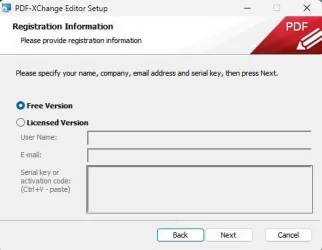
@KevTech wrote: "Have you ever considered PDF Exchange Editor?"

No... in fact I never heard of it. I appreciate the suggestion, but I'm not planning to investigate the original problem further. I was facing an intolerable situation with Adobe Acrobat and Reader, but now it's resolved. I'm asking follow-on questions and responding to messages like yours out of politeness, but I'm not trying to find the very best PDF reader, or combination of PDF readers, for me. I've found a good-enough solution, and good enough is good enough! PDFs aren't that big a part of my online life.
 

My Computer My Computer

At a glance

Windows 11i7-10875SH32 GBNVIDIA Quadro RTX 3000
OS
Windows 11
Computer type
Laptop
Manufacturer/Model
Dell Precision 5750
CPU
i7-10875SH
Memory
32 GB
Graphics Card(s)
NVIDIA Quadro RTX 3000
Screen Resolution
2x 1920x1200
Hard Drives
1 TB SSD
Browser
Firefox
I want the menu bar to be displayed at all times. I opened the settings file and discovered that the relevant setting, ShowMenubar, is already set to true.
As mentioned by @Hughbris , you can't show the Menu Bar and use Tabs simultaneously in the current release.
I suggest running a pre-release version of Sumatra, which are way more sophisticated...

13793.webp

13792.webp
 

My Computers My Computers

  • At a glance

    Windows 11 Pro
    OS
    Windows 11 Pro
    Computer type
    PC/Desktop
    Manufacturer/Model
    ASUS ROG Strix
  • At a glance

    Windows 11 Pro
    Operating System
    Windows 11 Pro
    Computer type
    Laptop
    Manufacturer/Model
    ASUS VivoBook
  • ASUS VivoBook 'Lite' ~ Windows 11 Home
@Edwin said, "I suggest running a pre-release version of Sumatra, which are way more sophisticated..."

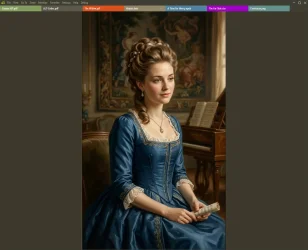
Fantabulous! It not only lets me display the menu bar, it displays a tip for how to do it.

Now that I've done it, though, I'd like that tip to go away...
 

My Computer My Computer

At a glance

Windows 11i7-10875SH32 GBNVIDIA Quadro RTX 3000
OS
Windows 11
Computer type
Laptop
Manufacturer/Model
Dell Precision 5750
CPU
i7-10875SH
Memory
32 GB
Graphics Card(s)
NVIDIA Quadro RTX 3000
Screen Resolution
2x 1920x1200
Hard Drives
1 TB SSD
Browser
Firefox

My Computers My Computers

  • At a glance

    Windows 11 Pro
    OS
    Windows 11 Pro
    Computer type
    PC/Desktop
    Manufacturer/Model
    ASUS ROG Strix
  • At a glance

    Windows 11 Pro
    Operating System
    Windows 11 Pro
    Computer type
    Laptop
    Manufacturer/Model
    ASUS VivoBook
  • ASUS VivoBook 'Lite' ~ Windows 11 Home
Tried that. It worked. Thank you.

I've found just one more problem, and when that is solved, my happiness will be complete.

There's no visual indication of when the SumatraPDF window is active. Windows applications typically signal this by changing the color of the title bar; but in SumatraPDF the title bar is black text on white background, whether the window is active or not.

I looked at the advanced options (and searched them for "bar" to reduce the background noise), but I don't see a way to fix this. What am I missing?
 

My Computer My Computer

At a glance

Windows 11i7-10875SH32 GBNVIDIA Quadro RTX 3000
OS
Windows 11
Computer type
Laptop
Manufacturer/Model
Dell Precision 5750
CPU
i7-10875SH
Memory
32 GB
Graphics Card(s)
NVIDIA Quadro RTX 3000
Screen Resolution
2x 1920x1200
Hard Drives
1 TB SSD
Browser
Firefox
What am I missing?
Starting with version 3.5, Sumatra uses a custom UI frame which does not respond to Windows' system level accent color changes.
The only indication you will see is the 'dimming' of the Minimize/Maximize/Close buttons, or the Taskbar icon highlighted or not.
To restore the active/inactive title bar functionality, you would have to use version 3.4.6 or earlier, (not recommended).
 

My Computers My Computers

  • At a glance

    Windows 11 Pro
    OS
    Windows 11 Pro
    Computer type
    PC/Desktop
    Manufacturer/Model
    ASUS ROG Strix
  • At a glance

    Windows 11 Pro
    Operating System
    Windows 11 Pro
    Computer type
    Laptop
    Manufacturer/Model
    ASUS VivoBook
  • ASUS VivoBook 'Lite' ~ Windows 11 Home
That's extremely frustrating. Why are the developers expending effort to make their product harder to use?

Lest you think I'm making a fuss about something trivial, I'll explain the use case. I'm converting many dozens of accumulated recipes from PDFs and DOCX files to a recipe manager program. The program has "smart" features that reduce the amount of retyping I must do, but using them involves a lot of switching between the two programs: switch to the PDF, copy the recipe description, switch to the recipe manager, paste and edit, switch back to the PDF, copy the ingredients, switch back to the recipe manager, paste and edit, and so on.

Since editing is inherently keyboard-centric, this conversion operation is keyboard centric. I switch between applications by using the Windows shortcut Ctrl+Tab, but there's a relatively high "cost" to entering keystrokes for one application when the other one is active, so the switch should always be followed by check that Windows did what I intended; that I didn't hit the wrong key, fail to press hard enough, etc. I check by glancing at the title bar of the application I'm switching to; but in the new improved SumatraPDF, it gives me no indication whatever of whether it's active or not.

As it happens, the recipe manager I'm using does the same, so the problem of no visual confirmation expands to both of them in both time and space.

The solution to this is to look for confirmation at the task bar instead of the application's title bar. But the next thing I want to do after switching requires focusing my attention on the (hopefully) active window's content, and the title bar is a large area nearby, so I can look at the content and confirm that the window is active with my peripheral vision. The buttons on the task bar, in contrast, are small and relatively far away; to check them I must actually move my eyes from the inactive window to the task bar, then to the active window, or worse, instinctively from the inactive window to the active window, then to the taskbar, then back.

Additionally, my habit of checking the title bar has been engraved on my reptilian brain by about 30 years of using Windows, and is not readily subject to change.

Now you're thinking, "this is trivial; the extra operations he's talking about take only a fraction of a second." That's true, but it's something I do a half dozen times for each recipe, and there are many recipes; those fractions of a second add up.

All of this would be avoided if at least one of these applications changed the appearance of the title bar when active. This is not asking the developers to figure out the whole series of usability considerations that I've explained above; it's only asking them to follow a UI custom (formerly a Microsoft UI standard) that has existed at least since early versions of Microsoft Windows were released!

 

My Computer My Computer

At a glance

Windows 11i7-10875SH32 GBNVIDIA Quadro RTX 3000
OS
Windows 11
Computer type
Laptop
Manufacturer/Model
Dell Precision 5750
CPU
i7-10875SH
Memory
32 GB
Graphics Card(s)
NVIDIA Quadro RTX 3000
Screen Resolution
2x 1920x1200
Hard Drives
1 TB SSD
Browser
Firefox
That's extremely frustrating. Why are the developers expending effort to make their product harder to use?
Try Sumatra version 3.4.6 Portable..., can't hurt to try it!

13850.gif

Or, just go with PDFgear.
 
Last edited:

My Computers My Computers

  • At a glance

    Windows 11 Pro
    OS
    Windows 11 Pro
    Computer type
    PC/Desktop
    Manufacturer/Model
    ASUS ROG Strix
  • At a glance

    Windows 11 Pro
    Operating System
    Windows 11 Pro
    Computer type
    Laptop
    Manufacturer/Model
    ASUS VivoBook
  • ASUS VivoBook 'Lite' ~ Windows 11 Home
I tried PDFgear. It has a pink title bar whether it is active or not, instead of a white title bar whether it is active or not. Not an improvement.

I disfavor solving problems by dropping back to an old release of software. As long as you depend on one, you will never be able to get an update. Nevertheless, I tried 3.4.6. Its main window has a white title bar whether it's active or not, but document windows have a pink title bar iff active. That solves my immediate problem, but I'd consider it a temporary solution at best.

I don't know about the portable version. Portable versions weren't listed on the "old releases" page, and when I ran the regular 3.4.6 installer, it didn't give me the option to install portable.

Can anyone explain why developers are so keen on exercising their creativity by designing unconventional user interfaces? It just steepens the learning curve for every potential user. There's a case to be made for designing a unique interface to solve a unique problem in a specific part of a UI, but I wish that wholesale reinventions could somehow be outlawed.
 

My Computer My Computer

At a glance

Windows 11i7-10875SH32 GBNVIDIA Quadro RTX 3000
OS
Windows 11
Computer type
Laptop
Manufacturer/Model
Dell Precision 5750
CPU
i7-10875SH
Memory
32 GB
Graphics Card(s)
NVIDIA Quadro RTX 3000
Screen Resolution
2x 1920x1200
Hard Drives
1 TB SSD
Browser
Firefox

My Computers My Computers

  • At a glance

    Windows 11 Pro
    OS
    Windows 11 Pro
    Computer type
    PC/Desktop
    Manufacturer/Model
    ASUS ROG Strix
  • At a glance

    Windows 11 Pro
    Operating System
    Windows 11 Pro
    Computer type
    Laptop
    Manufacturer/Model
    ASUS VivoBook
  • ASUS VivoBook 'Lite' ~ Windows 11 Home
Back
Top Bottom