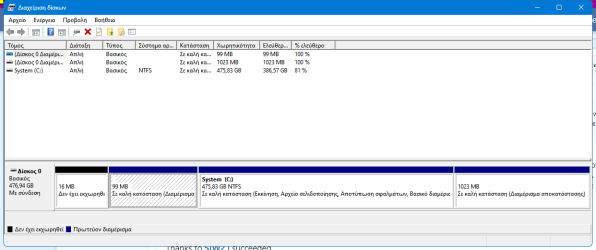
How to move non-functioning WinRE partition from start of disk to end and re-install it there?


is it offering to fix it ?


You could but why ?

Diskgen boot media could be used to delete the previous esp and msr and then create new ones at the begining of the disk.

Then populate the new esp with the boot critical files using bcdboot command
DG isn't offering a fix, though it will allow me to scan the volume for bad sectors. Should I do that?

If relocating the EFI and MSR were something I could easily do with DG, then I'd do it so future clones are correct (using DG or some other tool, not Samsung Magician) But it sounds like it's above my pay grade.
 

My Computers My Computers

  • At a glance

    Windows 11 Pro, 23H2, Build 22631.4317i7-1355U64GBIntel IRIS 1GB
    OS
    Windows 11 Pro, 23H2, Build 22631.4317
    Computer type
    Laptop
    Manufacturer/Model
    HP
    CPU
    i7-1355U
    Motherboard
    HP
    Memory
    64GB
    Graphics Card(s)
    Intel IRIS 1GB
    Sound Card
    Realtek (internal)
    Monitor(s) Displays
    Stock and external 27" Acer monitor
    Screen Resolution
    1080p
    Hard Drives
    m.2 2TB (Windows), 2TB SATA SSD (Data)
    PSU
    Stock
    Case
    Stock
    Cooling
    Stock
    Keyboard
    Stock and external HP keyboard
    Mouse
    Trackpad and external Logitech wired mouse
    Internet Speed
    FIOS 1GB
    Browser
    Chrome, Edge, Brave, Opera, Firefox
    Antivirus
    Microsoft Defender
    Other Info
    2TB Samsung 990 Pro, 2TB Samsung 870 EVO
  • At a glance

    Windows 10Intel i7-8550U32GBAMD Radeon 530
    Operating System
    Windows 10
    Computer type
    Laptop
    Manufacturer/Model
    Dell Inspiron 5770
    CPU
    Intel i7-8550U
    Motherboard
    Dell
    Memory
    32GB
    Graphics card(s)
    AMD Radeon 530
    Sound Card
    Realtek
    Monitor(s) Displays
    Laptop screen
    Screen Resolution
    1920x1080
    Hard Drives
    256GB Samsung SDD, 2TB Western Digital HDD
    Keyboard
    Arteck wireless
    Mouse
    Logitech wired
    Internet Speed
    FIOS 1GB
    Browser
    Chrome, Edge
    Antivirus
    Microsoft Defender
try Tools >check partition table
 

My Computers My Computers

  • At a glance

    Win7,Win11i7-97002x16gb 3600mhz
    OS
    Win7,Win11
    Computer type
    PC/Desktop
    CPU
    i7-9700
    Motherboard
    gigabyte b365m ds3h
    Memory
    2x16gb 3600mhz
    Monitor(s) Displays
    benq gw2480
    PSU
    bequiet pure power 11 400CM
    Cooling
    cryorig m9i
  • At a glance

    win7,win11i5-84002x8gb 3200
    Operating System
    win7,win11
    Computer type
    PC/Desktop
    CPU
    i5-8400
    Motherboard
    gigabyte b365m ds3h
    Memory
    2x8gb 3200
    PSU
    xfx pro 450
try Tools >check partition table
I get "Warn: The number of sectors in DBR less than actual value" with instructions I don't understand about clicking correct and then manually recreating or reformatting.
 

My Computers My Computers

  • At a glance

    Windows 11 Pro, 23H2, Build 22631.4317i7-1355U64GBIntel IRIS 1GB
    OS
    Windows 11 Pro, 23H2, Build 22631.4317
    Computer type
    Laptop
    Manufacturer/Model
    HP
    CPU
    i7-1355U
    Motherboard
    HP
    Memory
    64GB
    Graphics Card(s)
    Intel IRIS 1GB
    Sound Card
    Realtek (internal)
    Monitor(s) Displays
    Stock and external 27" Acer monitor
    Screen Resolution
    1080p
    Hard Drives
    m.2 2TB (Windows), 2TB SATA SSD (Data)
    PSU
    Stock
    Case
    Stock
    Cooling
    Stock
    Keyboard
    Stock and external HP keyboard
    Mouse
    Trackpad and external Logitech wired mouse
    Internet Speed
    FIOS 1GB
    Browser
    Chrome, Edge, Brave, Opera, Firefox
    Antivirus
    Microsoft Defender
    Other Info
    2TB Samsung 990 Pro, 2TB Samsung 870 EVO
  • At a glance

    Windows 10Intel i7-8550U32GBAMD Radeon 530
    Operating System
    Windows 10
    Computer type
    Laptop
    Manufacturer/Model
    Dell Inspiron 5770
    CPU
    Intel i7-8550U
    Motherboard
    Dell
    Memory
    32GB
    Graphics card(s)
    AMD Radeon 530
    Sound Card
    Realtek
    Monitor(s) Displays
    Laptop screen
    Screen Resolution
    1920x1080
    Hard Drives
    256GB Samsung SDD, 2TB Western Digital HDD
    Keyboard
    Arteck wireless
    Mouse
    Logitech wired
    Internet Speed
    FIOS 1GB
    Browser
    Chrome, Edge
    Antivirus
    Microsoft Defender
Some EF members very frequently use Macrium and may be able to guide you through the software steps.

Macrium can be used for clones as well as backup images.

See if you can make a Macrium backup image instead of a clone.

Then clean install Windows 11 and restore only the C: partition.

This should have the default UEFI / GPT partition: System, Reserved, Data, Recovery

If the backup restoration is successful with or without a startup repair then Macrium can be used for clones.


My Computer My Computer

At a glance

Windows 10Intel(R) Core(TM) i7-4800MQ CPU @ 2.70GHz16 GB Total: Manufacturer : Samsung MemoryTyp...NVIDIA Quadro K3100M; Intel(R) HD Graphics 4600
OS
Windows 10
Computer type
Laptop
Manufacturer/Model
HP
CPU
Intel(R) Core(TM) i7-4800MQ CPU @ 2.70GHz
Motherboard
Product : 190A Version : KBC Version 94.56
Memory
16 GB Total: Manufacturer : Samsung MemoryType : DDR3 FormFactor : SODIMM Capacity : 8GB Speed : 1600
Graphics Card(s)
NVIDIA Quadro K3100M; Intel(R) HD Graphics 4600
Sound Card
IDT High Definition Audio CODEC; PNP Device ID HDAUDIO\FUNC_01&VEN_111D&DEV_76E0
Hard Drives
Model Hitachi HTS727575A9E364
Antivirus
Microsoft Defender
Other Info
Mobile Workstation
Some EF members very frequently use Macrium and may be able to guide you through the software steps.

Macrium can be used for clones as well as backup images.

See if you can make a Macrium backup image instead of a clone.
Thanks, but when I used Macrium to make a backup and restore, although the partitions were in the correct places and Macrium reported no errors on verifying the backup, I had other issues, which is why I resorted to the clone. I'm just interested in fixing this EFI partition issue now; everything else seems to be working, and I'd rather avoid another eight hours of backing up to a hard drive and then restoring, if possible.
 

My Computers My Computers

  • At a glance

    Windows 11 Pro, 23H2, Build 22631.4317i7-1355U64GBIntel IRIS 1GB
    OS
    Windows 11 Pro, 23H2, Build 22631.4317
    Computer type
    Laptop
    Manufacturer/Model
    HP
    CPU
    i7-1355U
    Motherboard
    HP
    Memory
    64GB
    Graphics Card(s)
    Intel IRIS 1GB
    Sound Card
    Realtek (internal)
    Monitor(s) Displays
    Stock and external 27" Acer monitor
    Screen Resolution
    1080p
    Hard Drives
    m.2 2TB (Windows), 2TB SATA SSD (Data)
    PSU
    Stock
    Case
    Stock
    Cooling
    Stock
    Keyboard
    Stock and external HP keyboard
    Mouse
    Trackpad and external Logitech wired mouse
    Internet Speed
    FIOS 1GB
    Browser
    Chrome, Edge, Brave, Opera, Firefox
    Antivirus
    Microsoft Defender
    Other Info
    2TB Samsung 990 Pro, 2TB Samsung 870 EVO
  • At a glance

    Windows 10Intel i7-8550U32GBAMD Radeon 530
    Operating System
    Windows 10
    Computer type
    Laptop
    Manufacturer/Model
    Dell Inspiron 5770
    CPU
    Intel i7-8550U
    Motherboard
    Dell
    Memory
    32GB
    Graphics card(s)
    AMD Radeon 530
    Sound Card
    Realtek
    Monitor(s) Displays
    Laptop screen
    Screen Resolution
    1920x1080
    Hard Drives
    256GB Samsung SDD, 2TB Western Digital HDD
    Keyboard
    Arteck wireless
    Mouse
    Logitech wired
    Internet Speed
    FIOS 1GB
    Browser
    Chrome, Edge
    Antivirus
    Microsoft Defender
I would just click correct. Done it a few times without issue.

Make the boot media first, you should always have it on a usb stick. Do it now and you wont forget.
 

My Computers My Computers

  • At a glance

    Win7,Win11i7-97002x16gb 3600mhz
    OS
    Win7,Win11
    Computer type
    PC/Desktop
    CPU
    i7-9700
    Motherboard
    gigabyte b365m ds3h
    Memory
    2x16gb 3600mhz
    Monitor(s) Displays
    benq gw2480
    PSU
    bequiet pure power 11 400CM
    Cooling
    cryorig m9i
  • At a glance

    win7,win11i5-84002x8gb 3200
    Operating System
    win7,win11
    Computer type
    PC/Desktop
    CPU
    i5-8400
    Motherboard
    gigabyte b365m ds3h
    Memory
    2x8gb 3200
    PSU
    xfx pro 450
Please post images or share links displaying commands with results:

Code:
bcdedit
bcdedit | find "osdevice"
reagentc /info
shrink querymax


Code:
diskpart
lis dis
lis vol
sel dis 1
det dis
lis par
sel par 1
det par
sel par 2
det par
sel par 3
det par
sel par 4
det par
 

My Computer My Computer

At a glance

Windows 10Intel(R) Core(TM) i7-4800MQ CPU @ 2.70GHz16 GB Total: Manufacturer : Samsung MemoryTyp...NVIDIA Quadro K3100M; Intel(R) HD Graphics 4600
OS
Windows 10
Computer type
Laptop
Manufacturer/Model
HP
CPU
Intel(R) Core(TM) i7-4800MQ CPU @ 2.70GHz
Motherboard
Product : 190A Version : KBC Version 94.56
Memory
16 GB Total: Manufacturer : Samsung MemoryType : DDR3 FormFactor : SODIMM Capacity : 8GB Speed : 1600
Graphics Card(s)
NVIDIA Quadro K3100M; Intel(R) HD Graphics 4600
Sound Card
IDT High Definition Audio CODEC; PNP Device ID HDAUDIO\FUNC_01&VEN_111D&DEV_76E0
Hard Drives
Model Hitachi HTS727575A9E364
Antivirus
Microsoft Defender
Other Info
Mobile Workstation
I would just click correct. Done it a few times without issue.

Make the boot media first, you should always have it on a usb stick. Do it now and you wont forget.
Okay, I'll try just clicking Correct. I watched few videos on re-creating the EFI partition, and I'd rather not go that route if I don't have to. Thanks again for all your help.

And, I have created the DiskGenius boot media (to go with my growing collection of boot media). Thanks again for all your help. I was a tech writer, long ago, and I'm inclined to write up this move-the-WinRE stuff you've walked me through. I imagine every Samsung Magician user who clones a boot drive will need it, whether they know it or not. If I do, I'll post it in this thread, and if you get a chance, it would be helpful to get feedback on it. Perhaps it could go in the Tutorials section somewhere.
 

My Computers My Computers

  • At a glance

    Windows 11 Pro, 23H2, Build 22631.4317i7-1355U64GBIntel IRIS 1GB
    OS
    Windows 11 Pro, 23H2, Build 22631.4317
    Computer type
    Laptop
    Manufacturer/Model
    HP
    CPU
    i7-1355U
    Motherboard
    HP
    Memory
    64GB
    Graphics Card(s)
    Intel IRIS 1GB
    Sound Card
    Realtek (internal)
    Monitor(s) Displays
    Stock and external 27" Acer monitor
    Screen Resolution
    1080p
    Hard Drives
    m.2 2TB (Windows), 2TB SATA SSD (Data)
    PSU
    Stock
    Case
    Stock
    Cooling
    Stock
    Keyboard
    Stock and external HP keyboard
    Mouse
    Trackpad and external Logitech wired mouse
    Internet Speed
    FIOS 1GB
    Browser
    Chrome, Edge, Brave, Opera, Firefox
    Antivirus
    Microsoft Defender
    Other Info
    2TB Samsung 990 Pro, 2TB Samsung 870 EVO
  • At a glance

    Windows 10Intel i7-8550U32GBAMD Radeon 530
    Operating System
    Windows 10
    Computer type
    Laptop
    Manufacturer/Model
    Dell Inspiron 5770
    CPU
    Intel i7-8550U
    Motherboard
    Dell
    Memory
    32GB
    Graphics card(s)
    AMD Radeon 530
    Sound Card
    Realtek
    Monitor(s) Displays
    Laptop screen
    Screen Resolution
    1920x1080
    Hard Drives
    256GB Samsung SDD, 2TB Western Digital HDD
    Keyboard
    Arteck wireless
    Mouse
    Logitech wired
    Internet Speed
    FIOS 1GB
    Browser
    Chrome, Edge
    Antivirus
    Microsoft Defender
Please post images or share links displaying commands with results:

Code:
bcdedit
bcdedit | find "osdevice"
reagentc /info
shrink querymax


Code:
diskpart
lis dis
lis vol
sel dis 1
det dis
lis par
sel par 1
det par
sel par 2
det par
sel par 3
det par
sel par 4
det par
Okay, if "Correct" in DiskGenius doesn't fix it, I'll do that. It's after 2am here, so tomorrow or the next day. So far, the computer seems to be booting correctly despite this error.
 

My Computers My Computers

  • At a glance

    Windows 11 Pro, 23H2, Build 22631.4317i7-1355U64GBIntel IRIS 1GB
    OS
    Windows 11 Pro, 23H2, Build 22631.4317
    Computer type
    Laptop
    Manufacturer/Model
    HP
    CPU
    i7-1355U
    Motherboard
    HP
    Memory
    64GB
    Graphics Card(s)
    Intel IRIS 1GB
    Sound Card
    Realtek (internal)
    Monitor(s) Displays
    Stock and external 27" Acer monitor
    Screen Resolution
    1080p
    Hard Drives
    m.2 2TB (Windows), 2TB SATA SSD (Data)
    PSU
    Stock
    Case
    Stock
    Cooling
    Stock
    Keyboard
    Stock and external HP keyboard
    Mouse
    Trackpad and external Logitech wired mouse
    Internet Speed
    FIOS 1GB
    Browser
    Chrome, Edge, Brave, Opera, Firefox
    Antivirus
    Microsoft Defender
    Other Info
    2TB Samsung 990 Pro, 2TB Samsung 870 EVO
  • At a glance

    Windows 10Intel i7-8550U32GBAMD Radeon 530
    Operating System
    Windows 10
    Computer type
    Laptop
    Manufacturer/Model
    Dell Inspiron 5770
    CPU
    Intel i7-8550U
    Motherboard
    Dell
    Memory
    32GB
    Graphics card(s)
    AMD Radeon 530
    Sound Card
    Realtek
    Monitor(s) Displays
    Laptop screen
    Screen Resolution
    1920x1080
    Hard Drives
    256GB Samsung SDD, 2TB Western Digital HDD
    Keyboard
    Arteck wireless
    Mouse
    Logitech wired
    Internet Speed
    FIOS 1GB
    Browser
    Chrome, Edge
    Antivirus
    Microsoft Defender
If it boots please post a new disk management.

And if there are any issues post disk par info results:


My Computer My Computer

At a glance

Windows 10Intel(R) Core(TM) i7-4800MQ CPU @ 2.70GHz16 GB Total: Manufacturer : Samsung MemoryTyp...NVIDIA Quadro K3100M; Intel(R) HD Graphics 4600
OS
Windows 10
Computer type
Laptop
Manufacturer/Model
HP
CPU
Intel(R) Core(TM) i7-4800MQ CPU @ 2.70GHz
Motherboard
Product : 190A Version : KBC Version 94.56
Memory
16 GB Total: Manufacturer : Samsung MemoryType : DDR3 FormFactor : SODIMM Capacity : 8GB Speed : 1600
Graphics Card(s)
NVIDIA Quadro K3100M; Intel(R) HD Graphics 4600
Sound Card
IDT High Definition Audio CODEC; PNP Device ID HDAUDIO\FUNC_01&VEN_111D&DEV_76E0
Hard Drives
Model Hitachi HTS727575A9E364
Antivirus
Microsoft Defender
Other Info
Mobile Workstation
If it boots please post a new disk management.

And if there are any issues post disk par info results:


It hasn't had any issues with booting, just the repositioning of the WinRE partition, which I've corrected, and the EFI partition marked as "Damaged" by Disk Genius. I'm not seeing any errors in normal use or significant errors in the logs, so far.
 

My Computers My Computers

  • At a glance

    Windows 11 Pro, 23H2, Build 22631.4317i7-1355U64GBIntel IRIS 1GB
    OS
    Windows 11 Pro, 23H2, Build 22631.4317
    Computer type
    Laptop
    Manufacturer/Model
    HP
    CPU
    i7-1355U
    Motherboard
    HP
    Memory
    64GB
    Graphics Card(s)
    Intel IRIS 1GB
    Sound Card
    Realtek (internal)
    Monitor(s) Displays
    Stock and external 27" Acer monitor
    Screen Resolution
    1080p
    Hard Drives
    m.2 2TB (Windows), 2TB SATA SSD (Data)
    PSU
    Stock
    Case
    Stock
    Cooling
    Stock
    Keyboard
    Stock and external HP keyboard
    Mouse
    Trackpad and external Logitech wired mouse
    Internet Speed
    FIOS 1GB
    Browser
    Chrome, Edge, Brave, Opera, Firefox
    Antivirus
    Microsoft Defender
    Other Info
    2TB Samsung 990 Pro, 2TB Samsung 870 EVO
  • At a glance

    Windows 10Intel i7-8550U32GBAMD Radeon 530
    Operating System
    Windows 10
    Computer type
    Laptop
    Manufacturer/Model
    Dell Inspiron 5770
    CPU
    Intel i7-8550U
    Motherboard
    Dell
    Memory
    32GB
    Graphics card(s)
    AMD Radeon 530
    Sound Card
    Realtek
    Monitor(s) Displays
    Laptop screen
    Screen Resolution
    1920x1080
    Hard Drives
    256GB Samsung SDD, 2TB Western Digital HDD
    Keyboard
    Arteck wireless
    Mouse
    Logitech wired
    Internet Speed
    FIOS 1GB
    Browser
    Chrome, Edge
    Antivirus
    Microsoft Defender

My Computer My Computer

At a glance

Windows 10Intel(R) Core(TM) i7-4800MQ CPU @ 2.70GHz16 GB Total: Manufacturer : Samsung MemoryTyp...NVIDIA Quadro K3100M; Intel(R) HD Graphics 4600
OS
Windows 10
Computer type
Laptop
Manufacturer/Model
HP
CPU
Intel(R) Core(TM) i7-4800MQ CPU @ 2.70GHz
Motherboard
Product : 190A Version : KBC Version 94.56
Memory
16 GB Total: Manufacturer : Samsung MemoryType : DDR3 FormFactor : SODIMM Capacity : 8GB Speed : 1600
Graphics Card(s)
NVIDIA Quadro K3100M; Intel(R) HD Graphics 4600
Sound Card
IDT High Definition Audio CODEC; PNP Device ID HDAUDIO\FUNC_01&VEN_111D&DEV_76E0
Hard Drives
Model Hitachi HTS727575A9E364
Antivirus
Microsoft Defender
Other Info
Mobile Workstation

My Computers My Computers

  • At a glance

    Windows 11 Pro, 23H2, Build 22631.4317i7-1355U64GBIntel IRIS 1GB
    OS
    Windows 11 Pro, 23H2, Build 22631.4317
    Computer type
    Laptop
    Manufacturer/Model
    HP
    CPU
    i7-1355U
    Motherboard
    HP
    Memory
    64GB
    Graphics Card(s)
    Intel IRIS 1GB
    Sound Card
    Realtek (internal)
    Monitor(s) Displays
    Stock and external 27" Acer monitor
    Screen Resolution
    1080p
    Hard Drives
    m.2 2TB (Windows), 2TB SATA SSD (Data)
    PSU
    Stock
    Case
    Stock
    Cooling
    Stock
    Keyboard
    Stock and external HP keyboard
    Mouse
    Trackpad and external Logitech wired mouse
    Internet Speed
    FIOS 1GB
    Browser
    Chrome, Edge, Brave, Opera, Firefox
    Antivirus
    Microsoft Defender
    Other Info
    2TB Samsung 990 Pro, 2TB Samsung 870 EVO
  • At a glance

    Windows 10Intel i7-8550U32GBAMD Radeon 530
    Operating System
    Windows 10
    Computer type
    Laptop
    Manufacturer/Model
    Dell Inspiron 5770
    CPU
    Intel i7-8550U
    Motherboard
    Dell
    Memory
    32GB
    Graphics card(s)
    AMD Radeon 530
    Sound Card
    Realtek
    Monitor(s) Displays
    Laptop screen
    Screen Resolution
    1920x1080
    Hard Drives
    256GB Samsung SDD, 2TB Western Digital HDD
    Keyboard
    Arteck wireless
    Mouse
    Logitech wired
    Internet Speed
    FIOS 1GB
    Browser
    Chrome, Edge
    Antivirus
    Microsoft Defender
I would just click correct. Done it a few times without issue.

Make the boot media first, you should always have it on a usb stick. Do it now and you wont forget.
I clicked "Correct" in the Check Partition Errors tool and it reported that it fixed the partition, but the EFI partition is still flagged as Damaged. I see that it contains files from HP and Microsoft, so a simple re-creation won't work. When I look at my Macrium backup, it looks like I can delete the existing EFI and MSR partitions and restore the Macrium EFI and MSR partitions. I could also then reclaim the bit of space left at the front of the drive from the misplaced WinRE partition.

Is this worth doing? Is there any risk to it? Disk Genius doesn't say how the EFI partition is damaged, just that it is, and currently the computer seems to boot normally.

EDIT: I poked around in Macrium and among other things explored the backup files EFI partition, which involved mounting it. When I exited Macrium, it didn't unmount it, which I discovered when I started Disk Genius again. Disk Genius found it and identified it, too, as a System partition that was damaged. So maybe the original SSDs EFI was also damaged in some unclear way?
 
Last edited:

My Computers My Computers

  • At a glance

    Windows 11 Pro, 23H2, Build 22631.4317i7-1355U64GBIntel IRIS 1GB
    OS
    Windows 11 Pro, 23H2, Build 22631.4317
    Computer type
    Laptop
    Manufacturer/Model
    HP
    CPU
    i7-1355U
    Motherboard
    HP
    Memory
    64GB
    Graphics Card(s)
    Intel IRIS 1GB
    Sound Card
    Realtek (internal)
    Monitor(s) Displays
    Stock and external 27" Acer monitor
    Screen Resolution
    1080p
    Hard Drives
    m.2 2TB (Windows), 2TB SATA SSD (Data)
    PSU
    Stock
    Case
    Stock
    Cooling
    Stock
    Keyboard
    Stock and external HP keyboard
    Mouse
    Trackpad and external Logitech wired mouse
    Internet Speed
    FIOS 1GB
    Browser
    Chrome, Edge, Brave, Opera, Firefox
    Antivirus
    Microsoft Defender
    Other Info
    2TB Samsung 990 Pro, 2TB Samsung 870 EVO
  • At a glance

    Windows 10Intel i7-8550U32GBAMD Radeon 530
    Operating System
    Windows 10
    Computer type
    Laptop
    Manufacturer/Model
    Dell Inspiron 5770
    CPU
    Intel i7-8550U
    Motherboard
    Dell
    Memory
    32GB
    Graphics card(s)
    AMD Radeon 530
    Sound Card
    Realtek
    Monitor(s) Displays
    Laptop screen
    Screen Resolution
    1920x1080
    Hard Drives
    256GB Samsung SDD, 2TB Western Digital HDD
    Keyboard
    Arteck wireless
    Mouse
    Logitech wired
    Internet Speed
    FIOS 1GB
    Browser
    Chrome, Edge
    Antivirus
    Microsoft Defender
@dbookbinder
Another member in this forum had the sane problem.
To fix the problem, you'd have to format this partition and rebuild the BCD.
Take a look at the link below where I suggested the fix.
 
Last edited:

My Computers My Computers

  • At a glance

    Windows 11 Pro 25H2, Linux Mint 21.3Intel Core i9-14900K @5.8GHZ64GB (2XG Skill F5-6400J3239G32G) @6800Radeon (TM) RX 480 Graphics (8 GB)
    OS
    Windows 11 Pro 25H2, Linux Mint 21.3
    Computer type
    PC/Desktop
    Manufacturer/Model
    Self Build Feb.2024
    CPU
    Intel Core i9-14900K @5.8GHZ
    Motherboard
    MSI MAG Z790 Tomahawk Max WiFi 7
    Memory
    64GB (2XG Skill F5-6400J3239G32G) @6800
    Graphics Card(s)
    Radeon (TM) RX 480 Graphics (8 GB)
    Sound Card
    Intergrated Realtek
    Monitor(s) Displays
    Samsung
    Screen Resolution
    3840x2160
    Hard Drives
    1 - Crucial 705 1TB GEN5
    1 - Crucial 705 2TB GEN5
    2 - Crucial T500 2TB Gen4
    PSU
    750W EVGA-G3
    Case
    Antec NX410
    Cooling
    H2O Thermalright
    Keyboard
    Logitech K800
    Mouse
    Logitech Master 2S
    Internet Speed
    600 Mbps
    Browser
    Chrome
    Antivirus
    WD
  • At a glance

    Windows 11 Pro & Linux Mint X64Intel(R) Core(TM) i7-3770K CPU @ 4.20 GHz32.0GB Dual-Channel CMY16GX3M2A1600C9NVIDIA GeForce GT 740
    Operating System
    Windows 11 Pro & Linux Mint X64
    Computer type
    PC/Desktop
    Manufacturer/Model
    MSI Z77 MPower (MS-7751)
    CPU
    Intel(R) Core(TM) i7-3770K CPU @ 4.20 GHz
    Motherboard
    Z77 MPower (MS-7751)
    Memory
    32.0GB Dual-Channel CMY16GX3M2A1600C9
    Graphics card(s)
    NVIDIA GeForce GT 740
    Monitor(s) Displays
    40" Samsung
    Screen Resolution
    1920X1080
    Hard Drives
    WIN10 - 111GB Samsung SSD 840 Series
    WIN11 - 223GB Crucial CT240BX500SSD
    2X931GB Crucial CT1000BX500SSD1
    PSU
    Antec 850W
    Case
    Antec 900
    Cooling
    H20
    Keyboard
    Logitech K800 Wireless
    Mouse
    Logitech MX Master 2S
    Internet Speed
    100 Mbps
    Browser
    Chrome
    Antivirus
    Windows Defender
@dbookbinder
Another member in this forum had the sane problem.
To fix the problem, you'd have to format this partition and rebuild the BCD.
Take a look at the link below where I suggested the fix.
Thanks. I saw your post last night. I notice that the EFI partition contains some HP information as well as the Microsoft information. If I follow your instructions, I will just end up with a vanilla Microsoft EFI partition, is that correct? Does it matter? It appears to be mostly BIOS update related information. Possibly related to automatic recovery from a corrupted BIOS, but I don't actually know.
 

My Computers My Computers

  • At a glance

    Windows 11 Pro, 23H2, Build 22631.4317i7-1355U64GBIntel IRIS 1GB
    OS
    Windows 11 Pro, 23H2, Build 22631.4317
    Computer type
    Laptop
    Manufacturer/Model
    HP
    CPU
    i7-1355U
    Motherboard
    HP
    Memory
    64GB
    Graphics Card(s)
    Intel IRIS 1GB
    Sound Card
    Realtek (internal)
    Monitor(s) Displays
    Stock and external 27" Acer monitor
    Screen Resolution
    1080p
    Hard Drives
    m.2 2TB (Windows), 2TB SATA SSD (Data)
    PSU
    Stock
    Case
    Stock
    Cooling
    Stock
    Keyboard
    Stock and external HP keyboard
    Mouse
    Trackpad and external Logitech wired mouse
    Internet Speed
    FIOS 1GB
    Browser
    Chrome, Edge, Brave, Opera, Firefox
    Antivirus
    Microsoft Defender
    Other Info
    2TB Samsung 990 Pro, 2TB Samsung 870 EVO
  • At a glance

    Windows 10Intel i7-8550U32GBAMD Radeon 530
    Operating System
    Windows 10
    Computer type
    Laptop
    Manufacturer/Model
    Dell Inspiron 5770
    CPU
    Intel i7-8550U
    Motherboard
    Dell
    Memory
    32GB
    Graphics card(s)
    AMD Radeon 530
    Sound Card
    Realtek
    Monitor(s) Displays
    Laptop screen
    Screen Resolution
    1920x1080
    Hard Drives
    256GB Samsung SDD, 2TB Western Digital HDD
    Keyboard
    Arteck wireless
    Mouse
    Logitech wired
    Internet Speed
    FIOS 1GB
    Browser
    Chrome, Edge
    Antivirus
    Microsoft Defender
If I follow your instructions, I will just end up with a vanilla Microsoft EFI partition, is that correct?
Yes.

To make sure, You can open the command prompt and type: bcdedit /enum all then save it to a text file. Go thru the list to see if it contain extra info that need to be saved. If you are unsure, post the result then I'll take a look.
 
Last edited:

My Computers My Computers

  • At a glance

    Windows 11 Pro 25H2, Linux Mint 21.3Intel Core i9-14900K @5.8GHZ64GB (2XG Skill F5-6400J3239G32G) @6800Radeon (TM) RX 480 Graphics (8 GB)
    OS
    Windows 11 Pro 25H2, Linux Mint 21.3
    Computer type
    PC/Desktop
    Manufacturer/Model
    Self Build Feb.2024
    CPU
    Intel Core i9-14900K @5.8GHZ
    Motherboard
    MSI MAG Z790 Tomahawk Max WiFi 7
    Memory
    64GB (2XG Skill F5-6400J3239G32G) @6800
    Graphics Card(s)
    Radeon (TM) RX 480 Graphics (8 GB)
    Sound Card
    Intergrated Realtek
    Monitor(s) Displays
    Samsung
    Screen Resolution
    3840x2160
    Hard Drives
    1 - Crucial 705 1TB GEN5
    1 - Crucial 705 2TB GEN5
    2 - Crucial T500 2TB Gen4
    PSU
    750W EVGA-G3
    Case
    Antec NX410
    Cooling
    H2O Thermalright
    Keyboard
    Logitech K800
    Mouse
    Logitech Master 2S
    Internet Speed
    600 Mbps
    Browser
    Chrome
    Antivirus
    WD
  • At a glance

    Windows 11 Pro & Linux Mint X64Intel(R) Core(TM) i7-3770K CPU @ 4.20 GHz32.0GB Dual-Channel CMY16GX3M2A1600C9NVIDIA GeForce GT 740
    Operating System
    Windows 11 Pro & Linux Mint X64
    Computer type
    PC/Desktop
    Manufacturer/Model
    MSI Z77 MPower (MS-7751)
    CPU
    Intel(R) Core(TM) i7-3770K CPU @ 4.20 GHz
    Motherboard
    Z77 MPower (MS-7751)
    Memory
    32.0GB Dual-Channel CMY16GX3M2A1600C9
    Graphics card(s)
    NVIDIA GeForce GT 740
    Monitor(s) Displays
    40" Samsung
    Screen Resolution
    1920X1080
    Hard Drives
    WIN10 - 111GB Samsung SSD 840 Series
    WIN11 - 223GB Crucial CT240BX500SSD
    2X931GB Crucial CT1000BX500SSD1
    PSU
    Antec 850W
    Case
    Antec 900
    Cooling
    H20
    Keyboard
    Logitech K800 Wireless
    Mouse
    Logitech MX Master 2S
    Internet Speed
    100 Mbps
    Browser
    Chrome
    Antivirus
    Windows Defender
Yes.

To make sure, You can open the command prompt and type: bcdedit /enum all then save it to a text file. Go thru the list to see if it contain extra info that need to be saved. If you are unsure, post the result then I'll take a look.
Thanks. The attached file has the output of the bcdedit command above. The EFI folder itself contains an HP folder with about 50Mb of data. I'd want to preserve that in a new EFI partition.
 

Attachments

My Computers My Computers

  • At a glance

    Windows 11 Pro, 23H2, Build 22631.4317i7-1355U64GBIntel IRIS 1GB
    OS
    Windows 11 Pro, 23H2, Build 22631.4317
    Computer type
    Laptop
    Manufacturer/Model
    HP
    CPU
    i7-1355U
    Motherboard
    HP
    Memory
    64GB
    Graphics Card(s)
    Intel IRIS 1GB
    Sound Card
    Realtek (internal)
    Monitor(s) Displays
    Stock and external 27" Acer monitor
    Screen Resolution
    1080p
    Hard Drives
    m.2 2TB (Windows), 2TB SATA SSD (Data)
    PSU
    Stock
    Case
    Stock
    Cooling
    Stock
    Keyboard
    Stock and external HP keyboard
    Mouse
    Trackpad and external Logitech wired mouse
    Internet Speed
    FIOS 1GB
    Browser
    Chrome, Edge, Brave, Opera, Firefox
    Antivirus
    Microsoft Defender
    Other Info
    2TB Samsung 990 Pro, 2TB Samsung 870 EVO
  • At a glance

    Windows 10Intel i7-8550U32GBAMD Radeon 530
    Operating System
    Windows 10
    Computer type
    Laptop
    Manufacturer/Model
    Dell Inspiron 5770
    CPU
    Intel i7-8550U
    Motherboard
    Dell
    Memory
    32GB
    Graphics card(s)
    AMD Radeon 530
    Sound Card
    Realtek
    Monitor(s) Displays
    Laptop screen
    Screen Resolution
    1920x1080
    Hard Drives
    256GB Samsung SDD, 2TB Western Digital HDD
    Keyboard
    Arteck wireless
    Mouse
    Logitech wired
    Internet Speed
    FIOS 1GB
    Browser
    Chrome, Edge
    Antivirus
    Microsoft Defender
Thanks. I saw your post last night. I notice that the EFI partition contains some HP information as well as the Microsoft information. If I follow your instructions, I will just end up with a vanilla Microsoft EFI partition, is that correct? Does it matter? It appears to be mostly BIOS update related information. Possibly related to automatic recovery from a corrupted BIOS, but I don't actually know.

Because of Microsoft changed the update policy for WinRE , many users (of Win 10) have problems such as errors at Windows update.
The provided solution for these users is to delete and rebuild a larger WinRE. But are at Win 11. As you can see the "solution" is
and for Windows 11. In real at any time a user can play with that , by : put the partition WinRE at the end or start of the System Disk (if i remember OK , MS recommends at the end of) , change name or size WinRE partition.

So i tried for any case to make it 1GB , last partition , and with my own naming.
I made it. But before ............................ check what problems were created. You will found many answers.
Τhanks to SIW2 I succeeded :

1711569915590.png


-About Disk Genious. In order to find solutions i downloaded and tried.
I realized 2 things. That it has a lot of potential and that it is unreliable. I would tell you not to use it.

-In the other hand i use Mini tool partition wizard. It hasnt the abilities of DG , but is reliable.
-I can't prove it but I believe the error of DG gives you is false.

Whats important and you must check , to understand also if there is problem :
1) You can boot at WinRE via Shift+restart and ensure that major functions like Restore Points and Restore Image work OK.
2) You can boot at WinRE via USB stick and ensure that major functions like Restore Points and Restore Image work OK.
3) You can boot at WinRE by pressing F11 at boot and ensure that major functions like Restore Points and Restore Image work OK.
4) You can boot at HP's UEFI by press the defined key , at my Pavilion thats F2. (i think you have an HP , sorry if i m wrong).

If all these are OK , please post a screenshot of Disk Management and/or Minitool partition wizard ,
to see if there is something looks wrong.

In case that after all these , cant boot at HP's UEFI diagnostics its easy to recreate it.
Just download and run its setup file.

Knoledge about WinRE you could find here.
 

Attachments

  • 1711569206481.png
    1711569206481.png
    14.1 KB · Views: 1

My Computer My Computer

At a glance

Windows 11 ProIntel 113700H16GBNVIDIA RTX 3050 ti
OS
Windows 11 Pro
Computer type
Laptop
Manufacturer/Model
HP Pavilion 17 cd2205nw
CPU
Intel 113700H
Memory
16GB
Graphics Card(s)
NVIDIA RTX 3050 ti
Screen Resolution
1980x1020
Hard Drives
Micron 512GB
Mouse
Logitech
Internet Speed
100Mbs
Browser
Vivaldi , Edge
Antivirus
Windows defender
Looking at the BCD text file, I don't see anything related to the HP entry in esp partition, hence it is invalid, the same as in the other thread where the OP has invalid entries. This cause Diskgenius to complain.
As a precaution, you can copy and save this folder to desktop then proceed with the fix.

OR: better yet, just move this folder out of esp partition, reboot and check again to see if the problem goes away.

@Bug locker
I disagree with you about Diskgenius. I've been using Diskgenius since the beginning when it was called "PartitionGuru" then later renamed to be "DiskGenius". IMO, DiskGenius is way better than Partition Manger, There's a lot more features that Diskgenius offer and Minitool Partition doesn't. With Minitool you can only explore the System partitions (esp, Recovery) but you cannot manipulate as in Diskgenius. If you are using Linux, you can read/copy/transfer files between the 2 filesystems.
With the problem that he is having right now, you cannot reformat the esp partition usng Minitool without having to boot into WinPE.
I am making the statement above because I also own a copy of Minitool Partition Technical Edition.
 
Last edited:

My Computers My Computers

  • At a glance

    Windows 11 Pro 25H2, Linux Mint 21.3Intel Core i9-14900K @5.8GHZ64GB (2XG Skill F5-6400J3239G32G) @6800Radeon (TM) RX 480 Graphics (8 GB)
    OS
    Windows 11 Pro 25H2, Linux Mint 21.3
    Computer type
    PC/Desktop
    Manufacturer/Model
    Self Build Feb.2024
    CPU
    Intel Core i9-14900K @5.8GHZ
    Motherboard
    MSI MAG Z790 Tomahawk Max WiFi 7
    Memory
    64GB (2XG Skill F5-6400J3239G32G) @6800
    Graphics Card(s)
    Radeon (TM) RX 480 Graphics (8 GB)
    Sound Card
    Intergrated Realtek
    Monitor(s) Displays
    Samsung
    Screen Resolution
    3840x2160
    Hard Drives
    1 - Crucial 705 1TB GEN5
    1 - Crucial 705 2TB GEN5
    2 - Crucial T500 2TB Gen4
    PSU
    750W EVGA-G3
    Case
    Antec NX410
    Cooling
    H2O Thermalright
    Keyboard
    Logitech K800
    Mouse
    Logitech Master 2S
    Internet Speed
    600 Mbps
    Browser
    Chrome
    Antivirus
    WD
  • At a glance

    Windows 11 Pro & Linux Mint X64Intel(R) Core(TM) i7-3770K CPU @ 4.20 GHz32.0GB Dual-Channel CMY16GX3M2A1600C9NVIDIA GeForce GT 740
    Operating System
    Windows 11 Pro & Linux Mint X64
    Computer type
    PC/Desktop
    Manufacturer/Model
    MSI Z77 MPower (MS-7751)
    CPU
    Intel(R) Core(TM) i7-3770K CPU @ 4.20 GHz
    Motherboard
    Z77 MPower (MS-7751)
    Memory
    32.0GB Dual-Channel CMY16GX3M2A1600C9
    Graphics card(s)
    NVIDIA GeForce GT 740
    Monitor(s) Displays
    40" Samsung
    Screen Resolution
    1920X1080
    Hard Drives
    WIN10 - 111GB Samsung SSD 840 Series
    WIN11 - 223GB Crucial CT240BX500SSD
    2X931GB Crucial CT1000BX500SSD1
    PSU
    Antec 850W
    Case
    Antec 900
    Cooling
    H20
    Keyboard
    Logitech K800 Wireless
    Mouse
    Logitech MX Master 2S
    Internet Speed
    100 Mbps
    Browser
    Chrome
    Antivirus
    Windows Defender

Latest Support Threads

Back
Top Bottom