How to pass the Windows 11 Compatibility Checks


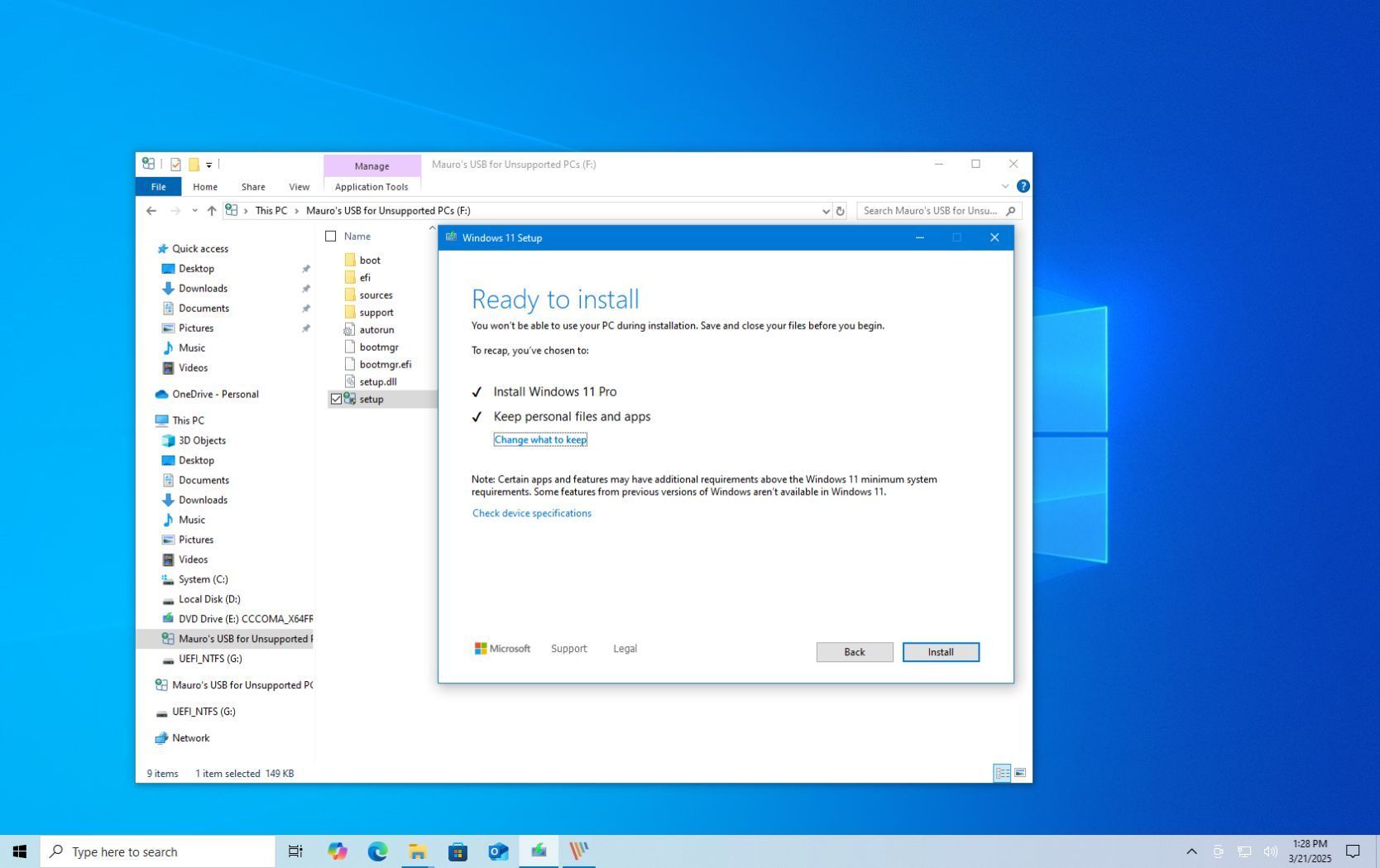
" disconnect from the internet before mounting the 11 iso "...................my mistake !
Is it possible still to correct my fault ??
 

My Computers My Computers

  • At a glance

    Windows11 Pro 25H2i732GBnVidia
    OS
    Windows11 Pro 25H2
    Computer type
    PC/Desktop
    Manufacturer/Model
    Asus
    CPU
    i7
    Motherboard
    z97k
    Memory
    32GB
    Graphics Card(s)
    nVidia
    Sound Card
    Realtek
    Hard Drives
    3
    Cooling
    air
    Browser
    Edge
    Antivirus
    ESET
  • At a glance

    Windows11 ProIntel i516GBIntel
    Operating System
    Windows11 Pro
    Computer type
    PC/Desktop
    Manufacturer/Model
    ASUS
    CPU
    Intel i5
    Motherboard
    ASUS Basic
    Memory
    16GB
    Graphics card(s)
    Intel
    Sound Card
    Realtek
    Monitor(s) Displays
    Samsung
    Hard Drives
    one intern , 0ne extern, OS on SSD
    Cooling
    air
    Keyboard
    wireless Logitech
    Mouse
    wireless Logitech
    Internet Speed
    1GB
    Browser
    Edge
    Antivirus
    ESET
" disconnect from the internet before mounting the 11 iso "...................my mistake !
Is it possible still to correct my fault ??
Hi,.
Yes just use a new iso.
 

My Computer My Computer

At a glance

Win-7-10-11Pro's10900k & 9940x & 5930kTrident-Z Royal 4000c16 2x16gb & Trident-Z 36...Titan Xp & 1080ti FTW3 & evga 980ti gaming
OS
Win-7-10-11Pro's
Computer type
PC/Desktop
Manufacturer/Model
Acer 17" Nitro 7840sn/ 2x16gb 5600c40/ 4060/ stock 1tb-os/ 4tb sn850x
CPU
10900k & 9940x & 5930k
Motherboard
z490-Apex & x299-Apex & x99-Sabertooth
Memory
Trident-Z Royal 4000c16 2x16gb & Trident-Z 3600c16 4x8gb & 3200c14 4x8gb
Graphics Card(s)
Titan Xp & 1080ti FTW3 & evga 980ti gaming
Sound Card
Onboard Realtek x3
Monitor(s) Displays
1-AOC G2460PG 24"G-Sync 144Hz/ 2nd 1-ASUS VG248QE 24"/ 3rd LG 43" series
Screen Resolution
1920-1080 not sure what the t.v is besides 43" class scales from 1920-1080 perfectly
Hard Drives
2-WD-sn850x 4tb/ 970evo+500gb/ 980 pro 2tb.
PSU
1000p2 & 1200p2 & 850p2
Case
D450 x2 & 1 Test bench in cherry Entertainment center
Cooling
Custom water loops x3 with 2x mora 360mm rads only 980ti gaming air cooled
Keyboard
G710+x3
Mouse
Redragon x3
Internet Speed
xfinity gigabyte
Browser
Firefox
Antivirus
mbam pro
Hi,.
Yes just use a new iso.
My iso does not change , can use it still for repair , only disconnect from the internet will do , am I right ?
Repairing , with this iso ( btw ; the same iso I did the upgrade with , from 10 to 11 ) with internet connected did not work on my "incompatible" PC.........

So, I can upgrade from 10 to 11 , on "incompatible " PC , only repair on 11 , with this ISO does not work with internet on ??
However , it does work with internet off ??
( need to know , in case of an inplace-repair ...........)
 
Last edited:

My Computers My Computers

  • At a glance

    Windows11 Pro 25H2i732GBnVidia
    OS
    Windows11 Pro 25H2
    Computer type
    PC/Desktop
    Manufacturer/Model
    Asus
    CPU
    i7
    Motherboard
    z97k
    Memory
    32GB
    Graphics Card(s)
    nVidia
    Sound Card
    Realtek
    Hard Drives
    3
    Cooling
    air
    Browser
    Edge
    Antivirus
    ESET
  • At a glance

    Windows11 ProIntel i516GBIntel
    Operating System
    Windows11 Pro
    Computer type
    PC/Desktop
    Manufacturer/Model
    ASUS
    CPU
    Intel i5
    Motherboard
    ASUS Basic
    Memory
    16GB
    Graphics card(s)
    Intel
    Sound Card
    Realtek
    Monitor(s) Displays
    Samsung
    Hard Drives
    one intern , 0ne extern, OS on SSD
    Cooling
    air
    Keyboard
    wireless Logitech
    Mouse
    wireless Logitech
    Internet Speed
    1GB
    Browser
    Edge
    Antivirus
    ESET
Hi,
You can try the upgrade again with the same iso if it fails let us know.

Not sure where ms installs the update that kills the back button.

You should be relying on free reflect system images not ms lame iso repair options.
 

My Computer My Computer

At a glance

Win-7-10-11Pro's10900k & 9940x & 5930kTrident-Z Royal 4000c16 2x16gb & Trident-Z 36...Titan Xp & 1080ti FTW3 & evga 980ti gaming
OS
Win-7-10-11Pro's
Computer type
PC/Desktop
Manufacturer/Model
Acer 17" Nitro 7840sn/ 2x16gb 5600c40/ 4060/ stock 1tb-os/ 4tb sn850x
CPU
10900k & 9940x & 5930k
Motherboard
z490-Apex & x299-Apex & x99-Sabertooth
Memory
Trident-Z Royal 4000c16 2x16gb & Trident-Z 3600c16 4x8gb & 3200c14 4x8gb
Graphics Card(s)
Titan Xp & 1080ti FTW3 & evga 980ti gaming
Sound Card
Onboard Realtek x3
Monitor(s) Displays
1-AOC G2460PG 24"G-Sync 144Hz/ 2nd 1-ASUS VG248QE 24"/ 3rd LG 43" series
Screen Resolution
1920-1080 not sure what the t.v is besides 43" class scales from 1920-1080 perfectly
Hard Drives
2-WD-sn850x 4tb/ 970evo+500gb/ 980 pro 2tb.
PSU
1000p2 & 1200p2 & 850p2
Case
D450 x2 & 1 Test bench in cherry Entertainment center
Cooling
Custom water loops x3 with 2x mora 360mm rads only 980ti gaming air cooled
Keyboard
G710+x3
Mouse
Redragon x3
Internet Speed
xfinity gigabyte
Browser
Firefox
Antivirus
mbam pro
Hi,
You can try the upgrade again with the same iso if it fails let us know.

Not sure where ms installs the update that kills the back button.

You should be relying on free reflect system images not ms lame iso repair options.
I upgraded already , three weeks ago , with all the latest 11-updates installed !
Only want to know ; HOW (?) to make an inplace-repair ( when needed !) on this "unsupported " Win11
Do I have to take extra bypass-options again , for using my Rufus-ISO ( the same which I used for the upgrade) ?
 

My Computers My Computers

  • At a glance

    Windows11 Pro 25H2i732GBnVidia
    OS
    Windows11 Pro 25H2
    Computer type
    PC/Desktop
    Manufacturer/Model
    Asus
    CPU
    i7
    Motherboard
    z97k
    Memory
    32GB
    Graphics Card(s)
    nVidia
    Sound Card
    Realtek
    Hard Drives
    3
    Cooling
    air
    Browser
    Edge
    Antivirus
    ESET
  • At a glance

    Windows11 ProIntel i516GBIntel
    Operating System
    Windows11 Pro
    Computer type
    PC/Desktop
    Manufacturer/Model
    ASUS
    CPU
    Intel i5
    Motherboard
    ASUS Basic
    Memory
    16GB
    Graphics card(s)
    Intel
    Sound Card
    Realtek
    Monitor(s) Displays
    Samsung
    Hard Drives
    one intern , 0ne extern, OS on SSD
    Cooling
    air
    Keyboard
    wireless Logitech
    Mouse
    wireless Logitech
    Internet Speed
    1GB
    Browser
    Edge
    Antivirus
    ESET
I upgraded already , three weeks ago , with all the latest 11-updates installed !
Hi,
At this point you should of made a system image
This would be your repair if things went bad.

Doing system images before and after updates in the future is the best strategy for undoing problems not a iso from ms.
 

My Computer My Computer

At a glance

Win-7-10-11Pro's10900k & 9940x & 5930kTrident-Z Royal 4000c16 2x16gb & Trident-Z 36...Titan Xp & 1080ti FTW3 & evga 980ti gaming
OS
Win-7-10-11Pro's
Computer type
PC/Desktop
Manufacturer/Model
Acer 17" Nitro 7840sn/ 2x16gb 5600c40/ 4060/ stock 1tb-os/ 4tb sn850x
CPU
10900k & 9940x & 5930k
Motherboard
z490-Apex & x299-Apex & x99-Sabertooth
Memory
Trident-Z Royal 4000c16 2x16gb & Trident-Z 3600c16 4x8gb & 3200c14 4x8gb
Graphics Card(s)
Titan Xp & 1080ti FTW3 & evga 980ti gaming
Sound Card
Onboard Realtek x3
Monitor(s) Displays
1-AOC G2460PG 24"G-Sync 144Hz/ 2nd 1-ASUS VG248QE 24"/ 3rd LG 43" series
Screen Resolution
1920-1080 not sure what the t.v is besides 43" class scales from 1920-1080 perfectly
Hard Drives
2-WD-sn850x 4tb/ 970evo+500gb/ 980 pro 2tb.
PSU
1000p2 & 1200p2 & 850p2
Case
D450 x2 & 1 Test bench in cherry Entertainment center
Cooling
Custom water loops x3 with 2x mora 360mm rads only 980ti gaming air cooled
Keyboard
G710+x3
Mouse
Redragon x3
Internet Speed
xfinity gigabyte
Browser
Firefox
Antivirus
mbam pro
Hi,
At this point you should of made a system image
This would be your repair if things went bad.

Doing system images before and after updates in the future is the best strategy for undoing problems not a iso from ms.
So I did already , have several Macrium backups on external disks , want to know still how to make an in-place repair ( with software, etc intact) on " unsupported" Win11..........
 

My Computers My Computers

  • At a glance

    Windows11 Pro 25H2i732GBnVidia
    OS
    Windows11 Pro 25H2
    Computer type
    PC/Desktop
    Manufacturer/Model
    Asus
    CPU
    i7
    Motherboard
    z97k
    Memory
    32GB
    Graphics Card(s)
    nVidia
    Sound Card
    Realtek
    Hard Drives
    3
    Cooling
    air
    Browser
    Edge
    Antivirus
    ESET
  • At a glance

    Windows11 ProIntel i516GBIntel
    Operating System
    Windows11 Pro
    Computer type
    PC/Desktop
    Manufacturer/Model
    ASUS
    CPU
    Intel i5
    Motherboard
    ASUS Basic
    Memory
    16GB
    Graphics card(s)
    Intel
    Sound Card
    Realtek
    Monitor(s) Displays
    Samsung
    Hard Drives
    one intern , 0ne extern, OS on SSD
    Cooling
    air
    Keyboard
    wireless Logitech
    Mouse
    wireless Logitech
    Internet Speed
    1GB
    Browser
    Edge
    Antivirus
    ESET
So I did already , have several Macrium backups on external disks , want to know still how to make an in-place repair ( with software, etc intact) on " unsupported" Win11..........
Hi,
That I know of every time the os updates the original iso becomes less useful for repairs.

This is where the 600mb recovery partition becomes usable I believe which I do not rely on this either.
 

My Computer My Computer

At a glance

Win-7-10-11Pro's10900k & 9940x & 5930kTrident-Z Royal 4000c16 2x16gb & Trident-Z 36...Titan Xp & 1080ti FTW3 & evga 980ti gaming
OS
Win-7-10-11Pro's
Computer type
PC/Desktop
Manufacturer/Model
Acer 17" Nitro 7840sn/ 2x16gb 5600c40/ 4060/ stock 1tb-os/ 4tb sn850x
CPU
10900k & 9940x & 5930k
Motherboard
z490-Apex & x299-Apex & x99-Sabertooth
Memory
Trident-Z Royal 4000c16 2x16gb & Trident-Z 3600c16 4x8gb & 3200c14 4x8gb
Graphics Card(s)
Titan Xp & 1080ti FTW3 & evga 980ti gaming
Sound Card
Onboard Realtek x3
Monitor(s) Displays
1-AOC G2460PG 24"G-Sync 144Hz/ 2nd 1-ASUS VG248QE 24"/ 3rd LG 43" series
Screen Resolution
1920-1080 not sure what the t.v is besides 43" class scales from 1920-1080 perfectly
Hard Drives
2-WD-sn850x 4tb/ 970evo+500gb/ 980 pro 2tb.
PSU
1000p2 & 1200p2 & 850p2
Case
D450 x2 & 1 Test bench in cherry Entertainment center
Cooling
Custom water loops x3 with 2x mora 360mm rads only 980ti gaming air cooled
Keyboard
G710+x3
Mouse
Redragon x3
Internet Speed
xfinity gigabyte
Browser
Firefox
Antivirus
mbam pro
Hi,
That I know of every time the os updates the original iso becomes less useful for repairs.

This is where the 600mb recovery partition becomes usable I believe which I do not rely on this either.
Yes, seems my backups ( Macrium, AoMEI ) are the only tools I can rely on , in case of repair needed............
 

My Computers My Computers

  • At a glance

    Windows11 Pro 25H2i732GBnVidia
    OS
    Windows11 Pro 25H2
    Computer type
    PC/Desktop
    Manufacturer/Model
    Asus
    CPU
    i7
    Motherboard
    z97k
    Memory
    32GB
    Graphics Card(s)
    nVidia
    Sound Card
    Realtek
    Hard Drives
    3
    Cooling
    air
    Browser
    Edge
    Antivirus
    ESET
  • At a glance

    Windows11 ProIntel i516GBIntel
    Operating System
    Windows11 Pro
    Computer type
    PC/Desktop
    Manufacturer/Model
    ASUS
    CPU
    Intel i5
    Motherboard
    ASUS Basic
    Memory
    16GB
    Graphics card(s)
    Intel
    Sound Card
    Realtek
    Monitor(s) Displays
    Samsung
    Hard Drives
    one intern , 0ne extern, OS on SSD
    Cooling
    air
    Keyboard
    wireless Logitech
    Mouse
    wireless Logitech
    Internet Speed
    1GB
    Browser
    Edge
    Antivirus
    ESET
Yes, seems my backups ( Macrium, AoMEI ) are the only tools I can rely on , in case of repair needed............
Hi,
Indeed
Only good thing about old iso is a consistent upgrade install point
MS has in the past changed the iso in a bad way lol
 

My Computer My Computer

At a glance

Win-7-10-11Pro's10900k & 9940x & 5930kTrident-Z Royal 4000c16 2x16gb & Trident-Z 36...Titan Xp & 1080ti FTW3 & evga 980ti gaming
OS
Win-7-10-11Pro's
Computer type
PC/Desktop
Manufacturer/Model
Acer 17" Nitro 7840sn/ 2x16gb 5600c40/ 4060/ stock 1tb-os/ 4tb sn850x
CPU
10900k & 9940x & 5930k
Motherboard
z490-Apex & x299-Apex & x99-Sabertooth
Memory
Trident-Z Royal 4000c16 2x16gb & Trident-Z 3600c16 4x8gb & 3200c14 4x8gb
Graphics Card(s)
Titan Xp & 1080ti FTW3 & evga 980ti gaming
Sound Card
Onboard Realtek x3
Monitor(s) Displays
1-AOC G2460PG 24"G-Sync 144Hz/ 2nd 1-ASUS VG248QE 24"/ 3rd LG 43" series
Screen Resolution
1920-1080 not sure what the t.v is besides 43" class scales from 1920-1080 perfectly
Hard Drives
2-WD-sn850x 4tb/ 970evo+500gb/ 980 pro 2tb.
PSU
1000p2 & 1200p2 & 850p2
Case
D450 x2 & 1 Test bench in cherry Entertainment center
Cooling
Custom water loops x3 with 2x mora 360mm rads only 980ti gaming air cooled
Keyboard
G710+x3
Mouse
Redragon x3
Internet Speed
xfinity gigabyte
Browser
Firefox
Antivirus
mbam pro
Unable to find this here, but, there is a Microsoft approved workaround to install Windows 11 on an unsupported computer.
This will allow an in-place upgrade.
"...you need to edit the Registry to apply the official workaround to bypass the official requirements of Windows 11..."
"...you will be able to install Windows 11 on a device that does not have a supported processor or TPM 2.0 (TPM 1.2 will still be required)..."

This procedure is dated 10Feb2022...
 

My Computers My Computers

  • At a glance

    Windows 11 HomeAMD Ryzen 7 3750H16GBAMD Radeon RX Vega 10 (Picasso) [AMD]
    OS
    Windows 11 Home
    Computer type
    PC/Desktop
    Manufacturer/Model
    Coofun (MinisForum) UM700
    CPU
    AMD Ryzen 7 3750H
    Motherboard
    BESSTAR TECH LIMITED UM700
    Memory
    16GB
    Graphics Card(s)
    AMD Radeon RX Vega 10 (Picasso) [AMD]
    Monitor(s) Displays
    HP 22 uh; HP N223
    Screen Resolution
    1920x1080
    Hard Drives
    KINGSTON OM8PDP3512B-A01 500GB
    Samsung SSD 860 EVO 1000GB
    Other Info
    System 3 Specs
    OS: Windows 11 Pro
    Lenovo ThinkPad X1 Yoga Gen6
    11th Gen Intel(R) Core(TM) i7-1185G7 @ 3.00GHz
    16GB RAM
    3840x2400 touch
    SKHynix_HFS512GD9TNI-L2B0B nVME SSD

    System 4 Specs
    OS: Windows 11 Pro
    Lenovo ThinkPad X1 Yoga Gen1
    6th Generation Intel® Core™ i7-6500U Processor(Core i7-6500U)
    16GB RAM
    2560x 1440 touch
    Samsung 512 GB SATA SSD

    System 5 Specs
    OS: Windows 11 Home
    HP Pavilion 23-p027c All-in-One
    4th Generation Intel® Core™ i5-4570T Processor
    16GB RAM
    1920 s 1080 touch
    Samsung SSD 860 EVO 500GB
  • At a glance

    Windows 11-Pro 64-bitIntel Core i7-8650U16GB
    Operating System
    Windows 11-Pro 64-bit
    Computer type
    Laptop
    Manufacturer/Model
    Lenovo ThinkPad X1 Carbon Gen 6
    CPU
    Intel Core i7-8650U
    Motherboard
    Lenovo
    Memory
    16GB
    Screen Resolution
    2560 x 1440 WQHD
    Hard Drives
    Samsung 870 EVO Plus - 1TB
Unable to find this here, but, there is a Microsoft approved workaround to install Windows 11 on an unsupported computer.
This will allow an in-place upgrade.
"...you need to edit the Registry to apply the official workaround to bypass the official requirements of Windows 11..."
"...you will be able to install Windows 11 on a device that does not have a supported processor or TPM 2.0 (TPM 1.2 will still be required)..."

This procedure is dated 10Feb2022...
So , if you dont have TPM 1.2 ( no TPM at all !) you are still not able to do an in-place upgrade at all ........?
 

My Computers My Computers

  • At a glance

    Windows11 Pro 25H2i732GBnVidia
    OS
    Windows11 Pro 25H2
    Computer type
    PC/Desktop
    Manufacturer/Model
    Asus
    CPU
    i7
    Motherboard
    z97k
    Memory
    32GB
    Graphics Card(s)
    nVidia
    Sound Card
    Realtek
    Hard Drives
    3
    Cooling
    air
    Browser
    Edge
    Antivirus
    ESET
  • At a glance

    Windows11 ProIntel i516GBIntel
    Operating System
    Windows11 Pro
    Computer type
    PC/Desktop
    Manufacturer/Model
    ASUS
    CPU
    Intel i5
    Motherboard
    ASUS Basic
    Memory
    16GB
    Graphics card(s)
    Intel
    Sound Card
    Realtek
    Monitor(s) Displays
    Samsung
    Hard Drives
    one intern , 0ne extern, OS on SSD
    Cooling
    air
    Keyboard
    wireless Logitech
    Mouse
    wireless Logitech
    Internet Speed
    1GB
    Browser
    Edge
    Antivirus
    ESET
So , if you dont have TPM 1.2 ( no TPM at all !) you are still not able to do an in-place upgrade at all ........?
Not if you have incompatible hardware, such as CPU. . I have the AMD Ryzen 1800X, but MS says it's incompatible. Which is BS. . I can run Windows 11 by doing a fresh install, but i can't do an in-place upgrade no matter what steps I try. It just won't work.
 

My Computers My Computers

  • At a glance

    Windows 11 Pro x64 24H2 v26200.5074AMD Ryzen 9 3600X 12-Core @ 3.80GHzCorsair 32GB DDR4EVGA GeForce gtx 1660 Super
    OS
    Windows 11 Pro x64 24H2 v26200.5074
    Computer type
    PC/Desktop
    Manufacturer/Model
    Built Myself in 2025
    CPU
    AMD Ryzen 9 3600X 12-Core @ 3.80GHz
    Motherboard
    MSI X570 Gaming Plus
    Memory
    Corsair 32GB DDR4
    Graphics Card(s)
    EVGA GeForce gtx 1660 Super
    Sound Card
    On Board
    Monitor(s) Displays
    2 X AOC 27" , Dell 27"
    Screen Resolution
    1920 X 1080
    Hard Drives
    ~~~~~~~~~~~~~~~~~~~~~~~~~~
    ~ P34A60 512GB NVMe PCIe Gen3x4 M.2
    ~ 6TB Toshiba HDD
    ~ 6TB HDD (Backup)
    ~ SanDisk 250GB SSD
    ~ 2 X 1TB HDD
    ~~~~~~~~~~
    PSU
    eVGA 750w G+
    Case
    GAMDIAS White ATX Mid Tower Gaming Computer PC Case w/Tempered Glass
    Cooling
    AMD Wraith Prism
    Keyboard
    Nulea RT05 Wireless Ergonomic
    Mouse
    Nulea MD280 Wireless Vertical Mouse
    Internet Speed
    761Mbps (Download) / 692Mbps (Upload)
    Browser
    Firefox
    Antivirus
    Malwarebytes
    Other Info
    *This is my Main Computer That I use*
  • At a glance

    Windows 11 Pro x64 24H2 v26100.2894AMD Ryzen 7 1800X @ 3.60Ghz16GBAMD RX580
    Operating System
    Windows 11 Pro x64 24H2 v26100.2894
    Computer type
    PC/Desktop
    CPU
    AMD Ryzen 7 1800X @ 3.60Ghz
    Motherboard
    Asus Crosshair VI Hero
    Memory
    16GB
    Graphics card(s)
    AMD RX580
    Sound Card
    onBoard
    Monitor(s) Displays
    LG 27UK650-W 27", eMachine 22"
    Screen Resolution
    1920 X 1080
    Hard Drives
    250GB SSD
    PSU
    CORSAIR RM850
    Case
    GAMDIAS Black ATX Mid Tower Gaming Computer PC Case w/Tempered Glass
    Cooling
    Liquid
    Keyboard
    Nulea RT05 Wireless Ergonomic
    Mouse
    Nulea MD280 Wireless Vertical Mouse
    Internet Speed
    752Mbps (Download) / 537Mbps (Upload)
    Browser
    Firefox
    Antivirus
    Malwarebytes
    Other Info
    I use this computer for photo/video editing and to track severe weather
Not if you have incompatible hardware, such as CPU. . I have the AMD Ryzen 1800X, but MS says it's incompatible. Which is BS. . I can run Windows 11 by doing a fresh install, but i can't do an in-place upgrade no matter what steps I try. It just won't work.
Same on my 6 years old ASUS , no TPM , no secure boot ( the rest is ok ) , not possible in-place upgrade/repair either .
Only thing you can do is making more regular backups ( Macrium, AoMEI, etc).................
 

My Computers My Computers

  • At a glance

    Windows11 Pro 25H2i732GBnVidia
    OS
    Windows11 Pro 25H2
    Computer type
    PC/Desktop
    Manufacturer/Model
    Asus
    CPU
    i7
    Motherboard
    z97k
    Memory
    32GB
    Graphics Card(s)
    nVidia
    Sound Card
    Realtek
    Hard Drives
    3
    Cooling
    air
    Browser
    Edge
    Antivirus
    ESET
  • At a glance

    Windows11 ProIntel i516GBIntel
    Operating System
    Windows11 Pro
    Computer type
    PC/Desktop
    Manufacturer/Model
    ASUS
    CPU
    Intel i5
    Motherboard
    ASUS Basic
    Memory
    16GB
    Graphics card(s)
    Intel
    Sound Card
    Realtek
    Monitor(s) Displays
    Samsung
    Hard Drives
    one intern , 0ne extern, OS on SSD
    Cooling
    air
    Keyboard
    wireless Logitech
    Mouse
    wireless Logitech
    Internet Speed
    1GB
    Browser
    Edge
    Antivirus
    ESET
Same on my 6 years old ASUS , no TPM , no secure boot ( the rest is ok ) , not possible in-place upgrade/repair either .
Only thing you can do is making more regular backups ( Macrium, AoMEI, etc).................
Try as a VM - and set the "Virtual CPU" in the hardware as one which passes -- also enable "Emulated TPM" and set the VM to "secure boot".
No problem then with updates in place either. I even have from the VM boot menu a choice between W11 or W10 (dual boot) from a single VM definition. The "Virtual disk " can be set up as EFI with a number of "VHDX" files on it and you can use dism /apply-image to install the initial Windows editions and bcdboot for the boot loader, Then your VM will display the "Classic" multi-boot menu. -- Neat from a SINGLE VM !!!.

CPU poodlefaking to pass W11 this way will even work on old MBR only machines

as per :
Screenshot_20220303_111830.png


and :

Screenshot_20220303_111953.png


And "Multi boot" from a Single VM :

Screenshot_20220123_143420.png
I'm sure equivalent type of "Virtual Hardware and Firmware" is do-able on Windows HOSTS with HYPER-V too.
I think though on older machines VMWare and VBOX won't do it though.

Linux Hosts even on machines that probably belong in the Science museum will still work with KVM/QEMU. For EFI and sec boot support in VM (KVM/QEMU) install package ovmf and for emulated TPM V2 install package swtpm both on the HOST of course.

Cheers
jimbo
 
Last edited:

My Computer My Computer

At a glance

Windows XP,11 Linux Fedora Rawhide pre-releas...2 X Intel i7
OS
Windows XP,11 Linux Fedora Rawhide pre-release 45
Computer type
PC/Desktop
CPU
2 X Intel i7
Screen Resolution
4KUHD X 2
Not if you have incompatible hardware, such as CPU. . I have the AMD Ryzen 1800X, but MS says it's incompatible. Which is BS. . I can run Windows 11 by doing a fresh install, but i can't do an in-place upgrade no matter what steps I try. It just won't work.
Hi,
Get an older 11 iso
Heidoc.net

I inplace upgraded a 13 year old acer 775 socket just by disconnecting from the internet and deleting appraiserres.dll after it said not compatible/ back button active/ next and waited for about an hour to 11 upgrade.
 

My Computer My Computer

At a glance

Win-7-10-11Pro's10900k & 9940x & 5930kTrident-Z Royal 4000c16 2x16gb & Trident-Z 36...Titan Xp & 1080ti FTW3 & evga 980ti gaming
OS
Win-7-10-11Pro's
Computer type
PC/Desktop
Manufacturer/Model
Acer 17" Nitro 7840sn/ 2x16gb 5600c40/ 4060/ stock 1tb-os/ 4tb sn850x
CPU
10900k & 9940x & 5930k
Motherboard
z490-Apex & x299-Apex & x99-Sabertooth
Memory
Trident-Z Royal 4000c16 2x16gb & Trident-Z 3600c16 4x8gb & 3200c14 4x8gb
Graphics Card(s)
Titan Xp & 1080ti FTW3 & evga 980ti gaming
Sound Card
Onboard Realtek x3
Monitor(s) Displays
1-AOC G2460PG 24"G-Sync 144Hz/ 2nd 1-ASUS VG248QE 24"/ 3rd LG 43" series
Screen Resolution
1920-1080 not sure what the t.v is besides 43" class scales from 1920-1080 perfectly
Hard Drives
2-WD-sn850x 4tb/ 970evo+500gb/ 980 pro 2tb.
PSU
1000p2 & 1200p2 & 850p2
Case
D450 x2 & 1 Test bench in cherry Entertainment center
Cooling
Custom water loops x3 with 2x mora 360mm rads only 980ti gaming air cooled
Keyboard
G710+x3
Mouse
Redragon x3
Internet Speed
xfinity gigabyte
Browser
Firefox
Antivirus
mbam pro
Hi,
Get an older 11 iso
Heidoc.net

I inplace upgraded a 13 year old acer 775 socket just by disconnecting from the internet and deleting appraiserres.dll after it said not compatible/ back button active/ next and waited for about an hour to 11 upgrade.
Other than that small problem, it's running pretty smoothly. A bit faster than previous ones. I don't wanna override it or anything for a small problem.
 

My Computers My Computers

  • At a glance

    Windows 11 Pro x64 24H2 v26200.5074AMD Ryzen 9 3600X 12-Core @ 3.80GHzCorsair 32GB DDR4EVGA GeForce gtx 1660 Super
    OS
    Windows 11 Pro x64 24H2 v26200.5074
    Computer type
    PC/Desktop
    Manufacturer/Model
    Built Myself in 2025
    CPU
    AMD Ryzen 9 3600X 12-Core @ 3.80GHz
    Motherboard
    MSI X570 Gaming Plus
    Memory
    Corsair 32GB DDR4
    Graphics Card(s)
    EVGA GeForce gtx 1660 Super
    Sound Card
    On Board
    Monitor(s) Displays
    2 X AOC 27" , Dell 27"
    Screen Resolution
    1920 X 1080
    Hard Drives
    ~~~~~~~~~~~~~~~~~~~~~~~~~~
    ~ P34A60 512GB NVMe PCIe Gen3x4 M.2
    ~ 6TB Toshiba HDD
    ~ 6TB HDD (Backup)
    ~ SanDisk 250GB SSD
    ~ 2 X 1TB HDD
    ~~~~~~~~~~
    PSU
    eVGA 750w G+
    Case
    GAMDIAS White ATX Mid Tower Gaming Computer PC Case w/Tempered Glass
    Cooling
    AMD Wraith Prism
    Keyboard
    Nulea RT05 Wireless Ergonomic
    Mouse
    Nulea MD280 Wireless Vertical Mouse
    Internet Speed
    761Mbps (Download) / 692Mbps (Upload)
    Browser
    Firefox
    Antivirus
    Malwarebytes
    Other Info
    *This is my Main Computer That I use*
  • At a glance

    Windows 11 Pro x64 24H2 v26100.2894AMD Ryzen 7 1800X @ 3.60Ghz16GBAMD RX580
    Operating System
    Windows 11 Pro x64 24H2 v26100.2894
    Computer type
    PC/Desktop
    CPU
    AMD Ryzen 7 1800X @ 3.60Ghz
    Motherboard
    Asus Crosshair VI Hero
    Memory
    16GB
    Graphics card(s)
    AMD RX580
    Sound Card
    onBoard
    Monitor(s) Displays
    LG 27UK650-W 27", eMachine 22"
    Screen Resolution
    1920 X 1080
    Hard Drives
    250GB SSD
    PSU
    CORSAIR RM850
    Case
    GAMDIAS Black ATX Mid Tower Gaming Computer PC Case w/Tempered Glass
    Cooling
    Liquid
    Keyboard
    Nulea RT05 Wireless Ergonomic
    Mouse
    Nulea MD280 Wireless Vertical Mouse
    Internet Speed
    752Mbps (Download) / 537Mbps (Upload)
    Browser
    Firefox
    Antivirus
    Malwarebytes
    Other Info
    I use this computer for photo/video editing and to track severe weather
Other than that small problem, it's running pretty smoothly. A bit faster than previous ones. I don't wanna override it or anything for a small problem.
Hi,
Checks are as you say BS so it's not much of an override
But clean install makes no difference to me but you did say you tried everything but clearly you have not :cool:
 

My Computer My Computer

At a glance

Win-7-10-11Pro's10900k & 9940x & 5930kTrident-Z Royal 4000c16 2x16gb & Trident-Z 36...Titan Xp & 1080ti FTW3 & evga 980ti gaming
OS
Win-7-10-11Pro's
Computer type
PC/Desktop
Manufacturer/Model
Acer 17" Nitro 7840sn/ 2x16gb 5600c40/ 4060/ stock 1tb-os/ 4tb sn850x
CPU
10900k & 9940x & 5930k
Motherboard
z490-Apex & x299-Apex & x99-Sabertooth
Memory
Trident-Z Royal 4000c16 2x16gb & Trident-Z 3600c16 4x8gb & 3200c14 4x8gb
Graphics Card(s)
Titan Xp & 1080ti FTW3 & evga 980ti gaming
Sound Card
Onboard Realtek x3
Monitor(s) Displays
1-AOC G2460PG 24"G-Sync 144Hz/ 2nd 1-ASUS VG248QE 24"/ 3rd LG 43" series
Screen Resolution
1920-1080 not sure what the t.v is besides 43" class scales from 1920-1080 perfectly
Hard Drives
2-WD-sn850x 4tb/ 970evo+500gb/ 980 pro 2tb.
PSU
1000p2 & 1200p2 & 850p2
Case
D450 x2 & 1 Test bench in cherry Entertainment center
Cooling
Custom water loops x3 with 2x mora 360mm rads only 980ti gaming air cooled
Keyboard
G710+x3
Mouse
Redragon x3
Internet Speed
xfinity gigabyte
Browser
Firefox
Antivirus
mbam pro
Hi,
Checks are as you say BS so it's not much of an override
But clean install makes no difference to me but you did say you tried everything but clearly you have not :cool:
Yes, I have tried everything that I have found on here and other sites. When that failed, I joined Insider dev and upgraded that way.
 

My Computers My Computers

  • At a glance

    Windows 11 Pro x64 24H2 v26200.5074AMD Ryzen 9 3600X 12-Core @ 3.80GHzCorsair 32GB DDR4EVGA GeForce gtx 1660 Super
    OS
    Windows 11 Pro x64 24H2 v26200.5074
    Computer type
    PC/Desktop
    Manufacturer/Model
    Built Myself in 2025
    CPU
    AMD Ryzen 9 3600X 12-Core @ 3.80GHz
    Motherboard
    MSI X570 Gaming Plus
    Memory
    Corsair 32GB DDR4
    Graphics Card(s)
    EVGA GeForce gtx 1660 Super
    Sound Card
    On Board
    Monitor(s) Displays
    2 X AOC 27" , Dell 27"
    Screen Resolution
    1920 X 1080
    Hard Drives
    ~~~~~~~~~~~~~~~~~~~~~~~~~~
    ~ P34A60 512GB NVMe PCIe Gen3x4 M.2
    ~ 6TB Toshiba HDD
    ~ 6TB HDD (Backup)
    ~ SanDisk 250GB SSD
    ~ 2 X 1TB HDD
    ~~~~~~~~~~
    PSU
    eVGA 750w G+
    Case
    GAMDIAS White ATX Mid Tower Gaming Computer PC Case w/Tempered Glass
    Cooling
    AMD Wraith Prism
    Keyboard
    Nulea RT05 Wireless Ergonomic
    Mouse
    Nulea MD280 Wireless Vertical Mouse
    Internet Speed
    761Mbps (Download) / 692Mbps (Upload)
    Browser
    Firefox
    Antivirus
    Malwarebytes
    Other Info
    *This is my Main Computer That I use*
  • At a glance

    Windows 11 Pro x64 24H2 v26100.2894AMD Ryzen 7 1800X @ 3.60Ghz16GBAMD RX580
    Operating System
    Windows 11 Pro x64 24H2 v26100.2894
    Computer type
    PC/Desktop
    CPU
    AMD Ryzen 7 1800X @ 3.60Ghz
    Motherboard
    Asus Crosshair VI Hero
    Memory
    16GB
    Graphics card(s)
    AMD RX580
    Sound Card
    onBoard
    Monitor(s) Displays
    LG 27UK650-W 27", eMachine 22"
    Screen Resolution
    1920 X 1080
    Hard Drives
    250GB SSD
    PSU
    CORSAIR RM850
    Case
    GAMDIAS Black ATX Mid Tower Gaming Computer PC Case w/Tempered Glass
    Cooling
    Liquid
    Keyboard
    Nulea RT05 Wireless Ergonomic
    Mouse
    Nulea MD280 Wireless Vertical Mouse
    Internet Speed
    752Mbps (Download) / 537Mbps (Upload)
    Browser
    Firefox
    Antivirus
    Malwarebytes
    Other Info
    I use this computer for photo/video editing and to track severe weather
I'm trying to do mines from Settings and it does not work
 

My Computer My Computer

At a glance

Windows 11 Insider BetaIntel Core i5-459012GBIntel HD Graphics 4600
OS
Windows 11 Insider Beta
Computer type
PC/Desktop
Manufacturer/Model
Dell Optiplex 7020
CPU
Intel Core i5-4590
Motherboard
OEM Motherboard
Memory
12GB
Graphics Card(s)
Intel HD Graphics 4600
Sound Card
Realtek HD Audio
Monitor(s) Displays
Philips 242V
Screen Resolution
1920 x 1080
Hard Drives
HP 500GB
Browser
Chrome
Antivirus
Bitdefender Total Security

Latest Support Threads

Back
Top Bottom