KB5034204 pending restart


wilpang

Member
Local time
2:53 PM
Posts
25
OS
Windows 11 Home
Hi guys,

I have installed KB5034204 but constantly getting 'pending restart' even after I have restarted, is there anything I can do? I've installed this on another laptop and no issues there so I gather this is isolated incident.

I've restarted the download and I have this problem occur on large updates.
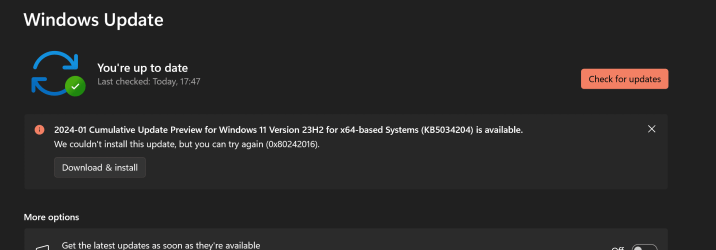
1706301720296.png
 

My Computer My Computer

At a glance

Windows 11 Home13980HX64GBRTX 4080m
OS
Windows 11 Home
Computer type
Laptop
Manufacturer/Model
MSI GT77
CPU
13980HX
Memory
64GB
Graphics Card(s)
RTX 4080m
Monitor(s) Displays
Built in
Screen Resolution
4k
Browser
Floorp
Antivirus
Kaspersky

My Computer My Computer

At a glance

W11
OS
W11
Computer type
PC/Desktop
Manufacturer/Model
2 HP Desktops, 1 Dell Desktop, 2 Dell XPS Laptops, 1 HP Laptop
Keyboard
Logitech
Mouse
Logitech MX Master 4 & 3
Internet Speed
500 mps
Browser
Firefox
Antivirus
Bitdefender
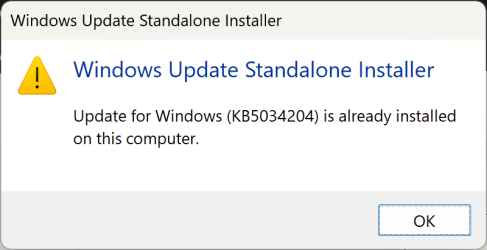
I have downloaded but getting this message:
1706306477470.png
 

My Computer My Computer

At a glance

Windows 11 Home13980HX64GBRTX 4080m
OS
Windows 11 Home
Computer type
Laptop
Manufacturer/Model
MSI GT77
CPU
13980HX
Memory
64GB
Graphics Card(s)
RTX 4080m
Monitor(s) Displays
Built in
Screen Resolution
4k
Browser
Floorp
Antivirus
Kaspersky
Okay, let's try this. In Windows Update, click on Update History. Then, next to the update in question click on Learn More. Scroll to the bottom, uninstall the update, then try to manually install.
 

My Computer My Computer

At a glance

W11
OS
W11
Computer type
PC/Desktop
Manufacturer/Model
2 HP Desktops, 1 Dell Desktop, 2 Dell XPS Laptops, 1 HP Laptop
Keyboard
Logitech
Mouse
Logitech MX Master 4 & 3
Internet Speed
500 mps
Browser
Firefox
Antivirus
Bitdefender
Run troubleshooter Settings>system>troubleshoot>other troubleshooter>windows update>run


My Computers My Computers

  • At a glance

    Windows 11 Pro 25H2 26200.8655i9-10900 10 core 20 threads32 gbnone-Intel UHD Graphics 630
    OS
    Windows 11 Pro 25H2 26200.8655
    Computer type
    PC/Desktop
    Manufacturer/Model
    Dell Optiplex 7080
    CPU
    i9-10900 10 core 20 threads
    Motherboard
    DELL 0J37VM
    Memory
    32 gb
    Graphics Card(s)
    none-Intel UHD Graphics 630
    Sound Card
    Integrated Realtek
    Monitor(s) Displays
    Benq 27
    Screen Resolution
    2560x1440
    Hard Drives
    2x1tb Solidigm m.2 nvme /External drives 512gb Samsung m.2 sata+2tb Kingston m2.nvme
    PSU
    500w
    Case
    MT
    Cooling
    Dell Premium
    Keyboard
    Logitech wired
    Mouse
    Logitech wireless
    Internet Speed
    so slow I'm too embarrassed to tell
    Browser
    #1 Edge #2 Firefox
    Antivirus
    Defender+MWB Premium
  • At a glance

    Windows 11 Pro 24H2 26200.8457AMD Ryzen 7 6800U32 gbintegrated
    Operating System
    Windows 11 Pro 24H2 26200.8457
    Computer type
    PC/Desktop
    Manufacturer/Model
    Beelink Mini PC SER5
    CPU
    AMD Ryzen 7 6800U
    Memory
    32 gb
    Graphics card(s)
    integrated
    Sound Card
    integrated
    Monitor(s) Displays
    Benq 27
    Screen Resolution
    2560x1440
    Hard Drives
    1TB Crucial nvme
    Keyboard
    Logitech wired
    Mouse
    Logitech wireless
    Internet Speed
    still too embarrassed to tell
    Browser
    Firefox
    Antivirus
    Defender
    Other Info
    System 3 is non compliant Dell 9020 i7-4770/24gb ram Win11 PRO 26200.8457
Okay, let's try this. In Windows Update, click on Update History. Then, next to the update in question click on Learn More. Scroll to the bottom, uninstall the update, then try to manually install.
Tried and still failed, was getting this:
1706309567772.png
My update history:
1706309615774.png
But at least it's not showing up anymore as pending restart or install.

Edit: auto refresh and update is back, might just leave it at this rate.
 

My Computer My Computer

At a glance

Windows 11 Home13980HX64GBRTX 4080m
OS
Windows 11 Home
Computer type
Laptop
Manufacturer/Model
MSI GT77
CPU
13980HX
Memory
64GB
Graphics Card(s)
RTX 4080m
Monitor(s) Displays
Built in
Screen Resolution
4k
Browser
Floorp
Antivirus
Kaspersky
Here's the flow chart I always I use if I encounter WU problems. One of these suggestions always works. (Sometimes, if I'm frustrated I'll end up doing all of them with a repair install the last resort. You hurt nothing by doing so).

1. Verify there are no corrupt system files going into the update.
Open a command prompt as administrator and type sfc /scannow
Pay attention to the scan results to see if SFC found anything it could not repair. If it found corruption it could not fix followup with this command (note the spaces)
dism /online /cleanup-image /restorehealth
Restart computer
(Note-you can follow up with another sfc /scannow command to make sure that dism repaired the files)

2.run troubleshooter-settings-system-troubleshoot-other troubleshooters-windows update-RUN.

3. Reset WU as noted above in post #5
Reset Windows Update in Windows 11 Tutorial

4. CLEAN UP COMPONENT STORE - dism /online /cleanup-image /startcomponentcleanup
5. Disable all third party AV completely, including Malwarebytes .. Make sure no instance is runniing in task manager.
Try the update again.

6. If it still fails, do a repair install of windows Repair Install Windows 11 with an In-place Upgrade Tutorial
 

My Computers My Computers

  • At a glance

    Windows 11 Pro 25H2 26200.8655i9-10900 10 core 20 threads32 gbnone-Intel UHD Graphics 630
    OS
    Windows 11 Pro 25H2 26200.8655
    Computer type
    PC/Desktop
    Manufacturer/Model
    Dell Optiplex 7080
    CPU
    i9-10900 10 core 20 threads
    Motherboard
    DELL 0J37VM
    Memory
    32 gb
    Graphics Card(s)
    none-Intel UHD Graphics 630
    Sound Card
    Integrated Realtek
    Monitor(s) Displays
    Benq 27
    Screen Resolution
    2560x1440
    Hard Drives
    2x1tb Solidigm m.2 nvme /External drives 512gb Samsung m.2 sata+2tb Kingston m2.nvme
    PSU
    500w
    Case
    MT
    Cooling
    Dell Premium
    Keyboard
    Logitech wired
    Mouse
    Logitech wireless
    Internet Speed
    so slow I'm too embarrassed to tell
    Browser
    #1 Edge #2 Firefox
    Antivirus
    Defender+MWB Premium
  • At a glance

    Windows 11 Pro 24H2 26200.8457AMD Ryzen 7 6800U32 gbintegrated
    Operating System
    Windows 11 Pro 24H2 26200.8457
    Computer type
    PC/Desktop
    Manufacturer/Model
    Beelink Mini PC SER5
    CPU
    AMD Ryzen 7 6800U
    Memory
    32 gb
    Graphics card(s)
    integrated
    Sound Card
    integrated
    Monitor(s) Displays
    Benq 27
    Screen Resolution
    2560x1440
    Hard Drives
    1TB Crucial nvme
    Keyboard
    Logitech wired
    Mouse
    Logitech wireless
    Internet Speed
    still too embarrassed to tell
    Browser
    Firefox
    Antivirus
    Defender
    Other Info
    System 3 is non compliant Dell 9020 i7-4770/24gb ram Win11 PRO 26200.8457
I assume that you are able to use the computer normally other than this annoyance? If so then consider that it is only a 'Preview' type update so not worth the hassle. If it were a security update then yes it would be a concern. I would just forget it and wait until the next Patch Tuesday (13th February) update. I imagine that update will install okay but if it doesn't then I would be concerned. Good luck.
 

My Computers My Computers

  • At a glance

    Windows 11 ProAMD Ryzen 9 8945HS32GB DDR5 SO-DIMMIntegrated AMD Radeon 780M (4.00 GHz)
    OS
    Windows 11 Pro
    Computer type
    PC/Desktop
    Manufacturer/Model
    GMKtec K11
    CPU
    AMD Ryzen 9 8945HS
    Memory
    32GB DDR5 SO-DIMM
    Graphics Card(s)
    Integrated AMD Radeon 780M (4.00 GHz)
    Monitor(s) Displays
    Benq 2250HM
    Screen Resolution
    1920 x 1080
    Hard Drives
    1 TB PCIe 4.0 NVMe M.2 SSD
  • At a glance

    Windows 11 HomeIntel® Core™ Ultra 7 - 255H processor16 GB LPDDR5 SDRAMIntel Arc 140T onboard graphics
    Operating System
    Windows 11 Home
    Computer type
    Laptop
    Manufacturer/Model
    ASUS Zenbook 14 OLED 14" Laptop - UX3405CA-QL192W
    CPU
    Intel® Core™ Ultra 7 - 255H processor
    Memory
    16 GB LPDDR5 SDRAM
    Graphics card(s)
    Intel Arc 140T onboard graphics
    Screen Resolution
    1920 x 1200 (16:10 WUXGA resolution) OLED Touchscreen
    Hard Drives
    1TB SSD
I assume that you are able to use the computer normally other than this annoyance? If so then consider that it is only a 'Preview' type update so not worth the hassle. If it were a security update then yes it would be a concern. I would just forget it and wait until the next Patch Tuesday (13th February) update. I imagine that update will install okay but if it doesn't then I would be concerned. Good luck.
Yes laptop is running normally so I will ignore for the moment, saw in Reddit other people are having the same problem.

@glasskuter will look at those options if update is important as suggested by @wiganken
 

My Computer My Computer

At a glance

Windows 11 Home13980HX64GBRTX 4080m
OS
Windows 11 Home
Computer type
Laptop
Manufacturer/Model
MSI GT77
CPU
13980HX
Memory
64GB
Graphics Card(s)
RTX 4080m
Monitor(s) Displays
Built in
Screen Resolution
4k
Browser
Floorp
Antivirus
Kaspersky
I assume that you are able to use the computer normally other than this annoyance? If so then consider that it is only a 'Preview' type update so not worth the hassle. If it were a security update then yes it would be a concern. I would just forget it and wait until the next Patch Tuesday (13th February) update. I imagine that update will install okay but if it doesn't then I would be concerned. Good luck.
The 'preview' has disappeared now and my security updates have installed but stuck with the cumulative ones not updating, goes through the usual route 'something went wrong' and 'something didn't go as planned. no need to worry-undoing changes'.
 

My Computer My Computer

At a glance

Windows 11 Home13980HX64GBRTX 4080m
OS
Windows 11 Home
Computer type
Laptop
Manufacturer/Model
MSI GT77
CPU
13980HX
Memory
64GB
Graphics Card(s)
RTX 4080m
Monitor(s) Displays
Built in
Screen Resolution
4k
Browser
Floorp
Antivirus
Kaspersky
A repair install should take care of it.
 

My Computers My Computers

  • At a glance

    Windows 11 Pro 25H2 26200.8655i9-10900 10 core 20 threads32 gbnone-Intel UHD Graphics 630
    OS
    Windows 11 Pro 25H2 26200.8655
    Computer type
    PC/Desktop
    Manufacturer/Model
    Dell Optiplex 7080
    CPU
    i9-10900 10 core 20 threads
    Motherboard
    DELL 0J37VM
    Memory
    32 gb
    Graphics Card(s)
    none-Intel UHD Graphics 630
    Sound Card
    Integrated Realtek
    Monitor(s) Displays
    Benq 27
    Screen Resolution
    2560x1440
    Hard Drives
    2x1tb Solidigm m.2 nvme /External drives 512gb Samsung m.2 sata+2tb Kingston m2.nvme
    PSU
    500w
    Case
    MT
    Cooling
    Dell Premium
    Keyboard
    Logitech wired
    Mouse
    Logitech wireless
    Internet Speed
    so slow I'm too embarrassed to tell
    Browser
    #1 Edge #2 Firefox
    Antivirus
    Defender+MWB Premium
  • At a glance

    Windows 11 Pro 24H2 26200.8457AMD Ryzen 7 6800U32 gbintegrated
    Operating System
    Windows 11 Pro 24H2 26200.8457
    Computer type
    PC/Desktop
    Manufacturer/Model
    Beelink Mini PC SER5
    CPU
    AMD Ryzen 7 6800U
    Memory
    32 gb
    Graphics card(s)
    integrated
    Sound Card
    integrated
    Monitor(s) Displays
    Benq 27
    Screen Resolution
    2560x1440
    Hard Drives
    1TB Crucial nvme
    Keyboard
    Logitech wired
    Mouse
    Logitech wireless
    Internet Speed
    still too embarrassed to tell
    Browser
    Firefox
    Antivirus
    Defender
    Other Info
    System 3 is non compliant Dell 9020 i7-4770/24gb ram Win11 PRO 26200.8457
Does that wipe my current set up?
 

My Computer My Computer

At a glance

Windows 11 Home13980HX64GBRTX 4080m
OS
Windows 11 Home
Computer type
Laptop
Manufacturer/Model
MSI GT77
CPU
13980HX
Memory
64GB
Graphics Card(s)
RTX 4080m
Monitor(s) Displays
Built in
Screen Resolution
4k
Browser
Floorp
Antivirus
Kaspersky
Does that wipe my current set up?
No, you'll be doing an in-place upgrade which is effectively a repair install but I doubt it will make a difference. You'll want to check your CBS log(s) to see what the rollback reason was, you can find them under: %systemroot%\Logs\CBS.
 

My Computer My Computer

At a glance

Windows 11, Windows 10, Linux Fedora Cinnamon
OS
Windows 11, Windows 10, Linux Fedora Cinnamon

My Computer My Computer

At a glance

Windows 11 Home13980HX64GBRTX 4080m
OS
Windows 11 Home
Computer type
Laptop
Manufacturer/Model
MSI GT77
CPU
13980HX
Memory
64GB
Graphics Card(s)
RTX 4080m
Monitor(s) Displays
Built in
Screen Resolution
4k
Browser
Floorp
Antivirus
Kaspersky
Thanks, could you please amend the access rights to that file so it is public? I don't really want to have to expose my personal email address.
 

My Computer My Computer

At a glance

Windows 11, Windows 10, Linux Fedora Cinnamon
OS
Windows 11, Windows 10, Linux Fedora Cinnamon
Last edited:

My Computer My Computer

At a glance

Windows 11 Home13980HX64GBRTX 4080m
OS
Windows 11 Home
Computer type
Laptop
Manufacturer/Model
MSI GT77
CPU
13980HX
Memory
64GB
Graphics Card(s)
RTX 4080m
Monitor(s) Displays
Built in
Screen Resolution
4k
Browser
Floorp
Antivirus
Kaspersky
Rich (BB code):
2024-02-14 22:27:18, Info                  CSI    00000b70 Begin executing advanced installer phase 31 index 0 (sequence 0)
    Old component: [l:0]''
    New component: [l:0]''
    Install mode: delta
    Smart installer: true
    Installer ID: {c5f0e9d7-e844-4507-89e4-701b5a747221}
    Installer name: 'Boot File Servicing (BFSVC) Installer'
2024-02-14 22:27:18, Info                  CSI    00000b71 BFSVC: 'ServiceBootFiles MuiOnly:n Res:n Fonts:n BootMgrOvw:n BootStatOvw:n DbgTrn:n SuspendBDE:n'

2024-02-14 22:27:18, Info                  CSI    00000b72 BFSVC: 'Failed to get partition name. Status = 0xc0000452'

2024-02-14 22:27:18, Info                  CSI    00000b73 BFSVC: 'Failed to get system partition! Last Error = 0x3bc3'

2024-02-14 22:27:18, Info                  CSI    00000b74 BFSVC: 'ServicingBootFiles failed. Error = 0x3bc3'

2024-02-14 22:27:18, Error                 CSI    00000b75@2024/2/14:22:27:18.940 (F) onecore\base\wcp\plugins\bfsvcai\bfsvcai.cpp(501): Error HRESULT_FROM_WIN32(15299) originated in function Windows::WCP::WCF::BfsvcInstaller::CommitChanges expression: Result
[gle=0x80004005]

It looks like your EFI System partition may be missing, could you please open an elevated command prompt and enter the following commands:

Rich (BB code):
diskpart
list disk
select disk #
list partition
list volume

You'll need to replace # with the number where your Windows installation resides.
 

My Computer My Computer

At a glance

Windows 11, Windows 10, Linux Fedora Cinnamon
OS
Windows 11, Windows 10, Linux Fedora Cinnamon
@x BlueRobot thank you for getting back to me, it was suggested that I do a clean install which I did and the partitions are back.
 

My Computer My Computer

At a glance

Windows 11 Home13980HX64GBRTX 4080m
OS
Windows 11 Home
Computer type
Laptop
Manufacturer/Model
MSI GT77
CPU
13980HX
Memory
64GB
Graphics Card(s)
RTX 4080m
Monitor(s) Displays
Built in
Screen Resolution
4k
Browser
Floorp
Antivirus
Kaspersky
Okay, you could have rebuild them without doing a clean install but at least you shouldn't have any other problems going forward.
 

My Computer My Computer

At a glance

Windows 11, Windows 10, Linux Fedora Cinnamon
OS
Windows 11, Windows 10, Linux Fedora Cinnamon
I will keep that in mind next time as I'm sure it'll happen again.
 

My Computer My Computer

At a glance

Windows 11 Home13980HX64GBRTX 4080m
OS
Windows 11 Home
Computer type
Laptop
Manufacturer/Model
MSI GT77
CPU
13980HX
Memory
64GB
Graphics Card(s)
RTX 4080m
Monitor(s) Displays
Built in
Screen Resolution
4k
Browser
Floorp
Antivirus
Kaspersky
Back
Top Bottom