(KB5077181)(26200.7840) 0x80070005 access denied


rvcjew

Member
Member
Local time
12:53 PM
Posts
4
OS
Win 11 x64 25H2
My Windows Version: 25H2 26200.7623

Hi, I have been fine installing most updates on system 1 in my profile, but this one has been a hurdle with it installing but then in the final phase it says something went wrong and it rolls back with the following error 0x80070005. Looking in the CBS log it shows that error on multiple registry entries it's trying to access, as well as the error when running Brinks win-update reset bat it will get access denied when doing the registry part. I also can't run the Update troubleshooter as it says it cant be ran and to talk to an agent which it can't get an agent either.

I am wondering if MBAM or ESET NOD 32 AV is not allowing those sections to be accessed but I have turned all of that off and it has made no difference in the outcome and they have never been an issue before.

What would be the best steps to take to try to fix this, also as the nuke option if I do an in-place upgrade will that not change my SID and mess up a bunch of software licenses as well reset a bunch of settings?

Perhaps it is time I refresh this machine as it has been carried over though many HW changes at this point (as well as 10 1909 through 11 25H2) and I would imagine the OS has a lot of config issues at this point I have just not found yet.

Thanks.
Malcolm
 
Windows Build/Version
25H2 26200.7623

My Computer

System One

  • OS
    Win 11 x64 25H2
    Computer type
    PC/Desktop
    CPU
    5950X
    Motherboard
    ASUS B550i Strix
    Memory
    64GB 2x32GB LPX DDR4 3600
    Graphics Card(s)
    EVGA 3080 FTW3
    Sound Card
    USB-Topping D50 iii
    Monitor(s) Displays
    3x 1440p (2x PB278q, 1x PG278q)
    Screen Resolution
    1440p
    Hard Drives
    1TB 970 EVO
    4TB 870 EVO
    PSU
    Corsair SF750 Gen 4
    Case
    Formd T1 2.1
    Cooling
    240 Atmos w/ 2x A12x25G2
    Antivirus
    MBAM+NOD 32
Are you running as a "user" or as an Administrator? It looks like you are lacking permissions.
 

My Computers

System One System Two

  • OS
    Windows 11 Home 25H2 26200.8524
    Computer type
    PC/Desktop
    Manufacturer/Model
    HP Pavilion TP01-2xxx
    CPU
    AMD Ryzen 3 5300G
    Memory
    8gb
    Graphics Card(s)
    Radeon Graphics 4.00GHZ
    Monitor(s) Displays
    ViewSonic
    Keyboard
    HP
    Mouse
    wireless Microsoft
    Browser
    FireFox
    Antivirus
    Avira
  • Operating System
    Updated Windows 10 to 11 25H2 26200.8524
    Computer type
    PC/Desktop
    Manufacturer/Model
    HP
    CPU
    Intel Core i3 8100 @3.60 GHz
    Motherboard
    HP 8653 (U3E1)
    Memory
    8.GB
    Graphics card(s)
    Intel UHD 360 (HP)
    Sound Card
    Realtek High Def
    Monitor(s) Displays
    ViewSonic
    Other Info
    #3 System: HP laptop Windows 25H2 11Pro 26200.7840
Are you running as a "user" or as an Administrator? It looks like you are lacking permissions.
I'm the only one in the administrators group, only a Quickbooks database user is in the users group so yes I am. That's why I'm confused. Its like some inheritance is screwed up somewhere.
 

My Computer

System One

  • OS
    Win 11 x64 25H2
    Computer type
    PC/Desktop
    CPU
    5950X
    Motherboard
    ASUS B550i Strix
    Memory
    64GB 2x32GB LPX DDR4 3600
    Graphics Card(s)
    EVGA 3080 FTW3
    Sound Card
    USB-Topping D50 iii
    Monitor(s) Displays
    3x 1440p (2x PB278q, 1x PG278q)
    Screen Resolution
    1440p
    Hard Drives
    1TB 970 EVO
    4TB 870 EVO
    PSU
    Corsair SF750 Gen 4
    Case
    Formd T1 2.1
    Cooling
    240 Atmos w/ 2x A12x25G2
    Antivirus
    MBAM+NOD 32
You can temporarily disable your antivirus applications and retry.

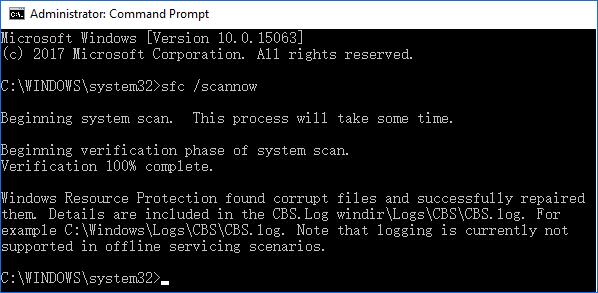
Press Windows + X keys to bring up a menu and click "Command Prompt (Admin)".
On the Command Prompt window, type sfc /scannow and press Enter.


run sfc scan
 

My Computers

System One System Two

  • OS
    Windows 11 Home 25H2 26200.8524
    Computer type
    PC/Desktop
    Manufacturer/Model
    HP Pavilion TP01-2xxx
    CPU
    AMD Ryzen 3 5300G
    Memory
    8gb
    Graphics Card(s)
    Radeon Graphics 4.00GHZ
    Monitor(s) Displays
    ViewSonic
    Keyboard
    HP
    Mouse
    wireless Microsoft
    Browser
    FireFox
    Antivirus
    Avira
  • Operating System
    Updated Windows 10 to 11 25H2 26200.8524
    Computer type
    PC/Desktop
    Manufacturer/Model
    HP
    CPU
    Intel Core i3 8100 @3.60 GHz
    Motherboard
    HP 8653 (U3E1)
    Memory
    8.GB
    Graphics card(s)
    Intel UHD 360 (HP)
    Sound Card
    Realtek High Def
    Monitor(s) Displays
    ViewSonic
    Other Info
    #3 System: HP laptop Windows 25H2 11Pro 26200.7840
Disable or uninstall any 3rd party antivirus
Disable fast boot via power options
Try the in-place upgrade again.

Perhaps it is time I refresh this machine as it has been carried over though many HW changes at this point (as well as 10 1909 through 11 25H2) and I would imagine the OS has a lot of config issues at this point I have just not found yet.

That would be a kindness, PC’s love a fresh start.
 

My Computers

System One System Two

  • OS
    Windows 11 Pro 25H2 Build 26200.8524
    Computer type
    PC/Desktop
    Manufacturer/Model
    Sin-built 2013
    CPU
    Intel(R) Core(TM) i7-4770K CPU @ 3.50GHz
    Motherboard
    ASUS ROG Maximus VI Formula
    Memory
    32.0 GB of I forget and the box is in storage.
    Graphics Card(s)
    Gigabyte nVidia GeForce GTX 1660 Super OC 6GB
    Sound Card
    Onboard thingy
    Monitor(s) Displays
    5 x LG 25MS500-B - 1 x 24MK430H-B - 1 x Wacom Pro 22" Touch Screen Tablet
    Screen Resolution
    All over the place
    Hard Drives
    Too many to list.
    OS on Samsung 1TB 870 QVO SATA
    PSU
    Silverstone 1500
    Case
    NZXT Phantom 820 Full-Tower Case
    Cooling
    Noctua NH-D15 Elite Class Dual Tower CPU Cooler / 6 x EziDIY 120mm / 2 x Corsair 140mm somethings / 1 x 140mm Thermaltake something / 2 x 200mm Corsair.
    Keyboard
    Corsair K95 / Logitech diNovo Edge Wireless
    Mouse
    Logitech: G402 / G502 / Mx Masters / Mx Air Cordless
    Internet Speed
    2000/500Mbps
    Browser
    All sorts
    Antivirus
    Kaspersky Premium
    Other Info
    ㅤㅤㅤㅤㅤㅤㅤㅤㅤㅤㅤㅤㅤㅤㅤㅤㅤㅤㅤㅤㅤㅤㅤㅤㅤㅤㅤㅤㅤㅤㅤㅤㅤㅤㅤㅤㅤㅤㅤㅤ⠀⠀⠀⠀⠀⠀⠀⠀⠀⠀
    TP-Link BE9300 WiFi 7 Bluetooth 5.4 (Archer TBE550E)
    TP-Link TX201 V1 2.5GB Lan

    Grandstream HT812 - VoIP
    ASUS DSL-AX82U - Mesh
    ASUS RT-AC68U - Mesh
    ASUS RT-BE88U Router

    Brother MFC-L2880DW Printer

    I’m on a horse.
  • Operating System
    Windows 11 Pro 25H2 Build 26200.8524
    Computer type
    Laptop
    Manufacturer/Model
    LENOVO Yoga 7 14IRL8 - 7i EVO OLED 14" Touchscreen i5 12 Core 16GB/512GB
    CPU
    Intel Core 12th Gen i5-1240P Processor (1.7 - 4.4GHz)
    Memory
    16GB LPDDR5 RAM
    Graphics card(s)
    Intel Iris Xe Graphics Processor
    Sound Card
    Optimized with Dolby Atmos®
    Screen Resolution
    QHD 2880 x 1800 OLED
    Hard Drives
    M.2 512GB
    Antivirus
    Defender / Malwarebytes
    Other Info
    …still on a horse.
Had to uninstall on my ultrabook. Was triggering a boot loop when I tried to install the latest Feb. 24 update.
 

My Computers

System One System Two

  • OS
    Windows 11 Education For 25H2
    Computer type
    Laptop
    Manufacturer/Model
    HP ZBook G2
    CPU
    Intel® Core i7 5500u
    Motherboard
    HP
    Memory
    8 GB
    Graphics Card(s)
    Intel HD Family Graphics 5500 AMD Firepro 4150M
    Sound Card
    Realtek High Audio
    Hard Drives
    1 TB SSD
    Mouse
    HP USB Mouse
    Antivirus
    Windows Defender
  • Operating System
    Windows 11 Pro For Workstations 25H2
    Computer type
    Laptop
    Manufacturer/Model
    HP Zbook G4
    CPU
    Xeon 1535m v6
    Motherboard
    HP
    Memory
    32 GB
    Graphics card(s)
    AMD Quadro Pro 4100
    Sound Card
    Bang and Olufson Audio
    Hard Drives
    1TB SSD
    Mouse
    HP USB Mouse
    Antivirus
    Windows Defender
Back
Top Bottom