Win Update KB5086672 Windows 11 Out-of-band Update build 26100.8117 (24H2) and 26200.8117 (25H2) - March 31


UPDATE 4/14:


 Microsoft Support:

March 31, 2026 - KB5086672 (OS Builds 26200.8117 and 26100.8117) Out-of-band​

This out-of-band update for Windows 11, version 25H2 and 24H2 (KB5086672) is cumulative and includes updates from previous security and non-security releases.

This update includes the improvements and features that were introduced in the March 26, 2026 non-security preview update (KB5079391), along with a fix for an installation issue that affected some devices attempting to install that update.

Improvements

This out-of-band update contains quality improvements from KB5079473 (released March 10, 2026), KB5085516 (released March 21, 2026), and KB5079391 (released March 26, 2026 - no longer offered). The following summary outlines key issues addressed by this out-of-band update. The bold text within the brackets indicates the item or area of the change.
  • [Setup] Fixed: While installing the March 2026 Windows preview update (KB5079391), some devices running Windows 11, version 25H2 or 24H2, might encounter the following error:

    Some update files are missing or have problems. We'll try to download the update again later. Error code: (0x80073712)
This out-of-band update is offered through Windows Update for devices running Windows 11 that have already installed KB5079473 or a later update. It is also available for manual download from the Microsoft Update Catalog.

Devices that have Get the latest updates as soon as they’re available turned on may see this update offered automatically through Windows Update when it becomes available for their device. If this setting is turned off, you can install the update manually by going to Settings > Windows Update and selecting Download & install.

Note: IT administrators using Microsoft Intune or Windows Autopatch should follow the guidance below for installing the out-of-band update via Windows Update.

AI Components

This release updates the following AI components:

AI Component​
Version​
Image Search1.2603.377.0
Content Extraction1.2603.377.0
Semantic Analysis1.2603.377.0
Settings Model1.2603.377.0

Windows 11 servicing stack update (KB5079387)- 26100.8112

This update makes quality improvements to the servicing stack, which is the component that installs Windows updates. Servicing stack updates (SSU) ensure that you have a robust and reliable servicing stack so that your devices can receive and install Microsoft updates. To learn more about SSUs, see Simplifying on-premises deployment of servicing stack updates.

Known issues in this update

Microsoft is not currently aware of any issues with this update.

How to get this update

Before you install this update

Microsoft combines the latest servicing stack update (SSU) for your operating system with the latest cumulative update (LCU). For general information about SSUs, see Servicing stack updates.

Install this update

To install this update, use one of the following Windows and Microsoft release channels.

Available​
Next Step​
Included
Open Start > Settings > Windows Update. > Advanced options > Optional updates. In the Optional updates available area, you will find the link to download and install available updates.

Check for optional updates
Included
To install this release from the Microsoft Update Catalog, select the option that matches your device architecture (arm64 or x64), and then follow the instructions.

If you want to remove the LCU

Before you decide to remove the LCU, see Understanding the risks: Why you should not uninstall security updates.

To remove the LCU after installing the combined SSU and LCU package, use the DISM/Remove-Package command line option with the LCU package name as the argument. You can find the package name by using this command: DISM /online /get-packages.

Running Windows Update Standalone Installer (wusa.exe) with the /uninstall switch on the combined package will not work because the combined package contains the SSU. You cannot remove the SSU from the system after installation.

File information

For a list of the files provided in this update, download the file information for out-of-band update 5086672.

For a list of the files provided in the servicing stack update, download the file information for the SSU (KB5079387) - version 26100.8112.


 Source:


Check Windows Updates


UUP Dump:

64-bit ISO download:

ARM64 ISO download:

 
Last edited:

My Computer My Computer

At a glance

Windows 11 Pro 25H2 (RP channel)AMD Ryzen 7 9800X3D 8-core64GB Corsair Titanium 6000/CL30MSI Suprim 5080 SOC
OS
Windows 11 Pro 25H2 (RP channel)
Computer type
PC/Desktop
Manufacturer/Model
MSI
CPU
AMD Ryzen 7 9800X3D 8-core
Motherboard
MEG X870E Godlike
Memory
64GB Corsair Titanium 6000/CL30
Graphics Card(s)
MSI Suprim 5080 SOC
Sound Card
Soundblaster AE-9
Monitor(s) Displays
ASUS TUF Gaming VG289Q
Screen Resolution
3840x2160
Hard Drives
Samsung 9100 Pro 4TB (gen 5 x4, system drive/games)
Samsung 990 Pro 2TB
Samsung 980 Pro 2TB
Samsung 870 Evo 4TB
Samsung 870 Evo 2TB
Samsung T9 4TB
PSU
Seasonic PX-2200
Case
Bequiet! Dark Base Pro 901
Cooling
Noctua NH-D15S Chromax black
Keyboard
Logitech G915 X (wired)
Mouse
Logitech G903 with PowerPlay charger
Internet Speed
900Mb/sec
Browser
Microsoft Edge
Antivirus
Windows Defender
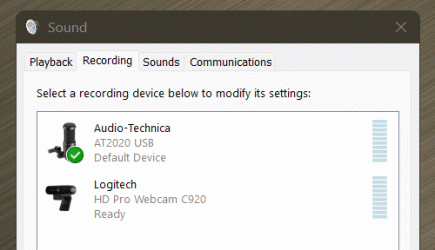
Hmm... I haven't checked the microphone on my laptop since that update, maybe I should! :unsure:
 

My Computers My Computers

  • At a glance

    Win 11 Pro 25H2, Build 26200.8737Intel Core i5 1450064GB DDR4GeForce RTX 4060
    OS
    Win 11 Pro 25H2, Build 26200.8737
    Computer type
    PC/Desktop
    Manufacturer/Model
    Home Brew
    CPU
    Intel Core i5 14500
    Motherboard
    Gigabyte B760M G P WIFI
    Memory
    64GB DDR4
    Graphics Card(s)
    GeForce RTX 4060
    Sound Card
    Chipset Realtek
    Monitor(s) Displays
    LG 45" Ultragear, Acer 24" 1080p
    Screen Resolution
    5120x1440, 1920x1080
    Hard Drives
    Crucial P310 2TB 2280 PCIe Gen4 3D NAND NVMe M.2 SSD (O/S)
    Silicon Power 2TB US75 NVMe PCIe Gen4 M.2 2280 SSD (backup)
    Crucial BX500 2TB 3D NAND (2nd backup)
    Seagate 4TB Ironwolf, rotating HDD archive files
    External off-line backup Drives: 2 NVMe 4TB drives in external enclosures
    PSU
    Thermaltake Toughpower GF3 750W
    Case
    LIAN LI LANCOOL 216 E-ATX PC Case
    Cooling
    Lots of fans!
    Keyboard
    Microsoft Comfort Curve 2000
    Mouse
    Logitech G305
    Internet Speed
    Verizon FiOS 1GB
    Browser
    Firefox
    Antivirus
    Malware Bytes & Windows Defender Security
  • At a glance

    Win 11 Pro 25H2, Build 26200.8655Intel Core i5 1440032GB DDR5Intel 700 Embedded GPU
    Operating System
    Win 11 Pro 25H2, Build 26200.8655
    Computer type
    PC/Desktop
    Manufacturer/Model
    Home Brew
    CPU
    Intel Core i5 14400
    Motherboard
    Gigabyte B760M DS3H AX
    Memory
    32GB DDR5
    Graphics card(s)
    Intel 700 Embedded GPU
    Sound Card
    Realtek Embedded
    Monitor(s) Displays
    27" HP 1080p
    Screen Resolution
    1920x1080
    Hard Drives
    Crucial P310 2TB 2280 PCIe Gen4 eD NAND PCIe SSD
    Samsung EVO 990 2TB NVMe Gen4 SSD
    Samsung 2TB SATA SSD
    PSU
    Thermaltake Smart BM3 650W
    Case
    Okinos Micro ATX Case
    Cooling
    Fans
    Keyboard
    Microsoft Comfort Curve 2000
    Mouse
    Logitech G305
    Internet Speed
    Verizon FiOS 1GB
    Browser
    Firefox
    Antivirus
    Malware Bytes & Windows Defender Security
  • Nimo N171 17" Laptop, (Intel i3-1215U, 16GB RAM, 2TB NVMe, Win11 Pro)
    Acemagic Vista Mini PC V1 (Intel N150, 16GB RAM, 1TB NVMe, Win11 Pro)
    HP ENVY h8-1540t, (24GB RAM, 2TB SSD, 2TB HDD, Win11 Pro)

My Computers My Computers

  • At a glance

    Windows 11 Pro
    OS
    Windows 11 Pro
    Computer type
    PC/Desktop
    Manufacturer/Model
    ASUS ROG Strix
  • At a glance

    Windows 11 Pro
    Operating System
    Windows 11 Pro
    Computer type
    Laptop
    Manufacturer/Model
    ASUS VivoBook
  • ASUS VivoBook 'Lite' ~ Windows 11 Home
I got the Microsoft Corporation AudioProcessingObject driver for the desktop computer. It has a microphone jack connected to the motherboard, maybe that's why.
 

My Computer My Computer

At a glance

windows 11
OS
windows 11
I got the Microsoft Corporation AudioProcessingObject driver for the desktop computer. It has a microphone jack connected to the motherboard, maybe that's why.
The majority of ATX (-equivalent) boards have 3.5mm / 1/8" headphone / microphone jacks, including mine, yet I never got this update.

Maybe because Microsoft knows I'm using an external interface with its own driver? I dunno.
 

My Computer My Computer

At a glance

Windows 11 Pro 25H2AMD Ryzen 9 3950X64 GB DDR4-3600 CL18 (2x32 GB)MSI Ventus RTX 2060 Super
OS
Windows 11 Pro 25H2
Computer type
PC/Desktop
Manufacturer/Model
custom
CPU
AMD Ryzen 9 3950X
Motherboard
ASUS ROG Strix X570-E (first gen)
Memory
64 GB DDR4-3600 CL18 (2x32 GB)
Graphics Card(s)
MSI Ventus RTX 2060 Super
Sound Card
Audient iD4 Mk.I
Monitor(s) Displays
2x AOC 24G1 / 1x XP-Pen Artist Pro 16 Gen 2 2.5K
Screen Resolution
1080p / 2560x1600
Hard Drives
1TB WD/SanDisk SN850X (main) / 2TB Sabrent Rocket 4 / 6TB WD MyBook EE
PSU
Corsair RM850X 850W Gold (2019)
Case
Lian-Li O11-D
Cooling
EKWB EK-AIO 360 RGB
Keyboard
wooting Two HE fullsize
Mouse
some old mouse from an older PC
Internet Speed
Gigabit symmetric (fibre); Bell Fibe
Browser
Firefox
Antivirus
ol' reliable Windows Defender
Other Info
Other peripherals:

- Shure SM7B (Mexico)
- AKG K 240 Studio (calibrated flat)
- PDP FaceOff wired Switch gamepad
On one machine, although this OOB update seemed to install OK, the PC working OK and installing other items OK, some time later the PC seemed to encounter an issue and then wouldn't boot to windows after a restart, without any video. After some restarts with failed attempts the PC entered recovery - I chose uninstall latest quality update and that succeeded in booting to Windows. It was this update that had been removed.

Trying the update again it now wouldn't install - same symptoms with the monitor appearing to switch on/off several times without an image, and then after some restarts the PC enters recovery - but as it's now failing mid-update it automatically removes the update and then boots OK to Windows.

In event viewer there's a bunch of event 14 and 153 on nvlddmkm and BSOD dump files also point to the Nv video driver. Its an older 970 video card.

I've tried some things like an earlier video driver but nothing has any effect. So although the PC did work for some time after first installing the update, now it wont install it.

The fix-all is the in-place repair but I suspect that will add in this update - although the repair process might completely roll back if it fails again I'm not sure what the best thing is to do - such as just wait for the next monthly update.
 

My Computer My Computer

At a glance

Windows 11
OS
Windows 11
this update has caused me a lot of problems and it still won't install properly due to missing files in it. I still wish Microsoft would pull the update even though they're the one causing a major problem for windows users.
 

My Computer My Computer

At a glance

Windows 11 Home 25H2AMD Ryzen 7 7700X-8-Core Processor32GBNvidia Geforce RTX 3060
OS
Windows 11 Home 25H2
Computer type
PC/Desktop
CPU
AMD Ryzen 7 7700X-8-Core Processor
Motherboard
Asus TUF Gaming B650E-E WIFI
Memory
32GB
Graphics Card(s)
Nvidia Geforce RTX 3060
Monitor(s) Displays
Samsung C27RG50
Screen Resolution
1920x1080
Keyboard
ReDragon Surara K582
Mouse
ReDragon Impact M908
Browser
Brave
Antivirus
Bitdefender Total Security
this update has caused me a lot of problems and it still won't install properly due to missing files in it. I still wish Microsoft would pull the update even though they're the one causing a major problem for windows users.
I've noticed that my taskbar intermittently stops working forcing me to hit the windows button to unhide it.
 

My Computers My Computers

  • At a glance

    Windows 11 ProIntel Core i9 14900k, Intel UHD 770 integrated32gb G.Skill Trident Z5 7200Gigabyte RTX 4090 Gaming OC
    OS
    Windows 11 Pro
    Computer type
    PC/Desktop
    Manufacturer/Model
    Self Built
    CPU
    Intel Core i9 14900k, Intel UHD 770 integrated
    Motherboard
    Gigabyte Z790 Aorus Master X
    Memory
    32gb G.Skill Trident Z5 7200
    Graphics Card(s)
    Gigabyte RTX 4090 Gaming OC
    Sound Card
    EVGA Nu Audio, Razer Kraken V3 Pro, Realtek Onboard
    Monitor(s) Displays
    Dell U4025QW nano IPS monitor, Samsung Odyssey G75F, Wisecoco 12.6" IPS sensor panel
    Screen Resolution
    5120X2160 x 2 1920x515
    Hard Drives
    WD Black SN8100, Samsung 990 Pro x 3, WD BLACK SN850x, WD Black 8tb HD
    PSU
    FSP Hydro PTM Pro 1350w
    Case
    Thermaltake Level 20 XT
    Cooling
    ARCTIC Liquid Freezer III 420 ARGB in push/pull, Antec Prism X 120mm ARGB Fans x 15
    Keyboard
    Razer Blackwidow V4 Pro
    Mouse
    Razer Basilik V3 Pro on Razer Firefly V2 mouse pad.
    Internet Speed
    950 Mbps cable primary, 6Mbps secondary vdsl
    Browser
    Chrome primary, FF-Edge-IE secondary
    Antivirus
    Norton 360 Premium
    Other Info
    I sit on a Libernovo Omni chair.😍 Sound by Fosi Audio DA-2120C pushing Magnat Series 503 bookshelf speakers and a SVS SB-1000 Pro subwoofer.
  • At a glance

    Windows 11 ProIntel 14900HX32gb ddr 5 5600Nvidia RTX 4090 mobile
    Operating System
    Windows 11 Pro
    Computer type
    Laptop
    Manufacturer/Model
    2023 Acer Predator Helios 18
    CPU
    Intel 14900HX
    Motherboard
    factory
    Memory
    32gb ddr 5 5600
    Graphics card(s)
    Nvidia RTX 4090 mobile
    Sound Card
    onboard
    Monitor(s) Displays
    18" 250hz IPS
    Screen Resolution
    2560X1600
    Hard Drives
    Samsung 9100 Pro, 990 Pro
    PSU
    factory 330W
    Case
    factory
    Cooling
    factory
    Keyboard
    individual key argb
    Mouse
    touchpad
    Internet Speed
    WiFi 7, 2.5gb ethernet
    Browser
    Chrome primary, FF-IE and Edge secondary
    Antivirus
    Norton 360 Premium
    Other Info
    Acer will not allow WD Black SN8100 to function in m.2 slot 0 and Crucial T710 ssd's to function in either slot.
I've noticed that my taskbar intermittently stops working forcing me to hit the windows button to unhide it.
wow i didn't know that it would do that to a system.
 

My Computer My Computer

At a glance

Windows 11 Home 25H2AMD Ryzen 7 7700X-8-Core Processor32GBNvidia Geforce RTX 3060
OS
Windows 11 Home 25H2
Computer type
PC/Desktop
CPU
AMD Ryzen 7 7700X-8-Core Processor
Motherboard
Asus TUF Gaming B650E-E WIFI
Memory
32GB
Graphics Card(s)
Nvidia Geforce RTX 3060
Monitor(s) Displays
Samsung C27RG50
Screen Resolution
1920x1080
Keyboard
ReDragon Surara K582
Mouse
ReDragon Impact M908
Browser
Brave
Antivirus
Bitdefender Total Security
I've noticed that my taskbar intermittently stops working forcing me to hit the windows button to unhide it.
I am also having the same issue
 

My Computer My Computer

At a glance

Windows 11
OS
Windows 11
Computer type
PC/Desktop
Manufacturer/Model
ASUS
Hmm... I haven't checked the microphone on my laptop since that update, maybe I should! :unsure:
Just checked mine after this update and the mic doesn't seem to be working. Tried with Sound Recorder and built in Web Cam, no noise.
I'm not sure if I've ever tried it before, HP laptop.

EDIT: just opened System>Sound>Properties and turned OFF "Audio Enhancements" was on "Device Default Effects" and then the Mic started working. :-) 🤷‍♂️
 
Last edited:

My Computer My Computer

At a glance

Windows 11 Pro 25H212th Gen Intel(R) Core(TM) i7-1255U (1.70 GHz16.0 GBIntel iRIS Xe
OS
Windows 11 Pro 25H2
Computer type
Laptop
Manufacturer/Model
HP 15s-fq5xxx
CPU
12th Gen Intel(R) Core(TM) i7-1255U (1.70 GHz
Memory
16.0 GB
Graphics Card(s)
Intel iRIS Xe
Screen Resolution
1920 x 1080
Hard Drives
Samsung SSD 512 GB
Mouse
Logitech Pebble
Internet Speed
500/50 Mb/sec
Browser
Chrome
Antivirus
Defender
it still won't install properly due to missing files in it.

I believe that you are mistaken in this. That was the previous build (8116). This build (8117) is no longer missing the files.
 

My Computers My Computers

  • At a glance

    Win11 Pro 25H2 (RTM+)Intel i7-14650HX32 GBNo GPU - Built-in Intel Graphics
    OS
    Win11 Pro 25H2 (RTM+)
    Computer type
    PC/Desktop
    Manufacturer/Model
    Acemagic
    CPU
    Intel i7-14650HX
    Memory
    32 GB
    Graphics Card(s)
    No GPU - Built-in Intel Graphics
    Sound Card
    Integrated
    Monitor(s) Displays
    Varies as machine will often be moved to locations with different monitors
    Screen Resolution
    Varies
    Hard Drives
    1 x 1TB Gen 4 NVMe SSD
    PSU
    120W Power Brick
    Keyboard
    Corsair K70 Max RGB Magnetic Keyboard
    Mouse
    Logitech MX Master 3
    Internet Speed
    1Gb Up / 1 Gb Down
    Browser
    Edge
    Antivirus
    Windows Defender
  • At a glance

    Win11 Pro 25H2 (RTM+)Intel i7-1255U16 GBIntel Iris Xe Graphics
    Operating System
    Win11 Pro 25H2 (RTM+)
    Computer type
    Laptop
    Manufacturer/Model
    Lenovo ThinkBook 13x Gen 2
    CPU
    Intel i7-1255U
    Memory
    16 GB
    Graphics card(s)
    Intel Iris Xe Graphics
    Sound Card
    Realtek® ALC3306-CG codec
    Monitor(s) Displays
    13.3-inch IPS Display
    Screen Resolution
    WQXGA (2560 x 1600)
    Hard Drives
    2 TB 4 x 4 NVMe SSD
    PSU
    USB-C / Thunderbolt 4 Power / Charging
    Keyboard
    Backlit, spill resistant keyboard
    Mouse
    Buttonless Glass Precision Touchpad
    Internet Speed
    1Gb Up / 1Gb Down
    Browser
    Edge
    Antivirus
    Windows Defender
    Other Info
    WiFi 6e / Bluetooth 5.1 / Facial Recognition / Fingerprint Sensor / ToF (Time of Flight) Human Presence Sensor
I believe that you are mistaken in this. That was the previous build (8116). This build (8117) is no longer missing the files.
Then MS fixed it with the 8117.
 

My Computer My Computer

At a glance

Win 11 Insider Release Preview and Beta chann...i5 Core [email protected] (Unsupported for Win 11)12GBGeneric PnP Monitor (1920x1080@60Hz) Intel HD...
OS
Win 11 Insider Release Preview and Beta channels.
Computer type
Laptop
Manufacturer/Model
HP ENVY Bought: March 2017
CPU
i5 Core [email protected] (Unsupported for Win 11)
Motherboard
HP 81AD (U3E1)
Memory
12GB
Graphics Card(s)
Generic PnP Monitor (1920x1080@60Hz) Intel HD Graphics 620 (HP)
Sound Card
Conexant ISST audio
Monitor(s) Displays
Generic PnP Monitor
Screen Resolution
1536x864 pixels
Hard Drives
HGST HTS721010A9E630
PSU
Well...PSU you too!! What's this mean?
Case
HP ENVY SILVER
Cooling
A fan.
Keyboard
USA
Mouse
Logitec Anywhere 2
Internet Speed
Good enough for me! Fast!
Browser
Edge/Waterfox
Antivirus
Windows Defender
Other Info
No 'mo.
The majority of ATX (-equivalent) boards have 3.5mm / 1/8" headphone / microphone jacks, including mine, yet I never got this update.

Maybe because Microsoft knows I'm using an external interface with its own driver? I dunno.
Third-party audio software needs to use Audio Processing Objects (APOs) for this driver to install, I think.

In Device Manager, under Voice Clarity, I looked in Driver Events, and I have a parent device called Micro Star (my MSI motherboard)...OEM.


My Computer My Computer

At a glance

windows 11
OS
windows 11
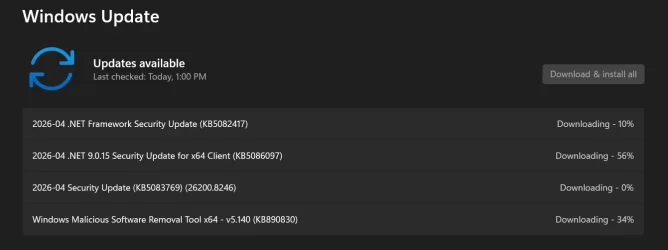
26200.8246 downloading
 

My Computer My Computer

At a glance

Windows 11 Pro 64bit (release preview channel)i5 840016 GB DDR4RTX 3060 Ti
OS
Windows 11 Pro 64bit (release preview channel)
Computer type
PC/Desktop
Manufacturer/Model
Asus
CPU
i5 8400
Motherboard
ROG STRIX Z370-H GAMING
Memory
16 GB DDR4
Graphics Card(s)
RTX 3060 Ti
Sound Card
On Board
Monitor(s) Displays
Acer VG242Y P
Screen Resolution
1080p
Hard Drives
Intel 660p SSD
PSU
800w
Internet Speed
1000 Mbps
same

1776186280864.webp
 

My Computer My Computer

At a glance

Windows 11 25H2AMD 9950X3d264GB Corsair vengeance DDR5 (6000 MHz) CL30AMD 9070XT
OS
Windows 11 25H2
Computer type
PC/Desktop
Manufacturer/Model
N/A
CPU
AMD 9950X3d2
Motherboard
Asus x870E Extreme
Memory
64GB Corsair vengeance DDR5 (6000 MHz) CL30
Graphics Card(s)
AMD 9070XT
Sound Card
Realtek
Monitor(s) Displays
N/A
Screen Resolution
1440p
PSU
Thermaltake 1200w
Case
Asus View 71 TG RGB
Cooling
Custom Cooling loop With an Alphacool 13339 VPP Apex Pump and EK Quantum surface radiator
Internet Speed
Xfinity 2300 mbps
Antivirus
Norton
New update on my end
 

My Computer My Computer

At a glance

Windows 1115GB RAM
OS
Windows 11
Computer type
Laptop
Manufacturer/Model
HP
Memory
15GB RAM
Hard Drives
SSD 1TB
Browser
Chrome

My Computers My Computers

  • At a glance

    Windows 11 Pro for WorkstationsIntel i7-8700K 5 GHz64 GB (4x16GB) G.SKILL TridentZ RGB DDR4 3600...ASUS ROG-STRIX-GTX1080TI-O11G-GAMING (11GB GD...
    OS
    Windows 11 Pro for Workstations
    Computer type
    PC/Desktop
    Manufacturer/Model
    Custom self build
    CPU
    Intel i7-8700K 5 GHz
    Motherboard
    ASUS ROG Maximus XI Formula Z390
    Memory
    64 GB (4x16GB) G.SKILL TridentZ RGB DDR4 3600 MHz (F4-3600C18D-32GTZR)
    Graphics Card(s)
    ASUS ROG-STRIX-GTX1080TI-O11G-GAMING (11GB GDDR5X)
    Sound Card
    Integrated Digital Audio (S/PDIF)
    Monitor(s) Displays
    2 x Samsung Odyssey G75 27"
    Screen Resolution
    2560x1440
    Hard Drives
    1TB Samsung 990 PRO M.2,
    4TB Samsung 990 PRO M.2,
    TerraMaster F8 SSD Plus NAS
    PSU
    Seasonic Prime Titanium 850W
    Case
    Thermaltake Core P3 wall mounted
    Cooling
    Corsair Hydro H115i
    Keyboard
    Amazon Basics Wired Full Keyboard MD005
    Mouse
    Logitech MX Master 4
    Internet Speed
    2 Gbps Download and 100 Mbps Upload
    Browser
    Chrome and Edge
    Antivirus
    Microsoft Defender
    Other Info
    Logitech Z625 speaker system,
    Logitech BRIO 4K Pro webcam,
    HP Color LaserJet Pro MFP M477fdn,
    CyberPower CP1500PFCLCD
    Galaxy S23 Plus phone
  • At a glance

    Windows 11 ProSnapdragon X Elite (12 core) 3.42 GHz16 GB LPDDR5x-7467 MHz
    Operating System
    Windows 11 Pro
    Computer type
    Laptop
    Manufacturer/Model
    Surface Laptop 7 Copilot+ PC
    CPU
    Snapdragon X Elite (12 core) 3.42 GHz
    Memory
    16 GB LPDDR5x-7467 MHz
    Monitor(s) Displays
    15" HDR
    Screen Resolution
    2496 x 1664
    Hard Drives
    1 TB SSD
    Internet Speed
    Wi-Fi 7 and Bluetooth 5.4
    Browser
    Chrome and Edge
    Antivirus
    Microsoft Defender
Very fast .......all fine ! 🛠️
 

My Computers My Computers

  • At a glance

    Windows11 Pro 25H2i732GBnVidia
    OS
    Windows11 Pro 25H2
    Computer type
    PC/Desktop
    Manufacturer/Model
    Asus
    CPU
    i7
    Motherboard
    z97k
    Memory
    32GB
    Graphics Card(s)
    nVidia
    Sound Card
    Realtek
    Hard Drives
    3
    Cooling
    air
    Browser
    Edge
    Antivirus
    ESET
  • At a glance

    Windows11 ProIntel i516GBIntel
    Operating System
    Windows11 Pro
    Computer type
    PC/Desktop
    Manufacturer/Model
    ASUS
    CPU
    Intel i5
    Motherboard
    ASUS Basic
    Memory
    16GB
    Graphics card(s)
    Intel
    Sound Card
    Realtek
    Monitor(s) Displays
    Samsung
    Hard Drives
    one intern , 0ne extern, OS on SSD
    Cooling
    air
    Keyboard
    wireless Logitech
    Mouse
    wireless Logitech
    Internet Speed
    1GB
    Browser
    Edge
    Antivirus
    ESET
I'm away from home at the moment, and only have this system with me. I will not be able to check my other systems until I return on Tuesday.

After trying SFC /ScanNow and DISM commands, and turning hibernation off and back on again (another recommended fix) hibernation was still broken.

I then downloaded the Win11_25H2_EnglishInternational_x64_v2.iso from Microsoft and performed an in-place upgrade. This took me back to 26200.8037. Tested hibernation and it worked normally.

Checked for updates and installed KB5086672. Tested hibernation and it failed.

Unistalled KB5086672. Tested hibernation and it was working again.
Hi Bree,
I am wondering. With 26200.8246 an audio issue was fixed. I am curious when you installed this latest update did it also solve your Hibernation issue?
 

My Computers My Computers

  • At a glance

    Win 11 Pro 25H2 Build 26200.8737, Zorin OS ProIntel® Core™ i7-12700KF 12th Gen. (S1700)32GB DDR5 5600-36 Vengeance (2x16)PCIe4.0 Asus NVIDIA RTX3060Ti
    OS
    Win 11 Pro 25H2 Build 26200.8737, Zorin OS Pro
    Computer type
    PC/Desktop
    Manufacturer/Model
    Self built
    CPU
    Intel® Core™ i7-12700KF 12th Gen. (S1700)
    Motherboard
    ASUS Prime Z690-A, BIOS v4505 (Z690 Intel Chipset)
    Memory
    32GB DDR5 5600-36 Vengeance (2x16)
    Graphics Card(s)
    PCIe4.0 Asus NVIDIA RTX3060Ti
    Sound Card
    Onboard; Realtek
    Monitor(s) Displays
    34" LG 34UC79G-B Curved 21:9 144Hz
    Screen Resolution
    2560x1080 (No HDR)
    Hard Drives
    250Gb Samsung 870PRO NVMe (Win 11 Pro)
    1Tb Samsung 980PRO NVMe
    1Tb Samsung 970EVO NVMe
    2Tb Samsung 990PRO NVMe with heatsink.
    4Tb WDC WD40EZRZ Blue SATA (Int.)
    4Tb WDC WD40EZRZ Blue SATA (Int.)
    3Tb WDC WD30EFRZ Red SATA (Int.)
    256Gb Samsung 840PRO SSD (RHEL 9,5)
    256Gb Samsung 850PRO SSD (Zorin OS Pro 18)
    PSU
    Coolermaster 850W V2 Gold with internal 12cm exaust fan
    Case
    Be-Quiet Pure Base 600.
    Cooling
    3x Be-Quiet! 12/14cm "Silent Wings 4" casefans, 1x Arctic Freezer i35 CPU towerblock with fan.
    Keyboard
    Steelseries APEX 7 keyboard.
    Mouse
    Logitech G-502 Hero
    Internet Speed
    1Gb
    Browser
    Brave
    Antivirus
    F-Secure
    Other Info
    No Noise system.
    256Gb Kingston Travler USB 3.0 drive.
    64Gb Sandisk USB 3.2 drive. (Ventoy)
    8Gb Philips USB 3.0 drive. (Win. Inst.)
    8Gb Philips USB 3.0 drive. (Rescue disk)
    2Tb WD USB 3.0 Passport drive.
    USB Ext. 500Gb WD SATA drive.
    External USB 3.0 C.A. CD/DVD* burner.
  • At a glance

    Windows 11 Pro 25H2Intel® Core™ i7-6700K 6th Gen. (S1151)32Gb DDR4 2400 Corsair Vengeance (4x8)ASUS GeForce GTX1080
    Operating System
    Windows 11 Pro 25H2
    Computer type
    PC/Desktop
    Manufacturer/Model
    Selfbuild
    CPU
    Intel® Core™ i7-6700K 6th Gen. (S1151)
    Motherboard
    ASUS Maximus VIII Ranger (Intel Chipset Z170)
    Memory
    32Gb DDR4 2400 Corsair Vengeance (4x8)
    Graphics card(s)
    ASUS GeForce GTX1080
    Sound Card
    Onboard; Realtek
    Monitor(s) Displays
    LG IPS277L 27" WideLED, IPS
    Screen Resolution
    1920x1080
    Hard Drives
    Samsung 850 Pro SSD
    PSU
    Zalman ZM600-HP with internal exhaust fan. Heatpipes & Modular cables.
    Case
    Cooler Master Aero
    Cooling
    Scythe Mugen 4 dual fan towerblock.
    Keyboard
    Red Dragon
    Mouse
    Red Dragon
    Internet Speed
    1Gb
    Browser
    Chrome
    Antivirus
    F-Secure
Back
Top Bottom