After I updated to windows 11 few months ago I've never been able to put my laptop to sleep.
When I put it to sleep it shuts down and instead of the power button lights blinking it turn back on to the login page.
I always have to shutdown instead.
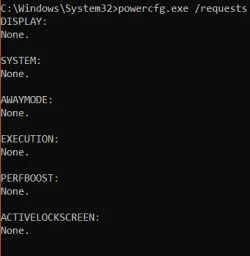
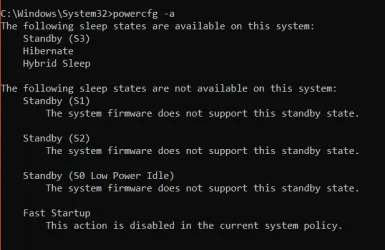
I tried all the powercfg commands I read on other forums the commands return NONE.
So I proceeded to reinstall windows 11, updated all the drivers. I also verified in device manager wake up feature is unchecked.
How can I put my laptop to sleep?
Any help is appreciated. Thanks
When I put it to sleep it shuts down and instead of the power button lights blinking it turn back on to the login page.
I always have to shutdown instead.
I tried all the powercfg commands I read on other forums the commands return NONE.
So I proceeded to reinstall windows 11, updated all the drivers. I also verified in device manager wake up feature is unchecked.
How can I put my laptop to sleep?
Any help is appreciated. Thanks
- Windows Build/Version
- Windows 11 24H2 Home single language version
My Computer
At a glance
Windows 11 Home EditionIntel® Core™ i7-6700HQ CPU @ 2.60GHz16GBIntel HD Graphics 530
- OS
- Windows 11 Home Edition
- Computer type
- Laptop
- Manufacturer/Model
- Lenovo Ideapad Y700-15ISK, 80NV
- CPU
- Intel® Core™ i7-6700HQ CPU @ 2.60GHz
- Memory
- 16GB
- Graphics Card(s)
- Intel HD Graphics 530