Laptop will not go to sleep!


jstaaron

Member
Local time
8:46 AM
Posts
27
OS
Windows 11 Home Edition
After I updated to windows 11 few months ago I've never been able to put my laptop to sleep.

When I put it to sleep it shuts down and instead of the power button lights blinking it turn back on to the login page.

I always have to shutdown instead.

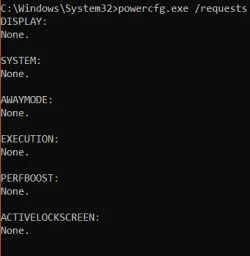
I tried all the powercfg commands I read on other forums the commands return NONE.

So I proceeded to reinstall windows 11, updated all the drivers. I also verified in device manager wake up feature is unchecked.

How can I put my laptop to sleep?

Any help is appreciated. Thanks
 
Windows Build/Version
Windows 11 24H2 Home single language version

My Computer My Computer

At a glance

Windows 11 Home EditionIntel® Core™ i7-6700HQ CPU @ 2.60GHz16GBIntel HD Graphics 530
OS
Windows 11 Home Edition
Computer type
Laptop
Manufacturer/Model
Lenovo Ideapad Y700-15ISK, 80NV
CPU
Intel® Core™ i7-6700HQ CPU @ 2.60GHz
Memory
16GB
Graphics Card(s)
Intel HD Graphics 530
Welcome to the forum. First and foremost, make sure you have the latest bios update. Then we can go from there.
I tried all the powercfg commands I read on other forums the commands return NONE.
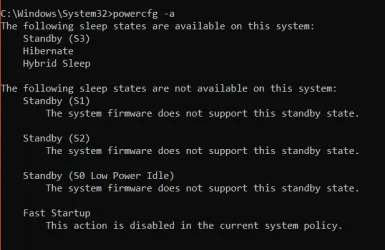
Are you saying from the command prompt (run as administrator) when you type powercfg -a
that you do not get anything showing?
That be so, try option 5 here Restore Missing Power Plans in Windows 11
 

My Computers My Computers

  • At a glance

    Windows 11 Pro 25H2 26200.8655i9-10900 10 core 20 threads32 gbnone-Intel UHD Graphics 630
    OS
    Windows 11 Pro 25H2 26200.8655
    Computer type
    PC/Desktop
    Manufacturer/Model
    Dell Optiplex 7080
    CPU
    i9-10900 10 core 20 threads
    Motherboard
    DELL 0J37VM
    Memory
    32 gb
    Graphics Card(s)
    none-Intel UHD Graphics 630
    Sound Card
    Integrated Realtek
    Monitor(s) Displays
    Benq 27
    Screen Resolution
    2560x1440
    Hard Drives
    2x1tb Solidigm m.2 nvme /External drives 512gb Samsung m.2 sata+2tb Kingston m2.nvme
    PSU
    500w
    Case
    MT
    Cooling
    Dell Premium
    Keyboard
    Logitech wired
    Mouse
    Logitech wireless
    Internet Speed
    so slow I'm too embarrassed to tell
    Browser
    #1 Edge #2 Firefox
    Antivirus
    Defender+MWB Premium
  • At a glance

    Windows 11 Pro 24H2 26200.8457AMD Ryzen 7 6800U32 gbintegrated
    Operating System
    Windows 11 Pro 24H2 26200.8457
    Computer type
    PC/Desktop
    Manufacturer/Model
    Beelink Mini PC SER5
    CPU
    AMD Ryzen 7 6800U
    Memory
    32 gb
    Graphics card(s)
    integrated
    Sound Card
    integrated
    Monitor(s) Displays
    Benq 27
    Screen Resolution
    2560x1440
    Hard Drives
    1TB Crucial nvme
    Keyboard
    Logitech wired
    Mouse
    Logitech wireless
    Internet Speed
    still too embarrassed to tell
    Browser
    Firefox
    Antivirus
    Defender
    Other Info
    System 3 is non compliant Dell 9020 i7-4770/24gb ram Win11 PRO 26200.8457
Welcome to the forum. First and foremost, make sure you have the latest bios update. Then we can go from there.

Are you saying from the command prompt (run as administrator) when you type powercfg -a
that you do not get anything showing?
That be so, try option 5 here Restore Missing Power Plans in Windows 11
Appreciate the welcome. Thank you.

I updated the bios from the lenovo website. I have the latest bios.

No, I was talking this command
powercfg.exe /requests
this return as NONE

I tried option 5 powercfg -restoredefaultschemes
this is a no go as well. Didn't work.
 

Attachments

  • Screenshot 2025-10-15 124410.webp
    Screenshot 2025-10-15 124410.webp
    10.5 KB · Views: 2

My Computer My Computer

At a glance

Windows 11 Home EditionIntel® Core™ i7-6700HQ CPU @ 2.60GHz16GBIntel HD Graphics 530
OS
Windows 11 Home Edition
Computer type
Laptop
Manufacturer/Model
Lenovo Ideapad Y700-15ISK, 80NV
CPU
Intel® Core™ i7-6700HQ CPU @ 2.60GHz
Memory
16GB
Graphics Card(s)
Intel HD Graphics 530
What do you get when you run the command I gave above? If anything we need a screenshot
 

My Computers My Computers

  • At a glance

    Windows 11 Pro 25H2 26200.8655i9-10900 10 core 20 threads32 gbnone-Intel UHD Graphics 630
    OS
    Windows 11 Pro 25H2 26200.8655
    Computer type
    PC/Desktop
    Manufacturer/Model
    Dell Optiplex 7080
    CPU
    i9-10900 10 core 20 threads
    Motherboard
    DELL 0J37VM
    Memory
    32 gb
    Graphics Card(s)
    none-Intel UHD Graphics 630
    Sound Card
    Integrated Realtek
    Monitor(s) Displays
    Benq 27
    Screen Resolution
    2560x1440
    Hard Drives
    2x1tb Solidigm m.2 nvme /External drives 512gb Samsung m.2 sata+2tb Kingston m2.nvme
    PSU
    500w
    Case
    MT
    Cooling
    Dell Premium
    Keyboard
    Logitech wired
    Mouse
    Logitech wireless
    Internet Speed
    so slow I'm too embarrassed to tell
    Browser
    #1 Edge #2 Firefox
    Antivirus
    Defender+MWB Premium
  • At a glance

    Windows 11 Pro 24H2 26200.8457AMD Ryzen 7 6800U32 gbintegrated
    Operating System
    Windows 11 Pro 24H2 26200.8457
    Computer type
    PC/Desktop
    Manufacturer/Model
    Beelink Mini PC SER5
    CPU
    AMD Ryzen 7 6800U
    Memory
    32 gb
    Graphics card(s)
    integrated
    Sound Card
    integrated
    Monitor(s) Displays
    Benq 27
    Screen Resolution
    2560x1440
    Hard Drives
    1TB Crucial nvme
    Keyboard
    Logitech wired
    Mouse
    Logitech wireless
    Internet Speed
    still too embarrassed to tell
    Browser
    Firefox
    Antivirus
    Defender
    Other Info
    System 3 is non compliant Dell 9020 i7-4770/24gb ram Win11 PRO 26200.8457
What do you get when you run the command I gave above? If anything we need a screenshot
nothing, I guess it executed the instruction. But I do not see any response after running.
 

Attachments

  • Screenshot 2025-10-15 125538.webp
    Screenshot 2025-10-15 125538.webp
    5.4 KB · Views: 1

My Computer My Computer

At a glance

Windows 11 Home EditionIntel® Core™ i7-6700HQ CPU @ 2.60GHz16GBIntel HD Graphics 530
OS
Windows 11 Home Edition
Computer type
Laptop
Manufacturer/Model
Lenovo Ideapad Y700-15ISK, 80NV
CPU
Intel® Core™ i7-6700HQ CPU @ 2.60GHz
Memory
16GB
Graphics Card(s)
Intel HD Graphics 530

Attachments

  • Screenshot 2025-10-15 125746.webp
    Screenshot 2025-10-15 125746.webp
    30.5 KB · Views: 3

My Computer My Computer

At a glance

Windows 11 Home EditionIntel® Core™ i7-6700HQ CPU @ 2.60GHz16GBIntel HD Graphics 530
OS
Windows 11 Home Edition
Computer type
Laptop
Manufacturer/Model
Lenovo Ideapad Y700-15ISK, 80NV
CPU
Intel® Core™ i7-6700HQ CPU @ 2.60GHz
Memory
16GB
Graphics Card(s)
Intel HD Graphics 530
Go to Control Panel, change top right from group to large icons. Then open Power Options and click to Change Plan Settings. Try to disable hybrid sleep, just in case is not working properly, and try the sleep function again. Generally, the computer has trouble sleeping if there are drivers missing or if an app keeps it awake. Close all apps running in the background and try to sleep again. Also make sure you have downloaded and updated all drivers from manufacturer. Don't rely entirely on Windows Update. The system performance can improve too if you install OEM drivers, especially the chipset and graphics.
 

My Computers My Computers

  • At a glance

    Windows 11 Pro 23H2 (5699), 25H2 (8737)Mobile DualCore Intel Core 2 Duo T7250, 2000 MHz4GBMobile Intel(R) GMA 4500M (Mobile 4 series)
    OS
    Windows 11 Pro 23H2 (5699), 25H2 (8737)
    Computer type
    Laptop
    Manufacturer/Model
    Acer Extensa 5630EZ
    CPU
    Mobile DualCore Intel Core 2 Duo T7250, 2000 MHz
    Motherboard
    Acer Extensa 5630
    Memory
    4GB
    Graphics Card(s)
    Mobile Intel(R) GMA 4500M (Mobile 4 series)
    Sound Card
    Realtek ALC268 @ Intel 82801IB ICH9 - High Definition Audio Controller
    Monitor(s) Displays
    1
    Screen Resolution
    1280x800
    Hard Drives
    Samsung SSD 850 EVO 250GB SATA Device (250 GB, SATA-III)
    Internet Speed
    VDSL 50 Mbps
    Browser
    MICROSOFT EDGE
    Antivirus
    WINDOWS DEFENDER
    Other Info
    Legacy MBR installation, no TPM, no Secure Boot, no WDDM 2.0 graphics drivers, no SSE4.2, cannot get more unsupported ;) This is only my test laptop. I had installed Windows 11 here before upgrading my main PC. For my main PC I use everyday see my 2nd system specs.
  • At a glance

    Windows 11 Pro v25H2 (build 26200.8737)Intel Core-i7 3770 3.40GHz s1155 (3rd generat...2x Kingston Hyper-X Blu 8GB DDR3-1600GIGABYTE GeForce RTX 3050 WINDFORCE OC V2 6GB...
    Operating System
    Windows 11 Pro v25H2 (build 26200.8737)
    Computer type
    PC/Desktop
    Manufacturer/Model
    Custom-built PC
    CPU
    Intel Core-i7 3770 3.40GHz s1155 (3rd generation)
    Motherboard
    Asus P8H61 s1155 ATX
    Memory
    2x Kingston Hyper-X Blu 8GB DDR3-1600
    Graphics card(s)
    GIGABYTE GeForce RTX 3050 WINDFORCE OC V2 6GB (GV-N3050WF2OCV2-6GD)
    Sound Card
    Realtek HD audio (ALC887)
    Monitor(s) Displays
    Sony Bravia KDL-19L4000 19" LCD TV via VGA
    Screen Resolution
    1440x900 32-bit 60Hz
    Hard Drives
    WD Blue SA510 2.5 1000GB SSD as system disk, Western Digital Caviar Purple 4TB SATA III (WD40PURZ) as second
    PSU
    Thermaltake Litepower RGB 550W Full Wired
    Case
    SUPERCASE MIDI-TOWER
    Cooling
    Deepcool Gamma Archer CPU cooler, 1x 8cm fan at the back
    Keyboard
    Mitsumi 101-key PS/2
    Mouse
    Sunnyline OptiEye PS/2
    Internet Speed
    100Mbps
    Browser
    Microsoft Edge, Mozilla Firefox
    Antivirus
    Microsoft Windows Defender
    Other Info
    Legacy BIOS (MBR) installation, no TPM, no Secure Boot, WDDM 3.0 graphics drivers, WEI score 7.4
I see you are running incompatible hardware. Has auto sleep ever worked? What version are you running...23h2, 24h2, 25h2?
If disabling hybrid sleep doesn't do it:
Verify these setting are set.
Control panel>power options>set plan to balanced
choose what the power buttons do - set press the power button to "shut down", set sleep button to "sleep"
Change when the computer sleeps>set a time for both display and sleep. For testing purposes set both for a short period of inactivity like 1-2 min.

Can you manually put your system to sleep with the power menu? (Start menu>power button icon)?
Is your bios set to default?
You have to test with all overclocking disabled.

Assuming that you can manually sleep, You have to use process of elimination to see why you system won't automatically sleep. There's no way around it. Start with the easy stuff first, testing after each one.

1. Disconnect all external devices except mouse and keyboard

2. Perform a clean boot to eliminate software conflict causing the issue. If it doesn't happen in a clean boot, you have some software conflicting with Windows. You have to use process of elimination to find which one. Perform a Clean Boot in Windows 11 to Troubleshoot Software Conflicts Tutorial

3. Make sure you have no corrupt system files that is causing this problem. Open a command prompt as administrator and type dism /online /cleanup-image /restorehealth
When complete, restart. Then open command prompt as admin again and run sfc /scannow
Pay attention to the scan results to see if SFC found anything it could not repair

4. Make sure no 3rd party driver is causing the issue using safe boot.
Boot to Safe Mode in Windows 11

5. Last but not least, a repair install. Repair Install Windows 11 with an In-place Upgrade
 

My Computers My Computers

  • At a glance

    Windows 11 Pro 25H2 26200.8655i9-10900 10 core 20 threads32 gbnone-Intel UHD Graphics 630
    OS
    Windows 11 Pro 25H2 26200.8655
    Computer type
    PC/Desktop
    Manufacturer/Model
    Dell Optiplex 7080
    CPU
    i9-10900 10 core 20 threads
    Motherboard
    DELL 0J37VM
    Memory
    32 gb
    Graphics Card(s)
    none-Intel UHD Graphics 630
    Sound Card
    Integrated Realtek
    Monitor(s) Displays
    Benq 27
    Screen Resolution
    2560x1440
    Hard Drives
    2x1tb Solidigm m.2 nvme /External drives 512gb Samsung m.2 sata+2tb Kingston m2.nvme
    PSU
    500w
    Case
    MT
    Cooling
    Dell Premium
    Keyboard
    Logitech wired
    Mouse
    Logitech wireless
    Internet Speed
    so slow I'm too embarrassed to tell
    Browser
    #1 Edge #2 Firefox
    Antivirus
    Defender+MWB Premium
  • At a glance

    Windows 11 Pro 24H2 26200.8457AMD Ryzen 7 6800U32 gbintegrated
    Operating System
    Windows 11 Pro 24H2 26200.8457
    Computer type
    PC/Desktop
    Manufacturer/Model
    Beelink Mini PC SER5
    CPU
    AMD Ryzen 7 6800U
    Memory
    32 gb
    Graphics card(s)
    integrated
    Sound Card
    integrated
    Monitor(s) Displays
    Benq 27
    Screen Resolution
    2560x1440
    Hard Drives
    1TB Crucial nvme
    Keyboard
    Logitech wired
    Mouse
    Logitech wireless
    Internet Speed
    still too embarrassed to tell
    Browser
    Firefox
    Antivirus
    Defender
    Other Info
    System 3 is non compliant Dell 9020 i7-4770/24gb ram Win11 PRO 26200.8457
I suggest you re-install your display driver in case it has become corrupted.
You can get the driver from the display card maker's support site.
There is no diagnostic test for this so reinstallation is the simplest way of confirming it / ruling it out as a cause of the problem.
This step used to form part of MS's standard advice for any sleep/hibernation problem years ago.


Best of luck,
Denis
 

My Computer My Computer

At a glance

Windows 11 Home x64 Version 25H2 Build 26200....
OS
Windows 11 Home x64 Version 25H2 Build 26200.8037
I see you are running incompatible hardware. Has auto sleep ever worked? What version are you running...23h2, 24h2, 25h2?
24H2
If disabling hybrid sleep doesn't do it:
Verify these setting are set.
Control panel>power options>set plan to balanced
choose what the power buttons do - set press the power button to "shut down", set sleep button to "sleep"
Change when the computer sleeps>set a time for both display and sleep. For testing purposes set both for a short period of inactivity like 1-2 min.
- Disabling hybrid sleep didn't do it.
- Yes I set plan to balanced (since mine is home edition that's the only plan that's shown).
- I Tested after set power button and sleep button.
The laptop will not go to sleep by itself.
Can you manually put your system to sleep with the power menu? (Start menu>power button icon)?
- Nop, I cannot manually put system to sleep either.
Is your bios set to default?
- I did edit bios to disable my Nvidia graphics card. I have dual graphics on this laptop (Intel & Nvidia). I disabled Nvidia in Bios so it won't load. I am not a heavy graphics user so I haven't needed it yet.
- I also disabled secure boot.
- other than the above, everything is in default.
You have to test with all overclocking disabled.
- Sorry I don't know what that means.
Assuming that you can manually sleep, You have to use process of elimination to see why you system won't automatically sleep. There's no way around it. Start with the easy stuff first, testing after each one.

1. Disconnect all external devices except mouse and keyboard
- Nope did not help.
2. Perform a clean boot to eliminate software conflict causing the issue. If it doesn't happen in a clean boot, you have some software conflicting with Windows. You have to use process of elimination to find which one. Perform a Clean Boot in Windows 11 to Troubleshoot Software Conflicts Tutorial
- I performed clean boot. But no didn't help.
3. Make sure you have no corrupt system files that is causing this problem. Open a command prompt as administrator and type dism /online /cleanup-image /restorehealth
When complete, restart. Then open command prompt as admin again and run sfc /scannow
Pay attention to the scan results to see if SFC found anything it could not repair
- I have yet to do this.
4. Make sure no 3rd party driver is causing the issue using safe boot.
Boot to Safe Mode in Windows 11
- I have yet to do this as well.
- I have to say that I am giving up trying to figure out a solution. Since, this is not a deal breaker for me. It's an annoyance. I can always hibernate. So, I guess I'll just suck it up and deal with it.

Thanks again for all the suggestions.

Apologies for not following through. I simply don't want to try and figure it out at this point. Since, there is no easy solution.

Thanks again.
 

My Computer My Computer

At a glance

Windows 11 Home EditionIntel® Core™ i7-6700HQ CPU @ 2.60GHz16GBIntel HD Graphics 530
OS
Windows 11 Home Edition
Computer type
Laptop
Manufacturer/Model
Lenovo Ideapad Y700-15ISK, 80NV
CPU
Intel® Core™ i7-6700HQ CPU @ 2.60GHz
Memory
16GB
Graphics Card(s)
Intel HD Graphics 530
And your display driver re-installation?


Denis
 

My Computer My Computer

At a glance

Windows 11 Home x64 Version 25H2 Build 26200....
OS
Windows 11 Home x64 Version 25H2 Build 26200.8037
If an app is misbehaving and not letting the system to sleep, updating the drivers might not work. However, he must do it, just in case. He must at least update the chipset and graphics drivers from manufacturer, don't trust Windows Update! While he is at manufacturer's support site, have a look at utilities. There might be a power utility to install.
 
Last edited:

My Computers My Computers

  • At a glance

    Windows 11 Pro 23H2 (5699), 25H2 (8737)Mobile DualCore Intel Core 2 Duo T7250, 2000 MHz4GBMobile Intel(R) GMA 4500M (Mobile 4 series)
    OS
    Windows 11 Pro 23H2 (5699), 25H2 (8737)
    Computer type
    Laptop
    Manufacturer/Model
    Acer Extensa 5630EZ
    CPU
    Mobile DualCore Intel Core 2 Duo T7250, 2000 MHz
    Motherboard
    Acer Extensa 5630
    Memory
    4GB
    Graphics Card(s)
    Mobile Intel(R) GMA 4500M (Mobile 4 series)
    Sound Card
    Realtek ALC268 @ Intel 82801IB ICH9 - High Definition Audio Controller
    Monitor(s) Displays
    1
    Screen Resolution
    1280x800
    Hard Drives
    Samsung SSD 850 EVO 250GB SATA Device (250 GB, SATA-III)
    Internet Speed
    VDSL 50 Mbps
    Browser
    MICROSOFT EDGE
    Antivirus
    WINDOWS DEFENDER
    Other Info
    Legacy MBR installation, no TPM, no Secure Boot, no WDDM 2.0 graphics drivers, no SSE4.2, cannot get more unsupported ;) This is only my test laptop. I had installed Windows 11 here before upgrading my main PC. For my main PC I use everyday see my 2nd system specs.
  • At a glance

    Windows 11 Pro v25H2 (build 26200.8737)Intel Core-i7 3770 3.40GHz s1155 (3rd generat...2x Kingston Hyper-X Blu 8GB DDR3-1600GIGABYTE GeForce RTX 3050 WINDFORCE OC V2 6GB...
    Operating System
    Windows 11 Pro v25H2 (build 26200.8737)
    Computer type
    PC/Desktop
    Manufacturer/Model
    Custom-built PC
    CPU
    Intel Core-i7 3770 3.40GHz s1155 (3rd generation)
    Motherboard
    Asus P8H61 s1155 ATX
    Memory
    2x Kingston Hyper-X Blu 8GB DDR3-1600
    Graphics card(s)
    GIGABYTE GeForce RTX 3050 WINDFORCE OC V2 6GB (GV-N3050WF2OCV2-6GD)
    Sound Card
    Realtek HD audio (ALC887)
    Monitor(s) Displays
    Sony Bravia KDL-19L4000 19" LCD TV via VGA
    Screen Resolution
    1440x900 32-bit 60Hz
    Hard Drives
    WD Blue SA510 2.5 1000GB SSD as system disk, Western Digital Caviar Purple 4TB SATA III (WD40PURZ) as second
    PSU
    Thermaltake Litepower RGB 550W Full Wired
    Case
    SUPERCASE MIDI-TOWER
    Cooling
    Deepcool Gamma Archer CPU cooler, 1x 8cm fan at the back
    Keyboard
    Mitsumi 101-key PS/2
    Mouse
    Sunnyline OptiEye PS/2
    Internet Speed
    100Mbps
    Browser
    Microsoft Edge, Mozilla Firefox
    Antivirus
    Microsoft Windows Defender
    Other Info
    Legacy BIOS (MBR) installation, no TPM, no Secure Boot, WDDM 3.0 graphics drivers, WEI score 7.4
And your display driver re-installation?


Denis
Hey Denis, Yes I downloaded the Intel VGA driver from Lenovo website. Still no go.
 

My Computer My Computer

At a glance

Windows 11 Home EditionIntel® Core™ i7-6700HQ CPU @ 2.60GHz16GBIntel HD Graphics 530
OS
Windows 11 Home Edition
Computer type
Laptop
Manufacturer/Model
Lenovo Ideapad Y700-15ISK, 80NV
CPU
Intel® Core™ i7-6700HQ CPU @ 2.60GHz
Memory
16GB
Graphics Card(s)
Intel HD Graphics 530
Intel VGA driver
I'm surprised it's called that.

What does the Intel Driver and Support Assistant say you ought to have?
Intel Driver and Support Assistant - Download

I should have checked a couple of other things -
- If you log into a different user account on your computer [even if you have to create one for this test], does it also suffer from the same sleep problem? If it does not then I have been wasting your time, it's a user profile corruption problem.
- What driver does Device manager [C:\Windows\System32\devmgmt.msc], say is installed?
Device mgr, Display driver tab.webp


Denis
 

My Computer My Computer

At a glance

Windows 11 Home x64 Version 25H2 Build 26200....
OS
Windows 11 Home x64 Version 25H2 Build 26200.8037
I'm surprised it's called that.

What does the Intel Driver and Support Assistant say you ought to have?
Intel Driver and Support Assistant - Download
Screenshot 2025-10-15 161757.webp
I should have checked a couple of other things -
- If you log into a different user account on your computer [even if you have to create one for this test], does it also suffer from the same sleep problem? If it does not then I have been wasting your time, it's a user profile corruption problem.
ohh okay I can create a new profile and confirm.
- What driver does Device manager [C:\Windows\System32\devmgmt.msc], say is installed?
View attachment 149056
Screenshot 2025-10-15 162136.webp
Thanks
 

My Computer My Computer

At a glance

Windows 11 Home EditionIntel® Core™ i7-6700HQ CPU @ 2.60GHz16GBIntel HD Graphics 530
OS
Windows 11 Home Edition
Computer type
Laptop
Manufacturer/Model
Lenovo Ideapad Y700-15ISK, 80NV
CPU
Intel® Core™ i7-6700HQ CPU @ 2.60GHz
Memory
16GB
Graphics Card(s)
Intel HD Graphics 530
A 2018 driver.
Oh.
Since not even Intel suggest an updated driver, I think you'll have to stick with what you've got.
But I am very surprised that even that old driver does not support sleep. Even my 2010 Dell laptop's very old driver suports sleep in Windows 11.


Denis
 

My Computer My Computer

At a glance

Windows 11 Home x64 Version 25H2 Build 26200....
OS
Windows 11 Home x64 Version 25H2 Build 26200.8037
I would install the found Intel drivers, but this might not be his issue. He has to close (even End Task from Task Manager) any app running in the background and try sleeping again.
 

My Computers My Computers

  • At a glance

    Windows 11 Pro 23H2 (5699), 25H2 (8737)Mobile DualCore Intel Core 2 Duo T7250, 2000 MHz4GBMobile Intel(R) GMA 4500M (Mobile 4 series)
    OS
    Windows 11 Pro 23H2 (5699), 25H2 (8737)
    Computer type
    Laptop
    Manufacturer/Model
    Acer Extensa 5630EZ
    CPU
    Mobile DualCore Intel Core 2 Duo T7250, 2000 MHz
    Motherboard
    Acer Extensa 5630
    Memory
    4GB
    Graphics Card(s)
    Mobile Intel(R) GMA 4500M (Mobile 4 series)
    Sound Card
    Realtek ALC268 @ Intel 82801IB ICH9 - High Definition Audio Controller
    Monitor(s) Displays
    1
    Screen Resolution
    1280x800
    Hard Drives
    Samsung SSD 850 EVO 250GB SATA Device (250 GB, SATA-III)
    Internet Speed
    VDSL 50 Mbps
    Browser
    MICROSOFT EDGE
    Antivirus
    WINDOWS DEFENDER
    Other Info
    Legacy MBR installation, no TPM, no Secure Boot, no WDDM 2.0 graphics drivers, no SSE4.2, cannot get more unsupported ;) This is only my test laptop. I had installed Windows 11 here before upgrading my main PC. For my main PC I use everyday see my 2nd system specs.
  • At a glance

    Windows 11 Pro v25H2 (build 26200.8737)Intel Core-i7 3770 3.40GHz s1155 (3rd generat...2x Kingston Hyper-X Blu 8GB DDR3-1600GIGABYTE GeForce RTX 3050 WINDFORCE OC V2 6GB...
    Operating System
    Windows 11 Pro v25H2 (build 26200.8737)
    Computer type
    PC/Desktop
    Manufacturer/Model
    Custom-built PC
    CPU
    Intel Core-i7 3770 3.40GHz s1155 (3rd generation)
    Motherboard
    Asus P8H61 s1155 ATX
    Memory
    2x Kingston Hyper-X Blu 8GB DDR3-1600
    Graphics card(s)
    GIGABYTE GeForce RTX 3050 WINDFORCE OC V2 6GB (GV-N3050WF2OCV2-6GD)
    Sound Card
    Realtek HD audio (ALC887)
    Monitor(s) Displays
    Sony Bravia KDL-19L4000 19" LCD TV via VGA
    Screen Resolution
    1440x900 32-bit 60Hz
    Hard Drives
    WD Blue SA510 2.5 1000GB SSD as system disk, Western Digital Caviar Purple 4TB SATA III (WD40PURZ) as second
    PSU
    Thermaltake Litepower RGB 550W Full Wired
    Case
    SUPERCASE MIDI-TOWER
    Cooling
    Deepcool Gamma Archer CPU cooler, 1x 8cm fan at the back
    Keyboard
    Mitsumi 101-key PS/2
    Mouse
    Sunnyline OptiEye PS/2
    Internet Speed
    100Mbps
    Browser
    Microsoft Edge, Mozilla Firefox
    Antivirus
    Microsoft Windows Defender
    Other Info
    Legacy BIOS (MBR) installation, no TPM, no Secure Boot, WDDM 3.0 graphics drivers, WEI score 7.4
I would install the found Intel drivers, but this might not be his issue. He has to close (even End Task from Task Manager) any app running in the background and try sleeping again.
yes, installed suggested drivers.
I did a clean boot as well
- disabled all startup
- I also disabled services in system configuration
still no go.

So I gave up.
 

My Computer My Computer

At a glance

Windows 11 Home EditionIntel® Core™ i7-6700HQ CPU @ 2.60GHz16GBIntel HD Graphics 530
OS
Windows 11 Home Edition
Computer type
Laptop
Manufacturer/Model
Lenovo Ideapad Y700-15ISK, 80NV
CPU
Intel® Core™ i7-6700HQ CPU @ 2.60GHz
Memory
16GB
Graphics Card(s)
Intel HD Graphics 530
A 2018 driver.
Oh.
Since not even Intel suggest an updated driver, I think you'll have to stick with what you've got.
But I am very surprised that even that old driver does not support sleep. Even my 2010 Dell laptop's very old driver suports sleep in Windows 11.


Denis
Hey Denis,

I know I said I gave up tryin to fix it but it's just so annoying. Long story short I ran powercfg -lastwake.
It says power button.
what does it mean? is the power button stuck? is the power button waking it up from sleep?
Screenshot 2025-10-16 094848.webp
Thanks
 

My Computer My Computer

At a glance

Windows 11 Home EditionIntel® Core™ i7-6700HQ CPU @ 2.60GHz16GBIntel HD Graphics 530
OS
Windows 11 Home Edition
Computer type
Laptop
Manufacturer/Model
Lenovo Ideapad Y700-15ISK, 80NV
CPU
Intel® Core™ i7-6700HQ CPU @ 2.60GHz
Memory
16GB
Graphics Card(s)
Intel HD Graphics 530
You can buy an air spray and try to remove dust or any dirt by spraying around the button. You may also ask a professional for more thorough cleaning or even replace it.
 

My Computers My Computers

  • At a glance

    Windows 11 Pro 23H2 (5699), 25H2 (8737)Mobile DualCore Intel Core 2 Duo T7250, 2000 MHz4GBMobile Intel(R) GMA 4500M (Mobile 4 series)
    OS
    Windows 11 Pro 23H2 (5699), 25H2 (8737)
    Computer type
    Laptop
    Manufacturer/Model
    Acer Extensa 5630EZ
    CPU
    Mobile DualCore Intel Core 2 Duo T7250, 2000 MHz
    Motherboard
    Acer Extensa 5630
    Memory
    4GB
    Graphics Card(s)
    Mobile Intel(R) GMA 4500M (Mobile 4 series)
    Sound Card
    Realtek ALC268 @ Intel 82801IB ICH9 - High Definition Audio Controller
    Monitor(s) Displays
    1
    Screen Resolution
    1280x800
    Hard Drives
    Samsung SSD 850 EVO 250GB SATA Device (250 GB, SATA-III)
    Internet Speed
    VDSL 50 Mbps
    Browser
    MICROSOFT EDGE
    Antivirus
    WINDOWS DEFENDER
    Other Info
    Legacy MBR installation, no TPM, no Secure Boot, no WDDM 2.0 graphics drivers, no SSE4.2, cannot get more unsupported ;) This is only my test laptop. I had installed Windows 11 here before upgrading my main PC. For my main PC I use everyday see my 2nd system specs.
  • At a glance

    Windows 11 Pro v25H2 (build 26200.8737)Intel Core-i7 3770 3.40GHz s1155 (3rd generat...2x Kingston Hyper-X Blu 8GB DDR3-1600GIGABYTE GeForce RTX 3050 WINDFORCE OC V2 6GB...
    Operating System
    Windows 11 Pro v25H2 (build 26200.8737)
    Computer type
    PC/Desktop
    Manufacturer/Model
    Custom-built PC
    CPU
    Intel Core-i7 3770 3.40GHz s1155 (3rd generation)
    Motherboard
    Asus P8H61 s1155 ATX
    Memory
    2x Kingston Hyper-X Blu 8GB DDR3-1600
    Graphics card(s)
    GIGABYTE GeForce RTX 3050 WINDFORCE OC V2 6GB (GV-N3050WF2OCV2-6GD)
    Sound Card
    Realtek HD audio (ALC887)
    Monitor(s) Displays
    Sony Bravia KDL-19L4000 19" LCD TV via VGA
    Screen Resolution
    1440x900 32-bit 60Hz
    Hard Drives
    WD Blue SA510 2.5 1000GB SSD as system disk, Western Digital Caviar Purple 4TB SATA III (WD40PURZ) as second
    PSU
    Thermaltake Litepower RGB 550W Full Wired
    Case
    SUPERCASE MIDI-TOWER
    Cooling
    Deepcool Gamma Archer CPU cooler, 1x 8cm fan at the back
    Keyboard
    Mitsumi 101-key PS/2
    Mouse
    Sunnyline OptiEye PS/2
    Internet Speed
    100Mbps
    Browser
    Microsoft Edge, Mozilla Firefox
    Antivirus
    Microsoft Windows Defender
    Other Info
    Legacy BIOS (MBR) installation, no TPM, no Secure Boot, WDDM 3.0 graphics drivers, WEI score 7.4

Latest Support Threads

Back
Top Bottom