My laptop won't sleep or hibernate when the lid is closed


desbest

Active member
Local time
3:44 AM
Posts
18
OS
Windows 11 22H2
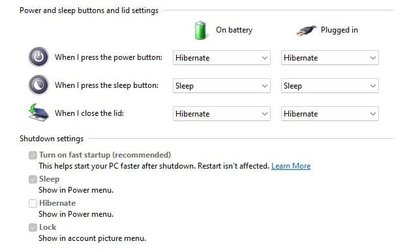
When I close my laptop lid, my laptop doesn't go to sleep or as I specifically chose, hibernate.
What is going wrong and how can this be fixed?

hibernate when laptop lid is closed.png
 

My Computer My Computer

At a glance

Windows 11 22H2Intel i5 10th generation Ice Lake8GBIntel Intregated Graphics
OS
Windows 11 22H2
Computer type
Laptop
Manufacturer/Model
Acer Aspire 315-56
CPU
Intel i5 10th generation Ice Lake
Memory
8GB
Graphics Card(s)
Intel Intregated Graphics
Sound Card
Realtek and Intel Audio
Monitor(s) Displays
Built-in
Screen Resolution
15.6"
Hard Drives
2TB Hard Disk Drive (HDD)
Keyboard
Built-in
Mouse
Built-in
Browser
Arc
Antivirus
Comodo Internet Security
Is Hibernation enabled?
I expect the answer is that it is but do check by running this command
PowerCfg -a

Please do post the results so that sleep issues can also be discussed.
I suspect that you do not have S3 Sleep [the "sleep" that we have all come to know over the past few decades] but instead have S0 Modern standby [aka S0 Low power idle].


Denis
 

My Computer My Computer

At a glance

Windows 11 Home x64 Version 25H2 Build 26200....
OS
Windows 11 Home x64 Version 25H2 Build 26200.9168
I'm still on 22H2, but here are the settings I use with my HP laptop. I have been using these settings for years without any issue. I just close the lid and everything shuts down. When I open the lid, and press the power button, everything comes back up.

When I run "PowerCfg -a" I get the following.

PS C:\Users\marti> PowerCfg -a
The following sleep states are available on this system:
Standby (S3)
Hibernate
Hybrid Sleep
Fast Startup
The following sleep states are not available on this system:
Standby (S1)
The system firmware does not support this standby state.
Standby (S2)
The system firmware does not support this standby state.
Standby (S0 Low Power Idle)
The system firmware does not support this standby state.
 

Attachments

  • Hibernate_Settings.jpg
    Hibernate_Settings.jpg
    22.7 KB · Views: 1

My Computers My Computers

  • At a glance

    Windows 11 Home, 25H2, Latest OS BuildIntel(R) Core(TM) i3-8145U CPU @ 2.10GHz 2.30...8GB
    OS
    Windows 11 Home, 25H2, Latest OS Build
    Computer type
    Laptop
    Manufacturer/Model
    HP 15-dw0xx
    CPU
    Intel(R) Core(TM) i3-8145U CPU @ 2.10GHz 2.30 GHz
    Memory
    8GB
    Screen Resolution
    1366 x 768
    Hard Drives
    930 GB
    Keyboard
    Built In
    Mouse
    Wireless Logitech M325S
    Browser
    Chrome 139.0.7258.128
    Antivirus
    Windows Defender
    Other Info
    Cygwin64
  • At a glance

    Windows 10 Home, Version 22H2, Build19045.3693AMD E-300 with Radeon HD Graphics 1.30 GHz10GBRadeon HD Graphics 1.30 GHz
    Operating System
    Windows 10 Home, Version 22H2, Build19045.3693
    Computer type
    PC/Desktop
    Manufacturer/Model
    HP Pavilion
    CPU
    AMD E-300 with Radeon HD Graphics 1.30 GHz
    Memory
    10GB
    Graphics card(s)
    Radeon HD Graphics 1.30 GHz
    Sound Card
    Realtek
    Monitor(s) Displays
    15"
    Screen Resolution
    1280 x 1024
    Hard Drives
    700 GB
    Keyboard
    Wireless
    Mouse
    Wireless
    Browser
    Chrome
    Antivirus
    Windows Defender
    Other Info
    This computer is connected to my IC-735 radio.
Code:
PS C:\Users\User> PowerCfg -a
The following sleep states are available on this system:
    Standby (S3)
    Hibernate
    Fast Startup

The following sleep states are not available on this system:
    Standby (S1)
        The system firmware does not support this standby state.

    Standby (S2)
        The system firmware does not support this standby state.

    Standby (S0 Low Power Idle)
        The system firmware does not support this standby state.

    Hybrid Sleep
        The hypervisor does not support this standby state.
 

My Computer My Computer

At a glance

Windows 11 22H2Intel i5 10th generation Ice Lake8GBIntel Intregated Graphics
OS
Windows 11 22H2
Computer type
Laptop
Manufacturer/Model
Acer Aspire 315-56
CPU
Intel i5 10th generation Ice Lake
Memory
8GB
Graphics Card(s)
Intel Intregated Graphics
Sound Card
Realtek and Intel Audio
Monitor(s) Displays
Built-in
Screen Resolution
15.6"
Hard Drives
2TB Hard Disk Drive (HDD)
Keyboard
Built-in
Mouse
Built-in
Browser
Arc
Antivirus
Comodo Internet Security

1 I think you'll need to monitor Event logs to see if it is trying to hibernate but failing or not even trying.
You can import the Power - Sleep-Hibernate-S0 transitions Custom view I use for this - Import Custom view - #4 - TenForums [read from the line starting with I suggest through to that beginning On a similarly confusing note]
This Custom view definition works in both Win10 & Win11 and in both S3 Sleep computers & S0 Modern standby computers.

2 Did it work before but suddenly stop working?

3 Personally, I'd reinstall the display driver in order to eliminate the possibility that it has become corrupted.

4 Does Device manager show any warning triangles or have an Other devices section [which means no driver found]?
Device manager warning signs-icons and Other devices.png

5 Do Sleep & Hibernate work at all?


Denis
 
Last edited:

My Computer My Computer

At a glance

Windows 11 Home x64 Version 25H2 Build 26200....
OS
Windows 11 Home x64 Version 25H2 Build 26200.9168
How old is the laptop? If it is old then could the lid-close microswitch be faulty? It may not be registering that you have closed the lid if it is faulty.
 

My Computers My Computers

  • At a glance

    Windows 11 ProAMD Ryzen 9 8945HS32GB DDR5 SO-DIMMIntegrated AMD Radeon 780M (4.00 GHz)
    OS
    Windows 11 Pro
    Computer type
    PC/Desktop
    Manufacturer/Model
    GMKtec K11
    CPU
    AMD Ryzen 9 8945HS
    Memory
    32GB DDR5 SO-DIMM
    Graphics Card(s)
    Integrated AMD Radeon 780M (4.00 GHz)
    Monitor(s) Displays
    Benq 2250HM
    Screen Resolution
    1920 x 1080
    Hard Drives
    1 TB PCIe 4.0 NVMe M.2 SSD
  • At a glance

    Windows 11 HomeIntel® Core™ Ultra 7 - 255H processor16 GB LPDDR5 SDRAMIntel Arc 140T onboard graphics
    Operating System
    Windows 11 Home
    Computer type
    Laptop
    Manufacturer/Model
    ASUS Zenbook 14 OLED 14" Laptop - UX3405CA-QL192W
    CPU
    Intel® Core™ Ultra 7 - 255H processor
    Memory
    16 GB LPDDR5 SDRAM
    Graphics card(s)
    Intel Arc 140T onboard graphics
    Screen Resolution
    1920 x 1200 (16:10 WUXGA resolution) OLED Touchscreen
    Hard Drives
    1TB SSD

Latest Support Threads

Back
Top Bottom