Hi,
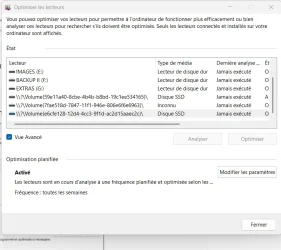
I enquiring about "mount points." While looking into my System Protection / Restore Points settings (C:\Windows\System32\SystemPropertiesProtection.exe, which can also be accessed through the Control Panel), I found a volume that was somehow linked to my C:\ drive. It had no drive letter and a very strange name: \\?\Volume{59e11a40-8cbe-4b4b-b8bd-19c1ee534165}\
After a lot of trial and error (searching for the volume GUID in the registry), I found out that this bizarre volume had exactly the same size as the fifth partition (the recovery partition) on my C:\ drive, and that the enigmatic volume was a mount point.. Its existence was apparently linked to the creation of a boot menu entry (Windows PE) with Hasleo Backup Suite.
So far, so good.
My curiosity was piqued, however, and I searched a bit further on the web about mount points. I had seen from my registry search that there were other mount points on my system. I was looking for a way to find all mount points on my computer and find out what they were doing or why they were there. I came across this link, which explains how to do that with the following command in PowerShell (as admin):
By doing this, I found another mount point volume linked to drive G:\ of my system:
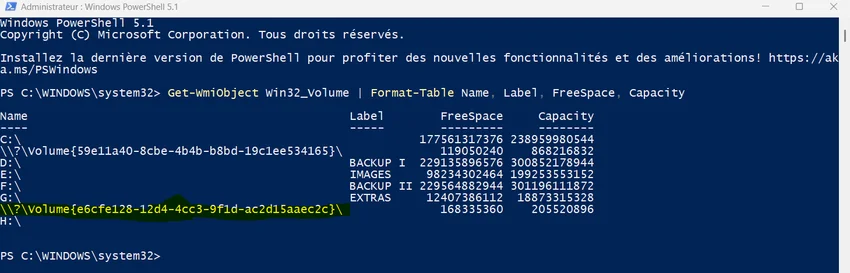
My drives G and F are on an external USB drive, while my other drives are internal. Searching for the reason this second enigmatic volume existed, I didn’t find anything. So, I decided to try to delete this mount point. Online documentation explains that one must use commands that require knowing the path of the drive from where the volume has been mounted.
However, I don’t know what created this mount point volume, and I couldn't find any indication of it in the registry.
So, I finally chose a radical approach: I deleted everything on drive G:\ (after backing up the content elsewhere) and formatted it. Then, I searched again for the mount points on my PC using the PowerShell command above... and the volume was still there. Next, I deleted volume G:\ completely (leaving it as unallocated space) and extended volume F:\ so that G:\ no longer existed. Guess what... The strange volume was still there, and was now linked to volume F:\.
Finally, I also deleted volume F:\ (it’s only my secondary backup volume; I still have the primary backup and can copy the data back over later).
And now the whole thing gets completely crazy! The strange volume was now linked to volume E:\, which is on another disk (!).
What on earth is going on here? And how can I find out what created that mount point (volume)?
Thanks for any help!
I enquiring about "mount points." While looking into my System Protection / Restore Points settings (C:\Windows\System32\SystemPropertiesProtection.exe, which can also be accessed through the Control Panel), I found a volume that was somehow linked to my C:\ drive. It had no drive letter and a very strange name: \\?\Volume{59e11a40-8cbe-4b4b-b8bd-19c1ee534165}\
After a lot of trial and error (searching for the volume GUID in the registry), I found out that this bizarre volume had exactly the same size as the fifth partition (the recovery partition) on my C:\ drive, and that the enigmatic volume was a mount point.. Its existence was apparently linked to the creation of a boot menu entry (Windows PE) with Hasleo Backup Suite.
So far, so good.
My curiosity was piqued, however, and I searched a bit further on the web about mount points. I had seen from my registry search that there were other mount points on my system. I was looking for a way to find all mount points on my computer and find out what they were doing or why they were there. I came across this link, which explains how to do that with the following command in PowerShell (as admin):
Get-WmiObject Win32_Volume | Format-Table Name, Label, FreeSpace, Capacity
By doing this, I found another mount point volume linked to drive G:\ of my system:
My drives G and F are on an external USB drive, while my other drives are internal. Searching for the reason this second enigmatic volume existed, I didn’t find anything. So, I decided to try to delete this mount point. Online documentation explains that one must use commands that require knowing the path of the drive from where the volume has been mounted.
However, I don’t know what created this mount point volume, and I couldn't find any indication of it in the registry.
So, I finally chose a radical approach: I deleted everything on drive G:\ (after backing up the content elsewhere) and formatted it. Then, I searched again for the mount points on my PC using the PowerShell command above... and the volume was still there. Next, I deleted volume G:\ completely (leaving it as unallocated space) and extended volume F:\ so that G:\ no longer existed. Guess what... The strange volume was still there, and was now linked to volume F:\.
Finally, I also deleted volume F:\ (it’s only my secondary backup volume; I still have the primary backup and can copy the data back over later).
And now the whole thing gets completely crazy! The strange volume was now linked to volume E:\, which is on another disk (!).
What on earth is going on here? And how can I find out what created that mount point (volume)?
Thanks for any help!
- Windows Build/Version
- Widows 11 25H2 26200.8737
My Computer
At a glance
Windows 11Intel Core i3 12 100 12th generationKingston DDR4-3200 16 GBytesIntel UHD 730
- OS
- Windows 11
- Computer type
- PC/Desktop
- Manufacturer/Model
- Gigabyte H610M H V2
- CPU
- Intel Core i3 12 100 12th generation
- Motherboard
- American Megatrend F35
- Memory
- Kingston DDR4-3200 16 GBytes
- Graphics Card(s)
- Intel UHD 730