Mysterious mount points (volumes) jumping between drives


rogerrabbit

Active member
Member
Local time
9:32 PM
Posts
41
OS
Windows 11
Hi,

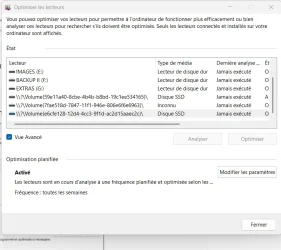
I enquiring about "mount points." While looking into my System Protection / Restore Points settings (C:\Windows\System32\SystemPropertiesProtection.exe, which can also be accessed through the Control Panel), I found a volume that was somehow linked to my C:\ drive. It had no drive letter and a very strange name: \\?\Volume{59e11a40-8cbe-4b4b-b8bd-19c1ee534165}\

After a lot of trial and error (searching for the volume GUID in the registry), I found out that this bizarre volume had exactly the same size as the fifth partition (the recovery partition) on my C:\ drive, and that the enigmatic volume was a mount point.. Its existence was apparently linked to the creation of a boot menu entry (Windows PE) with Hasleo Backup Suite.

So far, so good.

My curiosity was piqued, however, and I searched a bit further on the web about mount points. I had seen from my registry search that there were other mount points on my system. I was looking for a way to find all mount points on my computer and find out what they were doing or why they were there. I came across this link, which explains how to do that with the following command in PowerShell (as admin):

Get-WmiObject Win32_Volume | Format-Table Name, Label, FreeSpace, Capacity

By doing this, I found another mount point volume linked to drive G:\ of my system:
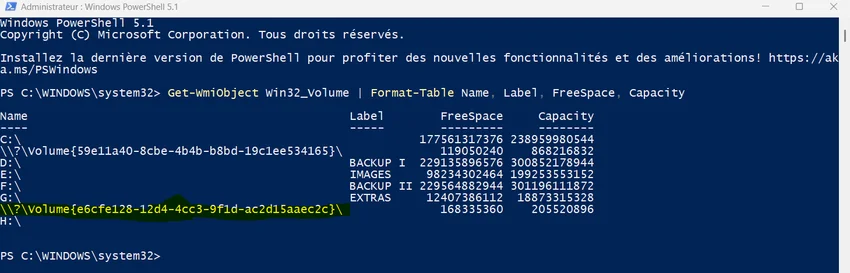
Capture.webp

My drives G and F are on an external USB drive, while my other drives are internal. Searching for the reason this second enigmatic volume existed, I didn’t find anything. So, I decided to try to delete this mount point. Online documentation explains that one must use commands that require knowing the path of the drive from where the volume has been mounted.

However, I don’t know what created this mount point volume, and I couldn't find any indication of it in the registry.

So, I finally chose a radical approach: I deleted everything on drive G:\ (after backing up the content elsewhere) and formatted it. Then, I searched again for the mount points on my PC using the PowerShell command above... and the volume was still there. Next, I deleted volume G:\ completely (leaving it as unallocated space) and extended volume F:\ so that G:\ no longer existed. Guess what... The strange volume was still there, and was now linked to volume F:\.

Finally, I also deleted volume F:\ (it’s only my secondary backup volume; I still have the primary backup and can copy the data back over later).

And now the whole thing gets completely crazy! The strange volume was now linked to volume E:\, which is on another disk (!).

What on earth is going on here? And how can I find out what created that mount point (volume)?

Thanks for any help!
 
Windows Build/Version
Widows 11 25H2 26200.8737

My Computer My Computer

At a glance

Windows 11Intel Core i3 12 100 12th generationKingston DDR4-3200 16 GBytesIntel UHD 730
OS
Windows 11
Computer type
PC/Desktop
Manufacturer/Model
Gigabyte H610M H V2 DDR4 (Rev. 1.0)
CPU
Intel Core i3 12 100 12th generation
Motherboard
American Megatrend F34
Memory
Kingston DDR4-3200 16 GBytes
Graphics Card(s)
Intel UHD 730
Frankly if you're not having a problem I wouldn't be messing with volumes. Volumes can exist that don't show up in disk management such as Google Drive or OneDrive.
 

My Computer My Computer

At a glance

Linux Mint
OS
Linux Mint
Computer type
Laptop
Manufacturer/Model
System76 Lemur Pro
Do you game? The Xbox app creates virtual drives/volumes for games
 

My Computer My Computer

At a glance

Windows 11 Pro 25H2 (RP channel)AMD Ryzen 7 9800X3D 8-core64GB Corsair Titanium 6000/CL30MSI Suprim 5080 SOC
OS
Windows 11 Pro 25H2 (RP channel)
Computer type
PC/Desktop
Manufacturer/Model
MSI
CPU
AMD Ryzen 7 9800X3D 8-core
Motherboard
MEG X870E Godlike
Memory
64GB Corsair Titanium 6000/CL30
Graphics Card(s)
MSI Suprim 5080 SOC
Sound Card
Soundblaster AE-9
Monitor(s) Displays
ASUS TUF Gaming VG289Q
Screen Resolution
3840x2160
Hard Drives
Samsung 9100 Pro 4TB (gen 5 x4, system drive/games)
Samsung 990 Pro 2TB
Samsung 980 Pro 2TB
Samsung 870 Evo 4TB
Samsung 870 Evo 2TB
Samsung T9 4TB
PSU
Seasonic PX-2200
Case
Bequiet! Dark Base Pro 901
Cooling
Noctua NH-D15S Chromax black
Keyboard
Logitech G915 X (wired)
Mouse
Logitech G903 with PowerPlay charger
Internet Speed
900Mb/sec
Browser
Microsoft Edge
Antivirus
Windows Defender
Do you game? The Xbox app creates virtual drives/volumes for games
No, I am old school, I do not game at all and I have completely uninstalled OneDrive !

---

@neemobeer

Thanks! Are you saying that there are things that are happening (in the background on the NTFS file system) on my computer, that I cannot (or should better) not try to control ?
 

My Computer My Computer

At a glance

Windows 11Intel Core i3 12 100 12th generationKingston DDR4-3200 16 GBytesIntel UHD 730
OS
Windows 11
Computer type
PC/Desktop
Manufacturer/Model
Gigabyte H610M H V2 DDR4 (Rev. 1.0)
CPU
Intel Core i3 12 100 12th generation
Motherboard
American Megatrend F34
Memory
Kingston DDR4-3200 16 GBytes
Graphics Card(s)
Intel UHD 730
There's nothing mysterious. Some volumes correspond to the EFI or Recovery volumes.
Code:
> Get-Volume | foreach { $_ | select UniqueID,DriveLetter,FileSystemType,DriveType,SizeRemaining,Size | Select-Object @{Name="Disk"; Expression={ (Get-Volume -UniqueID $_.UniqueID | Get-Partition).DiskNumber }}, @{Name="Partition"; Expression={ (Get-Volume -UniqueID $_.UniqueID | Get-Partition).PartitionNumber }}, *  } | Sort-Object Disk,Partition | Format-Table

Disk Partition UniqueID                                          DriveLetter FileSystemType DriveType SizeRemaining        Size
---- --------- --------                                          ----------- -------------- --------- -------------        ----
               \\?\Volume{e7de509b-51b3-11f1-84e8-806e6f6e6963}\           E Unknown        CD-ROM                0           0
0    1         \\?\Volume{4c23cd06-dc14-4bee-9325-97064ce5fa8b}\             FAT32          Fixed         231886848   268435456
0    3         \\?\Volume{a4ba3103-2432-4b95-89a1-aa4eff7c0893}\             NTFS           Fixed         719101952   733999104
0    4         \\?\Volume{90fd7f86-d5e4-490f-a5fc-0ce0620d7fa4}\           C NTFS           Fixed       29840297984 84054896640
0    5         \\?\Volume{45ec5256-afac-4366-92be-1d2195165f0b}\             NTFS           Fixed         802869248   817885184
1    1         \\?\Volume{33d5c96f-751a-11f1-8507-806e6f6e6963}\           D FAT32          Removable   27560280064 34337718272

> diskpart

DISKPART> select disk 0

Disk 0 is now the selected disk.

DISKPART> list part

  Partition ###  Type              Size     Offset
  -------------  ----------------  -------  -------
  Partition 1    System             260 MB  1024 KB
  Partition 2    Reserved            16 MB   261 MB
  Partition 3    Recovery           700 MB   277 MB
  Partition 4    Primary             78 GB   977 MB
  Partition 5    Recovery           780 MB    79 GB
 

My Computer My Computer

At a glance

Windows 7
OS
Windows 7
Which can be seen here as well, among other areas.

drives.webp
 

My Computers My Computers

  • At a glance

    All Branches but ReleaseAMD Ryzen 7 7735HS 3200-4500 Mhz 8 cores x 232 GB DDR5Radeon Graphic / NVIDIA GeForce RTX 4060 8 GB...
    OS
    All Branches but Release
    Computer type
    Laptop
    Manufacturer/Model
    Acer Nitro ANV15-51
    CPU
    AMD Ryzen 7 7735HS 3200-4500 Mhz 8 cores x 2
    Motherboard
    Sportage_RBH
    Memory
    32 GB DDR5
    Graphics Card(s)
    Radeon Graphic / NVIDIA GeForce RTX 4060 8 GB GDDR6
    Sound Card
    AMD/Realtek(R) Audio
    Monitor(s) Displays
    Integrated Monitor (15.3"vis)
    Screen Resolution
    FHD 1920X1080 16:9 144Hz
    Hard Drives
    KINGSTON OM8SEP4512Q-AA 1TB
    Western Digital 256GB
    PSU
    19V DC 6.32 A 120 W
    Cooling
    Dual Fans
    Mouse
    MS Bluetooth
    Internet Speed
    Fiber 1GB Cox -us & 1GB Orange-fr
    Browser
    Edge Canary- Firefox Nightly-Chrome Dev-Chrome Dev
    Antivirus
    Windows Defender
  • At a glance

    Windows 11 BetaAMD A9-94208 GB of DDR4AMD Radeon R5
    Operating System
    Windows 11 Beta
    Computer type
    Laptop
    Manufacturer/Model
    Asus X751BP
    CPU
    AMD A9-9420
    Memory
    8 GB of DDR4
    Graphics card(s)
    AMD Radeon R5
    Screen Resolution
    1600x900
    Hard Drives
    Seagate 1 TB
There's nothing mysterious. Some volumes correspond to the EFI or Recovery volumes

Thank you !

I run your commands, but the volume linked to drive G:\ (see screenshot in my first contribution) is shown nowhere.

Capture1.webpCapture2.webp


EDIT: Sorry, it is there: The GUID (beginning with e6cfe128) is the one of the FAT 32 partition on Drive C:\. But as one can see in the first screenshot (first contribution) this mount point is linked to drive G:\.

So what drive G:\has to do with the FAT partitipon on drive C:\ ?
 

My Computer My Computer

At a glance

Windows 11Intel Core i3 12 100 12th generationKingston DDR4-3200 16 GBytesIntel UHD 730
OS
Windows 11
Computer type
PC/Desktop
Manufacturer/Model
Gigabyte H610M H V2 DDR4 (Rev. 1.0)
CPU
Intel Core i3 12 100 12th generation
Motherboard
American Megatrend F34
Memory
Kingston DDR4-3200 16 GBytes
Graphics Card(s)
Intel UHD 730
Every drive volume has an UniqueID (which is a hashed value). Whenever possible, most Windows tools or commands will display a drive letter if one is assigned to the volume, instead of printing the UniqueID. Humans find drive letters easier to read.

Get-WmiObject Win32_Volume prints a list of drive volumes, with one entry per line.

There is no "special" volume assigned to G: on the next line, it's simply a different volume which happens to appear next in the sorted list. Just like C: does not have a special volume because the Recovery volume happens to be listed next.

You are assuming the two lines with UniqueID are each linked to the line that appears before them. They are not related in any way.
 

My Computer My Computer

At a glance

Windows 7
OS
Windows 7
Which can be seen here as well, among other areas.

View attachment 176090
Thank you that helped ! (y)
I have now identified my three volumes, which have no drive letter:

Capture.webp
The first one is the mount point volume of the Hasleo Boot menu (Drive C:\)
The second one is my CD Drive
The third one is the FAT 32 partition on drive C:\.

This still leaves the question why my G:\ drive is linked to the FAT 32 partition on drive C:\ (or vice versa)

Thanks to everyone !
 

Attachments

  • Capture.webp
    Capture.webp
    55.7 KB · Views: 0

My Computer My Computer

At a glance

Windows 11Intel Core i3 12 100 12th generationKingston DDR4-3200 16 GBytesIntel UHD 730
OS
Windows 11
Computer type
PC/Desktop
Manufacturer/Model
Gigabyte H610M H V2 DDR4 (Rev. 1.0)
CPU
Intel Core i3 12 100 12th generation
Motherboard
American Megatrend F34
Memory
Kingston DDR4-3200 16 GBytes
Graphics Card(s)
Intel UHD 730
You are assuming the two lines with UniqueID are each linked to the line that appears before them. They are not related in any way.

Thank you very much, ... that gives the answer to the last question I had ! (y)(y)
 

My Computer My Computer

At a glance

Windows 11Intel Core i3 12 100 12th generationKingston DDR4-3200 16 GBytesIntel UHD 730
OS
Windows 11
Computer type
PC/Desktop
Manufacturer/Model
Gigabyte H610M H V2 DDR4 (Rev. 1.0)
CPU
Intel Core i3 12 100 12th generation
Motherboard
American Megatrend F34
Memory
Kingston DDR4-3200 16 GBytes
Graphics Card(s)
Intel UHD 730
Back
Top Bottom