Solved Need Free Partitioning Software


The way I would do it is in stages. First is to create an image of the Windows drive.

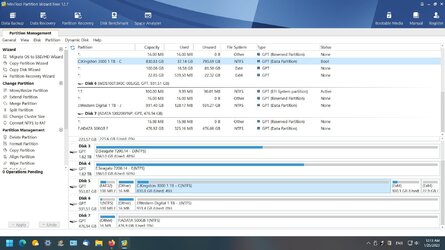
Using MiniTool move the last partition (NTFS 505MB) to the right, 22.4GB and apply. Once done move the partition (Ext4) to the right and apply then move the NTFS (633MB) and apply. That will leave the Unallocated partition to the right of the C partition so you can expand C. Just complete the moves one at a time.
You can then expand the C drive.
Unfortunately, your recipe does not account for my Linux partition between my Win 11 and the now slightly larger 22 GB empty space. I thought that formatting the latter to EXT4 would allow me to simply merge it with my Linux install. But MiniTool won't merge EXT4 partitions. And there is no way to simply jump the 22 GB of empty space overtop of the linux install and into the Win 11 install. I just tried GPart again and it has the same problem. It won't even merge the Linux install with the 22 GB of empty space, even though they are both EXT4.

I have simply deleted the 505 MB partition and formatted both it and the 22 GB partition into NTFS and merged them in MiniTool. Then, as I said, I formatted that partition to EXT4 to tried to merge it to the Linux install. It simply will not do that in MiniTool. And in GPart all it offers in any of the tools or menus is the option to copy the 22 GB partition into my Linux install, but it warns me that it will wipe out all the information on my Linux install so that is a non-starter.
 

My Computer My Computer

At a glance

Windows 11AMD Ryzen 7 3700X32 GigsNvidia Gigabyte 3600Ti
OS
Windows 11
Computer type
PC/Desktop
CPU
AMD Ryzen 7 3700X
Motherboard
Asus TUF Gaming X570 Plus
Memory
32 Gigs
Graphics Card(s)
Nvidia Gigabyte 3600Ti
Sound Card
Onboard sound from video card
Monitor(s) Displays
52 inch HDTV
Screen Resolution
1920x1080p
Hard Drives
Kingston 3000 NVME M.2 1 GB
PSU
EVGA 750 Watt
Case
Lian Li
Cooling
Stock Ryzen cooler and numerous fans on the case
Keyboard
Logitech wireless
Mouse
Logitech wireless
Internet Speed
20 MBs
Browser
Firefox
Antivirus
Windows Defender

My Computer My Computer

At a glance

Windows 10Intel(R) Core(TM) i7-4800MQ CPU @ 2.70GHz16 GB Total: Manufacturer : Samsung MemoryTyp...NVIDIA Quadro K3100M; Intel(R) HD Graphics 4600
OS
Windows 10
Computer type
Laptop
Manufacturer/Model
HP
CPU
Intel(R) Core(TM) i7-4800MQ CPU @ 2.70GHz
Motherboard
Product : 190A Version : KBC Version 94.56
Memory
16 GB Total: Manufacturer : Samsung MemoryType : DDR3 FormFactor : SODIMM Capacity : 8GB Speed : 1600
Graphics Card(s)
NVIDIA Quadro K3100M; Intel(R) HD Graphics 4600
Sound Card
IDT High Definition Audio CODEC; PNP Device ID HDAUDIO\FUNC_01&VEN_111D&DEV_76E0
Hard Drives
Model Hitachi HTS727575A9E364
Antivirus
Microsoft Defender
Other Info
Mobile Workstation
I simply do not understand how MiniTool works to move a partition to the right. It open up a completely different dialog, instead of allowing me to move the partition to the right with my mouse, it gives me a new window with Space before and after and I do not know how to make that happen. I have tried using the up and down arrows to increase both the before and after space but it it a profoundly inexplicable process. I don't have a clue what it is doing, and I simply have no way of comprehending it.

And Gpart is also an incomprehensible mess. But here is the current screenshot of MiniTool whith the current state of my system.
 

Attachments

  • Screenshot 3.jpg
    Screenshot 3.jpg
    202.3 KB · Views: 3

My Computer My Computer

At a glance

Windows 11AMD Ryzen 7 3700X32 GigsNvidia Gigabyte 3600Ti
OS
Windows 11
Computer type
PC/Desktop
CPU
AMD Ryzen 7 3700X
Motherboard
Asus TUF Gaming X570 Plus
Memory
32 Gigs
Graphics Card(s)
Nvidia Gigabyte 3600Ti
Sound Card
Onboard sound from video card
Monitor(s) Displays
52 inch HDTV
Screen Resolution
1920x1080p
Hard Drives
Kingston 3000 NVME M.2 1 GB
PSU
EVGA 750 Watt
Case
Lian Li
Cooling
Stock Ryzen cooler and numerous fans on the case
Keyboard
Logitech wireless
Mouse
Logitech wireless
Internet Speed
20 MBs
Browser
Firefox
Antivirus
Windows Defender
I don't use any of those storage services and wouldn't know how to link them to anything even if I did. I will run the batch files and try to save them to Notepad and post them here.
 

Attachments

My Computer My Computer

At a glance

Windows 11AMD Ryzen 7 3700X32 GigsNvidia Gigabyte 3600Ti
OS
Windows 11
Computer type
PC/Desktop
CPU
AMD Ryzen 7 3700X
Motherboard
Asus TUF Gaming X570 Plus
Memory
32 Gigs
Graphics Card(s)
Nvidia Gigabyte 3600Ti
Sound Card
Onboard sound from video card
Monitor(s) Displays
52 inch HDTV
Screen Resolution
1920x1080p
Hard Drives
Kingston 3000 NVME M.2 1 GB
PSU
EVGA 750 Watt
Case
Lian Li
Cooling
Stock Ryzen cooler and numerous fans on the case
Keyboard
Logitech wireless
Mouse
Logitech wireless
Internet Speed
20 MBs
Browser
Firefox
Antivirus
Windows Defender
chkdsk:
Code:
Windows has found problems that must be fixed offline.

Open administrative command prompt and type or copy and paste:

chkdsk /b /v C:

These chkdsk switches can take significant time.
Please run chkdsk overnight while sleeping.


C:\WINDOWS\system32>chkdsk /b /v
The type of the file system is NTFS.
Cannot lock current drive.

Chkdsk cannot run because the volume is in use by another
process. Would you like to schedule this volume to be
checked the next time the system restarts? (Y/N)

Type: Y

Reboot as needed.


Open administrative command prompt and type or copy and paste:

reagentc /info
reagentc /enable
reagentc /info

Post images or share links into this thread using one drive, drop box, or google drive.


Code:
Disk 4

KINGSTON SKC3000S1024G

Partition ###  Type              Size     Offset
  -------------  ----------------  -------  -------
  Partition 1    System             100 MB  1024 KB
  Partition 2    Reserved            16 MB   101 MB
  Partition 3    Primary            830 GB   117 MB
  Partition 4    Unknown            100 GB   830 GB
  Partition 5    OEM                 22 GB   931 GB


RAW system partition: Disk 5

Code:
Disk 5:  WDS100T3X0C-00SJG0

  Partition ###  Type              Size     Offset
  -------------  ----------------  -------  -------
  Partition 1    System             100 MB  1024 KB
  Partition 2    Reserved            16 MB   101 MB
  Partition 3    Primary            931 GB   117 MB

Partition 1 is now the selected partition.

Partition 1
Type    : c12a7328-f81f-11d2-ba4b-00a0c93ec93b
Hidden  : Yes
Required: No
Attrib  : 0000000000000000
Offset in Bytes: 1048576

  Volume ###  Ltr  Label        Fs     Type        Size     Status     Info
  ----------  ---  -----------  -----  ----------  -------  ---------  --------
* Volume 8                      RAW    Partition    100 MB  Healthy    Hidden


Windows RE status: Disabled
 
Last edited:

My Computer My Computer

At a glance

Windows 10Intel(R) Core(TM) i7-4800MQ CPU @ 2.70GHz16 GB Total: Manufacturer : Samsung MemoryTyp...NVIDIA Quadro K3100M; Intel(R) HD Graphics 4600
OS
Windows 10
Computer type
Laptop
Manufacturer/Model
HP
CPU
Intel(R) Core(TM) i7-4800MQ CPU @ 2.70GHz
Motherboard
Product : 190A Version : KBC Version 94.56
Memory
16 GB Total: Manufacturer : Samsung MemoryType : DDR3 FormFactor : SODIMM Capacity : 8GB Speed : 1600
Graphics Card(s)
NVIDIA Quadro K3100M; Intel(R) HD Graphics 4600
Sound Card
IDT High Definition Audio CODEC; PNP Device ID HDAUDIO\FUNC_01&VEN_111D&DEV_76E0
Hard Drives
Model Hitachi HTS727575A9E364
Antivirus
Microsoft Defender
Other Info
Mobile Workstation
That command is not recognized by Windows. C:\WINDOWS\system32>chkdsk /b /v

I did run the first command and it worked when I rebooted the PC. It went through 5 stages and said it repaired everything. I think it may say that whether it found any problems or not. This is a brand new drive and is very, very fast. I will move on to the remaining commands you posted.

Microsoft Windows [Version 10.0.22621.1105]
(c) Microsoft Corporation. All rights reserved.

C:\Users\Todd Sauve>reagentc /info
Windows Recovery Environment (Windows RE) and system reset configuration
Information:

Windows RE status: Disabled
Windows RE location:
Boot Configuration Data (BCD) identifier: 79e115f5-8b77-11ed-b252-b52a37c32cd6
Recovery image location:
Recovery image index: 0
Custom image location:
Custom image index: 0

REAGENTC.EXE: Operation Successful.


C:\Users\Todd Sauve>reagentc /enable
REAGENTC.EXE: The Windows RE image was not found.


C:\Users\Todd Sauve>reagentc /info
 

My Computer My Computer

At a glance

Windows 11AMD Ryzen 7 3700X32 GigsNvidia Gigabyte 3600Ti
OS
Windows 11
Computer type
PC/Desktop
CPU
AMD Ryzen 7 3700X
Motherboard
Asus TUF Gaming X570 Plus
Memory
32 Gigs
Graphics Card(s)
Nvidia Gigabyte 3600Ti
Sound Card
Onboard sound from video card
Monitor(s) Displays
52 inch HDTV
Screen Resolution
1920x1080p
Hard Drives
Kingston 3000 NVME M.2 1 GB
PSU
EVGA 750 Watt
Case
Lian Li
Cooling
Stock Ryzen cooler and numerous fans on the case
Keyboard
Logitech wireless
Mouse
Logitech wireless
Internet Speed
20 MBs
Browser
Firefox
Antivirus
Windows Defender
If it is of any help, I do back up my C Drive every night using Macrium Reflect, so if I do have a disaster I can restore everything in about five minutes, Win 11 and Linux and every other partition, useful or useless.
 

My Computer My Computer

At a glance

Windows 11AMD Ryzen 7 3700X32 GigsNvidia Gigabyte 3600Ti
OS
Windows 11
Computer type
PC/Desktop
CPU
AMD Ryzen 7 3700X
Motherboard
Asus TUF Gaming X570 Plus
Memory
32 Gigs
Graphics Card(s)
Nvidia Gigabyte 3600Ti
Sound Card
Onboard sound from video card
Monitor(s) Displays
52 inch HDTV
Screen Resolution
1920x1080p
Hard Drives
Kingston 3000 NVME M.2 1 GB
PSU
EVGA 750 Watt
Case
Lian Li
Cooling
Stock Ryzen cooler and numerous fans on the case
Keyboard
Logitech wireless
Mouse
Logitech wireless
Internet Speed
20 MBs
Browser
Firefox
Antivirus
Windows Defender
There is no longer a working recovery partition on disk 4.

Before you go to bed tonight please open administrative command prompt and copy:

chkdsk /b /v


C:\WINDOWS\system32>chkdsk /b /v
The type of the file system is NTFS.
Cannot lock current drive.

Chkdsk cannot run because the volume is in use by another
process. Would you like to schedule this volume to be
checked the next time the system restarts? (Y/N)

Type: Y

Reboot as needed.
 

My Computer My Computer

At a glance

Windows 10Intel(R) Core(TM) i7-4800MQ CPU @ 2.70GHz16 GB Total: Manufacturer : Samsung MemoryTyp...NVIDIA Quadro K3100M; Intel(R) HD Graphics 4600
OS
Windows 10
Computer type
Laptop
Manufacturer/Model
HP
CPU
Intel(R) Core(TM) i7-4800MQ CPU @ 2.70GHz
Motherboard
Product : 190A Version : KBC Version 94.56
Memory
16 GB Total: Manufacturer : Samsung MemoryType : DDR3 FormFactor : SODIMM Capacity : 8GB Speed : 1600
Graphics Card(s)
NVIDIA Quadro K3100M; Intel(R) HD Graphics 4600
Sound Card
IDT High Definition Audio CODEC; PNP Device ID HDAUDIO\FUNC_01&VEN_111D&DEV_76E0
Hard Drives
Model Hitachi HTS727575A9E364
Antivirus
Microsoft Defender
Other Info
Mobile Workstation
Are there any important files on Disk 5: WDS100T3X0C-00SJG0
 

My Computer My Computer

At a glance

Windows 10Intel(R) Core(TM) i7-4800MQ CPU @ 2.70GHz16 GB Total: Manufacturer : Samsung MemoryTyp...NVIDIA Quadro K3100M; Intel(R) HD Graphics 4600
OS
Windows 10
Computer type
Laptop
Manufacturer/Model
HP
CPU
Intel(R) Core(TM) i7-4800MQ CPU @ 2.70GHz
Motherboard
Product : 190A Version : KBC Version 94.56
Memory
16 GB Total: Manufacturer : Samsung MemoryType : DDR3 FormFactor : SODIMM Capacity : 8GB Speed : 1600
Graphics Card(s)
NVIDIA Quadro K3100M; Intel(R) HD Graphics 4600
Sound Card
IDT High Definition Audio CODEC; PNP Device ID HDAUDIO\FUNC_01&VEN_111D&DEV_76E0
Hard Drives
Model Hitachi HTS727575A9E364
Antivirus
Microsoft Defender
Other Info
Mobile Workstation
No, that drive is empty. Disk 5: WDS100T3X0C-00SJG0
 

My Computer My Computer

At a glance

Windows 11AMD Ryzen 7 3700X32 GigsNvidia Gigabyte 3600Ti
OS
Windows 11
Computer type
PC/Desktop
CPU
AMD Ryzen 7 3700X
Motherboard
Asus TUF Gaming X570 Plus
Memory
32 Gigs
Graphics Card(s)
Nvidia Gigabyte 3600Ti
Sound Card
Onboard sound from video card
Monitor(s) Displays
52 inch HDTV
Screen Resolution
1920x1080p
Hard Drives
Kingston 3000 NVME M.2 1 GB
PSU
EVGA 750 Watt
Case
Lian Li
Cooling
Stock Ryzen cooler and numerous fans on the case
Keyboard
Logitech wireless
Mouse
Logitech wireless
Internet Speed
20 MBs
Browser
Firefox
Antivirus
Windows Defender
There are EF members that regularly use Linux.

For Linux are you or do you intend to dual boot?

If Macrium can be used to move the Linux partition to another disk drive and later restore the partition then there is a work around to increase the size of C:
 

My Computer My Computer

At a glance

Windows 10Intel(R) Core(TM) i7-4800MQ CPU @ 2.70GHz16 GB Total: Manufacturer : Samsung MemoryTyp...NVIDIA Quadro K3100M; Intel(R) HD Graphics 4600
OS
Windows 10
Computer type
Laptop
Manufacturer/Model
HP
CPU
Intel(R) Core(TM) i7-4800MQ CPU @ 2.70GHz
Motherboard
Product : 190A Version : KBC Version 94.56
Memory
16 GB Total: Manufacturer : Samsung MemoryType : DDR3 FormFactor : SODIMM Capacity : 8GB Speed : 1600
Graphics Card(s)
NVIDIA Quadro K3100M; Intel(R) HD Graphics 4600
Sound Card
IDT High Definition Audio CODEC; PNP Device ID HDAUDIO\FUNC_01&VEN_111D&DEV_76E0
Hard Drives
Model Hitachi HTS727575A9E364
Antivirus
Microsoft Defender
Other Info
Mobile Workstation
Again, I ran your checkdisk command from an administrative prompt, my machine rebooted and it took less than 5 minutes to complete and told me there was nothing wrong. The second command said it cannot do that. So ... 🤔🤷‍♂️
 

My Computer My Computer

At a glance

Windows 11AMD Ryzen 7 3700X32 GigsNvidia Gigabyte 3600Ti
OS
Windows 11
Computer type
PC/Desktop
CPU
AMD Ryzen 7 3700X
Motherboard
Asus TUF Gaming X570 Plus
Memory
32 Gigs
Graphics Card(s)
Nvidia Gigabyte 3600Ti
Sound Card
Onboard sound from video card
Monitor(s) Displays
52 inch HDTV
Screen Resolution
1920x1080p
Hard Drives
Kingston 3000 NVME M.2 1 GB
PSU
EVGA 750 Watt
Case
Lian Li
Cooling
Stock Ryzen cooler and numerous fans on the case
Keyboard
Logitech wireless
Mouse
Logitech wireless
Internet Speed
20 MBs
Browser
Firefox
Antivirus
Windows Defender
When running administrative command prompt commands > type:
ctrl + a
ctrl + c

Paste into this thread typing:
ctrl + v

Please run it again and post results into this thread.
 

My Computer My Computer

At a glance

Windows 10Intel(R) Core(TM) i7-4800MQ CPU @ 2.70GHz16 GB Total: Manufacturer : Samsung MemoryTyp...NVIDIA Quadro K3100M; Intel(R) HD Graphics 4600
OS
Windows 10
Computer type
Laptop
Manufacturer/Model
HP
CPU
Intel(R) Core(TM) i7-4800MQ CPU @ 2.70GHz
Motherboard
Product : 190A Version : KBC Version 94.56
Memory
16 GB Total: Manufacturer : Samsung MemoryType : DDR3 FormFactor : SODIMM Capacity : 8GB Speed : 1600
Graphics Card(s)
NVIDIA Quadro K3100M; Intel(R) HD Graphics 4600
Sound Card
IDT High Definition Audio CODEC; PNP Device ID HDAUDIO\FUNC_01&VEN_111D&DEV_76E0
Hard Drives
Model Hitachi HTS727575A9E364
Antivirus
Microsoft Defender
Other Info
Mobile Workstation
I don't believe Macrium can move a particular partition off of one drive to another. There is the cloning option for an entire drive and that is all. Good idea, but there is also the Grub boot menu to contend with and it has both my Win 11 boot manager on it and the Linux boot manager, too. I do not believe these can be taken apart and moved to another disk without ruining the entire thing.
 

My Computer My Computer

At a glance

Windows 11AMD Ryzen 7 3700X32 GigsNvidia Gigabyte 3600Ti
OS
Windows 11
Computer type
PC/Desktop
CPU
AMD Ryzen 7 3700X
Motherboard
Asus TUF Gaming X570 Plus
Memory
32 Gigs
Graphics Card(s)
Nvidia Gigabyte 3600Ti
Sound Card
Onboard sound from video card
Monitor(s) Displays
52 inch HDTV
Screen Resolution
1920x1080p
Hard Drives
Kingston 3000 NVME M.2 1 GB
PSU
EVGA 750 Watt
Case
Lian Li
Cooling
Stock Ryzen cooler and numerous fans on the case
Keyboard
Logitech wireless
Mouse
Logitech wireless
Internet Speed
20 MBs
Browser
Firefox
Antivirus
Windows Defender
None of those commands work on my PC.

Microsoft Windows [Version 10.0.22621.1105]
(c) Microsoft Corporation. All rights reserved.

C:\Users\Todd Sauve>ctrl + a
'ctrl' is not recognized as an internal or external command,
operable program or batch file.

C:\Users\Todd Sauve>ctrl + c
'ctrl' is not recognized as an internal or external command,
operable program or batch file.

C:\Users\Todd Sauve>
 

My Computer My Computer

At a glance

Windows 11AMD Ryzen 7 3700X32 GigsNvidia Gigabyte 3600Ti
OS
Windows 11
Computer type
PC/Desktop
CPU
AMD Ryzen 7 3700X
Motherboard
Asus TUF Gaming X570 Plus
Memory
32 Gigs
Graphics Card(s)
Nvidia Gigabyte 3600Ti
Sound Card
Onboard sound from video card
Monitor(s) Displays
52 inch HDTV
Screen Resolution
1920x1080p
Hard Drives
Kingston 3000 NVME M.2 1 GB
PSU
EVGA 750 Watt
Case
Lian Li
Cooling
Stock Ryzen cooler and numerous fans on the case
Keyboard
Logitech wireless
Mouse
Logitech wireless
Internet Speed
20 MBs
Browser
Firefox
Antivirus
Windows Defender
Please do not type into command prompt but type on the keyboard:

Click the ctrl key and then click the a key while holding down the ctrl key.

Then click the ctrl key and then click the c key while holding down the ctrl key.

Then paste into this thread by clicking the ctrl key and the p key while holding down the ctrl key.


Section one and three:


If the above does not work then perform steps 1 and 2 in this link:
 
Last edited:

My Computer My Computer

At a glance

Windows 10Intel(R) Core(TM) i7-4800MQ CPU @ 2.70GHz16 GB Total: Manufacturer : Samsung MemoryTyp...NVIDIA Quadro K3100M; Intel(R) HD Graphics 4600
OS
Windows 10
Computer type
Laptop
Manufacturer/Model
HP
CPU
Intel(R) Core(TM) i7-4800MQ CPU @ 2.70GHz
Motherboard
Product : 190A Version : KBC Version 94.56
Memory
16 GB Total: Manufacturer : Samsung MemoryType : DDR3 FormFactor : SODIMM Capacity : 8GB Speed : 1600
Graphics Card(s)
NVIDIA Quadro K3100M; Intel(R) HD Graphics 4600
Sound Card
IDT High Definition Audio CODEC; PNP Device ID HDAUDIO\FUNC_01&VEN_111D&DEV_76E0
Hard Drives
Model Hitachi HTS727575A9E364
Antivirus
Microsoft Defender
Other Info
Mobile Workstation
There are multiple TF and EF threads in which Macrium was used to move only the C: partition.

A clean install of Windows was performed on the second disk, then the C: partition was restored using Macrium.
Then there was a new system, reserved, and recovery partition with the C: partition.
 

My Computer My Computer

At a glance

Windows 10Intel(R) Core(TM) i7-4800MQ CPU @ 2.70GHz16 GB Total: Manufacturer : Samsung MemoryTyp...NVIDIA Quadro K3100M; Intel(R) HD Graphics 4600
OS
Windows 10
Computer type
Laptop
Manufacturer/Model
HP
CPU
Intel(R) Core(TM) i7-4800MQ CPU @ 2.70GHz
Motherboard
Product : 190A Version : KBC Version 94.56
Memory
16 GB Total: Manufacturer : Samsung MemoryType : DDR3 FormFactor : SODIMM Capacity : 8GB Speed : 1600
Graphics Card(s)
NVIDIA Quadro K3100M; Intel(R) HD Graphics 4600
Sound Card
IDT High Definition Audio CODEC; PNP Device ID HDAUDIO\FUNC_01&VEN_111D&DEV_76E0
Hard Drives
Model Hitachi HTS727575A9E364
Antivirus
Microsoft Defender
Other Info
Mobile Workstation
None of what you wrote above does anything that the Admin prompt will understand at all. I honestly don't even know what you are hoping for from these commands. They are futile and the video was of no help either. 🤷‍♂️
 

My Computer My Computer

At a glance

Windows 11AMD Ryzen 7 3700X32 GigsNvidia Gigabyte 3600Ti
OS
Windows 11
Computer type
PC/Desktop
CPU
AMD Ryzen 7 3700X
Motherboard
Asus TUF Gaming X570 Plus
Memory
32 Gigs
Graphics Card(s)
Nvidia Gigabyte 3600Ti
Sound Card
Onboard sound from video card
Monitor(s) Displays
52 inch HDTV
Screen Resolution
1920x1080p
Hard Drives
Kingston 3000 NVME M.2 1 GB
PSU
EVGA 750 Watt
Case
Lian Li
Cooling
Stock Ryzen cooler and numerous fans on the case
Keyboard
Logitech wireless
Mouse
Logitech wireless
Internet Speed
20 MBs
Browser
Firefox
Antivirus
Windows Defender
There are multiple TF and EF threads in which Macrium was used to move only the C: partition.

A clean install of Windows was performed on the second disk, then the C: partition was restored using Macrium.
Then there was a new system, reserved, and recovery partition with the C: partition.
But that would destroy my boot sector with Grub on it. I simply will not destroy my system trying to follow your instructions.
 

My Computer My Computer

At a glance

Windows 11AMD Ryzen 7 3700X32 GigsNvidia Gigabyte 3600Ti
OS
Windows 11
Computer type
PC/Desktop
CPU
AMD Ryzen 7 3700X
Motherboard
Asus TUF Gaming X570 Plus
Memory
32 Gigs
Graphics Card(s)
Nvidia Gigabyte 3600Ti
Sound Card
Onboard sound from video card
Monitor(s) Displays
52 inch HDTV
Screen Resolution
1920x1080p
Hard Drives
Kingston 3000 NVME M.2 1 GB
PSU
EVGA 750 Watt
Case
Lian Li
Cooling
Stock Ryzen cooler and numerous fans on the case
Keyboard
Logitech wireless
Mouse
Logitech wireless
Internet Speed
20 MBs
Browser
Firefox
Antivirus
Windows Defender
There were no instructions for the partitions.

The instructions were for the chkdsk run.
 

My Computer My Computer

At a glance

Windows 10Intel(R) Core(TM) i7-4800MQ CPU @ 2.70GHz16 GB Total: Manufacturer : Samsung MemoryTyp...NVIDIA Quadro K3100M; Intel(R) HD Graphics 4600
OS
Windows 10
Computer type
Laptop
Manufacturer/Model
HP
CPU
Intel(R) Core(TM) i7-4800MQ CPU @ 2.70GHz
Motherboard
Product : 190A Version : KBC Version 94.56
Memory
16 GB Total: Manufacturer : Samsung MemoryType : DDR3 FormFactor : SODIMM Capacity : 8GB Speed : 1600
Graphics Card(s)
NVIDIA Quadro K3100M; Intel(R) HD Graphics 4600
Sound Card
IDT High Definition Audio CODEC; PNP Device ID HDAUDIO\FUNC_01&VEN_111D&DEV_76E0
Hard Drives
Model Hitachi HTS727575A9E364
Antivirus
Microsoft Defender
Other Info
Mobile Workstation
Back
Top Bottom