Need to Migrate from Windows 10 Pro to Windows 11 Pro: Scared!


Tweakit

Active member
Member
Local time
1:02 PM
Posts
46
OS
Windows 11 Pro, version 25H2 (OS Build 26200.7840)
I won't be able to procrastinate moving from Win10 Pro to Win11 Pro much longer. My hardware is good for Eleven, but I have lots of Software on my system and that includes probably a half dozen really old utilities and special purpose programs. They work fine on Windows Ten even though they predate it by a long time. I had no succuss upgrading from Windows 7 to 10 and had to do a clean install. I dread a clean install since it will take so long to re-load all programs and get everything back where it is now.
Will an upgrade from 10 to 11 be just as risky as from 7 to 10 or has the upgrade process gotten more reliable? Am I right to be afraid of this upgrade? Is there any new way of doing this or are the choices still a risky upgrade, or a clean install and reload all programs??
 
Windows Build/Version
22H2 Build 19045.5737

My Computer My Computer

At a glance

Windows 11 Pro, version 25H2 (OS Build 26200....i5-13500G.SKILL F4-3200C16D-16GVKBon board
OS
Windows 11 Pro, version 25H2 (OS Build 26200.7840)
Computer type
PC/Desktop
Manufacturer/Model
ASUS user built
CPU
i5-13500
Motherboard
ASUS Prime B760M-A AX D4
Memory
G.SKILL F4-3200C16D-16GVKB
Graphics Card(s)
on board
Sound Card
on board
Monitor(s) Displays
two monitors
Screen Resolution
1080p
Hard Drives
SSD for OS: Samsung 980 PRO 1TB, NVMe
PSU
FSP AURUM S 400, 400W ATX 2.31
Case
Antec Sonata II
Mouse
ANKER A7852M
Internet Speed
200Mbps up/dn
Browser
Edge
Antivirus
OS Native
all upgrades carry a risk.
make sure you have everything backed up before you attempt the upgrade.

there are several ways to upgrade.
windows update
rufus USB drive
upgrading in safe mode

best of luck, Steve ..
 

My Computers My Computers

  • At a glance

    Windows 11 HomeRyzen 7 5825u64GB DDR4 3200Ryzen 7 5825u
    OS
    Windows 11 Home
    Computer type
    PC/Desktop
    Manufacturer/Model
    HP 24" AiO
    CPU
    Ryzen 7 5825u
    Motherboard
    HP
    Memory
    64GB DDR4 3200
    Graphics Card(s)
    Ryzen 7 5825u
    Sound Card
    RealTek
    Monitor(s) Displays
    24" HP AiO
    Screen Resolution
    1920 x 1080 @60 Hz
    Hard Drives
    1TB WD Blue SN580 M2 SSD Partitioned.
    2x 1TB USB HDD External Backup/Storage.
    PSU
    90W external power brick
    Case
    24" All in One
    Cooling
    Default Air Cooling
    Keyboard
    HP WiFi UK extended
    Mouse
    HP WiFi 3 Button
    Internet Speed
    1GB full fibre
    Browser
    Edge & Firefox
    Antivirus
    AVG Internet Security/Windows Defender
    Other Info
    Mainly Open Source Software
  • At a glance

    Ubuntu 22.04.5 LTSi5 7200u16GB DDR4Intel
    Operating System
    Ubuntu 22.04.5 LTS
    Computer type
    Laptop
    Manufacturer/Model
    Dell 13" Latitude 2017
    CPU
    i5 7200u
    Motherboard
    Dell
    Memory
    16GB DDR4
    Graphics card(s)
    Intel
    Sound Card
    Intel
    Monitor(s) Displays
    13" Dell Laptop
    Hard Drives
    250GB Crucial 2.5" SSD
    Mouse
    Generic WiFi 3 button
    Internet Speed
    WiFi only
    Browser
    Firefox
    Antivirus
    ClamAV TK
    Other Info
    Mainly Open Source Software
You can always downgrade back to Windows 10 within 10 days after upgrade to Windows 11.
 

My Computer My Computer

At a glance

Windows 11AMD Ryzen 7 5700GMicron Technology DDR4-3200 16GBNVIDIA GeForce RTX 3060
OS
Windows 11
Computer type
PC/Desktop
Manufacturer/Model
HP Pavilion
CPU
AMD Ryzen 7 5700G
Motherboard
Erica6
Memory
Micron Technology DDR4-3200 16GB
Graphics Card(s)
NVIDIA GeForce RTX 3060
Sound Card
Realtek ALC671
Monitor(s) Displays
Samsung SyncMaster U28E590
Screen Resolution
3840 x 2160
Hard Drives
SAMSUNG MZVLQ1T0HALB-000H1
Get a Windows 11 23h2 iso first and upgrade with that. As 24h2 can be a bit funny about some drivers from third party apps.
It should give you a run down of apps it doesn’t like. Or/and check install logs.
As noted here by many users of this forum... make a backup of your working hard disk. e.g. Macrium Reflect free, there are others.
Also post a complete picture of "Disk Management" showing your current disk layout!!

Screenshot 2025-05-13 135644.webp
 

My Computer My Computer

At a glance

Windows 11 Pro 25H2Intel Alder lake i7 12700K32 Gb Corsair Vengeance LPX DDR4 3200 XMP2EVGA 3070ti FTW3 Ultra Gaming & Intel Arc
OS
Windows 11 Pro 25H2
Computer type
PC/Desktop
Manufacturer/Model
My Self
CPU
Intel Alder lake i7 12700K
Motherboard
Asus z690 Gaming WiFi D4, Bios Ver 4505
Memory
32 Gb Corsair Vengeance LPX DDR4 3200 XMP2
Graphics Card(s)
EVGA 3070ti FTW3 Ultra Gaming & Intel Arc
Sound Card
Via Display port
Monitor(s) Displays
Dell AW2723DF
Screen Resolution
2560 x 1440 @ 280Hz G-Sync mode
Hard Drives
WD Black SN850 1Tb NVME (Boot Drive)
WD BLACK SN850X + Heatsink 1Tb NVME
Samsung 870 Qvo 1Tb SSD,
Pioneer DVD-RW DVR-219L
WD Black SN850x NVME 2Tb x3
PSU
Corsair RM850
Case
Phanteks Enthoo Pro M Tempered Glass
Cooling
Be Quiet Shadow Rock 3
Keyboard
Logitech G Pro
Mouse
Logitech G903, Lightspeed + Powerplay Mat
Internet Speed
900Mb/900Mb Fritz!Box 7590ax v2
Browser
Firefox
Antivirus
MS Defender
Other Info
Logitech C930e webcam
Synology DS218 play 2 x 4Tb Synology HAT3300-4T
I won't be able to procrastinate moving from Win10 Pro to Win11 Pro much longer. My hardware is good for Eleven, but I have lots of Software on my system and that includes probably a half dozen really old utilities and special purpose programs. They work fine on Windows Ten even though they predate it by a long time. I had no succuss upgrading from Windows 7 to 10 and had to do a clean install. I dread a clean install since it will take so long to re-load all programs and get everything back where it is now.
Will an upgrade from 10 to 11 be just as risky as from 7 to 10 or has the upgrade process gotten more reliable? Am I right to be afraid of this upgrade? Is there any new way of doing this or are the choices still a risky upgrade, or a clean install and reload all programs??
After centuries of dealing with old and new PCs in my office, I recommend you back up everything and then clean install the latest stable version of Windows 11 from your bootable USB drive. after this, download the latest version of your drivers from your manufacturer website (support page) and install them. Then you can download and install the latest version of your apps which are better than the old ones and are compatible with Win11 24H2.
Don't be afraid of updating your OS and apps!
 

My Computers My Computers

  • At a glance

    Windows 11 Pro 25H2Ryzen 5 3500U8GBVega 8
    OS
    Windows 11 Pro 25H2
    Computer type
    Laptop
    Manufacturer/Model
    Huawei MateBook D15
    CPU
    Ryzen 5 3500U
    Memory
    8GB
    Graphics Card(s)
    Vega 8
    Screen Resolution
    FHD
    Hard Drives
    256GB Samsung SSD + 1TB HDD
    Browser
    Microsoft Edge
    Antivirus
    ESET Smart Security Premium
  • At a glance

    Windows 10 Enterprise LTSC 21H2intel core i7 6700HQ16GBNvidia Geforce GTX1060 (6GB)
    Operating System
    Windows 10 Enterprise LTSC 21H2
    Computer type
    Laptop
    Manufacturer/Model
    MSI GS73 6RF Stealth Pro
    CPU
    intel core i7 6700HQ
    Memory
    16GB
    Graphics card(s)
    Nvidia Geforce GTX1060 (6GB)
    Screen Resolution
    FHD
    Hard Drives
    128GB SSD + 1TB HDD
    Browser
    Microsoft Edge
    Antivirus
    Windows Defender
Investigate program transfer software. One I have used in Zinstall. It is a little pricy but gets the job done
 

My Computer My Computer

At a glance

Windows 11 Pro 64-bitIntel Core i9-14900KF64 GB4083MB NVIDIA GeForce RTX 4090
OS
Windows 11 Pro 64-bit
Computer type
PC/Desktop
Manufacturer/Model
Alienware Aurora R16
CPU
Intel Core i9-14900KF
Motherboard
Alienware 0RF96M (U3E1)
Memory
64 GB
Graphics Card(s)
4083MB NVIDIA GeForce RTX 4090
Monitor(s) Displays
ROG XG43UQ 43 inch monitor
Screen Resolution
(3840x2160@120Hz)
Hard Drives
Samsung SSD 870 EVO 2TB
NVMe Samsung 2048GB
I would also strongly recommend a clean install of the new version and then install the applications you use. Not only do you get rid of all the bloat of stuff you've stopped using, but you don't have the baggage of the old system and little gremlins that are lurking in the shadows.
 

My Computers My Computers

  • At a glance

    Win 11 Pro 25H2, Build 26200.8894Intel Core i5 1450064GB DDR4GeForce RTX 4060
    OS
    Win 11 Pro 25H2, Build 26200.8894
    Computer type
    PC/Desktop
    Manufacturer/Model
    Home Brew
    CPU
    Intel Core i5 14500
    Motherboard
    Gigabyte B760M G P WIFI
    Memory
    64GB DDR4
    Graphics Card(s)
    GeForce RTX 4060
    Sound Card
    Chipset Realtek
    Monitor(s) Displays
    LG 45" Ultragear, Acer 24" 1080p
    Screen Resolution
    5120x1440, 1920x1080
    Hard Drives
    Crucial P310 2TB 2280 PCIe Gen4 3D NAND NVMe M.2 SSD (O/S)
    Silicon Power 2TB US75 NVMe PCIe Gen4 M.2 2280 SSD (backup)
    Crucial BX500 2TB 3D NAND (2nd backup)
    Seagate 4TB Ironwolf, rotating HDD archive files
    External off-line backup Drives: 2 NVMe 4TB drives in external enclosures
    PSU
    Thermaltake Toughpower GF3 750W
    Case
    LIAN LI LANCOOL 216 E-ATX PC Case
    Cooling
    Lots of fans!
    Keyboard
    Microsoft Comfort Curve 2000
    Mouse
    Logitech G305
    Internet Speed
    Verizon FiOS 1GB
    Browser
    Firefox
    Antivirus
    Malware Bytes & Windows Defender Security
  • At a glance

    Win 11 Pro 25H2, Build 26200.8894Intel Core i5 1440032GB DDR5Intel 700 Embedded GPU
    Operating System
    Win 11 Pro 25H2, Build 26200.8894
    Computer type
    PC/Desktop
    Manufacturer/Model
    Home Brew
    CPU
    Intel Core i5 14400
    Motherboard
    Gigabyte B760M DS3H AX
    Memory
    32GB DDR5
    Graphics card(s)
    Intel 700 Embedded GPU
    Sound Card
    Realtek Embedded
    Monitor(s) Displays
    27" HP 1080p
    Screen Resolution
    1920x1080
    Hard Drives
    Crucial P310 2TB 2280 PCIe Gen4 eD NAND PCIe SSD
    Samsung EVO 990 2TB NVMe Gen4 SSD
    Samsung 2TB SATA SSD
    PSU
    Thermaltake Smart BM3 650W
    Case
    Okinos Micro ATX Case
    Cooling
    Fans
    Keyboard
    Microsoft Comfort Curve 2000
    Mouse
    Logitech G305
    Internet Speed
    Verizon FiOS 1GB
    Browser
    Firefox
    Antivirus
    Malware Bytes & Windows Defender Security
  • Nimo N171 17" Laptop, (Intel i3-1215U, 16GB RAM, 2TB NVMe, Win11 Pro)
    Acemagic Vista Mini PC V1 (Intel N150, 16GB RAM, 1TB NVMe, Win11 Pro)
    HP ENVY h8-1540t, (24GB RAM, 2TB SSD, 2TB HDD, Win11 Pro)
Use Macrium Reflect to save a disc image to a USB hard drive. Do an in-place upgrade to Win 11. I recently moved 5 business PCs at my shop and my laptop to Win 11 and all programs are fine. But should you not be so lucky have Macrium Reflect restore your drive C and go to a plan B. For those that say you should do a clean install to leave problems behind I say I have a couple shop PCs that have had hardware and Win version upgrades all the way way from Windows 7 without problems.
 

My Computer My Computer

At a glance

Windows 11, Win 10, Win XP (!!!!) for voice m...All are Ryzen8-16 gig/PC (Except vm pc and security DVR)Mostly built in, generic, cheap, no gaming
OS
Windows 11, Win 10, Win XP (!!!!) for voice mail mini-pc
Computer type
PC/Desktop
Manufacturer/Model
HOMEBREW, 5 PC network, shop dvr camera system, ancient minipc runs voice mail
CPU
All are Ryzen
Motherboard
Various generic, ASRock, ASUS, GIGA-BYTE
Memory
8-16 gig/PC (Except vm pc and security DVR)
Graphics Card(s)
Mostly built in, generic, cheap, no gaming
Sound Card
MB sound
Monitor(s) Displays
27"
Screen Resolution
1080
Hard Drives
SSD, some mechanical backup drives
PSU
Generic
Case
Generic
Cooling
Fans only
Keyboard
Generic
Mouse
Generic, some cordless
Internet Speed
1 gig Google Fiber
Browser
Edge, Chrome, Firefox
Antivirus
Norton
Other Info
All built and upgraded over time by Don Lewis, LLC partner 95% retired
For those that say you should do a clean install to leave problems behind I say I have a couple shop PCs that have had hardware and Win version upgrades all the way way from Windows 7 without problems.
OK, you're a sample of one, that doesn't by any stretch of the imagination portend what the greater user community will experience!
 

My Computers My Computers

  • At a glance

    Win 11 Pro 25H2, Build 26200.8894Intel Core i5 1450064GB DDR4GeForce RTX 4060
    OS
    Win 11 Pro 25H2, Build 26200.8894
    Computer type
    PC/Desktop
    Manufacturer/Model
    Home Brew
    CPU
    Intel Core i5 14500
    Motherboard
    Gigabyte B760M G P WIFI
    Memory
    64GB DDR4
    Graphics Card(s)
    GeForce RTX 4060
    Sound Card
    Chipset Realtek
    Monitor(s) Displays
    LG 45" Ultragear, Acer 24" 1080p
    Screen Resolution
    5120x1440, 1920x1080
    Hard Drives
    Crucial P310 2TB 2280 PCIe Gen4 3D NAND NVMe M.2 SSD (O/S)
    Silicon Power 2TB US75 NVMe PCIe Gen4 M.2 2280 SSD (backup)
    Crucial BX500 2TB 3D NAND (2nd backup)
    Seagate 4TB Ironwolf, rotating HDD archive files
    External off-line backup Drives: 2 NVMe 4TB drives in external enclosures
    PSU
    Thermaltake Toughpower GF3 750W
    Case
    LIAN LI LANCOOL 216 E-ATX PC Case
    Cooling
    Lots of fans!
    Keyboard
    Microsoft Comfort Curve 2000
    Mouse
    Logitech G305
    Internet Speed
    Verizon FiOS 1GB
    Browser
    Firefox
    Antivirus
    Malware Bytes & Windows Defender Security
  • At a glance

    Win 11 Pro 25H2, Build 26200.8894Intel Core i5 1440032GB DDR5Intel 700 Embedded GPU
    Operating System
    Win 11 Pro 25H2, Build 26200.8894
    Computer type
    PC/Desktop
    Manufacturer/Model
    Home Brew
    CPU
    Intel Core i5 14400
    Motherboard
    Gigabyte B760M DS3H AX
    Memory
    32GB DDR5
    Graphics card(s)
    Intel 700 Embedded GPU
    Sound Card
    Realtek Embedded
    Monitor(s) Displays
    27" HP 1080p
    Screen Resolution
    1920x1080
    Hard Drives
    Crucial P310 2TB 2280 PCIe Gen4 eD NAND PCIe SSD
    Samsung EVO 990 2TB NVMe Gen4 SSD
    Samsung 2TB SATA SSD
    PSU
    Thermaltake Smart BM3 650W
    Case
    Okinos Micro ATX Case
    Cooling
    Fans
    Keyboard
    Microsoft Comfort Curve 2000
    Mouse
    Logitech G305
    Internet Speed
    Verizon FiOS 1GB
    Browser
    Firefox
    Antivirus
    Malware Bytes & Windows Defender Security
  • Nimo N171 17" Laptop, (Intel i3-1215U, 16GB RAM, 2TB NVMe, Win11 Pro)
    Acemagic Vista Mini PC V1 (Intel N150, 16GB RAM, 1TB NVMe, Win11 Pro)
    HP ENVY h8-1540t, (24GB RAM, 2TB SSD, 2TB HDD, Win11 Pro)
Use Macrium Reflect to save a disc image to a USB hard drive. Do an in-place upgrade to Win 11. I recently moved 5 business PCs at my shop and my laptop to Win 11 and all programs are fine. But should you not be so lucky have Macrium Reflect restore your drive C and go to a plan B. For those that say you should do a clean install to leave problems behind I say I have a couple shop PCs that have had hardware and Win version upgrades all the way way from Windows 7 without problems.
There is nothing like a clean install and I totally agree with gunrunnerjohn
The easy way is to upgrade but it isn't the best to do.
 

My Computers My Computers

  • At a glance

    Windows 11 Pro - Windows 7 HP 64 - Lubuntui5 6600K - 800MHz to 4400MHz4+4G GSkill DDR4 3000IG - Intel 530
    OS
    Windows 11 Pro - Windows 7 HP 64 - Lubuntu
    Computer type
    PC/Desktop
    Manufacturer/Model
    custom build
    CPU
    i5 6600K - 800MHz to 4400MHz
    Motherboard
    GA-Z170-HD3P
    Memory
    4+4G GSkill DDR4 3000
    Graphics Card(s)
    IG - Intel 530
    Monitor(s) Displays
    Samsung 226BW
    Screen Resolution
    1680x1050
    Hard Drives
    (1) -1 SM951 – 128GB M.2 AHCI PCIe SSD drive for Win 11
    (2) -1 WD SATA 3 - 1T for Data
    (3) -1 WD SATA 3 - 1T for backup
    (4) -1 BX500 SSD - 256G for Windows 7 and Lubuntu
    PSU
    Thermaltake 450W TR2 gold
    Keyboard
    Old and good Chicony mechanical keyboard
    Mouse
    Logitech mX performance - 9 buttons (had to disable some)
    Internet Speed
    500 Mb/s
    Browser
    Firefox 64
  • At a glance

    Windows 11 Proi7-4500U 800- 3000MHz(4+4)G DDR3 1600IG intel 4400 + NVIDIA GeForce GT 745M
    Operating System
    Windows 11 Pro
    Computer type
    Laptop
    Manufacturer/Model
    Asus Q550LF
    CPU
    i7-4500U 800- 3000MHz
    Motherboard
    Asus Q550LF
    Memory
    (4+4)G DDR3 1600
    Graphics card(s)
    IG intel 4400 + NVIDIA GeForce GT 745M
    Sound Card
    Realtek
    Monitor(s) Displays
    LG Display LP156WF4-SPH1
    Screen Resolution
    1920 x 1080
    Hard Drives
    BX500 120G SSD for Windows and programs
    & 1T HDD for data
    Internet Speed
    500 Mb/s
    Browser
    Firefox 64
If you have image backups with Hasleo or Macrium you can try several ways to upgrade and go back to your stable Windows 10 as often as you like.
 

My Computers My Computers

  • At a glance

    Windows 11 Pro 25H2 26200.8894AMD Ryzen 7 5825U with Radeon Graphics16GB
    OS
    Windows 11 Pro 25H2 26200.8894
    Computer type
    Laptop
    Manufacturer/Model
    Acemagic LX15PRO
    CPU
    AMD Ryzen 7 5825U with Radeon Graphics
    Motherboard
    BIOS CT_BI_AMI_LX15PRO_AB8139_A-004
    Memory
    16GB
    Screen Resolution
    1920 x 1080
    Hard Drives
    SSD 2TB
    Internet Speed
    30 Mbps
    Browser
    Brave
    Antivirus
    Webroot SecureAnywhere Complete beta
  • At a glance

    Windows 11 Pro 23H2 22631.2506Atom N450 1.66GHz2GB
    Operating System
    Windows 11 Pro 23H2 22631.2506
    Computer type
    Laptop
    Manufacturer/Model
    HP Mini 210-1090NR PC (bought in late 2009!)
    CPU
    Atom N450 1.66GHz
    Memory
    2GB
    Browser
    Brave
    Antivirus
    Webroot
  • Acer Swift SF114-34 laptop
    OS Windows 11 Pro 26200.8894
    CPU Pentium Silver N6000
    RAM 4GB
    BIOS v1.17
    SSD Samsung 970 EVO Plus SSD 2TB (an upgrade)

Tweakit,​

Is your computer the ASUS Prime B760M with the i5 13500?
If yes, it should be Win 11 compatible, unless you installed win 10 as Legacy - MBR (Win 11 default is UEFI - GPT).
If it's the case, you first need to convert the Legacy - MBR to UEFI - GPT (easy task using mbr2gpt.exe) and then WU will upgrade for you.

Please post a whole window Disk Manager image of ALL your drives. Don't forget to expand the columns so we can read them. How to Post a Screenshot of Disk Management
If you have a MiniTool or AOMEI Partition use it instead or Windows disk manager.
 

My Computers My Computers

  • At a glance

    Windows 11 Pro - Windows 7 HP 64 - Lubuntui5 6600K - 800MHz to 4400MHz4+4G GSkill DDR4 3000IG - Intel 530
    OS
    Windows 11 Pro - Windows 7 HP 64 - Lubuntu
    Computer type
    PC/Desktop
    Manufacturer/Model
    custom build
    CPU
    i5 6600K - 800MHz to 4400MHz
    Motherboard
    GA-Z170-HD3P
    Memory
    4+4G GSkill DDR4 3000
    Graphics Card(s)
    IG - Intel 530
    Monitor(s) Displays
    Samsung 226BW
    Screen Resolution
    1680x1050
    Hard Drives
    (1) -1 SM951 – 128GB M.2 AHCI PCIe SSD drive for Win 11
    (2) -1 WD SATA 3 - 1T for Data
    (3) -1 WD SATA 3 - 1T for backup
    (4) -1 BX500 SSD - 256G for Windows 7 and Lubuntu
    PSU
    Thermaltake 450W TR2 gold
    Keyboard
    Old and good Chicony mechanical keyboard
    Mouse
    Logitech mX performance - 9 buttons (had to disable some)
    Internet Speed
    500 Mb/s
    Browser
    Firefox 64
  • At a glance

    Windows 11 Proi7-4500U 800- 3000MHz(4+4)G DDR3 1600IG intel 4400 + NVIDIA GeForce GT 745M
    Operating System
    Windows 11 Pro
    Computer type
    Laptop
    Manufacturer/Model
    Asus Q550LF
    CPU
    i7-4500U 800- 3000MHz
    Motherboard
    Asus Q550LF
    Memory
    (4+4)G DDR3 1600
    Graphics card(s)
    IG intel 4400 + NVIDIA GeForce GT 745M
    Sound Card
    Realtek
    Monitor(s) Displays
    LG Display LP156WF4-SPH1
    Screen Resolution
    1920 x 1080
    Hard Drives
    BX500 120G SSD for Windows and programs
    & 1T HDD for data
    Internet Speed
    500 Mb/s
    Browser
    Firefox 64
Am I right to be afraid of this upgrade? Is there any new way of doing this or are the choices still a risky upgrade, or a clean install and reload all programs??
There is nothing to be afraid of. Any upgrade incurs risk, but you can mitigate it with a good backup strategy.

I am in the fresh install camp as well. There's nothing like a Windows PC running with a nice clean install. Faster and with less problems, in my own experience. Win 11 is not the devil that some make it out to be. IMHO, it is a good, robust OS. It needs a few fixes, but they are getting to it.
 

My Computer My Computer

At a glance

Win 11 Pro 25H2Intel i7 13700KF32 GB Team Group DDR5 - 6000 CL 30ASUS TUF GAMING RTX 3070 Ti
OS
Win 11 Pro 25H2
Computer type
PC/Desktop
Manufacturer/Model
Self build
CPU
Intel i7 13700KF
Motherboard
Gigabyte Z790 UD AC
Memory
32 GB Team Group DDR5 - 6000 CL 30
Graphics Card(s)
ASUS TUF GAMING RTX 3070 Ti
Sound Card
On board Realtek
Monitor(s) Displays
ACER 34 inch
Screen Resolution
4K
Hard Drives
1 TB Samsung 980 Pro Nvme, 1 TB Samsung 970 EVO Nvme, 2 x Samsung 970 2TB SSD SATA
PSU
EVGA 1000Q
Case
Rosewill something or other
Cooling
Noctua NH-D15. A whole schwak of Noctua case fans. $$$
Keyboard
Logitech G815
Mouse
Logitech G502 Hero
Internet Speed
700 up, 600 down
Browser
Firefox
Antivirus
MalwareBytes
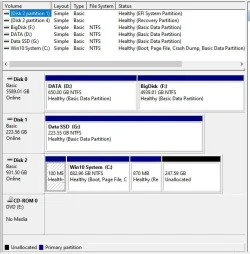
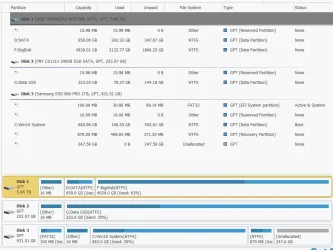
Thanks for the many great responses! I'm attaching the disk information from both Mini Tool Partition Wizzard and Windows Disk Management. The 931.5GB disk is where the OS is installed, and all my programs are installed. That disk is NVMe and GPT. Other disks are used for data and backup only. No need to make any changes to other disks.
DM.webpPW.webp
 
Last edited:

My Computer My Computer

At a glance

Windows 11 Pro, version 25H2 (OS Build 26200....i5-13500G.SKILL F4-3200C16D-16GVKBon board
OS
Windows 11 Pro, version 25H2 (OS Build 26200.7840)
Computer type
PC/Desktop
Manufacturer/Model
ASUS user built
CPU
i5-13500
Motherboard
ASUS Prime B760M-A AX D4
Memory
G.SKILL F4-3200C16D-16GVKB
Graphics Card(s)
on board
Sound Card
on board
Monitor(s) Displays
two monitors
Screen Resolution
1080p
Hard Drives
SSD for OS: Samsung 980 PRO 1TB, NVMe
PSU
FSP AURUM S 400, 400W ATX 2.31
Case
Antec Sonata II
Mouse
ANKER A7852M
Internet Speed
200Mbps up/dn
Browser
Edge
Antivirus
OS Native
There are a few things that occur to me.

  1. I could uninstall the half dozen or so legacy programs I have, do the upgrade and reinstall them. Any idea if this would decrease the risk? The non-legacy programs are things everyone is familiar with like browsers and Microsoft products.
  2. When I migrated from Win7 to Win10, I kept the Win7 installation in place on its original drive. I clean installed onto a new drive specifically for Win 10 (at that time is was not NVMe type drive). I then could choose what drive to boot from. I may have had to unplug the unused drive, I can remember now. So at my leisure, I installed everything I wanted on Win 10. The process probably took a few months to complete. Before completion I could boot to the Win 7 drive whenever I needed to access some app that wasn’t yet on the Win 10 drive. Once Win 10 was completed I got rid of the Win 7 drive. I did not find that process to be painful at all. I’m not sure if booting from two NVMe drives (one at a time) is possible on this mobo. I could always remove one and replace with the other but that’s too much trouble and over time something might break after many RR operations.
 

My Computer My Computer

At a glance

Windows 11 Pro, version 25H2 (OS Build 26200....i5-13500G.SKILL F4-3200C16D-16GVKBon board
OS
Windows 11 Pro, version 25H2 (OS Build 26200.7840)
Computer type
PC/Desktop
Manufacturer/Model
ASUS user built
CPU
i5-13500
Motherboard
ASUS Prime B760M-A AX D4
Memory
G.SKILL F4-3200C16D-16GVKB
Graphics Card(s)
on board
Sound Card
on board
Monitor(s) Displays
two monitors
Screen Resolution
1080p
Hard Drives
SSD for OS: Samsung 980 PRO 1TB, NVMe
PSU
FSP AURUM S 400, 400W ATX 2.31
Case
Antec Sonata II
Mouse
ANKER A7852M
Internet Speed
200Mbps up/dn
Browser
Edge
Antivirus
OS Native
I won't be able to procrastinate moving from Win10 Pro to Win11 Pro much longer. My hardware is good for Eleven, but I have lots of Software on my system and that includes probably a half dozen really old utilities and special purpose programs.....

.....Will an upgrade from 10 to 11 be just as risky as from 7 to 10 or has the upgrade process gotten more reliable? Am I right to be afraid of this upgrade? Is there any new way of doing this or are the choices still a risky upgrade, or a clean install and reload all programs??
Less risky, the kernel of Windows 11 is for the most part the same as for Windows 10. I had no problem with my software, and some of mine is pretty old too, for example....

Jasc Paint Shop Pro Version 7.04 ©1991-2000 Jasc Software, Inc.
 

My Computers My Computers

  • At a glance

    Windows 11 HomeAMD Athlon Silver 3050U8GBRadeon Graphics
    OS
    Windows 11 Home
    Computer type
    Laptop
    Manufacturer/Model
    Acer Aspire 3 A315-23-R9VY
    CPU
    AMD Athlon Silver 3050U
    Memory
    8GB
    Graphics Card(s)
    Radeon Graphics
    Monitor(s) Displays
    laptop screen
    Screen Resolution
    1366x768 native resolution, up to 2560x1440 with Radeon Virtual Super Resolution
    Hard Drives
    1TB Samsung EVO 870 SSD (from April 2026: 250GB EVO 850)
    Internet Speed
    150 Mbps
    Browser
    Edge, Firefox
    Antivirus
    Defender
    Other Info
    fully 'Windows 11 ready' laptop. Windows 10 C: partition migrated from my old unsupported 'main machine' then upgraded to 11. A test migration ran Insider builds for 2 months. When 11 was released on 5th October 2021 it was re-imaged back to 10 and was offered the upgrade in Windows Update on 20th October. Windows Update offered the 22H2 Feature Update on 20th September 2022. It got the 23H2 Feature Update on 4th November 2023 through Windows Update, 24H2 on 3rd October 2024 through Windows Update by setting the Target Release Version for 24H2, and 25H2 on 30th September 2025 through Windows Update by setting the Target Release Version for 25H2.

    UPDATE - 11 April 2026: due to mechanical deterioration this PC has been retired from active duty. The OS with all software and files has been migrated to my System Seven in 'Other systems' to carry on as my general purpose 'main machine'.

    I've now clean installed 25H2 and used Garlin's scripts to update Secure Boot to CA 2023 and revoke the PCA 2011 certificates. It's new role is to test secure boot issues.
  • At a glance

    Windows 11 ProIntel® Core™ i5-520M8GB(integrated graphics) Intel HD Graphics
    Operating System
    Windows 11 Pro
    Computer type
    Laptop
    Manufacturer/Model
    Dell Latitude E4310
    CPU
    Intel® Core™ i5-520M
    Motherboard
    0T6M8G
    Memory
    8GB
    Graphics card(s)
    (integrated graphics) Intel HD Graphics
    Screen Resolution
    1366x768
    Hard Drives
    500GB Crucial MX500 SSD
    Browser
    Firefox, Edge
    Antivirus
    Defender
    Other Info
    unsupported machine: Legacy bios, MBR, TPM 1.2, upgraded from W10 to W11 using W10/W11 hybrid install media workaround.

    In-place upgrade to 22H2 using ISO and a workaround.
    Feature Update to 23H2 by manually installing the Enablement Package.
    In-place upgrade to 24H2 using hybrid 23H2/24H2 install media.
    Upgraded to 25H2 by Enablement Package.

    Also running Insider Dev, and Canary builds and Windows 10 as native boot .vhdx.
  • My SYSTEM THREE is a Dell Latitude 5410, i7-10610U, 32GB RAM, 512GB NVMe ssd, supported device running Windows 11 Pro.

    My SYSTEM FOUR is a 2-in-1 convertible Lenovo Yoga 11e 20DA, Celeron N2930, 8GB RAM, 256GB ssd. Unsupported device: currently running Win10 Pro, plus Win11 Pro RTM and Insider Dev, Beta, and RP 24H2 as native boot vhdx.

    My SYSTEM FIVE is a Dell Latitude 3190 2-in-1, Pentium Silver N5030, 8GB RAM, 1TB NVMe ssd, supported device running Windows 11 Pro, plus Insider Beta, Dev, and Canary builds (and a few others) as a native boot .vhdx.

    My SYSTEM SIX is a Dell Latitude 5550, Core Ultra 7 165H, 64GB RAM, 1TB NVMe SSD, supported device, Windows 11 Pro 24H2, Hyper-V host machine. Updated to 25H2 on 30th September 2025.

    My SYSTEM SEVEN is a Lenovo Thinkpad T580, Intel Core i7-8650U, 16GB RAM, 512GB NVMe SSD + 2nd 512GB NVMe SSD, a supported device for Windows 11. This is my current general purpose 'main machine'. The installed Windows 11 Home from my System One has been migrated to this machine.
Thanks for the many great responses! I'm attaching the disk information from both Mini Tool Partition Wizzard and Windows Disk Management. The 931.5GB disk is where the OS is installed, and all my programs are installed. That disk is NVMe and GPT. Other disks are used for data and backup only. No need to make any changes to other disks.
View attachment 133994
Your drive already is UEFI-GPT. Itseams to have everything to be officially candidate to Win 11
The question is: Why WU didn't offer you to upgrade to win 11?
Maybe TPM isn't enabled on BIOS.
Please download and run WhyNotWin11.exe to see what is blocking your natural upgrade
 

My Computers My Computers

  • At a glance

    Windows 11 Pro - Windows 7 HP 64 - Lubuntui5 6600K - 800MHz to 4400MHz4+4G GSkill DDR4 3000IG - Intel 530
    OS
    Windows 11 Pro - Windows 7 HP 64 - Lubuntu
    Computer type
    PC/Desktop
    Manufacturer/Model
    custom build
    CPU
    i5 6600K - 800MHz to 4400MHz
    Motherboard
    GA-Z170-HD3P
    Memory
    4+4G GSkill DDR4 3000
    Graphics Card(s)
    IG - Intel 530
    Monitor(s) Displays
    Samsung 226BW
    Screen Resolution
    1680x1050
    Hard Drives
    (1) -1 SM951 – 128GB M.2 AHCI PCIe SSD drive for Win 11
    (2) -1 WD SATA 3 - 1T for Data
    (3) -1 WD SATA 3 - 1T for backup
    (4) -1 BX500 SSD - 256G for Windows 7 and Lubuntu
    PSU
    Thermaltake 450W TR2 gold
    Keyboard
    Old and good Chicony mechanical keyboard
    Mouse
    Logitech mX performance - 9 buttons (had to disable some)
    Internet Speed
    500 Mb/s
    Browser
    Firefox 64
  • At a glance

    Windows 11 Proi7-4500U 800- 3000MHz(4+4)G DDR3 1600IG intel 4400 + NVIDIA GeForce GT 745M
    Operating System
    Windows 11 Pro
    Computer type
    Laptop
    Manufacturer/Model
    Asus Q550LF
    CPU
    i7-4500U 800- 3000MHz
    Motherboard
    Asus Q550LF
    Memory
    (4+4)G DDR3 1600
    Graphics card(s)
    IG intel 4400 + NVIDIA GeForce GT 745M
    Sound Card
    Realtek
    Monitor(s) Displays
    LG Display LP156WF4-SPH1
    Screen Resolution
    1920 x 1080
    Hard Drives
    BX500 120G SSD for Windows and programs
    & 1T HDD for data
    Internet Speed
    500 Mb/s
    Browser
    Firefox 64
Your drive already is UEFI-GPT. Itseams to have everything to be officially candidate to Win 11
The question is: Why WU didn't offer you to upgrade to win 11?
Maybe TPM isn't enabled on BIOS.
Please download and run WhyNotWin11.exe to see what is blocking your natural upgrade
WU has been trying to get me to update, and I've asked it to stop reminding me since I've been procrastinating the upgrade. Is turning it over to WU one of the safer ways of doing the upgrade? Some folks have been advising against upgrading to 24H2 and instead upgrading to 23H2 using some other methods like media creation tool on bootable thumb.
 

My Computer My Computer

At a glance

Windows 11 Pro, version 25H2 (OS Build 26200....i5-13500G.SKILL F4-3200C16D-16GVKBon board
OS
Windows 11 Pro, version 25H2 (OS Build 26200.7840)
Computer type
PC/Desktop
Manufacturer/Model
ASUS user built
CPU
i5-13500
Motherboard
ASUS Prime B760M-A AX D4
Memory
G.SKILL F4-3200C16D-16GVKB
Graphics Card(s)
on board
Sound Card
on board
Monitor(s) Displays
two monitors
Screen Resolution
1080p
Hard Drives
SSD for OS: Samsung 980 PRO 1TB, NVMe
PSU
FSP AURUM S 400, 400W ATX 2.31
Case
Antec Sonata II
Mouse
ANKER A7852M
Internet Speed
200Mbps up/dn
Browser
Edge
Antivirus
OS Native
You can use the In place upgrade using an Win 11 iso file (23h2 or 24h2). You mount the iso and on the virtual DVD you run setup.exe and it will upgrade.

I have an unsupported hardware so I am still on Win 11 23h2 as I read that some of us had some issues but most of us didn't have any problem.
 

My Computers My Computers

  • At a glance

    Windows 11 Pro - Windows 7 HP 64 - Lubuntui5 6600K - 800MHz to 4400MHz4+4G GSkill DDR4 3000IG - Intel 530
    OS
    Windows 11 Pro - Windows 7 HP 64 - Lubuntu
    Computer type
    PC/Desktop
    Manufacturer/Model
    custom build
    CPU
    i5 6600K - 800MHz to 4400MHz
    Motherboard
    GA-Z170-HD3P
    Memory
    4+4G GSkill DDR4 3000
    Graphics Card(s)
    IG - Intel 530
    Monitor(s) Displays
    Samsung 226BW
    Screen Resolution
    1680x1050
    Hard Drives
    (1) -1 SM951 – 128GB M.2 AHCI PCIe SSD drive for Win 11
    (2) -1 WD SATA 3 - 1T for Data
    (3) -1 WD SATA 3 - 1T for backup
    (4) -1 BX500 SSD - 256G for Windows 7 and Lubuntu
    PSU
    Thermaltake 450W TR2 gold
    Keyboard
    Old and good Chicony mechanical keyboard
    Mouse
    Logitech mX performance - 9 buttons (had to disable some)
    Internet Speed
    500 Mb/s
    Browser
    Firefox 64
  • At a glance

    Windows 11 Proi7-4500U 800- 3000MHz(4+4)G DDR3 1600IG intel 4400 + NVIDIA GeForce GT 745M
    Operating System
    Windows 11 Pro
    Computer type
    Laptop
    Manufacturer/Model
    Asus Q550LF
    CPU
    i7-4500U 800- 3000MHz
    Motherboard
    Asus Q550LF
    Memory
    (4+4)G DDR3 1600
    Graphics card(s)
    IG intel 4400 + NVIDIA GeForce GT 745M
    Sound Card
    Realtek
    Monitor(s) Displays
    LG Display LP156WF4-SPH1
    Screen Resolution
    1920 x 1080
    Hard Drives
    BX500 120G SSD for Windows and programs
    & 1T HDD for data
    Internet Speed
    500 Mb/s
    Browser
    Firefox 64
That's a pretty straight forwards way of doing things. I may just give that a shot. Of course I'll make a Macrum backup first, maybe two!
The ISO is gotten using the media creation tool, Right??
 

My Computer My Computer

At a glance

Windows 11 Pro, version 25H2 (OS Build 26200....i5-13500G.SKILL F4-3200C16D-16GVKBon board
OS
Windows 11 Pro, version 25H2 (OS Build 26200.7840)
Computer type
PC/Desktop
Manufacturer/Model
ASUS user built
CPU
i5-13500
Motherboard
ASUS Prime B760M-A AX D4
Memory
G.SKILL F4-3200C16D-16GVKB
Graphics Card(s)
on board
Sound Card
on board
Monitor(s) Displays
two monitors
Screen Resolution
1080p
Hard Drives
SSD for OS: Samsung 980 PRO 1TB, NVMe
PSU
FSP AURUM S 400, 400W ATX 2.31
Case
Antec Sonata II
Mouse
ANKER A7852M
Internet Speed
200Mbps up/dn
Browser
Edge
Antivirus
OS Native
Back
Top Bottom