Not always connecting to the internet on fresh startup


Gareth Unwin

Member
Local time
11:00 PM
Posts
4
OS
Windows 11 Pro 64-bit
I have recently encountered a problem with my PC. I am on Windows 11 Pro - 64 bit

Upon a fresh startup it does not always connect to the internet and has a delay connecting, and correctly illuminating to my Razor keyboard.

On a good startup, the Razor logo comes on the screen early, my keyboard illuminates with rainbow sequence and the "Samsung Magician" box pops up about an update.

I know if there will be no internet as the keyboard remains 1 colour for a while and no Samsung Magician notification.

I then have to restart my PC to get internet connection.

I tried the SFC scannow yesterday with a few fixes but alas that was obviously not a fault to do with this.

I tried removing and replacing the ethernet cable but did not re-connect.

My Router always remains on so not a fault with that.

Any Ideas please?
 

My Computer My Computer

At a glance

Windows 11 Pro 64-bitIntel(R) Core(TM) i5-14600K (20 CPUs) 3.5GHZ32768RTX 4070 Super
OS
Windows 11 Pro 64-bit
Computer type
PC/Desktop
Manufacturer/Model
Asus, Intel i5-RTX 4070 Super-TUF Gaming H770 Pro
CPU
Intel(R) Core(TM) i5-14600K (20 CPUs) 3.5GHZ
Motherboard
TUF Gaming H770-Pro WiFi
Memory
32768
Graphics Card(s)
RTX 4070 Super
Sound Card
Realtek
Monitor(s) Displays
AOC Q27 G3XMN X 2
Internet Speed
1Gig
do you have 'fast startup' enabled in control panel > power settings.
if you do please disable fast startup and then try the system for awhile to see if there is any improvement.

best of luck, Steve ..
 

My Computers My Computers

  • At a glance

    Windows 11 HomeRyzen 7 5825u64GB DDR4 3200Ryzen 7 5825u
    OS
    Windows 11 Home
    Computer type
    PC/Desktop
    Manufacturer/Model
    HP 24" AiO
    CPU
    Ryzen 7 5825u
    Motherboard
    HP
    Memory
    64GB DDR4 3200
    Graphics Card(s)
    Ryzen 7 5825u
    Sound Card
    Realtek External 5w speaker bar.
    Monitor(s) Displays
    24" HP AiO
    Screen Resolution
    1920 x 1080 @60 Hz
    Hard Drives
    1TB WD Blue SN580 M2 SSD Partitioned C:/D: drives.
    2x 1TB USB HDD External Backup/Storage.
    all VeraCrypt encrypted.
    PSU
    90W external power brick
    Case
    24" All in One
    Cooling
    Default Air Cooling
    Keyboard
    Dell WiFi UK extended
    Mouse
    Dell WiFi 3 Button
    Internet Speed
    1GB full fibre
    Browser
    Vivaldi Browser/Email/Calendar
    Antivirus
    AVG Internet Security/Windows Defender
    Other Info
    Mainly Open Source Software
  • At a glance

    Ubuntu 22.04.5 LTSi5 7200u16GB DDR4Intel
    Operating System
    Ubuntu 22.04.5 LTS
    Computer type
    Laptop
    Manufacturer/Model
    Dell 13" Latitude 2017
    CPU
    i5 7200u
    Motherboard
    Dell
    Memory
    16GB DDR4
    Graphics card(s)
    Intel
    Sound Card
    Intel
    Monitor(s) Displays
    13" Dell Laptop
    Hard Drives
    250GB Crucial 2.5" SSD
    Mouse
    Generic WiFi 3 button
    Internet Speed
    WiFi only
    Browser
    Firefox
    Antivirus
    ClamAV TK
    Other Info
    Mainly Open Source Software
You are always connected to the Internet if the router is turned on.
Windows connects to the router according to the settings in

Settings > Network & internet > ...
 

My Computer My Computer

At a glance

Microsoft Windows 11 HomeIntel Core i5-13490F2 x 16 Patriot Memory (PDP Systems) PSD516G56...GIGABYTE GeForce RTX 4070 WINDFORCE OC 12G (G...
OS
Microsoft Windows 11 Home
Computer type
PC/Desktop
Manufacturer/Model
MSI MS-7D98
CPU
Intel Core i5-13490F
Motherboard
MSI B760 GAMING PLUS WIFI
Memory
2 x 16 Patriot Memory (PDP Systems) PSD516G560081 6400MT (32-37-37-74); 1.35V)
Graphics Card(s)
GIGABYTE GeForce RTX 4070 WINDFORCE OC 12G (GV-N4070WF3OC-12GD)
Sound Card
Bluetooth Аудио
Monitor(s) Displays
INNOCN 15K1F
Screen Resolution
1920 x 1080
Hard Drives
WD_BLACK SN770 250GB
KINGSTON SNV2S1000G (ELFK0S.6)
PSU
Thermaltake Toughpower GF3 1000W
Case
CG560 - DeepCool
Cooling
ID-COOLING SE-224-XTS / 2 x 140Mm Fan - rear and top; 3 x 120Mm - front
Keyboard
Corsair K70 RGB TKL
Mouse
Corsair KATAR PRO XT
Internet Speed
100 Mbps
Browser
Firefox
Antivirus
Microsoft Defender Antivirus
Other Info
https://www.userbenchmark.com/UserRun/66553205
Thanks for the reply and advice Steve.

Fast Startup was enabled and I had no clue. Neither did I have a clue it can cause issues which I have just read on Google.

So I have disabled it and will see how it goes for a while.

Many Thanks again for the help.
 

My Computer My Computer

At a glance

Windows 11 Pro 64-bitIntel(R) Core(TM) i5-14600K (20 CPUs) 3.5GHZ32768RTX 4070 Super
OS
Windows 11 Pro 64-bit
Computer type
PC/Desktop
Manufacturer/Model
Asus, Intel i5-RTX 4070 Super-TUF Gaming H770 Pro
CPU
Intel(R) Core(TM) i5-14600K (20 CPUs) 3.5GHZ
Motherboard
TUF Gaming H770-Pro WiFi
Memory
32768
Graphics Card(s)
RTX 4070 Super
Sound Card
Realtek
Monitor(s) Displays
AOC Q27 G3XMN X 2
Internet Speed
1Gig
You are always connected to the Internet if the router is turned on.
Windows connects to the router according to the settings in

Settings > Network & internet > ...
That's not true in all cases. I have had times I lost the internet on just one computer even though it's connected to the router. The web pages will stop loading and when I place the mouse cursor on the Wi-Fi icon it'll say the show the name of the Wi-Fi and say No Internet Access. When it happens on just the one computer I'll try toggling the Wi-Fi off and on. If that doesn't work I'll restart my computer. If it's on all devices, I'll restart the router. Depending if it's a problem with the router or a problem with Comcast determines if it works or not.
 

My Computers My Computers

  • At a glance

    Windows 11 Pro 25H2Intel Core i7-10700K16GB (8GB PC4-19200 DDR4 SDRAM x2)NVIDIA GeForce GTX 1050 TI
    OS
    Windows 11 Pro 25H2
    Computer type
    PC/Desktop
    Manufacturer/Model
    PowerSpec B746
    CPU
    Intel Core i7-10700K
    Motherboard
    ASRock Z490 Phantom Gaming 4/ax
    Memory
    16GB (8GB PC4-19200 DDR4 SDRAM x2)
    Graphics Card(s)
    NVIDIA GeForce GTX 1050 TI
    Sound Card
    Realtek Audio
    Monitor(s) Displays
    #1. LG ULTRAWIDE 34" #2. AOC Q32G2WG3 32"
    Screen Resolution
    #1. 3440 X 1440 #2. 1920 x 1080
    Hard Drives
    NVMe WDC WDS100T2B0C-00PXH0 1TB
    Samsung SSD 860 EVO 1TB
    PSU
    750 Watts (62.5A)
    Case
    PowerSpec/Lian Li ATX 205
    Keyboard
    Logitech K270
    Mouse
    Logitech M185
    Browser
    Microsoft Edge and Firefox
    Antivirus
    Webroot SecureAnywhere CE 26.1
  • At a glance

    Windows 11 Canary ChannelIntel Core i5-8400 CPU @ 2.80GHz16 MB DDR 4-2666
    Operating System
    Windows 11 Canary Channel
    Computer type
    PC/Desktop
    Manufacturer/Model
    PowerSpec G156
    CPU
    Intel Core i5-8400 CPU @ 2.80GHz
    Motherboard
    AsusTeK Prime B360M-A
    Memory
    16 MB DDR 4-2666
    Monitor(s) Displays
    23" Speptre HDMI 75Hz
    Screen Resolution
    1920x1080
    Hard Drives
    Samsung 970 EVO 500GB NVMe
    Keyboard
    Logitek K270
    Mouse
    Logitek M185
    Browser
    Firefox, Edge and Edge Canary
    Antivirus
    Windows Defender
It definatley was not connected. Even when going inro Network - disable then enable it did not work.

XxXxX was correct with his solution of disabling Fast Start up. It connects fine every time now.
 

My Computer My Computer

At a glance

Windows 11 Pro 64-bitIntel(R) Core(TM) i5-14600K (20 CPUs) 3.5GHZ32768RTX 4070 Super
OS
Windows 11 Pro 64-bit
Computer type
PC/Desktop
Manufacturer/Model
Asus, Intel i5-RTX 4070 Super-TUF Gaming H770 Pro
CPU
Intel(R) Core(TM) i5-14600K (20 CPUs) 3.5GHZ
Motherboard
TUF Gaming H770-Pro WiFi
Memory
32768
Graphics Card(s)
RTX 4070 Super
Sound Card
Realtek
Monitor(s) Displays
AOC Q27 G3XMN X 2
Internet Speed
1Gig
It definatley was not connected. Even when going inro Network - disable then enable it did not work.

XxXxX was correct with his solution of disabling Fast Start up. It connects fine every time now.
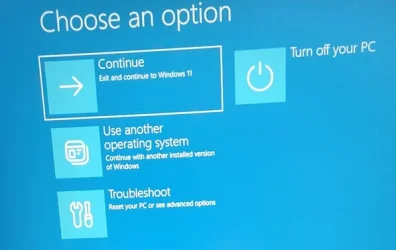
IMO the problem with Fast Start is that it doesn't actually close Windows so nothing get's reset. I have Fast Start disabled on all of the computers. When my computers are having problems that I think a restart may fix, I hold the Shift key while clicking on Restart.
 

My Computers My Computers

  • At a glance

    Windows 11 Pro 25H2Intel Core i7-10700K16GB (8GB PC4-19200 DDR4 SDRAM x2)NVIDIA GeForce GTX 1050 TI
    OS
    Windows 11 Pro 25H2
    Computer type
    PC/Desktop
    Manufacturer/Model
    PowerSpec B746
    CPU
    Intel Core i7-10700K
    Motherboard
    ASRock Z490 Phantom Gaming 4/ax
    Memory
    16GB (8GB PC4-19200 DDR4 SDRAM x2)
    Graphics Card(s)
    NVIDIA GeForce GTX 1050 TI
    Sound Card
    Realtek Audio
    Monitor(s) Displays
    #1. LG ULTRAWIDE 34" #2. AOC Q32G2WG3 32"
    Screen Resolution
    #1. 3440 X 1440 #2. 1920 x 1080
    Hard Drives
    NVMe WDC WDS100T2B0C-00PXH0 1TB
    Samsung SSD 860 EVO 1TB
    PSU
    750 Watts (62.5A)
    Case
    PowerSpec/Lian Li ATX 205
    Keyboard
    Logitech K270
    Mouse
    Logitech M185
    Browser
    Microsoft Edge and Firefox
    Antivirus
    Webroot SecureAnywhere CE 26.1
  • At a glance

    Windows 11 Canary ChannelIntel Core i5-8400 CPU @ 2.80GHz16 MB DDR 4-2666
    Operating System
    Windows 11 Canary Channel
    Computer type
    PC/Desktop
    Manufacturer/Model
    PowerSpec G156
    CPU
    Intel Core i5-8400 CPU @ 2.80GHz
    Motherboard
    AsusTeK Prime B360M-A
    Memory
    16 MB DDR 4-2666
    Monitor(s) Displays
    23" Speptre HDMI 75Hz
    Screen Resolution
    1920x1080
    Hard Drives
    Samsung 970 EVO 500GB NVMe
    Keyboard
    Logitek K270
    Mouse
    Logitek M185
    Browser
    Firefox, Edge and Edge Canary
    Antivirus
    Windows Defender
What does holding shift and clicking restart do?
 

My Computer My Computer

At a glance

Windows 11 Pro 64-bitIntel(R) Core(TM) i5-14600K (20 CPUs) 3.5GHZ32768RTX 4070 Super
OS
Windows 11 Pro 64-bit
Computer type
PC/Desktop
Manufacturer/Model
Asus, Intel i5-RTX 4070 Super-TUF Gaming H770 Pro
CPU
Intel(R) Core(TM) i5-14600K (20 CPUs) 3.5GHZ
Motherboard
TUF Gaming H770-Pro WiFi
Memory
32768
Graphics Card(s)
RTX 4070 Super
Sound Card
Realtek
Monitor(s) Displays
AOC Q27 G3XMN X 2
Internet Speed
1Gig
Last edited:

My Computers My Computers

  • At a glance

    Windows 11 Pro 25H2Intel Core i7-10700K16GB (8GB PC4-19200 DDR4 SDRAM x2)NVIDIA GeForce GTX 1050 TI
    OS
    Windows 11 Pro 25H2
    Computer type
    PC/Desktop
    Manufacturer/Model
    PowerSpec B746
    CPU
    Intel Core i7-10700K
    Motherboard
    ASRock Z490 Phantom Gaming 4/ax
    Memory
    16GB (8GB PC4-19200 DDR4 SDRAM x2)
    Graphics Card(s)
    NVIDIA GeForce GTX 1050 TI
    Sound Card
    Realtek Audio
    Monitor(s) Displays
    #1. LG ULTRAWIDE 34" #2. AOC Q32G2WG3 32"
    Screen Resolution
    #1. 3440 X 1440 #2. 1920 x 1080
    Hard Drives
    NVMe WDC WDS100T2B0C-00PXH0 1TB
    Samsung SSD 860 EVO 1TB
    PSU
    750 Watts (62.5A)
    Case
    PowerSpec/Lian Li ATX 205
    Keyboard
    Logitech K270
    Mouse
    Logitech M185
    Browser
    Microsoft Edge and Firefox
    Antivirus
    Webroot SecureAnywhere CE 26.1
  • At a glance

    Windows 11 Canary ChannelIntel Core i5-8400 CPU @ 2.80GHz16 MB DDR 4-2666
    Operating System
    Windows 11 Canary Channel
    Computer type
    PC/Desktop
    Manufacturer/Model
    PowerSpec G156
    CPU
    Intel Core i5-8400 CPU @ 2.80GHz
    Motherboard
    AsusTeK Prime B360M-A
    Memory
    16 MB DDR 4-2666
    Monitor(s) Displays
    23" Speptre HDMI 75Hz
    Screen Resolution
    1920x1080
    Hard Drives
    Samsung 970 EVO 500GB NVMe
    Keyboard
    Logitek K270
    Mouse
    Logitek M185
    Browser
    Firefox, Edge and Edge Canary
    Antivirus
    Windows Defender

Latest Support Threads

Back
Top Bottom