Hi all,
hoping someone can help with this, for the last few months I've been getting an option of signing in using my personal phone.
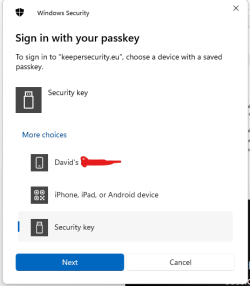
As you can see there is the option for my phone as a passkey. As far as I can remember I have never used my personal phone for anything work related, I keep them VERY seperate.
I've searched all through my laptop and phone for any saved passkeys and I have found nothing. I cleared out all everything in credential manager on my laptop and checked my phone numerous times.
It only appears on my laptop as when I sign into one of the shared laptops, I do not get this option, so I'm fairly sure that it's not liked to my Azure account the way the security key is.
I'd prefer not to have to do a reset on my laptop.
Anyone seen anything like this, or know where or what i should be checking? I even went through the registry but wasn't sure what I was actually looking for!
Cheers,
D
hoping someone can help with this, for the last few months I've been getting an option of signing in using my personal phone.
As you can see there is the option for my phone as a passkey. As far as I can remember I have never used my personal phone for anything work related, I keep them VERY seperate.
I've searched all through my laptop and phone for any saved passkeys and I have found nothing. I cleared out all everything in credential manager on my laptop and checked my phone numerous times.
It only appears on my laptop as when I sign into one of the shared laptops, I do not get this option, so I'm fairly sure that it's not liked to my Azure account the way the security key is.
I'd prefer not to have to do a reset on my laptop.
Anyone seen anything like this, or know where or what i should be checking? I even went through the registry but wasn't sure what I was actually looking for!
Cheers,
D
- Windows Build/Version
- Windows 11 22631.4317
My Computer
At a glance
Windows 11
- OS
- Windows 11
- Computer type
- Laptop
- Manufacturer/Model
- Dell