Patch Tuesday update problem


I may well have to consider doing an in-place repair upgrade although I wouldn't personally feel comfortable attempting that. I would have to leave that in the hands of my nephew.

I do have another thread active on here at the moment, although it would seem it is more important to concentrate on this.

My nephew paused all updates until the 28th, which isn't exactly ideal. It means I have to apply protection updates manually, and I'm currently concerned the PC is not protected as it should be as a result. Also my mother wouldn't know how to apply Windows Security protection updates manually.

Basically, it's a source of worry. As far as I know we are still unable to install the problematic update, and I don't really want to wait another ten (?) days in the hope it might be resolved then.

I will try contacting my nephew again.


Thank you for bearing with me.
 

My Computer My Computer

At a glance

Windows 11 Home 26H2 26300.9711
OS
Windows 11 Home 26H2 26300.9711
Computer type
PC/Desktop
Manufacturer/Model
HP
No need to wait for all the updates. Just block the specific one and install the rest.
 

My Computers My Computers

  • At a glance

    Windows 11 Pro 23H2 (7584), 26H2 (9711)Mobile DualCore Intel Core 2 Duo T7250, 2000 MHz4GBMobile Intel(R) GMA 4500M (Mobile 4 series)
    OS
    Windows 11 Pro 23H2 (7584), 26H2 (9711)
    Computer type
    Laptop
    Manufacturer/Model
    Acer Extensa 5630EZ
    CPU
    Mobile DualCore Intel Core 2 Duo T7250, 2000 MHz
    Motherboard
    Acer Extensa 5630
    Memory
    4GB
    Graphics Card(s)
    Mobile Intel(R) GMA 4500M (Mobile 4 series)
    Sound Card
    Realtek ALC268 @ Intel 82801IB ICH9 - High Definition Audio Controller
    Monitor(s) Displays
    1
    Screen Resolution
    1280x800
    Hard Drives
    Samsung SSD 850 EVO 250GB SATA Device (250 GB, SATA-III)
    Internet Speed
    802.11g wireless 54 Mbps
    Browser
    MICROSOFT EDGE
    Antivirus
    WINDOWS DEFENDER
    Other Info
    Legacy MBR installation, no TPM, no Secure Boot, no WDDM 2.0 graphics drivers, no SSE4.2, cannot get more unsupported ;) This is only my test laptop. I had installed Windows 11 here before upgrading my main PC. For my main PC I use everyday see my 2nd system specs.
  • At a glance

    Windows 11 Pro 26H2 (build 26300.9711)Intel Core-i7 3770 3.40GHz s1155 (3rd generat...2x Kingston Hyper-X Blu 8GB DDR3-1600GIGABYTE GeForce RTX 3050 WINDFORCE OC V2 6GB...
    Operating System
    Windows 11 Pro 26H2 (build 26300.9711)
    Computer type
    PC/Desktop
    Manufacturer/Model
    Custom-built PC
    CPU
    Intel Core-i7 3770 3.40GHz s1155 (3rd generation)
    Motherboard
    Asus P8H61 s1155 ATX
    Memory
    2x Kingston Hyper-X Blu 8GB DDR3-1600
    Graphics card(s)
    GIGABYTE GeForce RTX 3050 WINDFORCE OC V2 6GB (GV-N3050WF2OCV2-6GD)
    Sound Card
    Realtek HD audio (ALC887)
    Monitor(s) Displays
    Sony Bravia KDL-19L4000 19" LCD TV via VGA
    Screen Resolution
    1440x900 32-bit 60Hz
    Hard Drives
    WD Blue SA510 2.5 1000GB SSD as system disk, Western Digital Caviar Purple 4TB SATA III (WD40PURZ) as second
    PSU
    Thermaltake Litepower RGB 550W Full Wired
    Case
    SUPERCASE MIDI-TOWER
    Cooling
    Deepcool Gamma Archer CPU cooler, 1x 8cm fan at the back
    Keyboard
    Mitsumi 101-key PS/2
    Mouse
    Microsoft Compact Optical Mouse
    Internet Speed
    802.11ac 5GHz wireless 260Mpbs
    Browser
    Microsoft Edge, Mozilla Firefox
    Antivirus
    Microsoft Windows Defender
    Other Info
    Legacy BIOS (MBR) installation, no TPM, no Secure Boot, WDDM 3.0 graphics drivers, WEI score 7.4
No need to wait for all the updates. Just block the specific one and install the rest.

Everything has installed apart from that one, but I have no knowledge of how to block specific ones (I'd have thought my nephew would have, he knows far more than I).

As I say, he has paused updates until the 28th, and I need to speak to / email him about this, as it is not ideal. It is preventing Defender from updating.
 

My Computer My Computer

At a glance

Windows 11 Home 26H2 26300.9711
OS
Windows 11 Home 26H2 26300.9711
Computer type
PC/Desktop
Manufacturer/Model
HP
Shall I try post #56 again ?
 

My Computer My Computer

At a glance

Windows 11 Home 26H2 26300.9711
OS
Windows 11 Home 26H2 26300.9711
Computer type
PC/Desktop
Manufacturer/Model
HP
OK, so just tried creating / running the WUreset.bat file as suggested.

Further steps, please (before resorting to the in-place repair upgrade) ?
 

My Computer My Computer

At a glance

Windows 11 Home 26H2 26300.9711
OS
Windows 11 Home 26H2 26300.9711
Computer type
PC/Desktop
Manufacturer/Model
HP
Restarted PC, tried the 'Other troubleshooters / Windows Update', and the automated diagnostic tool.

However, reported as 'unable to' (again).
 

My Computer My Computer

At a glance

Windows 11 Home 26H2 26300.9711
OS
Windows 11 Home 26H2 26300.9711
Computer type
PC/Desktop
Manufacturer/Model
HP
A (pertinent ?) query:

Knowing as little as I do (and still on a somewhat steep learning curve for me), would using the Windows Update Cleanup Tool be any help whatsoever ?

I had asked about this in an earlier post.

Thanks.
 

My Computer My Computer

At a glance

Windows 11 Home 26H2 26300.9711
OS
Windows 11 Home 26H2 26300.9711
Computer type
PC/Desktop
Manufacturer/Model
HP
Everything has installed apart from that one, but I have no knowledge of how to block specific ones (I'd have thought my nephew would have, he knows far more than I).

As I say, he has paused updates until the 28th, and I need to speak to / email him about this, as it is not ideal. It is preventing Defender from updating.
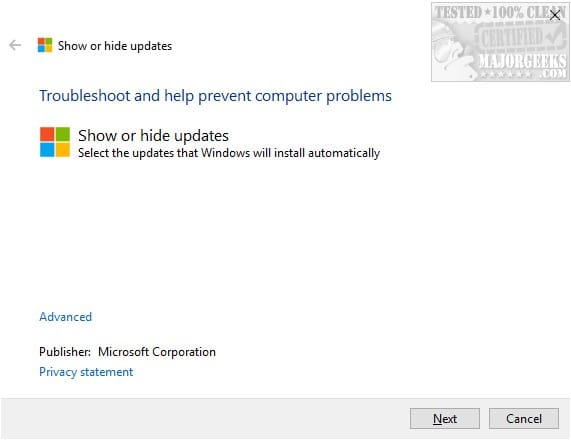
Download Microsoft Windows Update Show/Hide Tool and run it to find available updates. Check the box to hide (block) the specific one that keeps falling. In the rare case you see an error it couldn't search for updates, download Windows Automatic Updates Manager (WAU Manager) instead. Both utilities are available at Major Geeks:


My Computers My Computers

  • At a glance

    Windows 11 Pro 23H2 (7584), 26H2 (9711)Mobile DualCore Intel Core 2 Duo T7250, 2000 MHz4GBMobile Intel(R) GMA 4500M (Mobile 4 series)
    OS
    Windows 11 Pro 23H2 (7584), 26H2 (9711)
    Computer type
    Laptop
    Manufacturer/Model
    Acer Extensa 5630EZ
    CPU
    Mobile DualCore Intel Core 2 Duo T7250, 2000 MHz
    Motherboard
    Acer Extensa 5630
    Memory
    4GB
    Graphics Card(s)
    Mobile Intel(R) GMA 4500M (Mobile 4 series)
    Sound Card
    Realtek ALC268 @ Intel 82801IB ICH9 - High Definition Audio Controller
    Monitor(s) Displays
    1
    Screen Resolution
    1280x800
    Hard Drives
    Samsung SSD 850 EVO 250GB SATA Device (250 GB, SATA-III)
    Internet Speed
    802.11g wireless 54 Mbps
    Browser
    MICROSOFT EDGE
    Antivirus
    WINDOWS DEFENDER
    Other Info
    Legacy MBR installation, no TPM, no Secure Boot, no WDDM 2.0 graphics drivers, no SSE4.2, cannot get more unsupported ;) This is only my test laptop. I had installed Windows 11 here before upgrading my main PC. For my main PC I use everyday see my 2nd system specs.
  • At a glance

    Windows 11 Pro 26H2 (build 26300.9711)Intel Core-i7 3770 3.40GHz s1155 (3rd generat...2x Kingston Hyper-X Blu 8GB DDR3-1600GIGABYTE GeForce RTX 3050 WINDFORCE OC V2 6GB...
    Operating System
    Windows 11 Pro 26H2 (build 26300.9711)
    Computer type
    PC/Desktop
    Manufacturer/Model
    Custom-built PC
    CPU
    Intel Core-i7 3770 3.40GHz s1155 (3rd generation)
    Motherboard
    Asus P8H61 s1155 ATX
    Memory
    2x Kingston Hyper-X Blu 8GB DDR3-1600
    Graphics card(s)
    GIGABYTE GeForce RTX 3050 WINDFORCE OC V2 6GB (GV-N3050WF2OCV2-6GD)
    Sound Card
    Realtek HD audio (ALC887)
    Monitor(s) Displays
    Sony Bravia KDL-19L4000 19" LCD TV via VGA
    Screen Resolution
    1440x900 32-bit 60Hz
    Hard Drives
    WD Blue SA510 2.5 1000GB SSD as system disk, Western Digital Caviar Purple 4TB SATA III (WD40PURZ) as second
    PSU
    Thermaltake Litepower RGB 550W Full Wired
    Case
    SUPERCASE MIDI-TOWER
    Cooling
    Deepcool Gamma Archer CPU cooler, 1x 8cm fan at the back
    Keyboard
    Mitsumi 101-key PS/2
    Mouse
    Microsoft Compact Optical Mouse
    Internet Speed
    802.11ac 5GHz wireless 260Mpbs
    Browser
    Microsoft Edge, Mozilla Firefox
    Antivirus
    Microsoft Windows Defender
    Other Info
    Legacy BIOS (MBR) installation, no TPM, no Secure Boot, WDDM 3.0 graphics drivers, WEI score 7.4
See if your nephew can perform these steps:

For all steps post images or share links.


1) Download Microsoft .NET Framework Repair Tool from Official Microsoft Download Center > run > post images or share links

2) Run administrative command prompt: > post images or share links

a) Dism /Online /Cleanup-image /Restorehealth
b) Dism /Online /Cleanup-Image /StartComponentCleanup
c) Sfc /scannow

3) Perform Windows 11 and defender updates

4) Post any error messages or codes

5) Search for > post share links

C:\windows\logs\CBS\CBS.log
C:\windows\logs\CBS\CbsPersist
 

My Computer My Computer

At a glance

Windows 10Intel(R) Core(TM) i7-4800MQ CPU @ 2.70GHz16 GB Total: Manufacturer : Samsung MemoryTyp...NVIDIA Quadro K3100M; Intel(R) HD Graphics 4600
OS
Windows 10
Computer type
Laptop
Manufacturer/Model
HP
CPU
Intel(R) Core(TM) i7-4800MQ CPU @ 2.70GHz
Motherboard
Product : 190A Version : KBC Version 94.56
Memory
16 GB Total: Manufacturer : Samsung MemoryType : DDR3 FormFactor : SODIMM Capacity : 8GB Speed : 1600
Graphics Card(s)
NVIDIA Quadro K3100M; Intel(R) HD Graphics 4600
Sound Card
IDT High Definition Audio CODEC; PNP Device ID HDAUDIO\FUNC_01&VEN_111D&DEV_76E0
Hard Drives
Model Hitachi HTS727575A9E364
Antivirus
Microsoft Defender
Other Info
Mobile Workstation
Back
Top Bottom