PC randomly shuts down


@esebm

Sometimes thermal paste leaks out and can short a few pins.
That could also look like a motherboard problem.
 

My Computers

System One System Two

  • OS
    Win 11 Home ♦♦♦26200.8457 ♦♦♦♦♦♦♦25H2
    Computer type
    PC/Desktop
    Manufacturer/Model
    Built by Ghot® [May 2020]
    CPU
    AMD Ryzen 7 3700X
    Motherboard
    Asus Pro WS X570-ACE (BIOS 5302)
    Memory
    G.Skill (F4-3200C14D-16GTZKW)
    Graphics Card(s)
    EVGA RTX 2070 (08G-P4-2171-KR)
    Sound Card
    Realtek ALC1220P / ALC S1220A
    Monitor(s) Displays
    Dell U3011 30"
    Screen Resolution
    2560 x 1600
    Hard Drives
    2x Samsung 860 EVO 500GB,
    WD 4TB Black FZBX - SATA III,
    WD 8TB Black FZBX - SATA III,
    DRW-24B1ST CD/DVD Burner
    PSU
    PC Power & Cooling 750W Quad EPS12V
    Case
    Cooler Master ATCS 840 Tower
    Cooling
    CM Hyper 212 EVO (push/pull)
    Keyboard
    Ducky DK9008 Shine II Blue LED
    Mouse
    Logitech Optical M-100
    Internet Speed
    300/300
    Browser
    Firefox (latest)
    Antivirus
    Bitdefender Total Security
    Other Info
    Speakers: Klipsch Pro Media 2.1
  • Operating System
    Windows XP Pro 32bit w/SP3
    Computer type
    PC/Desktop
    Manufacturer/Model
    Built by Ghot® (not in use)
    CPU
    AMD Athlon 64 X2 5000+ (OC'd @ 3.2Ghz)
    Motherboard
    ASUS M2N32-SLI Deluxe Wireless Edition
    Memory
    TWIN2X2048-6400C4DHX (2 x 1GB, DDR2 800)
    Graphics card(s)
    EVGA 256-P2-N758-TR GeForce 8600GT SSC
    Sound Card
    Onboard
    Monitor(s) Displays
    ViewSonic G90FB Black 19" Professional (CRT)
    Screen Resolution
    up to 2048 x 1536
    Hard Drives
    WD 36GB 10,000rpm Raptor SATA
    Seagate 80GB 7200rpm SATA
    Lite-On LTR-52246S CD/RW
    Lite-On LH-18A1P CD/DVD Burner
    PSU
    PC Power & Cooling Silencer 750 Quad EPS12V
    Case
    Generic Beige case, 80mm fans
    Cooling
    ZALMAN 9500A 92mm CPU Cooler
    Keyboard
    Logitech Classic Keybooard 200
    Mouse
    Logitech Optical M-BT96a
    Internet Speed
    300/300
    Browser
    Firefox 3.x ??
    Antivirus
    Symantec (Norton)
    Other Info
    Still assembled, still runs. Haven't turned it on for 15 years?
As I had mentioned in post # 7, the CPU has new thermal paste.
You may want to check it or re-paste it again.
 

My Computers

System One System Two

  • OS
    Windows 11 Pro
    Computer type
    PC/Desktop
    CPU
    AMD Ryzen 7 9800X3D
    Motherboard
    MSI PRO B850-P Wifi
    Memory
    32GB DDR5 CL30 Kingston Fury
    Graphics Card(s)
    ASUS Prime Radeon RX 9060 XT OC Edition 16GB
    Monitor(s) Displays
    LG Ultrawide 34" + LG 27" 1080p
    Screen Resolution
    3440x1440
    Hard Drives
    Main Boot Drive : 512GB Adata XPG RGB Gen3x4 NVMe M.2 SSD
    PSU
    EVGA 750 Watts 80+ Gold
    Case
    Deepcool Genome II
    Cooling
    Thermalright Burst Assassin 120
    Internet Speed
    1Gbps
    Browser
    Chrome
    Antivirus
    "Moderna"
  • Operating System
    Windows 11 Pro
    Computer type
    PC/Desktop
    CPU
    i7-4790K
    Motherboard
    ASRock Xtreme6 Z97
    Memory
    16GB Corsair Vengeance Pro
    Graphics card(s)
    MSI R9 290
    Monitor(s) Displays
    LG Ultrawide 34"
    Screen Resolution
    3440x1440
    Hard Drives
    500GB Adata SSD (OS Only)
    PSU
    Thermaltake 475 Watts 80 Bronze
    Case
    Thermaltake Commander I Snow Edition
    Cooling
    Deep Cool Archer Air Cooler
    Keyboard
    Armageddon MKA-5R RGB-Hornet
    Mouse
    Logitech G402
    Internet Speed
    1Gbps
    Browser
    Chrome
    Antivirus
    Moderna :)

My Computers

System One System Two

  • OS
    Windows 11 Pro
    Computer type
    PC/Desktop
    CPU
    AMD Ryzen 7 9800X3D
    Motherboard
    MSI PRO B850-P Wifi
    Memory
    32GB DDR5 CL30 Kingston Fury
    Graphics Card(s)
    ASUS Prime Radeon RX 9060 XT OC Edition 16GB
    Monitor(s) Displays
    LG Ultrawide 34" + LG 27" 1080p
    Screen Resolution
    3440x1440
    Hard Drives
    Main Boot Drive : 512GB Adata XPG RGB Gen3x4 NVMe M.2 SSD
    PSU
    EVGA 750 Watts 80+ Gold
    Case
    Deepcool Genome II
    Cooling
    Thermalright Burst Assassin 120
    Internet Speed
    1Gbps
    Browser
    Chrome
    Antivirus
    "Moderna"
  • Operating System
    Windows 11 Pro
    Computer type
    PC/Desktop
    CPU
    i7-4790K
    Motherboard
    ASRock Xtreme6 Z97
    Memory
    16GB Corsair Vengeance Pro
    Graphics card(s)
    MSI R9 290
    Monitor(s) Displays
    LG Ultrawide 34"
    Screen Resolution
    3440x1440
    Hard Drives
    500GB Adata SSD (OS Only)
    PSU
    Thermaltake 475 Watts 80 Bronze
    Case
    Thermaltake Commander I Snow Edition
    Cooling
    Deep Cool Archer Air Cooler
    Keyboard
    Armageddon MKA-5R RGB-Hornet
    Mouse
    Logitech G402
    Internet Speed
    1Gbps
    Browser
    Chrome
    Antivirus
    Moderna :)
Looking at the log in the Event Viewer, I can assume that it's a hardware failure rather software-related bug. It happens unexpectedly without any previous errors like a driver fault or disk read/write error. OS cannot even create a dump of the error or show the BSOD. Aside of overheating (you said that the temperature is normal), it may be a result of overclocking of CPU or RAM. Such overclocking may be not your mistake, but wrong default settings in BIOS. Disable any automatic settings and try to set manually the lesser possible CPU frequency multiplier and longest RAM timing.
 

My Computer

System One

  • OS
    Windows 11 Pro 25H2
    Computer type
    Laptop
    Manufacturer/Model
    Lenovo Legion 5-15ARH05
    CPU
    AMD Rysen 5 4600H
    Memory
    32 GB (2 x 16 GB Samsung SO-DIMM DDR4-3200)
    Graphics Card(s)
    GeForce GTX 1650 Ti, 4 GB GDDR6
    Screen Resolution
    1920x1080
    Hard Drives
    SSD M.2 512 GB SAMSUNG MZALQ512; SSD M.2 1 TB Seagate FireCuda 530
    Mouse
    Logitech M650L in Bluetooth mode
XxXxXx: I have done that several times. Didn't make a difference.
Lately I keep getting errors: Name resolution policy table has been corrupted. DNS resolution will fail until it is fixed. Contact your network administrator. For more information: read policy table for rule {D6543593-7808-4B33-B72A-5F90967C109F} failed with error 0x57
Does that indicate anything?
 

My Computer

System One

  • OS
    win 11
    Computer type
    PC/Desktop
    Manufacturer/Model
    Home build
    CPU
    Ryzen 5600G
    Motherboard
    B450 Tomahawk Max
    Memory
    32 GB DDR4
    Graphics Card(s)
    on board
    Monitor(s) Displays
    LG 27MR400
    Screen Resolution
    1280 x 1024
    Hard Drives
    SSD
    Internet Speed
    3MB/s
    Browser
    Opera
    Antivirus
    Windows
XxXxXx: I have done that several times. Didn't make a difference.
Lately I keep getting errors: Name resolution policy table has been corrupted. DNS resolution will fail until it is fixed. Contact your network administrator. For more information: read policy table for rule {D6543593-7808-4B33-B72A-5F90967C109F} failed with error 0x57
Does that indicate anything?
You shouldn't fixate on that error; this is not where your problem lies.
For that DNS error, just use:
Code:
IPconfig.exe /flushdns
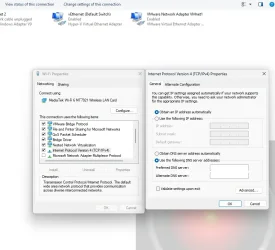
You should post a screenshot of your DNS configuration.


IPV.webp
 

My Computers

System One System Two

  • OS
    All Branches but Release
    Computer type
    Laptop
    Manufacturer/Model
    Acer Nitro ANV15-51
    CPU
    AMD Ryzen 7 7735HS 3200-4500 Mhz 8 cores x 2
    Motherboard
    Sportage_RBH
    Memory
    32 GB DDR5
    Graphics Card(s)
    Radeon Graphic / NVIDIA GeForce RTX 4060 8 GB GDDR6
    Sound Card
    AMD/Realtek(R) Audio
    Monitor(s) Displays
    Integrated Monitor (15.3"vis)
    Screen Resolution
    FHD 1920X1080 16:9 144Hz
    Hard Drives
    KINGSTON OM8SEP4512Q-AA 1TB
    Western Digital 256GB
    PSU
    19V DC 6.32 A 120 W
    Cooling
    Dual Fans
    Mouse
    MS Bluetooth
    Internet Speed
    Fiber 1GB Cox -us & 1GB Orange-fr
    Browser
    Edge Canary- Firefox Nightly-Chrome Dev-Chrome Dev
    Antivirus
    Windows Defender
  • Operating System
    Windows 11 Beta
    Computer type
    Laptop
    Manufacturer/Model
    Asus X751BP
    CPU
    AMD A9-9420
    Memory
    8 GB of DDR4
    Graphics card(s)
    AMD Radeon R5
    Screen Resolution
    1600x900
    Hard Drives
    Seagate 1 TB
Guys, the PC ran all day (normal mode) without a single shutdown. Go figure.
CPU temp is 37C/96F with all the usual apps running (email client, browser, LibreOffice writer, Groupme) and not a single error message re NRP.
I'll try to find that DNS configuration tomorrow to get a screen shot.
 

My Computer

System One

  • OS
    win 11
    Computer type
    PC/Desktop
    Manufacturer/Model
    Home build
    CPU
    Ryzen 5600G
    Motherboard
    B450 Tomahawk Max
    Memory
    32 GB DDR4
    Graphics Card(s)
    on board
    Monitor(s) Displays
    LG 27MR400
    Screen Resolution
    1280 x 1024
    Hard Drives
    SSD
    Internet Speed
    3MB/s
    Browser
    Opera
    Antivirus
    Windows
Oat, I just checked the DNS settings and it's looks exactly as in your schreenshot except f course for the "Connect Using".
Just for the fun of it, I have changed the alternate configuration to 1.1.1.1. (Cloudflare DNS server). Maybe it makes a difference.
 

My Computer

System One

  • OS
    win 11
    Computer type
    PC/Desktop
    Manufacturer/Model
    Home build
    CPU
    Ryzen 5600G
    Motherboard
    B450 Tomahawk Max
    Memory
    32 GB DDR4
    Graphics Card(s)
    on board
    Monitor(s) Displays
    LG 27MR400
    Screen Resolution
    1280 x 1024
    Hard Drives
    SSD
    Internet Speed
    3MB/s
    Browser
    Opera
    Antivirus
    Windows
Oat, I just checked the DNS settings and it's looks exactly as in your schreenshot except f course for the "Connect Using".
Just for the fun of it, I have changed the alternate configuration to 1.1.1.1. (Cloudflare DNS server). Maybe it makes a difference.
Did you flush the DNS cache as well?

IPconfig.exe /flushdns
 

My Computers

System One System Two

  • OS
    All Branches but Release
    Computer type
    Laptop
    Manufacturer/Model
    Acer Nitro ANV15-51
    CPU
    AMD Ryzen 7 7735HS 3200-4500 Mhz 8 cores x 2
    Motherboard
    Sportage_RBH
    Memory
    32 GB DDR5
    Graphics Card(s)
    Radeon Graphic / NVIDIA GeForce RTX 4060 8 GB GDDR6
    Sound Card
    AMD/Realtek(R) Audio
    Monitor(s) Displays
    Integrated Monitor (15.3"vis)
    Screen Resolution
    FHD 1920X1080 16:9 144Hz
    Hard Drives
    KINGSTON OM8SEP4512Q-AA 1TB
    Western Digital 256GB
    PSU
    19V DC 6.32 A 120 W
    Cooling
    Dual Fans
    Mouse
    MS Bluetooth
    Internet Speed
    Fiber 1GB Cox -us & 1GB Orange-fr
    Browser
    Edge Canary- Firefox Nightly-Chrome Dev-Chrome Dev
    Antivirus
    Windows Defender
  • Operating System
    Windows 11 Beta
    Computer type
    Laptop
    Manufacturer/Model
    Asus X751BP
    CPU
    AMD A9-9420
    Memory
    8 GB of DDR4
    Graphics card(s)
    AMD Radeon R5
    Screen Resolution
    1600x900
    Hard Drives
    Seagate 1 TB
Just did it.
 

My Computer

System One

  • OS
    win 11
    Computer type
    PC/Desktop
    Manufacturer/Model
    Home build
    CPU
    Ryzen 5600G
    Motherboard
    B450 Tomahawk Max
    Memory
    32 GB DDR4
    Graphics Card(s)
    on board
    Monitor(s) Displays
    LG 27MR400
    Screen Resolution
    1280 x 1024
    Hard Drives
    SSD
    Internet Speed
    3MB/s
    Browser
    Opera
    Antivirus
    Windows
  • Like
Reactions: OAT
Wonder over wonder, 2nd day without crashing, no error messages in event viewer.
Can someone explain that?
 

My Computer

System One

  • OS
    win 11
    Computer type
    PC/Desktop
    Manufacturer/Model
    Home build
    CPU
    Ryzen 5600G
    Motherboard
    B450 Tomahawk Max
    Memory
    32 GB DDR4
    Graphics Card(s)
    on board
    Monitor(s) Displays
    LG 27MR400
    Screen Resolution
    1280 x 1024
    Hard Drives
    SSD
    Internet Speed
    3MB/s
    Browser
    Opera
    Antivirus
    Windows
Guys, still no shutdown. However, I have tried to fix this warning:
The application-specific permission settings do not grant Local Activation permission for the COM Server application with CLSID
{9EA82395-E31B-41CA-8DF7-EC1CEE7194DF}
and APPID
{2ED83BAA-B2FD-43B1-99BF-E6149C622692}
to the user NT AUTHORITY\NETWORK SERVICE SID (S-1-5-20) from address LocalHost (Using LRPC) running in the application container Unavailable SID (Unavailable). This security permission can be modified using the Component Services administrative tool.
Although I have signed into regedit as administrator, access to modify the permissions had been denied. What is going on here?
 

My Computer

System One

  • OS
    win 11
    Computer type
    PC/Desktop
    Manufacturer/Model
    Home build
    CPU
    Ryzen 5600G
    Motherboard
    B450 Tomahawk Max
    Memory
    32 GB DDR4
    Graphics Card(s)
    on board
    Monitor(s) Displays
    LG 27MR400
    Screen Resolution
    1280 x 1024
    Hard Drives
    SSD
    Internet Speed
    3MB/s
    Browser
    Opera
    Antivirus
    Windows
Guys, still no shutdown. However, I have tried to fix this warning:
The application-specific permission settings do not grant Local Activation permission for the COM Server application with CLSID
{9EA82395-E31B-41CA-8DF7-EC1CEE7194DF}
and APPID
{2ED83BAA-B2FD-43B1-99BF-E6149C622692}
to the user NT AUTHORITY\NETWORK SERVICE SID (S-1-5-20) from address LocalHost (Using LRPC) running in the application container Unavailable SID (Unavailable). This security permission can be modified using the Component Services administrative tool.
Although I have signed into regedit as administrator, access to modify the permissions had been denied. What is going on here?
It's a warning, not an error.
Stay away from the event viewer as many of those warnings can be caused by service shutdowns, system shutdowns, updates, reboot.
You want to keep what's left of your sanity? Stay away from the event viewer, it's not for the end user.
 

My Computers

System One System Two

  • OS
    All Branches but Release
    Computer type
    Laptop
    Manufacturer/Model
    Acer Nitro ANV15-51
    CPU
    AMD Ryzen 7 7735HS 3200-4500 Mhz 8 cores x 2
    Motherboard
    Sportage_RBH
    Memory
    32 GB DDR5
    Graphics Card(s)
    Radeon Graphic / NVIDIA GeForce RTX 4060 8 GB GDDR6
    Sound Card
    AMD/Realtek(R) Audio
    Monitor(s) Displays
    Integrated Monitor (15.3"vis)
    Screen Resolution
    FHD 1920X1080 16:9 144Hz
    Hard Drives
    KINGSTON OM8SEP4512Q-AA 1TB
    Western Digital 256GB
    PSU
    19V DC 6.32 A 120 W
    Cooling
    Dual Fans
    Mouse
    MS Bluetooth
    Internet Speed
    Fiber 1GB Cox -us & 1GB Orange-fr
    Browser
    Edge Canary- Firefox Nightly-Chrome Dev-Chrome Dev
    Antivirus
    Windows Defender
  • Operating System
    Windows 11 Beta
    Computer type
    Laptop
    Manufacturer/Model
    Asus X751BP
    CPU
    AMD A9-9420
    Memory
    8 GB of DDR4
    Graphics card(s)
    AMD Radeon R5
    Screen Resolution
    1600x900
    Hard Drives
    Seagate 1 TB
I realize it's not an error but I still would like to know why I can't change the permissions.
And, if the event viewer is not for the end user, why is it even part of windows?
 

My Computer

System One

  • OS
    win 11
    Computer type
    PC/Desktop
    Manufacturer/Model
    Home build
    CPU
    Ryzen 5600G
    Motherboard
    B450 Tomahawk Max
    Memory
    32 GB DDR4
    Graphics Card(s)
    on board
    Monitor(s) Displays
    LG 27MR400
    Screen Resolution
    1280 x 1024
    Hard Drives
    SSD
    Internet Speed
    3MB/s
    Browser
    Opera
    Antivirus
    Windows
Back
Top Bottom