Solved Problem printing


Sven1458

Well-known member
Member
Local time
8:28 PM
Posts
94
Location
Torrance, CA
OS
Windows11 home
Hi all,

I have a laptop and a desktop; both came with win 10 and have been upgraded to win 11 winver 22H2 22621.2283
The laptop is wirelessly connected to a HP Deskjet 4155e, the desktop is wired to a HP inkjet 1000 J110.
While on windows 10 both worked just fine, but after upgrading to win 11 they have the same problem:

In any program when I click on print, the printer icon appears in the notification area and when I click on it, it shows me the Print Queue with the progress indicator running from left to right. Sometimes it will print, sometimes it will not and tells me “Error”. I then right click on the printer icon and select go to “Bluetooth and devices, printer and scanner”. I then click on the printer, and it gets me to the next page and from there I click on “run the troubleshooter”. Shortly after starting the troubleshooter the printer starts printing. My laptop is only used by me, and I know how to get it going, but the desktop is used by People with less Computer skills, and they then call me to fix it. I was hoping that the next update to Windows would take care of this, but no luck. Also, I used Driver updater to see if I have an outdated driver, again no luck.
 
Windows Build/Version
22H2 22621.2283

My Computer My Computer

At a glance

Windows11 homeAMD Ryson 9, 16-core, 32 -threat unlocked des...48 GBSapphire 11308-01-20G 16GB GDDR6
OS
Windows11 home
Computer type
PC/Desktop
Manufacturer/Model
Asus
CPU
AMD Ryson 9, 16-core, 32 -threat unlocked desktop proce
Motherboard
US ROG Strix B650 AM5
Memory
48 GB
Graphics Card(s)
Sapphire 11308-01-20G 16GB GDDR6
Monitor(s) Displays
ViewSonic VG2440V sRGB 6500K
Screen Resolution
1920x1080
Hard Drives
1TB + 3.63 tb WD BLACK
PSU
Rosewill Glacier series 1000 Watt 80 Plus
Case
Full Tower
Keyboard
Dell
Mouse
Generic
Internet Speed
Spectrum, ping 9ms, download 241Mbps upload 11 Mbps
Browser
EDGE
Antivirus
Windows
Hello, Here are all the things I can think of to try.

1. Open services. Make sure Print Spooler is running and set to automatic. Restart print spooler.
2.. Be on the safe side and verify you have no corrupt system files that is causing this problem. Open a command prompt as administrator and type sfc /scannow
Pay attention to the scan results to see if SFC found anything it could not repair. If it found corruption it could not fix followup with this command (note the spaces)
dism /online /cleanup-image /restorehealth
Restart computer
(Note-you can follow up with another sfc /scannow command to make sure that dism repaired the files)

3. For the deskjet 4155e apply the firmware update dated 8/31/23

4, The printers were installed under Windows 10. I would uninstall both printers AND the printer software. Then restart the machines. DO NOT use a driver updater. Reinstall the printers using the latest drivers on HP site. HP Smart is available to install the Deskjet 4155e

If the issues continues run HP Print and Scan Doctor Official HP Print and Scan Doctor for Windows | Free Download hppsdr.exe

5. Repair install Windows 11 using the latest iso from Microsoft. Repair Install Windows 11 with an In-place Upgrade Tutorial
 

My Computers My Computers

  • At a glance

    Windows 11 Pro 25H2 26200.8655i9-10900 10 core 20 threads32 gbnone-Intel UHD Graphics 630
    OS
    Windows 11 Pro 25H2 26200.8655
    Computer type
    PC/Desktop
    Manufacturer/Model
    Dell Optiplex 7080
    CPU
    i9-10900 10 core 20 threads
    Motherboard
    DELL 0J37VM
    Memory
    32 gb
    Graphics Card(s)
    none-Intel UHD Graphics 630
    Sound Card
    Integrated Realtek
    Monitor(s) Displays
    Benq 27
    Screen Resolution
    2560x1440
    Hard Drives
    2x1tb Solidigm m.2 nvme /External drives 512gb Samsung m.2 sata+2tb Kingston m2.nvme
    PSU
    500w
    Case
    MT
    Cooling
    Dell Premium
    Keyboard
    Logitech wired
    Mouse
    Logitech wireless
    Internet Speed
    so slow I'm too embarrassed to tell
    Browser
    #1 Edge #2 Firefox
    Antivirus
    Defender+MWB Premium
  • At a glance

    Windows 11 Pro 24H2 26200.8457AMD Ryzen 7 6800U32 gbintegrated
    Operating System
    Windows 11 Pro 24H2 26200.8457
    Computer type
    PC/Desktop
    Manufacturer/Model
    Beelink Mini PC SER5
    CPU
    AMD Ryzen 7 6800U
    Memory
    32 gb
    Graphics card(s)
    integrated
    Sound Card
    integrated
    Monitor(s) Displays
    Benq 27
    Screen Resolution
    2560x1440
    Hard Drives
    1TB Crucial nvme
    Keyboard
    Logitech wired
    Mouse
    Logitech wireless
    Internet Speed
    still too embarrassed to tell
    Browser
    Firefox
    Antivirus
    Defender
    Other Info
    System 3 is non compliant Dell 9020 i7-4770/24gb ram Win11 PRO 26200.8457
Thanks for all the suggestions. Good thing the weekend is coming up. Hopefully i have time to get to it.
Thanks again
 

My Computer My Computer

At a glance

Windows11 homeAMD Ryson 9, 16-core, 32 -threat unlocked des...48 GBSapphire 11308-01-20G 16GB GDDR6
OS
Windows11 home
Computer type
PC/Desktop
Manufacturer/Model
Asus
CPU
AMD Ryson 9, 16-core, 32 -threat unlocked desktop proce
Motherboard
US ROG Strix B650 AM5
Memory
48 GB
Graphics Card(s)
Sapphire 11308-01-20G 16GB GDDR6
Monitor(s) Displays
ViewSonic VG2440V sRGB 6500K
Screen Resolution
1920x1080
Hard Drives
1TB + 3.63 tb WD BLACK
PSU
Rosewill Glacier series 1000 Watt 80 Plus
Case
Full Tower
Keyboard
Dell
Mouse
Generic
Internet Speed
Spectrum, ping 9ms, download 241Mbps upload 11 Mbps
Browser
EDGE
Antivirus
Windows
HP software is notorious for problems like this. It can be hard to completely uninstall before reinstalling. I would uninstall and then use Ccleaner or similar to vacuum up all the leftovers.
 

My Computers My Computers

  • At a glance

    Windows 11 Pro 25H2 26200.8655AMD Ryzen 7 5825U with Radeon Graphics16GB
    OS
    Windows 11 Pro 25H2 26200.8655
    Computer type
    Laptop
    Manufacturer/Model
    Acemagic LX15PRO
    CPU
    AMD Ryzen 7 5825U with Radeon Graphics
    Motherboard
    BIOS CT_BI_AMI_LX15PRO_AB8139_A-004
    Memory
    16GB
    Screen Resolution
    1920 x 1080
    Hard Drives
    SSD 2TB
    Internet Speed
    30 Mbps
    Browser
    Brave
    Antivirus
    Defender/Windows Security
    Other Info
    System 3

    Acer Swift SF114-34 laptop
    OS Windows 11 Pro 26200.8655
    CPU Pentium Silver N6000
    RAM 4GB
    BIOS v1.17
    SSD Samsung 970 EVO Plus SSD 2TB (an upgrade)
  • At a glance

    Windows 11 Pro 23H2 22631.2506Atom N450 1.66GHz2GB
    Operating System
    Windows 11 Pro 23H2 22631.2506
    Computer type
    Laptop
    Manufacturer/Model
    HP Mini 210-1090NR PC (bought in late 2009!)
    CPU
    Atom N450 1.66GHz
    Memory
    2GB
    Browser
    Brave
    Antivirus
    Webroot
Hi all,

I have a laptop and a desktop; both came with win 10 and have been upgraded to win 11 winver 22H2 22621.2283
The laptop is wirelessly connected to a HP Deskjet 4155e, the desktop is wired to a HP inkjet 1000 J110.
While on windows 10 both worked just fine, but after upgrading to win 11 they have the same problem:

In any program when I click on print, the printer icon appears in the notification area and when I click on it, it shows me the Print Queue with the progress indicator running from left to right. Sometimes it will print, sometimes it will not and tells me “Error”. I then right click on the printer icon and select go to “Bluetooth and devices, printer and scanner”. I then click on the printer, and it gets me to the next page and from there I click on “run the troubleshooter”. Shortly after starting the troubleshooter the printer starts printing. My laptop is only used by me, and I know how to get it going, but the desktop is used by People with less Computer skills, and they then call me to fix it. I was hoping that the next update to Windows would take care of this, but no luck. Also, I used Driver updater to see if I have an outdated driver, again no luck.
Hi there
This method still works !!!

@glasskuter too :

From a very old post of mine sharing printers between XP and W7 - just change the machine around for the appropriate.


("Stand alone" Network printers can be done slightly similarly BTW).

assume the computers are call XPMACHINE and W7MACHINE.

1) Ensure Printer on XP machine is shared - assume it's called SHAREDPRINTER.

2) On the Network Browsing on your W7 machine ensure you can "See" the Printer share.

Now on the W7 machine do the following (doesn't matter if it's X-86 or x-64).

3) Control Panel==> add LOCAL (Yes LOCAL) printer. I know it's on a Network but hold your horses -- what we are actually doing is "Poodlefaking" the W7 machine into thinking it's running the printer.

4) Create NEW port==>Local port

5) Portname is \\XPMACHINE\SHAREDPRINTER

6) Now W7 will load a driver and you'll be able to print on the XP machine.

Simple

(For a "Network stand alone printer") at 4) chose TCPIP port
and at 5) enter the IP address.


If the printer is on the W7 machine and you want to print on the XP machine then do the same instructions on the XP machine --
port name in this case will be \\W7MACHINE\SHAREDPRINTER

(Of course you need to ensure Network discovery is on, allow remote connections to this computer etc. So you can see both computers when browsing your network - Then you can either hard wire the printer to 1 computer and still use it on the other or set it up as an independent stand alone network printer if it has that feature available e.g wifi). The disadvantage to hard wiring on one machine is that if the machine is switched off -- no printer !!!.

Cheers
jimbo
 

My Computer My Computer

At a glance

Windows XP,11 Linux Fedora Rawhide pre-releas...2 X Intel i7
OS
Windows XP,11 Linux Fedora Rawhide pre-release 45
Computer type
PC/Desktop
CPU
2 X Intel i7
Screen Resolution
4KUHD X 2
Hi Jimbo45,
The printers are not shared. They are connected to a specific Computer. the 4155 is on the laptop and the 1000 is on the desktop.
 

My Computer My Computer

At a glance

Windows11 homeAMD Ryson 9, 16-core, 32 -threat unlocked des...48 GBSapphire 11308-01-20G 16GB GDDR6
OS
Windows11 home
Computer type
PC/Desktop
Manufacturer/Model
Asus
CPU
AMD Ryson 9, 16-core, 32 -threat unlocked desktop proce
Motherboard
US ROG Strix B650 AM5
Memory
48 GB
Graphics Card(s)
Sapphire 11308-01-20G 16GB GDDR6
Monitor(s) Displays
ViewSonic VG2440V sRGB 6500K
Screen Resolution
1920x1080
Hard Drives
1TB + 3.63 tb WD BLACK
PSU
Rosewill Glacier series 1000 Watt 80 Plus
Case
Full Tower
Keyboard
Dell
Mouse
Generic
Internet Speed
Spectrum, ping 9ms, download 241Mbps upload 11 Mbps
Browser
EDGE
Antivirus
Windows
Glasskuter,
I did the scannow thing and it found and repaired files. Now i have to wait and see if the problem is solved.
Thanks for your help
 

My Computer My Computer

At a glance

Windows11 homeAMD Ryson 9, 16-core, 32 -threat unlocked des...48 GBSapphire 11308-01-20G 16GB GDDR6
OS
Windows11 home
Computer type
PC/Desktop
Manufacturer/Model
Asus
CPU
AMD Ryson 9, 16-core, 32 -threat unlocked desktop proce
Motherboard
US ROG Strix B650 AM5
Memory
48 GB
Graphics Card(s)
Sapphire 11308-01-20G 16GB GDDR6
Monitor(s) Displays
ViewSonic VG2440V sRGB 6500K
Screen Resolution
1920x1080
Hard Drives
1TB + 3.63 tb WD BLACK
PSU
Rosewill Glacier series 1000 Watt 80 Plus
Case
Full Tower
Keyboard
Dell
Mouse
Generic
Internet Speed
Spectrum, ping 9ms, download 241Mbps upload 11 Mbps
Browser
EDGE
Antivirus
Windows
Another thing to try with the desktop is to uninstall the HP driver and re download from here,
I would use the basic drivers for now.

1696631308722.png

Once downloaded right click the driver and select show more options. Select troubleshoot compatibility. In the new troubleshooting pane select yes to the first question then select 'none of the above' for the second. Wait for it to load select 'Do you want us to apply recommended compatibility settings for you? select yes. Once it shows that the diagnostic action has been done install the driver. Reboot and test it out.


1696632158869.png


As for the HP Deskjet 4155e open HP Smart, select Printer settings, Advanced settings and it should show the online settings for the printer and status. I've always given my printers a static IP address and seems to work the best for me.

Network, networking, Network address.
There are good HP videos on YT on how to set it up.
My settings will be different to yours so just an example.

1696633222809.png
 

My Computers My Computers

  • At a glance

    Win 11 ProAMD Ryzen™ 7 7730U24GB Dual-Channel DDR4 @ 1596MHz (22-22-22-52)512MB ATI AMD Radeon Graphics (ASUStek Comput...
    OS
    Win 11 Pro
    Computer type
    Laptop
    Manufacturer/Model
    ASUS Vivobook
    CPU
    AMD Ryzen™ 7 7730U
    Motherboard
    M1605YA
    Memory
    24GB Dual-Channel DDR4 @ 1596MHz (22-22-22-52)
    Graphics Card(s)
    512MB ATI AMD Radeon Graphics (ASUStek Computer Inc)
    Monitor(s) Displays
    Generic PnP Monitor (1920x1200@60Hz) - P1 PLUS (1920x1080@59Hz)
    Screen Resolution
    1920 X 1200
    Hard Drives
    953GB Western Digital WD
    PSU
    45 Watts
    Mouse
    Lenovo Bluetooth.
    Internet Speed
    500 Mbps
    Browser
    Edge
    Antivirus
    Defender
  • At a glance

    Windows 11AMD Ryzen 7 5800H / 3.2 GHz32 GB DDR4 SDRAM 3200 MHzNVIDIA GeForce RTX 3060 6 GB GDDR6 SDRAM
    Operating System
    Windows 11
    Computer type
    Laptop
    Manufacturer/Model
    ACER NITRO
    CPU
    AMD Ryzen 7 5800H / 3.2 GHz
    Motherboard
    CZ Scala_CAS (FP6)
    Memory
    32 GB DDR4 SDRAM 3200 MHz
    Graphics card(s)
    NVIDIA GeForce RTX 3060 6 GB GDDR6 SDRAM
    Sound Card
    Realtek Audio. NVIDIA High Definition Audio
    Monitor(s) Displays
    15.6" LED backlight 1920 x 1080 (Full HD) 144 Hz
    Screen Resolution
    1920 x 1080 (Full HD)
    Hard Drives
    Samsung 970 Evo Plus 2TB NVMe M.2
    PSU
    180 Watt, 19.5 V
    Mouse
    Lenovo Bluetooth
    Internet Speed
    500 Mbps
    Browser
    Edge
    Antivirus
    Defender
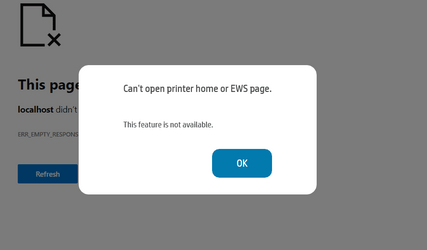
When i click on advanced settings i get this
 

Attachments

  • Screenshot 2023-10-06 161648.png
    Screenshot 2023-10-06 161648.png
    5.5 KB · Views: 4

My Computer My Computer

At a glance

Windows11 homeAMD Ryson 9, 16-core, 32 -threat unlocked des...48 GBSapphire 11308-01-20G 16GB GDDR6
OS
Windows11 home
Computer type
PC/Desktop
Manufacturer/Model
Asus
CPU
AMD Ryson 9, 16-core, 32 -threat unlocked desktop proce
Motherboard
US ROG Strix B650 AM5
Memory
48 GB
Graphics Card(s)
Sapphire 11308-01-20G 16GB GDDR6
Monitor(s) Displays
ViewSonic VG2440V sRGB 6500K
Screen Resolution
1920x1080
Hard Drives
1TB + 3.63 tb WD BLACK
PSU
Rosewill Glacier series 1000 Watt 80 Plus
Case
Full Tower
Keyboard
Dell
Mouse
Generic
Internet Speed
Spectrum, ping 9ms, download 241Mbps upload 11 Mbps
Browser
EDGE
Antivirus
Windows
When i click on advanced settings i get this
Do you use Edge as your default browser?
If you do check Browser Essential is showing in the toolbar otherwise it's under settings. Open it and turn off VPN.
 

My Computers My Computers

  • At a glance

    Win 11 ProAMD Ryzen™ 7 7730U24GB Dual-Channel DDR4 @ 1596MHz (22-22-22-52)512MB ATI AMD Radeon Graphics (ASUStek Comput...
    OS
    Win 11 Pro
    Computer type
    Laptop
    Manufacturer/Model
    ASUS Vivobook
    CPU
    AMD Ryzen™ 7 7730U
    Motherboard
    M1605YA
    Memory
    24GB Dual-Channel DDR4 @ 1596MHz (22-22-22-52)
    Graphics Card(s)
    512MB ATI AMD Radeon Graphics (ASUStek Computer Inc)
    Monitor(s) Displays
    Generic PnP Monitor (1920x1200@60Hz) - P1 PLUS (1920x1080@59Hz)
    Screen Resolution
    1920 X 1200
    Hard Drives
    953GB Western Digital WD
    PSU
    45 Watts
    Mouse
    Lenovo Bluetooth.
    Internet Speed
    500 Mbps
    Browser
    Edge
    Antivirus
    Defender
  • At a glance

    Windows 11AMD Ryzen 7 5800H / 3.2 GHz32 GB DDR4 SDRAM 3200 MHzNVIDIA GeForce RTX 3060 6 GB GDDR6 SDRAM
    Operating System
    Windows 11
    Computer type
    Laptop
    Manufacturer/Model
    ACER NITRO
    CPU
    AMD Ryzen 7 5800H / 3.2 GHz
    Motherboard
    CZ Scala_CAS (FP6)
    Memory
    32 GB DDR4 SDRAM 3200 MHz
    Graphics card(s)
    NVIDIA GeForce RTX 3060 6 GB GDDR6 SDRAM
    Sound Card
    Realtek Audio. NVIDIA High Definition Audio
    Monitor(s) Displays
    15.6" LED backlight 1920 x 1080 (Full HD) 144 Hz
    Screen Resolution
    1920 x 1080 (Full HD)
    Hard Drives
    Samsung 970 Evo Plus 2TB NVMe M.2
    PSU
    180 Watt, 19.5 V
    Mouse
    Lenovo Bluetooth
    Internet Speed
    500 Mbps
    Browser
    Edge
    Antivirus
    Defender
Well, the printer is doing just fine now, so i mark it solved
 

My Computer My Computer

At a glance

Windows11 homeAMD Ryson 9, 16-core, 32 -threat unlocked des...48 GBSapphire 11308-01-20G 16GB GDDR6
OS
Windows11 home
Computer type
PC/Desktop
Manufacturer/Model
Asus
CPU
AMD Ryson 9, 16-core, 32 -threat unlocked desktop proce
Motherboard
US ROG Strix B650 AM5
Memory
48 GB
Graphics Card(s)
Sapphire 11308-01-20G 16GB GDDR6
Monitor(s) Displays
ViewSonic VG2440V sRGB 6500K
Screen Resolution
1920x1080
Hard Drives
1TB + 3.63 tb WD BLACK
PSU
Rosewill Glacier series 1000 Watt 80 Plus
Case
Full Tower
Keyboard
Dell
Mouse
Generic
Internet Speed
Spectrum, ping 9ms, download 241Mbps upload 11 Mbps
Browser
EDGE
Antivirus
Windows
Update:
I changed the "let windows manage your printer" to Select as default printer. I get a warning that windows will no longer manage the printer, but now it works every time i try.
 

My Computer My Computer

At a glance

Windows11 homeAMD Ryson 9, 16-core, 32 -threat unlocked des...48 GBSapphire 11308-01-20G 16GB GDDR6
OS
Windows11 home
Computer type
PC/Desktop
Manufacturer/Model
Asus
CPU
AMD Ryson 9, 16-core, 32 -threat unlocked desktop proce
Motherboard
US ROG Strix B650 AM5
Memory
48 GB
Graphics Card(s)
Sapphire 11308-01-20G 16GB GDDR6
Monitor(s) Displays
ViewSonic VG2440V sRGB 6500K
Screen Resolution
1920x1080
Hard Drives
1TB + 3.63 tb WD BLACK
PSU
Rosewill Glacier series 1000 Watt 80 Plus
Case
Full Tower
Keyboard
Dell
Mouse
Generic
Internet Speed
Spectrum, ping 9ms, download 241Mbps upload 11 Mbps
Browser
EDGE
Antivirus
Windows

Latest Support Threads

Back
Top Bottom