Solved QTTabBar


Another huge advantage of QTTabBar's Hover Peek feature is:
Say, for example, you're typing some information or values into a dialog box and you need to reference some info from a document or screenshot, you can just hover over the reference item and keep typing as your cursor stays active in the dialog box...

11414.gif
 

My Computers My Computers

  • At a glance

    Windows 11 Pro
    OS
    Windows 11 Pro
    Computer type
    PC/Desktop
    Manufacturer/Model
    ASUS ROG Strix
  • At a glance

    Windows 11 Pro
    Operating System
    Windows 11 Pro
    Computer type
    Laptop
    Manufacturer/Model
    ASUS VivoBook
  • ASUS VivoBook 'Lite' ~ Windows 11 Home
@Edwin Can you tell how do you keep QTTabBar working on your W11?
Did you disable KB5068861, or it was not necessary on Windows 11 Insider?
 

My Computer My Computer

At a glance

Windows 11 22H2
OS
Windows 11 22H2
@Edwin Can you tell how do you keep QTTabBar working on your W11?
Did you disable KB5068861, or it was not necessary on Windows 11 Insider?

i disabled KB5070311 with vivetool as shown in the japanese thread.
this disables AI funcionality.
QtTabBar still not shown fully up, shows vertical bar and tabs on bottom.

the translation in firefox of the japanese page is not very good, i'm still struggling to understand all of this.
using actual win 11 regular version.
 

My Computer My Computer

At a glance

W11x6425H2 build 26.200 7309I7 670064GB CorsairIntel Arc A 380
OS
W11x6425H2 build 26.200 7309
Computer type
PC/Desktop
Manufacturer/Model
Self build
CPU
I7 6700
Motherboard
Prime Z-270
Memory
64GB Corsair
Graphics Card(s)
Intel Arc A 380
Sound Card
Terratec 5.1 USB
Monitor(s) Displays
Philipps PHL351
Screen Resolution
2k
Hard Drives
2 SSD M2 + 3USB, 15TB together
Case
to old
Cooling
coolermaster 6 fans
Keyboard
Logitech iluminated
Mouse
Logitech
Internet Speed
1000mega
Browser
FF Nigthly
Antivirus
MS included
Other Info
EX IT worker...long time ago
  • Like
Reactions: jed
2048 does not work on the latest Canary! I stayed on the previous Build.
1038 keeps working on 23H2. 🤷‍♂️
 

My Computers My Computers

  • At a glance

    Windows 11 Pro
    OS
    Windows 11 Pro
    Computer type
    PC/Desktop
    Manufacturer/Model
    ASUS ROG Strix
  • At a glance

    Windows 11 Pro
    Operating System
    Windows 11 Pro
    Computer type
    Laptop
    Manufacturer/Model
    ASUS VivoBook
  • ASUS VivoBook 'Lite' ~ Windows 11 Home
  • Like
Reactions: jed
.JXL support? Gotta have it!
You can get the 'thumbs' dll here.
here's svg if you need it.
also - what pdf dll did you use for the peek? i played with qt on a test machine. i've almost got it working perfectly without actually using its tabs, but rather win 11 tabs instead. just 1 minor visual glitch im still working on


My Computer My Computer

At a glance

Windows 11 Pro
OS
Windows 11 Pro

My Computers My Computers

  • At a glance

    Windows 11 Pro
    OS
    Windows 11 Pro
    Computer type
    PC/Desktop
    Manufacturer/Model
    ASUS ROG Strix
  • At a glance

    Windows 11 Pro
    Operating System
    Windows 11 Pro
    Computer type
    Laptop
    Manufacturer/Model
    ASUS VivoBook
  • ASUS VivoBook 'Lite' ~ Windows 11 Home
What would that be?
when opening a new tab via win 11, it make the qt bar turn white and no qt options are applied to that tab. i have to open a new tab, close it and open a new tab again. i'll get it sorted lol. i want the colored text per ext and the hover previews (i made an ahk that lets me hover files to preview via quicklook, so no keyboard necessary.. but i need to get it to resize the preview window. then it'll work as an alternative)
 

My Computer My Computer

At a glance

Windows 11 Pro
OS
Windows 11 Pro
when opening a new tab via win 11, it make the qt bar turn white and no qt options are applied to that tab.
When using Win11 Tabs, set QT Tabs to auto-hide...

0008290.webp
 

My Computers My Computers

  • At a glance

    Windows 11 Pro
    OS
    Windows 11 Pro
    Computer type
    PC/Desktop
    Manufacturer/Model
    ASUS ROG Strix
  • At a glance

    Windows 11 Pro
    Operating System
    Windows 11 Pro
    Computer type
    Laptop
    Manufacturer/Model
    ASUS VivoBook
  • ASUS VivoBook 'Lite' ~ Windows 11 Home
Last edited:

My Computer My Computer

At a glance

Windows 11 Pro
OS
Windows 11 Pro
if i have each launch into their own window, no issue. if i use tabs:
The only time I get white Toolbars is if I completely disable SAB, otherwise they just turn black..., Toolbars, Navigation Pane, etc...

11481.gif
 

My Computers My Computers

  • At a glance

    Windows 11 Pro
    OS
    Windows 11 Pro
    Computer type
    PC/Desktop
    Manufacturer/Model
    ASUS ROG Strix
  • At a glance

    Windows 11 Pro
    Operating System
    Windows 11 Pro
    Computer type
    Laptop
    Manufacturer/Model
    ASUS VivoBook
  • ASUS VivoBook 'Lite' ~ Windows 11 Home

My Computers My Computers

  • At a glance

    Windows 11 Pro
    OS
    Windows 11 Pro
    Computer type
    PC/Desktop
    Manufacturer/Model
    ASUS ROG Strix
  • At a glance

    Windows 11 Pro
    Operating System
    Windows 11 Pro
    Computer type
    Laptop
    Manufacturer/Model
    ASUS VivoBook
  • ASUS VivoBook 'Lite' ~ Windows 11 Home
The only time I get white Toolbars is if I completely disable SAB, otherwise they just turn black..., Toolbars, Navigation Pane, etc...
i knew you 'da' man for this! that test pc wasnt running sab, only qt. with sab on and win 11 fe selected, it does that same thing BUT no white bar and actually only does it 1 out of ever 3 new tabs. have a few more ideas on what could help that now too. time for some more testing

May I ask why you want to use Win11 Tabs instead of QT Tabs?
i made a windhawk mod that gives me an active tab identifier (green) and a hovering identifier (yellow) for when i have multiple tabs open. i just like the look of it...

1766161478432.webp
 

My Computer My Computer

At a glance

Windows 11 Pro
OS
Windows 11 Pro
@dacrone
I just figured you'd be missing out on so many QTTabBar features not using it's Tabs..., like omnipresent jump lists, hover peek and so much more... :wink:

0008310.webp
 

My Computers My Computers

  • At a glance

    Windows 11 Pro
    OS
    Windows 11 Pro
    Computer type
    PC/Desktop
    Manufacturer/Model
    ASUS ROG Strix
  • At a glance

    Windows 11 Pro
    Operating System
    Windows 11 Pro
    Computer type
    Laptop
    Manufacturer/Model
    ASUS VivoBook
  • ASUS VivoBook 'Lite' ~ Windows 11 Home

My Computer My Computer

At a glance

Windows 11 Pro
OS
Windows 11 Pro
Wouldn’t mind using them if I could place them above the address bar
Good point! (y)
I wish someone would get ahold of Quizo and see if they could take over the code and work on it some more! 🤷‍♂️
 

My Computers My Computers

  • At a glance

    Windows 11 Pro
    OS
    Windows 11 Pro
    Computer type
    PC/Desktop
    Manufacturer/Model
    ASUS ROG Strix
  • At a glance

    Windows 11 Pro
    Operating System
    Windows 11 Pro
    Computer type
    Laptop
    Manufacturer/Model
    ASUS VivoBook
  • ASUS VivoBook 'Lite' ~ Windows 11 Home
happy new year evryone!

I've tried using the japanese solution with vivetool to get back the top tab bar and it seems to work, but now everytime I try to alt-tab or win-tab, my explorer crash! And i use both qttabbar and alt/win-tab a lot, I don't want to have to choose between one of the two!
Does anyone has this problem as well?
Do you have a better solution than vivetool to get back the qttabbar?
Is it better to use 1043 or 2048 in the vivetool solution ?
 

My Computer My Computer

At a glance

windows 11 pro 25H212th Gen Intel(R) Core(TM) i7-12700K32,0Go 4800 MT/sNvidia RTX A2000 12Gb
OS
windows 11 pro 25H2
Computer type
PC/Desktop
Manufacturer/Model
HP
CPU
12th Gen Intel(R) Core(TM) i7-12700K
Memory
32,0Go 4800 MT/s
Graphics Card(s)
Nvidia RTX A2000 12Gb

Attachments

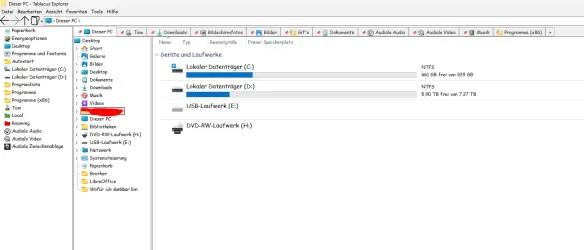
  • Dieser PC - Tablacus Explorer-Stephan Gruner 06-01-2026  17_32_57.webp
    Dieser PC - Tablacus Explorer-Stephan Gruner 06-01-2026  17_32_57.webp
    48.1 KB · Views: 4

My Computer My Computer

At a glance

Windows 11 ProIntel(R) Core(TM) i7-14700K
OS
Windows 11 Pro
Computer type
PC/Desktop
Manufacturer/Model
Memory PC GmbH
CPU
Intel(R) Core(TM) i7-14700K

My Computer My Computer

At a glance

Win 10 Pro 19045.6937 Win 11 25H2 VMXeon W-10885M64GB ECC DDR4 128GB maxIntel 1080p + Quadro RTX 5000 Max-Q 16GB 4K
OS
Win 10 Pro 19045.6937 Win 11 25H2 VM
Computer type
Laptop
Manufacturer/Model
Dell Precicion 15 Workstation
CPU
Xeon W-10885M
Motherboard
Dell
Memory
64GB ECC DDR4 128GB max
Graphics Card(s)
Intel 1080p + Quadro RTX 5000 Max-Q 16GB 4K
Sound Card
onboard Realtec
Monitor(s) Displays
NA
Screen Resolution
1080p to 4k
Hard Drives
1 TB Samsung 9100 M2 SSD main
2 TB Samsung 9100 M2 SSD storage
500 GB Corsair T500 storage M2 SSD (6 TB max)
PSU
NA
Case
NA
Cooling
NA
Keyboard
backlit
Mouse
Logitec M720 Bluetooth Free scroll
Internet Speed
slow
Browser
Pale Moon 33.9.x.x - x64 AVX2 build
Antivirus
Windows Defender
Thank you to propose alternatives, but I really intend to stick to QTtabbar. It offers so much that alternatives don't!
 

My Computer My Computer

At a glance

windows 11 pro 25H212th Gen Intel(R) Core(TM) i7-12700K32,0Go 4800 MT/sNvidia RTX A2000 12Gb
OS
windows 11 pro 25H2
Computer type
PC/Desktop
Manufacturer/Model
HP
CPU
12th Gen Intel(R) Core(TM) i7-12700K
Memory
32,0Go 4800 MT/s
Graphics Card(s)
Nvidia RTX A2000 12Gb
I solve my problem! I think the problem was : With all the first manipulations proposed on the japanese page before the final solution, my windows image was corrupted so restore it!

If someone face the same problem, to restore a windows image do this :

open cmd ans an administrator :

press win+R
Type cmd
press ctrl+shift+enter
type : dism /online /cleanup-image /restorehealth
press enter
wait until it finished (it could seems to block, lot of people face this problem, especially if it's at 62.3%, but it juste take time)
then type : sfc /scannow
press enter

the image is now clean

(btw I did a system restoration before all the japanese manipulation i tryed (in order to go back to something cleaner)
THEN the reconstruction of the windows image
THEN the sole manipulations with vivetool 0.3.4 in cmd and powershell.
THEN I restart and then it woks!
 

My Computer My Computer

At a glance

windows 11 pro 25H212th Gen Intel(R) Core(TM) i7-12700K32,0Go 4800 MT/sNvidia RTX A2000 12Gb
OS
windows 11 pro 25H2
Computer type
PC/Desktop
Manufacturer/Model
HP
CPU
12th Gen Intel(R) Core(TM) i7-12700K
Memory
32,0Go 4800 MT/s
Graphics Card(s)
Nvidia RTX A2000 12Gb

Latest Support Threads

Back
Top Bottom