Solved QTTabBar


Hello everybody, un saludo desde Espana!

i made an account here to jump into QTTabBar,

at first:
there are NEW community driven builds and website:

take a look:

QTTabBar – Tabbed File Explorer for Windows 11

i uninstalled old and very outdated Quizo build, cleaned my system and installed the new one, but it won't show up.
you guys out there just try and report, maybe you've more luck.

I wrote an email to the new developers with detailled informations and waiting for response.
in the meantime I'm helping myself with XYplorer, but's not the same...
Tablacus is kinda crap...

haven't tried explorer tab utility yet.

i have some perfect configuration backups if needed, i use my own frequently used programs in QTT and still haven't found any kind of replacement..

W11 build is 26200.7309

please try the new builds on this site, looking forward to get it back again, using QTT for over 10 years.
I'm from spain.
 
Last edited:

My Computer

System One

  • OS
    W11x6425H2 build 26.200 7309
    Computer type
    PC/Desktop
    Manufacturer/Model
    Self build
    CPU
    I7 6700
    Motherboard
    Prime Z-270
    Memory
    64GB Corsair
    Graphics Card(s)
    Intel Arc A 380
    Sound Card
    Terratec 5.1 USB
    Monitor(s) Displays
    Philipps PHL351
    Screen Resolution
    2k
    Hard Drives
    2 SSD M2 + 3USB, 15TB together
    Case
    to old
    Cooling
    coolermaster 6 fans
    Keyboard
    Logitech iluminated
    Mouse
    Logitech
    Internet Speed
    1000mega
    Browser
    FF Nigthly
    Antivirus
    MS included
    Other Info
    EX IT worker...long time ago
This is fantastic, since the tabs and the double-click in space is the primary thing that helps with vanilla Windows Explorer navigation.
I'll definitely be looking at this later on. But, will keep checking in here if there's any further updates of an alternate, or if QTTabBar works again, by some miracle.

I've now been using ExplorerTabUtility for full three days and works fine, eating only 41 MB of RAM.

I asked Google AI for replacements for Qttabbar and the AI told me to check ExplorerTabUtility, among other apps. I had never heard of it. ExplorerTabUtility could easily be called Qttabbar Lite.

Bummer! :(
I might make a clean image and try to put 2048 on !
And, screen record it!
@Dan Dare You're on 26200.7309 right?

QTTabBar may not be the most powerfully featured utility of it's kind, but, it has a style of it's own..., comfortably powerful without being too complicated.
I've grown so accustomed to it that I can't function without it anymore!

View attachment 155923

Yes, I'm on 26200.7309.

I had been using Qttabbar since agust 2014 (I know because of the Qttabbar folder on my HDD creation date) and also never had any problem with it.

Next week I will virtualize a new install of the 26200.7309 ISO and quickly check if Qttabbar and Open Shell Explorer work from start on a fresly installed Windows 11 Pro or not.
 

My Computer

System One

  • OS
    Windows 11 Pro
    Computer type
    PC/Desktop
    CPU
    13900K
    Graphics Card(s)
    RTX 4090
    Screen Resolution
    4K
    PSU
    Corsair 2500 W
Hello everybody, un saludo desde Espana!

i made an account here to jump into QTTabBar,

at first:
there are NEW community driven builds and website:

take a look:

QTTabBar – Tabbed File Explorer for Windows 11

i uninstalled old and very outdated Quizo build, cleaned my system and installed the new one, but it won't show up.
you guys out there just try and report, maybe you've more luck.

I wrote an email to the new developers with detailled informations and waiting for response.
in the meantime I'm helping myself with XYplorer, but's not the same...
Tablacus is kinda crap...

haven't tried explorer tab utility yet.

i have some perfect configuration backups if needed, i use my own frequently used programs in QTT and still haven't found any kind of replacement..

W11 build is 26200.7309

please try the new builds on this site, looking forward to get it back again, using QTT for over 10 years.
I'm from spain.

Hi

I already tried the chinese fork versions days ago and they didn't work for me.

I also tried all kind of Windows file explorer replacements like Tablacus, Explorer++, XYplorer, etc and didn't like them.

I only like the original Windows file explorer, so for now I will stick with ExplorerTabUtility, until Microsoft releases a new Windows update that breaks it too. :tears:
 
Last edited:

My Computer

System One

  • OS
    Windows 11 Pro
    Computer type
    PC/Desktop
    CPU
    13900K
    Graphics Card(s)
    RTX 4090
    Screen Resolution
    4K
    PSU
    Corsair 2500 W

My Computers

System One System Two

  • OS
    Windows 11 Pro
    Computer type
    PC/Desktop
    Manufacturer/Model
    ASUS ROG Strix
  • Operating System
    Windows 11 Pro
    Computer type
    Laptop
    Manufacturer/Model
    ASUS VivoBook
Japanese blogger wenbang posted yesterday a windows register file that he says should fix the Qttabbar problem with the latest Windows 11 update. I've tried that REG file but Qttabbar still doesn't work for me. :tears:

[Added 2025/12/06: The reason why QTTabBar disappeared (no longer displayed) has been discovered]
After some investigation, we discovered the reason why the QTTabBar was not displayed. The cause was that the registry value that manages the toolbar settings for Explorer had been reset to the default value (which means the QTTabBar is not displayed) ITBar7Layout at some point (such as when an update was applied) .

"ITBar7Layout" is a registry value that is automatically created when you open the old Explorer.

Normally, QTTabBarEnabler.exe this value should be restored using the "Restore" function, but it seems that it may not be written correctly depending on the environment.

Therefore, I created a repair file (.reg) that forcibly rewrites this registry value to "Display QTTabBar." If the command or reinstallation does not fix the problem, please try the following steps.

Everybody else, try it:
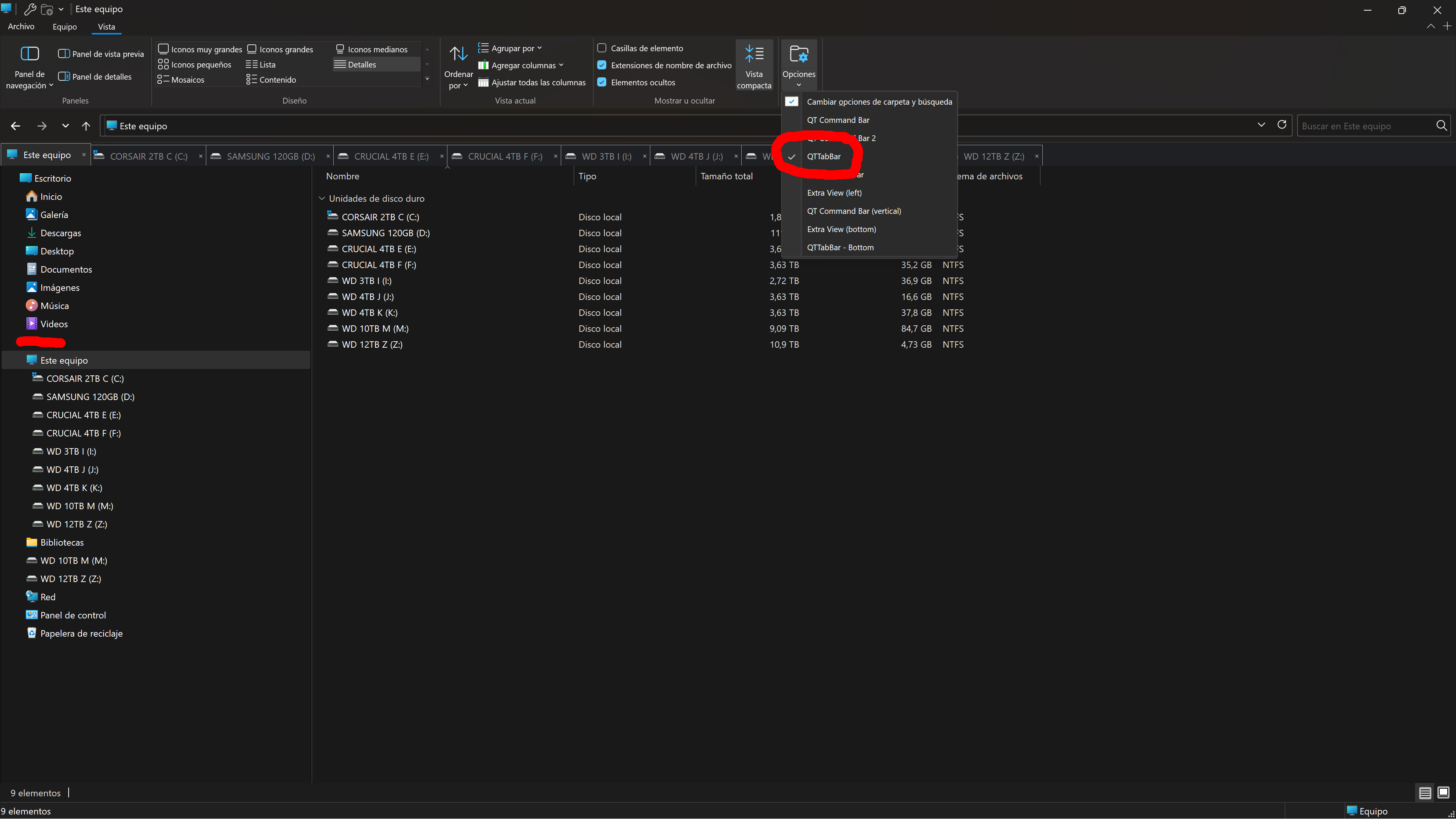
  1. Just download, unzip and run the REG file you will find inside this zip file (right click Save as...) QTTabBar_Restore.zip
  2. or it can also be downloaded from the bottom of 更新プログラムKB5070311で「QTTabBar」が消える不具合と解決法【旧エクスプローラー環境】 | Windows 技!
  3. restart Windows 11.
  4. check if Qttabbar works now for you.
 

My Computer

System One

  • OS
    Windows 11 Pro
    Computer type
    PC/Desktop
    CPU
    13900K
    Graphics Card(s)
    RTX 4090
    Screen Resolution
    4K
    PSU
    Corsair 2500 W
do i need old explorer for this fix?
 

My Computer

System One

  • OS
    W11x6425H2 build 26.200 7309
    Computer type
    PC/Desktop
    Manufacturer/Model
    Self build
    CPU
    I7 6700
    Motherboard
    Prime Z-270
    Memory
    64GB Corsair
    Graphics Card(s)
    Intel Arc A 380
    Sound Card
    Terratec 5.1 USB
    Monitor(s) Displays
    Philipps PHL351
    Screen Resolution
    2k
    Hard Drives
    2 SSD M2 + 3USB, 15TB together
    Case
    to old
    Cooling
    coolermaster 6 fans
    Keyboard
    Logitech iluminated
    Mouse
    Logitech
    Internet Speed
    1000mega
    Browser
    FF Nigthly
    Antivirus
    MS included
    Other Info
    EX IT worker...long time ago
do i need old explorer for this fix?

You can try this fix on Windows 11 file explorer from this week's latest update 26200.7309

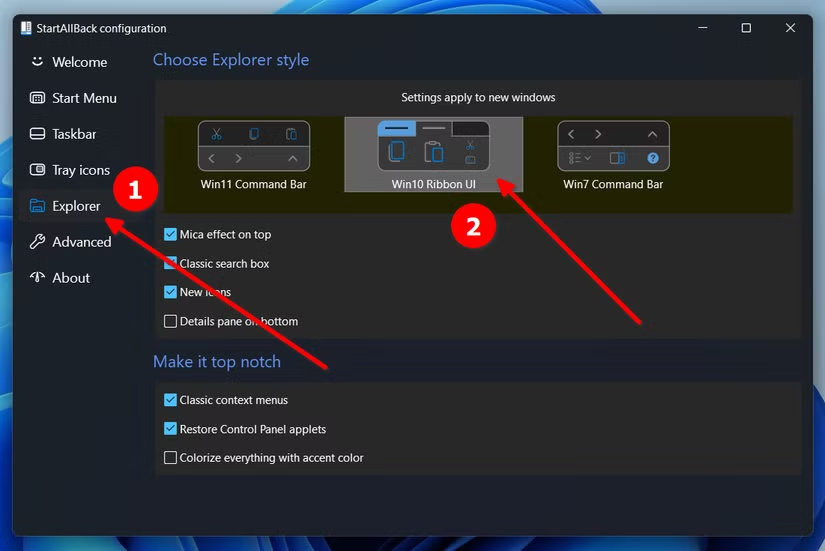
You need to have a ribbon that allows you to see the VIEW menu on file explorer. I use StartAllBack Windows 10 ribbon.

2a588gS.png
 

My Computer

System One

  • OS
    Windows 11 Pro
    Computer type
    PC/Desktop
    CPU
    13900K
    Graphics Card(s)
    RTX 4090
    Screen Resolution
    4K
    PSU
    Corsair 2500 W
You can try this fix on Windows 11 file explorer from this week's latest update 26200.7309

You need to have a ribbon that allows you to see the VIEW menu on file explorer. I use StartAllBack Windows 10 ribbon.

2a588gS.png
 

My Computer

System One

  • OS
    W11x6425H2 build 26.200 7309
    Computer type
    PC/Desktop
    Manufacturer/Model
    Self build
    CPU
    I7 6700
    Motherboard
    Prime Z-270
    Memory
    64GB Corsair
    Graphics Card(s)
    Intel Arc A 380
    Sound Card
    Terratec 5.1 USB
    Monitor(s) Displays
    Philipps PHL351
    Screen Resolution
    2k
    Hard Drives
    2 SSD M2 + 3USB, 15TB together
    Case
    to old
    Cooling
    coolermaster 6 fans
    Keyboard
    Logitech iluminated
    Mouse
    Logitech
    Internet Speed
    1000mega
    Browser
    FF Nigthly
    Antivirus
    MS included
    Other Info
    EX IT worker...long time ago
Now it becomes tricky, as i read startallback doesn't go along with start11 (purchased), am i right with this?
 

My Computer

System One

  • OS
    W11x6425H2 build 26.200 7309
    Computer type
    PC/Desktop
    Manufacturer/Model
    Self build
    CPU
    I7 6700
    Motherboard
    Prime Z-270
    Memory
    64GB Corsair
    Graphics Card(s)
    Intel Arc A 380
    Sound Card
    Terratec 5.1 USB
    Monitor(s) Displays
    Philipps PHL351
    Screen Resolution
    2k
    Hard Drives
    2 SSD M2 + 3USB, 15TB together
    Case
    to old
    Cooling
    coolermaster 6 fans
    Keyboard
    Logitech iluminated
    Mouse
    Logitech
    Internet Speed
    1000mega
    Browser
    FF Nigthly
    Antivirus
    MS included
    Other Info
    EX IT worker...long time ago

My Computer

System One

  • OS
    Windows 11 Pro
    Computer type
    PC/Desktop
    CPU
    13900K
    Graphics Card(s)
    RTX 4090
    Screen Resolution
    4K
    PSU
    Corsair 2500 W

My Computers

System One System Two

  • OS
    Windows 11 Pro
    Computer type
    PC/Desktop
    Manufacturer/Model
    ASUS ROG Strix
  • Operating System
    Windows 11 Pro
    Computer type
    Laptop
    Manufacturer/Model
    ASUS VivoBook
It bugs me that the Hide Menu option is dickered on some PC's and not others!!! 🤷‍♂️

11286.gif
 

My Computers

System One System Two

  • OS
    Windows 11 Pro
    Computer type
    PC/Desktop
    Manufacturer/Model
    ASUS ROG Strix
  • Operating System
    Windows 11 Pro
    Computer type
    Laptop
    Manufacturer/Model
    ASUS VivoBook

My Computer

System One

  • OS
    W11x6425H2 build 26.200 7309
    Computer type
    PC/Desktop
    Manufacturer/Model
    Self build
    CPU
    I7 6700
    Motherboard
    Prime Z-270
    Memory
    64GB Corsair
    Graphics Card(s)
    Intel Arc A 380
    Sound Card
    Terratec 5.1 USB
    Monitor(s) Displays
    Philipps PHL351
    Screen Resolution
    2k
    Hard Drives
    2 SSD M2 + 3USB, 15TB together
    Case
    to old
    Cooling
    coolermaster 6 fans
    Keyboard
    Logitech iluminated
    Mouse
    Logitech
    Internet Speed
    1000mega
    Browser
    FF Nigthly
    Antivirus
    MS included
    Other Info
    EX IT worker...long time ago
you missunderstood me, not WIN11, i mentioned START11 from stardock, and startallback overwrites taskbar settings and more...that does not work togehter.

so i will try oldnewexplorer, th reg fix and then reinstall qttabar, will see what happens...

Oh yes, I missunderstood you. 😀

You could also use Explorer Patcher to get the Windows 10 ribbon: GitHub - valinet/ExplorerPatcher: This project aims to enhance the working environment on Windows

By the way, the japanese blogger added a new, once again, solution yesterday. 更新プログラムKB5070311で「QTTabBar」が消える不具合と解決法【旧エクスプローラー環境】 | Windows 技!

My Qttabbar 2048 keeps not saving settings and not loading at the top of the file explorer.
 

My Computer

System One

  • OS
    Windows 11 Pro
    Computer type
    PC/Desktop
    CPU
    13900K
    Graphics Card(s)
    RTX 4090
    Screen Resolution
    4K
    PSU
    Corsair 2500 W
Oh yes, I missunderstood you. 😀

You could also use Explorer Patcher to get the Windows 10 ribbon: GitHub - valinet/ExplorerPatcher: This project aims to enhance the working environment on Windows
i will try them.
By the way, the japanese blogger added a new, once again, solution yesterday. 更新プログラムKB5070311で「QTTabBar」が消える不具合と解決法【旧エクスプローラー環境】 | Windows 技!

My Qttabbar 2048 keeps not saving settings and not loading at the top of the file explorer.

question: does this solution works only with Quizos build or with the other chinese fork?

the build in tranlator for those japanese sites isn't that good, cannot find the solution
 

My Computer

System One

  • OS
    W11x6425H2 build 26.200 7309
    Computer type
    PC/Desktop
    Manufacturer/Model
    Self build
    CPU
    I7 6700
    Motherboard
    Prime Z-270
    Memory
    64GB Corsair
    Graphics Card(s)
    Intel Arc A 380
    Sound Card
    Terratec 5.1 USB
    Monitor(s) Displays
    Philipps PHL351
    Screen Resolution
    2k
    Hard Drives
    2 SSD M2 + 3USB, 15TB together
    Case
    to old
    Cooling
    coolermaster 6 fans
    Keyboard
    Logitech iluminated
    Mouse
    Logitech
    Internet Speed
    1000mega
    Browser
    FF Nigthly
    Antivirus
    MS included
    Other Info
    EX IT worker...long time ago
Another thing that baffles me:
Preview on Mouse Hover has existed in Windows since The Dawn Of Time..., and still does!...


View attachment 0008277.mp4

only now, they suggest to install some chintzy, convoluted app from the Store which requires the item to be rendered in a dedicated window anyway, so what's the point! 🤷‍♂️

QTTabBar for the win, AGAIN!!!

11309.gif
 
Last edited:

My Computers

System One System Two

  • OS
    Windows 11 Pro
    Computer type
    PC/Desktop
    Manufacturer/Model
    ASUS ROG Strix
  • Operating System
    Windows 11 Pro
    Computer type
    Laptop
    Manufacturer/Model
    ASUS VivoBook
BREAKING NEWS!!!

Qttabbar is working again on Windows 11. :party: :party: :party:

MWalwU4.png


Japanese blogger wenbang posted a final new update that this time really works. You just need to use the Vibetool.exe to disable a Windows 11 file explorer update. The root cause is Explorer's new AI features.


My Computer

System One

  • OS
    Windows 11 Pro
    Computer type
    PC/Desktop
    CPU
    13900K
    Graphics Card(s)
    RTX 4090
    Screen Resolution
    4K
    PSU
    Corsair 2500 W
Japanese blogger wenbang posted a final new update that this time really works. You just need to use the Vibetool.exe to disable a Windows 11 file explorer update. The root cause is Explorer's new AI features.
...just another reason to get rid of AI?
 

My Computer

System One

  • OS
    Windows 11 Pro 25H2 (26200.8457)
    Computer type
    PC/Desktop
    Manufacturer/Model
    Pre-built
    CPU
    AMD Ryzen 7 7800X3D
    Motherboard
    MSI Pro B650-VC WiFi
    Memory
    32gb Team Group (T-Force) DDR5-6000
    Graphics Card(s)
    Zotac nVidia GeForce RTX 4070 SUPER - 12gb
    Sound Card
    Sound BlasterX G6
    Monitor(s) Displays
    Koorui G2421V and ViewSonic VX2453
    Screen Resolution
    P:2560x1440 S:1920x1080
    Hard Drives
    WD Blue SN5000 - 500gb NVME
    WD Blue SN580 - 2TB NVME
    Seagate 4TB HDD - ST4000VN008-2DR166
    Keyboard
    Mountain Everest
    Mouse
    Logitech G502 Hero
    Internet Speed
    T-Mobile Home Internet
    Browser
    Firefox
    Other Info
    QNAP TS-469 Pro NAS
    TP-Link W7200 (2 unit mesh network)
    Elgato Streamdeck
BREAKING NEWS!!!

Qttabbar is working again on Windows 11. :party: :party: :party:

MWalwU4.png


Japanese blogger wenbang posted a final new update that this time really works. You just need to use the Vibetool.exe to disable a Windows 11 file explorer update. The root cause is Explorer's new AI features.

So yes, running the command:
Code:
vivetool /disable /id:57048216
temporarily resolved the problem.

And I mean temporarily, as sooner or later MS disallows disabling this feature via ViveTool, like with any other feature they attempt to force.

So we either need another workaround or the MS's grip on QTTabBar will tighten irrevocably.
 

My Computer

System One

  • OS
    Windows 11 22H2
Here's a setting I keep forgetting about:
In the Preview-Text section, set the KiB to maximum, (16 I believe)...,

11386.webp

... that will allow you to Mouse Hover read/scan a large supported document in it's entirety...

11388.gif
 

My Computers

System One System Two

  • OS
    Windows 11 Pro
    Computer type
    PC/Desktop
    Manufacturer/Model
    ASUS ROG Strix
  • Operating System
    Windows 11 Pro
    Computer type
    Laptop
    Manufacturer/Model
    ASUS VivoBook
Back
Top Bottom